Have you ever changed a word on a screen and watched your whole sentence improve right away? That is one reason digital writing tools are so powerful. Writers can type, erase, move words, add pictures, listen to their writing, and share their work with others. When adults help, young writers can use these tools to make their ideas clear and strong.
When we produce writing, we create it. We think of ideas and put them into words. We might type on a computer, tap on a tablet, or use a microphone tool to say our words aloud. Producing writing means making the piece.
When we publish writing, we share a finished version. A published piece might be printed for the class, shown on a screen, added to a class book, or posted in a safe school space with adult help. Publishing means that your writing is ready for other people to read.
Produce means to create writing. Publish means to share the finished writing with others. Collaboration means working together. Digital tools are tools on a computer, tablet, or other device that help you write, fix, and share your work.
Adults help students use digital tools in smart ways. A teacher, parent, or another trusted grown-up can help you log in, save your work, choose the right app, check your spelling, and make safe choices about sharing. Adult guidance does not mean the adult does the writing. It means the adult helps you learn how to do it yourself.
Writers can use many digital tools to help with their work, as [Figure 1] shows. Some tools help you type words. Some help you draw or add pictures. Some even read your writing aloud so you can hear how it sounds.
A computer keyboard helps you type letters, spaces, and punctuation marks. A tablet lets you tap letters on a screen. A word processor lets you write sentences, change the size of letters, and fix mistakes without starting over. A microphone tool can turn your spoken words into text. A shared document lets more than one person work on the same writing piece.
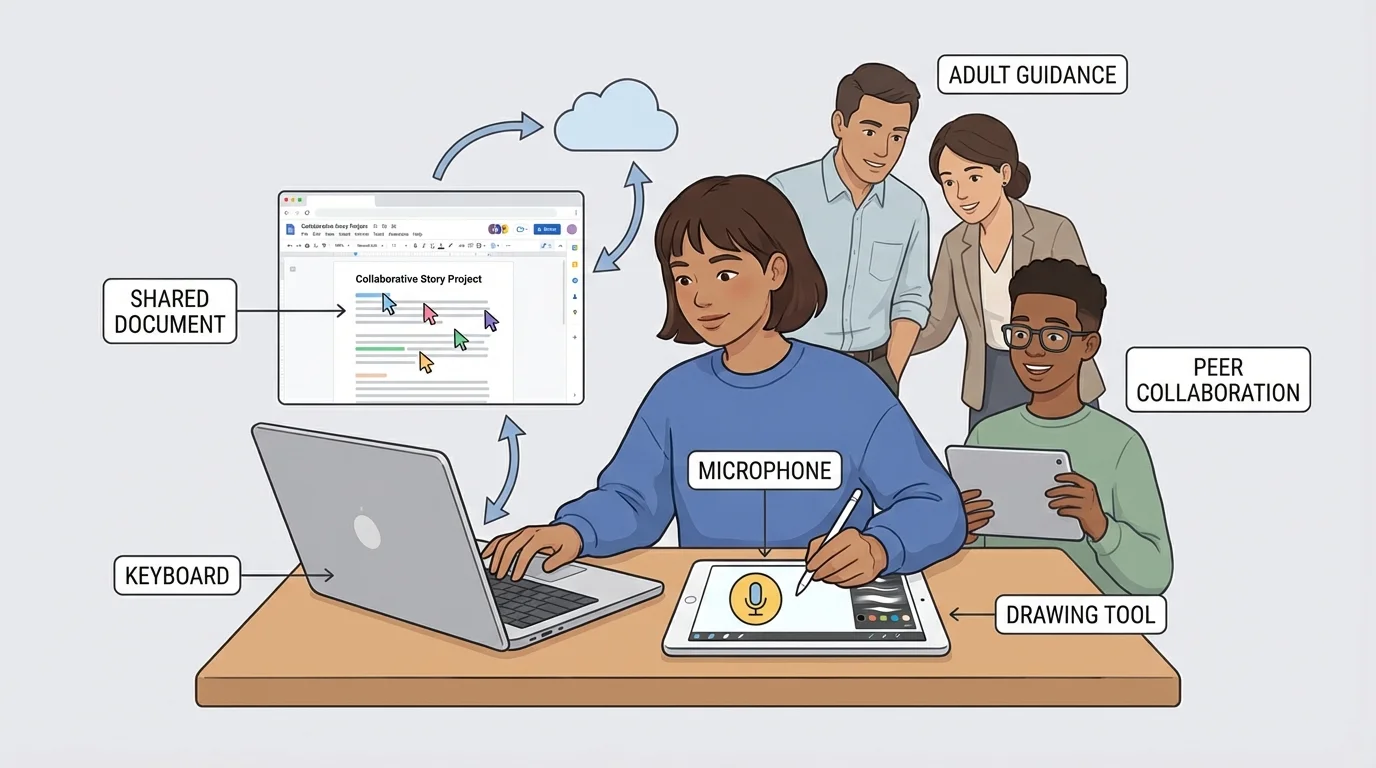
Some digital tools are especially helpful when writing feels hard. If spelling is tricky, spell-check tools may help you notice mistakes. If typing is slow, speech-to-text can help you record your ideas. If you want your page to look neat, digital tools can help you move pictures and words into the right places.
Even with these tools, the writer still makes the important choices. The tool helps, but the ideas belong to you. You choose what to say, what order to put it in, and what details to add. That is why good writing still needs careful thinking.
Many authors use computers because they can revise again and again without making a messy page. Digital writing makes it easier to try a better word or add a new sentence.
When you use a digital tool, it is helpful to ask, "What does this tool help me do?" A keyboard helps you enter text. A microphone helps you speak your ideas. A drawing tool helps you add meaning with pictures. A shared file helps a team work together.
Strong writing usually happens in steps, and [Figure 2] shows those steps in order. Writers do not just type one time and stop. They plan, draft, revise, edit, and publish.
Planning means thinking about your topic and your message. You might make a list of ideas or talk with a teacher first. Drafting means writing your first version. Revising means making your ideas clearer. Editing means fixing mistakes. Publishing means sharing the final copy.
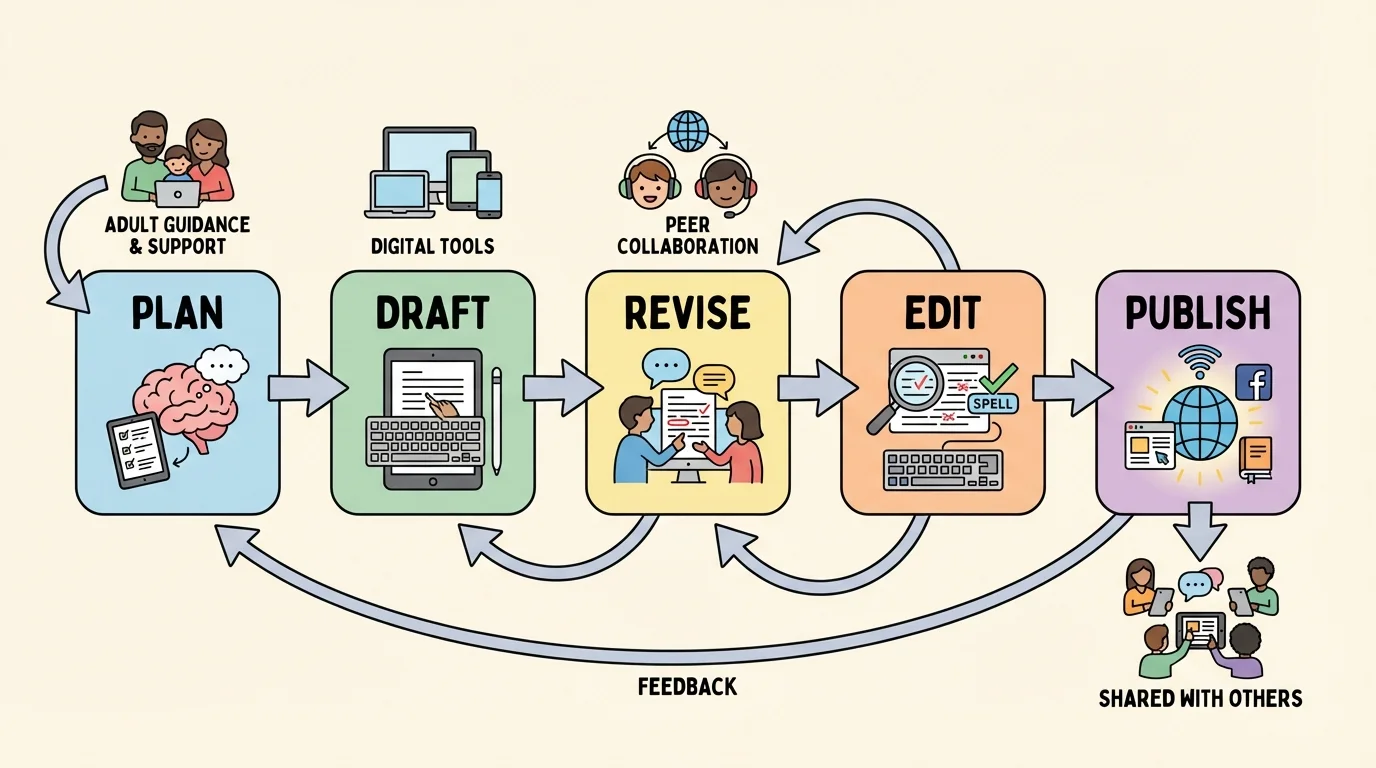
These steps do not always happen only one time. Sometimes you draft, then revise, then revise again. Sometimes you edit and notice that a sentence still needs more detail. Writers move back and forth to make the writing better.
The writing process helps writers grow. Planning helps you know what to say. Drafting gets your ideas onto the page. Revising improves meaning. Editing improves correctness. Publishing gives your writing a real audience. Each step has a special job.
Digital tools make these steps easier. You can type a first draft quickly, highlight a sentence you want to change, or move a paragraph to a better spot. You can save your work and return to it later instead of losing your ideas.
Revising is not just fixing tiny mistakes. Revising means improving your message so readers understand it better. A writer may add details, take out words that do not help, change a weak word for a stronger word, or put sentences in a better order.
Suppose a student writes, "My dog is nice." That sentence is fine, but it is not very specific. After revising, it might become, "My dog Max is gentle and loves to bring me his red ball." The second sentence gives the reader a clearer picture.
Writers also revise when writing sounds confusing. If two ideas are mixed together, the writer can separate them. If a sentence is too short and leaves the reader wondering, the writer can add information. If the writing repeats the same word too often, the writer can choose a better one.
Example of revising
First draft: "We went to the park. It was fun."
Step 1: Add details.
The writer asks, "What made it fun?"
Step 2: Improve the sentence.
New version: "We went to the park and raced to the swings. I laughed when my sister pumped her legs so high."
The revised version helps the reader see and feel the moment.
When writers revise on a device, they can quickly test different ideas. They can erase a word, type a new one, and read the sentence again. They can cut and paste sentences into a better order. That is one reason digital writing is helpful for young authors.
After revising, writers edit their work. Editing means checking for correct spelling, capitalization, grammar, and punctuation. This step helps the writing look polished and easy to read.
Spelling matters because readers need to know what words you mean. Capitalization matters because sentences begin with capital letters and names need capitals too. Grammar helps words fit together correctly. Punctuation helps readers know where to pause and understand the meaning.
Look at this sentence: "my friend sara like cats". It needs editing. A better version is: "My friend Sara likes cats." The first word begins with a capital letter, the name Sara is capitalized, the verb matches the subject, and the sentence ends with a period.
Remember that every sentence begins with a capital letter and ends with punctuation. A statement usually ends with a period. A question ends with a question mark. A sentence that shows strong feeling may end with an exclamation point.
Digital tools can support editing. A red underline may tell you a word might be misspelled. A read-aloud tool may help you hear a missing word. Still, you must think carefully. Tools can help you notice a problem, but you decide how to fix it.
Reading your writing slowly is one of the best editing tricks. You may catch a missing capital or a word that does not sound right. Some students point to each word on the screen as they read. Others ask an adult or partner to listen.
Collaboration means working together, and [Figure 3] illustrates how students can share ideas in one digital writing project. Sometimes one student types while another suggests ideas. Sometimes both students add to the same shared document at different times.
Good collaboration includes taking turns, listening carefully, and speaking kindly. If your partner has an idea, stop and hear it. If you want to suggest a change, use respectful words like, "Maybe we could add more detail here," or "What if we changed this word?"
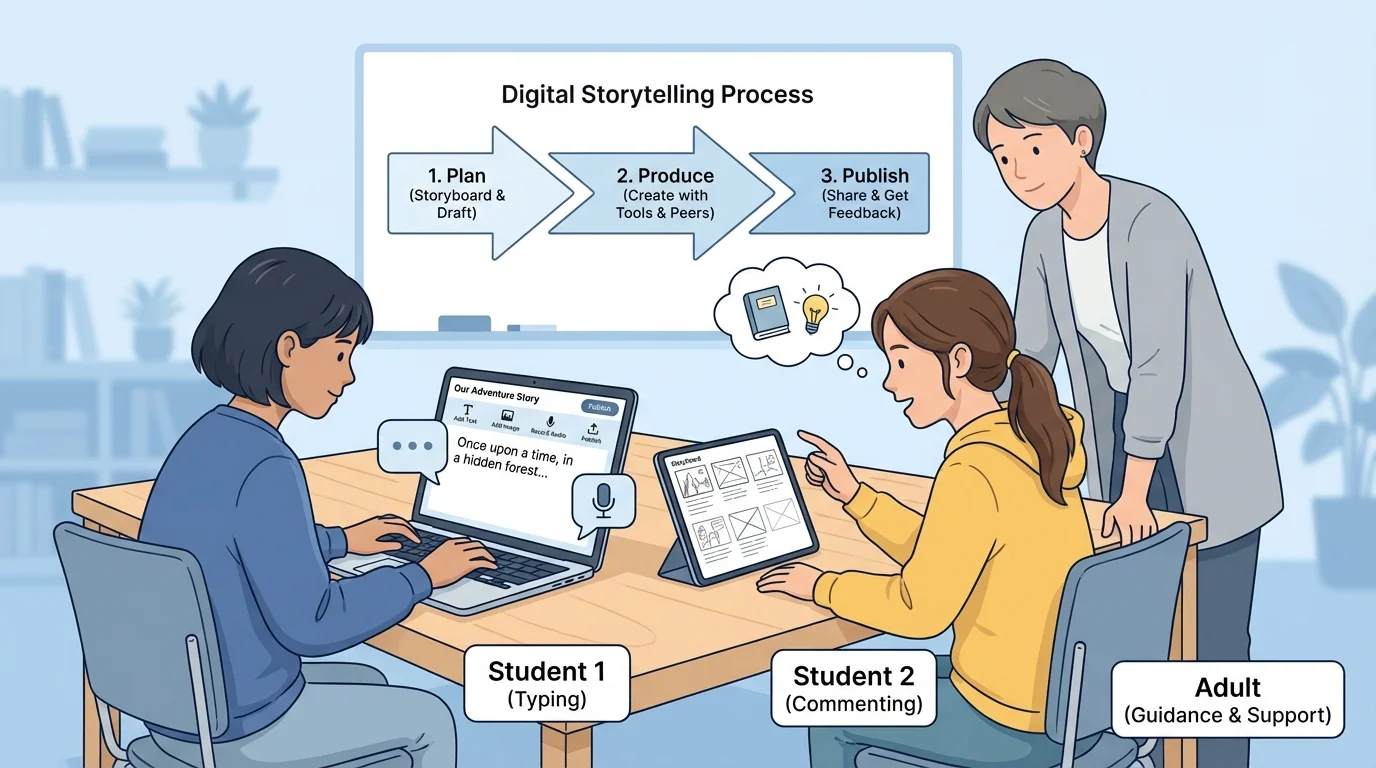
When classmates work together, each person has a job. One person might check capitals and punctuation. Another might think of describing words. Another might read the story aloud. Teams often do better work because they notice more ideas and more mistakes together than alone.
Adults help collaboration go well. A teacher may show students how to leave helpful comments, how to wait for a turn, and how to solve small disagreements. Adults also help students remember that the goal is not to be the boss. The goal is to make the writing stronger.
Example of partner feedback
One student writes: "The frog jumped." A partner wants more detail.
Step 1: Give kind feedback.
The partner says, "Can you tell where the frog jumped?"
Step 2: Revise together.
The sentence becomes: "The green frog jumped off the wet rock into the pond."
The partner did not take over the writing. The partner helped the writer make the idea clearer.
Later, when students return to a shared document, they can see how teamwork improved the final piece. One child's strong idea and another child's careful editing can combine to make excellent writing.
Publishing is exciting because your writing gets a real audience, and [Figure 4] shows one safe way to share in a classroom. A published piece should be your best work. That means you have revised your ideas, edited mistakes, and checked that the writing is complete.
You might publish by printing your story, showing it on a classroom screen, adding it to a digital class book, or sharing it in a school-approved online space. Some students record themselves reading their writing aloud. Others add drawings or photos that match their words.
Safe sharing is very important. Students should use only teacher-approved websites or apps. They should not share private information such as home addresses, phone numbers, or passwords. Adults help decide what can be shared and with whom.
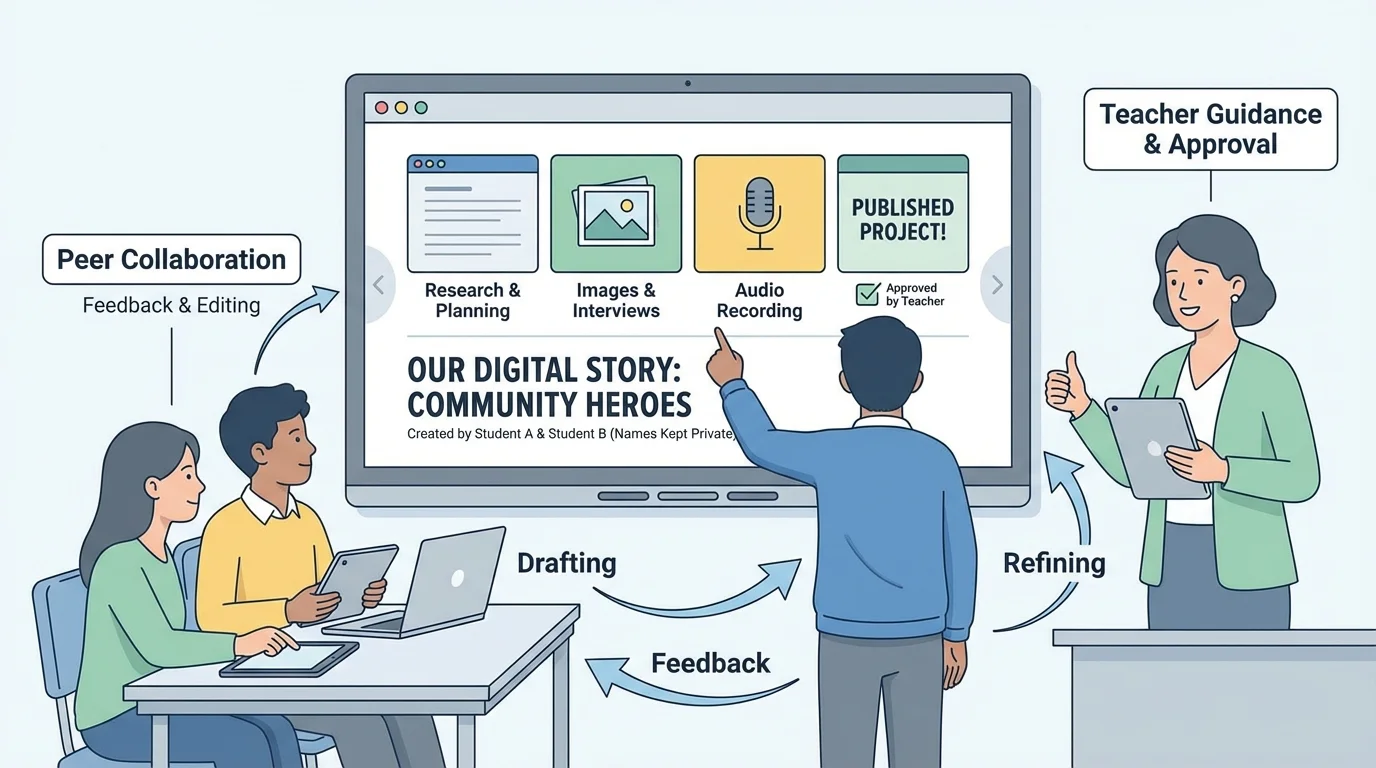
Publishing also means making the page easy for others to read. Writers choose a clear font, add spaces between words, and make sure pictures match the topic. A neat digital page helps the audience pay attention to the message.
"Good writers do not just write. They rewrite."
— Writing principle
When you look at a safe classroom sharing scene, you can see that publishing is not only about putting words on a screen. It is also about being responsible, respectful, and ready for others to read your ideas.
Let's follow one student writer. Maya wants to write about feeding birds outside her window. First, she plans her idea by talking to her teacher and listing a few details: birdseed, a blue jay, and the sound of wings.
Next, Maya drafts on a tablet: "I saw a bird. It ate food." Her teacher says the idea is clear, but Maya can add more detail. Maya revises her writing to say: "I saw a blue jay peck at birdseed outside my window. Its wings fluttered fast when another bird came near."
Then Maya edits. She checks that the sentence starts with a capital letter. She makes sure blue jay is spelled correctly. She adds periods at the end. She reads the writing aloud and notices that everything makes sense.
Example of the full process
Maya creates a short digital report about birds.
Step 1: Plan
She thinks of the main idea and lists details.
Step 2: Draft
She types her first sentences in a writing app.
Step 3: Revise
She adds stronger details so readers can picture the bird.
Step 4: Edit
She fixes capitals, spelling, and punctuation.
Step 5: Publish
She shares the finished piece in a class digital book with help from the teacher.
This process turns a simple idea into a polished piece of writing.
Now Maya works with a classmate, who suggests adding a picture label for the bird feeder. Maya agrees. Together they check the title, the spacing, and the final look of the page. Their teacher helps them save the work in the right folder and share it safely with the class.
This is how digital writing, revision, editing, adult guidance, and collaboration all fit together. Writers use tools to make their ideas stronger, not just faster. A careful writer thinks, improves, checks, and then shares.
