Have you ever needed one quick fact, like what penguins eat or where tornadoes happen, and not wanted to read every single word on every page? Good readers use a helpful strategy: they use special parts of a text to help them find information fast. These helpers are called text features. They are like clues that point readers to the facts they need.
Informational texts are books, articles, websites, and other materials that teach us about the real world. These texts often include extra parts besides the main paragraphs. Those extra parts help readers understand ideas, notice important words, and jump to the right place.
Text features are parts of an informational text that help readers find, understand, and remember information. Some common text features are captions, bold print, subheadings, glossaries, indexes, electronic menus, and icons.
When you know how each feature works, you do not have to guess where the answer might be. You can look in the best place first. That saves time and helps you become a stronger reader.
Text features are built to guide your eyes and your thinking. A title states the topic. A picture can show what something looks like. A heading can name a section. A glossary can explain a new word. An index can lead you to a page number. On a computer or tablet, menus and icons can help you open the exact part you need.
These features are most helpful when you are reading to learn. If you want to know one fact about frogs, you may not need to read the whole book from beginning to end. You can use text features to go straight to the part about frog habitats, food, or life cycle.
Text features do not replace reading. They help you get to the right place. After you find the right section, you still read the words carefully to make sure you understand the information correctly.
[Figure 1] A caption is a short line of text near a picture, drawing, or diagram. It tells what the image is showing or gives an important fact about it. If you look at a photo of a penguin sliding on ice, the caption might tell you that penguins use their bellies to slide quickly across snow and ice.
Captions matter because pictures are helpful, but pictures alone do not always explain enough. The caption adds words that connect the picture to the topic. Sometimes the caption gives a fact that is not written in the main paragraph.
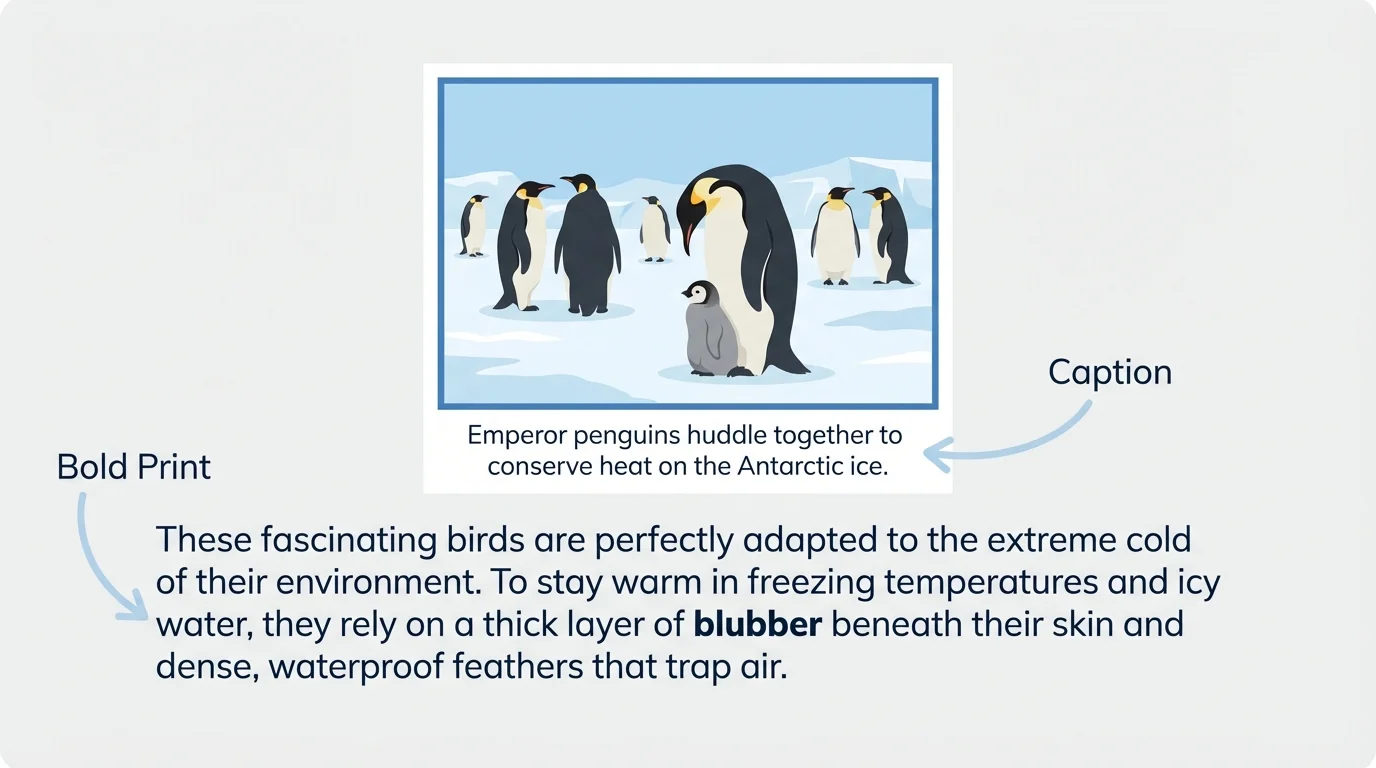
Bold print is darker and thicker than regular print. Writers use bold print to make certain words stand out. These words are often important vocabulary words or key ideas. For example, in a book about polar animals, the word blubber might be in bold print because it is an important word to learn.
When you see bold print, slow down and notice it. Ask yourself, "Why did the author make this word stand out?" Often, the meaning is explained nearby, or you may find the word again in a glossary. Bold print tells you, "This word is important."
Later, when you remember the penguin page in [Figure 1], you can use both the caption and the bold word to gather key facts quickly. The caption helps with the picture, and the bold print helps with important vocabulary.
Some readers look at captions before they read the whole page. That quick preview can help them predict what they are about to learn.
Captions and bold print often work as a team. One points to visual information, and the other points to important words in the text.
A subheading is a small heading inside a text. It names a section and tells what that part is mostly about. In a book about butterflies, subheadings might be Life Cycle, Food, and Habitat.
Subheadings are useful because they break a long text into smaller parts. Instead of reading everything to find one fact, you can scan the subheadings first. If you want to know what butterflies eat, the subheading Food tells you where to begin.
Subheadings also help readers stay organized in their thinking. They show how ideas are grouped together. That makes informational text easier to understand because each section has one main topic.
If you ask, "Where do desert animals sleep?" you might look for subheadings such as Shelter, Homes, or Staying Safe. A smart reader uses the clues in the subheadings before reading all the details.
[Figure 2] A glossary and an index are two powerful tools. They may both help you, but they are not the same.
A glossary is usually found near the back of a book. It lists important words in alphabetical order and tells what they mean. If you read the bold word blubber and do not know it, the glossary can tell you that blubber is a layer of fat that keeps some animals warm.
An index is also often found near the back of a book, but it does something different. It lists topics and tells the page numbers where those topics can be found. If you want to learn about penguin chicks, you can look in the index under penguins or chicks and then turn to the page number listed.
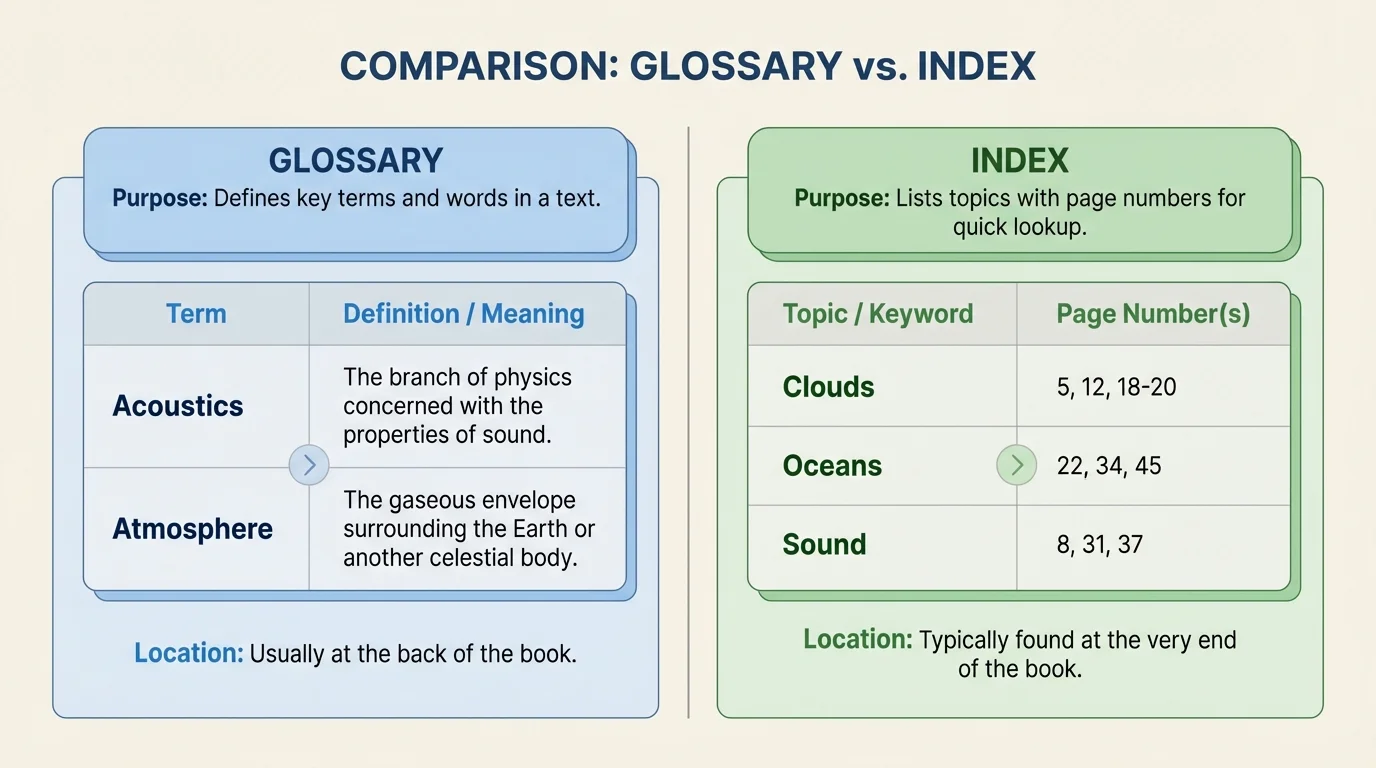
One easy way to remember the difference is this: a glossary helps with meaning, and an index helps with location. If you need to know what a word means, use the glossary. If you need to know where to find a topic, use the index.
This difference matters when you are trying to work efficiently. A reader who wants the meaning of a word should not waste time searching the index first. A reader who wants a page about volcanoes should not flip through the glossary. Pick the tool that matches your goal.
| Text Feature | What It Helps You Do | Example Use |
|---|---|---|
| Caption | Understand a picture | Learn what an animal is doing in a photo |
| Bold print | Notice important words | Spot a new science word |
| Subheading | Find the right section | Jump to the part about weather |
| Glossary | Find a word meaning | Learn what "habitat" means |
| Index | Find a topic and page number | Locate pages about sharks |
Table 1. Common text features and how each one helps a reader find or understand information.
When you compare glossary and index functions, the contrast in [Figure 2] becomes clear: one explains words, and the other points to pages.
Using the right tool
Good readers think about their purpose before they search. If the question is "What does this word mean?" they choose a glossary. If the question is "Where is this topic in the book?" they choose an index. Matching the tool to the job makes reading faster and smarter.
That is why text features are not just decorations. They are tools built for different kinds of reading jobs.
[Figure 3] Texts on screens use special features too. An electronic menu is a list of choices on a website, app, or digital book. An icon is a small picture or symbol that stands for an action or place. On a tablet page, you might see a home icon, a search icon, or a menu with tabs such as Animals, Weather, and Space.
Electronic menus help readers move from one part of a digital text to another. Instead of turning paper pages, you tap a choice. If you want facts about rain forests, you may choose the Animals tab and then select a rainforest section.
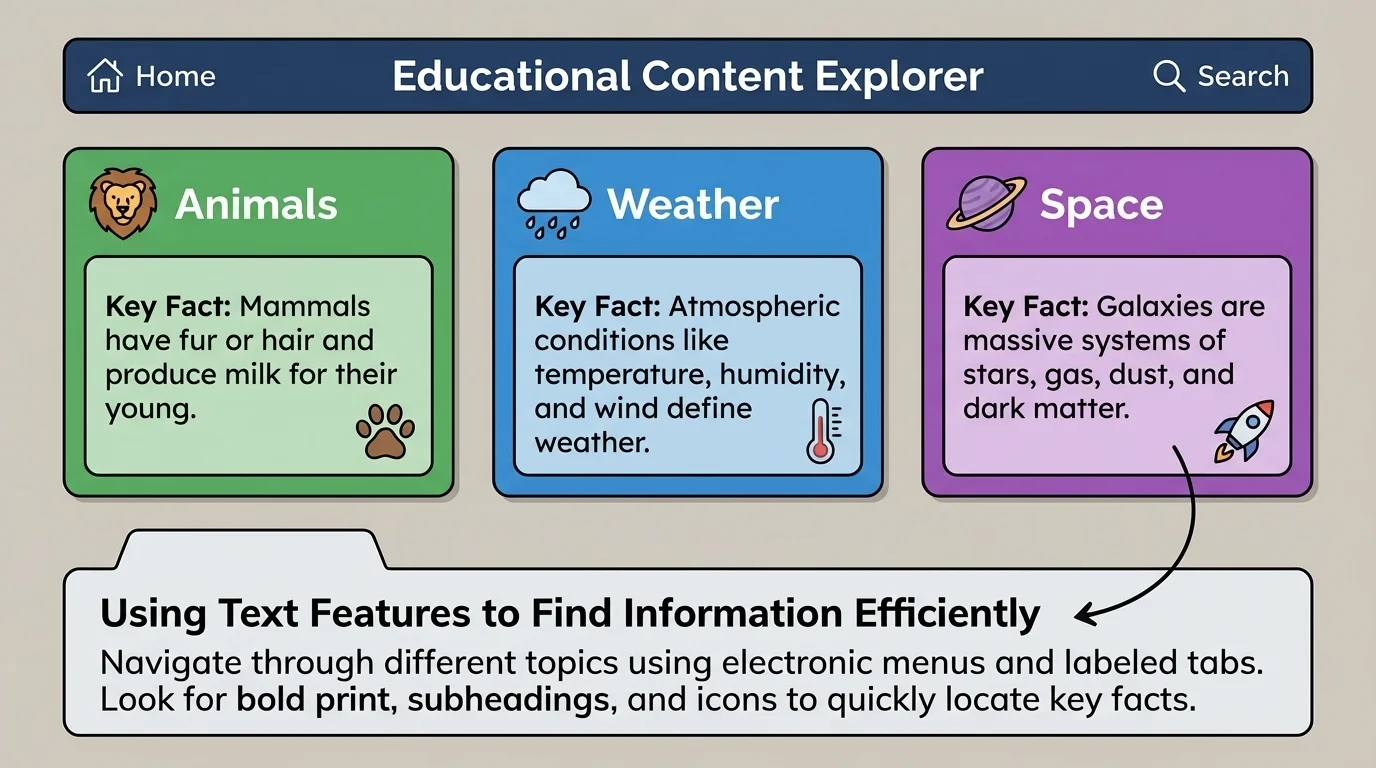
Icons help because they give quick visual clues. A house-shaped icon often means home. A magnifying glass often means search. A speaker icon may play sound. Once you learn what common icons mean, you can use them to move through digital texts faster.
Digital reading still requires careful thinking. A menu helps you jump to a section, but you still have to choose the best section. A search tool helps you find a word, but you still have to read the results to see which one answers your question.
Later, when you use a website for research, the screen tools in [Figure 3] remind you that digital texts also have features that guide readers, just like printed books do.
Strong readers ask themselves a question first: "What am I trying to find?" The answer helps them choose the best text feature.
If you want to know what a new word means, use the glossary. If you want to find a topic in a book, use the index. If you want to see what a picture is teaching, read the caption. If you want to find the right part of a chapter, look at the subheadings. If you are reading online, use menus and icons to move to the right page or section.
Examples of choosing a text feature
Step 1: You read the word camouflage in bold print and do not know it.
Best feature: glossary, because you need the meaning of a word.
Step 2: You need to find the pages about whales in a long animal book.
Best feature: index, because you need page numbers for a topic.
Step 3: You want the part of a chapter that explains why volcanoes erupt.
Best feature: subheadings, because they help you jump to the correct section.
Step 4: You see a photo of a bee covered in yellow dust and want to know what is happening.
Best feature: caption, because it explains the picture.
Choosing the right feature is a little like choosing the right tool from a toolbox. A hammer and a screwdriver are both useful, but each has a different job. Text features work the same way.
Efficient reading means finding information without wasting time. Text features help you do that. But efficient does not mean careless. After you use a feature to find the right place, you still read carefully to check the fact.
For example, the index may lead you to a page about bears, but the answer you need might only be in one paragraph. A subheading may lead you to the section on food, but you still need to read the sentences to learn which foods the animal eats. Text features guide you, but the main text gives the full answer.
You already know that nonfiction teaches real facts. Text features make those facts easier to find and understand.
When readers use text features well, they become more independent. They can answer questions, learn new words, and explore topics with confidence. Whether the text is on paper or on a screen, these features are there to help.
The more you notice captions, bold words, subheadings, glossaries, indexes, menus, and icons, the more quickly you can locate key facts. And when you can find information quickly, you have more time to think about what you are learning.
