Have you ever seen how fast a sentence can change on a screen? One little click can add a word, fix a spelling mistake, or move a whole sentence to a better spot. That is one reason why many writers use technology. A computer, tablet, or other digital tool can help a writer think, write, improve, and share ideas.
When we talk about technology, we mean tools such as computers, tablets, keyboards, headphones, microphones, and writing apps. Writers do not use technology to do the thinking for them. Writers use it to support their work. The writer still chooses the topic, the main ideas, and the details.
A writer might use a notebook and a pencil, but a writer might also use a computer document or a tablet app. Both ways can work. Technology is helpful because it lets writers save their work, return to it later, and make changes without starting all over again.
Writing process means the steps writers use to create a piece of writing. These steps often include planning, drafting, revising, editing, and publishing or sharing.
Informative writing is writing that teaches the reader about a topic by using main ideas, facts, details, and definitions.
When students write to teach about animals, weather, school rules, or community helpers, they are often creating informative writing. Technology can help them keep their ideas organized so the writing is clear and easy to understand.
Writing usually happens in steps, as [Figure 1] shows. Writers first think about what they want to say. Then they write a draft. After that, they go back to make the writing better. Finally, they fix small mistakes and share the finished work.
These steps do not always happen only one time. A writer may draft, revise, and edit more than once. Technology makes this easier because the writer can add, delete, or move text quickly.
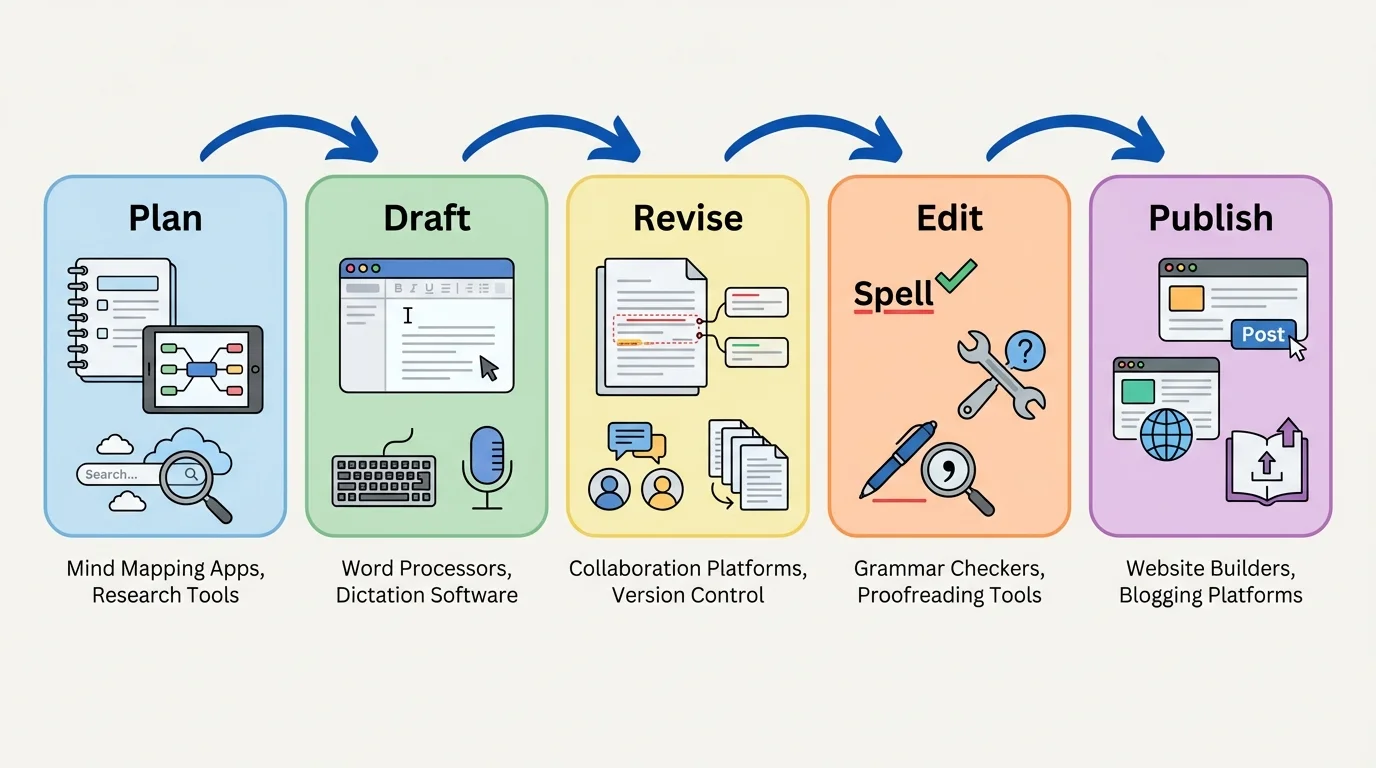
Let's look at each step. Planning is when the writer gathers ideas. Drafting is when the writer puts ideas into sentences and paragraphs. Revising is when the writer improves the meaning. Editing is when the writer fixes spelling, capitalization, punctuation, and grammar. Publishing or sharing is when the writer presents the final piece to readers.
Some writers say the easiest part is getting the first idea, but the strongest writing often comes after revising it several times.
That is why technology matters. A writer does not have to erase a whole page to improve one sentence. The writer can click, type, and keep going. Later, when we think again about the writing steps in [Figure 1], we can see that technology helps at every stage, not just at the end.
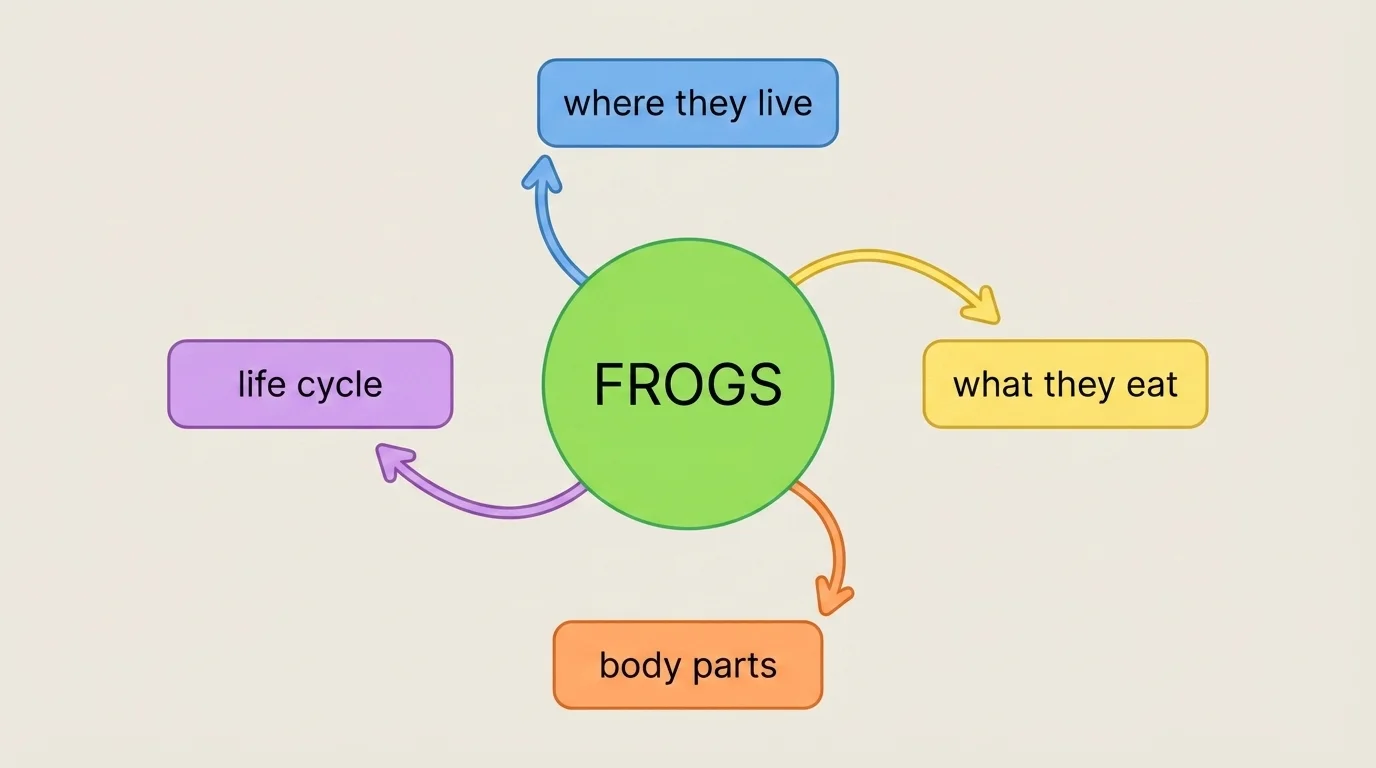
Before writing, many students need a way to collect and sort their thoughts. A graphic organizer can help with that, as [Figure 2] illustrates. Some apps let writers make idea webs, lists, or boxes with labels. This helps the writer see the main topic and the details that belong with it.
Suppose a student wants to write about frogs. In a digital organizer, the student can put "Frogs" in the middle. Then the student can add details such as "where they live," "what they eat," and "how they grow." Now the writer already has a plan for the informative piece.
Technology can also help with brainstorming. A writer may use digital sticky notes, a drawing app, or a voice recorder to save ideas quickly. Sometimes children think of a strong idea before they are ready to write full sentences. A digital tool helps them keep that idea safe until they are ready.
Main ideas and supporting details work together in informative writing. The main idea tells what a section is mostly about. Supporting details give facts, examples, and definitions that help the reader understand. Technology helps writers keep these parts organized so each detail matches the correct main idea.
Planning matters because good writing is easier when the ideas are in order. A digital plan, like the one in [Figure 2], helps a writer decide what to say first, next, and last.
After planning, writers begin the draft. A draft is the first version of the writing. On a computer or tablet, students can type letters, words, and sentences. They can make a title and write one paragraph at a time.
Some writers type with a keyboard. Some use an on-screen keyboard. Some use a microphone and speech-to-text. Speech-to-text is a tool that turns spoken words into typed words on the screen. This can be very helpful for writers who have many ideas and want to say them out loud first.
Writers still need to read what appears on the screen. Speech-to-text tools can turn spoken words into typed text, but the writer must check whether the words are correct. For example, if a child says, "Frogs live in ponds," the tool might type a wrong word. The writer reads it and fixes it.
Example: From plan to draft
A student is writing to teach others about butterflies.
Step 1: The student opens a writing app and types the title Butterflies.
Step 2: The student writes a first sentence: "Butterflies are insects."
Step 3: The student adds a detail sentence: "They begin life as eggs."
Step 4: The student starts a new paragraph about what butterflies eat.
The technology helps the student write neatly, add spaces, and keep the writing in one place.
Drafting on a screen can also help writers focus on ideas. If they want to add another sentence in the middle, they can place the cursor and type it there. They do not need to squeeze words into a small space.
Once a draft is written, the writer begins revising and editing, as [Figure 3] shows. Revising means changing the writing to make the ideas clearer and stronger. Editing means fixing mistakes in spelling, capitalization, punctuation, and grammar.
Technology is especially useful here. A writer can highlight a word and replace it with a better one. A sentence can be moved to a new spot. Another detail can be added. A paragraph can be split into two shorter paragraphs if that makes the writing easier to read.
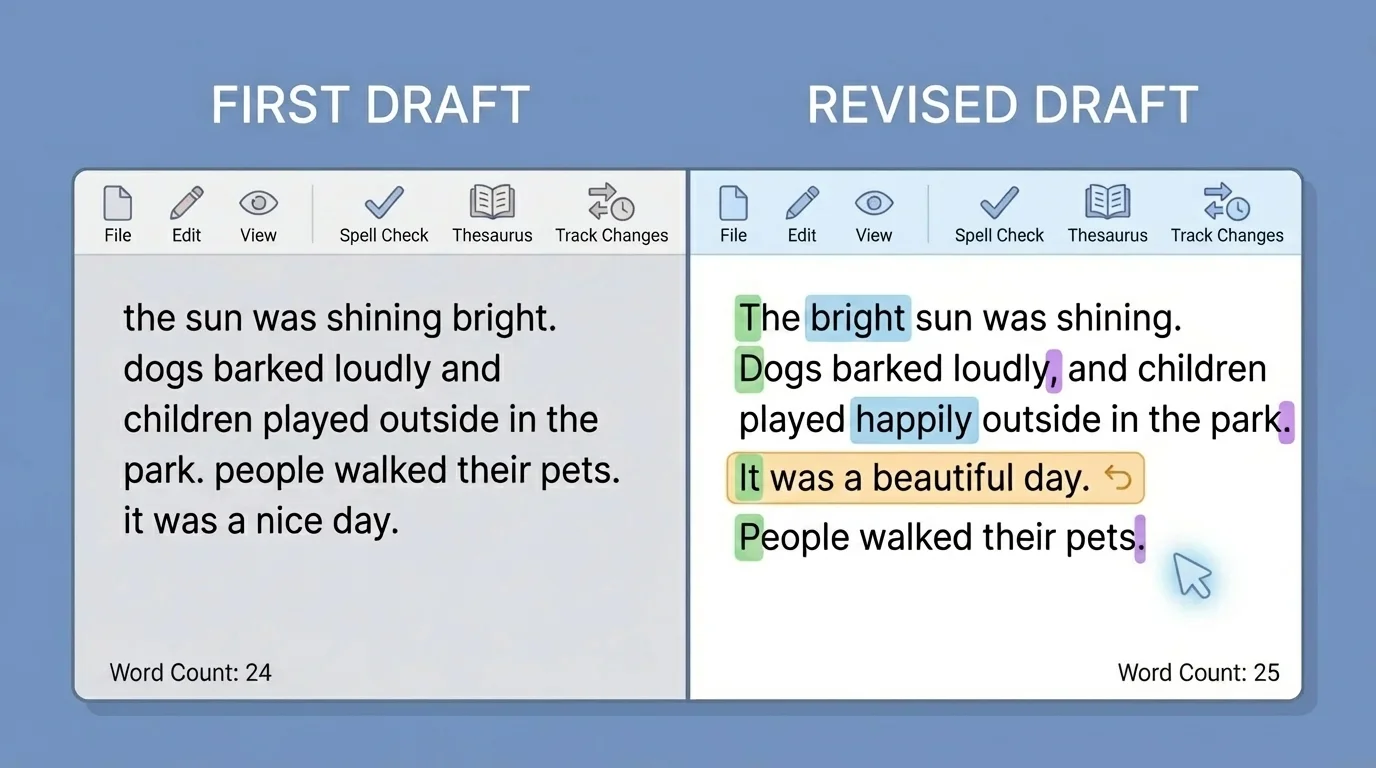
For example, a student might first write, "Frogs are nice." The student can revise it to: "Frogs are helpful animals. They live in wet places such as ponds and marshes." The second version gives the reader more information.
Editing tools can help too. Some programs underline a misspelled word or suggest a missing capital letter at the beginning of a sentence. These tools are helpful, but they are not perfect. Writers still need to think carefully. The computer is a helper, not the boss.
Remember that a complete informative piece needs a topic, clear ideas, and details that match the topic. Technology can help the writer notice mistakes, but the writer decides what information belongs.
When we compare versions of writing, like the changes in [Figure 3], we can see how revision makes a piece stronger for the reader.
Informative writing teaches. That means writers need true information. Technology can help writers collect facts, definitions, and details from safe sources chosen by a teacher or school. A child may read an online article, watch a short educational video, or look at digital pictures to learn more about a topic.
For example, if a student is writing about penguins, the student may learn that penguins are birds, that they have feathers, and that many live in cold places. These facts can become supporting details in the writing. The writer might also learn a definition, such as what a habitat is, and include it to help the reader understand.
Writers should choose facts that match the main idea. If the paragraph is about where penguins live, then the details should be about ice, water, and habitat. A random detail about another animal would not fit well. Technology helps writers keep notes in order so each paragraph stays on topic.
| Writing job | How technology can help |
|---|---|
| Find information | Read safe digital articles or view teacher-approved videos |
| Keep notes | Type facts in a note app or save them in a document |
| Organize ideas | Use headings, lists, and digital organizers |
| Add definitions | Look up the meaning of a new word in a kid-friendly source |
| Check the piece | Reread and revise on the screen |
Table 1. Ways technology supports informative writing from research to final checking.
A good writer asks, "Does this fact help my reader learn?" That question matters whether the writer uses paper or a screen.
After a writer plans, drafts, revises, and edits, it is time to share the work. Technology gives writers many ways to publish. A student might print the writing, show it on a classroom screen, save it in a digital folder, or send it to a teacher through a class platform.
When writers publish digitally, they also think about how the page looks. They choose a readable font, make a clear title, and leave spaces between paragraphs. Sometimes they add a picture that matches the topic. These choices help readers understand the information more easily.
Example: Making a final copy
A student finishes a report about bees.
Step 1: The student rereads each paragraph on the screen.
Step 2: The student corrects capitalization and adds a period.
Step 3: The student changes the title to How Bees Help Plants.
Step 4: The student prints the report and shares it with the class.
The final piece is neat, clear, and easier for others to read.
Publishing is important because writing has a purpose. Writers want readers to learn something. Technology helps make that sharing simple and clear.
Good writers also use technology responsibly. They save their work often so it does not disappear. They ask an adult or teacher before using websites. They use kind words when sharing writing online or in class tools.
Writers also need to check information. Not every digital source is correct. Young writers should use teacher-approved materials and trusted classroom resources. That way, their informative writing teaches true facts.
Another smart habit is naming files clearly. A file name like frog_report is easier to find than a file with no clear name. Writers who stay organized can keep working without confusion.
"Technology is a tool. It helps writers share their thinking, but the ideas still come from the writer."
When students understand this, they become stronger writers. They learn that technology can help them plan, write, improve, and teach others through clear information.
