Have you ever noticed how quickly a story can change when you type it on a computer? One moment a sentence is in the wrong place, and the next moment you can move it, fix it, and make it stronger. Technology gives writers powerful tools. It helps them create neat work, save ideas, share writing with others, and work together. Even young writers can use technology to make their writing clearer and more exciting.
When students use computers or tablets for writing, they are not just pressing keys. They are learning how to turn ideas into words, how to improve those words, and how to share them with real readers. With help from adults such as teachers, parents, or guardians, students can learn how to use digital tools in smart and safe ways.
Technology helps writers in many ways. It can make writing easier to read because typed words are neat and clear. It can also help writers save their work, return to it later, and make changes without starting over. If a writer wants to add a new sentence, delete a weak sentence, or fix a spelling mistake, digital tools make that job much faster.
Writers also use technology to publish their work. Publishing means getting writing ready for others to read. A published piece might be printed, posted in a class folder, shared in a slideshow, or added to a class website by an adult. Technology makes it possible for writing to reach more readers.
Another important reason to use technology is communication. Students can send their writing to a teacher, work on a shared class document, or respond to a classmate's ideas. These digital tools help writers connect with other people.
Publish means to prepare and share writing so other people can read it.
Collaborate means to work together with other people to create or improve something.
Although technology is helpful, good writing still matters most. A computer does not do all the thinking. The writer has to choose ideas, organize them, and decide what words to use. Technology is a tool, and the writer is the one in charge.
Strong writing usually does not appear in one try. Writers move through a writing process, and digital tools support each part of it. As [Figure 1] shows, writers often move forward and then go back to improve their work. That is why writing is called a recursive process. Recursive means you may return to earlier steps instead of staying in a straight line.
Planning is the first step. A writer thinks about the topic, audience, and purpose. On a device, planning might mean making a list, using a graphic organizer, typing notes, or talking through ideas with an adult. For example, if a student is writing about frogs, the plan might include where frogs live, what they eat, and how they grow.
Drafting is when the writer turns ideas into sentences and paragraphs. A draft does not have to be perfect. It is the place to get ideas down. On a computer, students can type a first draft and keep going even if they are not sure every word is correct yet.
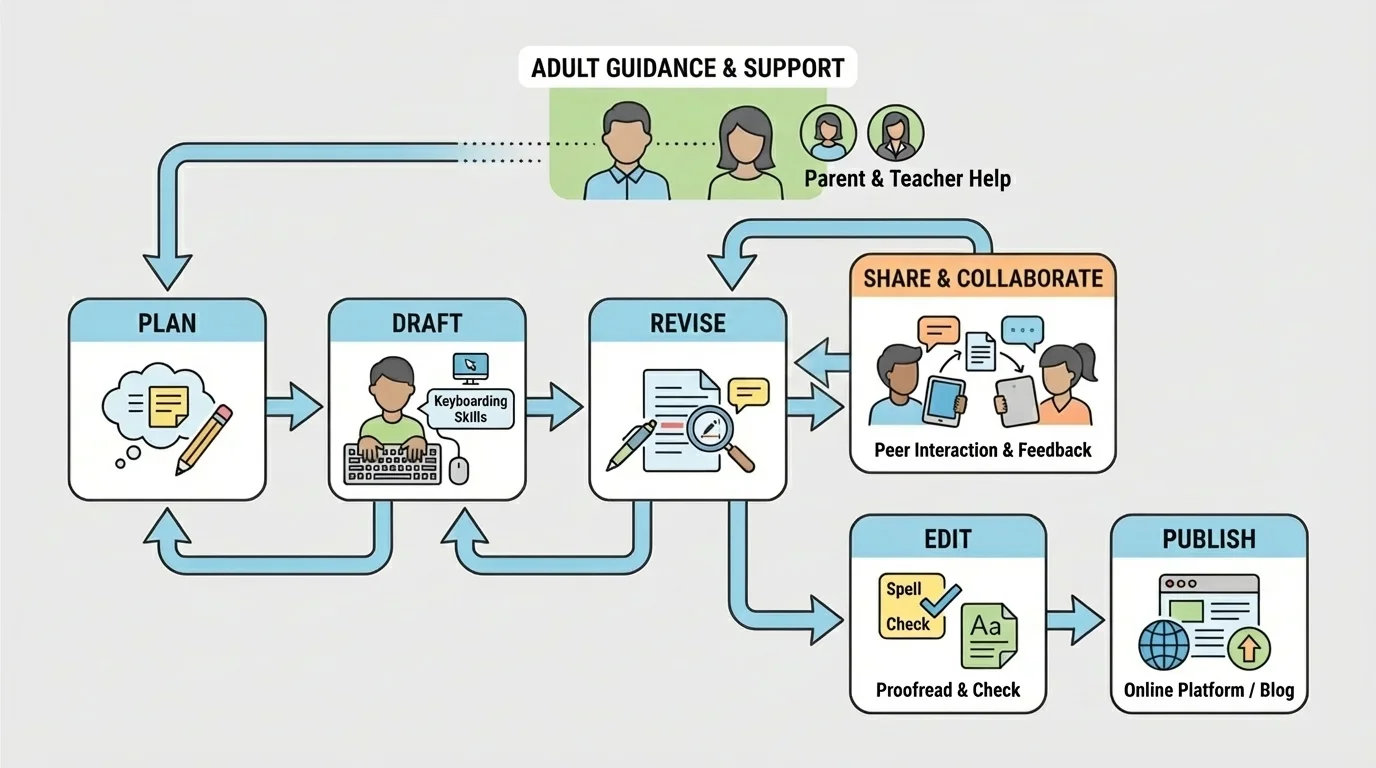
Revising means improving the ideas and organization. A writer may add details, remove repeated ideas, or put sentences in a better order. Revising is not the same as fixing every small mistake. Revising asks, "Does this writing say what I want it to say?" If the answer is no, the writer changes the content.
Editing means correcting mistakes in grammar, capitalization, punctuation, and spelling. This is the stage where writers look carefully at the details. Spell-check tools can help, but writers still need to read closely because computers do not always know what the writer means.
Publishing is the final step. The writer prepares the piece so others can read it. The title is checked, the format looks neat, and the final version is saved or shared. Later, when students work on a new piece, they use the same process again. In fact, the loop in [Figure 1] reminds us that even during editing, a writer may decide to go back and revise.
Why the process loops back
Writers often discover new ideas while they are drafting or editing. A student might notice that the ending is weak and return to revising, or notice that an important detail is missing and go back to drafting. Technology makes this easier because text can be moved, added, or deleted without rewriting the whole piece by hand.
This flexible process helps students become stronger writers. Instead of thinking, "I made a mistake, so I failed," they can think, "I can improve this." That is one of the best things about digital writing.
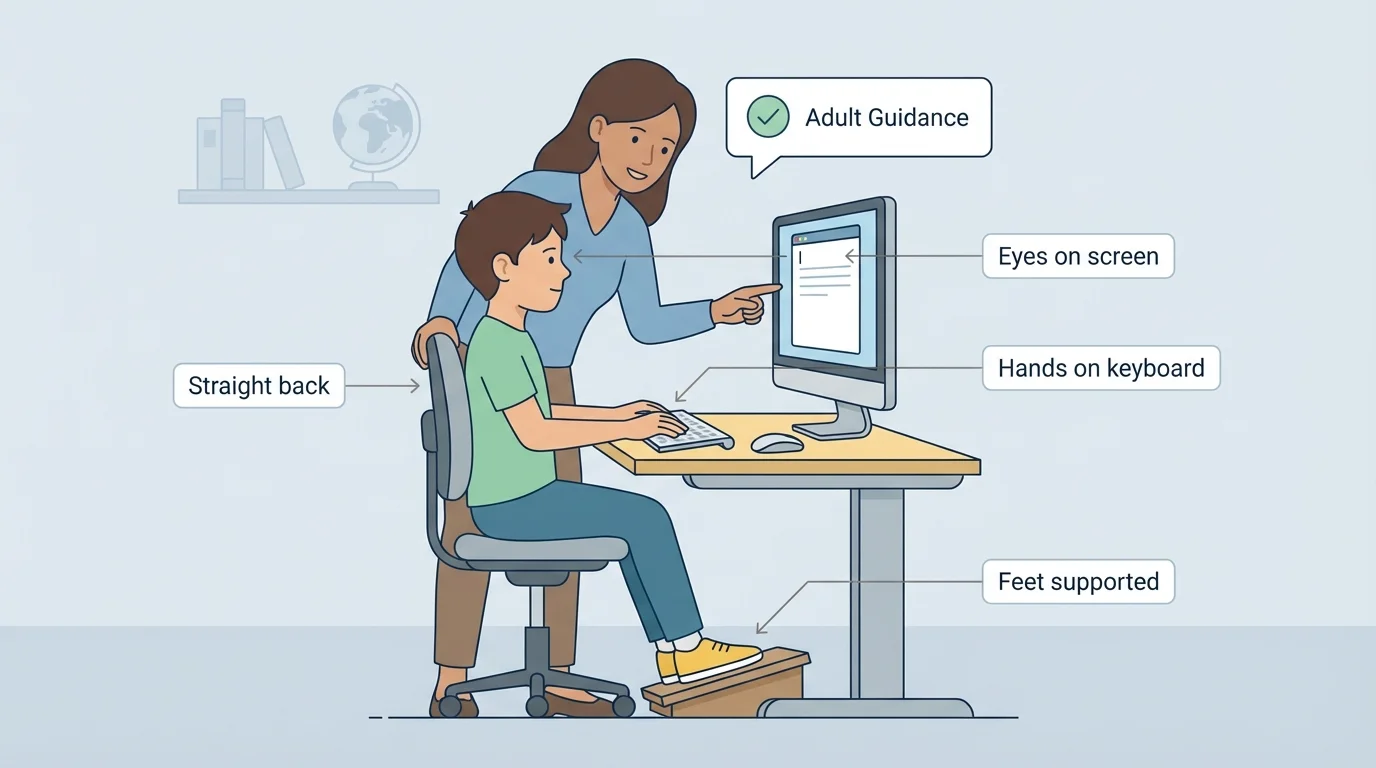
Good keyboarding helps writers use technology more smoothly. As [Figure 2] illustrates, keyboarding is not only about pressing keys. It also includes sitting correctly, placing hands well, and using the keyboard in smart ways so writing feels easier and faster over time.
Students should sit up straight, keep both feet steady, and look at the screen. Their hands should rest lightly on the keyboard. They should not pound the keys. Gentle, careful typing helps prevent mistakes.
Writers need to know how to use important keys. The letter keys help them type words. The space bar makes spaces between words. The shift key helps make capital letters. The enter or return key starts a new line. The backspace or delete key removes mistakes. Learning these keys makes writing more efficient.
Students do not need to be super fast typists in third grade. What matters most is building good habits. Accuracy comes before speed. If a student types slowly but carefully, the writing will still improve.
Keyboarding practice also helps students focus on ideas. When finding letters becomes easier, the writer can spend more energy thinking about the message. That is why keyboarding is such an important part of digital writing.
Many writers use the backspace key a lot because revising while typing is normal. Changing your mind during writing is not a problem. It is part of the process.
Students can also learn simple shortcuts with adult help, such as how to save a file or open a document again. These small skills build confidence and help writers stay organized.
Before a piece is shared, writers should check the rules that help readers understand it. These include grammar, capitalization, punctuation, and spelling. Technology supports this work, but the writer still needs to make choices.
Grammar helps words fit together in clear sentences. A sentence needs to make sense. For example, "The dog ran fast" is clear, but "Dog the fast ran" is not. When students reread typed sentences, they can often hear when something sounds wrong.
Capitalization means using uppercase letters in the right places, such as at the beginning of a sentence and for names like Maria or Denver. Punctuation includes marks such as periods, question marks, commas, and exclamation points. These marks help readers know when to stop, pause, or change expression.
Spelling matters because readers need to recognize words easily. A spell-check tool may underline a word, but students should not click without thinking. For example, if a student means "there," the computer might not help if the student types "their," because both are real words. Careful rereading is still necessary.
Digital revision example
A student types this draft sentence: "my dog like to chase leafs in the yard"
Step 1: Check capitalization.
The first word should begin with a capital letter: "My".
Step 2: Check grammar.
"dog" is singular, so the verb should be "likes," not "like."
Step 3: Check spelling and word form.
"leafs" should be "leaves."
Step 4: Check punctuation.
Add a period at the end.
The corrected sentence is: "My dog likes to chase leaves in the yard."
Adults can help by asking useful questions: "Does this sentence sound right?" "Did you begin with a capital letter?" "Can you add more detail?" Support from adults helps students notice what to fix and what to improve.
When writing is ready, the next step is to prepare it for readers. Publishing using technology may be as simple as printing a final copy or as exciting as sharing a digital book with a class. The key idea is that the work is complete, polished, and ready to be seen.
Writers should make sure the title stands out, the text is easy to read, and the spacing looks neat. They should also save the file with a clear name. A file called "Animal Report Final" is easier to find than one called "stuff" or "writing 2." Good file names help students stay organized.
Formatting also matters. This means how the writing looks on the page or screen. Students may choose a readable font, use paragraph breaks, and check that words are not crowded together. Technology gives writers ways to make their work look polished.
Sometimes publishing includes adding pictures, labels, or headings. For example, a student writing a report about penguins might include a title, short sections, and an image placed by an adult. A student writing a personal narrative might type a strong title and add an ending line that feels complete.
From earlier writing lessons, remember that a final copy should be your best version, not just your first version typed neatly. Good writers improve the ideas before they share the writing.
Publishing gives writing a real purpose. Students often work more carefully when they know classmates, families, or teachers will read their words.
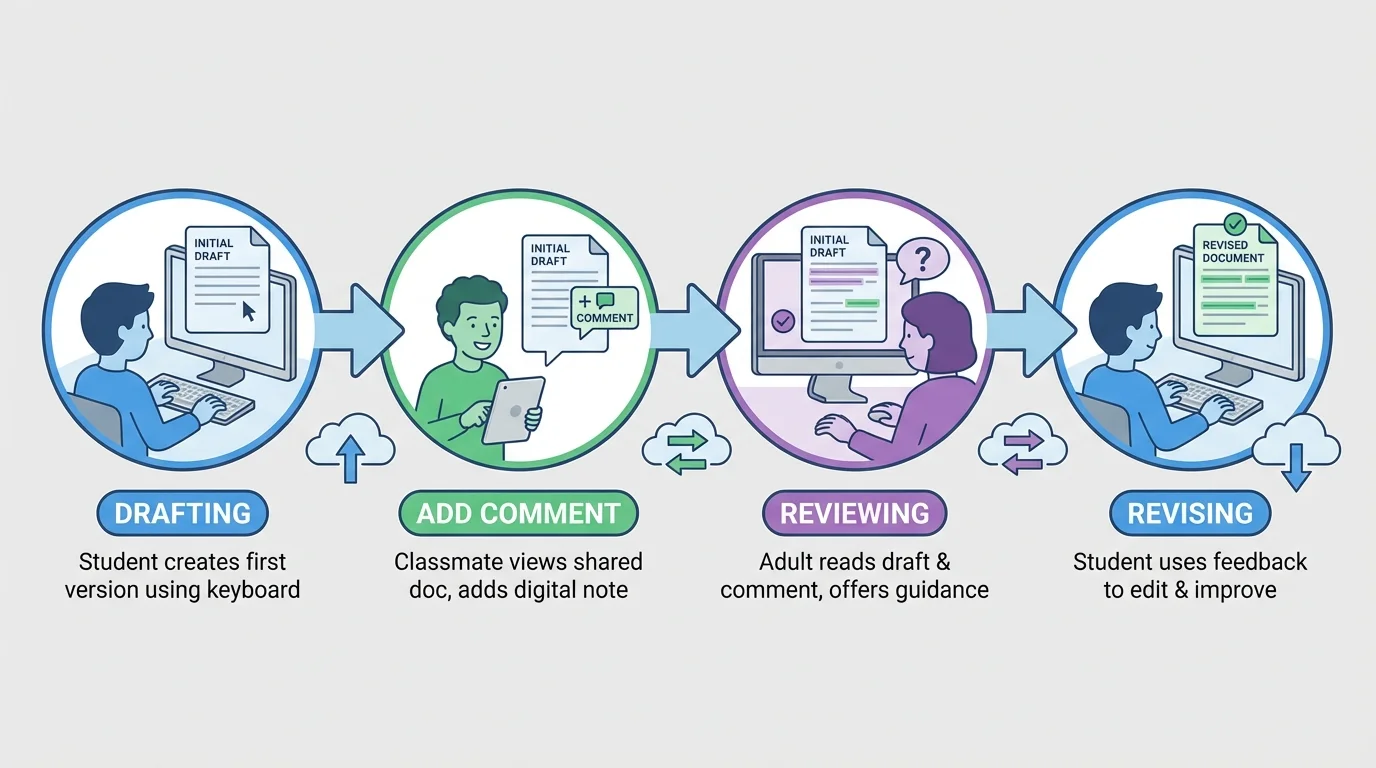
Technology is not only for writing alone. It also helps students collaborate with others. In shared digital spaces, students can write together, read each other's work, and respond with comments. The collaboration process in [Figure 3] shows that digital writing can include the writer, classmates, and adults, all helping at different times.
For example, one student may write a paragraph in a shared class document. Another student may add a kind comment such as, "I like your detail about the turtle's shell." A teacher might then guide the writer by saying, "Can you add where the turtle lives?" The writer uses that feedback to improve the piece.
When students interact online, they should be respectful. Their words should be kind, helpful, and clear. Good comments sound like this: "I like your beginning," "This part made me curious," or "You could add another fact here." Unkind comments do not help anyone grow.
Students also need to be patient and responsible in shared documents. They should not erase someone else's work without permission. They should wait their turn, follow directions, and stay on the assigned task.
Sometimes collaboration means creating one piece together, such as a class book about weather, a group report about habitats, or a list of interview questions for a guest speaker. In these projects, each person has a job, and technology helps combine everyone's work into one final product.
"Good writers listen, think, revise, and share."
Later, when students work on bigger group projects, the collaboration process shown in [Figure 3] still matters. One person creates, another responds, an adult guides, and the writing improves.
Whenever students use digital tools, safety matters. They should use only websites, apps, and platforms that an adult has approved. They should ask before sharing writing online and should never post personal information without permission.
Personal information includes full names, home addresses, phone numbers, passwords, and other private details. Students should understand that writing shared online may be read by other people, so adult guidance is important.
Students should also use appropriate language and pictures. School technology is for learning. That means students stay focused on their assignment and make choices that are respectful and safe.
If something confusing or upsetting happens online, students should tell an adult right away. Asking for help is a smart part of using technology.
Students can use technology for many kinds of writing. They might type a story about a mysterious treehouse, write an opinion paragraph about the best school lunch, create a report about whales, or draft a friendly letter to a community helper.
They can also make class books, digital posters, slideshows, or shared research notes. A science report might include headings such as "Habitat," "Food," and "Life Cycle." A personal narrative might include a beginning, middle, and end. Technology supports all of these forms.
Here are some common digital writing tasks students may do with adult support:
| Writing Task | Purpose | How Technology Helps |
|---|---|---|
| Story | Entertain readers | Typing, revising, adding a title |
| Report | Teach facts | Organizing sections, saving notes, publishing neatly |
| Opinion piece | Share a point of view | Reordering reasons, editing carefully |
| Letter or message | Communicate with someone | Typing clearly, sharing digitally with adult help |
| Group project | Work together | Shared documents, comments, combined final work |
Table 1. Examples of writing tasks and ways technology supports each one.
No matter what kind of piece students write, the same big ideas remain important: think first, draft, revise, edit, and publish. Technology helps at every stage, but thoughtful writing is always the goal.
