Have you ever opened a big nonfiction book or looked at a long webpage and wondered, "Where is the part I need?" Good readers do not always start at the first word and read every single line. They know how to use clues built into the text to find information fast. That skill saves time, helps you learn more, and makes reading informational text feel like solving a smart little mystery.
Informational texts are full of tools that help readers. A book about sharks, weather, space, or famous people is carefully organized. A website is organized too. When you learn to notice these tools, you can go straight to the parts that match your topic.
When authors write informational texts, they know readers may be searching for one specific fact. So they add text features to guide the reader. These are parts of a text that are not just regular paragraphs. They help organize ideas, point out important facts, and make information easier to find.
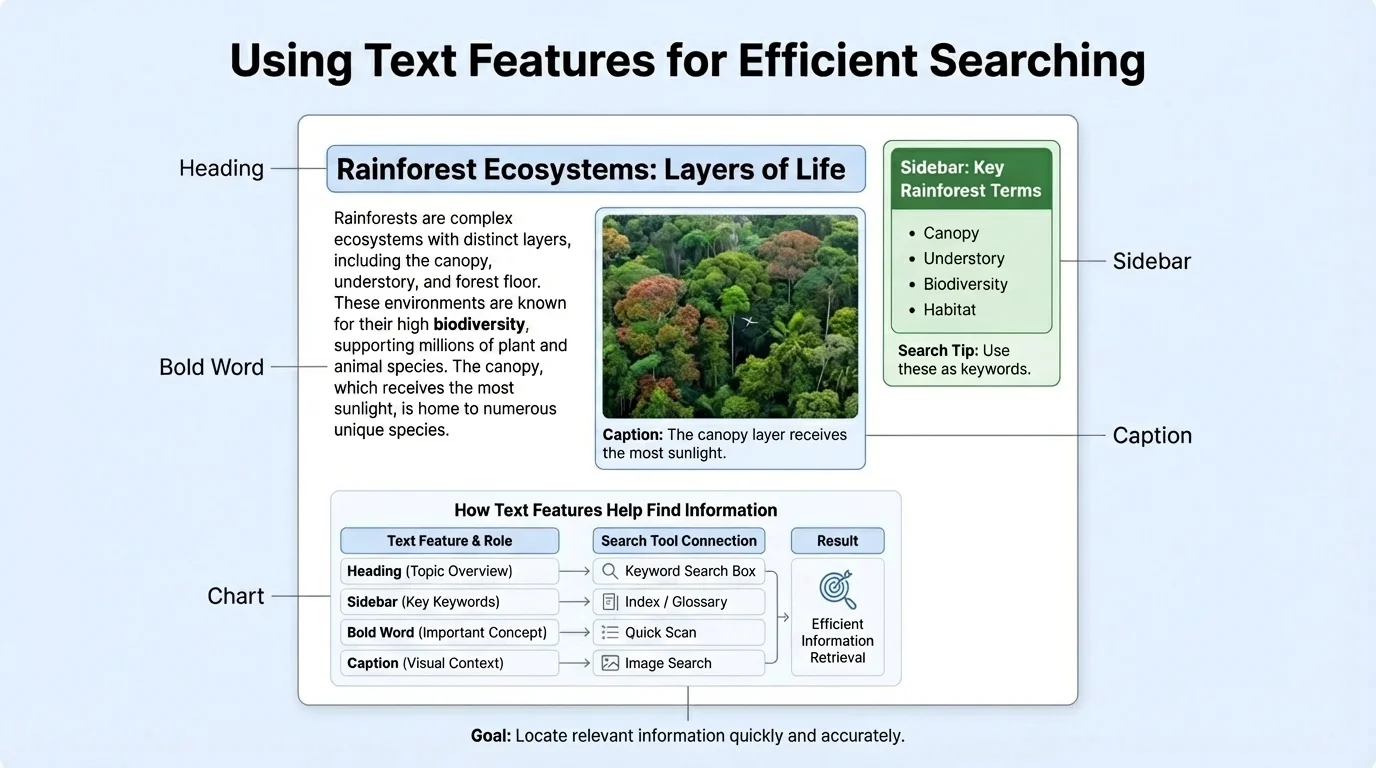
A page in an information book often has many clues, as [Figure 1] shows. Instead of reading the whole page right away, a reader can first look at the heading, the picture, the caption, and any extra boxes. These features act like signs on a road. They tell you where to go next.
Text features are special parts of informational text that help readers understand and locate information. Examples include headings, captions, sidebars, charts, indexes, and hyperlinks.
If your topic is "how frogs grow," you might not need every sentence in a whole book about frogs. You might look for a heading called Life Cycle, a diagram with labels, or a caption under a picture of tadpoles. Text features help you zoom in on the part that matters.
Different texts use different features, but some appear again and again. A table of contents at the front of a book lists sections and page numbers. An index at the back lists important topics in alphabetical order. A glossary explains special words. Headings and subheadings divide the text into parts.
Inside the pages, you may see a sidebar, which is a short section beside the main text. Sidebars often add interesting facts, quick explanations, or important details. You may also see captions under pictures, labels on diagrams, bold words, maps, charts, and graphs. Each one helps in a different way.
On a busy nonfiction page, each feature has a job. A heading tells the topic of a section. A caption explains what a picture shows. Bold words point to important vocabulary. A chart may compare facts quickly. A sidebar may share an extra detail without interrupting the main paragraph.
Suppose you are reading about deserts. If you want to know how hot deserts get, you might first find a heading like Desert Climate. Then you may read the chart for temperatures. If you want to know what animals live there, the photo captions or labels may help. You are not guessing. You are using the text's organization.
| Text Feature | What It Helps You Do | Example |
|---|---|---|
| Heading | Find the main idea of a section | How Plants Make Food |
| Sidebar | Read extra facts quickly | A box about the tallest tree |
| Caption | Understand a picture | "This polar bear is swimming between ice sheets." |
| Index | Find pages about a topic | "bears, 12, 16, 27" |
| Glossary | Learn word meanings | "habitat: the place where an animal lives" |
| Hyperlink | Jump to related information online | A blue word you can click |
Table 1. Common text features and how they help readers locate information.
Later, when you compare two sources, the same feature may help in different ways. The sidebar in one article may explain a fact briefly, while the chart in another article may make that fact even clearer. As you saw earlier in [Figure 1], strong readers notice the structure of the page before they begin deep reading.
Many nonfiction readers spend a little time previewing headings, captions, and pictures before reading the paragraphs. That quick preview often helps them understand and remember more.
One smart habit is to ask, "Which feature will help me most right now?" If you need a definition, check the glossary. If you need a page number, check the index. If you need a quick clue from a picture, read the caption.
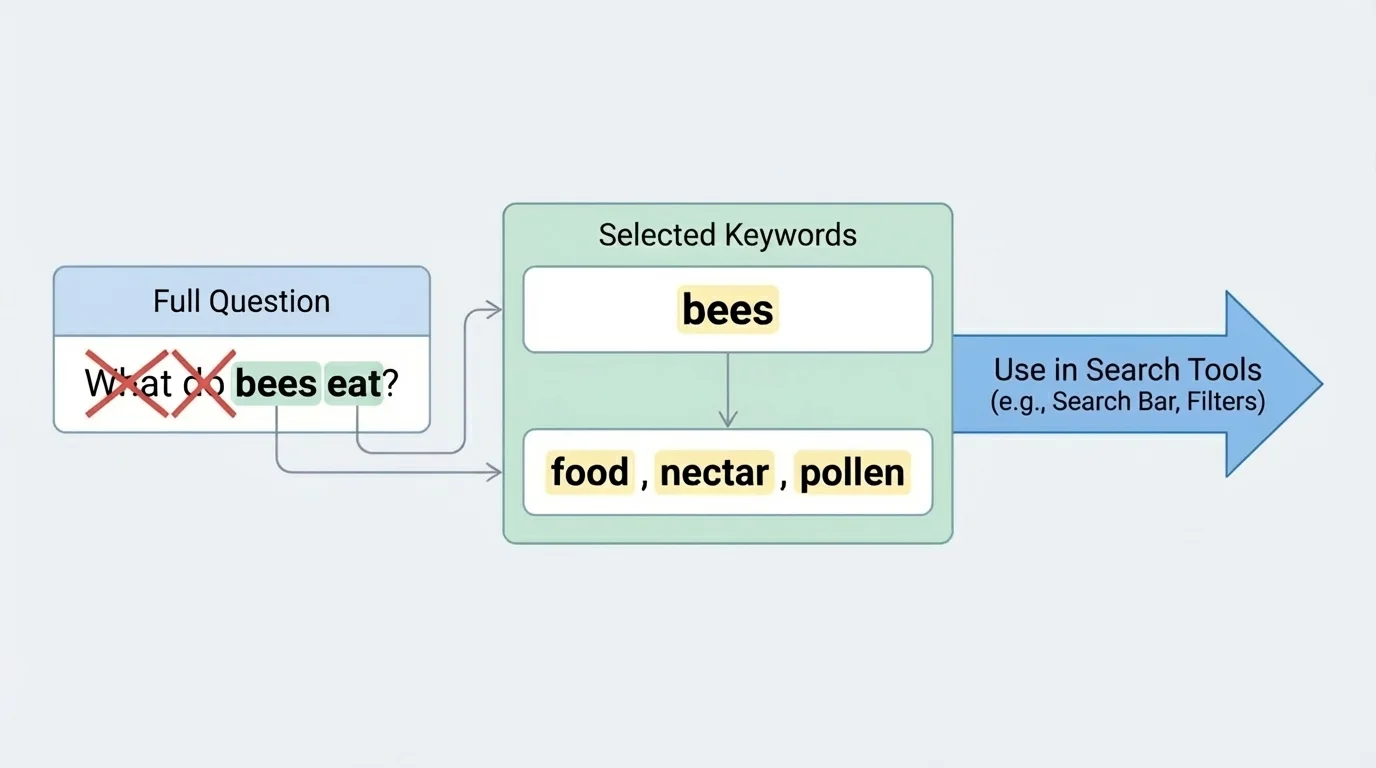
When you search for information in a book or online, strong key words make a big difference. A key word is an important word connected to your topic. Good key words are usually the main ideas, not small extra words such as the, is, or what.
[Figure 2] For example, if your question is "What do bees eat?" the most useful key words are bees, eat, food, nectar, and pollen. If your question is "How do volcanoes form?" your key words might be volcanoes, form, magma, and eruption.
Long questions can often be trimmed down. Instead of typing or looking for the whole sentence, keep the important idea words. That makes searching faster and often gives better results.
Choosing key words from a question
Question: "Where do sea turtles lay their eggs?"
Step 1: Read the whole question.
The question asks about sea turtles and egg-laying.
Step 2: Keep the important words.
Useful key words are sea turtles, lay eggs, nest, and beach.
Step 3: Drop extra words.
Words like where, do, and their are less helpful for searching.
Now the search is focused and easier.
Sometimes one set of key words is not enough. If you search for jaguars, you might find the animal, but you might also find a car brand. So you can add another key word like rainforest or animal. Then your search becomes clearer.
Readers also change key words when needed. If kidney function feels too hard in a science article, you might search what kidneys do. If weathering does not give enough results, you might add rocks. Good searching is flexible.
Efficient readers do not read every text the same way. Sometimes they scan, which means they move their eyes quickly to find a specific word, heading, or fact. Other times they read closely and slowly. Knowing when to scan and when to slow down is an important reading skill.
If your teacher asks, "Find out what owls eat," you can first scan the page for the heading Food or Diet. You can look at bold words, labels, or captions. Once you find the right section, then you read more carefully.
Scan first, read deeply second
Scanning helps you locate the right part of a text. Close reading helps you understand the details in that part. Good readers often do both in order: first find, then learn.
Think of a library book about oceans. You would not need to read every chapter to answer one question about coral reefs. You could use the table of contents, flip to the reef section, scan for a subheading such as Animals of the Reef, and then read those paragraphs carefully.
Captions are especially helpful because they often give fast facts. A photograph may show a penguin, but the caption may tell you that emperor penguins keep eggs warm on their feet. That fact might not be obvious from the picture alone.
Sidebars are useful too. A sidebar may include a short set of facts, a mini biography, or a question-and-answer box. If your topic matches that box, you may find what you need much faster than reading the full article from top to bottom.
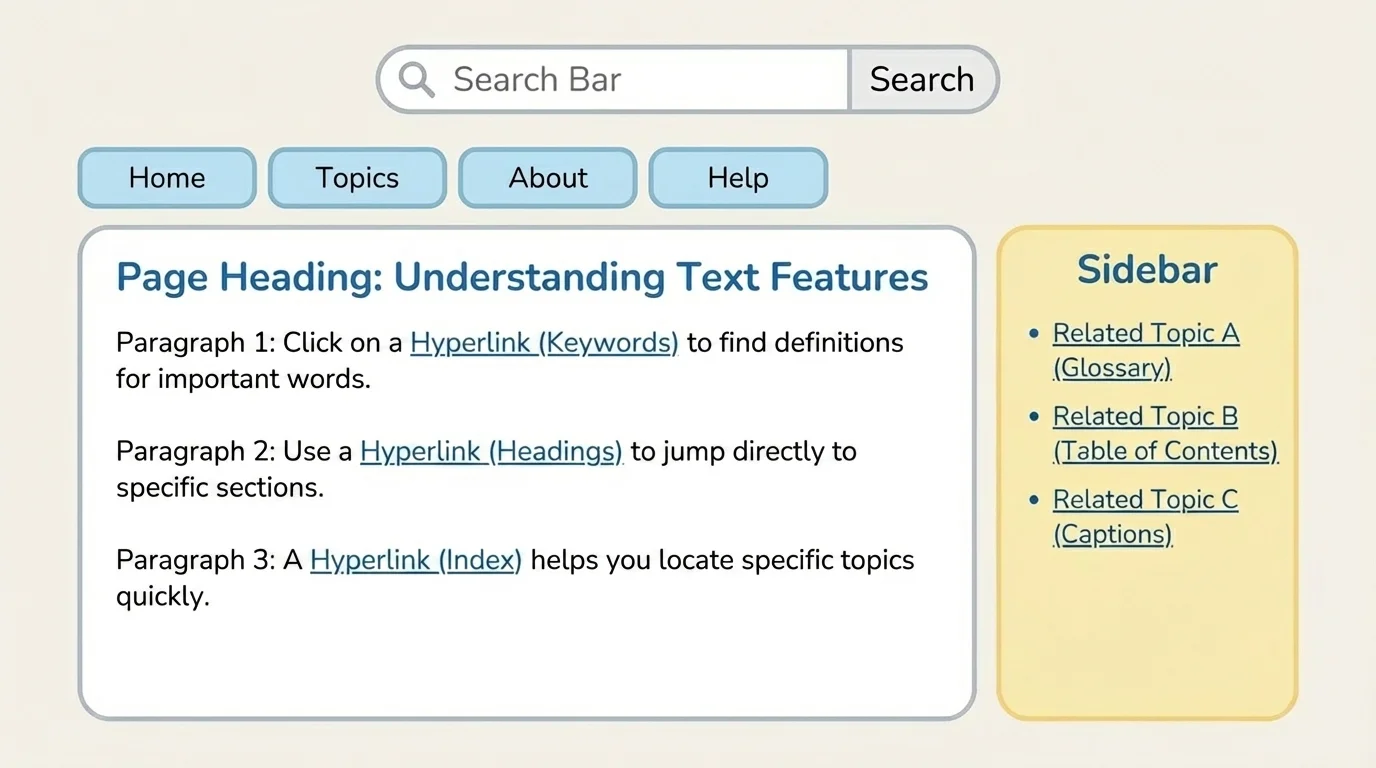
Websites have special tools just like books do. A search bar lets you type key words. Menus and tabs organize pages into sections. Blue or underlined words are often hyperlinks, which you can click to jump to another page or section.
[Figure 3] A website is a bit like a building with many rooms. The homepage is like the front door. Menus help you choose a room. Hyperlinks are like hallways that connect one room to another. A search bar is like asking, "Take me right to the page about volcanoes."
When you use a website, read the page title and section headings first. Then notice where the links lead. Some links go to related topics. For example, on a page about butterflies, a hyperlink might lead to pages about metamorphosis, caterpillars, or habitats.
Hyperlinks are powerful because they connect ideas. If you are learning about the moon, a link might take you to pages about phases, craters, or astronauts. That can help you stay focused on your topic without starting over each time.
But not every result is useful. Some pages may be about a different topic with the same word. That is why careful readers check the heading, the first sentences, and the source before spending time reading.
Remember that books and websites both have organization. In books, you may use tables of contents and indexes. On websites, you may use search bars, menus, and hyperlinks. The goal is the same: find the right information quickly.
On the internet, it is also smart to use trusted, school-appropriate sources. A kid-friendly encyclopedia, museum website, zoo website, or science organization often gives clearer and safer information than random pages.
Later, when you move from one page to another, the webpage structure in [Figure 3] still matters. The search bar helps you start, but the hyperlinks help you keep exploring connected ideas without losing your topic.
Finding information is only part of the job. You also need to decide whether it is relevant. Relevant information matches your topic or answers your question. Information can be interesting but still not relevant.
Suppose your topic is "how koalas get food." A paragraph about where koalas sleep may be interesting, but it does not answer the question. A caption that says koalas eat eucalyptus leaves is relevant because it fits your topic exactly.
One way to check relevance is to ask yourself three questions: Does this match my topic? Does it answer my question? Do I need this fact right now? If the answer is yes, the information is useful.
Relevant or not?
Topic: "How do pandas eat?"
Fact 1: "Pandas use strong jaws to chew bamboo."
This is relevant because it explains how pandas eat.
Fact 2: "Some pandas live in mountain forests in China."
This may be true, but it is not the best match if the question is only about eating.
Fact 3: "Pandas spend many hours each day eating."
This is relevant because it connects to the eating topic.
Good readers stay focused. They do not collect every fact they see. They choose the details that fit their purpose.
This is also where captions, sidebars, and headings help again. A heading tells whether a section matches your topic. A sidebar may give a quick fact that is exactly what you need. As shown earlier in [Figure 1], different features work together to help readers find and select the best information.
Now think about a real topic: "How do plants survive in deserts?" You could begin with the key words plants, desert, and survive. In a book, you might check the table of contents for a chapter about deserts or plants. Then you could scan for a heading such as Plant Adaptations.
If you find a page with a photo of a cactus, read the caption. If there is a sidebar about storing water, read that too. If a bold word says adaptation, check the glossary if you are unsure of the meaning. Each step helps you move closer to the exact information you need.
Using text features and search tools on one topic
Topic: "Why do whales need blubber?"
Step 1: Choose key words.
Use whales, blubber, warmth, and fat layer.
Step 2: Search in a book or website.
Look for headings like Body Covering, Adaptations, or Staying Warm.
Step 3: Use text features.
Read the caption under a whale picture, the sidebar about ocean temperatures, and any labeled diagram.
Step 4: Check relevance.
Keep facts about how blubber helps whales stay warm and store energy. Skip facts that are mostly about whale songs if they do not answer the question.
This process helps a reader work efficiently and stay focused.
Online, you could type your key words into a search bar, then open a useful page. Once there, you could click a hyperlink to cactus spines or water storage. The key-word process from [Figure 2] helps you begin, and the website tools from [Figure 3] help you keep going.
The more you practice with informational texts, the more quickly you will notice patterns. You will know when to use the index, when to scan a heading, when to trust a caption, and when to click a hyperlink. These are the habits of a strong reader who reads with purpose.
"Good readers do not just read more. They read smarter."
Finding information efficiently is a powerful skill in every subject. In science, you may search for facts about animals or weather. In social studies, you may use headings and maps to learn about places and people. In health, art, and technology, the same reading tools help you stay focused on your question and find the facts that matter.
