A hundred years ago, if a child wanted to share a story with many readers, the story usually had to be printed or copied on paper and passed from person to person.
Today, a student can type a paragraph, revise it, add a title, and share it with classmates or family in minutes. Technology has changed how people write, but one thing has stayed the same: writing still needs to be clear, organized, and thoughtful.
When students use computers and the Internet to write, they are doing more than pressing keys. They are making choices about words, sentences, punctuation, and design. They are also learning how to work with others, respond to feedback, and publish writing for a real audience. That is why technology and writing go together so well.
To produce writing means to create it. A writer may plan ideas, type a first draft, revise sentences, and edit mistakes. Technology makes this process easier because a writer can move words, erase mistakes, add details, and save changes without starting over on a new sheet of paper.
To publish writing means to prepare it so other people can read it. Publishing can happen in different ways. A student might print a report, post a class paragraph in an online classroom, add a poem to a digital slide show, or share a book review on a school website. Publishing means the writing is ready for an audience.
When writers know who will read their work, they make stronger choices. If a student is writing directions for classmates, the writing should be clear and ordered. If the student is writing a thank-you message to a guest speaker, the tone should be polite. If the writing will be seen online, the writer should check even more carefully for mistakes, because many people may read it.
Digital writing is writing created with technology, such as a computer or tablet. Audience means the people who will read the writing. Publish means to share finished writing with readers.
Technology gives writers many tools. A student can choose a font that is easy to read, add a heading, organize ideas into paragraphs, and save the work for later. These features help writing look neat and professional, but they do not replace careful thinking. A well-formatted paragraph still needs good ideas and clear sentences.
Using technology does not mean grammar stops mattering. In fact, grammar and mechanics matter even more when writing is shared quickly. Standard English includes rules for grammar, usage, capitalization, punctuation, and spelling. These rules help readers understand what the writer means.
For example, look at these two sentences: lets eat grandma and Let's eat, Grandma. The second sentence uses an apostrophe and a comma, so the meaning is completely different. Small marks can make a big difference. When students type online, they need to check these details carefully.
Clear writing usually includes complete sentences, correct end punctuation, capitals where needed, and words spelled correctly. It also uses verbs that match their subjects and pronouns that make sense. In digital writing, tools such as spellcheck and grammar suggestions can help, but writers should not trust them blindly. A computer may miss a mistake if the wrong word is still a real word, such as their instead of there.
Why conventions matter
Conventions are the shared rules writers use so readers can follow their ideas. When a sentence begins with a capital letter, ends with punctuation, and uses words in the right order, the reader can focus on the meaning instead of getting stuck on confusion.
Writers should also watch for informal habits that sometimes appear in texting. Shortcuts like u for you or leaving out capitals may be fine in a quick message to a friend, but they usually do not belong in school writing. School writing should be complete, respectful, and easy to read.
Paragraphs matter too. A paragraph groups related ideas together. On a computer, pressing the Enter key helps separate one paragraph from the next. This makes the writing easier for readers to follow, especially when the piece is one page or longer.
[Figure 1] Strong digital writing follows a process. Writers usually move from an idea to a draft, then to revision, editing, publishing, and sharing. Technology helps at each stage because it allows writers to save work, return to it later, and improve it step by step.
The first step is planning. A student may brainstorm in a digital note, create a list, or use a graphic organizer. For example, if the topic is pets, the student might list food, habitat, behavior, and care. Planning helps the writer gather ideas before beginning the draft.
Next comes drafting. A draft is a first version of writing. It does not have to be perfect. During drafting, the writer focuses on getting ideas down. A student writing about volcanoes might begin with a topic sentence, add facts in the middle, and end with a closing sentence. The writer can always improve the draft later.
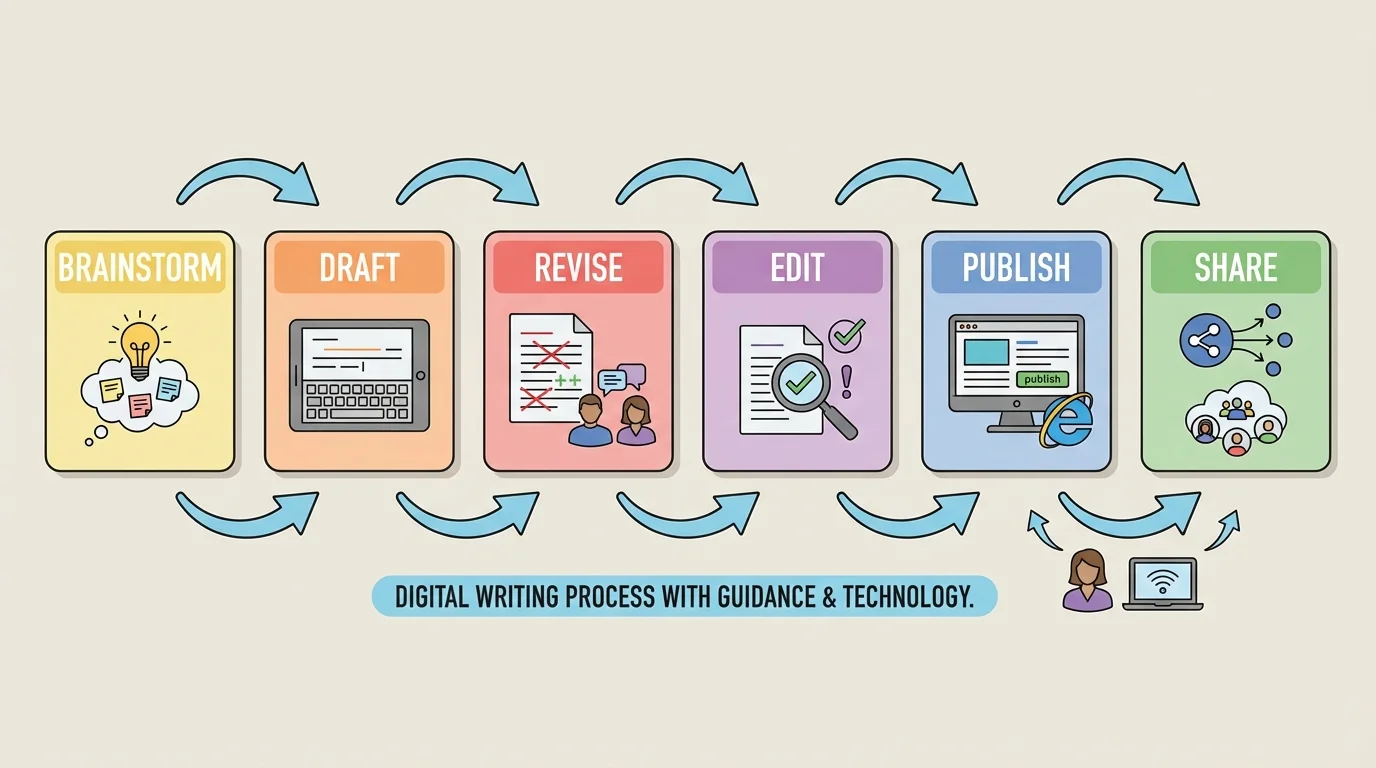
Adults can be very helpful during this process. A teacher, parent, or another trusted adult might help a student log in, save a file, organize ideas, or understand a writing assignment. Guidance does not mean the adult does the writing. It means the adult supports the student so the student can learn to do more independently.
Saving work is an important digital habit. Writers should save often and give files clear names, such as Animal_Report_Draft_1. A file name like stuff or my writing can make it hard to find the correct document later.
Many professional writers revise their work many times. Typing makes revision faster because a writer can move a sentence, replace a word, or add a paragraph without rewriting the whole piece by hand.
Another useful tool is the copy-and-paste function, but it should be used carefully. Writers can use it to move their own sentences into a better order. They should never copy someone else's writing and pretend it is their own. Good writers create original work and give credit when needed.
Revising means improving the ideas, organization, or word choice in a piece of writing. Revising is different from editing. A writer may revise by adding examples, changing the order of ideas, or replacing boring words with stronger ones. For example, The dog was nice could become The playful dog greeted everyone with a wagging tail.
Editing means correcting mistakes in grammar, spelling, punctuation, and capitalization. After revising, a writer should read carefully and fix errors. Reading the piece aloud can help the writer hear awkward sentences and missing words.
Digital tools can support both revising and editing. A writer can use spellcheck, look up a word in an online dictionary, or zoom in to check punctuation. Still, the writer must think. If a sentence sounds odd, the student should ask, "Does this make sense?" A writing tool is helpful, but the writer is still in charge.
Publishing online or through a digital platform means making the final copy neat and ready to read. Writers should include a title, readable font size, and clear paragraph spacing. If the assignment asks for images, captions, or headings, those should support the writing instead of distracting from it.
Example: turning a draft into a published paragraph
A student writes about recycling.
Step 1: Draft
Recycling is good. It helps trash. People should do it.
Step 2: Revise for detail
Recycling helps reduce trash in landfills. When people recycle paper, plastic, and metal, useful materials can be used again.
Step 3: Edit for correctness
The writer checks capitalization, punctuation, and spelling, then adds a title.
The published version is clearer, more informative, and easier for readers to understand.
Later, when writers return to the writing process, the same sequence still matters because publishing is not the beginning. It comes after planning, drafting, revising, and editing.
[Figure 2] Technology also helps writers work together. In a shared document, more than one student can read, comment on, or suggest changes to a piece of writing. Collaboration can make writing stronger because each person notices different things.
A student may ask a classmate, "Does my opening make you want to keep reading?" or "Did I explain my main idea clearly?" These questions lead to helpful feedback. Good feedback is specific. Instead of saying It's good, a classmate might say, Your facts are strong, but your ending could be clearer.
When responding to someone else's writing, students should be respectful. They should be honest but kind. Comments like This part confused me because I was not sure who was speaking are useful. Comments like This is bad are not helpful and are unkind.
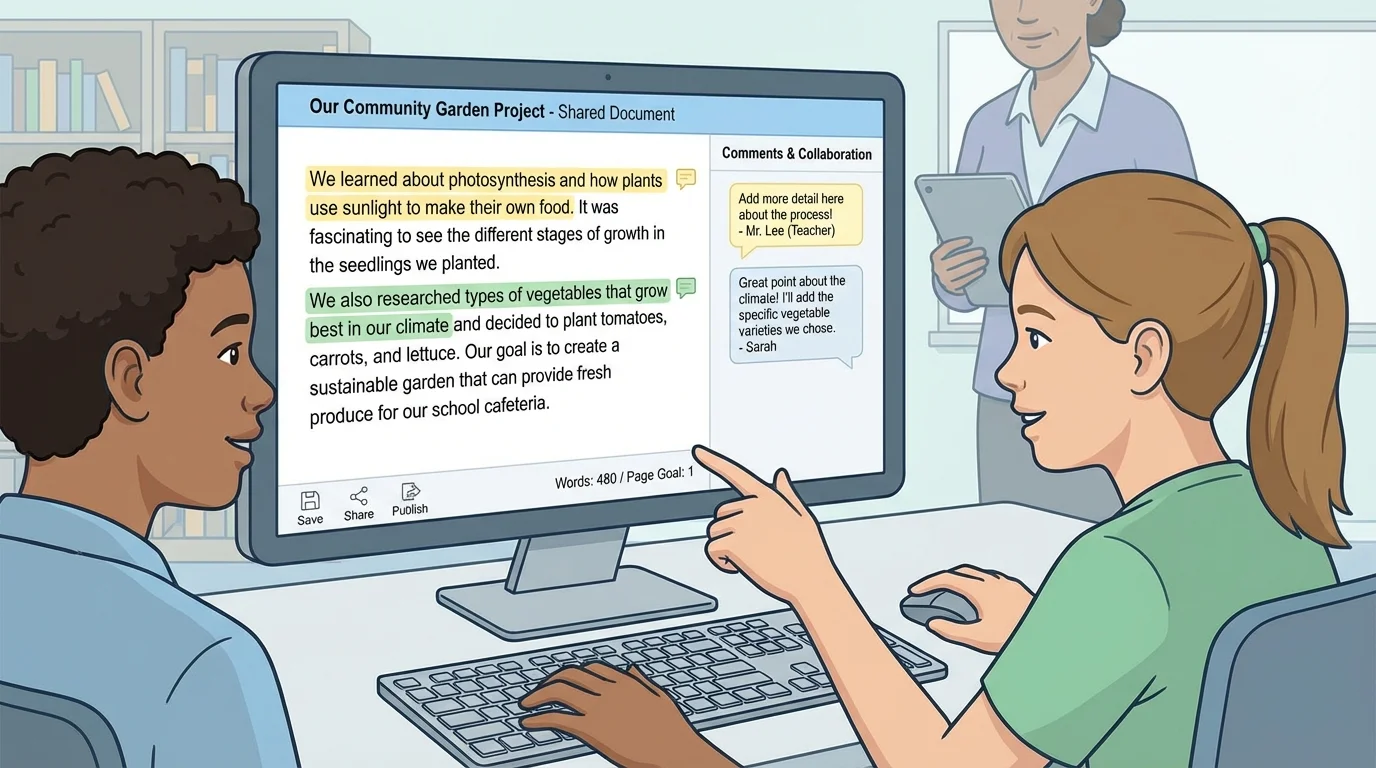
Writers should also respond politely when they receive suggestions. They do not need to agree with every comment, but they should listen carefully and think about the advice. Collaboration means sharing ideas, not arguing over every sentence.
Some digital tools allow students to see who made changes and when. This can help a group stay organized. If three students are writing a report together, one might work on the introduction, another on facts, and another on the conclusion. Then the group can review the whole report and make sure it sounds like one clear piece.
When you work with a partner in speaking or writing, you already know some collaboration skills: listening, taking turns, and staying on topic. Digital collaboration uses the same habits, just through technology tools.
Good collaboration also includes giving credit. If a classmate shares an idea that improves the writing, it is fair to recognize that contribution. Working together does not mean taking over someone else's work. It means building something stronger as a team.
The best shared documents are organized and polite. Clear comments, highlighted sections, and thoughtful suggestions help everyone improve the final piece.
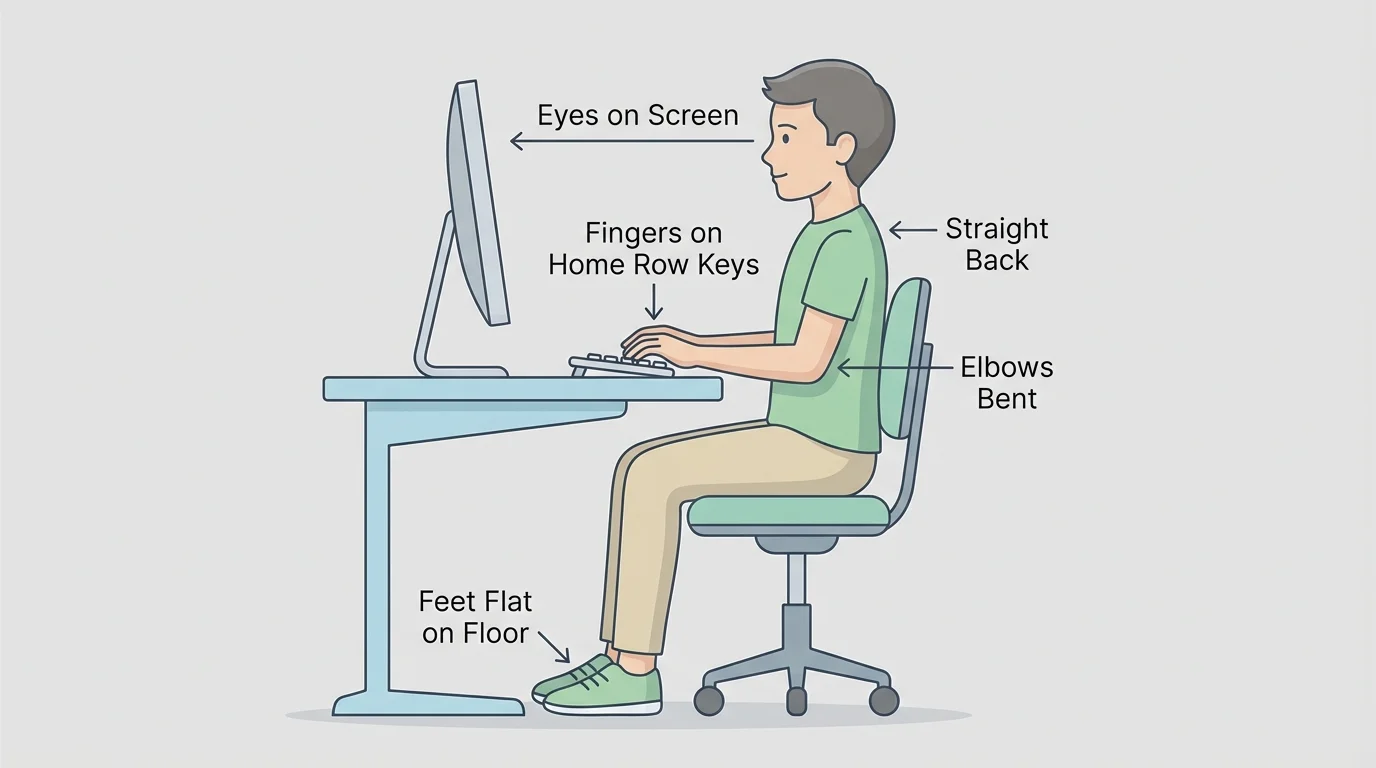
[Figure 3] Typing one full page in a single sitting takes more than fast fingers. It requires comfort, focus, and good habits. Body position matters, and posture and hand placement help writers type longer pieces without getting tired too quickly.
Good keyboarding usually includes sitting up straight, keeping feet on the floor, and looking at the screen more than the keyboard. Fingers rest on the home row keys, which are the middle keys used as a starting position. When students learn where the keys are, they can type more smoothly.
Accuracy is more important than speed at first. If a student types quickly but makes many errors, the writer loses time by fixing mistakes. A steady pace with correct letters, spaces, and punctuation is better than rushing.
Students also build stamina by typing more often. Stamina means the ability to keep working without giving up or tiring too fast. A student who practices keyboarding regularly can type longer pieces more comfortably.
Writers should use the shift key for capital letters, the space bar once between words, and the backspace key carefully for corrections. They should also remember that a page usually needs several organized paragraphs, not one giant block of text.
Example: habits that help a student type a full page
Step 1: Get ready
The student opens the document, checks posture, and places fingers on the correct keys.
Step 2: Focus on ideas first
The student types the draft without stopping every few seconds to make tiny changes.
Step 3: Revise after the page is written
Once the full page is finished, the student rereads it and edits mistakes.
This routine helps the writer stay productive and complete a longer piece in one sitting.
As students become more skilled, good posture and hand position remain important because they support both comfort and control.
Using technology for writing also means being a responsible digital citizen. A digital citizen uses technology in safe, respectful, and honest ways. This includes protecting personal information, treating others kindly, and using school tools correctly.
Students should never share private details online without adult permission. Private details can include a home address, phone number, passwords, or a full name. If a website or platform asks for information and the student is unsure, a trusted adult should help.
Online writing should be kind and respectful. Messages, comments, and shared documents should use school-appropriate language. It is easy to forget that real people are reading the words on the screen, but digital words still have a real effect on others.
"Write online as if a real person is reading your words, because a real person is."
Students should also think carefully before believing everything they read online. Some sources are accurate, and some are not. Adults can help students choose reliable websites for research and check whether information is trustworthy.
Finally, students should log out when needed, keep passwords private, and use only approved school tools or websites. Safe habits protect both the writer and the people working with the writer.
Suppose a student is assigned to write a one-page article about a state animal. First, the student gathers facts from safe, teacher-approved websites with adult support. Next, the student plans the article with headings such as appearance, habitat, food, and interesting facts. Then the student types a draft.
After drafting, the student revises by adding stronger details and clearer transitions. The student edits punctuation, capitalization, and spelling. A classmate reads the article and leaves a respectful comment about the ending. The writer decides how to improve it, then publishes the final version in the class online space.
This kind of writing uses many skills at once: grammar, organization, keyboarding, collaboration, and safety. Technology makes the process more flexible and interactive, but the writer's thinking is still the most important part.
Whether students are writing stories, reports, letters, or opinions, they can use technology to create writing that is clear, correct, and ready to share. With guidance and support from adults, they can learn how to type longer pieces, work with others respectfully, and publish writing with confidence.
