Have you ever looked up one fact online, found three different answers, and wondered which one is right? That happens to adults too. Good readers do not depend on just one book, one website, or one article. They draw on information from multiple sources so they can answer questions faster, check facts, and solve problems more wisely.
When you use several sources, you are acting like a careful investigator. You might use a nonfiction book to get background information, a website to find updated details, and a chart or diagram to understand the topic clearly. This is an important reading skill because school, work, and everyday life often require people to gather information quickly and make good decisions.
A source is any place where information comes from. A source can be printed, like a textbook, magazine, newspaper, or encyclopedia. It can also be digital, like a website, online article, database, or e-book.
Using more than one source helps in three big ways. First, it can make your answer more accurate. If two or three trustworthy sources say nearly the same thing, the information is more likely to be correct. Second, different sources often give different pieces of the answer. One source may explain what happened, while another explains why it happened. Third, multiple sources can save time because one source may have a quick fact, while another gives details only when you need them.
Multiple sources means using more than one text, article, book, website, chart, or other information source to answer a question or solve a problem. Efficiently means doing something in a way that saves time and effort while still getting a strong result.
Suppose you want to answer the question, "Why do some animals migrate?" A science book may explain that migration helps animals find food or warmer weather. A wildlife website may show when certain animals migrate. A map may show where they travel. No single source gives the whole picture as clearly as several sources together.
Informational reading includes many kinds of texts. Some are long and detailed. Others are short and quick to search. Learning which kind of source fits your question is part of being an efficient reader.
Here are common kinds of sources:
| Type of source | What it is useful for | Example |
|---|---|---|
| Textbook or nonfiction book | Background knowledge and detailed explanations | A book about weather |
| Encyclopedia | Quick facts and summaries | An encyclopedia entry on volcanoes |
| Magazine or newspaper article | Current events and recent updates | An article about a space mission |
| Website | Fast searching and updated information | A national park website |
| Chart, table, or infographic | Comparing data quickly | A rainfall chart |
| Glossary or dictionary | Definitions of important words | The meaning of "erosion" |
Table 1. Common source types and the kinds of information they provide.
Sometimes the best answer comes from mixing source types. If your question is "How tall is Mount Everest and where is it located?" an encyclopedia may give the height quickly, while a map helps you understand its location. If your question is "What should we pack for a field trip tomorrow?" you might combine a weather app, a school message, and a park website.
Some readers think using more sources always takes longer. In fact, the opposite is often true. When you choose the right source for the right job, you can avoid reading pages and pages that do not answer your question.
That is why strong readers do not just read more. They read smarter.
Before you search, stop and look closely at the question. If you do not know exactly what you are trying to find, you can waste time reading information that is interesting but not useful.
Ask yourself: What am I really looking for? Is the question asking for a definition, a reason, a date, steps in a process, a comparison, or a solution to a problem? The kind of question tells you what type of source may help most.
Turn the question into a search plan
Readers can save time by pulling out the most important words from a question. These important words become keywords. Keywords help you search in a book index, in headings, or in a digital search bar. For example, the question "How do bees help flowering plants?" can become the keywords bees, flowering plants, and pollination.
For example, if the question is "What causes earthquakes?" your key idea is causes of earthquakes. If the question is "How can we reduce plastic waste at school?" you may need information about plastic waste, recycling, reusable materials, and school habits. The second question is a problem to solve, so you may need more than one kind of source.
Strong keywords are usually specific. Searching for animal is too broad. Searching for why monarch butterflies migrate is much more helpful. In print sources, keywords help you scan headings and indexes. In digital sources, they help you search quickly.
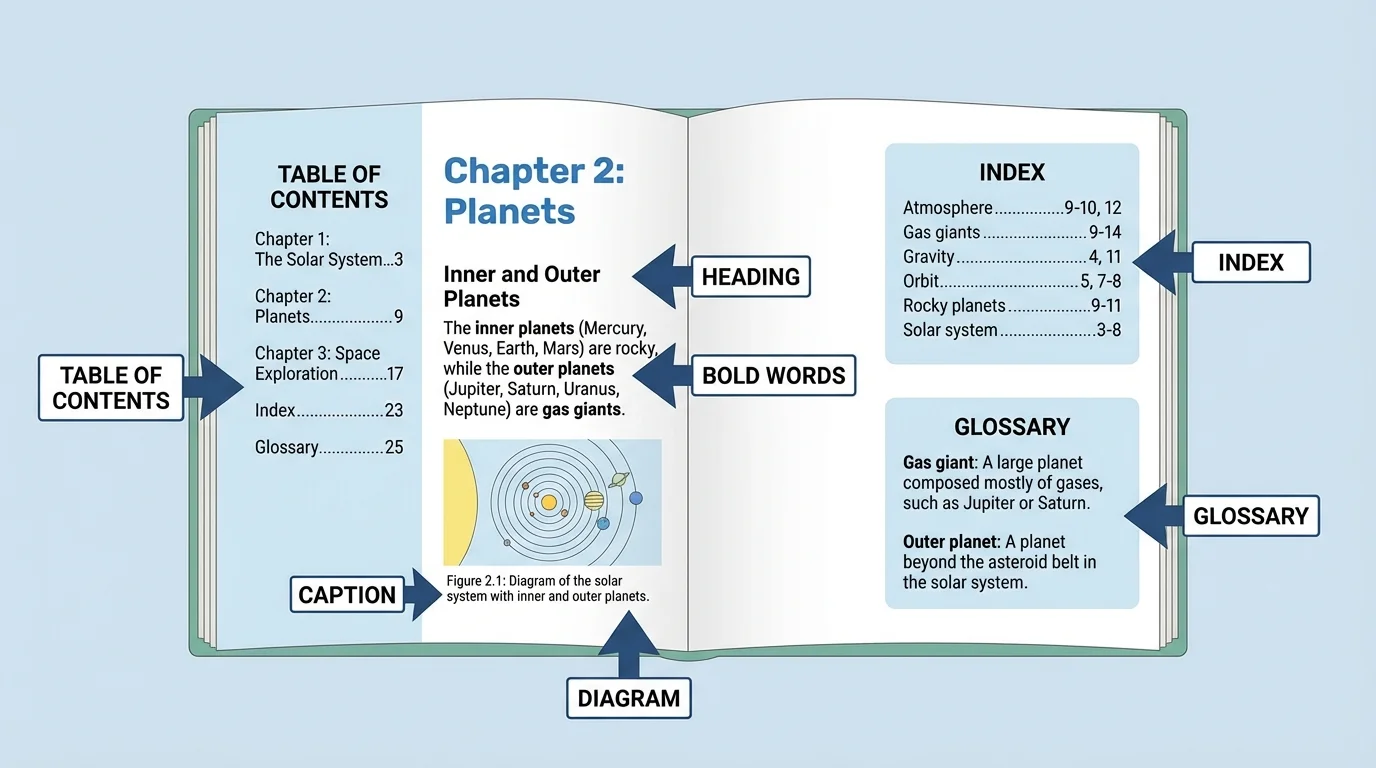
Print texts have built-in tools for finding information quickly, as [Figure 1] explains through the parts of a nonfiction text. Good readers do not always start at page one and read every word. Instead, they use text features to go directly to likely answers.
The table of contents helps you find chapters or sections. Headings and subheadings show the main topic of each part. The index, usually at the back of a book, lists important topics in alphabetical order with page numbers. A glossary gives definitions of special words. Captions under pictures and diagrams often contain important facts. Bold words, sidebars, and labels can also point you to useful information.
One of the most useful print reading strategies is skimming. Skimming means looking quickly over a text to find main ideas or important sections without reading every sentence. You might skim chapter titles, headings, the first sentence of paragraphs, and captions. Once you find the right section, then you slow down and read carefully.
Another useful strategy is scanning. Scanning means moving your eyes quickly to find one exact detail, such as a date, a name, or a vocabulary word. If your question asks, "When did the first Earth Day happen?" you can scan for years rather than read every line on the page.
Example: Using a print source efficiently
Question: "What do penguins eat?"
Step 1: Choose a likely source.
A nonfiction animal book or encyclopedia is a strong choice for a quick fact question.
Step 2: Use the index or table of contents.
Look for penguins in the index, then turn to the page listed.
Step 3: Skim the headings.
Look for headings such as Diet, Food, or Hunting.
Step 4: Read only the needed part closely.
Read the paragraph or caption that explains what penguins eat, instead of reading the entire chapter.
This approach is faster and more focused than reading the whole book from the beginning.
Later, when you compare sources, the print-text tools shown in [Figure 1] still matter because they help you return to exact pages and details.
[Figure 2] shows the key tools that help readers jump to useful information in digital texts. But speed only helps if you know how to search wisely.
Start with strong keywords in the search bar. If your first search is too broad, make it more specific. For example, instead of searching storms, search how hurricanes form. On a webpage, use headings, menus, tabs, and links to move to the part you need. If the page is long, the find-on-page tool can save time by locating exact words.
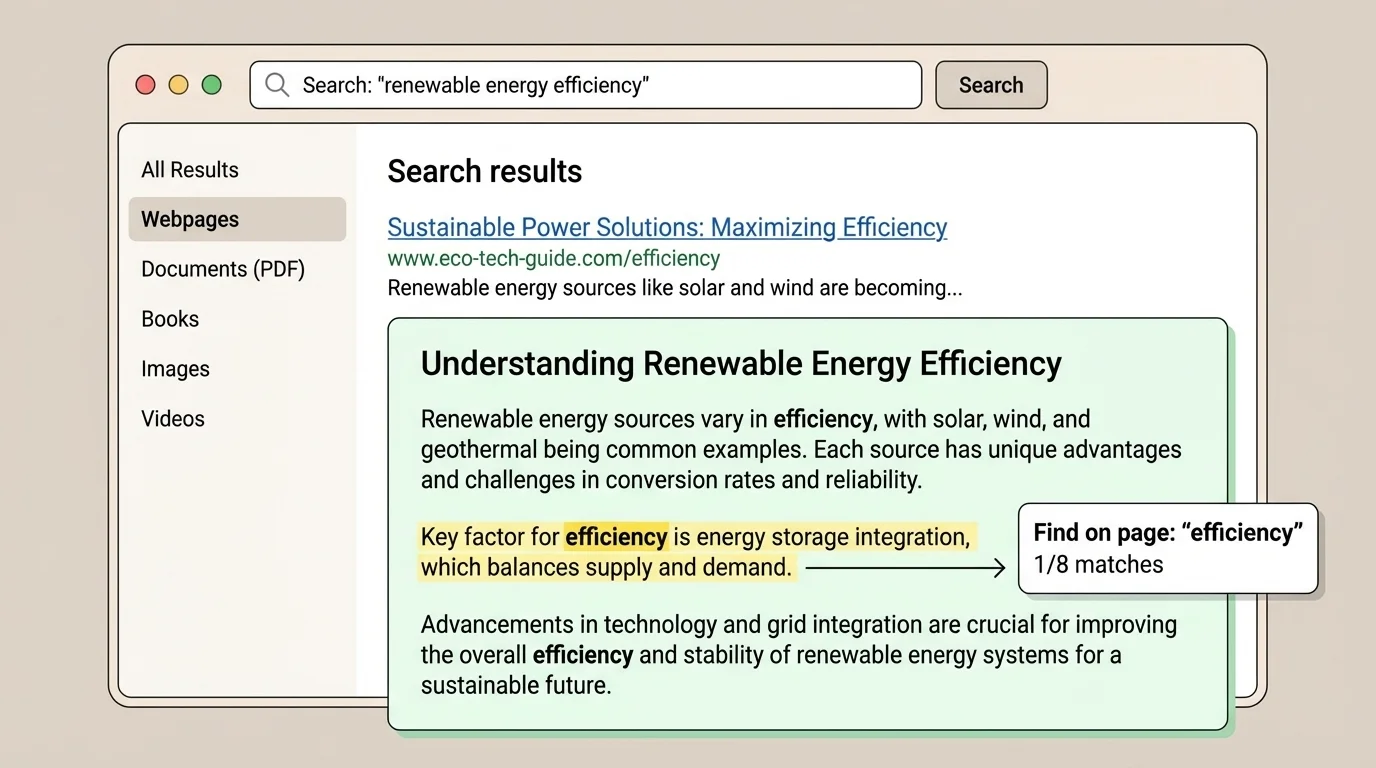
Many computers use a keyboard shortcut for find-on-page: on many systems, it is Ctrl + F or Command + F. When you type a keyword there, the browser highlights where that word appears on the page. This is especially helpful when you need one detail hidden inside a long article.
Digital readers should also look at the website itself. What organization made it? Is it a museum, school, government agency, news site, or personal blog? A site's purpose can help you decide whether it is a strong source for your question.
Example: Using a digital source efficiently
Question: "What is the life cycle of a frog?"
Step 1: Search with clear keywords.
Type frog life cycle stages instead of just frog.
Step 2: Choose a likely reliable site.
A science museum, zoo, or educational website is often a strong choice.
Step 3: Use headings or the find tool.
Jump to sections labeled Life Cycle, Egg, Tadpole, and Adult.
Step 4: Check another source.
Use a second site or a book to make sure the stages match.
This helps you get a correct answer quickly instead of trusting the first result you see.
Digital searching is powerful, but it should not turn into random clicking. Focused searching, careful source choice, and keyword changes make the process much more efficient.
Good readers do more than collect facts. They compare and combine them, and [Figure 3] illustrates a simple way to organize what several sources say. This process is called synthesizing information: putting together ideas from different sources into one clear understanding.
Sometimes sources agree. That can make you more confident in the answer. Sometimes they add different details. One source may say that sea turtles travel long distances. Another may explain that they return to the beach where they were born. A third may show the route on a map. When you combine those ideas, your answer becomes richer and more complete.
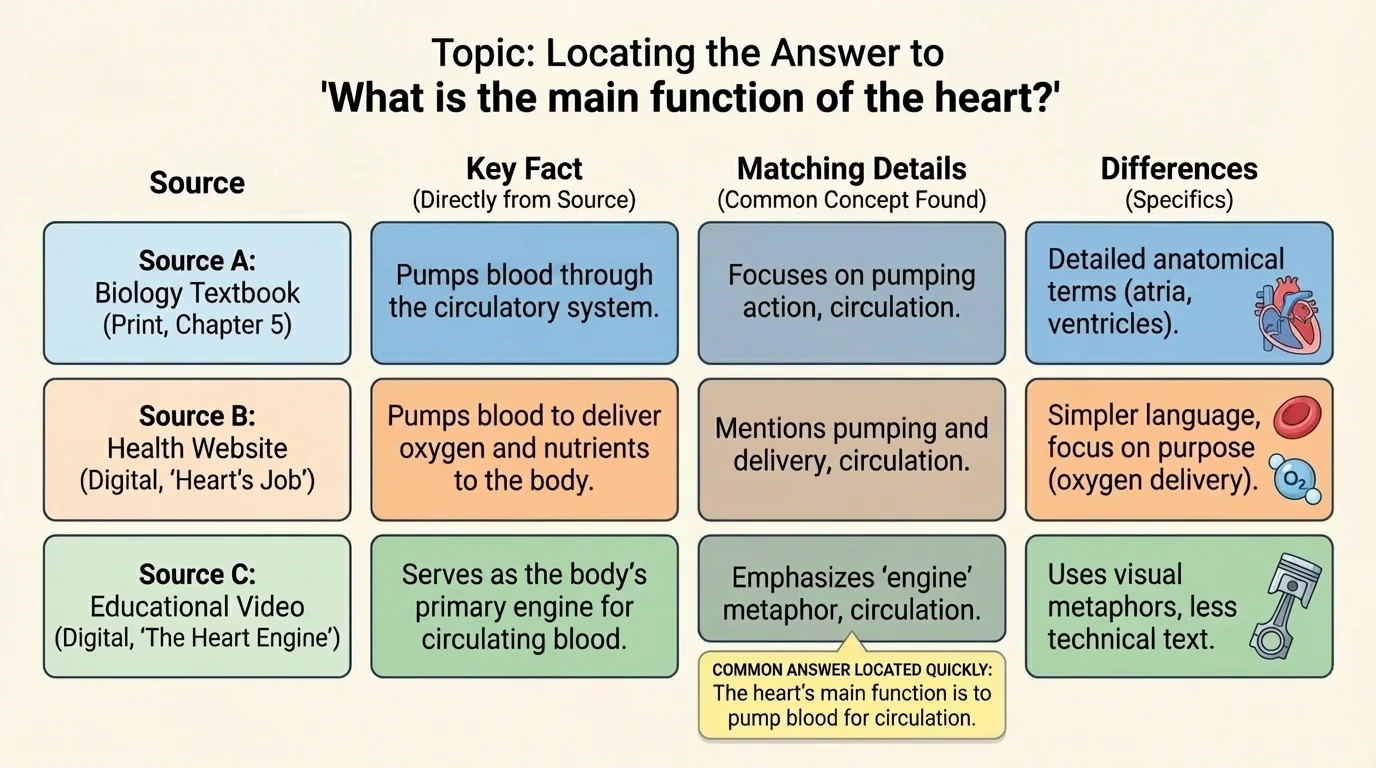
Sometimes sources seem to disagree. That does not always mean one is wrong. One source may be older, one may be more detailed, or each may focus on a different part of the topic. For example, one source may group places by continents, while another groups them by regions. You need to look carefully at what each source is actually discussing.
A smart way to compare information is to ask these questions: What facts are the same? What details are different? Which source gives the clearest evidence? Which source is newer? Which source best matches the question I am trying to answer?
Example: Combining information from three sources
Question: "Why is exercise good for children?"
Step 1: Read a health book.
It explains that exercise strengthens muscles and bones.
Step 2: Read a health website for children.
It adds that exercise supports heart health and gives energy.
Step 3: Look at a chart or infographic.
It shows that children should be active every day.
Step 4: Combine the ideas.
A strong answer is: Exercise helps children build strong muscles and bones, supports heart health, gives energy, and should be part of daily life.
This answer is stronger than one taken from only a single sentence in one source.
When you organize information by source, like the comparison setup in [Figure 3], you can more easily see what belongs together and what needs checking.
[Figure 4] highlights the features readers should check before trusting a source. Not all information sources are equally trustworthy. A source can be easy to find but still be weak, outdated, or one-sided.
When judging a source, consider the signs that it is reliable: who wrote it, when it was published or updated, why it was created, and whether it gives evidence. A page from a science museum, a government weather service, or a respected encyclopedia is often more reliable than an unknown blog with no author listed.
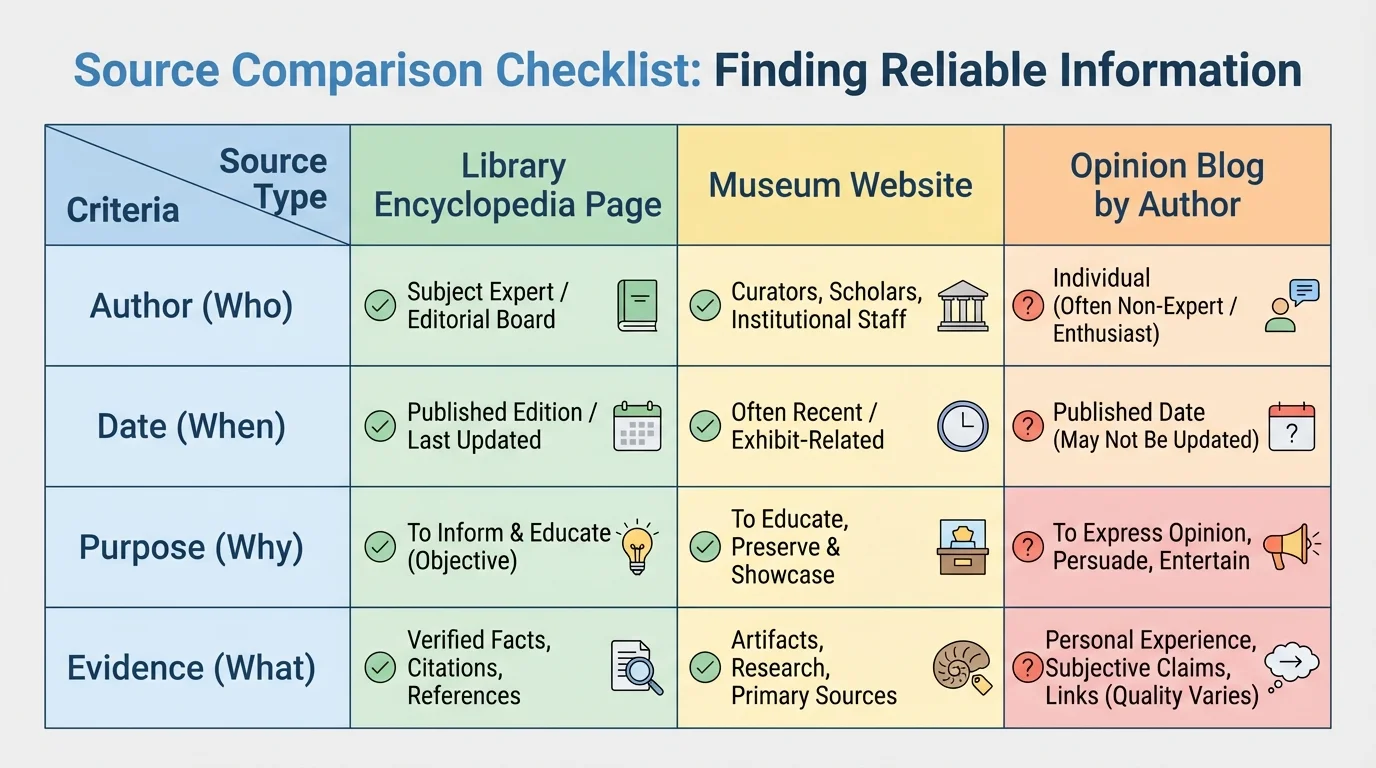
It is also important to choose sources that are useful for the exact task. A website full of opinions may not be the best place to find the average rainfall in a city. A current news article may not be the best source for a full explanation of the water cycle. Different questions need different tools.
Watch out for sources that seem designed mostly to sell something or persuade you without evidence. They may leave out important facts. If a source makes a big claim, look for another trustworthy source to confirm it.
You already know that nonfiction texts are written to inform, explain, or describe real topics. This skill builds on that idea by helping you decide which nonfiction texts are most useful and how to combine them thoughtfully.
When you return to digital or print sources after checking reliability, the search tools from [Figure 2] and the print features from [Figure 1] help you gather trustworthy details more quickly.
This reading skill is not only for answering school questions. It also helps solve real problems. Suppose your class wants to plant a small garden. You need to know which plants grow well in your area, how much sunlight they need, and how often they should be watered. One source might be a gardening book. Another might be a local weather website. Another could be a seed packet or plant care chart. Together, these sources help your class make a smart plan.
Or imagine your family is planning a weekend hike. To prepare well, you might check a weather forecast, a park map, and the park's safety page. One source tells you the temperature, another shows the trail, and another explains the rules. That is efficient problem-solving because each source gives a different kind of information.
Matching the source to the task
Efficient readers ask, "Which source gives this kind of answer fastest?" For a definition, a glossary or encyclopedia may be best. For current conditions, a recent website may be best. For step-by-step directions, a how-to article or labeled diagram may be best. For checking whether a fact is trustworthy, a second reliable source is essential.
Even in group projects, this skill matters. If one student looks only at pictures, another looks only at one website, and no one checks the facts, the project can become confusing or inaccurate. But if students divide tasks wisely and compare information at the end, they can work both quickly and carefully.
One common mistake is using weak keywords. If the question is about why leaves change color in autumn, searching for trees is far too broad. Better keywords might be why leaves change color or autumn leaf pigments. Strong keywords lead to faster answers.
Another mistake is reading too much before deciding whether the source is useful. You do not need to read an entire chapter or article if the heading already shows the source does not answer your question. Skim first. Read deeply only where it matters.
A third mistake is trusting the first answer you see. Fast searching is helpful, but quick is not the same as correct. Check another reliable source, especially when the information is important or surprising.
"The goal is not to read everything. The goal is to find the right information and understand it well."
A fourth mistake is copying information without thinking. If you cannot explain the answer in your own words, you may not understand it yet. Combining information means making sense of it, not just collecting it.
Like any skill, using multiple sources gets easier with practice. Strong readers develop habits that save time. They identify the question first, choose useful keywords, pick likely sources, skim for key sections, read closely when needed, compare what they find, and check reliability before deciding on an answer.
It also helps to stay organized. Some students jot down where each fact came from. Others make a quick chart with columns such as source, main fact, and notes. This keeps information from getting mixed up and makes comparing easier.
Example: A simple source plan for a class question
Question: "How can we save water at school?"
Step 1: Start with background information.
Read a short article or encyclopedia entry about water conservation.
Step 2: Find local or current information.
Use a city water department website or school building information.
Step 3: Look for practical ideas.
Read a school sustainability page or infographic with specific actions.
Step 4: Combine the evidence.
Create a plan such as fixing leaks, turning off taps fully, and reminding students to use only the water they need.
This uses multiple sources to move from learning facts to solving a real problem.
When readers use more than one source well, they become faster, more thoughtful, and more confident. They are not just finding information. They are learning how to judge it, connect it, and use it for a purpose.
