A single piece of writing can now travel farther and faster than ever before. A story typed in class can be shared with families the same day, a science report can become part of a class website, and a group of students can all help improve one document at the same time. That is why learning to use technology for writing is so important: it helps writers create, improve, share, and discuss ideas with real audiences.
Technology gives writers useful tools. Instead of writing everything by hand, students can type, move sentences, fix mistakes, add titles, insert pictures, and share their work with others. With guidance from adults, students can also use the Internet to publish writing in safe spaces such as class blogs, learning platforms, shared documents, or digital newsletters.
Writing on a computer or tablet does not change the need for strong writing. A good digital piece still needs a clear idea, organized paragraphs, correct grammar, and careful word choice. Technology is helpful, but it works best when a writer also thinks carefully about audience, purpose, and clarity.
For example, a thank-you email to a guest speaker should sound polite and complete. A class news article should include facts in a clear order. A shared story written by a group should have sentences that fit together smoothly. In each case, technology helps the writer do the job better, but the writer still has to make good choices.
Producing writing means creating it by planning, drafting, revising, and editing. Publishing writing means sharing the finished piece with others, such as classmates, families, or the school community. Collaborate means to work together with other people to create or improve something.
When adults provide support, students can make stronger choices about what to write, where to share it, and how to stay safe while doing it.
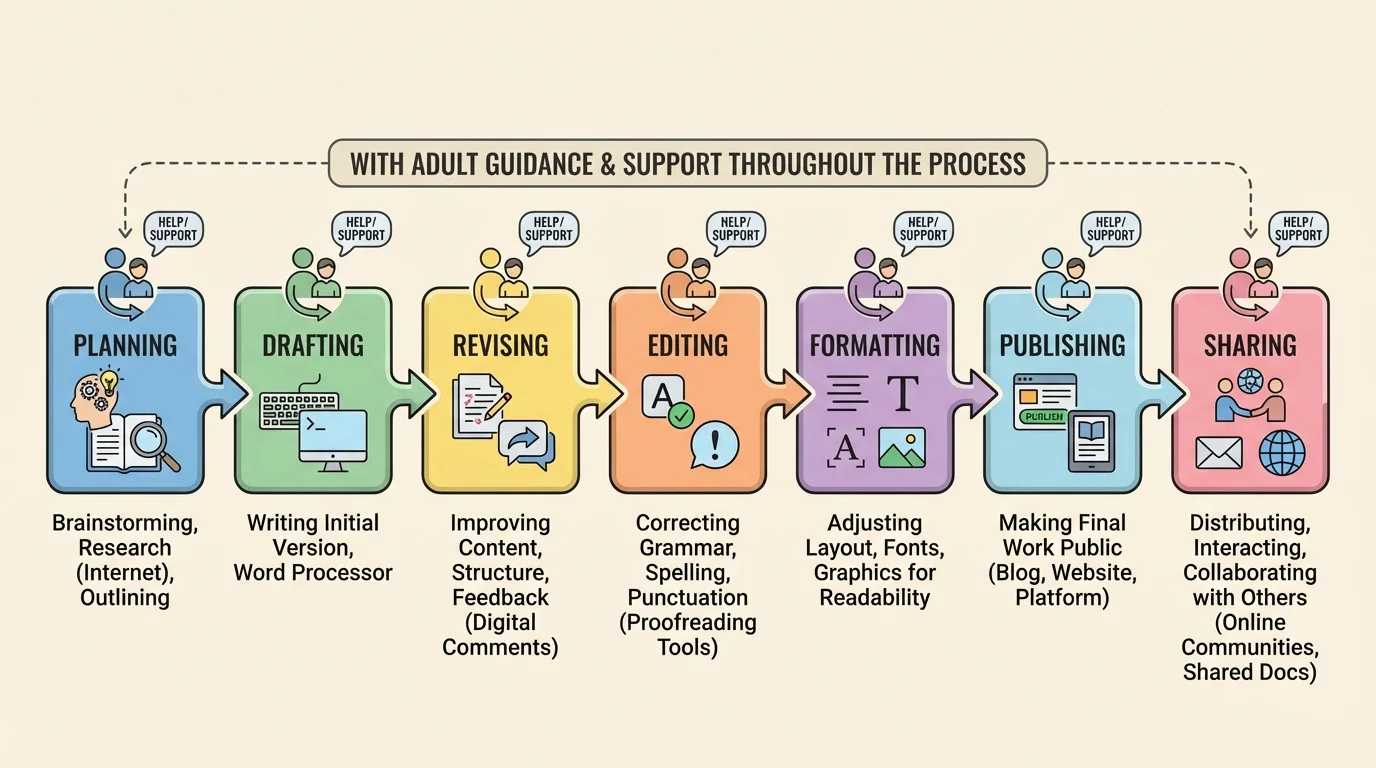
Digital writing follows a process, and [Figure 1] shows how a writer moves step by step from an idea to a published piece. Even when technology makes writing faster, strong writing still grows through careful stages.
The first stage is planning. A student may brainstorm ideas, make a list, or create an outline. The next stage is drafting, which means writing the first version. After that comes revising, where the writer improves ideas, organization, and details. Then comes editing, where the writer fixes spelling, punctuation, capitalization, and grammar. Finally, the piece is formatted and published so others can read it.
Publishing does not always mean posting something for the whole world to see. For an elementary school student, publishing might mean printing a final copy, posting to a password-protected class website, sharing in a school newsletter, or sending the writing to a teacher through a learning platform. Adult support helps students choose the right place to publish.
One big advantage of technology is that it makes revision easier. A writer can delete repeated words, move a paragraph, add stronger details, or change a weak title without rewriting the entire piece. This encourages students to improve their writing instead of stopping after the first draft.
Later, when students publish, the earlier steps still matter. The process in [Figure 1] reminds us that posting quickly is not the same as publishing well. Good digital writers check their work before they share it.
Digital writing should be easy for readers to understand. That means using complete sentences, correct punctuation, clear paragraphing, and words that match the topic and audience. Standard English grammar and usage help writers make meaning clear.
Draft writing often contains mistakes, and that is normal. What matters is that writers revise and edit. For example, a rough sentence might say, "me and jayden seen birds at recess and it was cool." A clearer version would be, "Jayden and I saw birds at recess, and it was exciting to watch them." The second sentence uses correct pronouns, verb tense, capitalization, and punctuation.
Revise means improving the ideas and structure of writing. A student might add facts, choose stronger verbs, or reorder information so it makes more sense. Editing means checking conventions such as spelling, punctuation, grammar, and capitalization.
Online readers often scan quickly, so formatting matters too. Titles should match the topic. Paragraphs should stay focused. Lists can help organize information. Headings can guide the reader. If a student publishes a report online, a clear heading like How Volcanoes Form works better than a vague heading like My Writing.
Clear digital writing depends on both ideas and conventions. A piece can have interesting information, but if the grammar is confusing, the meaning becomes hard to follow. In the same way, correct punctuation alone is not enough if the ideas are out of order. Strong writers use both thoughtful content and correct conventions to strengthen style.
Word choice matters online as well. A message to a friend may sound informal, but a letter to a principal or a published class article should sound more formal. Writers should think, "Who will read this?" and "What tone fits this situation?"
Many digital tools support young writers. A word processor helps students type, save, and organize their work. A spell-check tool can underline possible misspellings. Grammar tools can suggest corrections. Voice typing can help students get their ideas down quickly. Dictionary and thesaurus tools can help students choose accurate words.
A word processor is one of the most useful tools because it allows writers to change text easily. Students can copy and paste, insert a missing sentence, bold a title, or adjust spacing so the writing is easier to read.
Still, digital tools are helpers, not bosses. Spell-check does not always know what a writer means. For example, if a student types "there" when the correct word is "their," a tool may not catch the mistake. That is why writers must reread their work carefully.
Students may also use the Internet to gather information for a report, but they need adult guidance. A teacher or parent can help students choose reliable websites, check facts, and avoid copying. Writers should put ideas into their own words instead of taking someone else's sentences.
Some professional authors draft on computers, revise on tablets, and publish online for millions of readers. The same writing process students learn in school is used by real writers every day.
Technology can also make writing more accessible. Some students use larger text, speech-to-text, audio tools, or keyboard shortcuts. These tools help more learners take part in writing and publishing.
Digital tools make collaboration much easier, and [Figure 2] illustrates how shared documents, comments, and teacher support let several people improve one piece of writing together. Instead of passing one paper around the room, students can all help from their own devices.
When students work together online, they might each have a job. One student writes the introduction. Another checks facts. Another adds details. Another edits punctuation. A teacher may guide the group and help decide what changes make the writing stronger.
Comments and suggestions are useful collaboration tools. A student might write, "Can you add a fact here?" or "This sentence is clear." Good comments are specific, kind, and helpful. Saying "Fix this" is not very useful. Saying "Add a comma after the first word" is much better.
Students should also respond respectfully when someone gives feedback. If a classmate suggests changing a title, the writer can read the suggestion, think about it, and decide with support whether the change improves the piece. Collaboration is not about winning; it is about making the writing better.
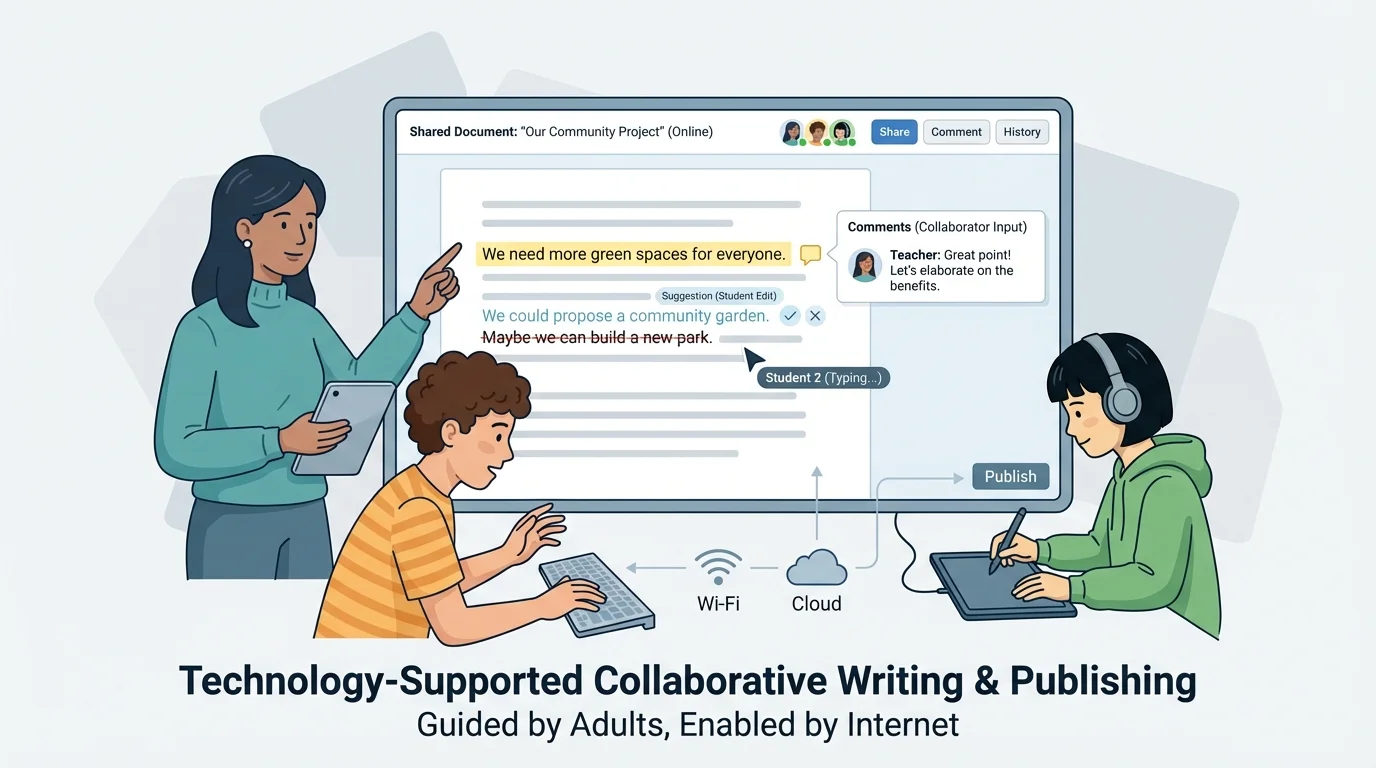
When groups collaborate, they need clear communication. Everyone should stay on topic, read others' ideas carefully, and avoid changing someone's work carelessly. The teamwork shown in [Figure 2] depends on trust, patience, and attention to detail.
Interacting online can also include posting in class discussions, replying to a shared question, or helping edit a group report. In each case, students should write in complete thoughts and use respectful language.
Publishing and interacting online can be exciting, but safety comes first. As [Figure 3] shows, basic online safety rules help students decide what information is safe to share and what information must stay private.
Students should never post personal information such as a home address, phone number, password, or private schedule. They should ask an adult before sharing writing, photos, or recordings online. Even when a website seems safe, an adult should help decide what is appropriate.
A digital footprint is the trail of information a person leaves online. A comment, post, or shared document can last longer than a student expects. That is why writers should pause before posting and ask, "Is this kind, safe, and appropriate?"
Responsible writers also respect other people. They do not copy writing and pretend it is their own. They do not post mean comments. They do not share someone else's personal information. Good digital citizenship means being honest, careful, and respectful.
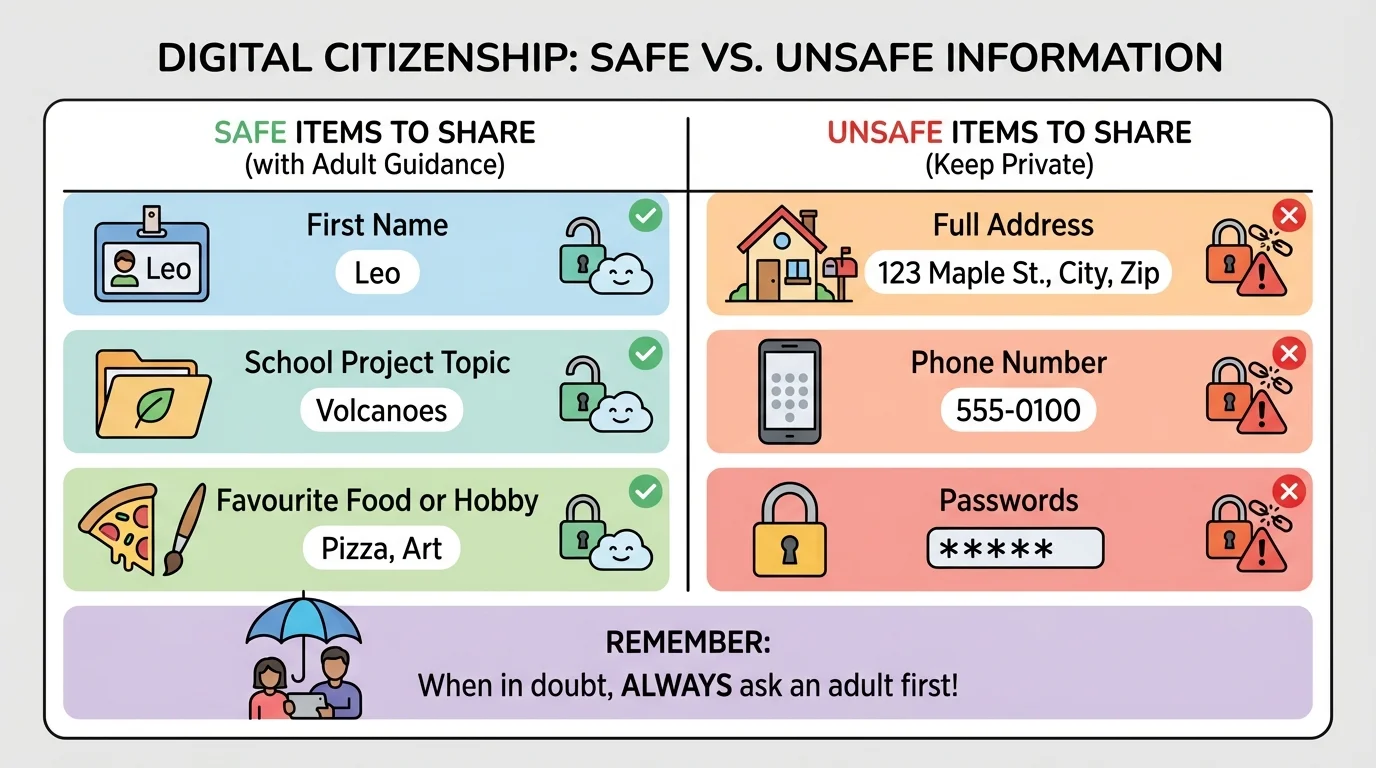
Adult guidance is especially important here. Teachers and families can help students create safe usernames, choose secure passwords, understand privacy settings, and decide where writing should be published. The safety choices in [Figure 3] support smart online behavior.
When you write for school, the same rules of respect that matter in the classroom also matter online. Being polite, truthful, and careful does not change just because a screen is involved.
Students should also learn that not every website or online message is trustworthy. If something seems confusing, strange, or too personal, it is time to ask an adult for help.
A full example makes the process easier to see, and [Figure 4] follows one piece of writing from rough draft to final publication. Suppose a class is creating a short online article about the school garden.
Example: Turning a rough draft into a published class article
Step 1: Write a rough draft
A student types: "our garden have tomato plants the kids water them every tuesday and the plants is growing fast."
Step 2: Revise for clarity
The student adds details and improves the sentence: "Our school garden has tomato plants, and students water them every Tuesday. The plants are growing quickly in the spring sunlight."
Step 3: Edit conventions
The writer checks capitalization, punctuation, verb agreement, and spelling. The student also makes sure the article title matches the topic.
Step 4: Collaborate and publish
A classmate suggests adding one fact about the vegetables. The teacher approves the final version, and the class posts it on a school learning page.
This example shows that digital publishing is more than typing. The writer improves ideas, fixes errors, accepts feedback, and publishes only after checking the work carefully.
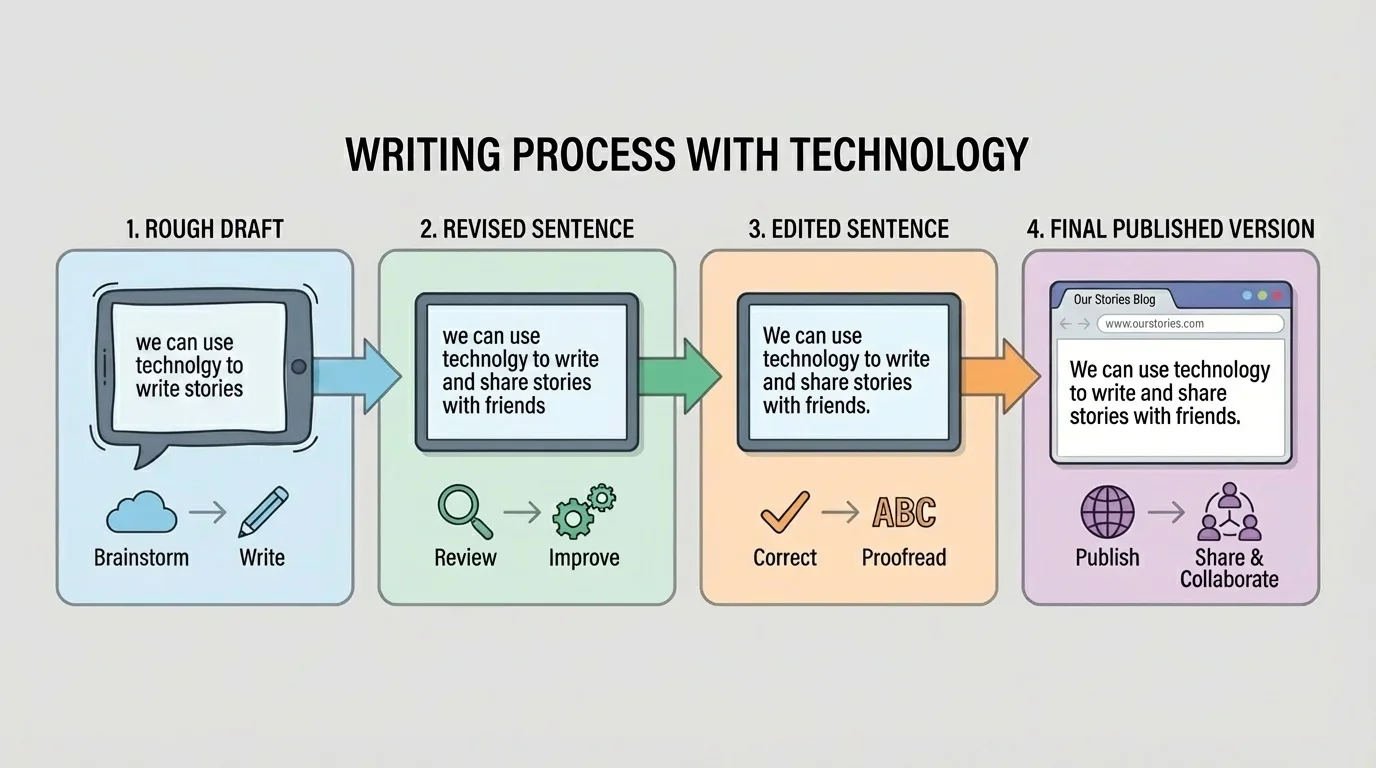
When students compare the stages in [Figure 4], they can see how grammar and punctuation affect meaning. A polished sentence is easier to read, sounds more professional, and communicates the idea more clearly.
Not all digital writing looks the same. Writers choose a form based on purpose and audience. A personal narrative tells a story. An informational report teaches facts. An email sends a message. A discussion post shares an opinion or response. A slide presentation uses short text to support speaking.
| Type of digital writing | Main purpose | Important features |
|---|---|---|
| Communicate with a person or group | Greeting, clear message, polite closing | |
| Report | Explain facts and information | Headings, organized paragraphs, accurate details |
| Story | Entertain or express ideas | Characters, setting, events, descriptive language |
| Discussion post | Respond and interact | Clear opinion, evidence, respectful tone |
| Newsletter article | Inform a larger audience | Strong title, important facts, correct conventions |
Table 1. Common types of digital writing and the features that help each one succeed.
For example, an email to a teacher should begin with a greeting such as "Dear Ms. Lee," and end with a polite closing. A discussion post should answer the question and respond respectfully to others. A story shared on a class site should have strong paragraphs and vivid details.
Technology lets students switch between these forms more easily, but each form still has its own rules and style. Strong writers notice those differences.
Strong digital writers develop habits. They save their work often. They reread before posting. They check whether their words sound respectful. They use tools wisely, but they also trust careful thinking.
They ask useful questions: "Did I answer the topic?" "Will readers understand this?" "Did I use complete sentences?" "Did I check spelling and punctuation?" "Is this safe to share?" These questions help writers make thoughtful decisions.
With support from adults, students can learn to write not just for one teacher, but for real readers. They can create class magazines, publish reports, send messages, and build writing projects together. Technology opens those doors, but clear writing, good judgment, and respectful collaboration help students walk through them successfully.
"Think before you post, and check before you publish."
As writers keep practicing, they become more confident in using digital tools for school, communication, and creativity. The goal is not simply to use technology, but to use it well.
