Have you ever opened a science book to find one fact fast, like what animals eat or how volcanoes form, and noticed that you did not need to read every single word from the beginning? That is not cheating. That is smart reading. Informational texts are built like toolboxes. They include special parts that help readers locate ideas, organize details, answer questions, and follow instructions.
Unlike many stories, informational texts are usually written to teach, explain, or direct. A recipe, an article on a website about weather, a social studies textbook page, a brochure at a zoo, and a science magazine article are all examples of informational text. Good readers notice not just what the text says, but also how it is arranged.
Informational text features are parts of a text that help readers find, understand, and use information. Text structure is the way the main ideas and details are organized. Graphic organizers are visual tools, such as charts or webs, that sort information into groups or show how ideas connect.
When you understand these tools, reading becomes more like solving a puzzle with clues already placed in front of you. You can decide where to look first, what kind of information you need, and how the parts of the text work together.
Authors of informational texts want readers to learn something clearly. To help with that, they organize ideas in patterns. They also add signs on the page, such as titles, headings, and labels. These signs make it easier to move through the text. If a student wants to know only what causes erosion, the student can often go straight to the section with a heading about causes instead of reading every paragraph before it.
This is one big difference between reading a story and reading informational text. In a story, the order usually matters because events unfold over time. In informational text, readers often move around. They may scan a heading, check a bold term, study a chart, or look at a glossary before reading the full section.
You already know that main ideas tell what a section is mostly about and details support that idea. Text features and text structures help you find those main ideas and details more easily.
Thinking this way helps you become an active reader. Instead of letting the page control you, you use the page to guide your thinking.
Authors place clues on the page to guide readers, and [Figure 1] shows how several text features can appear together on one page. Each feature has a job. Some help you find information. Some help you understand unfamiliar words. Some help you see how ideas connect.
One important feature is a heading. A heading tells the topic of a section. If a page has the heading "Life Cycle of a Frog," you can predict that the section will explain stages of growth. Headings act like signs on a highway. They tell you where you are and what is coming next.
Another useful feature is bold type. Bold words stand out because the author wants you to notice them. Often these are important terms, such as key terms in science or social studies. When you see a bold word like "evaporation," it is a signal that the word matters and may be defined nearby or in a glossary.
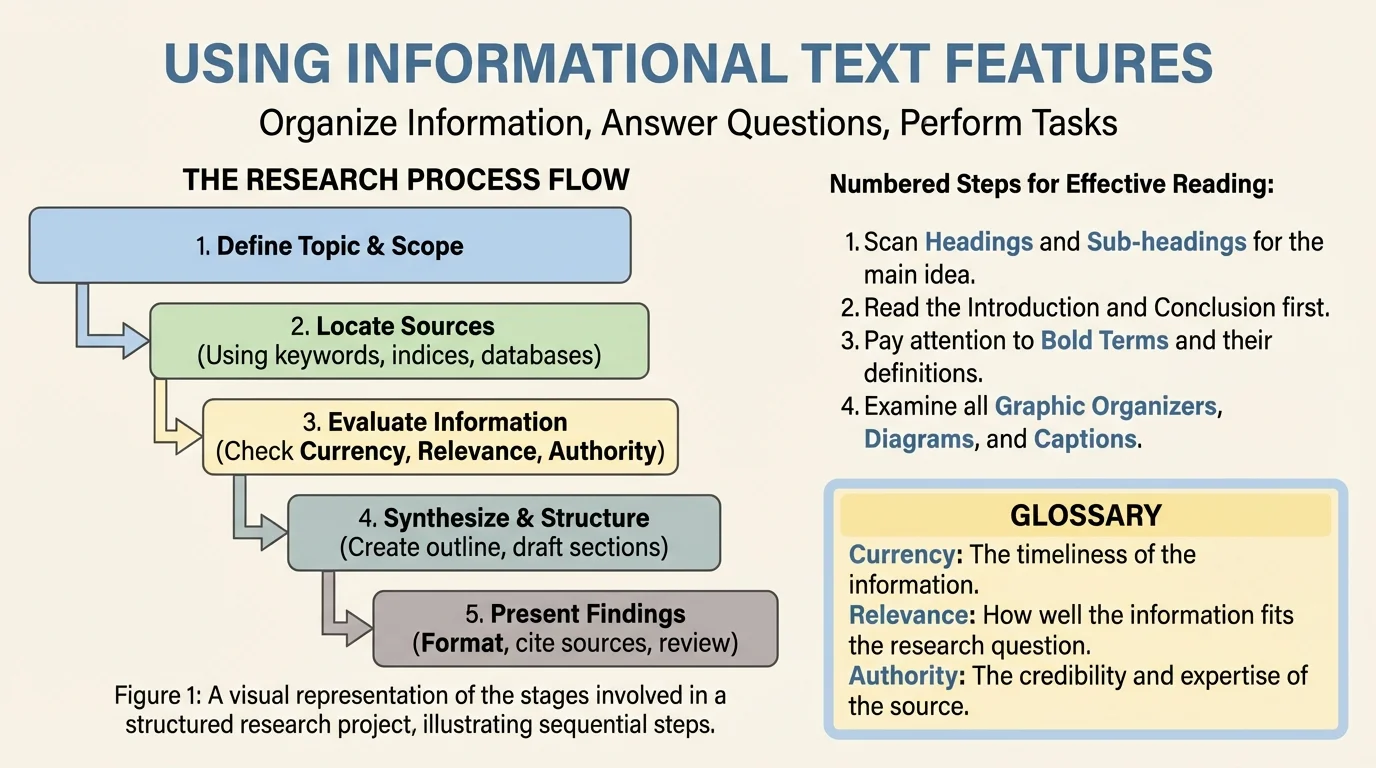
A numbering scheme shows steps or items in order. This is especially helpful in how-to texts. For example, a set of directions for washing a dog may use numbers so the reader knows what to do first, second, and third. If the order changes, the task may not work well.
A glossary is a list of important words and their definitions, usually found at the back of a book. It gives definitions for important words used in the text. If you read about ecosystems and see the bold word "consumer," the glossary can help you understand that it means an organism that gets energy by eating other organisms.
A graphic organizer presents information visually. It might be a chart, web, timeline, or table. A chart can group facts into categories. A timeline can place events in time order. A web can show parts of a big idea. This makes information easier to compare and remember.
Other common features include captions under pictures, labels on diagrams, sidebars with extra facts, tables, indexes, and maps. Later, when you need to organize your own notes, the same tools can help you, just as we see on the page in [Figure 1].
Using text features to answer a question
Question: Which part of a plant carries water from the roots to the leaves?
Step 1: Notice the heading.
The heading "Parts of a Plant" tells you the section matches the question.
Step 2: Look for bold words and labels.
A diagram label may name stem and explain its job.
Step 3: Read the caption or nearby sentence.
The caption may explain that the stem carries water and nutrients through the plant.
By using the heading, labels, and caption, the reader finds the answer quickly without rereading the whole chapter.
Strong readers do not treat every part of the page as equal. They notice which feature is most likely to help with the question they have.
Different texts use different patterns to organize information, and [Figure 2] illustrates these patterns as road maps for ideas. When you recognize the structure, you can predict what kind of details will come next. That helps you understand the text and take better notes.
One common structure is description. In a descriptive text, the author tells what something is like by listing traits, facts, and characteristics. A passage about sharks might describe size, habitat, body parts, and diet.
Another structure is sequence, also called chronological or time order. This structure shows steps, stages, or events in order. A text explaining how a caterpillar becomes a butterfly usually follows sequence because the stages happen one after another.
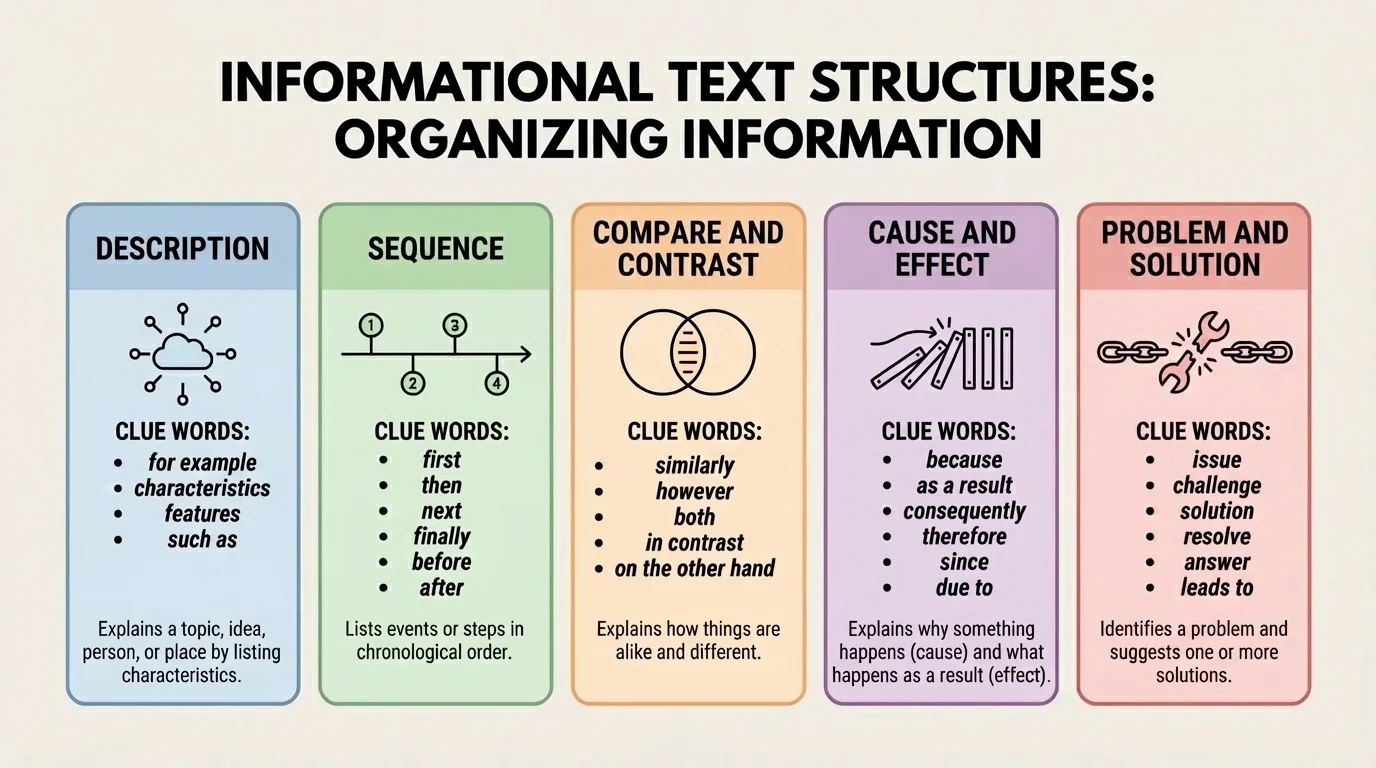
A third structure is compare and contrast. This structure shows how two or more things are alike and different. A text might compare wolves and dogs by discussing appearance, behavior, and habitat. Signal words include both, similar, different, however, and unlike.
A fourth structure is cause and effect. This explains why something happens and what happens because of it. For example, heavy rain may be the cause, and flooding may be the effect. Signal words include because, since, therefore, and as a result.
A fifth structure is problem and solution. In this pattern, the text presents a problem and then explains one or more ways to solve it. An article might describe plastic waste in oceans and suggest solutions such as reducing single-use plastics and organizing cleanups.
Knowing these structures gives you power. If a paragraph starts explaining why bees are disappearing and what happens afterward, you can expect a cause-and-effect structure. If a text lists steps for making a bird feeder, sequence is probably the best fit. The patterns in [Figure 2] help you notice these clues faster.
| Text Structure | What It Does | Common Signal Words | Example Topic |
|---|---|---|---|
| Description | Tells traits or facts | for example, such as, includes | Features of deserts |
| Sequence | Puts ideas in order | first, next, then, finally | How to recycle paper |
| Compare and contrast | Shows similarities and differences | both, unlike, however | Turtles and tortoises |
| Cause and effect | Explains reasons and results | because, so, as a result | How drought affects crops |
| Problem and solution | Presents an issue and ways to fix it | problem, solution, solve | Reducing cafeteria waste |
Table 1. Common informational text structures, their purposes, signal words, and examples.
Some texts use more than one structure. A science article might begin with description, then explain cause and effect, and end with a problem and solution. That is why readers must stay flexible.
Many websites use the same reading tools as printed books. Headings, menus, bold links, diagrams, and charts all help readers locate information quickly.
When you move from one structure to another, your note-taking should change too. Sequence works well with steps. Compare and contrast works well with a two-column chart. Cause and effect often works well with arrows.
Not every question asks for the same kind of reading. If the question is "What does the word erosion mean?" the glossary or a bold definition is probably the best place to look. If the question is "How are hurricanes and tornadoes different?" a compare-and-contrast section or chart will help most.
If the question asks "What happens after the egg hatches?" the text probably uses sequence. If the question asks "Why did the town build a dam?" then cause and effect or problem and solution may be the better structure to examine.
Skilled readers ask themselves, What type of information am I looking for? Then they match the question to the correct feature or structure. This saves time and improves accuracy.
Question matching means connecting the question you have with the best tool in the text. Word-meaning questions often match a glossary or bold term. "How" questions often match sequence. "Why" questions often match cause and effect. "How are they alike or different?" questions often match compare and contrast.
This strategy is useful in every subject. In science, you may study diagrams and labels. In social studies, you may rely on headings, maps, and timelines. In health, you may follow numbered directions. In all cases, the organization of the text helps you think.
Sometimes reading is not just about learning facts. Sometimes reading helps you do something. A procedural text guides the reader from start to finish, and [Figure 3] shows how materials, steps, and notes work together in a how-to format. Recipes, game instructions, science experiments, craft directions, and safety guides are examples.
These texts usually use sequence. They often include headings such as "Materials" or "Directions," along with numbered steps. The order matters. If you skip a step in a science experiment, your result may be wrong. If you mix ingredients before measuring them in a recipe, the food may not turn out the same.
Sometimes a task text also includes warnings, tips, or diagrams. A warning such as "Wear goggles" is important for safety. A tip such as "Do not overwater the seed" helps the task succeed. A diagram can show where each part belongs.
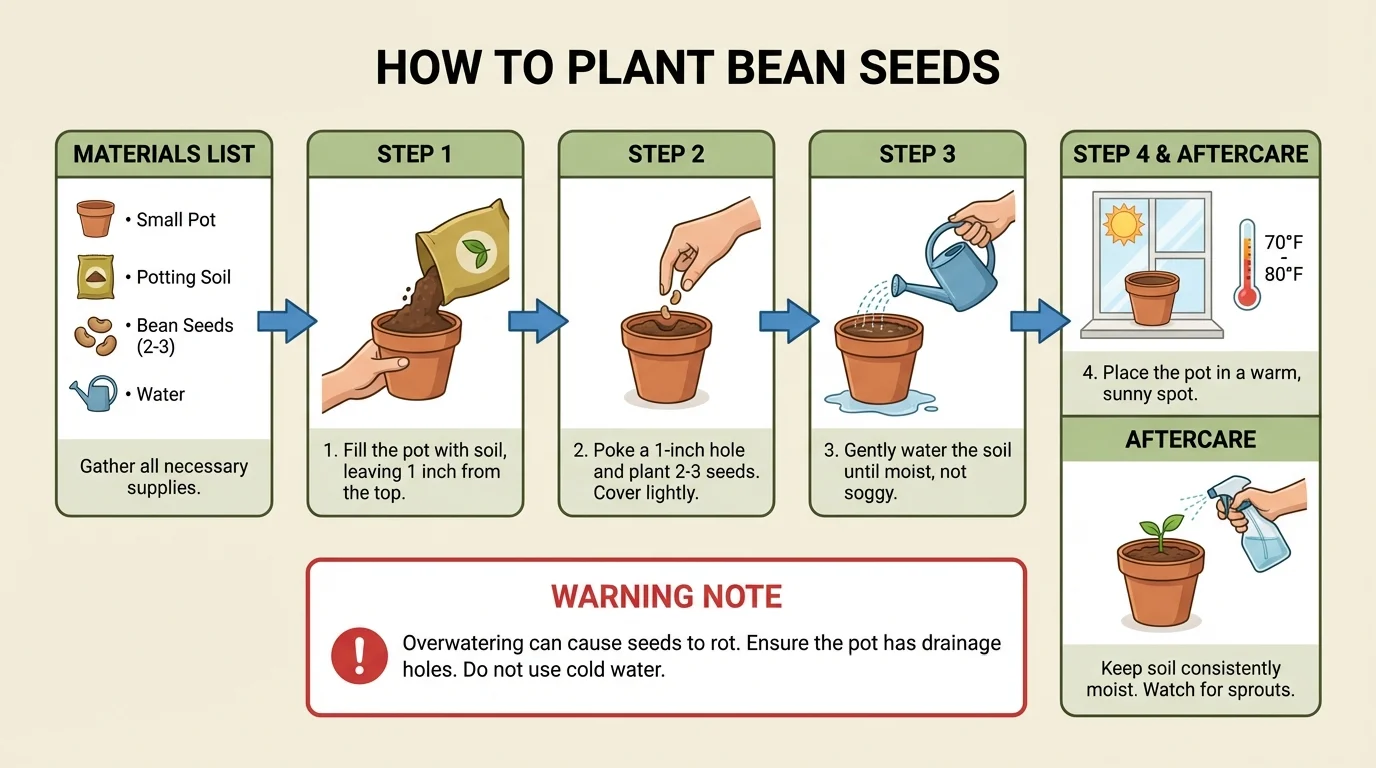
For example, suppose you are reading directions for planting bean seeds. You might first check the materials list: pot, soil, seed, and water. Then you follow each step in order: fill the pot, place the seed, cover it lightly, water it, and place it near sunlight. A sequence of steps, like the one shown in [Figure 3], helps prevent mistakes.
Reading to complete a task
Task: Build a simple paper airplane from a set of directions.
Step 1: Read the title and materials.
This tells you what you are making and what you need before you begin.
Step 2: Follow the numbering scheme in order.
If step 3 comes before step 2, the folds may not line up.
Step 3: Check any diagram labels.
The diagram may show where the wings should fold or how wide they should be.
Step 4: Reread only the step that seems confusing.
You do not always need to restart the whole text. You can return to the exact place where the problem began.
Using the structure of the directions makes the task much easier.
This kind of reading happens in everyday life. People use informational text when assembling furniture, learning a game, following a map, or checking instructions on medicine bottles.
When you read a long passage full of facts, categories help turn it into organized groups of ideas, and [Figure 4] shows how a graphic organizer can sort details into clear boxes. This is especially helpful when several details belong under different subtopics.
Suppose you read an article about rainforest animals. Instead of writing one long list of random facts, you can sort the information into categories such as habitat, diet, body features, and behavior. Suddenly the information becomes clearer.
Headings can create categories. A chart can separate ideas into columns. Bullet points can list important details. A web can place the main topic in the center and connected details around it. These are not just text features you read; they are also tools you can use when you study.
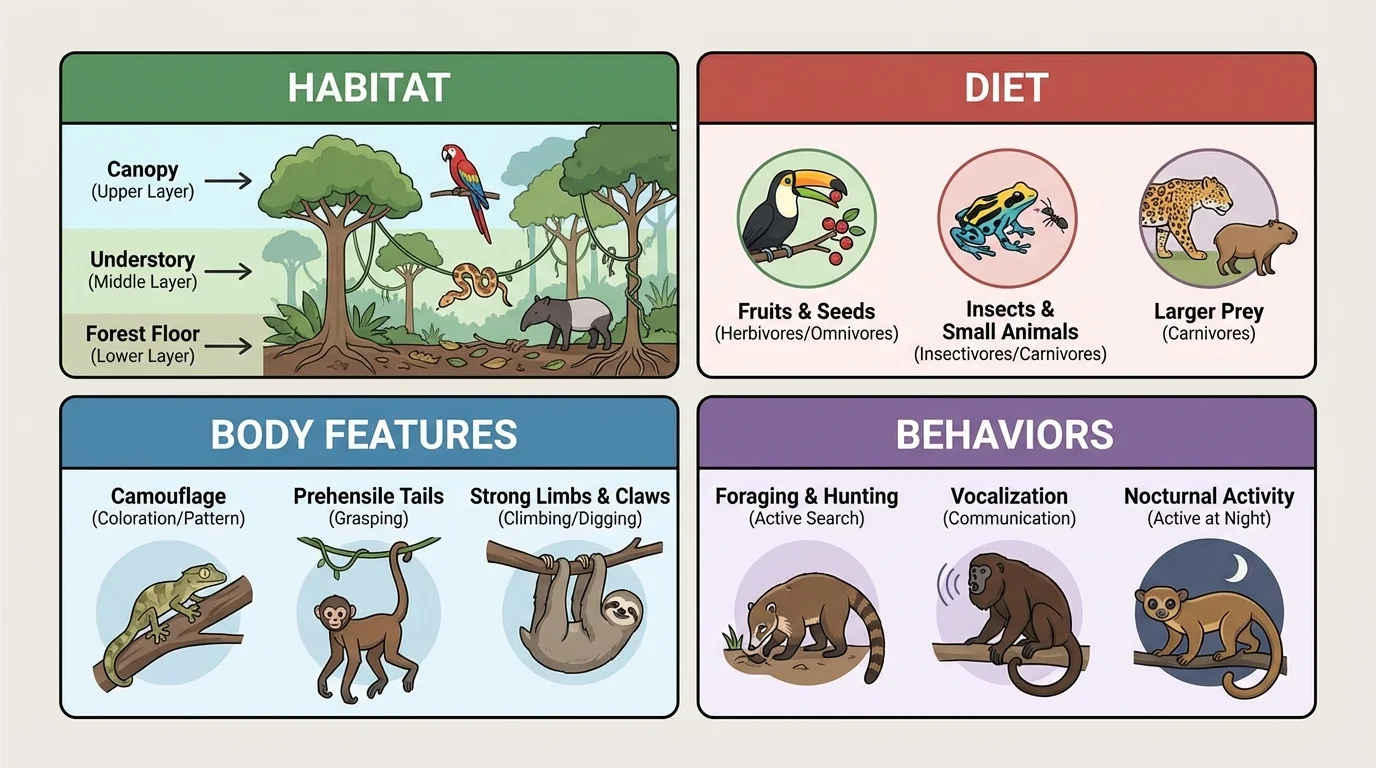
If a text compares two things, you might make a two-column chart. If a text explains causes and effects, you might draw arrows from reasons to results. If a text is in sequence, you might make a timeline or numbered list. The categories in [Figure 4] help show how facts can be sorted by topic instead of piled together.
| Reading Situation | Helpful Feature or Structure | Why It Helps |
|---|---|---|
| Find the meaning of a new word | Glossary or bold type | Points to important vocabulary and definitions |
| Follow directions | Numbering scheme and sequence | Keeps actions in correct order |
| Sort facts into groups | Graphic organizer or headings | Creates categories |
| Explain why something happened | Cause and effect | Connects reasons and results |
| Show how two things are alike and different | Compare and contrast | Organizes similarities and differences |
Table 2. Common reading situations matched with the most useful text feature or structure.
Organizing information this way helps with understanding, discussion, writing, and studying later. A reader who can sort ideas clearly is less likely to get overwhelmed by a page full of facts.
One common mistake is ignoring text features and reading straight through when that is not necessary. If you need only one fact, start with headings, bold words, labels, or a table. That is efficient reading.
Another mistake is thinking that every list means sequence. Sometimes a list simply describes parts or examples. You have to ask whether the order matters. If the order matters, sequence is likely. If not, the structure may be description.
A third mistake is confusing cause and effect with problem and solution. A cause explains why something happens. A problem is an issue that needs to be fixed. Sometimes a text contains both, but they are not exactly the same.
Sorting out two similar structures
Text A: "Too much trash filled the park, so volunteers organized a cleanup day."
Text B: "Heavy rain soaked the ground, so the river overflowed."
Step 1: Ask whether the first part is an issue to fix or simply a reason.
In Text A, the park being full of trash is a problem.
Step 2: Look for an action that fixes the issue.
Volunteers organizing a cleanup is a solution, so Text A fits problem and solution.
Step 3: Check whether one event simply causes another event.
In Text B, heavy rain causes the river to overflow, so it fits cause and effect.
Another mistake is making categories that are too broad or too mixed. If you are taking notes on an article about space, a category called "stuff" will not help much. Categories like planets, moons, atmosphere, and temperature are much clearer.
Informational reading is a little like detective work. You gather clues from headings, bold words, diagrams, charts, and structure. Then you decide what those clues tell you. When a reader asks smart questions and notices how the text is built, the text becomes easier to understand.
You can train yourself to pause and ask: What feature will help me most right now? What structure is this section using? How can I group these details? Is the author describing, comparing, explaining causes, or giving steps? These questions turn reading into active thinking.
As you keep practicing, you will notice that informational texts are carefully designed. They are not random collections of facts. Their features and structures help readers locate important ideas, answer questions efficiently, and complete tasks correctly. Once you understand those patterns, you can use them not only to read better, but also to organize your own learning.
