A single piece of writing can now be created on a tablet, revised on a laptop, commented on by a classmate from home, and published for readers across the school in the same day. That is a big change from the days when writing stayed on one sheet of paper. Technology has not replaced good writing, but it has changed how writers produce, improve, and share their ideas. To use these tools well, students need both strong writing habits and smart digital choices.
When you write with technology, you are doing more than typing words. You are making choices about organization, design, audience, and communication. A digital piece of writing might be an essay, a class blog post, a report, an email, a script, a slide presentation, or a shared document created by several students.
Digital writing matters because it can be revised quickly, shared easily, and improved through feedback. It can also include features that paper writing cannot use as easily, such as hyperlinks, embedded images, comment threads, and collaborative editing. These features help readers understand how ideas connect.
Digital publishing means preparing writing so other people can view it using technology, such as posting it on a class website, submitting it online, sharing a document, or presenting it in slides. Collaboration means working with one or more people to create, improve, or respond to writing. Audience is the group of readers or viewers the writer wants to reach.
Even with powerful tools, the writer still does the most important work. A device can help with spelling suggestions or formatting, but it cannot fully replace clear thinking, accurate information, and careful revision.
Good digital writing follows a process, and [Figure 1] shows how a writer can move from a first idea to a finished publication. Technology helps at each stage: brainstorming in a notes app, outlining in a document, drafting on a word processor, revising with comments, and publishing in a shared online space.
The first step is planning. Before drafting, a writer should decide the purpose of the piece. Is the goal to inform, persuade, explain, or entertain? Then the writer should think about the audience. A report for a teacher sounds different from a post written for classmates. Purpose and audience affect vocabulary, tone, detail, and structure.
Technology gives writers many planning tools. A student might create a digital outline with headings, use sticky-note apps to sort ideas, or make a concept map to connect topics and evidence. These tools help break a large writing task into manageable parts.
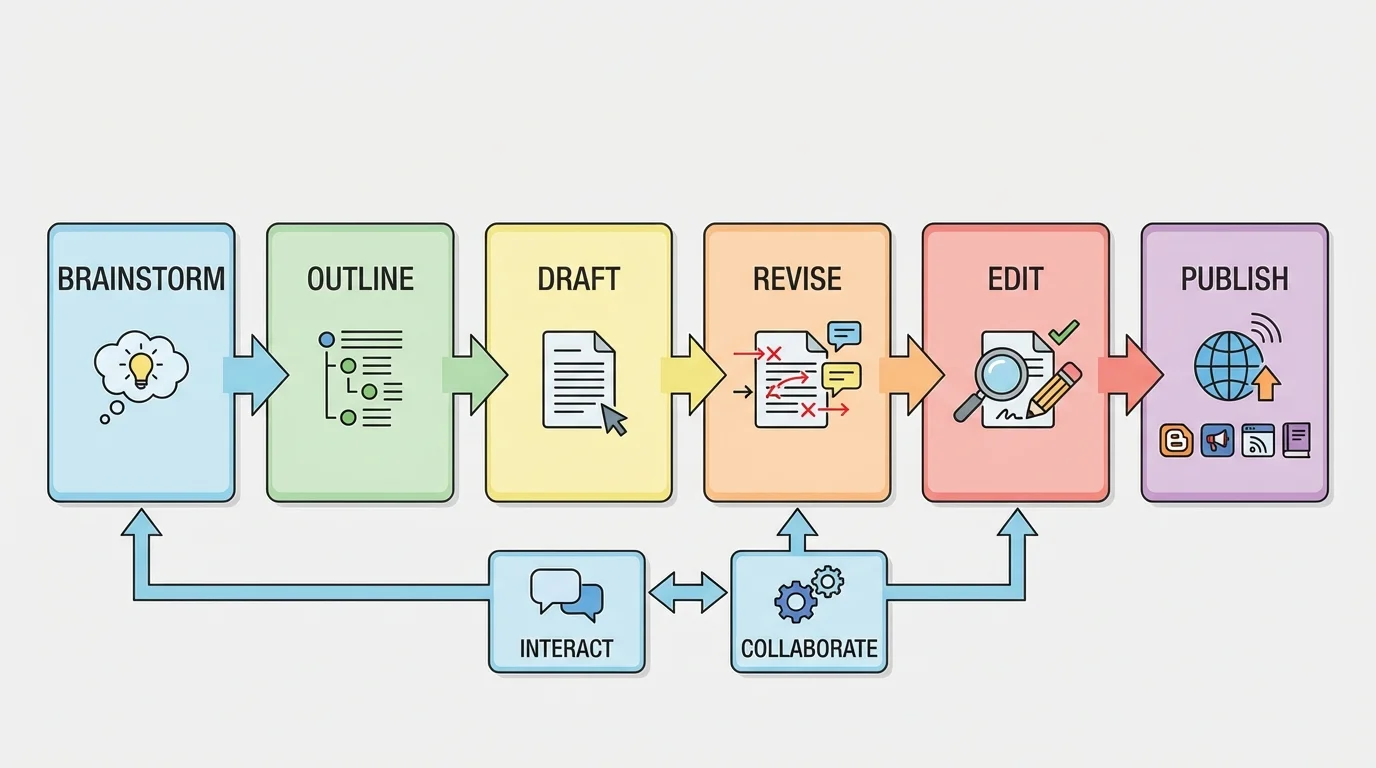
Once ideas are organized, the writer creates a draft. A digital draft has an advantage over handwritten work because it is easy to rearrange. A paragraph can be moved, a sentence can be cut and pasted, and a heading can be changed without rewriting the whole piece. This makes experimentation easier. Writers can test different openings, transitions, and conclusions until the structure becomes stronger.
An outline is important because it acts like a map. It shows where the writing is going before every sentence is built. Writers do not always need a long formal outline, but they do need some plan for the order of ideas.
Example: Turning notes into a draft
A student is writing about why school gardens help communities.
Step 1: Gather ideas in a digital notes app
The student lists: fresh food, science learning, teamwork, beautifying school grounds, and helping pollinators.
Step 2: Group related ideas
The student creates three sections: benefits for health, benefits for learning, and benefits for the environment.
Step 3: Build a draft in a document
The student writes an introduction, adds one paragraph for each section, and ends with a conclusion about why gardens matter.
Technology makes this process faster because ideas can be moved, expanded, and reorganized without starting over.
As the process continues, the writer keeps checking whether each part supports the main point. This is one reason digital tools are helpful: they let the writer focus on structure as well as wording.
Revision means improving the ideas, organization, and clarity of writing. Editing means correcting grammar, spelling, punctuation, and formatting. These are not the same thing. A student who only fixes commas but never improves weak explanations has edited, but not truly revised.
Technology supports both jobs. Spell check can catch many typing mistakes. Grammar tools may point out sentence fragments or repeated words. Read-aloud features can help a writer hear awkward phrasing. Comment tools allow teachers or classmates to suggest clearer evidence or stronger transitions.
However, writers must use judgment. Automatic tools are helpful, but they are not always correct. A grammar checker may suggest a change that does not fit the writer's meaning. Strong writers review suggestions carefully instead of clicking every correction.
Human judgment matters more than the tool. A computer program can flag possible errors, but it does not fully understand your purpose, your audience, or the exact point you are trying to make. The writer must decide whether a sentence is precise, whether a fact belongs in the paragraph, and whether the tone is appropriate.
One of the most useful digital features is version history. This lets writers look back at earlier drafts and restore deleted work if needed. That means revision becomes less risky. If a student tries a new structure and it does not work, the earlier version can still be recovered.
Another powerful feature is comments. A classmate might write, "This example needs evidence," or "This sentence is confusing." Those comments do not just point out problems; they help the writer think. Careful feedback turns writing into a conversation instead of a lonely task.
Strong digital writing does not only contain good information. It also shows readers how the ideas connect, and [Figure 2] illustrates how layout and text features guide the reader from the main idea to details, examples, and evidence. This is especially important in informational writing, where readers need to follow the logic clearly.
Writers can show relationships between ideas by using titles, headings, subheadings, bullet points, numbered lists, captions, and hyperlinks. These features act like signs on a road. They tell the reader what is most important, what comes next, and which details support which main idea.
For example, an article about renewable energy might begin with a heading called Types of Renewable Energy, followed by subheadings such as Solar Power, Wind Power, and Hydropower. That structure helps readers compare ideas quickly. A list can show steps in a process. A chart can compare features. A hyperlink can lead to a trustworthy source with more detail.
Digital design also affects understanding. Font size, spacing, color, and placement can make a piece easier or harder to read. A crowded page with giant blocks of text can hide good ideas. A clean layout with clear sections makes the writing more effective.
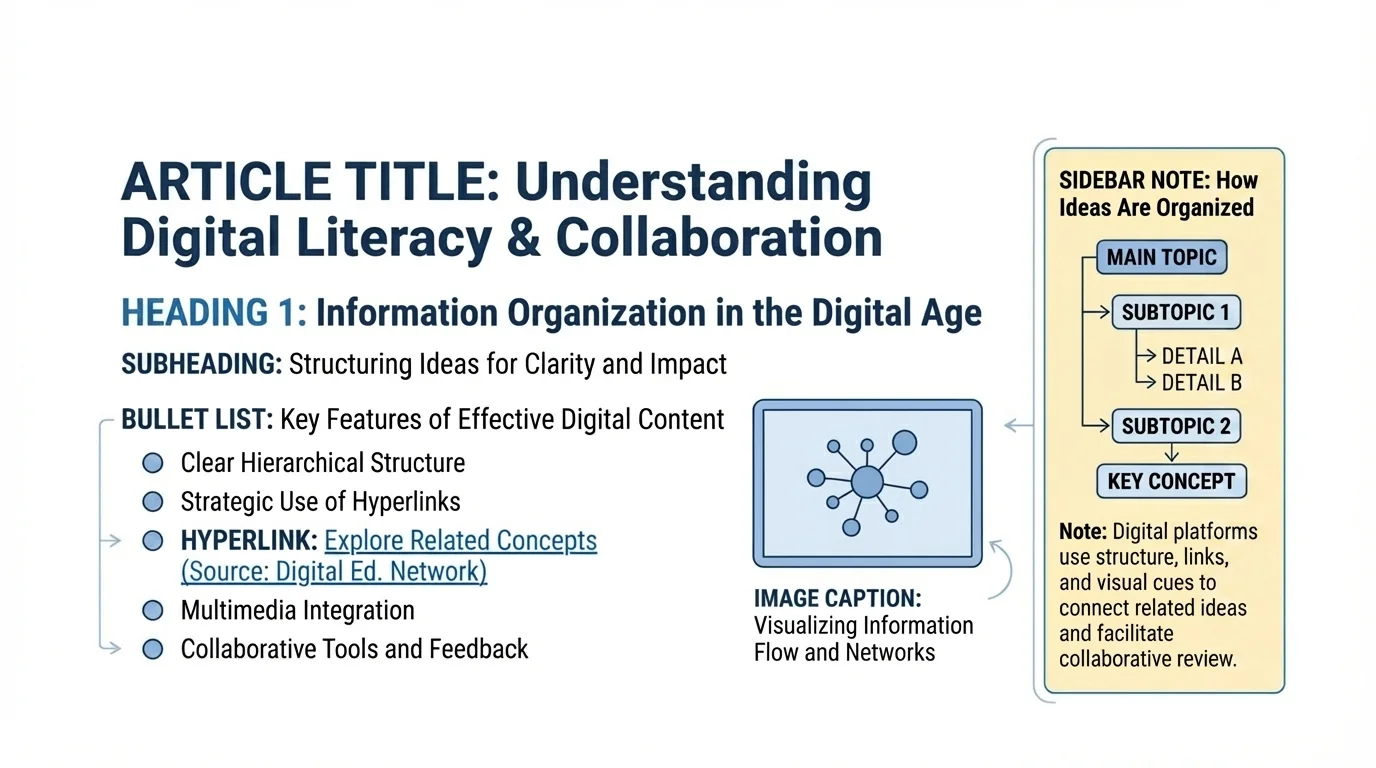
Writers should also think about visual balance. If every sentence is bold, nothing stands out. If colors are too bright, readers may become distracted. Good presentation supports meaning instead of competing with it.
Later, when readers return to a text for information, those design choices save time. A heading can point directly to the needed section, while a bullet list can make key facts easy to scan.
| Digital feature | How it helps readers | Best use |
|---|---|---|
| Heading | Shows a main section | Breaking a topic into parts |
| Subheading | Shows a smaller idea inside a section | Organizing details under a bigger topic |
| Bullet list | Makes information easy to scan | Key points, features, or examples |
| Numbered list | Shows order or sequence | Steps in directions or a process |
| Hyperlink | Connects to another source or page | Adding evidence or extra reading |
| Caption | Explains an image or figure | Supporting visuals with context |
Table 1. Common digital text features and how they help present relationships between ideas.
Publishing changes how writers think. When work will be seen by real readers, students often write more carefully, explain more clearly, and revise more seriously. A published piece might appear in a classroom newsletter, on a school website, in a shared online folder, or as part of a presentation.
Publish does not always mean making something public to the whole world. It can also mean sharing writing in a controlled space, such as a class learning platform. What matters is that the piece is prepared for readers or viewers beyond the writer alone.
Many professional writers publish digitally first, then continue revising after readers respond. Online writing is often more flexible than print because updates can be made quickly.
Before publishing, writers should check four things: content, correctness, appearance, and audience fit. Is the information accurate? Are grammar and punctuation correct? Is the layout easy to read? Does the tone match the intended audience? A scientific explanation, for example, should sound different from a personal reflection.
Technology also allows writers to combine formats. A report might include text, a chart, a captioned photo, and a short slide presentation. When used well, these features strengthen understanding instead of distracting from the message.
One of the biggest advantages of digital writing is that several people can work on the same piece, and [Figure 3] shows how shared documents, comments, and suggestion tools make that possible. Collaboration can happen in real time, with students typing at once, or over time, with each person returning later to add ideas.
In a shared document, one student might write the introduction, another might add research, and another might check transitions between paragraphs. Comments can ask questions, suggest stronger evidence, or point out unclear wording. Suggestion mode is especially useful because it allows changes to be reviewed before they become final.
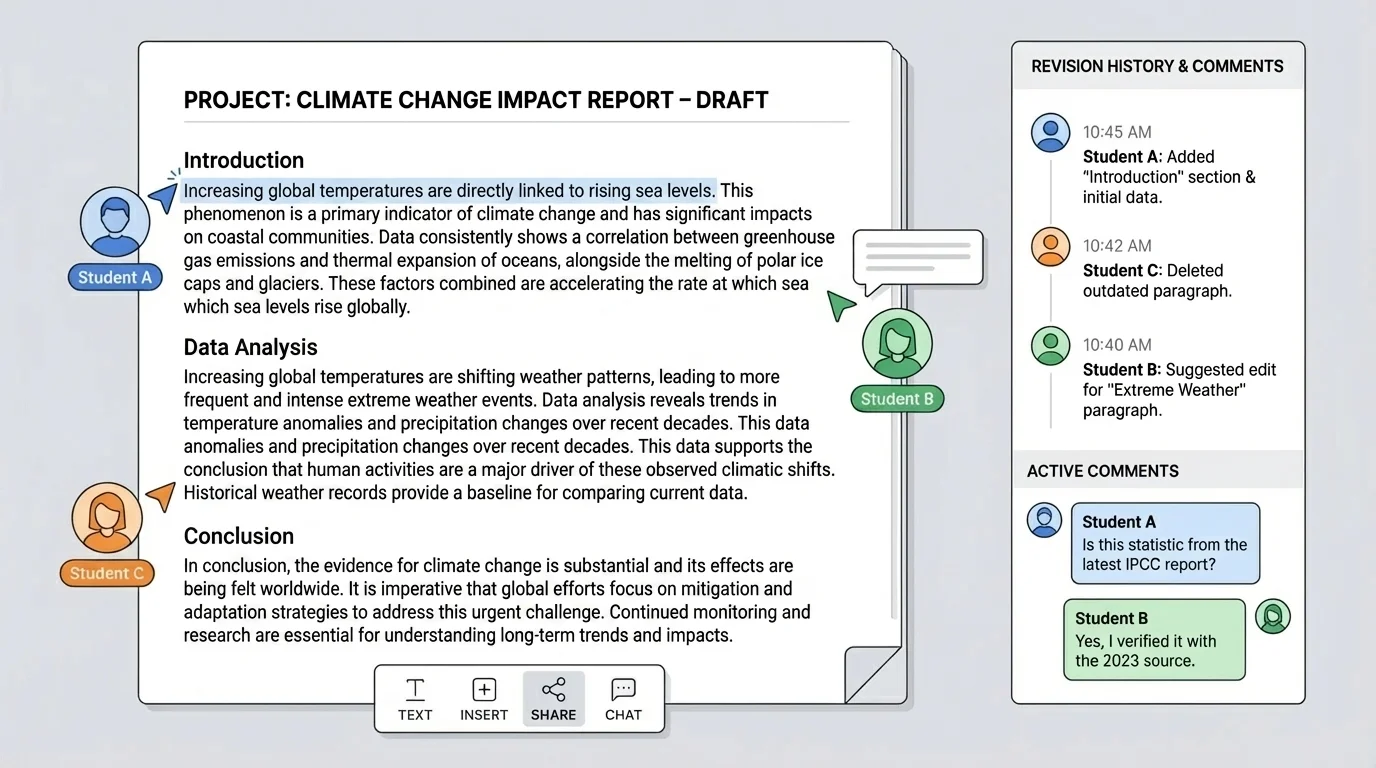
Good collaboration depends on communication. Students should divide tasks clearly, listen to one another, and keep the shared goal in mind. If one student changes another person's sentence, the reason should be explained respectfully. Productive collaboration is not grabbing control of the document. It is building better writing together.
Digital citizenship matters here. This means using technology responsibly, respectfully, and safely. In collaborative writing, digital citizenship includes polite comments, honest contribution, and appropriate language. A helpful comment might say, "This paragraph needs another example," instead of "This is bad."
Example: Strong online peer feedback
A student reads a classmate's article about recycling.
Step 1: Notice what works
The student comments, "Your introduction clearly explains the problem."
Step 2: Ask a useful question
The student adds, "Can you include a fact or source about how much plastic is recycled each year?"
Step 3: Suggest a specific improvement
The student writes, "Maybe combine these two short sentences to improve flow."
This kind of response is respectful, specific, and helpful.
Later in a group project, the same shared-document tools remain useful. Comments and version history help teams track who contributed what and how the writing improved over time.
Technology makes sharing easy, but it also creates responsibilities. Writers must protect personal information. Full names, passwords, home addresses, phone numbers, and private details should never be posted carelessly online. Students should use school-approved platforms and follow classroom rules for safety.
Writers must also respect ownership of ideas. Copying text from a website and pretending it is your own is plagiarism. Even when information is free to read, it still belongs to its creator. Students should summarize in their own words, use quotation marks when needed, and give credit to sources.
Remember: A source is where information comes from. Sources can be books, articles, websites, videos, interviews, or databases. Trustworthy writing depends on checking whether a source is accurate, current, and relevant.
Accuracy matters because digital writing spreads quickly. A mistake posted online can be copied and shared before it is corrected. That is why writers should verify facts before publishing. If a website makes a surprising claim, it is wise to compare it with another reliable source.
Writers should also think carefully about hyperlinks. A link should lead to a relevant and trustworthy page. Adding random links does not strengthen writing. A good link gives readers useful support for the point being made.
Not every writing task needs the same technology. A writer should choose tools based on purpose, audience, and features, and [Figure 4] presents this matching process clearly. A drafting tool is best for long paragraphs, while a slide tool is better for visual presentation. A shared document works well for teamwork, and a blog format works well for regular public updates.
For example, a word processor is strong for essays and reports because it offers headings, spell check, comments, and page formatting. Slide software is useful when ideas need to be presented visually to an audience. A spreadsheet can help organize data for a report. A publishing platform or website builder is useful when the final piece needs to be viewed online.
| Tool type | Best for | Helpful features |
|---|---|---|
| Word processor | Essays, reports, scripts | Drafting, revising, comments, formatting |
| Shared online document | Group writing | Real-time collaboration, comments, version history |
| Slide presentation tool | Presenting key ideas to viewers | Visual layout, images, speaker support |
| Spreadsheet | Organizing data | Tables, sorting, chart creation |
| Blog or class website | Publishing for readers online | Posts, links, audience access |
Table 2. Common digital tools and the writing tasks they support best.
Choosing well saves time and improves quality. A student who tries to write a long research paper entirely in a slide tool will probably struggle. A student who tries to present a visual topic using only a plain block of text may not communicate effectively.
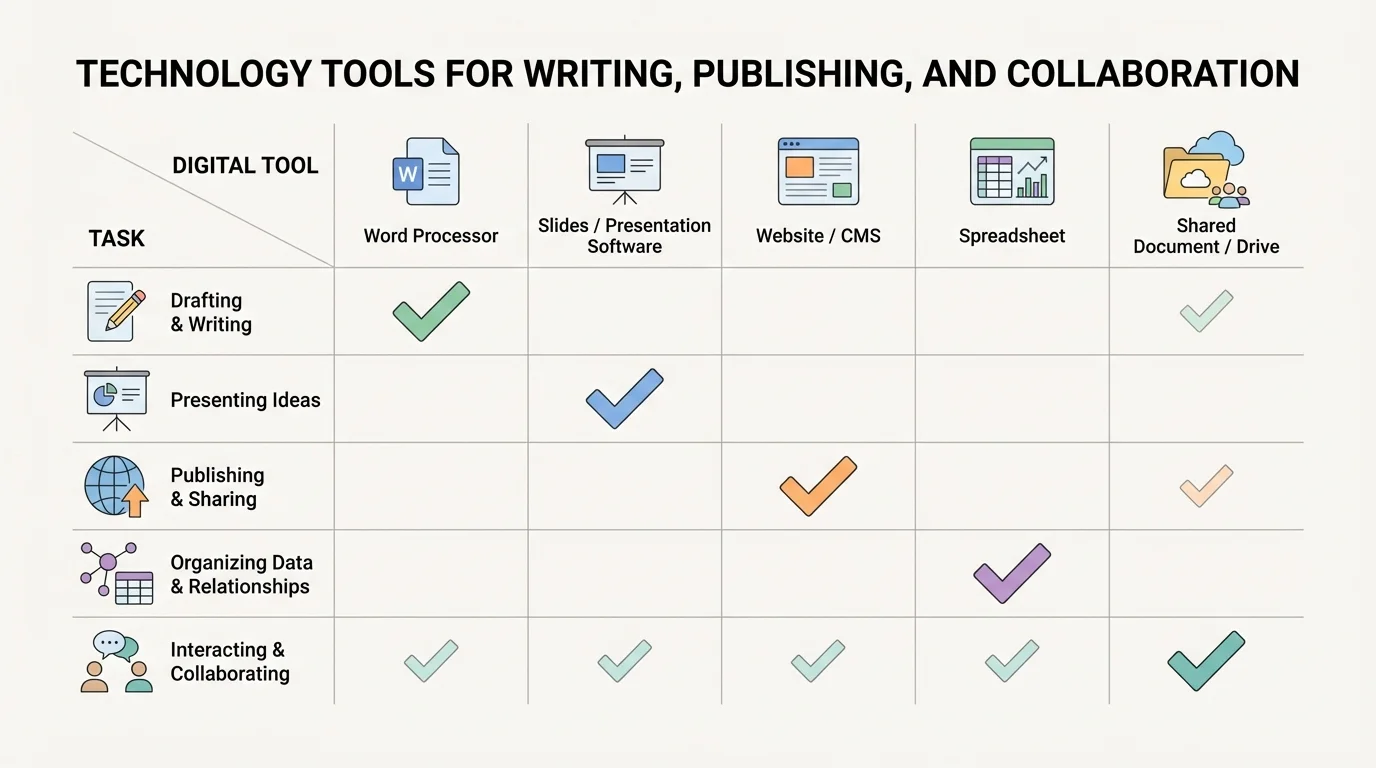
Writers become more flexible when they understand the strengths of different tools. Later, as assignments become more complex, this skill becomes even more important.
Becoming a strong digital writer takes practice, but certain habits make a big difference. Save work often. Name files clearly. Organize folders. Review comments thoughtfully. Check formatting before publishing. Read your own writing aloud. Ask whether every paragraph supports your main point.
Strong digital writers also know that speed is not the same as quality. Technology can make writing faster, but the goal is not just to finish quickly. The goal is to communicate clearly and effectively. Careful planning, revision, and collaboration still matter.
"The right tool helps, but clear thinking makes the writing work."
As writing tasks become more advanced, students will continue using technology not only to type, but to shape ideas, show relationships, and connect with others. That is what makes digital writing such an important skill: it combines communication, design, responsibility, and teamwork in one process.
