Every day, people publish words that can travel farther and faster than they ever could on paper. A student can write a review, post a science explanation, share a class project, or comment on a group document, and within seconds someone else can read it. That speed is powerful, but it also means writers have a bigger responsibility. Digital writing should be clear, accurate, respectful, and honest about where information comes from.
Using technology for writing is more than typing on a screen. It includes choosing digital tools, organizing ideas, revising with feedback, linking to information, citing sources, and working with others. Good digital writers do not just make their work look polished. They also make it trustworthy and useful for their readers.
When you write online, your words often reach a real audience, not just one teacher. Your audience might be classmates, a teacher, family members, or even a larger public group if the writing is shared on a website. Because of that, writers need to think carefully about purpose. Are you trying to explain, persuade, inform, reflect, or report? The answer affects your tone, word choice, structure, and details.
Digital writing also gives you tools that paper cannot. You can move paragraphs easily, use headings, insert links, collaborate in real time, and return to older versions of your draft. Those tools make writing more flexible. But they do not replace careful thinking. A flashy document with weak ideas is still weak writing.
Digital writing is both communication and design. A strong online piece does not only say something important. It also helps readers follow the message easily through clear organization, readable formatting, and accurate source information. In digital spaces, how writing is presented can affect whether readers understand it.
This is why planning, drafting, revising, editing, publishing, and collaborating all matter. Technology helps at every stage, but the writer still makes the important choices.
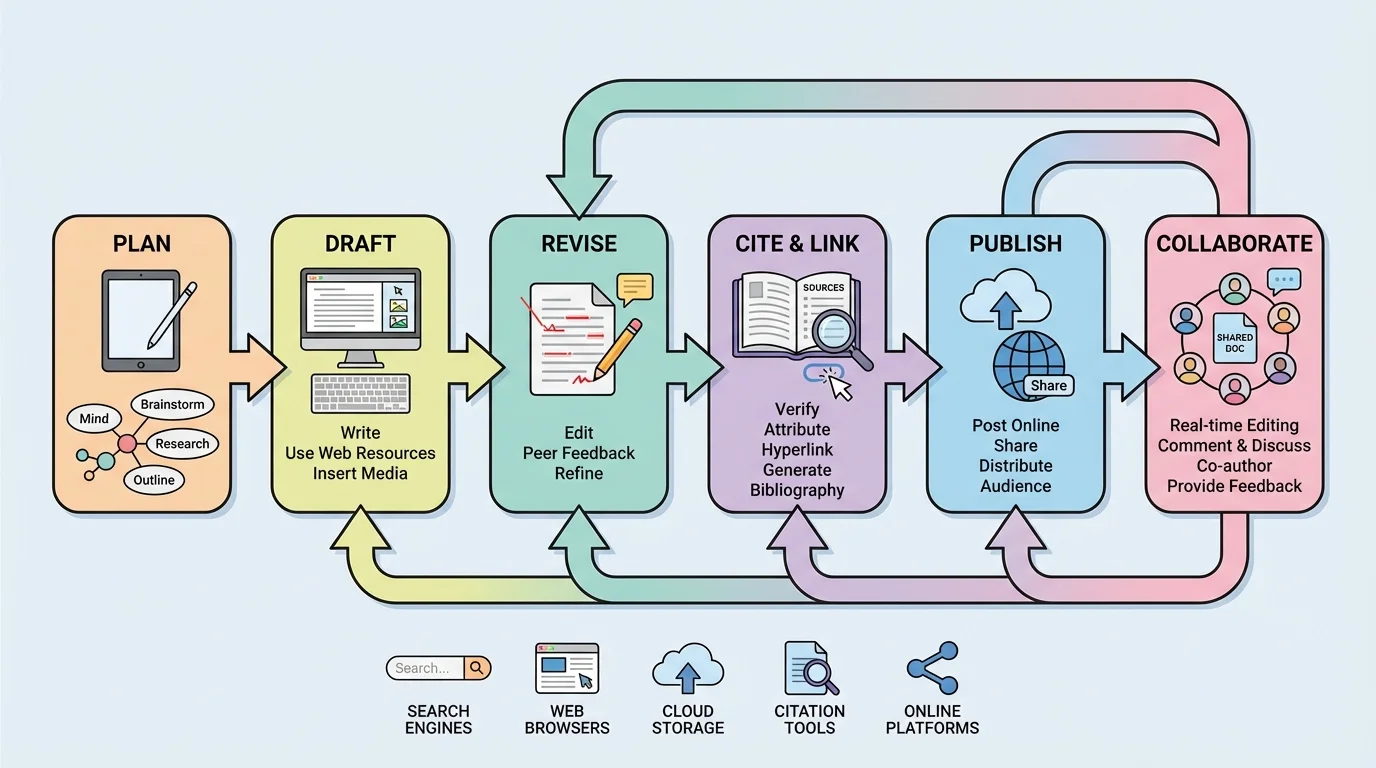
As [Figure 1] suggests, good writing rarely appears perfectly on the first try. It usually moves through a process, and digital tools make those stages easier to manage. Online writing often follows a connected path: plan, draft, revise, cite, publish, and sometimes return for more changes after feedback. Because digital documents are easy to update, writing can become more thoughtful over time.
The first step is planning. A writer may begin with notes in a document, a digital outline, a brainstorming app, or a graphic organizer. During planning, ask questions such as: Who will read this? What do they need to know? What kind of evidence will make my ideas stronger? What sources might I need?
Next comes drafting. A draft is a working version, not a finished one. In a digital draft, you can quickly rearrange ideas, add headings, and leave yourself notes. For example, if you are writing an article about reducing plastic waste at school, your draft might include sections such as the problem, evidence, possible solutions, and a conclusion.
One advantage of digital drafting is that it encourages experimentation. You can try one introduction, then replace it with another. You can move your strongest example higher in the piece. You can duplicate a paragraph before making major changes so you do not lose your original thinking.
Writers should also choose tools that fit the task. A basic word processor works well for essays. A slide-based platform may help with a multimedia report. A shared document works best when multiple writers need access. The technology should support the writing goal instead of distracting from it.
Professional writers, journalists, and scientists often revise many times in digital formats before anything is published. What readers see as a smooth final product may have gone through dozens of changes.
Planning digitally can save time, but it should not become endless. Strong writers gather enough ideas to begin, then start drafting so their thinking can develop in actual sentences and paragraphs.
Many students think revision and editing are the same, but they are different. Revision means improving ideas, organization, and clarity. Editing means correcting grammar, spelling, punctuation, and formatting. Technology supports both, but in different ways.
During revision, digital writers can cut and paste paragraphs, add transitions, reorganize sections, and compare versions. This is useful when a piece feels confusing or out of order. Suppose your report starts with tiny details before explaining the main idea. In a digital document, you can move the explanation to the beginning in seconds.
Editing tools such as spell-check and grammar suggestions can help catch mistakes, but they are not perfect. Sometimes a grammar tool flags a sentence that is actually correct. Sometimes it misses a problem completely. Writers should treat these tools as helpers, not bosses.
Using technology to revise a paragraph
A student writes: "Our school should recycle more. Recycling is good. There are bins. Some people do not use them."
Step 1: Identify what is weak
The ideas are short and repetitive. The reader does not learn why recycling matters or what should change.
Step 2: Add detail and improve organization
The student revises the paragraph in a word processor by combining sentences, adding specific information, and clarifying the main point.
Step 3: Edit for correctness
The student checks punctuation, capitalization, and wording before saving the new version.
Revised version: "Our school should recycle more by placing clearly labeled bins in classrooms and lunch areas. Although some bins already exist, many students do not notice them or are unsure what belongs inside. Better signs and easier access could help the school reduce waste."
Another useful digital feature is version history. This tool stores earlier forms of a document so you can see changes over time or restore an older version. That matters when you make a change and later realize the earlier wording was stronger.
Formatting is part of revision too. Headings, paragraph breaks, readable fonts, and consistent spacing make digital writing easier to follow. A wall of text often drives readers away, even when the ideas are good.
As [Figure 2] illustrates, online writing often includes information from other texts, videos, articles, or databases. Writers need to guide readers to those sources and give proper credit. A hyperlink and a citation do related but different jobs. A hyperlink connects the reader directly to a source, while a citation identifies the source clearly so the reader knows where the information came from.
When you use a source, ask yourself whether you are quoting, paraphrasing, or summarizing. A quotation uses the exact words from the source, placed in quotation marks. Paraphrase means restating the idea fully in your own words and sentence structure. Summarizing means giving only the main points in a shorter form. All three require credit to the original source.
If you copy words, facts, or ideas without giving credit, that is plagiarism. Plagiarism is not just copying a whole paragraph. It can also happen if a writer copies a sentence, changes only a few words, or uses another person's idea without naming the source.
Hyperlinks are useful because they let readers check evidence directly. For example, in an article about sleep and learning, a sentence might include linked text leading to a health organization or research article. But a link by itself is not always enough. Readers still need source information such as the author, title, website or publisher, and date if available.
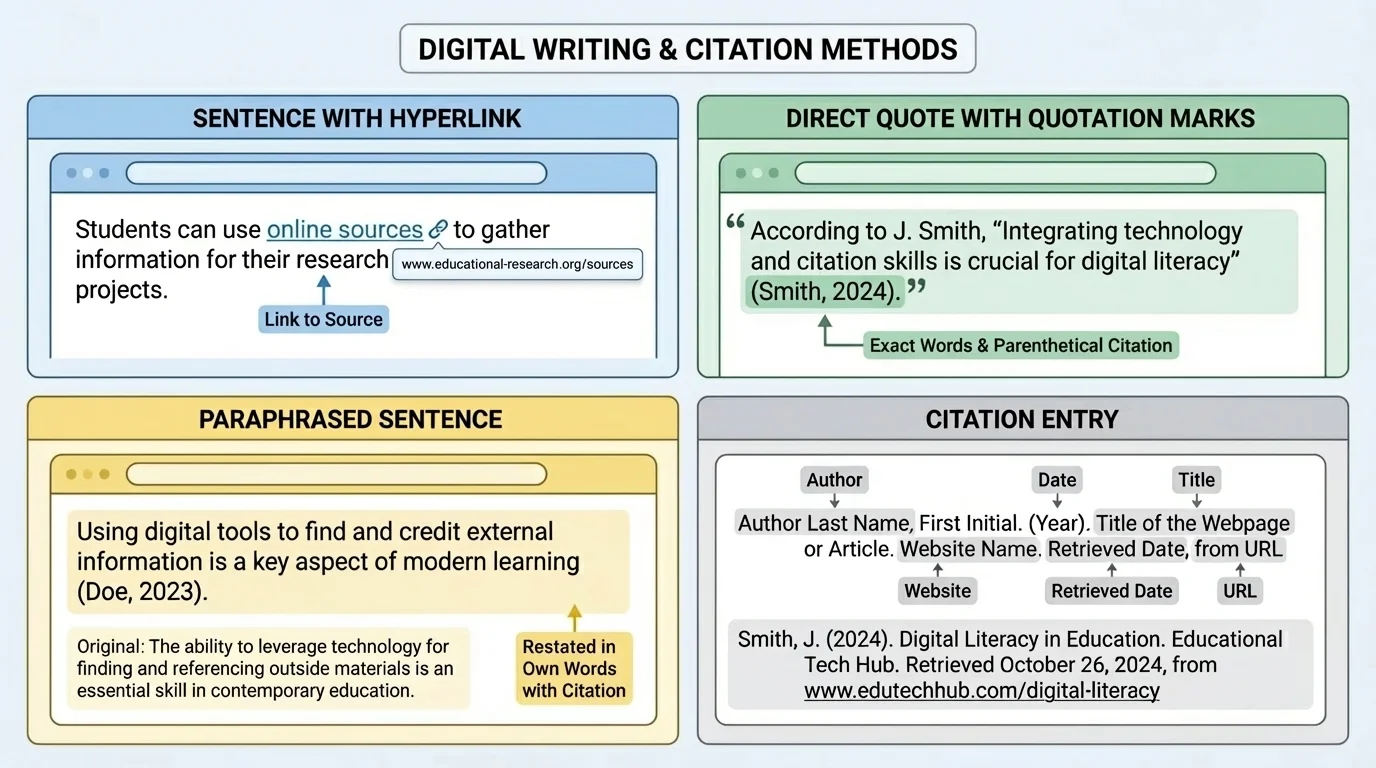
Different teachers and subjects may use slightly different citation styles, but the basic purpose stays the same: show where information came from. A citation should help someone else locate the original source.
Source means the place where information originally comes from. Attribution means giving credit to that source in your writing. Citation is the formal source information that helps readers identify and find the original material.
Here is a simple comparison of how writers use source material responsibly.
| Method | What the writer does | What is required |
|---|---|---|
| Quotation | Uses the source's exact words | Quotation marks, source credit, and citation |
| Paraphrase | Restates the idea in new wording and structure | Source credit and citation |
| Summary | Gives the main idea briefly | Source credit and citation |
| Hyperlink | Connects readers directly to a digital source | Accurate linked text and often citation details |
Table 1. Comparison of common ways writers use and credit source material.
Suppose you are writing, "According to the National Park Service, peregrine falcons can dive at extremely high speeds." If that information came from the organization's website, you might include a hyperlink on the organization name or the article title, and you would also include source details in the format your teacher expects.
Later, when you publish your writing, the difference shown earlier in [Figure 2] becomes even more important. A broken or misleading link confuses readers, and missing citation details weaken trust in your work.
To publish writing means to share it with readers in a final or public form. Publishing might happen on a class website, blog, discussion board, school newsletter, or shared folder. Before publishing, writers should review both content and presentation.
Digital publishing requires attention to readability. Use clear headings, consistent font choices, and manageable paragraph lengths. If the writing includes links, test every one. If it includes images, make sure they support the writing and are allowed for use. If names or personal information appear, check whether sharing them is appropriate and safe.
Writers should also think about tone. Online text can sound harsher than intended because readers cannot hear your voice or see your facial expression. A sentence that seems funny to the writer may feel rude to the reader. That is one reason careful proofreading matters.
Earlier writing lessons taught that clear organization, complete sentences, and correct grammar matter for all writing. Digital publishing does not replace those rules. It raises the stakes because more people may read the final version.
Before posting, many writers use a final checklist: Is the claim clear? Is the evidence accurate? Are the sources credited? Are grammar and punctuation correct? Does the format help readers understand the message? That last review can prevent many common mistakes.
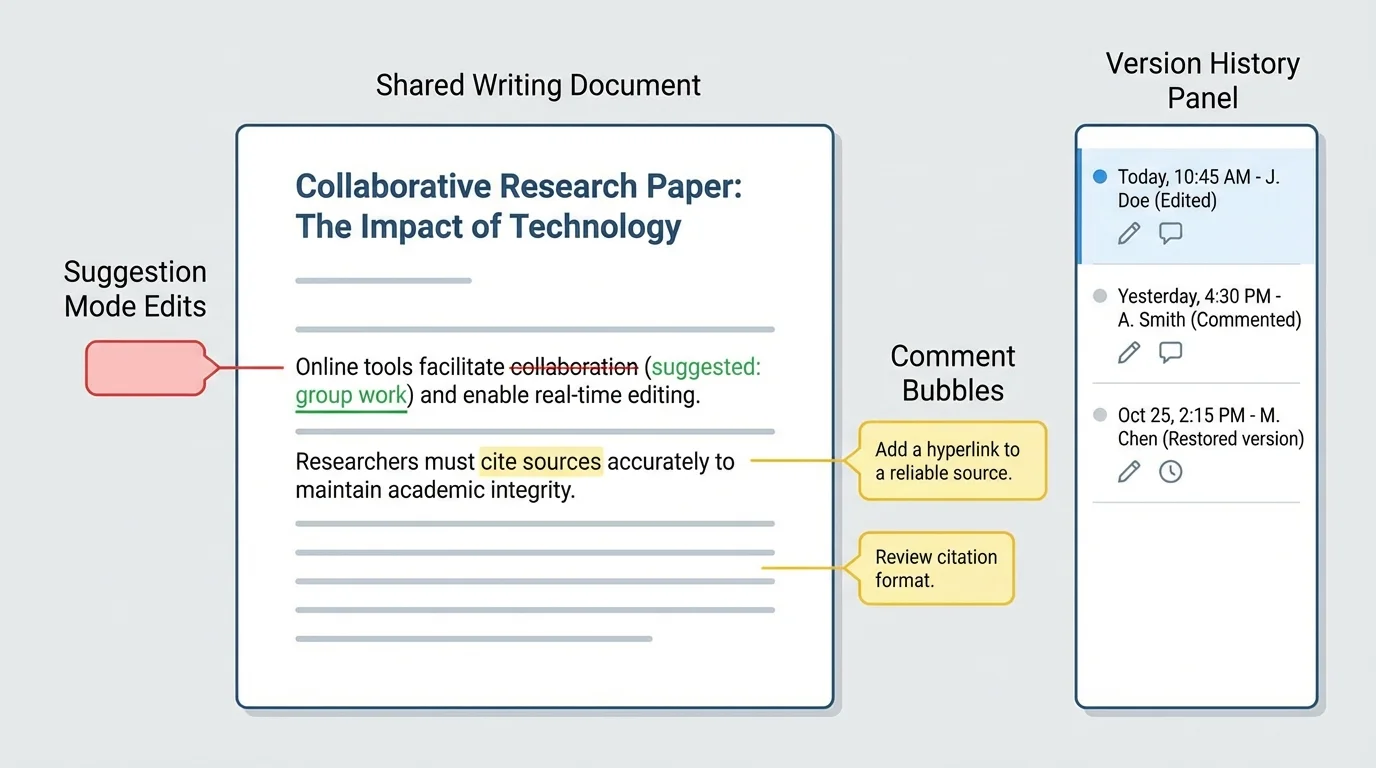
As [Figure 3] shows, one of the most powerful features of digital writing is collaboration. Shared tools allow multiple writers to plan, draft, and revise the same document through comments, suggestions, and saved changes. Instead of passing one paper back and forth, students can work in the same space and see each other's ideas develop.
Collaboration works best when each person has a clear role. In a group article, one student might gather sources, another draft the introduction, another check citations, and another revise for clarity. Shared documents help everyone see progress, but they also require responsibility. Writers should not delete others' work carelessly or make silent changes that confuse the group.
Comments and suggestion tools are especially helpful. A comment lets a reader ask questions or give feedback without changing the text directly. Suggestion mode allows proposed edits that the writer can accept or reject. These tools support respectful discussion about writing choices.
Digital collaboration also depends on digital citizenship. That means behaving responsibly, respectfully, and safely online. In writing, this includes giving useful feedback, using school-appropriate language, protecting private information, and following rules for sharing work.
Giving strong feedback in a shared document
Weak comment: "This is bad."
Strong comment: "Your main idea is interesting, but I got confused in the second paragraph. Could you add a sentence that explains how your evidence connects to your claim?"
The second comment is specific, respectful, and useful. It helps the writer improve instead of simply feeling criticized.
Good collaborators also keep track of source information as they work. In many group projects, one student finds a source and another uses it later in the draft. If the citation details are not saved immediately, the group may struggle to give credit correctly.
When disagreements happen, the writing goal should guide the decision. The question is not "Whose sentence stays?" but "Which choice makes the writing clearer, stronger, and more accurate?" That mindset turns collaboration into a real writing skill.
Not every online source is reliable. Some are outdated, biased, or false. Writers should examine who created the source, when it was published, whether it uses evidence, and whether other trusted sources support the same information. A polished website can still contain weak information.
Writers should protect personal privacy too. Do not publish private addresses, phone numbers, passwords, or other personal details. In school settings, follow teacher directions about what names, photos, or project details may be shared.
Copyright matters as well. Just because a picture, article, or video appears online does not mean it is free to copy. Writers should use approved materials, public-domain or licensed images when allowed, and give credit when required. Responsible digital writers respect both ideas and ownership.
"With great power comes great responsibility."
— A widely quoted principle that fits online publishing
Accuracy is part of responsibility. Before sharing writing publicly, verify facts, check spellings of names, test links, and reread quotations carefully. Readers trust writers who are careful with details.
A practical workflow can make digital writing more manageable. Start by identifying topic, purpose, and audience. Then gather notes and sources in one organized place. Draft your ideas clearly. Revise for meaning and structure. Edit for correctness. Add links and citations. Publish thoughtfully. Finally, respond to feedback and make updates if needed.
This workflow connects back to the process shown earlier in [Figure 1]. Digital writing is rarely a straight line. Sometimes a comment from a classmate sends you back to revision. Sometimes a missing citation sends you back to source notes. That flexibility is a strength, not a problem.
The same is true of collaboration tools we saw in [Figure 3]. Publishing does not always mean the writing is frozen forever. In many digital spaces, writing continues to improve through feedback, corrections, and new versions.
Strong digital writers combine old and new skills. They still need good sentences, logical organization, and careful editing. But they also need to manage links, citations, online readers, shared documents, and responsible interaction. Technology makes writing more powerful, and that makes thoughtful choices even more important.
