What do streaming recommendations, traffic lights, online maps, and even your school timetable have in common? Behind all of them are invisible step-by-step processes—algorithms—designed using a particular style of problem solving called computational thinking. These systems feel almost "magical," but they are built from very precise, logical ideas that you can learn to use yourself. 🤔
Computational thinking is a way of approaching problems so that they can be solved clearly, systematically, and often with the help of computers. It is not just about writing code. Instead, it focuses on how to:
Computational thinking helps create solutions that are:
You can apply computational thinking to classic computer science tasks, like sorting a list of names, but also to everyday problems: organizing a tournament, planning a study schedule, or designing a school event.
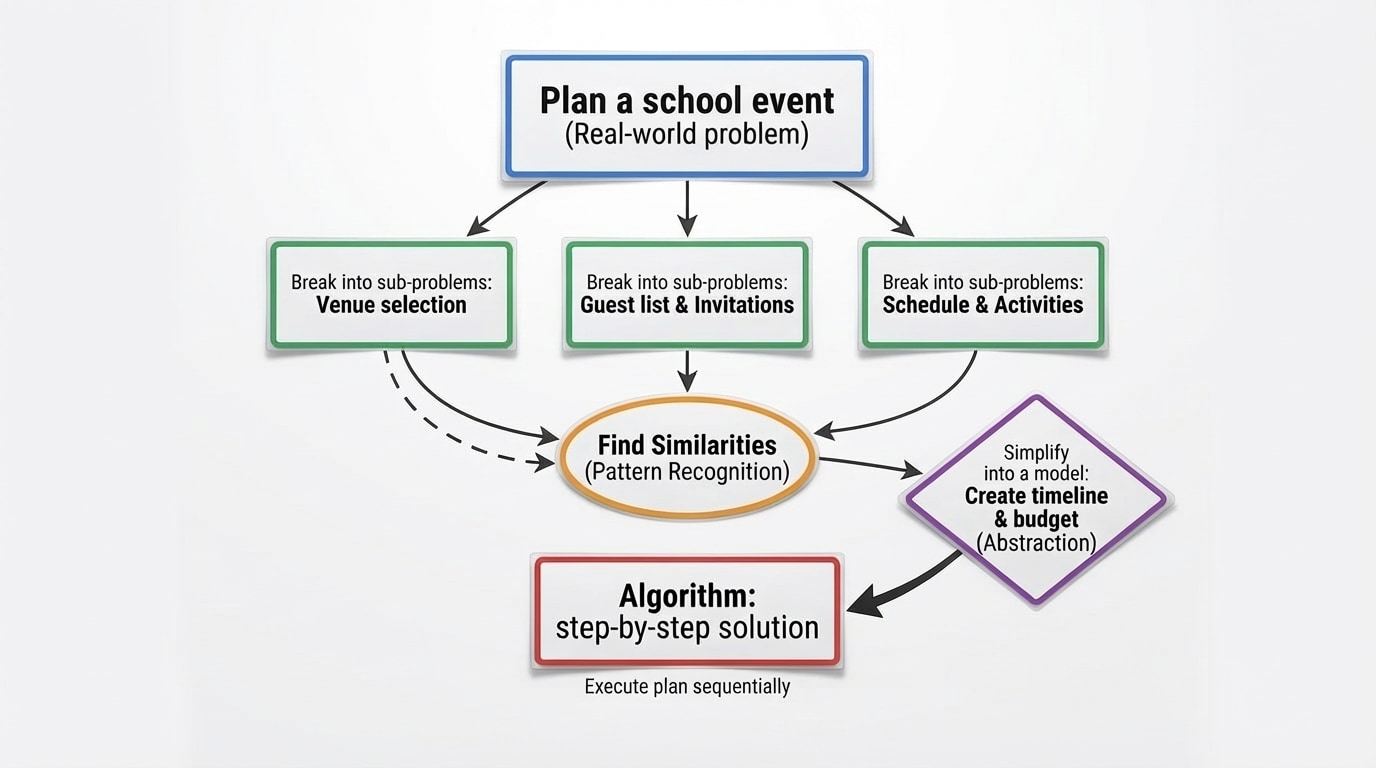
Computational thinking is often described in terms of four core elements: decomposition, pattern recognition, abstraction, and algorithms. Together, they form a pipeline from messy real-world problems to clear solutions, as shown in [Figure 1].
1. Decomposition: Breaking Problems into Parts
Decomposition means taking a big, complex problem and splitting it into smaller, easier sub-problems.
Suppose your task is to "organize a school talent show." That sounds huge. Using decomposition, you might break it into:
Each of these is still a problem, but much easier to handle than "do everything." Computational thinking starts by making problems less overwhelming.
2. Pattern Recognition: Finding Similarities
Pattern recognition focuses on noticing similarities and repetitions among problems or within data.
For example, when you study for exams, you might notice that many teachers reuse question styles from past tests. Spotting this pattern lets you prepare more efficiently. In computing, pattern recognition is key for tasks like:
3. Abstraction: Ignoring Unnecessary Detail
Abstraction means focusing on the important information and ignoring details that do not affect the solution.
Imagine building a navigation app. To calculate the fastest route, the app cares about:
The app does not care what color the buildings are or how many trees are on the sidewalk. Those details are abstracted away. Without abstraction, problems become impossibly complicated.
4. Algorithms: Step-by-Step Solutions
An algorithm is a clear, finite, ordered set of instructions that solves a problem or completes a task.
You use algorithms all the time, even if you do not call them that. A simple morning routine, a recipe, or the steps to log into a website are all examples of algorithms. For a computer, the algorithm must be precise enough that there is no ambiguity.
For example, a basic login algorithm might be:
Decomposition, pattern recognition, and abstraction all support the creation of algorithms. They help you understand what the algorithm should do and what details it can safely ignore.
To see how computational thinking operates on a real-world task, consider a very everyday situation: managing a crowded school lunch line. Students want to get their food quickly; the cafeteria staff want to avoid chaos. How can computational thinking help here? 🍽️
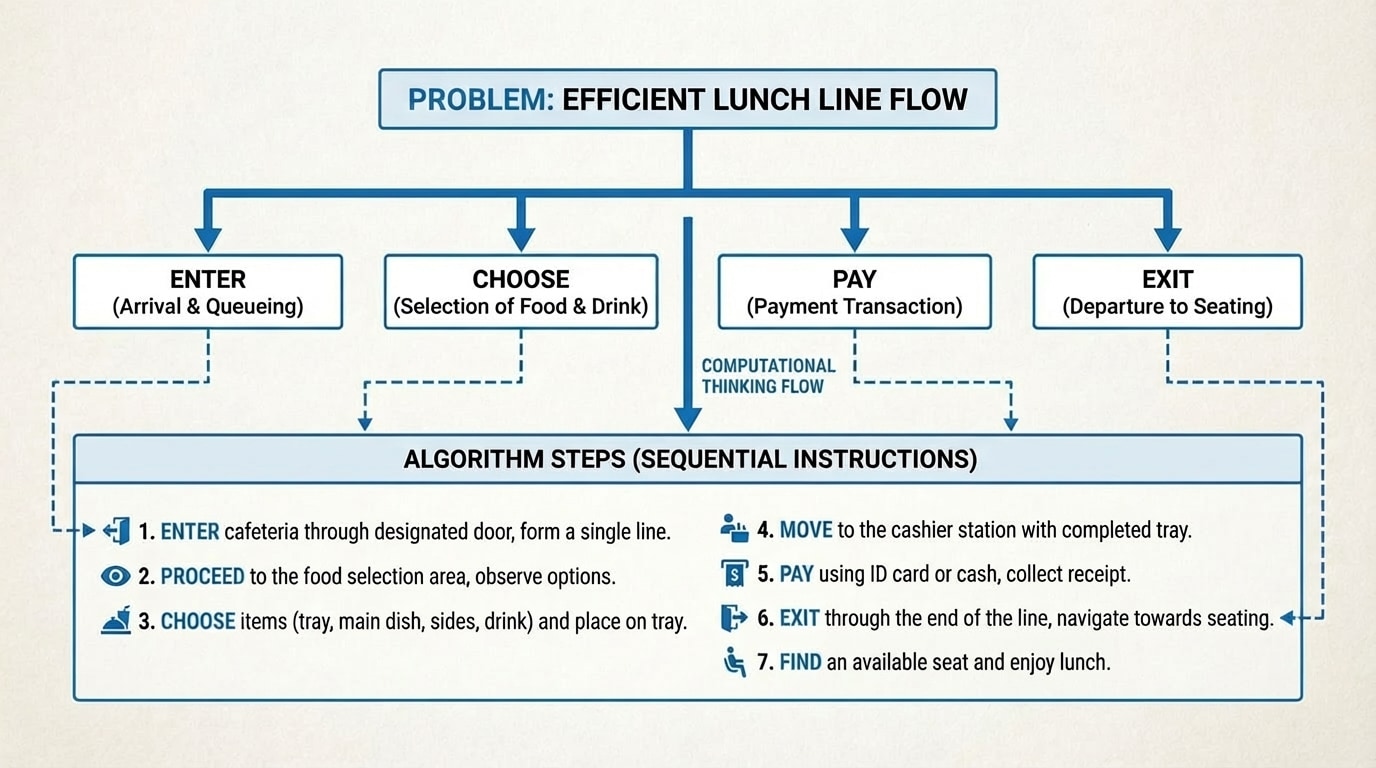
We will move from the messy real world to a clear algorithm, as outlined in [Figure 2].
Step 1: Decompose the Problem
The problem "make lunch lines faster" can be decomposed into sub-problems:
Each sub-problem can then be refined further. For payment, you might consider:
Step 2: Recognize Patterns
We might notice that every student must follow a similar sequence: enter, pick up a tray, choose food, pay, leave. We also notice that delays usually happen at two points:
Recognizing these patterns tells us where to focus our solution.
Step 3: Use Abstraction
We do not need to care what specific food each student chooses. For designing the line system, the important information is how long each choice takes and how many choices there are. We can model each student as "a person who needs a tray, then food, then payment, then exit." That is an abstraction: a simplified model that preserves what matters for the problem.
Step 4: Design an Algorithm
Now we can propose a step-by-step process for each student:
We could improve this algorithm by adding rules like "have your ID card ready before reaching the cashier" or by splitting the line into two: one for simple meals and one for custom orders. Each version is still an algorithm, but some are more efficient than others.
This process—decompose, recognize patterns, abstract, then design an algorithm—is exactly what computational thinking is about and can be viewed as a repeated flow of steps.
Algorithms can be represented in different ways depending on who needs to understand them. Common forms include:
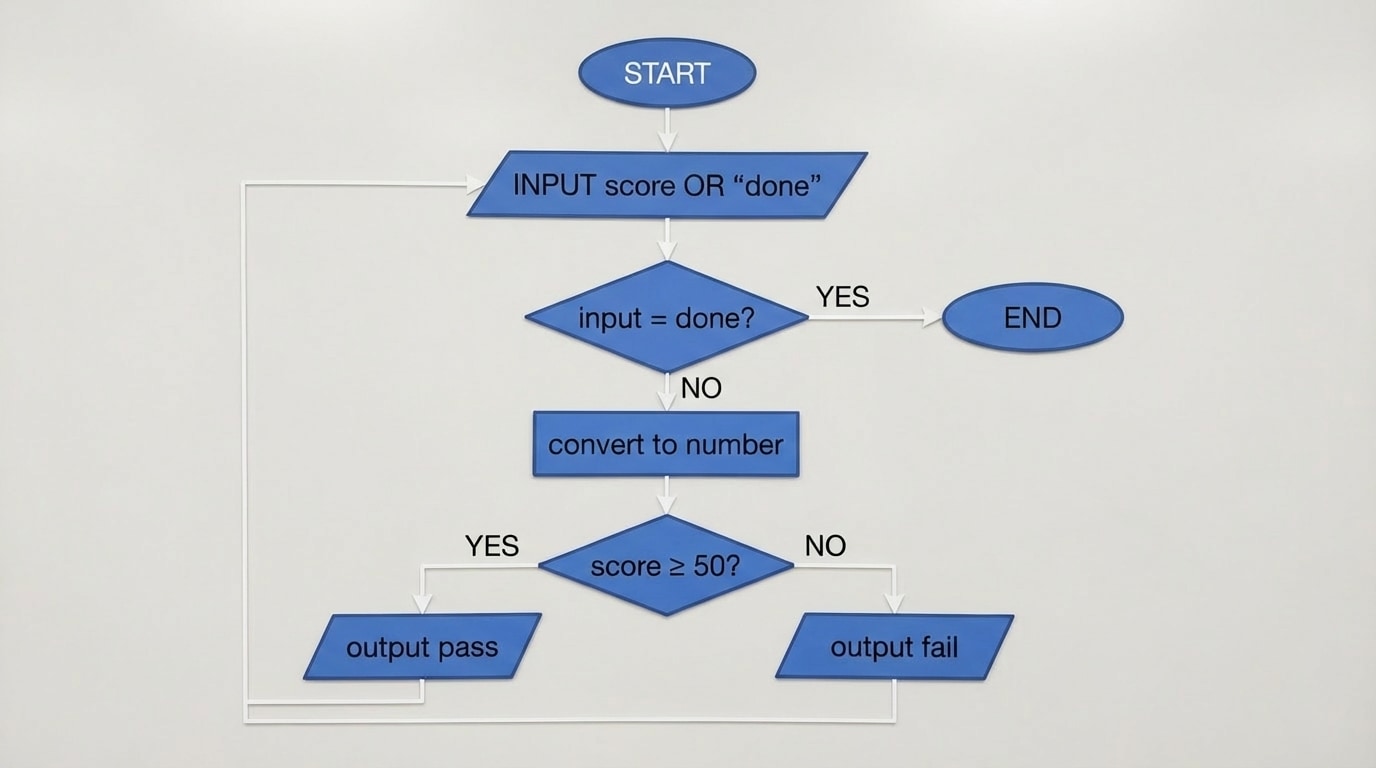
These representations help humans and computers work together effectively. Flowcharts in particular show the control flow of an algorithm: the order of steps, choices, and loops, as illustrated in [Figure 3].
Key Properties of Good Algorithms
Basic Control Structures
Most algorithms are built from three basic control structures:
Consider this algorithm that repeatedly asks for test scores and decides pass or fail until the user is done:
Plain-language algorithm:
This algorithm includes sequencing (steps 1 to 6), selection (checking whether the score is at least 50), and iteration (returning to step 1). The flowchart version highlights where decisions are made and where the loop occurs, as shown in [Figure 3].
Once you have an algorithm, computational thinking does not stop. You also need to evaluate and improve it.
Correctness Across All Cases
First, you check whether your algorithm works for all valid inputs, including edge cases. For the test-score algorithm:
Computational thinking involves anticipating such cases and adjusting the algorithm, perhaps by adding checks like "if the score is outside 0 to 100, show an error message."
Efficiency and Input Size
Efficiency matters especially when the size of the input grows. We often use a variable like \(n\) to represent the number of items the algorithm processes.
For example, consider two ways to find whether a name is in a list of students:
When \(n\) is small, both methods may feel equally fast. When \(n\) is very large, Method B is dramatically faster. Computational thinking trains you to notice such differences and choose or design better algorithms.
Refinement and Iteration
Real-world algorithms are rarely perfect at the first attempt. They are refined repeatedly:
This cycle of design → test → evaluate → improve is central to effective algorithmic problem solving.
Computational thinking is not just an academic concept. It silently powers much of modern life, in ways that closely follow the decomposition–pattern–abstraction–algorithm pipeline from [Figure 1]. 💡
1. Navigation and Route Planning
Apps like Google Maps or Waze must find efficient routes through road networks.
The results feel simple to you ("turn left in 300 m"), but they are the output of very sophisticated computational thinking.
2. Recommendation Systems
Streaming platforms and online stores suggest movies, songs, or products you might like.
3. Medical Diagnosis Support
Computer systems can help doctors interpret scans or lab results.
These systems do not replace medical professionals but assist them with faster and sometimes more accurate pattern recognition.
4. Disaster Response and Logistics
During natural disasters, responders must decide where to send supplies, how to evacuate people, and how to use limited resources.
As you develop computational thinking skills, it helps to avoid a few common misconceptions.
Misconception 1: "Computational Thinking Is Just Coding."
Programming is one way to express computational thinking, but the thinking itself comes first. You can design and analyze algorithms on paper, in plain language, or with diagrams like the flowchart in [Figure 3]. Many professionals in science, engineering, law, and business use computational thinking even when they never write a line of code.
Misconception 2: "Problems Must Be About Computers."
Any problem that benefits from clear steps and logical structure can use computational thinking: from planning a sports tournament to arranging playlists for a party. The lunch line example is one small demonstration; the same logic scales up to city-level transportation or international supply chains.
Pitfall: Over- or Under-Abstraction
Abstraction is powerful, but you can go wrong in two ways:
The art of computational thinking involves choosing the right level of abstraction for each problem.
Pitfall: Ignoring Edge Cases
Many algorithm errors come from ignoring unusual inputs or situations, such as:
Thinking ahead about such cases helps you design more robust algorithms.
Computational thinking is a powerful, general-purpose way of solving problems, not just a skill for programmers. It relies on four interconnected elements—decomposition, pattern recognition, abstraction, and algorithm design—that take you from messy real-world challenges to clear, step-by-step solutions, as summarized conceptually in [Figure 1]. These ideas help you design algorithms that are correct, clear, finite, and efficient, like the control-flow example shown earlier in [Figure 3]. By practicing this mindset on everyday tasks—like organizing events, planning routes, or structuring your own study routine—you build the same thinking tools used in navigation systems, recommendation engines, medical support software, and disaster logistics. Ultimately, computational thinking equips you to create algorithmic solutions that work reliably in the real world and scale as problems grow more complex. 🎯
