When a popular app crashes right as you are about to submit homework or buy concert tickets, it is not just “bad luck.” It usually means something went wrong earlier: in how that software was designed. On the other hand, the tools you trust daily—search engines, navigation apps, secure messaging—work smoothly because someone carefully designed them long before any code was typed. 💡
Writing a computer program is not just hammering out lines of code. It is closer to designing a bridge, planning a movie, or architecting a building. Behind every reliable program is a design process that moves from idea, to plan, to working software that can be tested, improved, and maintained over time.
Many beginners think, “I have an idea; I will just start coding.” That sometimes works for tiny scripts, but it quickly fails for anything complex, shared with others, or used in the real world. Without design, programs often end up with:
Design is the step where you think carefully about what a program should do and how it will do it before committing to detailed code. In large projects—like flight control systems, banking software, or hospital record systems—good design is literally a safety requirement.
Even if you are writing a game for fun, design helps you avoid painting yourself into a corner, where adding one new feature breaks three others. Design supports creativity by giving you a clear structure to build on.
The creation of a computer program usually follows a series of stages that together form a cycle, as shown in [Figure 1]. Different organizations use slightly different names, but the core ideas are very similar:
These stages are not strictly one-way. Teams constantly loop back: tests reveal design problems, user feedback leads to new requirements, and maintenance may require redesigning parts of the system. Professional software development is highly iterative.
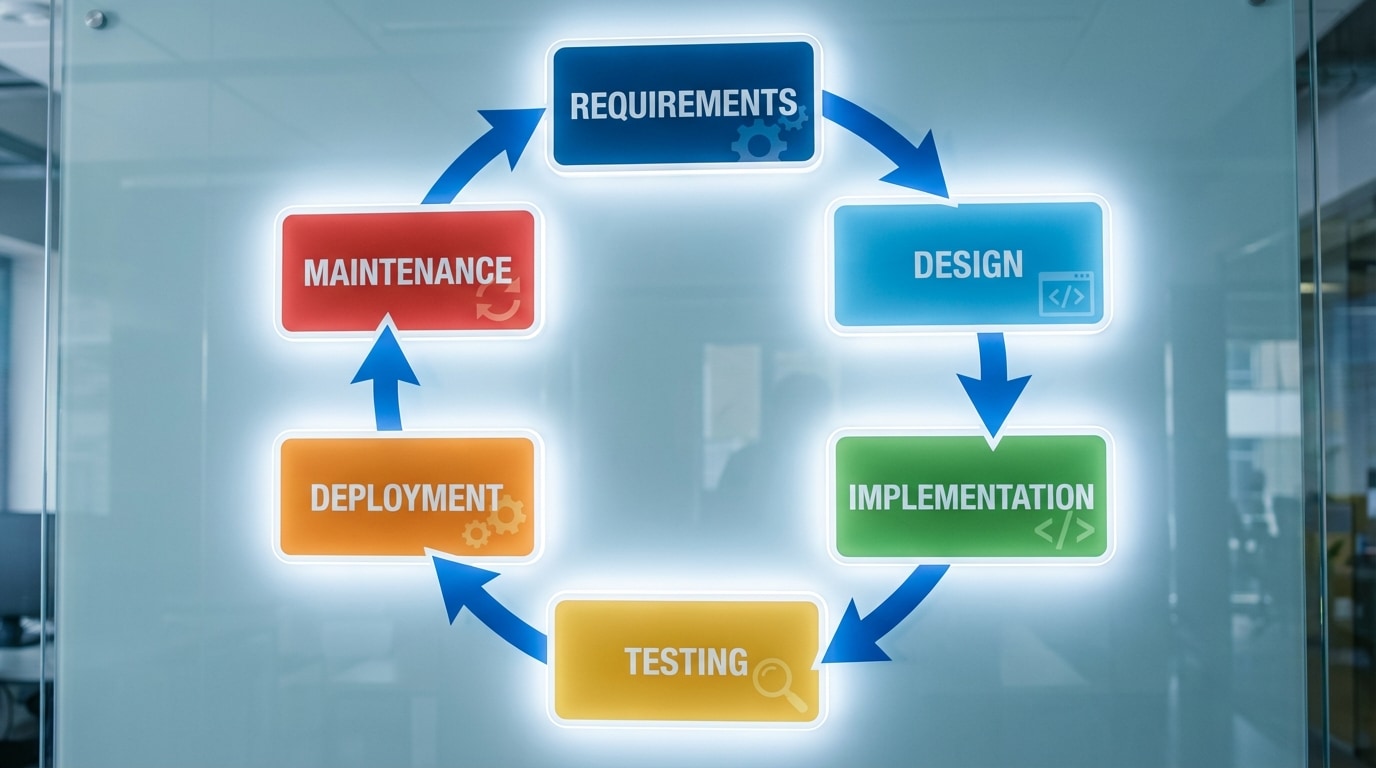
Even in a small high school project, you likely move through these same stages: understanding assignment requirements, sketching your solution, coding, testing with sample data, and fixing issues. Thinking of programming as an ongoing design cycle helps you improve the quality of your work.
The design process begins with a question: What problem are we trying to solve? This sounds obvious, but many software failures come from misunderstandings at this very first step.
When you analyze a problem, you identify:
A useful way to think about this is through requirements. Two major types are:
Consider a simple project: a school club management app. Some functional requirements might be:
Non-functional requirements could include:
Spending time here saves time later. If you misunderstand the problem, even a perfectly coded solution is still the wrong solution.
Once you understand the problem, the next question is: How will the program accomplish this? The design answer is an algorithm—a clear, step-by-step method for solving a problem or performing a task.
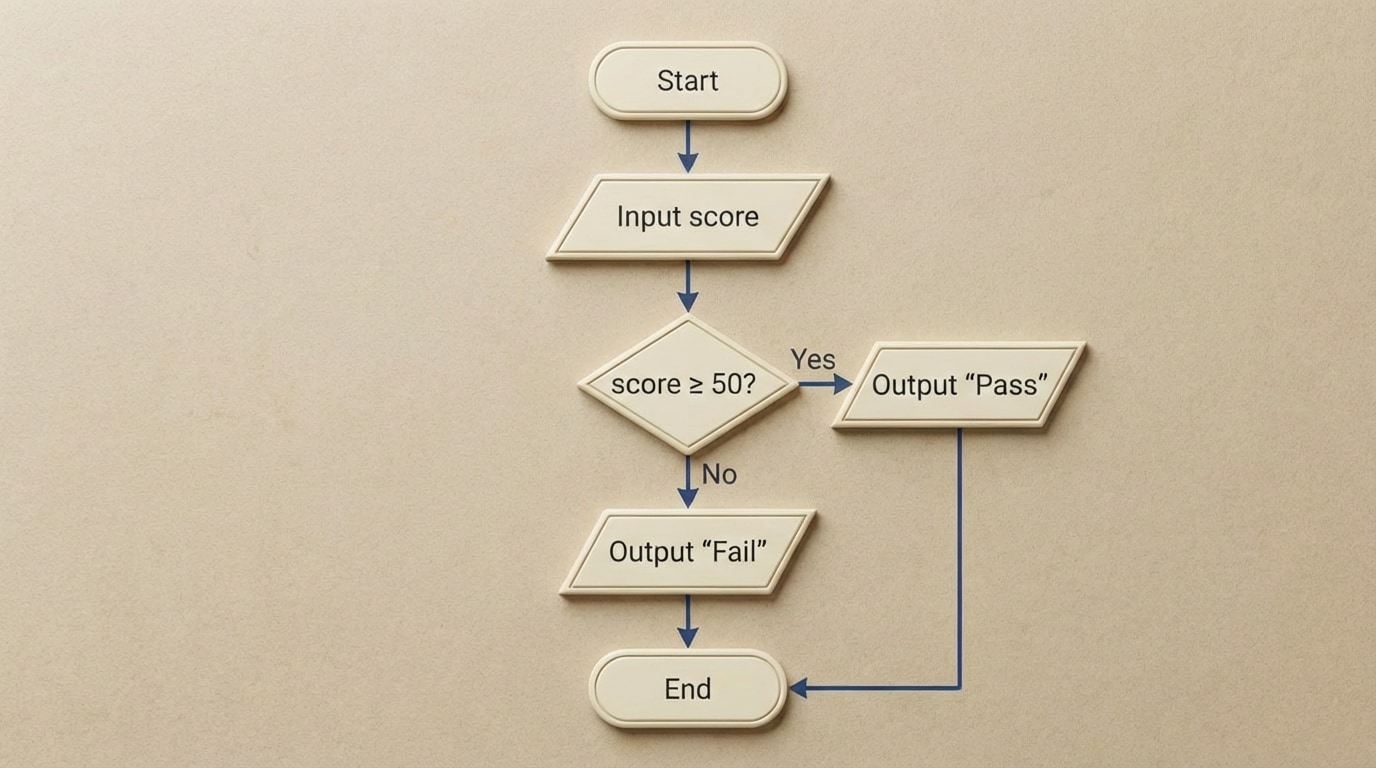
An algorithm is not tied to any specific programming language. It is just the logic. You can express algorithms in everyday language, in diagrams, or in a structured form called pseudocode (which looks like code but is not meant for computers to run directly), and they are often summarized visually in flowcharts, as illustrated in [Figure 2].
For example, suppose you want to design a simple program to read a student’s score and print “Pass” if the score is at least 50, and “Fail” otherwise. A basic algorithm in words could be:
In pseudocode, this might look like:
Example pseudocode:
<pre><code>INPUT score
IF score >= 50 THEN
OUTPUT "Pass"
ELSE
OUTPUT "Fail"
END IF</code></pre>
Sometimes it helps to visualize an algorithm with a flowchart. Flowcharts use standardized shapes (ovals for start/end, parallelograms for input/output, diamonds for decisions, rectangles for processes) connected by arrows to show the flow of control.
For a more complex example, imagine designing a small console to-do list program:
Pseudocode could be:
<pre><code>CREATE empty list tasks
REPEAT
DISPLAY menu options
INPUT choice
IF choice is "add" THEN
INPUT newTask
APPEND newTask to tasks
ELSE IF choice is "list" THEN
DISPLAY all tasks
ELSE IF choice is "remove" THEN
INPUT index
REMOVE task at index from tasks
END IF
UNTIL choice is "quit"
OUTPUT "Goodbye"</code></pre>
This design is already useful even before you pick a language. Pseudocode lets you focus on logic without worrying about semicolons, indentation rules, or syntax errors.
Every interesting program needs to store and manipulate data. During design, you decide what data you need, how it is structured, and how different pieces of data relate to each other.
Key concepts include:
Returning to the school club app, each member might be represented by an object or record with fields like:
Your data design could include:
Thoughtful data design makes algorithms much simpler. For example, if each event has its own list of attendees, then checking who signed up is as simple as looking up that list by event. If your data design is poor—say you scattered attendance information across several unrelated lists—your algorithms become messy and error-prone.
Good data design answers questions like:
Design is not just about what the program does; it is also about how it is organized internally. At the core of every program is control flow: the order in which instructions are executed and the decisions that change that order.
Basic control flow building blocks include:
For example, in pseudocode for counting from 1 to 10, you might have:
<pre><code>FOR i FROM 1 TO 10 DO
OUTPUT i
END FOR</code></pre>
This is a simple sequence plus repetition. Most real programs are made of many such pieces, nested and combined.
Another key design idea is decomposition: breaking a large problem into smaller, manageable parts, often in the form of functions, procedures, or modules. As referenced in [Figure 3], you can picture a program as a collection of blocks, each handling a specific responsibility.
For the to-do list program, you might design functions like:
Your main program loop calls these functions rather than containing all the details inline. This structure makes the program easier to read, test, and modify.
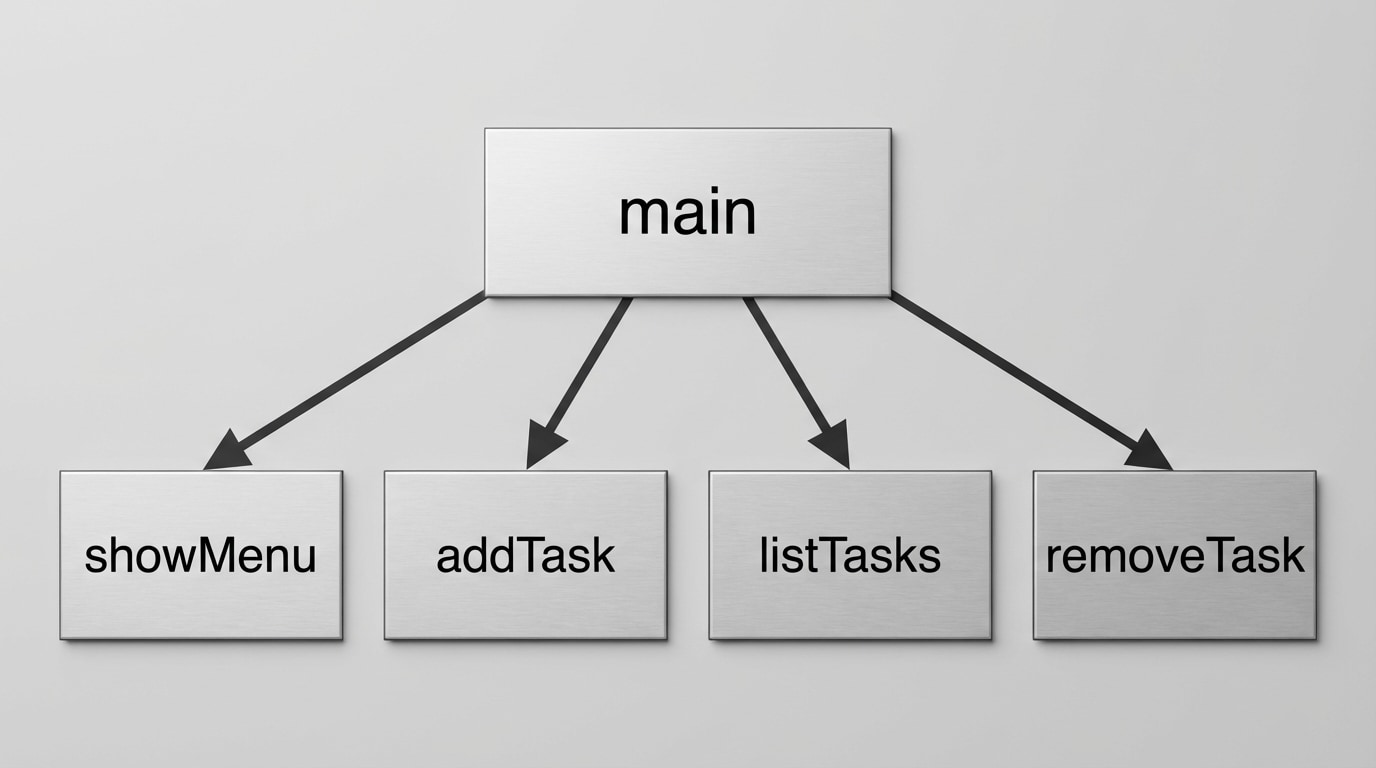
Decomposition also supports teamwork. On a group project, one person can design and implement the input module while another works on data processing, as long as everyone agrees on how the modules connect (their interfaces).
After planning algorithms, data structures, and program structure, you finally move into implementation: writing actual code in a specific programming language such as Python, Java, or JavaScript.
Implementation involves:
For example, the earlier Pass/Fail pseudocode might become, in Python-like syntax:
<pre><code>score = int(input("Enter your score: "))
if score >= 50:
print("Pass")
else:
print("Fail")</code></pre>
If your design is solid, coding feels like carefully translating a blueprint into a building. If you find yourself constantly stuck, rewriting large sections, or unsure what to code next, that is often a sign that the design phase was rushed or incomplete.
During implementation, developers also perform small design improvements called refactoring: cleaning up code structure (renaming variables, splitting long functions, removing duplication) without changing what the program does. This keeps the internal design healthy as the codebase grows.
No matter how careful the design, the first version of a program almost never works perfectly. That is why testing and debugging are essential parts of the design process, not just afterthoughts.
Types of testing include:
Good testing includes not only typical cases but also edge cases: unusual or extreme inputs. For a grading program, you would test scores like 0, 49, 50, 100, and even invalid inputs such as negative numbers or text.
When a test fails, debugging begins. You trace through your code, inspect variables, and compare the actual behavior to the intended design. Sometimes the bug is in the code itself (a typo, wrong operator, or off-by-one error). Other times, the bug reveals a deeper design problem: maybe your data structure does not handle a scenario you forgot about, or your algorithm misses a case.
This is where the process becomes a loop again: you may need to adjust the design, update the implementation, and re-test. This iterative cycle continues until the software is reliable enough for real users. 🎯
There is not just one “correct” way to design all software. Over time, programmers have developed several design approaches and paradigms that help structure programs more effectively.
Top-down vs. bottom-up design:
In practice, projects often use a mix of both. You might sketch a top-down structure, then design some bottom-up reusable modules.
Procedural vs. object-oriented design:
Many modern languages (like Java, C++, Python, and C#) support object-oriented design, but procedural thinking is still very important. Understanding both perspectives helps you choose the best approach for a given problem.
The design process is not just for classroom projects; it affects software you rely on every day.
Examples where strong design is crucial:
In industry, design is also about collaboration. Teams create design documents, diagrams, and interface specifications so that dozens or hundreds of developers can work on the same project without chaos. Well-designed software is easier to test, easier to extend with new features, and more resilient to bugs.
As technology changes, designs evolve. But the core idea remains: treating programming as a design-driven engineering process leads to software that is safer, more powerful, and more enjoyable to use. 🚀
The creation of a computer program is guided by a structured design process, not just by writing code. First, you clarify the problem and identify both functional and non-functional requirements so you know what users truly need. Then you design algorithms and express them using pseudocode or flowcharts, which capture the logic independently of any specific language, as illustrated in [Figure 2].
Next, you design how data will be represented using variables, collections, and objects, and you plan the program’s control flow and structure. Decomposing the program into smaller functions or modules, as shown conceptually in [Figure 3], makes the system easier to understand, test, and maintain. After that, you implement the design in code, performing refactoring to keep the internal structure clean.
Testing and debugging are integrated parts of the process, leading to multiple iterations where design and code are improved in response to failures and new insights. At a higher level, different design strategies—such as top-down vs. bottom-up and procedural vs. object-oriented design—offer alternative ways to structure your thinking. Across domains from medical systems to games, the quality of the design process heavily influences whether software is reliable, secure, efficient, and maintainable, reinforcing that successful programming is fundamentally a disciplined design activity.
