Collaborative tools, methods and strategies can be used to design, develop and update computational artifacts.
Building Software Together: Collaborative Tools, Methods, and Strategies
If software were written by just one person, it would probably crash a lot, update rarely, and lack many of the features you expect.
Modern software—from games to medical systems—is so complex that it must be built by teams. That raises a big question: how can many people safely work on the same code and the same data without creating chaos? This lesson explores the tools, methods, and strategies that make that possible.
Why Collaboration Matters in Programming
In computer science, a computational artifact is any human-made object that uses computation. Examples include apps, websites, simulations, data visualizations, machine-learning models, and even interactive art installations.
Real-world computational artifacts usually have these characteristics:
They are large and complex. Thousands or millions of lines of code, many files, many components.
They keep changing. New features, bug fixes, security updates, performance improvements.
They must be reliable. Failures can cost money, trust, or even lives (think of medical or aviation software).
No single programmer can handle all of that for serious systems. Collaboration matters because it:
Divides work into manageable parts (features, modules, tasks).
Combines different strengths (algorithms, UI design, testing, security, documentation).
Improves quality through review and shared testing.
Makes software maintainable so it can be updated for years.
To collaborate effectively, teams rely on three things:
Tools — software that supports shared code, communication, and planning.
Methods — structured ways of working such as version control, testing, and reviews.
Strategies — decisions about how to organize roles, workflows, and communication.
Version Control Systems: The Foundation of Team Coding
When multiple people edit the same code files, two big problems appear:
Whose change is the “real” one when there are different versions?
How do you undo mistakes without losing others’ work?
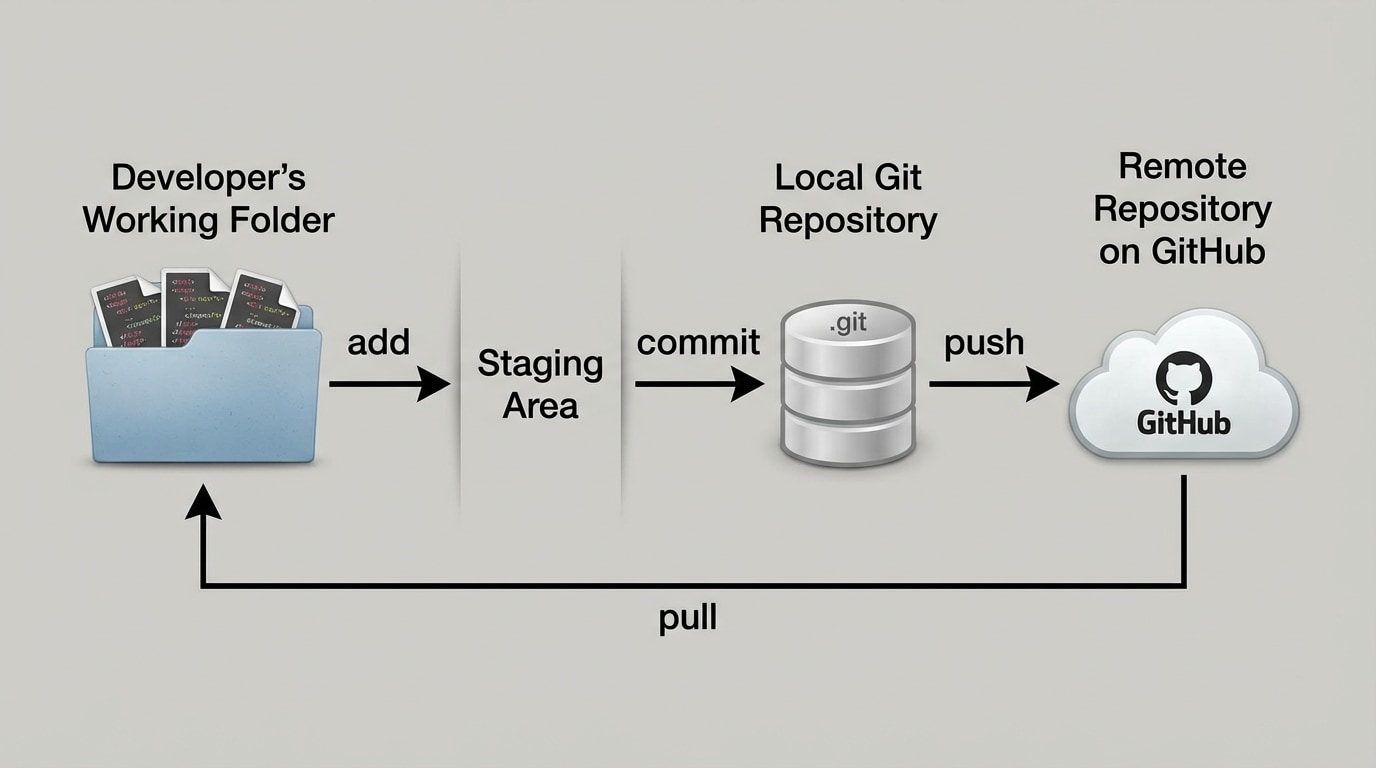
Version control systems (VCS) solve these problems. Git is the most widely used system today. A typical Git workflow, as shown in [Figure 1], connects your working folder, a local repository, and a remote repository on a hosting platform.
Key concepts in Git:
Repository (repo): A project folder whose history is tracked by Git.
Commit: A snapshot of your changes at a point in time, with a message describing what you did.
History: An ordered list of commits, so you can see how a file evolved.
Remote repository: A copy of the repo on a server (for example, GitHub, GitLab, Bitbucket) so others can clone and contribute.
Basic local workflow:
You edit files in your working folder.
You stage the changes you want to save.
You commit them with a message like “Fix login validation bug.”
Then you push your commits to the remote repository so teammates can pull them into their own copies.
Figure 1: Diagram of a Git workflow showing a developer's working folder, a local Git repository, and a remote repository on GitHub, with arrows labeled 'commit', 'push', and 'pull'
Example scenario:
You create a file score.py that calculates a player’s score in a game.
You test it locally and it works.
You run a command that makes a commit with the message “Add score calculation function.”
You push the commit to the remote repo so your teammate implementing the user interface can use your function.
This workflow allows teams to:
Track exactly who changed what and when.
Roll back to an earlier version if something breaks.
Work simultaneously without emailing code files around.
Platforms like GitHub go further by adding:
Issue tracking for bugs and feature requests.
Pull requests (or merge requests) for reviewing and merging changes.
Discussion threads attached to specific commits or lines of code.
Branching, Merging, and Conflict Resolution Strategies
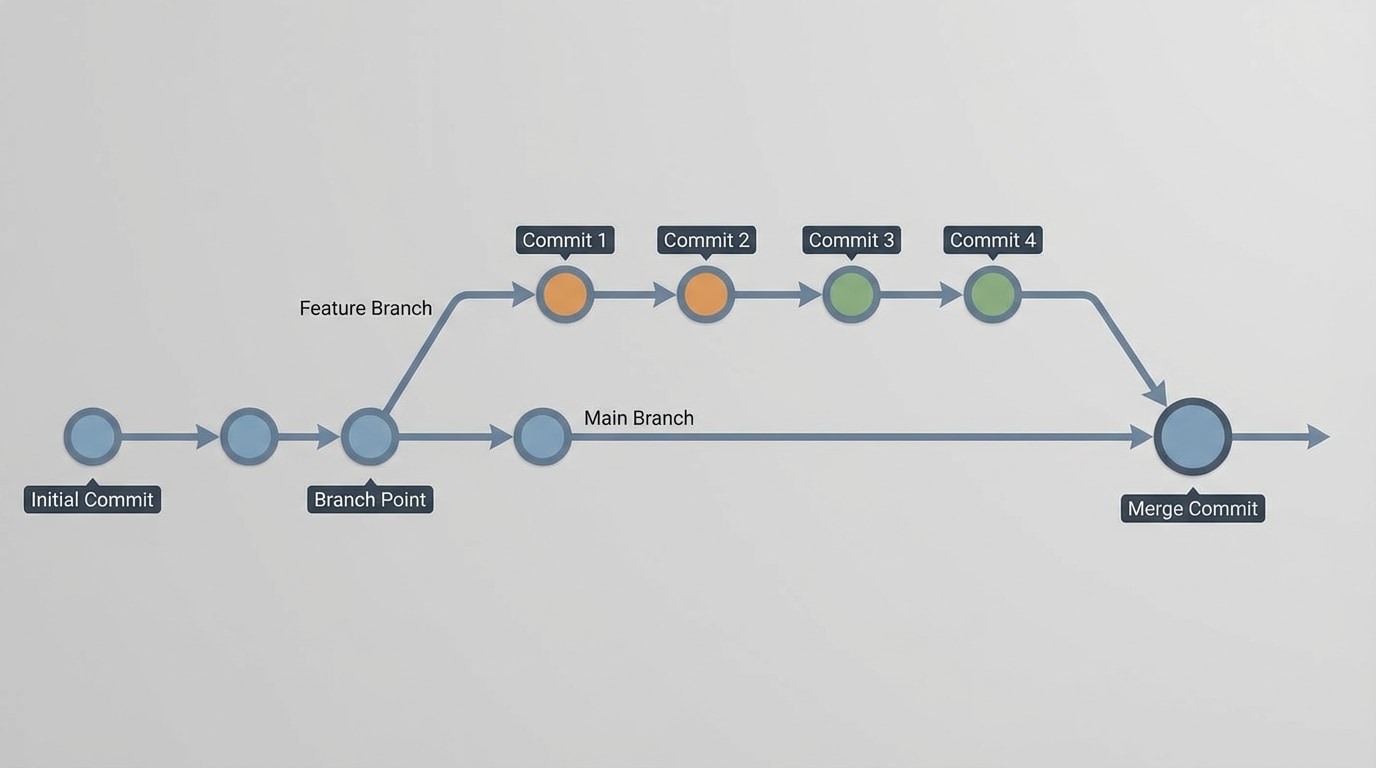
If everyone just committed straight to the same history, the project would quickly become unstable. Teams use branches to isolate work. Visually, branches look like parallel lines of history, as shown in [Figure 2].
Key ideas:
Main or master branch: The base line of development that should usually be stable.
Feature branch: A branch created to add one feature or fix one bug.
Merging: Combining changes from one branch into another.
Typical strategy:
The team agrees that the main branch must always pass tests and be releasable.
To add “Dark Mode,” a developer creates a branch named feature/dark-mode.
All the commits related to Dark Mode go into that branch.
When the feature is ready and reviewed, the branch is merged back into main.
This structure lets multiple features be developed in parallel without breaking the main product.
Figure 2: Timeline diagram showing a main branch, a feature branch splitting off with several commits, and then merging back into main with a merge commit
Merge conflicts occur when two changes touch the same part of a file in incompatible ways. For example:
You change the text of a button from “Start” to “Play.”
Your teammate changes the same line from “Start” to “Begin.”
When Git tries to merge these commits, it cannot decide which version is correct, so it marks a conflict. The team must resolve it by:
Opening the file and examining both versions.
Discussing which wording or code is correct (maybe “Play” is better than “Begin”).
Editing the file to the final agreed version.
Making a new commit that records the resolution.
To reduce conflicts, teams use strategies such as:
Small, frequent commits instead of rare, huge ones.
Short-lived branches that are merged back quickly.
Clear ownership of files or modules to reduce overlap.
Communication when changing widely used parts of the codebase.
Branches, merges, and conflict resolution are essential methods for safely updating computational artifacts while many people work on them.
Communication and Planning Tools
Even the best version control system fails if the team does not communicate clearly. Software teams use multiple channels:
Chat tools like Slack, Discord, or Microsoft Teams for quick questions and updates.
Video meetings for design discussions, demos, and pair programming.
Issue trackers (often inside GitHub or GitLab) to record bugs and feature requests with details.
A common planning method is to break work into user stories and tasks. A user story describes something valuable a user wants, for example:
“As a student, I want to log into the homework app using my school account so I do not need a separate password.”
This story can be split into tasks like:
Design login screen layout.
Implement authentication with the school system.
Handle login errors and messages.
Write tests for login behavior.
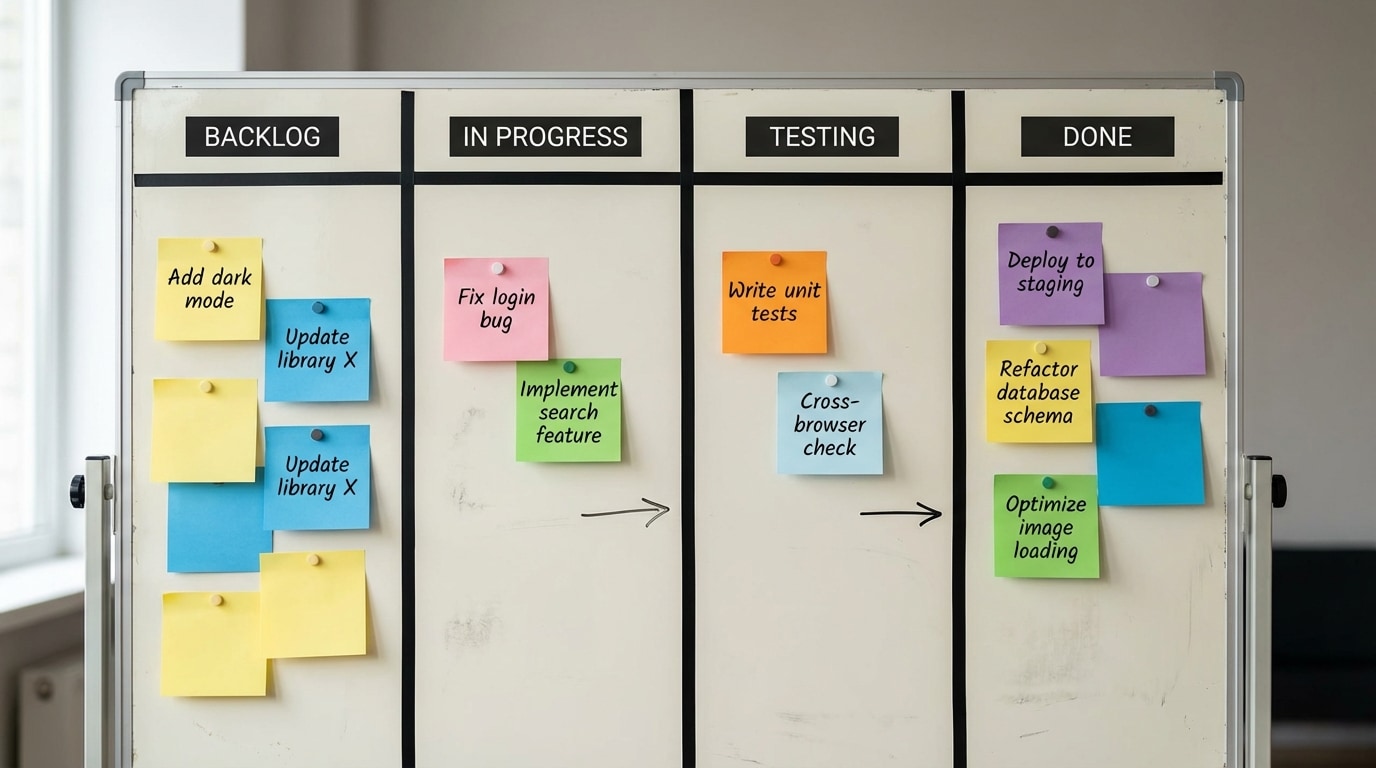
A Kanban board, like the one in [Figure 3], helps everyone see the status of each task in real time.
Teams often visualize tasks on a Kanban board with columns such as:
Backlog – tasks we might do later.
In Progress – tasks someone is currently working on.
Testing – tasks that need to be verified.
Done – completed tasks.
Each task is a “card” that moves from left to right as work progresses. This simple visual method:
Prevents tasks from being forgotten.
Makes blockers visible (for example, a task stuck in “Testing” for days).
Helps the team balance workload.
Figure 3: Kanban board with four columns labeled Backlog, In Progress, Testing, Done, and sticky-note style task cards such as 'Fix login bug', 'Add dark mode', 'Write unit tests' moving toward Done
Planning and communication tools do not write code, but they are crucial for designing, developing, and updating computational artifacts in a predictable and transparent way.
Pair Programming and Mob Programming
Sometimes the most powerful “tool” is another person. Two well-known collaborative methods are pair programming and mob programming.
Pair programming means two people work together at one computer (or shared screen) on the same code. They take on two roles:
Driver: Types the code and focuses on the mechanics of writing it.
Navigator: Reviews each line as it is typed, thinks about design, catches errors, and suggests improvements.
The pair regularly switches roles to keep both people engaged and thinking at different levels.
Benefits of pair programming:
Fewer bugs because code is reviewed as it is written.
Faster learning since partners explain ideas to each other.
Shared understanding of how a part of the system works.
Challenges and strategies:
One person might dominate; to prevent this, switch roles on a timer.
Skill levels may differ; the more experienced partner should guide, not control, and should explain decisions clearly.
Remote pairing needs tools like shared IDEs, screen sharing, and audio chat.
Mob programming extends this idea to the whole team. Everyone works together on the same problem, with one driver and multiple navigators. This can be intense, so teams often use it for:
Complex design decisions.
Tricky bug fixes.
Onboarding new team members to the codebase.
These human-centered methods are strategies that directly affect how computational artifacts are designed and improved. Instead of each person disappearing to write code alone, the team shares responsibility line by line.
Collaborative Design of Computational Artifacts
Before writing code, professional teams design the artifact together. Collaboration at the design stage prevents expensive mistakes later.
Common collaborative design tools and methods include:
Shared documents (for example, Google Docs) for describing requirements, outlining features, and recording decisions.
Diagram tools (for example, draw.io, Figma, Lucidchart) for sketching system architecture, data flow, and user interfaces.
Wireframes and mockups that show how screens will look and behave.
API contracts that describe how different parts of the system will communicate (for example, what data a function returns).
A typical process might look like this:
The team meets to understand the problem and write down user stories.
They sketch several design options in a shared diagramming tool.
They discuss trade-offs: simplicity vs. flexibility, performance vs. readability.
They agree on naming conventions and coding style to keep the code consistent across contributors.
They record the final design in a document that becomes a reference for implementation.
Design reviews are important checkpoints. In a design review, a student or team presents:
Their proposed architecture (for example, separate modules for input, processing, and output).
Data structures they plan to use (for example, lists vs. dictionaries).
Potential risks (for example, performance limits, security concerns).
Others ask questions and suggest improvements. This process leads to better artifacts because multiple minds examine the plan before large amounts of code are written.
Even small high-school projects benefit from collaborative design. For example, a three-person team building a quiz app might divide responsibilities like this:
Person A: Question database and scoring logic.
Person B: User interface layout and navigation.
Person C: Data storage and results screen.
They coordinate using a diagram that shows how these parts interact and agree on function names and data formats so everything fits together when implemented.
Testing, Continuous Integration, and Maintaining Artifacts Over Time
Designing and building a computational artifact is only the beginning. Teams must continuously test and maintain their software as requirements change, users discover bugs, and new technologies appear.
Key collaborative practices for this stage include:
Shared test suites: The team writes automated tests for important functions and behaviors. Everyone runs these tests before merging changes.
Continuous Integration (CI): A server that automatically runs tests whenever new code is pushed to the repository.
Code reviews: Peers examine a proposed change (often in a pull request) before it is merged.
How CI supports collaboration:
When someone opens a pull request, the CI system automatically builds the project and runs tests.
If tests fail, the author fixes the problem before teammates spend time reviewing.
If tests pass, reviewers can focus on design and readability rather than basic correctness.
This combination of tools and methods creates a feedback loop:
Design a change.
Implement it on a branch.
Run tests locally and in CI.
Request review and discuss suggestions.
Merge when the team is satisfied.
Monitor behavior in real use and repeat as needed.
Over months or years, a project might have hundreds or thousands of such cycles. Without these collaborative strategies, the artifact would quickly become unstable and unmaintainable.
Open-Source Collaboration and Professional Practices
Many of the tools and strategies described above are most visible in open-source software projects. In open-source projects, anyone can inspect the code, propose changes, and collaborate from anywhere in the world.
Typical open-source workflow:
A contributor finds a bug or wants to add a feature.
They open an issue to discuss it with the maintainers.
They fork the repository (make their own copy), create a branch, and implement the change.
They open a pull request, describing what they changed and why.
Maintainers and community members review the code, request changes, or approve it.
Once it meets the project’s standards, it is merged into the main branch.
This process uses the same tools (Git, issue trackers, CI, reviews) but at a global scale. Clear contribution guidelines, codes of conduct, and templates for issues and pull requests help keep collaboration respectful and efficient.
For high school students, even small contributions to open-source projects can be an eye-opening experience in real-world collaboration. You see how:
Design discussions happen in public threads.
Automated checks enforce style and testing rules.
Long-term maintenance is shared by many people over time.
These are the same professional practices used by companies that build the apps and services you use every day.
Key Takeaways
Collaborative tools, methods, and strategies turn programming from a solo activity into a team sport with clear rules and shared goals. Version control systems like Git and platforms like GitHub record changes, support branching and merging, and enable code reviews. Visual tools such as the workflow in [Figure 1], branch diagrams like [Figure 2], and planning boards like [Figure 3] help teams understand complex work at a glance.
Branches, pull requests, and conflict resolution strategies allow many developers to safely update the same computational artifact. Communication and planning tools keep everyone aligned about what to build and when. Methods like pair programming and mob programming use human collaboration directly as a quality-improvement tool.
Collaborative design, shared testing practices, and continuous integration ensure that software can evolve while remaining reliable. Open-source projects demonstrate how these ideas scale to communities spread across the planet. Together, these practices make it possible to design, develop, and continually update complex computational artifacts that meet real-world needs and can be maintained over time.