Have you ever used an app that was so confusing you deleted it after two minutes? Or a website that kept crashing right when you needed it most? Those are usually not just “coding problems” — they are design problems. The team that built the software did not fully understand what real people (their clients and users) needed, or they ignored feedback along the way.
In computer programming, a “quality” product is not just one that compiles without errors. It is one that solves the right problem, in the right way, for the right people. That only happens when developers carefully gather client-based design requirements and then keep improving the product using feedback over time.
This lesson explores how programmers work with clients and users to define requirements, build prototypes, collect feedback, and iterate until the software truly fits its purpose.
In professional software development, “client” is not always a single person. It usually refers to whoever is asking for and paying for the product, or whoever is responsible for deciding what the product should do.
Key roles:
These groups sometimes want different things. A school principal might want lots of detailed reports. Teachers might want something quick and simple during class. IT staff might want something secure and easy to maintain. Part of client-based design is balancing these needs.
Understanding exactly who your client and users are is the first step toward building a quality computational product or service.
Clients usually start with ideas like “We need a better way to track homework” or “We want a website where customers can book appointments.” These ideas are not yet clear instructions for programmers. Developers must translate these needs into precise, testable requirements, as shown in [Figure 1].
What is a requirement? A requirement is a specific statement of something the system should do or a condition it should meet. Good requirements are clear, unambiguous, and measurable.
For example, instead of saying “The app should be fast,” a clearer requirement is: “The app should load the home screen in less than 2 seconds on a typical phone with a network speed of at least 10 Mbps.”
Common ways to gather requirements:
Developers organize this information into a requirements document that guides the rest of the project. This document becomes the contract between the client and the development team.
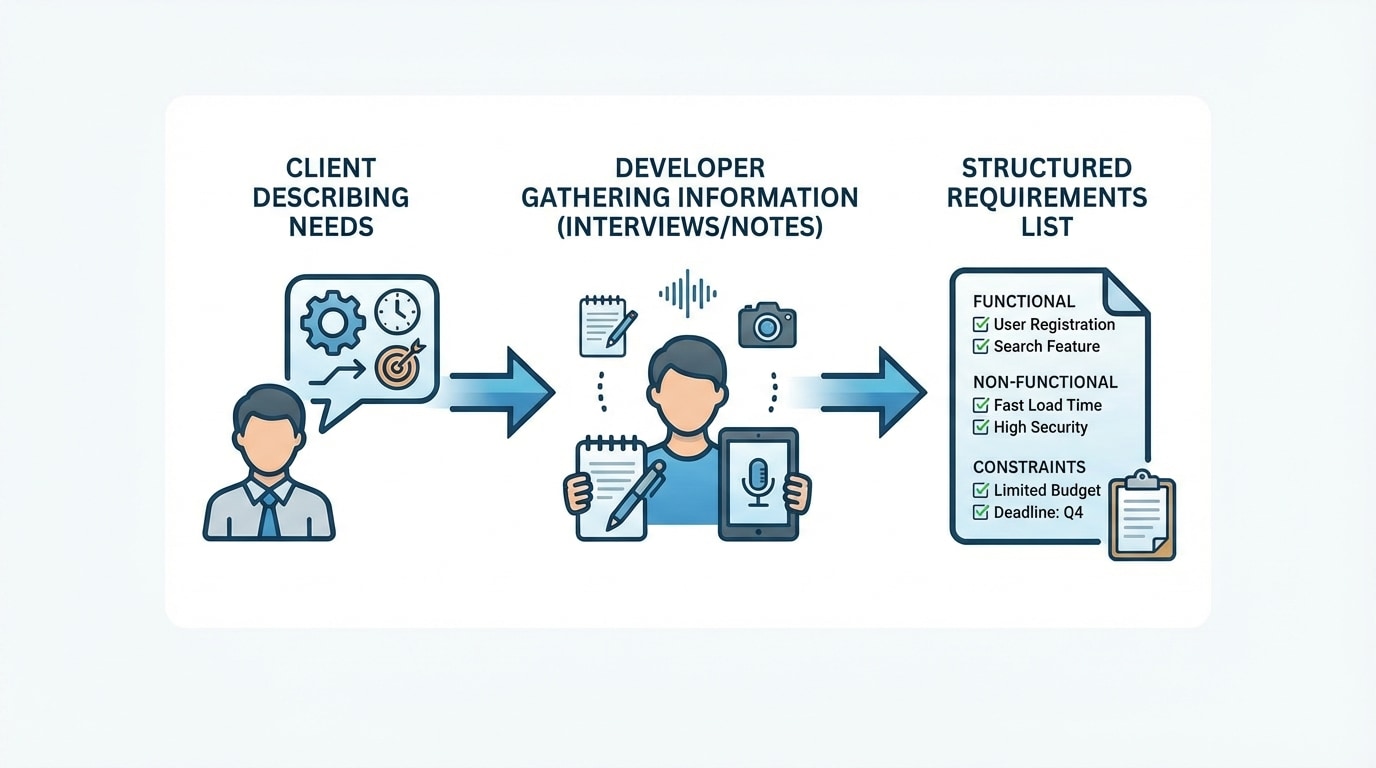
Not all requirements are the same. They can be grouped into categories that help developers design and test more effectively.
1. Functional requirements
Functional requirements describe what the system must do. They are about features and behaviors.
Examples:
Each of these can be tested: either the function exists and works as described, or it does not.
2. Non-functional requirements
Non-functional requirements describe how well the system performs, not which features it has. They affect user satisfaction and overall quality.
Important types:
3. Constraints
Constraints are limits the project must respect. These might include:
Mini case study: Suppose a local gym hires you to build an appointment scheduling app.
Together, these define what you can realistically build and how you will judge if the final product is “good enough” for the client.
Even with a detailed requirements document, words can be misunderstood. Clients might say “That sounds perfect” but imagine something completely different from what the developers are planning. To reduce this risk, programmers and designers create models and prototypes.
Common forms of models and prototypes:
For example, if you are designing a mobile homework tracker, you might first draw the home screen, the “Add assignment” screen, and the calendar view on paper or using a design tool. You show these to a small group of students and teachers and ask: “Is this what you expected? What is confusing? What is missing?”
The goal of prototypes is to get feedback early, when changes are cheap and quick, instead of after months of coding when changes are expensive and stressful.
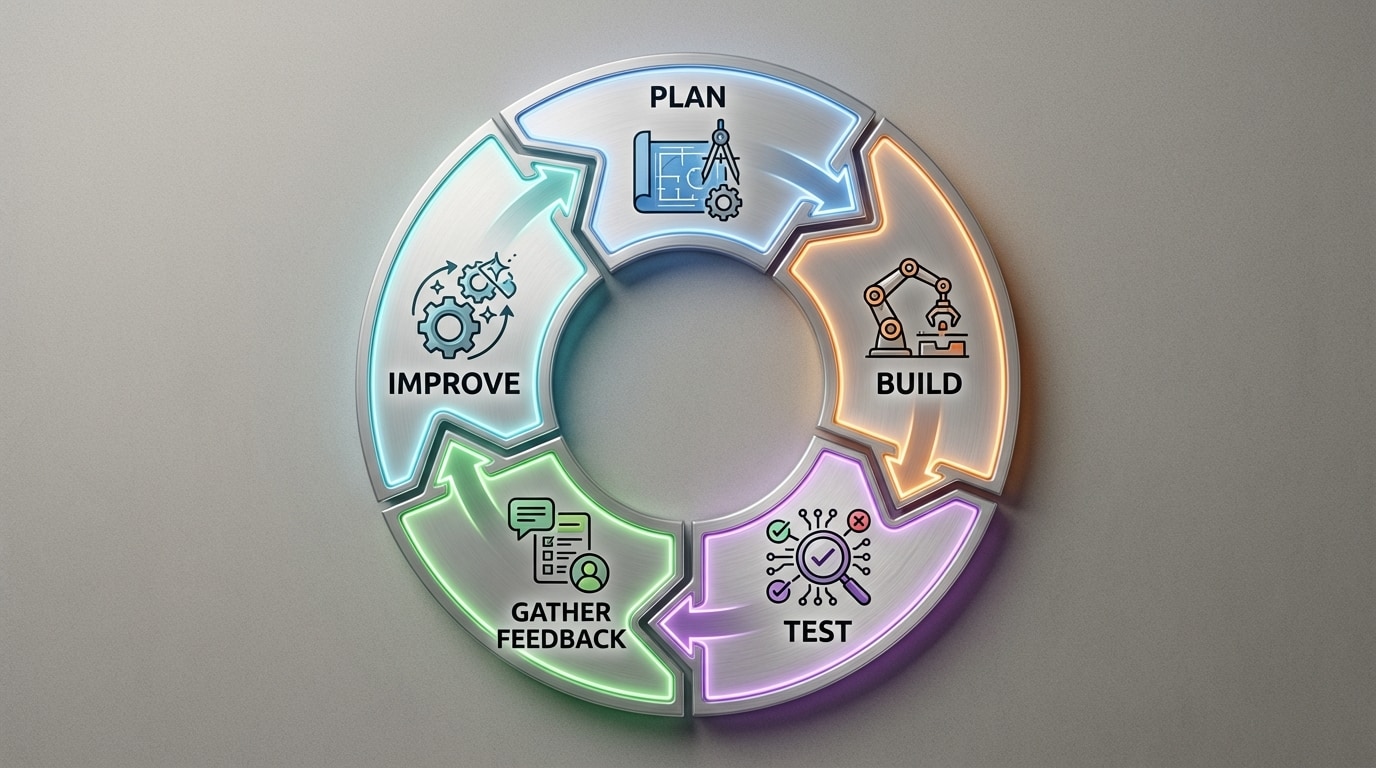
Good software is rarely “right” the first time it is coded. Instead, it evolves through cycles of building, testing, getting feedback, and improving, as in the development loop illustrated in [Figure 2]. This is called iterative development.
A typical feedback loop looks like this:
This cycle repeats many times. Each version should move the product closer to what the client and users actually need.
Types of feedback sources:
Over time, this feedback loop increases quality (fewer bugs, better performance), usability (easier to use), and client satisfaction (the software actually solves the intended problem). Without a strong feedback loop, even well-coded software can fail in the real world.
Technical skill alone does not make a successful programmer. Communication with clients and stakeholders is just as important.
Asking good questions:
When a client says, “I want a fast, secure website,” that is not enough information. Developers need to ask:
These questions turn vague desires into concrete requirements.
Trade-offs:
Resources such as time, money, and developer effort are limited. Sometimes you cannot build every feature at once. You may have to choose between:
Developers must explain these trade-offs in plain language so clients can make informed decisions.
Documentation:
Important decisions should be written down. This usually includes:
Clear documentation prevents misunderstandings like “I thought this feature was included!” and helps new team members understand the project quickly.
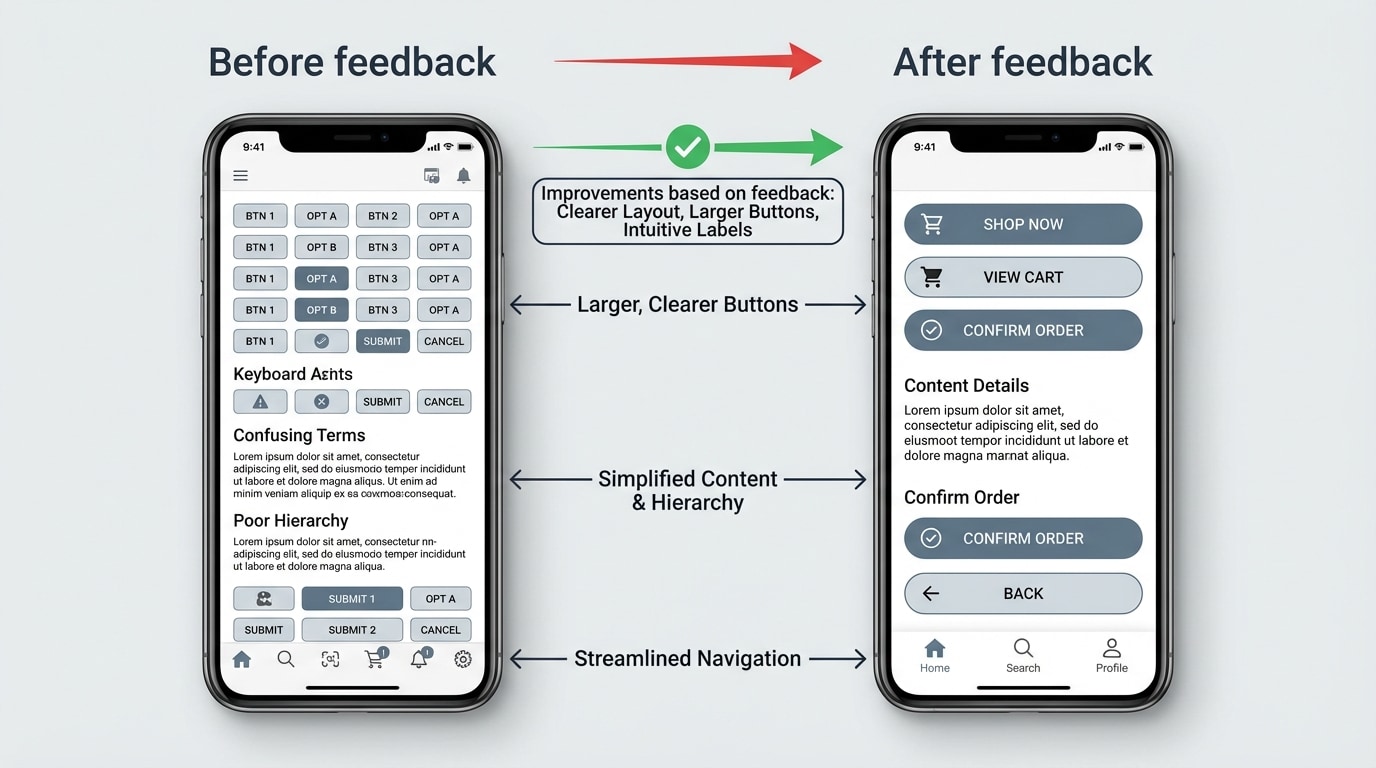
A digital product you use today is shaped by continuous client and user feedback. As these products evolve, their interfaces often change in visible ways, as shown in [Figure 3].
Example 1: Social media apps
Social platforms track which features users actually use. If many users ignore a button, the design team might move it to a different location or change its color and label. When users complain about confusing privacy controls, the company may redesign the settings page to be clearer and add explanations.
Example 2: Video games
Game developers often release early versions called “betas” to a limited audience. Players report bugs, complain about unbalanced weapons or levels, and suggest new features. The developers use this feedback to adjust game mechanics, difficulty, and controls before the full release.
Example 3: School information systems
Many schools use online systems for grades, attendance, and messaging. Administrators might be the official clients, but teachers, students, and parents all give feedback. Teachers might ask for faster ways to enter grades. Parents might request clearer views of assignments and due dates. Over time, updates respond to these requests.
Example 4: Streaming services
Streaming platforms analyze what people watch, when they stop watching, and which recommendations they click on. This data is a massive form of feedback that shapes recommendation algorithms and UI changes. If users often quit after a confusing step, designers change that step to be simpler.
In all these cases, ignoring feedback would mean losing users to competing products that listen better.
Client-based design is not just about making something popular. It is also about being fair, inclusive, and respectful of people’s rights. Feedback from diverse users is essential for this.
Accessibility:
People with disabilities often face barriers in software and web design. For example, a visually impaired user might rely on a screen reader, or a user with limited mobility might need to navigate without precise mouse movements. By listening to their feedback, developers can:
Bias and fairness:
Algorithms can unintentionally treat different groups of people unfairly. If feedback shows that a system performs worse for certain groups (for example, voice recognition that struggles with some accents), developers have an ethical duty to investigate and improve it.
Privacy and consent:
Users care about how their data is collected, stored, and shared. Feedback can reveal when people feel uncomfortable or confused about data practices. Responsible developers respond by clarifying privacy policies, reducing unnecessary data collection, and giving users more control over their information.
By valuing feedback from all user groups, not just the majority, programmers create products and services that are more just, inclusive, and trustworthy.
Main takeaways:
When programmers base their design on well-understood client requirements and take feedback seriously at every stage, they dramatically increase the chances of building computational products and services that are useful, reliable, and trusted.
