A piece of writing can go from a rough idea to a polished public product in a single afternoon. A student can draft on a phone, revise on a laptop, get comments from a classmate online, add a link to a source, and publish the final version for a real audience. That speed creates new possibilities, but it also changes what writing means. Digital writing is not just typing instead of handwriting. It is a different way of planning, sharing, revising, and presenting ideas.
When writers use technology, they can do more than produce neat text. They can reorganize paragraphs instantly, save multiple versions, collaborate in real time, connect readers to outside information, and update writing after it has already been published. In school, that might mean creating a group research page, a class newsletter article, or a literary analysis in a shared document. Outside school, the same skills are used in journalism, business, science, law, and public communication.
Digital writing also changes the relationship between writer and audience. A handwritten essay usually goes to one teacher. A digital piece might be read by classmates, families, or the public. Because of that, writers need to think carefully about clarity, tone, accuracy, design, and responsibility.
Digital publishing is the process of sharing writing through electronic platforms such as websites, blogs, shared documents, school learning systems, or online portfolios.
Recursive writing process means writing does not move in a straight line from beginning to end. Writers often return to earlier stages to rethink ideas, improve organization, edit language, and update content.
Good digital writers are not just strong typists. They are decision-makers. They choose tools that fit their purpose, shape information for readers, and revise as new ideas and feedback appear.
The recursive writing process becomes especially visible when technology is involved, as [Figure 1] shows. A writer may plan in a notes app, draft in a word processor, move sections around, get feedback in comments, revise the thesis, proofread, publish, and then return later to improve the final product. Digital tools make this back-and-forth movement faster and easier.
A common digital writing sequence includes planning, drafting, revising, editing, publishing, and updating. Even though those stages can be listed in order, they often overlap. For example, while drafting, a student may notice weak evidence and go back to research. During revision, the student may realize the introduction no longer matches the argument and rewrite it completely.
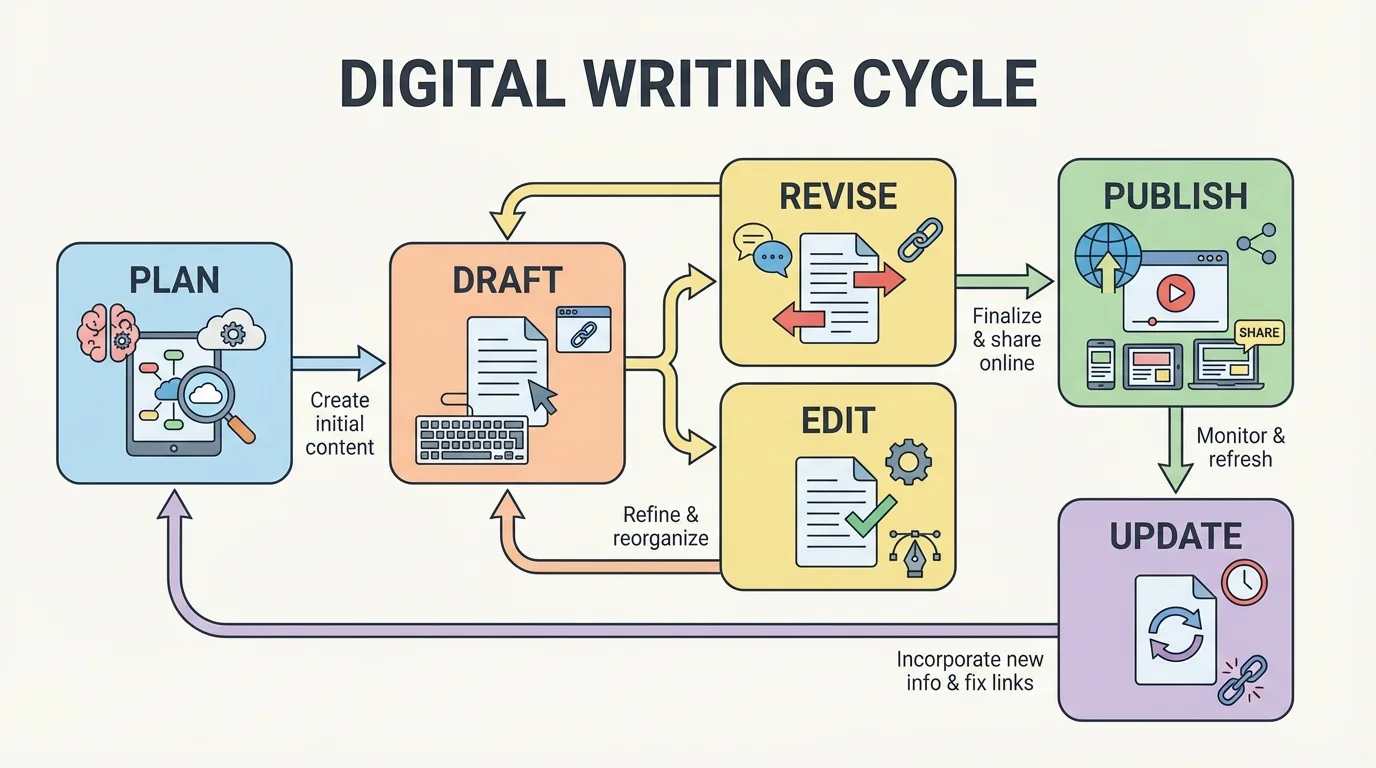
Technology supports each stage in specific ways. Planning tools include digital notebooks, mind maps, and outlines. Drafting tools include word processors and writing apps. Revising becomes easier with cut, paste, highlight, and comment features. Editing is supported by spell check, grammar suggestions, and read-aloud tools. Publishing can happen through a class website, blog, digital magazine, or shared drive folder. Updating matters because digital writing can stay alive after publication.
This is one reason digital writing can feel more realistic than traditional one-time assignments. In many real jobs, writing is never truly finished. A company updates its website. A reporter corrects a story. A scientist revises a public explanation of new findings. As we saw in [Figure 1], publication is often a stage in the middle of a longer cycle, not the final stop.
Technology and revision
Revision means improving ideas, structure, support, and clarity. Editing means correcting grammar, spelling, punctuation, and formatting. Technology helps with both, but it does not replace thinking. A grammar checker may spot a missing comma, but it cannot always tell whether your evidence is convincing or whether your organization makes sense.
Strong writers use technology as a tool, not as a substitute for judgment. They compare suggested changes with their purpose and audience instead of clicking "accept" automatically.
Different writing tasks need different platforms. A formal essay may belong in a word processor. A group report may work best in a shared online document. A public awareness campaign may need a website or blog. A digital portfolio can collect different types of work in one place. Choosing the right tool helps a writer stay organized and communicate effectively.
A word processor is useful when a writer needs careful formatting, polished paragraphs, and easy editing. Shared cloud-based documents are better when multiple people need access at the same time. Blogging platforms are useful for public writing because they can organize posts by topic and date. Presentation and publishing platforms may combine writing with images, charts, audio, or video.
| Tool | Best Use | Key Strength |
|---|---|---|
| Word processor | Essays, reports, formal drafts | Formatting and editing tools |
| Shared document | Group writing | Real-time collaboration |
| Blog or website | Public publishing | Easy sharing and updating |
| Digital portfolio | Collecting work over time | Shows growth and reflection |
| Learning platform | Class assignments | Teacher feedback and submission history |
Table 1. Common digital writing tools and the tasks they support best.
The best tool is not always the newest one. It is the one that matches the assignment, audience, and type of writing.
Professional writers often draft in one tool, revise in another, and publish in a third. The technology stack behind a news article or company webpage is often more complex than readers realize.
That matters in school too. A student might brainstorm in a notes app on a phone, expand the draft in a cloud document, then publish the final version on a class site.
One of the biggest changes technology brings to writing is collaboration. Instead of passing one paper back and forth, students can work in the same document at the same time, as [Figure 2] illustrates. They can add comments, suggest edits, divide sections, and track changes without losing earlier drafts.
Shared writing works best when each person has a clear role. One student might organize the structure, another might gather evidence, and another might check citations and formatting. In a strong group, everyone still reads the full piece, because the final product needs one clear voice and purpose.
Online writing tools often include comments, suggestion mode, and version history. Comments allow feedback without changing the text directly. Suggestion mode lets a writer propose edits that others can accept or reject. Version history saves older drafts so a group can recover lost material or review how the writing changed over time.
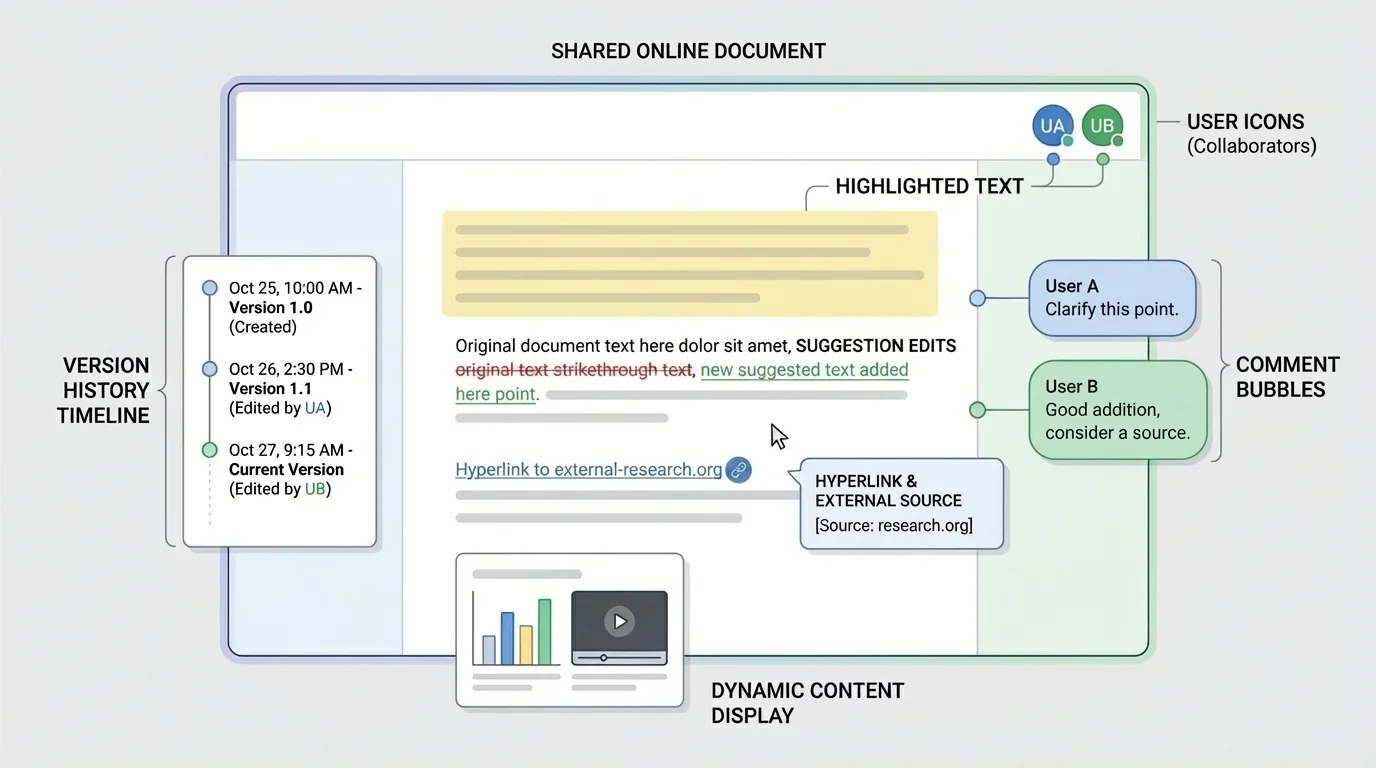
These tools are useful, but they also require digital citizenship. Writers should leave respectful comments, avoid vague feedback like "make this better," and be specific instead: "This paragraph needs evidence," or "The transition between these ideas is unclear." Clear online communication saves time and reduces conflict.
Collaboration also creates accountability. Version history can reveal who contributed, who revised, and when major changes happened. Later, when evaluating how a group project developed, teachers and students can return to the process shown in [Figure 2] and see that digital platforms record writing decisions in a way paper drafts usually do not.
Case study: a shared research article
Three students are writing an article about the effects of social media on teen sleep.
Step 1: They create a shared outline and assign sections: background, evidence, counterargument, and conclusion.
Step 2: Each student drafts a section, but all group members comment on the full article to improve consistency.
Step 3: One student notices that two sources disagree. The group adds a paragraph explaining the difference instead of ignoring it.
Step 4: Before publishing, they review version history, unify the tone, check links, and proofread the final page.
The result is stronger than three disconnected pieces because technology supports both teamwork and revision.
Shared writing is not automatically good writing. The tool helps, but the group still needs focus, organization, and mutual respect.
Digital writing can point readers beyond the page. A hyperlink connects one digital text to another source, page, video, document, or section. This ability changes how writers support claims. Instead of only mentioning a source, they can lead readers directly to it.
Links can deepen understanding when they are chosen carefully. In a research-based article about climate policy, a writer might link to a scientific report, a government data page, and an interview with an expert. In a literary blog post, a student might link to the poem being discussed or to an author biography. These choices help readers explore evidence for themselves.
Hyperlink is a clickable connection from one digital location to another. It allows writers to connect their text to supporting information, background material, or related ideas.
Citation is the information that identifies a source so readers know where ideas, quotations, or data came from.
However, linking does not remove the need for explanation. A strong writer still introduces the source, explains why it matters, and shows how it supports the point. A link should extend the writing, not replace it.
Writers must also evaluate source quality. Not every website is credible. Before linking to a source, students should ask who created it, when it was updated, whether it is biased, and whether the evidence is trustworthy. A clean design does not guarantee accurate information.
Careful citation remains essential. Even if a source is linked, borrowed ideas, quotations, and statistics must still be credited properly. Technology makes copying easy, which is why it also requires stronger attention to honesty and plagiarism.
One of technology's greatest strengths is that it lets writing change shape for different readers and devices, as [Figure 3] demonstrates. A printed page is mostly fixed. A digital text can include headings that expand or collapse, sidebars, buttons, images, audio clips, videos, or menus. The same information may appear differently on a phone, tablet, or laptop.
This flexible display helps writers organize information more clearly. Long blocks of text can be broken into sections with headings. Important points can appear in bullet lists. A table can compare information quickly. A linked menu can help readers jump to the exact part they need. These choices improve readability and make digital texts easier to navigate.
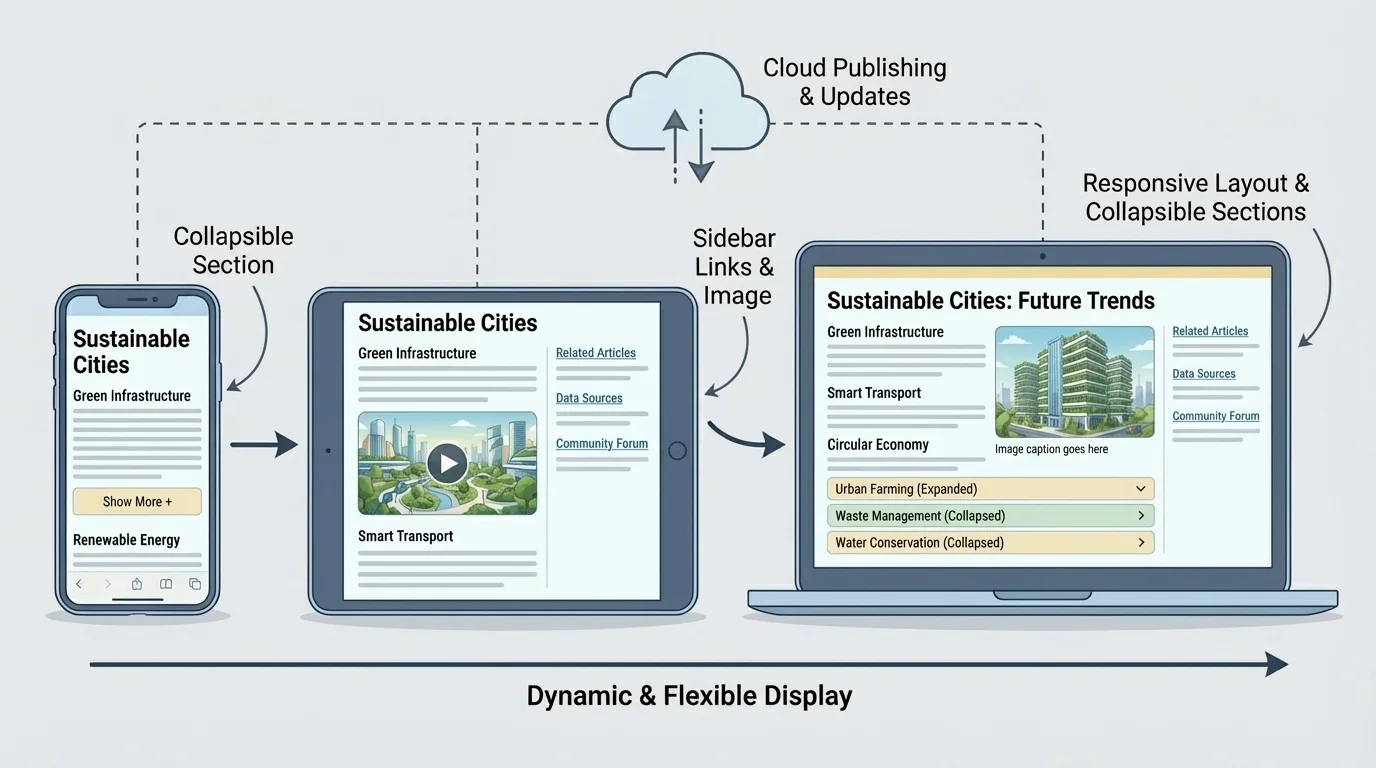
Dynamic display also allows a writer to combine modes of communication. A science explanation might include labeled images. A history article might include a timeline. A school announcement might embed a video message. This does not mean adding media just because it looks impressive. Every design choice should support understanding.
Writers should think about accessibility too. Clear fonts, readable contrast, descriptive headings, alt text for images, and logical layout help more people use the text successfully. A digital piece is stronger when it is designed not only to be attractive, but also to be usable.
Later, when revising layout decisions, writers can return to the idea shown in [Figure 3]: digital writing is flexible because form can shift along with purpose. A school article meant for quick mobile reading may need shorter sections than a detailed report meant for a large screen.
Form affects meaning
In digital spaces, how information is displayed shapes how readers understand it. A timeline emphasizes sequence. A comparison table emphasizes differences. A video clip adds tone and motion. Writers need to match the form of presentation to the message they want readers to grasp.
That is why digital writing is part composition and part design. The writer is arranging not only words, but also attention.
In print, mistakes can remain permanently. Online, writing can be corrected, expanded, and refreshed. This ability to update published work is one of the most important differences between digital and traditional publication.
Updating might involve fixing errors, replacing broken links, adding new evidence, changing outdated information, or responding to audience questions. For example, if a class website publishes an article about a community event, students may later add photos, revise event details, or include a follow-up interview. A digital piece can keep developing as the situation changes.
This does not mean writers should publish carelessly and promise to fix everything later. Publication still requires accuracy and attention. But it does mean digital writers should think of writing as something that can evolve over time.
Readers trust writing that is accurate, current, and transparent. When a published piece is updated, responsible writers make sure the new information improves clarity rather than hiding earlier mistakes.
Many professional websites include timestamps, correction notes, or revision dates. These details show readers whether information is current and whether the writer values honesty.
Because digital writing can spread quickly, mistakes can spread quickly too. A writer should proofread carefully before publishing and review again after publication. Checking links, formatting, image captions, citations, and readability matters just as much as checking grammar.
Writers also need to think about copyright, privacy, and digital footprint. Images, music, and text found online are not automatically free to reuse. Personal information should not be shared without permission. A post made carelessly today may still affect someone's reputation later.
"The Internet remembers what writers forget."
— Digital citizenship principle
Tone matters as well. In digital spaces, readers cannot always hear sarcasm or detect intention. A comment that seems harmless to the writer may sound rude to others. Professional, respectful language is especially important in school collaborations and public-facing work.
Writers should also avoid depending entirely on automated tools. Spell check may miss homophones, grammar software may misread style, and citation generators can produce errors. Human review remains essential.
These skills are not limited to English class. A student council might publish meeting updates. A science group might create a webpage explaining local water quality data. A history class might build an online exhibit with captions, timelines, and source links. A student applying for jobs, internships, or colleges might maintain a digital portfolio that displays writing growth over time.
In each case, the writer uses technology not just to type words, but to shape communication for an audience. That includes choosing structure, integrating sources, designing layout, collaborating when needed, and revising after feedback.
Real-world publishing example: a school literary magazine
A school literary magazine moves through many digital stages.
Step 1: Student editors collect poems, essays, and artwork through an online submission form.
Step 2: Editors review submissions in shared folders and leave comments for revision.
Step 3: The final pieces are arranged on a website with author names, categories, and navigation links.
Step 4: After publication, the site is updated with new issues, corrections, and featured selections.
The magazine becomes both a writing project and a publishing platform.
When students learn to use digital tools well, they are not only completing assignments. They are practicing how modern communication actually works.
