Have you ever looked at your screen, your notes, your messages, and your to-do list and thought, "How did all of this pile up so fast?" That feeling is common, especially in online school, where a lot of the structure has to come from you. When you learn how to manage your own workload, you are not just becoming "more organized." You are building a real-life skill that helps with school, activities, family responsibilities, and eventually jobs, finances, and adult independence.
Self-management does not mean being perfect. It means creating a dependable way to remember what matters, decide what to do next, and keep moving even when you feel busy or distracted. A good system lowers stress because you stop relying on memory alone. Instead of trying to hold everything in your head, you use tools and routines that do some of the work for you.
Self-management is the ability to organize your time, tasks, attention, and effort so you can meet responsibilities without feeling constantly overwhelmed.
Workload is the total amount of work you need to complete. Deadline means the date or time something must be finished. Routine is a pattern you repeat regularly, such as checking assignments every morning. Prioritize means choosing what deserves your attention first.
In online school, self-management matters even more because no one is physically beside you reminding you to start, switch tasks, or turn something in. You may also be balancing chores, sibling care, sports, creative hobbies, or community activities. A strong system helps you stay in control instead of feeling like your day is controlling you.
A system is not just a planner or an app. It is a set of habits and tools that work together. Your system should answer three questions every day: What do I need to do? When will I do it? How will I know I finished it?
If your system is weak, you may forget assignments, start big projects too late, or spend an hour "getting ready to work" without actually beginning. If your system is strong, you can open your plan, see the next step, and get started quickly. That saves mental energy. You stop making the same decisions over and over.
A good system is simple enough to use when you are tired. If your planning method is too complicated, you will stop using it. The best system is one you can keep up with on busy days, not just on perfect days.
Your self-management system should include these parts: one place for tasks, one calendar for dates, a routine for planning, a way to break work down, and a way to check progress. When those parts work together, you create accountability for yourself. That means you have a clear way to notice whether you are following through.
Your first job is to create one trusted place for your school life. [Figure 1] This "command center" can be digital, paper, or a mix of both. What matters is that you do not scatter important information across random tabs, screenshots, sticky notes, and mental reminders. If your assignments are in one app, your due dates are in another, and your project ideas are in a notebook you rarely open, things will get lost.
A simple command center has four parts: a task list, a calendar, a materials space, and a completed-work check. Your task list holds assignments and next steps. Your calendar holds due dates and study times. Your materials space holds notes, files, links, and drafts. Your completed-work check helps you confirm that a task is truly done, not just "almost done."
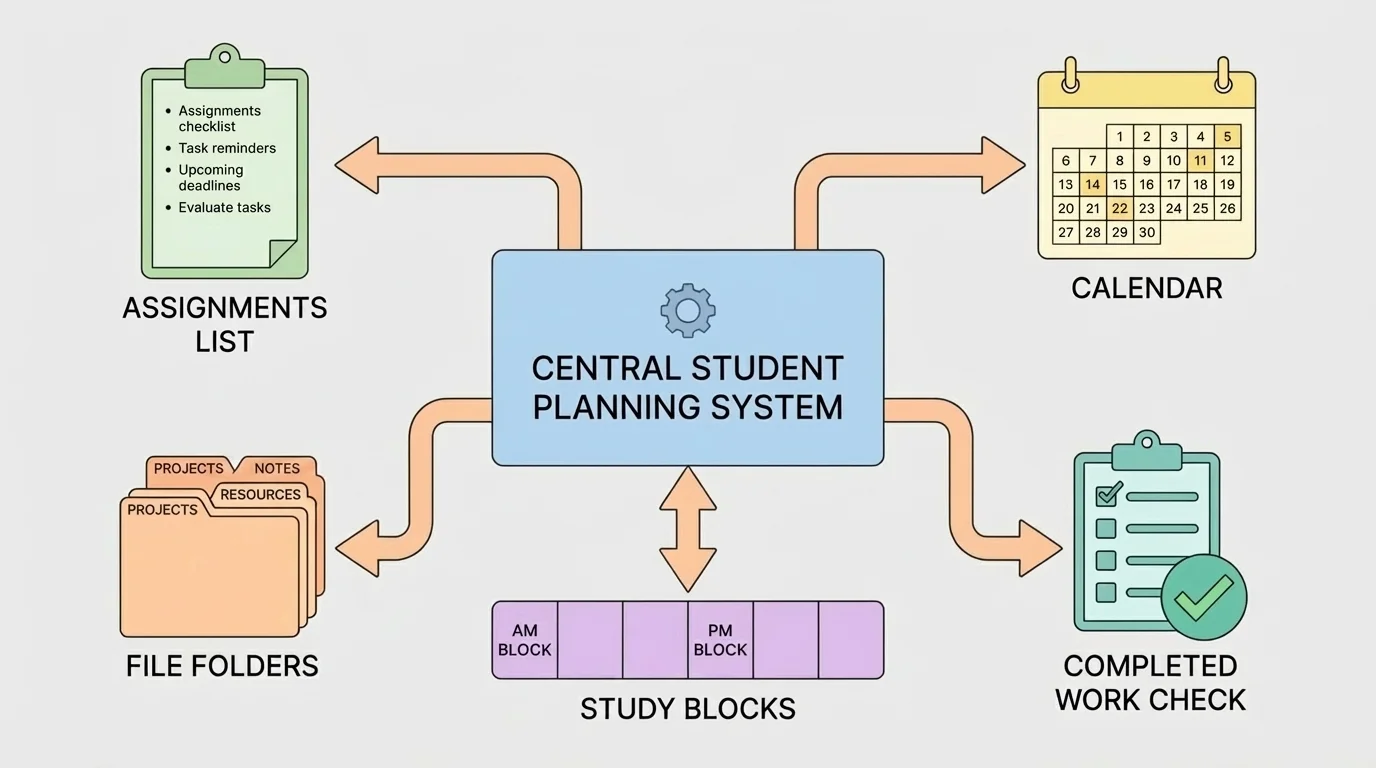
For example, you might use your online school dashboard for assignment details, a calendar app for due dates, and one notebook for your daily top tasks. That works well if you check all three in the same order every day. Another student might prefer one paper planner and one folder on their device for each class. That also works. The goal is not to copy someone else's exact method. The goal is to create one system you actually trust.
Here is a useful rule: if you think, "I'll remember that," put it in your system anyway. Memory is helpful, but it is unreliable when you are tired, distracted, stressed, or focused on something else.
| Part of your system | What it does | Practical example |
|---|---|---|
| Task list | Shows what needs action | "Math quiz review," "history outline," "upload science photo" |
| Calendar | Shows when things happen | Essay due on Thursday, club video call at 6:00 p.m. |
| Materials space | Keeps resources easy to find | One folder for each class with notes and drafts |
| Completion check | Prevents "I thought I submitted it" problems | Verify upload, press submit, confirm status |
Table 1. Core parts of a practical self-management system for online learning.
Try This: Pick one place today where all new assignments will go. From now on, every task enters that same place first.
Large tasks feel stressful mostly because they are unclear. [Figure 2] A project can seem huge until you use chunking to divide it into smaller steps. Chunking means dividing one big job into smaller actions that are easier to begin and finish. "Do the project" is not a usable step. "Pick topic," "find three sources," and "write introduction" are usable steps.
When you break work down, include both the action and the estimated time. A step like "review notes" is better when it becomes "review notes for 20 minutes and list three key ideas." That gives your brain a clear starting point. Even if your estimate is imperfect, it is still more useful than guessing nothing.
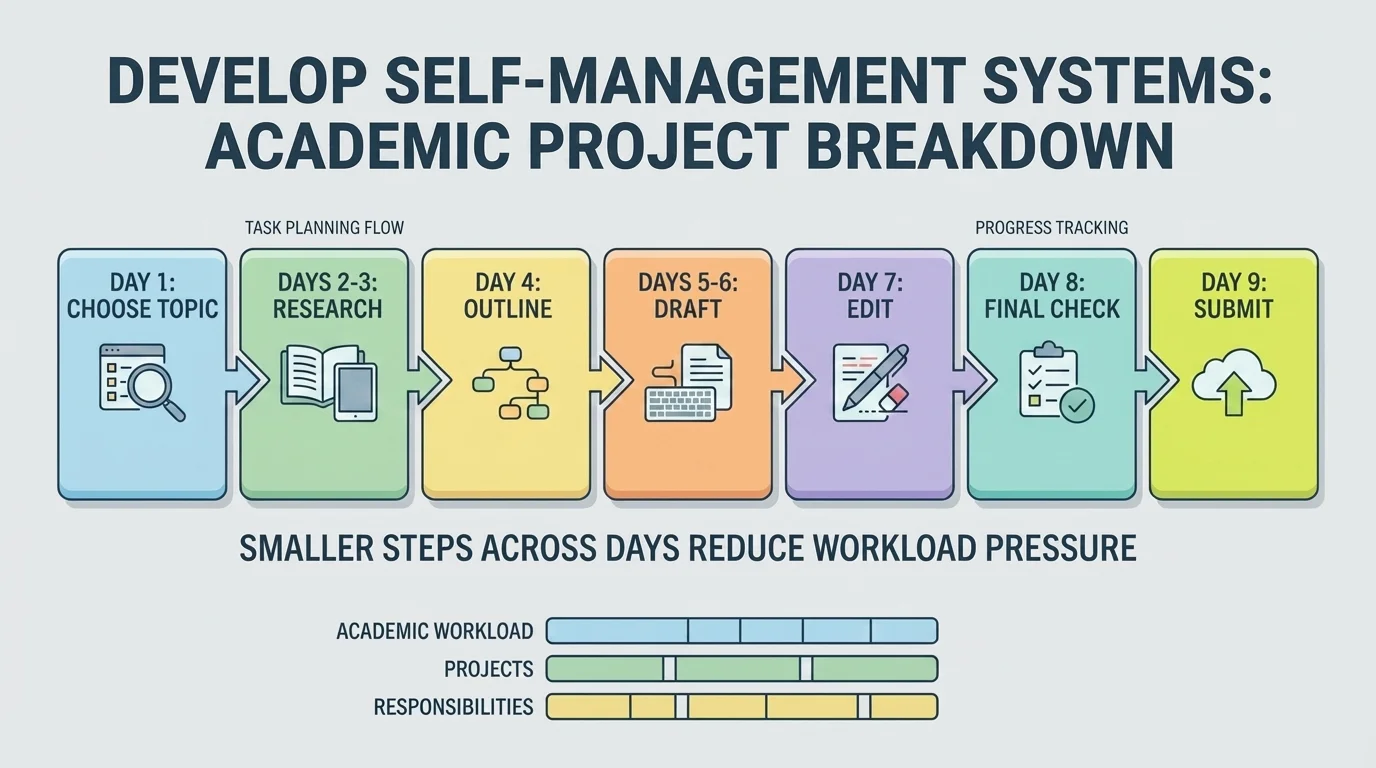
Suppose you have a presentation due in one week. Instead of waiting until the night before, you could plan it like this: Day 1, choose a topic and gather sources; Day 2, read and take notes; Day 3, create an outline; Day 4, make slides; Day 5, write speaker notes; Day 6, practice and edit; Day 7, submit. That is much easier than facing one giant unfinished task.
Example: Breaking a project into steps
You have a digital science report due in 6 days.
Step 1: Write the final goal clearly.
Goal: finish and submit the report by Sunday at 8:00 p.m.
Step 2: List the parts.
Parts: research, notes, outline, first draft, revision, final upload.
Step 3: Estimate time for each part.
Research: 30 minutes; notes: 20 minutes; outline: 15 minutes; draft: 45 minutes; revision: 25 minutes; upload check: 5 minutes.
Step 4: Spread the work across several days.
Instead of one long session of about 140 minutes, divide it into shorter work sessions.
Step 5: Put each step in your calendar.
If it is scheduled, it is more likely to happen.
Notice that the total work time is about 140 minutes, which is a lot easier to handle when divided into smaller blocks. You do not have to "feel ready" for the whole project. You only need to start the next small step.
Try This: Take one assignment you have right now and rewrite it as at least three small action steps.
Good self-management happens in two layers: weekly planning and daily planning. Weekly planning helps you see the bigger picture. Daily planning helps you act on it. If you only plan by the day, big deadlines can sneak up on you. If you only plan by the week, you may know what matters but still waste the day.
Set aside a weekly reset time, such as Sunday evening or Monday morning. During this reset, check all classes, list due dates, notice longer projects, and block time for important work. This is also the time to include non-school responsibilities, like chores, appointments, practice, or helping your family. A plan that ignores real life is not a useful plan.
Then, each day, choose your time blocks and your top three tasks. A time block is a set amount of time for one kind of work. You might plan a 30-minute reading block, a 25-minute writing block, and a 15-minute check-and-submit block. Time blocking helps because it turns vague intentions into specific appointments with yourself.
Weekly planning reduces surprises; daily planning reduces hesitation. Weekly planning helps you prepare early. Daily planning helps you know exactly what to begin when it is time to work.
In online school, daily routines matter because your home environment may have interruptions. Maybe a sibling needs help, your phone keeps buzzing, or you lose time switching between tabs. A small routine can protect your focus: open your planner, open the needed class tab, silence notifications, gather materials, and begin with the easiest useful step.
Some students work best in the morning; others focus better later. Your schedule should match your energy when possible. If you know your brain is sharper at 10:00 a.m., place your hardest school task there. Save lower-energy jobs, like renaming files or checking messages, for times when your concentration is lower.
Your brain often resists starting more than it resists working. Once you begin, even for 5 minutes, continuing usually feels easier than expected.
Try This: Tonight, list your top three tasks for tomorrow before you stop working. That way, tomorrow starts with direction instead of confusion.
[Figure 3] When several tasks compete for your attention, you need a fast way to decide what comes first. One useful method is an urgent-important matrix. Urgent means it needs attention soon. Important means it has a meaningful effect on your goals, grades, or responsibilities.
A task due tonight is urgent. A project due next week may not feel urgent yet, but it is important. If you ignore important tasks until they become urgent, stress rises fast. Strong self-management means working on important tasks before they become emergencies.
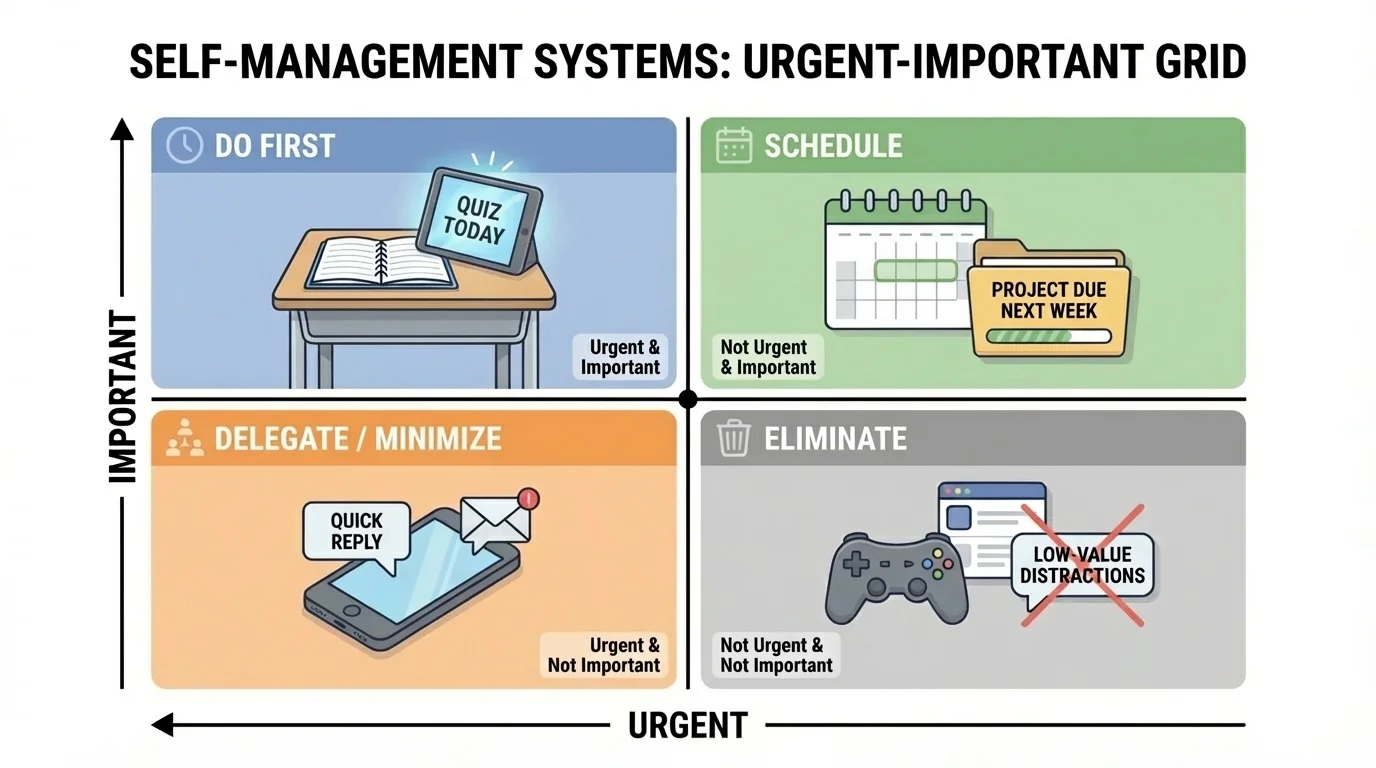
Here is a simple way to sort tasks: Do now for urgent and important work, like an assignment due today. Schedule for important but not urgent work, like starting a project early. Do quickly for small urgent tasks, like replying to a teacher message. Reduce or avoid for things that feel busy but are not helping, like endlessly reorganizing files instead of writing the draft.
As you saw in [Figure 3], not every urgent thing deserves the same amount of time. A two-minute form and a one-hour essay might both be urgent, but they do not belong in the same mental category. Quick tasks should not steal all your energy from deep work.
| Situation | Weak choice | Stronger choice |
|---|---|---|
| Quiz tomorrow, project due in 5 days | Only study for the quiz | Study for the quiz, then spend 20 minutes starting the project |
| Many missing small tasks | Guess where to start | List them, sort by deadline and points, begin with the highest impact |
| You feel busy but made little progress | Keep multitasking | Choose one important task and finish one chunk before switching |
Table 2. Examples of weak and strong prioritizing choices.
Try This: When your list feels overwhelming, circle one task that is both important and close to due. Start there.
Even the best plan can fail if your attention keeps getting pulled away. In online learning, distractions are often only one click away. Social media, games, messages, extra tabs, and even "productive" distractions like changing fonts or reorganizing folders can break your focus.
Procrastination does not always mean laziness. Often, it means a task feels boring, confusing, stressful, or too big. Your brain avoids discomfort by choosing something easier. The fix is usually not "try harder." The fix is to make starting easier.
How to start when you do not feel like it
Step 1: Shrink the starting point.
Instead of "write the essay," begin with "open the document and type the title."
Step 2: Set a short timer.
Work for 10 or 15 minutes. Starting small lowers resistance.
Step 3: Remove one distraction before you begin.
Put your phone across the room, close extra tabs, or silence notifications.
Step 4: Use momentum.
If you are focused when the timer ends, keep going. If not, take a short break and restart.
Your environment matters too. A perfect workspace is not required, but a consistent one helps. Try to work in the same spot when possible. Keep needed materials nearby. If noise is a problem, use quiet background sound or headphones. If your device pulls your attention away, keep only the tabs open that you need for the current task.
Energy management is part of self-management. Sleep, food, hydration, movement, and breaks affect your focus more than many students realize. If you plan to do your hardest task when you are exhausted, the plan may fail even if it looks good on paper. A smart system matches difficult work to your strongest energy times.
"You do not rise to the level of your goals. You fall to the level of your systems."
— James Clear
This idea matters because motivation changes from day to day. Systems are what carry you when motivation is low. If you have a set start routine, a clear task list, and small next steps, you can still make progress on a day when you do not feel especially motivated.
A self-management system is not something you build once and never change. You need a regular weekly review to see what is working. During your review, look at what you completed, what you postponed, what took longer than expected, and what is coming next. This helps you improve your estimates and catch problems early.
Sometimes you will fall behind. That does not mean your system failed forever. It means you need a recovery plan, as [Figure 4] illustrates. The worst response is often avoidance. When students feel behind, they sometimes stop checking messages or dashboards because they feel nervous. That makes the problem bigger.
Instead, do three things: identify what is missing, communicate early, and restart small. Make a list of unfinished work. Mark what is still worth completing. Then send a clear message if needed: explain briefly, ask what can still be turned in, and state your plan. After that, pick the smallest meaningful task and begin. Small action rebuilds momentum.
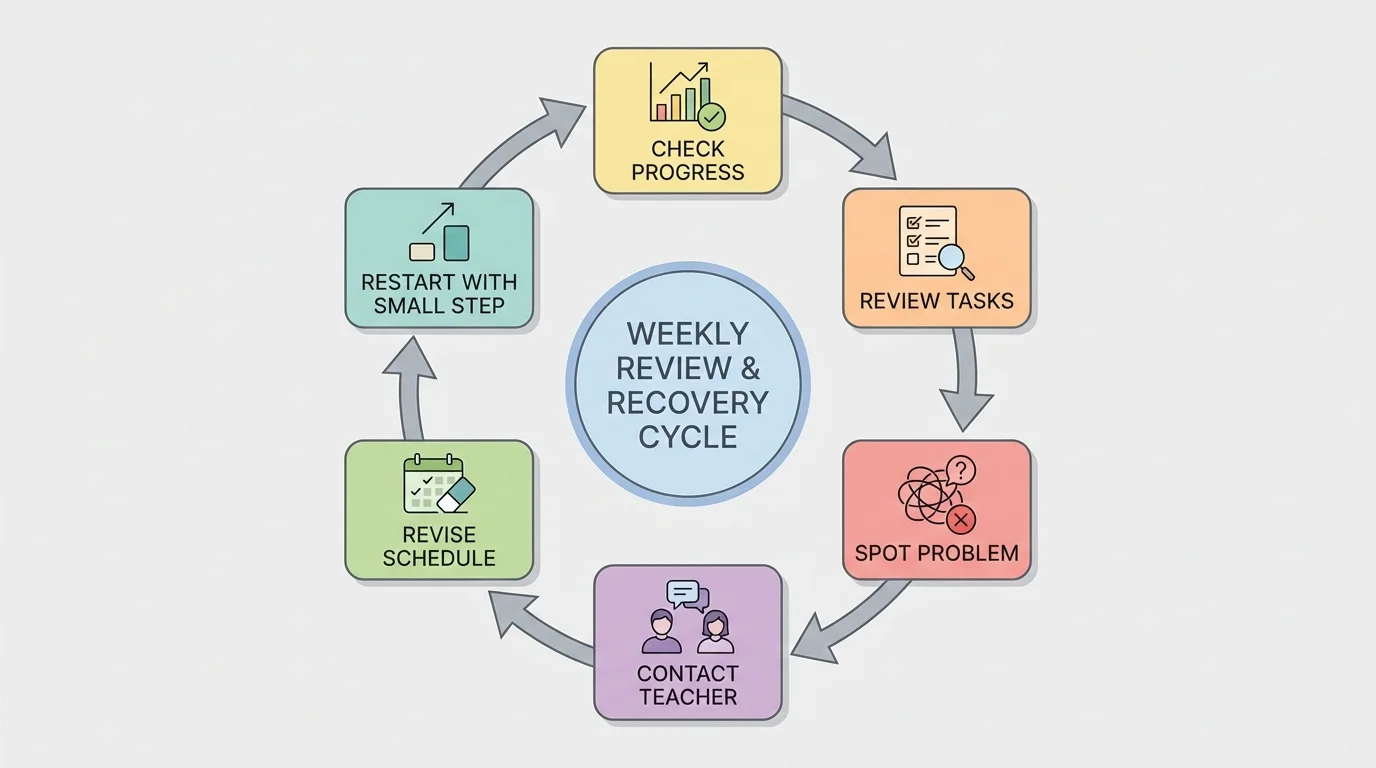
As shown earlier in [Figure 1], your command center helps here because you can quickly see what is overdue, what is submitted, and what needs time on your calendar. And as [Figure 4] makes clear, recovery is a cycle, not a one-time fix. You review, adjust, act, and then check again.
You should also notice patterns. Maybe reading assignments always take longer than you think. Maybe you focus best after a snack and short walk. Maybe your phone causes most of your lost time. These patterns are useful information. A strong system changes based on real experience, not wishful thinking.
Consider Maya, an online eighth-grade student with four classes, soccer practice twice a week, and chores at home. At first, she kept assignments in her head and only checked due dates when she felt worried. She often remembered work late at night. Once she built one task list, did a weekly reset, and split projects into steps, she stopped having so many last-minute surprises. Her stress did not disappear, but it became manageable because she always knew the next action.
Now consider Jayden, who kept making detailed plans but rarely followed them. His problem was not planning. It was starting. He solved that by creating a short start routine: water bottle ready, notifications off, planner open, first task chosen, timer set for 10 minutes. That routine made action automatic. Over time, those small starts added up to much better consistency.
If you have learned about goal setting before, remember that goals tell you what you want to achieve, but systems control how you work toward it every day. A goal without a system often stays a wish.
Your responsibilities may also include things outside school. Maybe you help cook dinner, watch a younger sibling for part of the afternoon, or attend a community activity online. A useful plan includes these responsibilities instead of pretending they do not exist. If you need to help from 5:00 to 6:00 p.m., your study plan should work around that reality.
Try This: Create a short weekly reset checklist: check classes, list due dates, break projects into steps, schedule work blocks, and prepare tomorrow's top three tasks.
