A lot of online danger does not look dangerous at first. It can look like a fun game invite, a giveaway, a new follower, a message from a "friend," or a warning that your account has a problem. That is what makes digital risk tricky: the most harmful situations often start with something that seems normal.
When you are online, you are constantly making small choices: what to post, what to click, who to answer, what to believe, and what to share. One rushed decision can lead to an account being stolen, private information being exposed, money being taken from a family member, or a conversation becoming unsafe. The good news is that digital safety is a skill. You can learn how to slow down, notice warning signs, and make stronger choices.
Evaluating digital risk means thinking before you act. Instead of asking only, "Is this real?" you also ask, "What could happen if I trust this?" That shift matters. Even if something turns out to be harmless, cautious habits protect you. If something is dangerous, those same habits can save you from a much bigger problem.
Digital risk is the chance that something online could harm your privacy, identity, safety, reputation, relationships, or devices. Identity includes the information that can be used to recognize you or pretend to be you. A scam is a trick meant to get your information, money, access, or trust. An unsafe online interaction is communication that feels manipulative, threatening, secretive, sexual, pressuring, or otherwise harmful.
Some risks are obvious, like a stranger demanding personal information. Others are subtle, like a quiz that collects details about your birthday, pets, and favorite places. Those details may seem random, but they can be used to guess passwords or security questions.
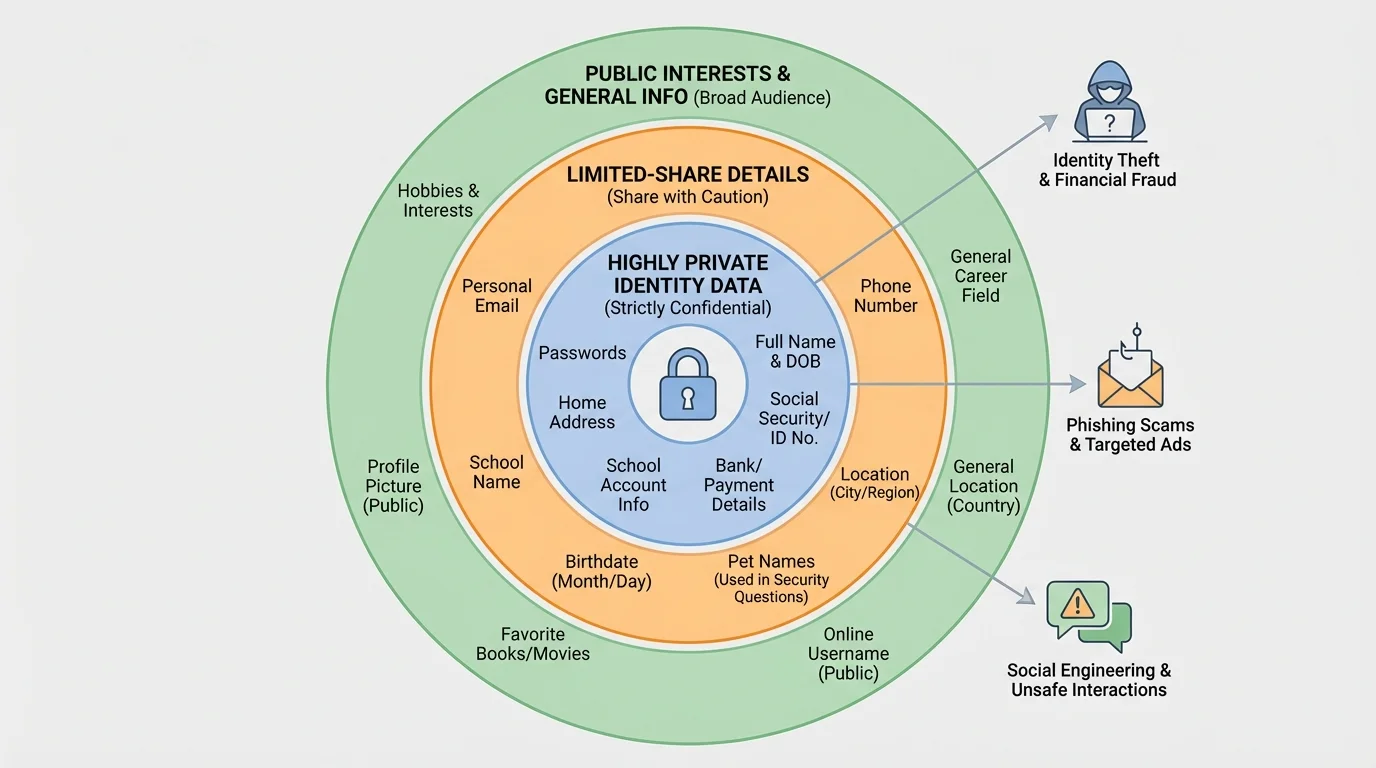
Your digital footprint is the trail of information connected to you online. It includes what you post, what others post about you, the usernames you choose, the photos you share, and the accounts you use. Parts of your identity may seem harmless by themselves, but when combined they can become risky, as [Figure 1] shows through different layers of personal information.
Think of your personal information in levels. Some things are usually low risk, like a favorite sport or a general hobby. Some things are medium risk, like your city, age, or a selfie in a recognizable location. Some things are high risk, like your full name, home address, phone number, passwords, school login, live location, or photos of documents. The more pieces someone collects, the easier it becomes to identify you, guess your accounts, or pretend to be someone you trust.
A common mistake is saying, "It is only one small detail." But online safety is often about combinations. If you post your birthday, your pet's name, your gaming username, and a photo with your street sign in the background, you have shared much more than you may realize. Someone could use that information for password guessing, fake friendship, or impersonation.
Your identity also includes your reputation. A joke, photo, or comment posted in the moment can be copied, forwarded, or screenshotted. Even if you delete it later, someone else may still have it. That does not mean you should be scared of posting anything. It means you should treat posting like publishing. Ask yourself whether you would still be okay with it later.
Another important idea is privacy settings. These are controls that let you choose who can see your posts, contact you, tag you, or view your profile. Privacy settings are helpful, but they are not magic. They lower risk; they do not erase it. A private account can still be screenshotted, copied, or viewed by someone you accepted without thinking carefully.
Many account recovery systems still use details such as birthdays, pet names, and favorite places. Information that seems personal but safe can become a clue for someone trying to break into an account.
One of the smartest habits you can build is separating what is public from what is private. Public information is what you are okay with many people knowing. Private information is anything that could expose, track, identify, embarrass, or harm you if shared with the wrong person.
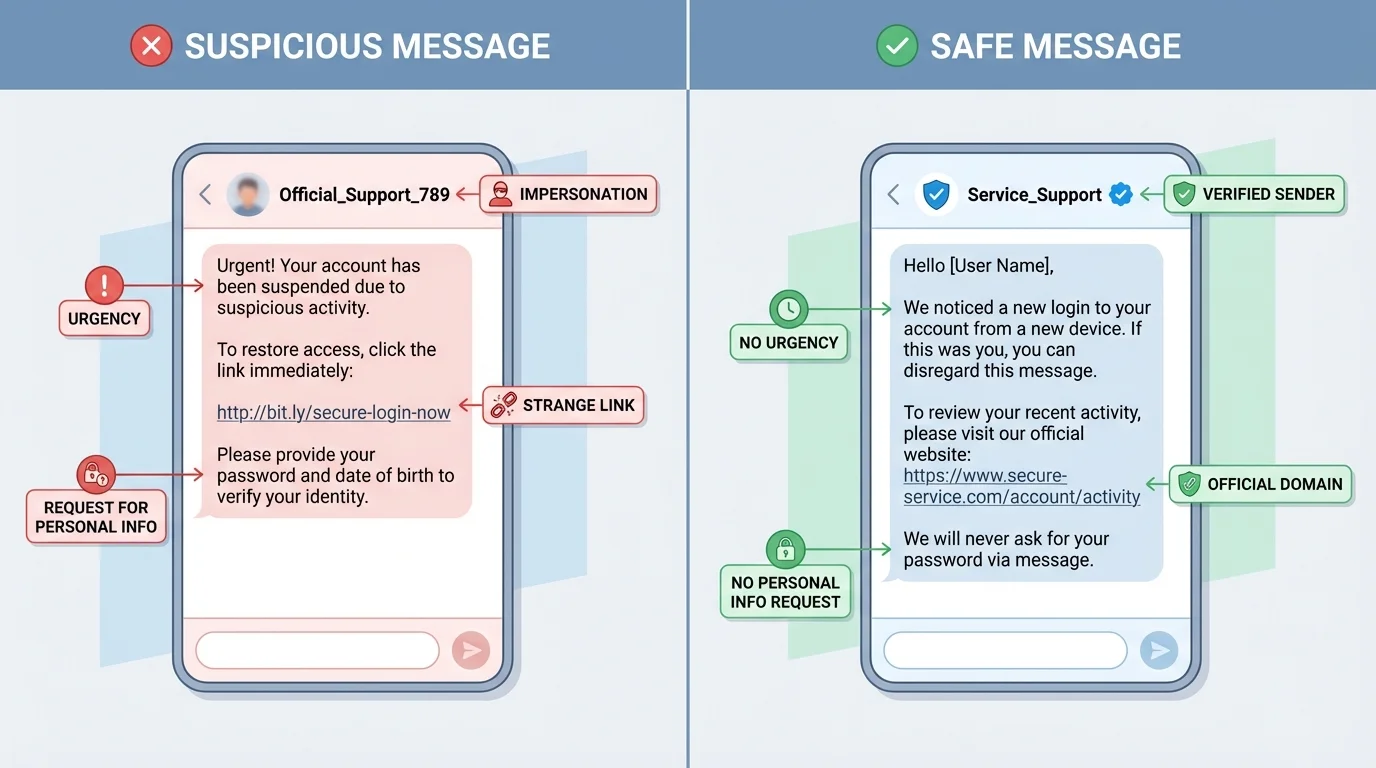
Scams work because they target feelings before they target facts. They try to make you excited, scared, curious, greedy, flattered, or rushed. A message might promise free game currency, claim you won a prize, warn that your account will be locked, or say a friend needs urgent help. Those emotional pushes are major warning signs, as [Figure 2] illustrates in a suspicious message.
Phishing is when someone tries to trick you into giving information, clicking a harmful link, or logging into a fake website. It might come through email, text, direct message, or a fake pop-up. The message often looks official, but small details give it away: weird spelling, a strange link, pressure to act fast, or a request for information real companies should not ask for in a message.
Another common trick is impersonation. A scammer may pretend to be a company, a content creator, a tech support worker, a friend, or even a family member. If someone says, "This is urgent, don't tell anyone," that is a serious red flag. Safe adults and real businesses do not usually pressure you into secrecy.
Watch for these scam signs: urgent deadlines, threats, unbelievable rewards, requests for passwords, requests for payment or gift cards, links that do not match the real site, and messages that feel just a little "off." You do not need proof that something is fake before being cautious. If it feels wrong, pause.
Scams also show up in buying and selling. A fake seller may ask you to pay outside the app, use gift cards, or move the conversation to another platform quickly. A fake buyer may "accidentally" overpay and ask for money back. These tricks are designed to confuse you and make you act before thinking.
If you game online, be careful with "free skins," "special mods," "account upgrades," or "secret hacks." Offers that seem too good to be true usually are. Downloading random files or typing your password into an unofficial site can lead to malware, account theft, or both.
Case study: The fake giveaway
You get a direct message saying you won a gaming headset. To claim it, you must click a link and enter your username, password, birthday, and shipping address within ten minutes.
Step 1: Notice the pressure
The short time limit is meant to stop you from thinking clearly.
Step 2: Check the request
A real giveaway would not need your password. Asking for it is a major warning sign.
Step 3: Verify outside the message
Go to the official account or website yourself instead of using the link.
Step 4: Protect yourself
Do not click. Report the message, block the sender, and move on.
The main lesson is simple: urgency plus personal information request equals high risk.
As with the comparison in [Figure 2], scam messages often mix a believable look with one or two pressure tactics. Your job is not to investigate like a detective. Your job is to recognize the risk and not take the bait.
Not every risky interaction is a scam. Some are about control, manipulation, or emotional pressure. An unsafe interaction might begin with compliments, shared interests, or sympathy. Over time, the person may try to make the connection more private, more intense, or more secret.
Be careful when someone you do not really know online asks for private photos, your location, your full name, your school account details, or a private call right away. It is also a warning sign if they push you to keep the conversation secret from parents, guardians, or other trusted adults. Safe relationships do not depend on secrecy and pressure.
Grooming is a process where someone builds trust with a young person in order to manipulate, exploit, or abuse them later. It can look friendly at first. The danger is not always obvious in the beginning. That is why patterns matter more than one single message.
How manipulation usually works
Manipulation often follows a pattern: attention, trust-building, testing boundaries, secrecy, pressure, and control. A person may start by being extra nice, then slowly ask for more access, more personal details, or more private communication. The shift can be gradual, which is why it is important to pay attention to how the interaction changes over time.
Unsafe interactions can also happen between people closer to your age. Someone may pressure you to send a photo, share gossip, hand over a password, or join in bullying. If a conversation makes you feel trapped, confused, scared, ashamed, or pressured, treat that feeling as useful information. Discomfort is a signal worth respecting.
One practical rule is this: if you would not want a trusted adult to read the conversation, stop and think carefully. That rule is not perfect, but it can help you notice when a situation is moving in a risky direction.
Earlier, [Figure 1] separates low-risk and high-risk personal details. Unsafe interactions often become more dangerous when the other person starts collecting those high-risk details piece by piece.
You do not need to memorize a giant list of rules. A short process works better. [Figure 3] presents this quick system as a clear decision path: stop, check, decide, act. Before you click, reply, join, share, or send, use that process.
Stop. Pause for a moment. Scammers and manipulators want speed. A pause gives your brain time to catch up with your emotions.
Check the sender. Do you really know this person? Is the account verified? Does the username look slightly different from a real one? Have they contacted you in a normal way before?
Check the request. Are they asking for personal information, money, passwords, codes, photos, location, or secrecy? Are they trying to move you to another app quickly? Are they creating urgency?
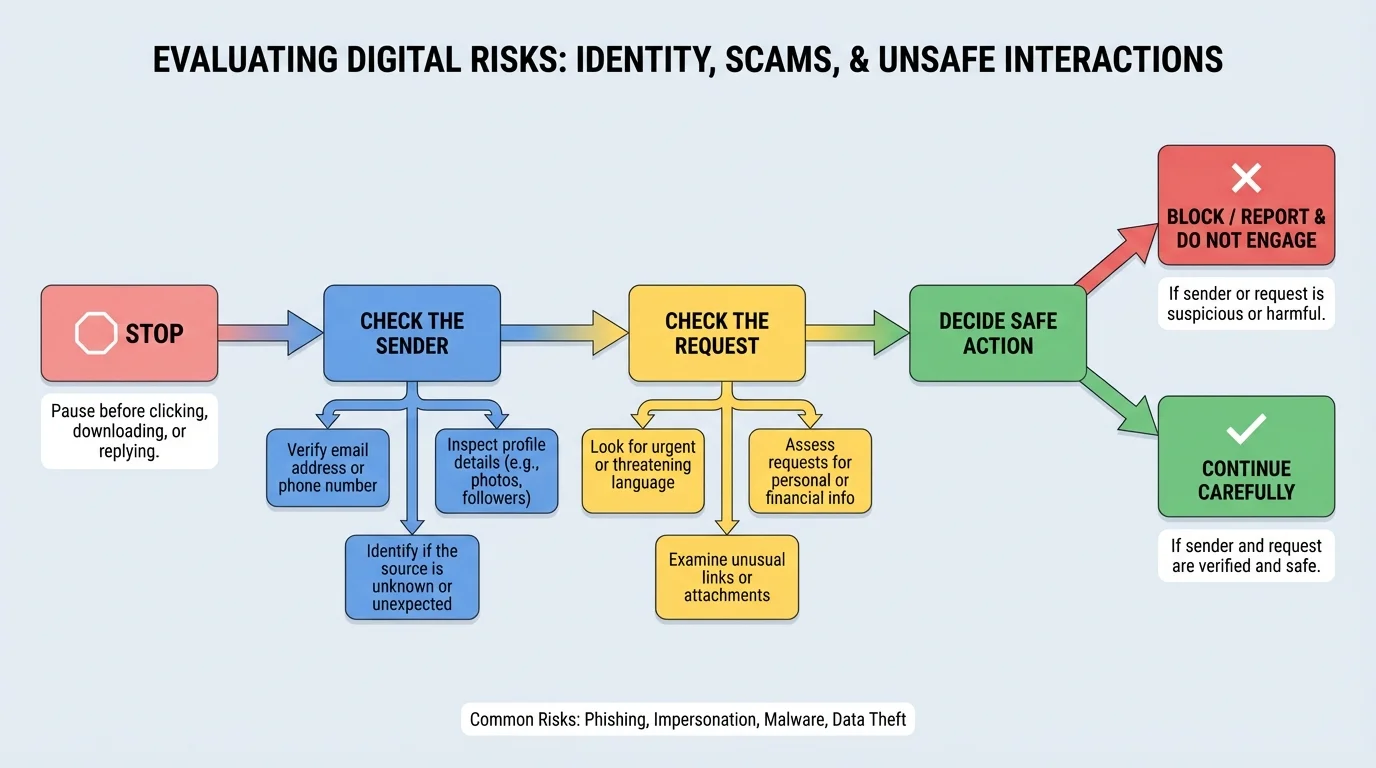
Decide the risk level. You can sort many situations into three levels:
| Risk level | What it looks like | What to do |
|---|---|---|
| Low | Normal message, no pressure, no personal info requested | Proceed carefully |
| Medium | Unknown person, odd request, unclear purpose | Do not share; verify first |
| High | Urgency, secrecy, password request, money request, threats, sexual pressure | Block, report, and tell a trusted adult |
Table 1. Risk levels for evaluating online messages and interactions.
Act safely. If something is low risk, continue with caution. If it is medium risk, verify it using another method. If it is high risk, do not engage. Leave, block, report, and get help.
This system is useful because it turns a vague feeling into a decision. Instead of just thinking, "This is weird," you ask specific questions. That helps you respond more confidently.
If a message or post creates strong emotion fast, that is a clue to slow down. Strong emotion can make smart people ignore obvious warning signs.
The flow works well for more than messages. You can use it for links, pop-ups, download offers, online sellers, friend requests, and group chats.
Even careful people make mistakes. Maybe you clicked a link, replied to a scammer, shared too much, or realized a conversation has turned unsafe. The goal is not to panic. The goal is to respond in the right order. [Figure 4] shows a calm response plan that helps you protect yourself faster.
First, stop engaging. Do not keep arguing, explaining, or trying to "fix" the person. If it is a scam, more replies can give them more chances to manipulate you. If it is an unsafe interaction, continuing can increase risk.
Next, save evidence. Take screenshots, save usernames, and keep message records if possible. Evidence can help with reporting and with explaining the situation to a trusted adult or the platform.
Then block and report. Most apps, games, and social platforms have tools for this. Reporting does not mean you are overreacting. It means you are using the platform's safety system the way it is supposed to be used.
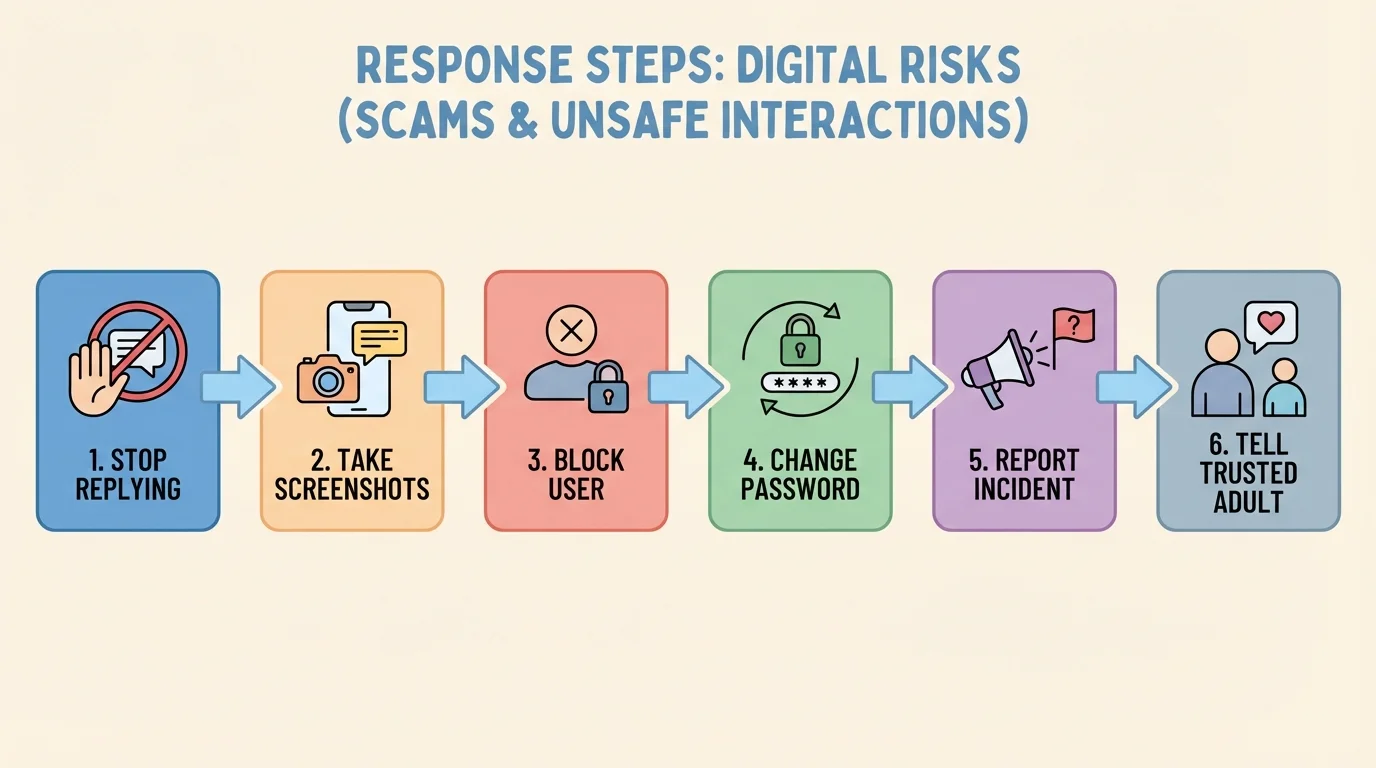
If you entered your password anywhere suspicious, change it right away. If you reused that password on other accounts, change those too. This is one reason strong, different passwords matter. A stolen password becomes much more dangerous when it opens multiple accounts.
Two-factor authentication adds a second step to logging in, like a code from an app or device. It is not perfect, but it makes account theft harder because a password alone is not enough.
Most importantly, tell a trusted adult. That could be a parent, guardian, counselor, coach, club leader, or another adult who takes your safety seriously. Asking for help early usually makes problems smaller. Waiting often makes them harder to fix.
"If someone tries to rush you, pressure you, or isolate you online, that is information, not just a feeling."
Later, when you review what happened, you can learn from it without blaming yourself. The response order matters because it focuses first on safety, then on evidence, then on recovery.
Good safety is not just about reacting to danger. It is about building habits so danger has fewer chances to reach you.
Use strong passwords that are hard to guess. Avoid using names, birthdays, or simple patterns. Do not share passwords with friends. Even if you trust someone now, passwords can be misused later during conflict, joking, or peer pressure.
Turn on privacy settings and review them regularly. Check who can message you, who can view your posts, who can add you to groups, and whether your location is shared. Also check which apps have access to your camera, microphone, contacts, and photos.
Verify before trusting. If a "friend" asks for something unusual, contact them another way. If a company sends a warning, go directly to the real app or website instead of tapping the message link. If a buyer or seller is pushy, walk away.
Share less in real time. Posting after you leave a place is safer than posting while you are there. Avoid showing house numbers, street signs, schedules, travel plans, school account screens, or personal documents in photos and videos.
Try This: a 60-second safety check
Step 1: Open one app you use often.
Step 2: Review who can contact you and who can see your posts.
Step 3: Remove anything public that shares more than you meant to share.
Step 4: Turn on extra login protection if the app offers it.
Small checks done regularly are easier than dealing with a bigger problem later.
Another strong habit is listening to your instincts without depending only on them. Your instincts can warn you, but your checklist helps confirm what to do next.
Scenario one: someone in a game says they can get you rare items if you log into a website they send. This is high risk. The request involves a login, the offer is unrealistic, and the site is unofficial. Safe move: do not click, block, and report.
Scenario two: a person you do not know follows you, likes many posts, and starts messaging every day. At first they are friendly, then they ask for your full name and a private video call. This is moving toward an unsafe interaction. Safe move: stop sharing, tighten privacy settings, block if needed, and tell a trusted adult if the pressure continues.
Scenario three: you get a message saying your account will be deleted unless you confirm your password within five minutes. That combines urgency and a password request. Treat it as a scam. Go directly to the real app and check your account there instead.
Scenario four: a friend sends a screenshot and asks you to keep a secret account password "just in case." Even between friends, this is risky. Password sharing can lead to account takeovers, blame, and broken trust. Safe move: say no and encourage them to use a password manager with adult help instead.
Strong digital citizenship is not about being suspicious of everyone all the time. It is about noticing patterns, protecting your identity, and responding wisely when something feels off. The more you practice, the faster and calmer these decisions become.
