Most students do not fall behind because they are lazy. They fall behind because too many small things stay in their heads at once: a quiz link, a discussion reply, a missing file, a message from a teacher, a long project due next week, and chores at home happening at the same time. When your brain becomes your storage system, important things get lost. The fix is not "try harder." The fix is to build systems that remember for you.
In online high school, you have more freedom than many students in a traditional classroom, but that also means you need stronger habits. No one is standing next to you reminding you to open the right tab, submit the right file, or start the essay before the last minute. Strong executive functioning is the set of skills that helps you plan, organize, start, and finish tasks. The good news is that these skills can be trained.
Time management means deciding how you will use your time on purpose instead of reacting to whatever feels urgent. Organization means setting up your materials, space, and digital tools so you can find what you need quickly. Follow-through means finishing what you planned to do, even when motivation drops or distractions show up.
A good school system should do three jobs: show you what matters now, show you what is coming next, and make it easier to act. If your setup is too complicated, you probably will not keep using it. The best system is usually simple, visible, and repeated every day.
Motivation feels great when it shows up, but it is unreliable. Some days you will feel focused. Other days you will feel tired, distracted, annoyed, or overwhelmed. If you only work when you "feel ready," your results will rise and crash with your mood. A system protects you from that pattern.
Think about brushing your teeth. You probably do not hold a meeting with yourself each night to decide whether dental health matters. You have a routine. School systems work the same way. When you know what time you check your courses, where you write tasks, and how you begin work, you spend less energy deciding and more energy doing.
"You do not rise to the level of your goals. You fall to the level of your systems."
— Common productivity principle
That idea matters because goals are important, but they are not enough. "I want better grades" is a goal. "Every weekday at 8:30, I check all course announcements, update my task list, and start the first assignment block" is a system. Goals point the direction. Systems move you there.
Your command center is the one place where you keep track of school life. It should include one calendar, one task list, and one short daily review. If you scatter reminders across sticky notes, random screenshots, memory, and multiple apps, you create confusion.
[Figure 1] Start with one calendar. Put in due dates, live sessions, quizzes, project checkpoints, and personal commitments that affect your schedule. If your family has appointments, sports practices, a part-time job, or regular responsibilities at home, include those too. Time management works better when your calendar reflects your real life, not an imaginary perfect week.
Next, keep one master task list. This is different from your calendar. A calendar tells you when. A task list tells you what. Write tasks in action language: "watch lesson video," "complete algebra problems," "draft paragraph 1," "message teacher about missing link." Avoid vague items like "science project" because they do not tell you what to do next.
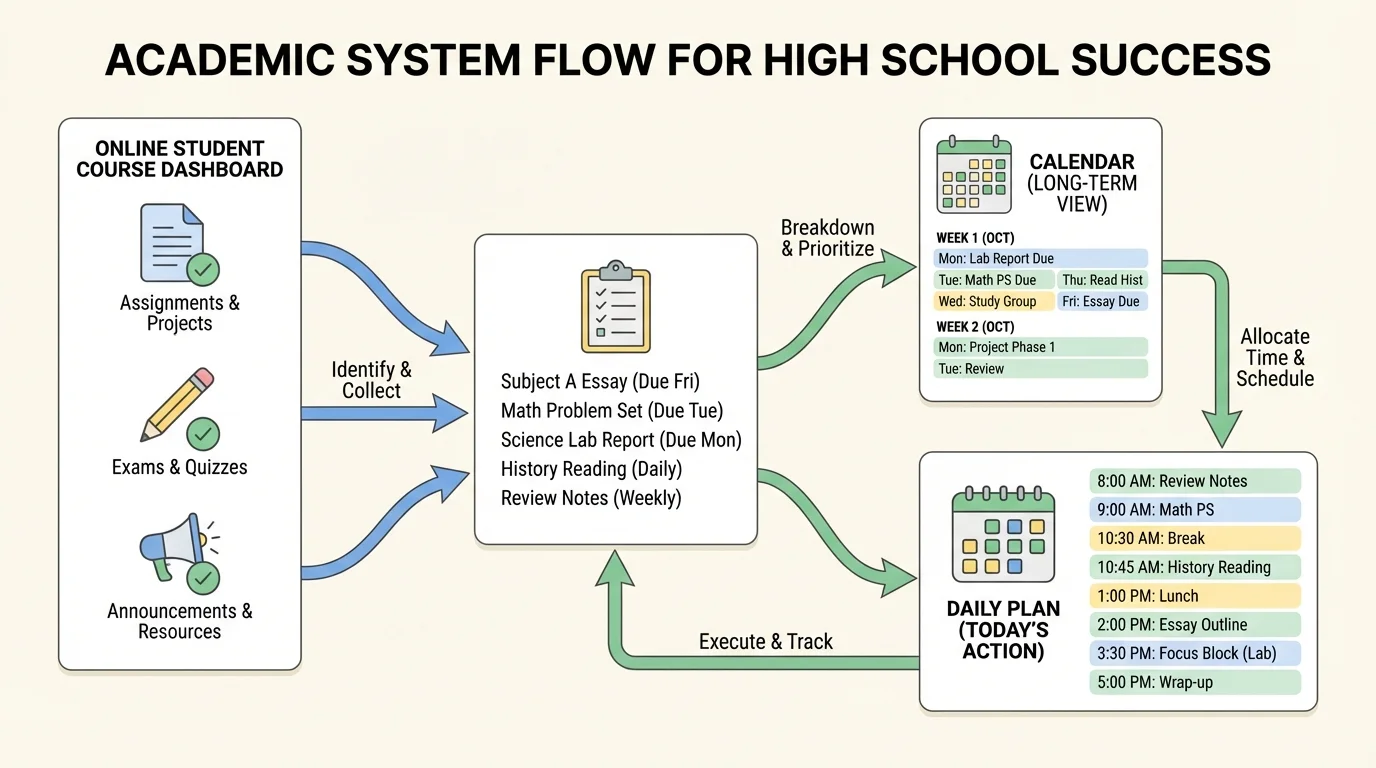
The third part is a daily review. Once in the morning or before your main school block, check each course page, announcements, and messages. Then update your task list and compare it to your calendar. This habit keeps surprises small. Missing one daily check can turn a simple task into a stressful problem.
Later, when you feel overwhelmed, return to the same structure from [Figure 1]: check courses, update your list, then decide what fits today. A command center reduces panic because it turns a pile of worries into visible next steps.
Simple command center setup
Step 1: Choose your tools.
Use one digital calendar, one notebook or notes app for tasks, and one folder for school documents.
Step 2: Enter fixed events.
Add class meetings, assignment due dates, family commitments, and activities outside school.
Step 3: Make the task list active.
Rewrite unclear assignments as action steps you can do in one sitting.
Step 4: Review daily.
Spend about 5 to 10 minutes checking courses and updating what changed.
If you are thinking, "That sounds basic," that is exactly the point. Systems fail when they are fancy but inconsistent. Basic and repeatable beats impressive and forgotten.
One reason students procrastinate is that large tasks feel blurry. A next action is the smallest useful step that moves a task forward. Big assignments feel less threatening when broken into visible steps.
[Figure 2] Suppose you have a research presentation due in one week. "Do presentation" is too big. Instead, break it into parts: choose topic, find sources, take notes, create outline, make slides, practice, revise, submit. Now you know where to start.
This process is called chunking. Chunking helps because your brain handles one concrete action better than one huge cloud of work. It also helps you estimate time more honestly. "Write essay" might feel endless, but "write introduction for 20 minutes" feels doable.
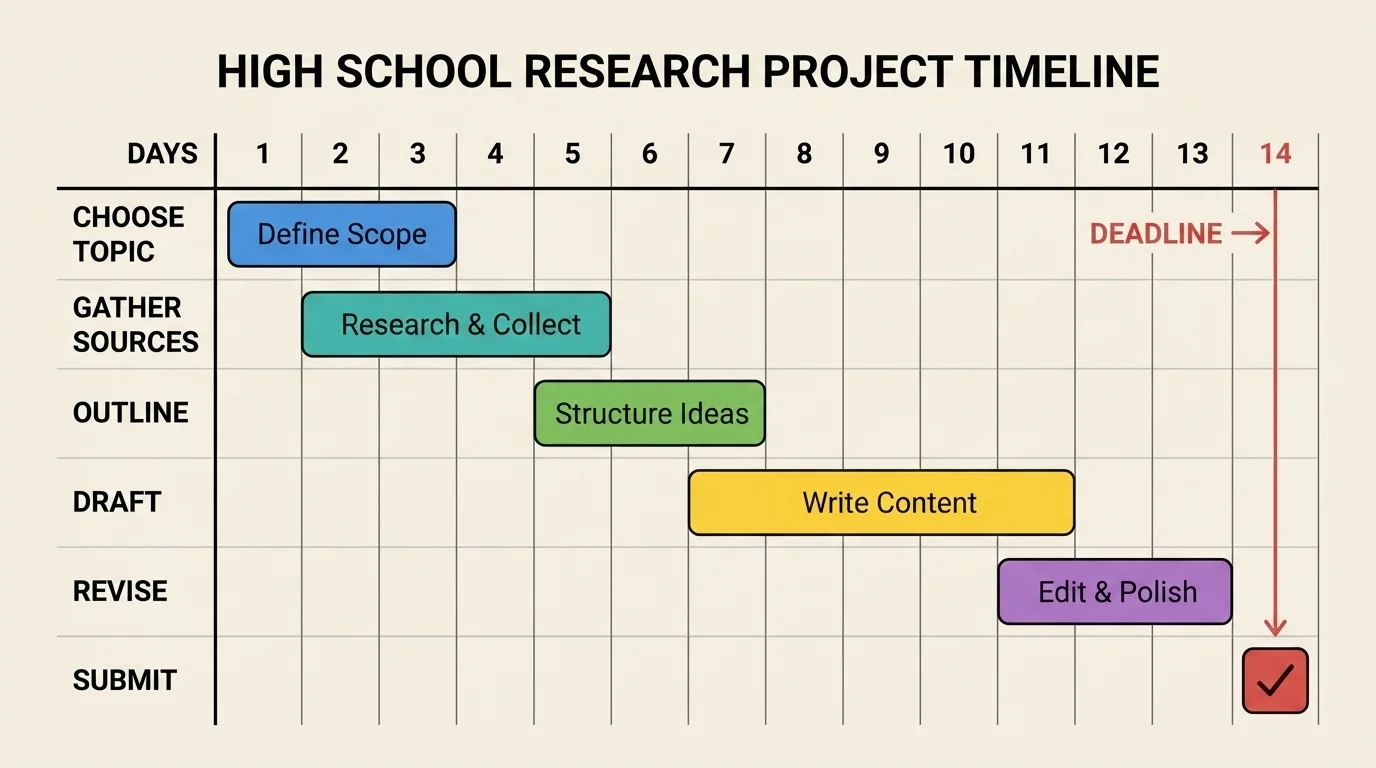
When you break work down, include mini-deadlines before the real due date. If a project is due Friday, your draft might be due to yourself on Wednesday. That gives you time to revise instead of submitting rushed work at the last second.
Here is a helpful planning question: What would I do first if I could only work on this for 10 minutes? Your answer is often your true next action. Maybe it is opening the document, finding the assignment directions, or writing three bullet points. Small starts create momentum.
From vague to actionable
Vague tasks create delay because they hide the starting point. Actionable tasks name a specific behavior. Compare "study history" with "review section 3 notes and answer 5 practice questions." The second version makes starting much easier.
Another smart move is to estimate time, then add a buffer. If you think an assignment will take about 30 minutes, block 45 minutes. If you think a project will take 2 hours total, plan for a little more. Students often underestimate because they forget setup time, reading directions, technical issues, or the need to revise.
You do not need perfect estimates. You need useful ones. Even rough planning is better than guessing in the moment.
[Figure 3] Weekly planning is where scattered tasks become a realistic schedule. Without a weekly plan, every day feels like a surprise attack. With one, you can see where work fits and where problems might appear.
A good weekly plan assigns work to actual time blocks. This is called time blocking. Instead of keeping a long list in your head, you decide in advance when each type of work will happen.
For example, you might block Monday from 9:00 to 10:00 for math and science, 10:15 to 11:00 for English reading, and 1:00 to 1:30 for discussion posts. You may also block time for exercise, meals, chores, and family responsibilities. A real schedule works better than an ideal one.
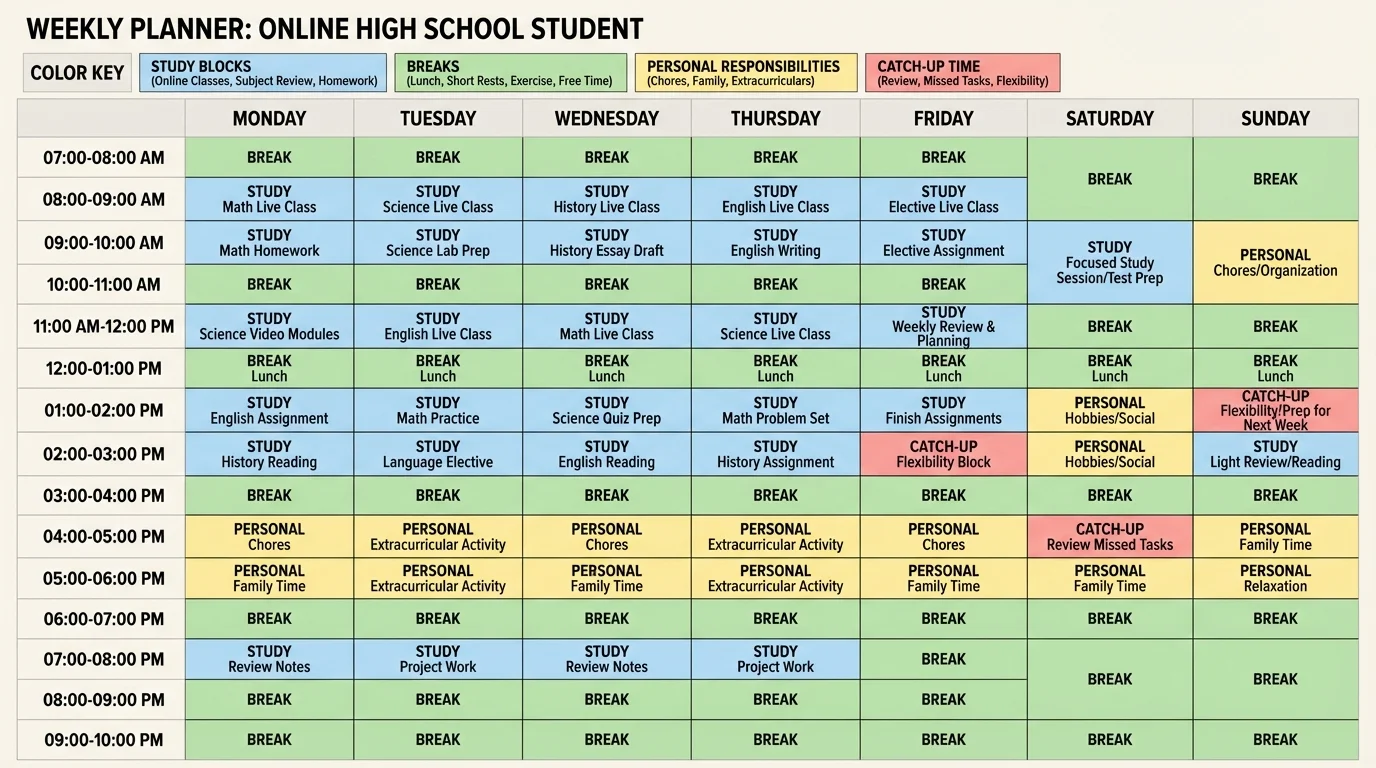
Always include buffer time. Buffer time is open space for work that takes longer than expected, technology issues, or assignments you forgot to add earlier. If every minute is packed, one problem can throw off the whole week.
One strong weekly habit is the preview-review routine. At the start of the week, preview upcoming deadlines and tests. At the end of the week, review what worked and what did not. If you ignored your afternoon work block every day, that is not a character flaw. It is data. You may need a different time, shorter sessions, or fewer tasks in one block.
| Planning move | What it does | Example |
|---|---|---|
| Preview deadlines | Prevents surprise due dates | Check all courses on Sunday evening |
| Time block work | Assigns tasks to specific times | Tuesday 10:00–10:45 for biology notes |
| Add buffer time | Protects your schedule from problems | Friday 2:00–2:30 for unfinished tasks |
| Review the week | Improves your system over time | Notice that mornings are more productive |
Table 1. Weekly planning moves that help online students stay on top of schoolwork.
If your week feels crowded, choose your top priorities early. A useful rule is: first finish urgent and important work, then move to important but not urgent work, and only then spend time on lower-priority tasks. This prevents small easy tasks from stealing time from major assignments.
People often feel less stressed when tasks are written down in a trusted system. The brain relaxes when it no longer has to keep rehearsing every reminder over and over.
A weekly plan should guide you, not trap you. If something changes, update the plan and move on. Flexibility is part of good time management, not failure.
Routines help you start faster because they remove extra choices. In online school, where distractions are always close, reducing friction matters a lot. Friction is anything that makes starting harder: a dead laptop battery, ten open tabs, unclear materials, or no quiet workspace.
Create a start-of-day routine. It might include getting water, opening your calendar, checking your course dashboard, placing your phone out of reach, and choosing the first task before you begin. Keep it short enough that you will actually do it.
Create a work-session routine too. For example: read the directions, estimate how long the task will take, set a timer, work until the timer ends, then take a short break. Short cycles can help when your focus is low. You might work for 25 minutes and break for 5 minutes, or choose another pattern that fits you.
Finally, use a shutdown routine. At the end of your school day, check what you finished, submit what is ready, write tomorrow's first task, and close unnecessary tabs. This makes tomorrow easier because you are not starting from confusion.
Daily routine that supports follow-through
Step 1: Start with a reset.
Clear your desk, silence notifications, and open only the tabs you need.
Step 2: Choose one priority task.
Pick the assignment with the nearest deadline or highest importance.
Step 3: Work in a focused block.
Use a timer and stay on one task until the block ends.
Step 4: Close the loop.
Submit, save, or note the next action before you switch tasks.
The phrase "close the loop" matters. If you stop in the middle of a task, leave a note for your future self: "Need to finish conclusion and upload file." That small habit saves time and mental energy later.
[Figure 4] Online students live in a digital environment, so digital organization matters as much as physical neatness. You should be able to find a file in seconds. If your downloads folder is full of random documents named "final," "final2," and "reallyfinal," school gets harder than it needs to be.
Use a folder for each course. Inside each course folder, make subfolders such as Notes, Assignments, and Submitted Work. Name files clearly with the topic and date if needed, such as "Biology_Cell_Notes_Sept12" or "English_Essay_Draft1." Clear names help you know what a file is without opening it.
Also manage your tabs and messages. Too many open tabs can drain attention. During work time, keep only what you need for the current task. If your teachers send announcements through email or a learning platform, check them at planned times instead of every few minutes.
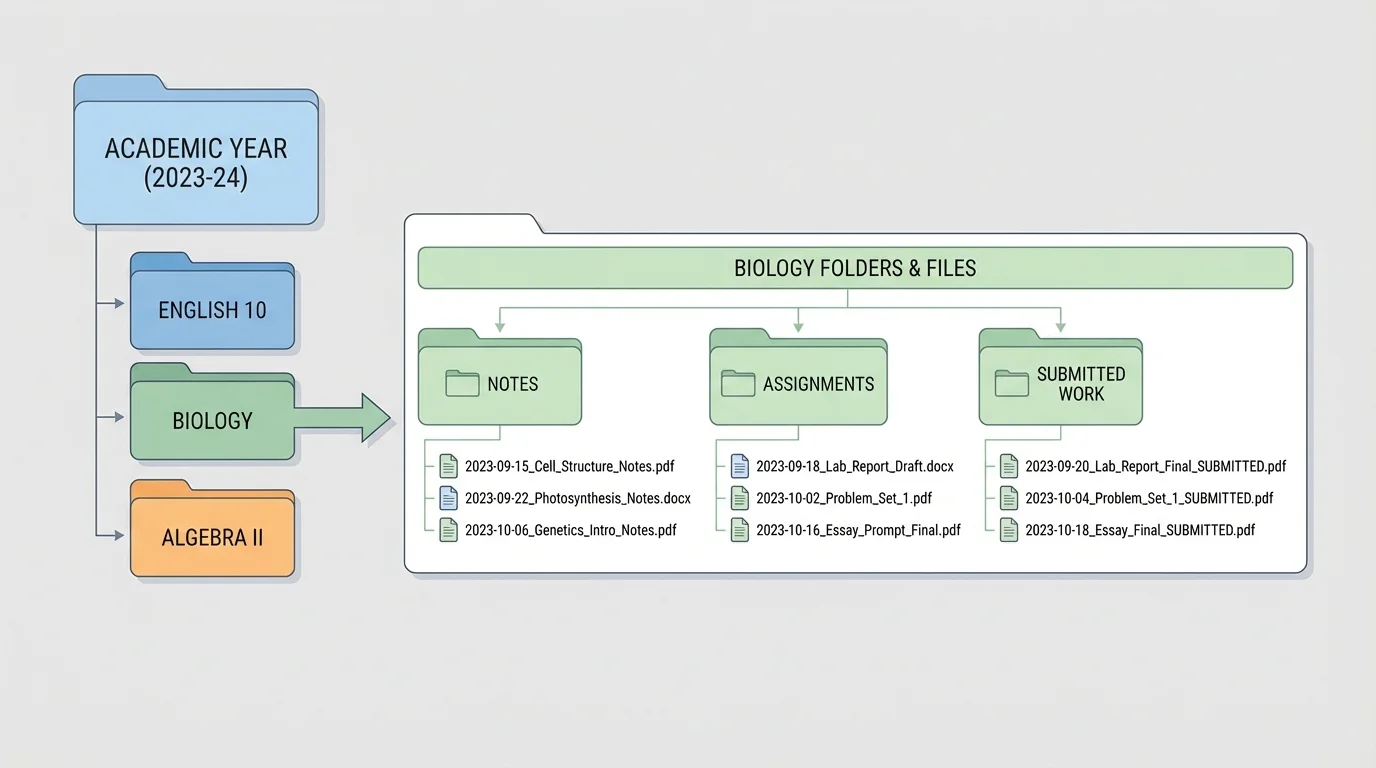
Before submitting, do a submission check: Is this the correct file? Is it the finished version? Did it upload fully? Did I click submit, not just attach? These questions prevent avoidable mistakes.
Later, when a teacher asks for a revision or you need to study for a test, that structure saves time because your notes, drafts, and finished work are already sorted instead of buried in a digital mess.
Remember: Being organized does not mean making everything look perfect. It means your system helps you find, use, and submit what you need without wasting time.
Your physical workspace matters too, even at home. It does not need to be fancy. It just needs the basics: charged device, notebook, pen, headphones if helpful, and fewer distractions. Good organization supports attention.
Follow-through is tested most when a task is boring, difficult, or emotionally uncomfortable. Maybe the directions are confusing. Maybe you feel behind. Maybe you are worried your work will not be good enough. These moments are where many students stop.
One common problem is procrastination. Procrastination is usually not about laziness. It is often about avoiding discomfort. Starting an assignment may bring boredom, frustration, or fear of failure, so your brain looks for easier relief, like scrolling, snacking, or switching tasks.
To beat procrastination, lower the starting barrier. Tell yourself you only need to work for 5 minutes. Open the document. Read the prompt once. Write one sentence. Action changes your brain state faster than waiting for inspiration.
Another issue is perfectionism. If you think every assignment must be amazing from the start, you may avoid beginning at all. Remind yourself that rough drafts are supposed to be rough. Finished work usually comes from revision, not from perfect first tries.
Progress over drama
When school feels heavy, ask: what is the smallest move that still counts as progress? Progress might be reading the directions carefully, creating a title page, or answering the first two questions. Small progress is still progress.
If you fall behind, do not waste energy pretending the problem is not there. Make a recovery plan. List all missing or late work. Mark what is still accepted. Then sort tasks into three groups: do now, schedule soon, and ask about. This turns shame into action.
For example, if you have 8 overdue items, you probably should not try to finish all 8 tonight. Choose the most important or most recoverable tasks first. Completing 2 important tasks is better than panicking about 8 and finishing none.
Recovery plan when you are behind
Step 1: Face the list.
Write every missing task in one place.
Step 2: Sort by impact.
Find out which tasks affect your grade most and which are still accepted.
Step 3: Choose a short rescue plan.
Pick 1 to 3 tasks for today, not everything at once.
Step 4: Communicate.
Message teachers if you need clarification, an updated link, or a plan for catching up.
Distractions also need a system. If your phone pulls your attention every few minutes, move it across the room or leave it outside your study space. If websites distract you, sign out, block them during work blocks, or use full-screen mode. Relying on willpower alone is hard; changing the environment is smarter.
Strong students are not the ones who never need help. They are often the ones who ask sooner. In online school, silence can hide a problem for days. If directions are unclear, a link does not work, or you are confused about expectations, contact the teacher early instead of guessing for too long.
Keep messages short and clear. Include the course name, assignment name, and your specific question. For example: "Hi, I'm working on the persuasive essay in English. I'm confused about whether we need two or three sources. I checked the instructions but I'm still unsure. Could you clarify?" That kind of message makes it easier for the teacher to help you quickly.
You can also communicate with a parent, guardian, learning coach, or trusted adult at home when your schedule is slipping. You do not need to wait until everything is a mess. Saying "I have three overdue tasks and need help planning tonight" is responsible, not weak.
Asking for help early often saves time, because a 2-minute clarification can prevent 45 minutes of confused work on the wrong thing.
If live sessions or office hours are available, use them when needed. Even in an online setting, communication is part of organization. A missed question can become a missed assignment.
The best system is one you will still use next month. That means it should fit your energy, your home environment, and your responsibilities outside school. If you are more focused in the morning, put your hardest work there. If afternoons are noisy at home, save lighter tasks for that time.
Review your system once a week. Ask yourself: What helped me finish work? What kept getting in the way? What should I simplify? Maybe your task list is too long, your notifications are too loud, or your work blocks are too big. Small adjustments matter.
Try to build around a few non-negotiables: one calendar, one task list, one daily check, one weekly planning session, and one clean place for files. That foundation is strong enough for most students.
You are not trying to become a productivity machine. You are building habits that protect your time, lower stress, and help you do what you said you would do. That is what academic follow-through looks like in real life.
Try This: Today, choose just one improvement: create a master task list, clean your files, set a weekly planning time, or break one big assignment into next actions. Small systems become powerful when you repeat them.
