Here is a surprising truth: most people do not become "organized" because they suddenly get more motivated. They become organized because they stop expecting their brain to remember everything. If you have ever forgotten an assignment, lost your charger, missed a deadline, or felt busy all day without finishing much, the problem is usually not that you are lazy. The problem is that you need a better system.
Systems matter because daily life has a lot of moving parts. You may be balancing online school, chores, hobbies, sports, family responsibilities, messages, appointments, and your own need for rest. When there is no system, every task competes for attention. When there is a system, you know what to do, where things belong, and how to use your time on purpose.
System means a repeatable way of doing something so you do not have to figure it out from scratch every time. Routine is a regular sequence of actions you do consistently. Priority means the task that matters most or needs attention first.
Good systems are not complicated. In fact, the best ones are usually simple enough to keep using on tired days, busy days, and stressful days. The goal is not perfection. The goal is to make daily life easier, more reliable, and less overwhelming.
A strong system helps you make fewer decisions in the moment. Instead of asking, "What should I do now?" ten times a day, you can follow a plan. Instead of searching for your headphones for fifteen minutes, you can reach for the spot where they always go. Instead of hoping you remember a due date, you write it down in one trusted place.
This matters because memory is limited. Your brain is great for thinking, solving problems, and being creative, but it is not the best storage device for every responsibility. The more tasks you try to carry in your head, the easier it is to forget one. That can lead to late work, stress, arguments at home, or the feeling that you are always behind.
People often feel less stressed when they write tasks down, not because the tasks disappear, but because their brain no longer has to keep repeating reminders in the background.
A system also protects your time. If you do not decide where your time will go, other things will decide for you: notifications, random scrolling, distractions, or last-minute emergencies. That is why independent living starts with small skills like planning your afternoon, putting items back where they belong, and checking your schedule before the day gets away from you.
Your first step is creating one trusted task capture system. This means every responsibility goes into the same place instead of being scattered across your memory, text messages, sticky notes, and random screenshots. Your system might be a notes app, a planner, a calendar, or a task app. What matters most is that you actually use it.
When a task appears, capture it right away. If your parent asks you to take out the trash later, if a coach posts a practice change, or if an online class gives a project deadline, write it down immediately. Do not tell yourself, "I'll remember." That is how small responsibilities turn into forgotten problems.
Next, sort what you capture into clear groups. A simple setup is: today, this week, and later. You can also add categories like school, home, activities, and personal. The point is to keep your list usable. A giant pile of unsorted tasks can become stressful, so give each task a place.
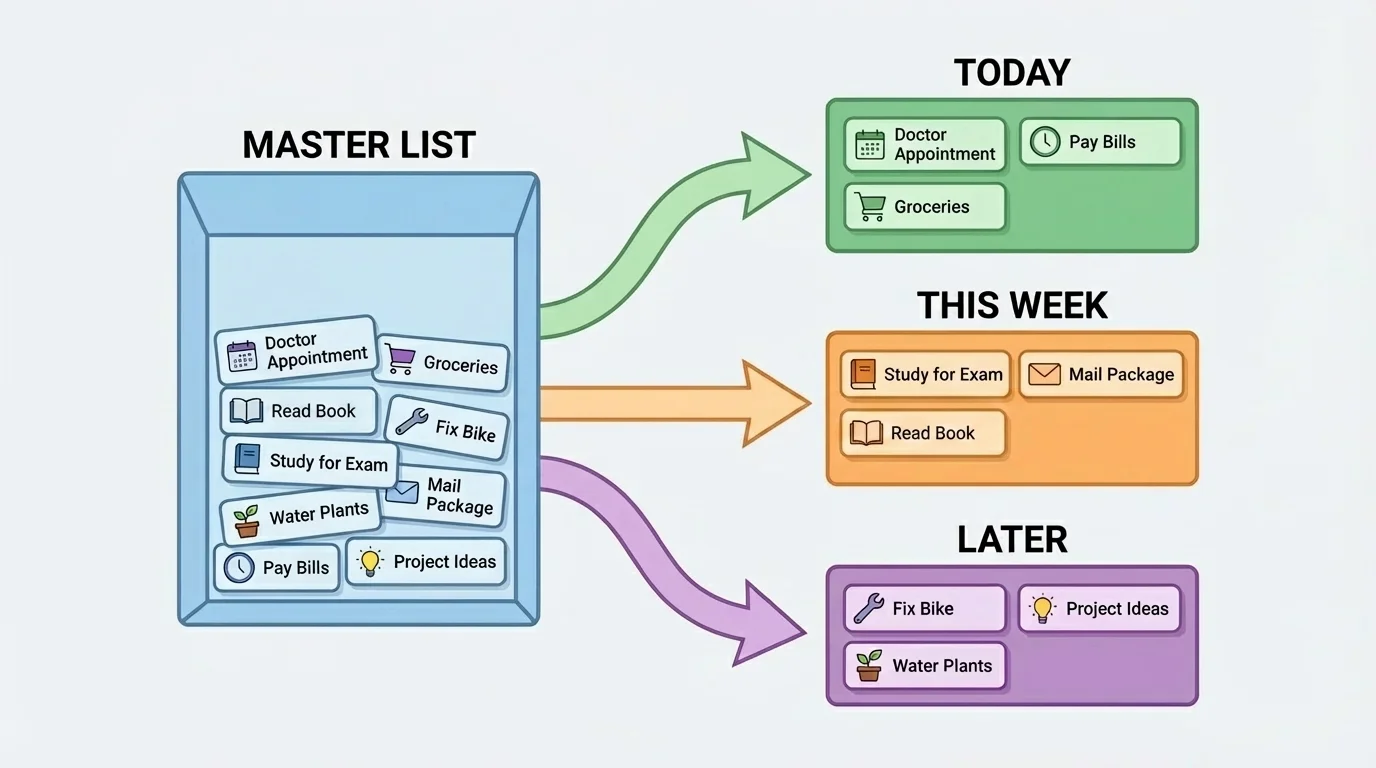
Then decide what matters most. A useful method is must-do, should-do, could-do. A must-do task has a deadline or important consequence. A should-do task matters, but not as urgently. A could-do task is optional if time allows. For example, finishing a quiz by tonight is a must-do. Folding laundry may be a should-do. Reorganizing your playlist is a could-do.
This kind of sorting helps when your list is long. If you have seven tasks and only enough time for three, you do not want to choose based on mood. You want to choose based on importance. That is one reason the sorting flow in [Figure 1] is useful: it turns a messy pile of responsibilities into a clear plan.
One system beats several half-used systems
If you write some tasks in a notebook, some in a phone app, some in chat messages, and some only in your head, you create confusion. A single main system reduces the chance that something important gets lost. You can still use both a calendar and a checklist, but one should be your main home base for planning.
A daily check-in keeps the system alive. Spend a few minutes each morning or evening looking at what is due, what is coming up, and what needs to move to another day. Without review, even a good system becomes a storage box instead of a working tool.
Once you know what you need to do, the next challenge is deciding when to do it. Time blocking means giving tasks a specific place in your day instead of hoping they somehow fit. This works especially well in online school, where more freedom can sometimes lead to more procrastination.
Start by looking at fixed parts of your day: live class sessions, family responsibilities, meals, practices, appointments, and sleep. Then place flexible tasks around them, such as homework, exercise, cleaning, or relaxation. When you can see your day as blocks, it becomes easier to make realistic choices.
You also need to estimate how long tasks take. Many people underestimate. They think an assignment will take twenty minutes, but it actually takes fifty. To improve, start timing common tasks. If math homework usually takes about forty minutes, write that down mentally or in your planner. Over time, you will get better at planning.
Another key idea is buffer time. Buffer time is extra time between tasks in case something takes longer, technology fails, or you need a short break. If a task usually takes about thirty minutes, you might schedule forty-five. That extra space lowers stress and helps prevent one delay from ruining the rest of your day.
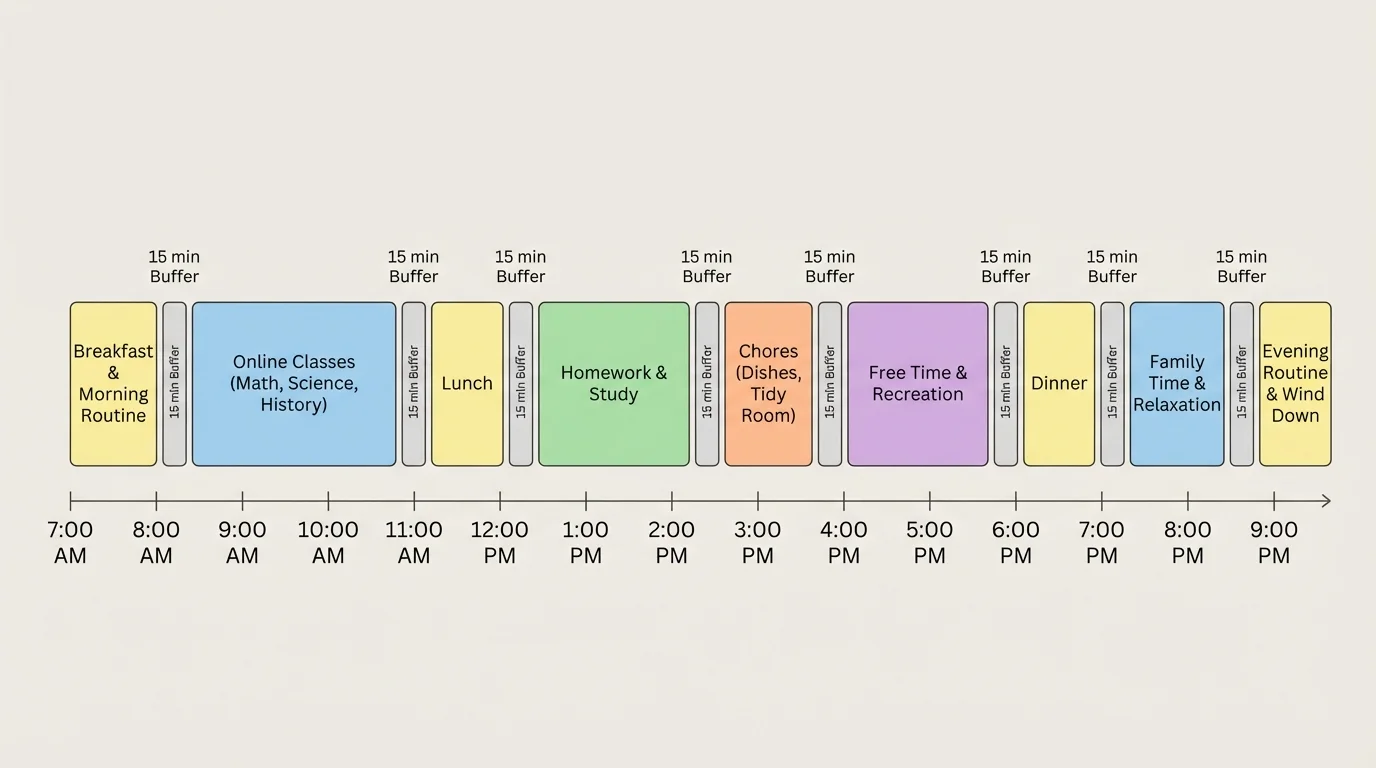
For example, suppose you have three main tasks after lunch: science work, walking the dog, and cleaning your room. You estimate science at forty minutes, dog walking at twenty minutes, and cleaning at thirty minutes. The total time is \(40 + 20 + 30 = 90\) minutes. If you add two fifteen-minute buffers, your real plan becomes \(90 + 30 = 120\) minutes. That is a more honest schedule than pretending everything will happen perfectly.
Time blocking is not about making every minute strict. It is about giving your priorities a real chance to happen. The schedule pattern in [Figure 2] works because it includes work, rest, and margin for surprises. A day with no margin often collapses as soon as one thing changes.
A simple after-school planning example
You finish your live online class sessions at 2:00 p.m. and need to decide how to use the rest of your day.
Step 1: List the tasks.
History reading, math assignment, empty dishwasher, message your club leader, and free time.
Step 2: Mark priorities.
Math is due today, so it is a must-do. History is due tomorrow, so it is a should-do. Emptying the dishwasher is a must-do if your family expects it today. Messaging the club leader is a should-do. Free time is a could-do, but it is still important to schedule as rest.
Step 3: Give each task a time block.
Math from 2:15 to 3:00, dishwasher from 3:00 to 3:10, break from 3:10 to 3:25, history from 3:25 to 4:00, message from 4:00 to 4:05, free time after that.
This plan is short, realistic, and easier to follow than a vague goal like "do homework later."
One more helpful rule is to plan the next day before the day ends. Even five minutes can help. When you already know your top tasks for tomorrow, you start faster and waste less energy deciding.
Managing responsibilities gets easier when your space supports you. Organized spaces work best when every item has a home. An item home is the regular place where something belongs when you are not using it. If your charger, keys, earbuds, notebook, and water bottle each have a home, you spend less time searching and more time getting things done.
This does not mean your room must look perfect. It means your most-used items should be easy to find. Start with the things you use almost every day: school supplies, devices, chargers, headphones, sports gear, wallet, and personal care items. Ask yourself: where would it make the most sense for this item to live?
Put items close to where you use them. Chargers should be near charging spots. School materials should be near your work area. Shoes and bags should be near the exit or another consistent spot. When an item's home matches real life, you are more likely to put it back.
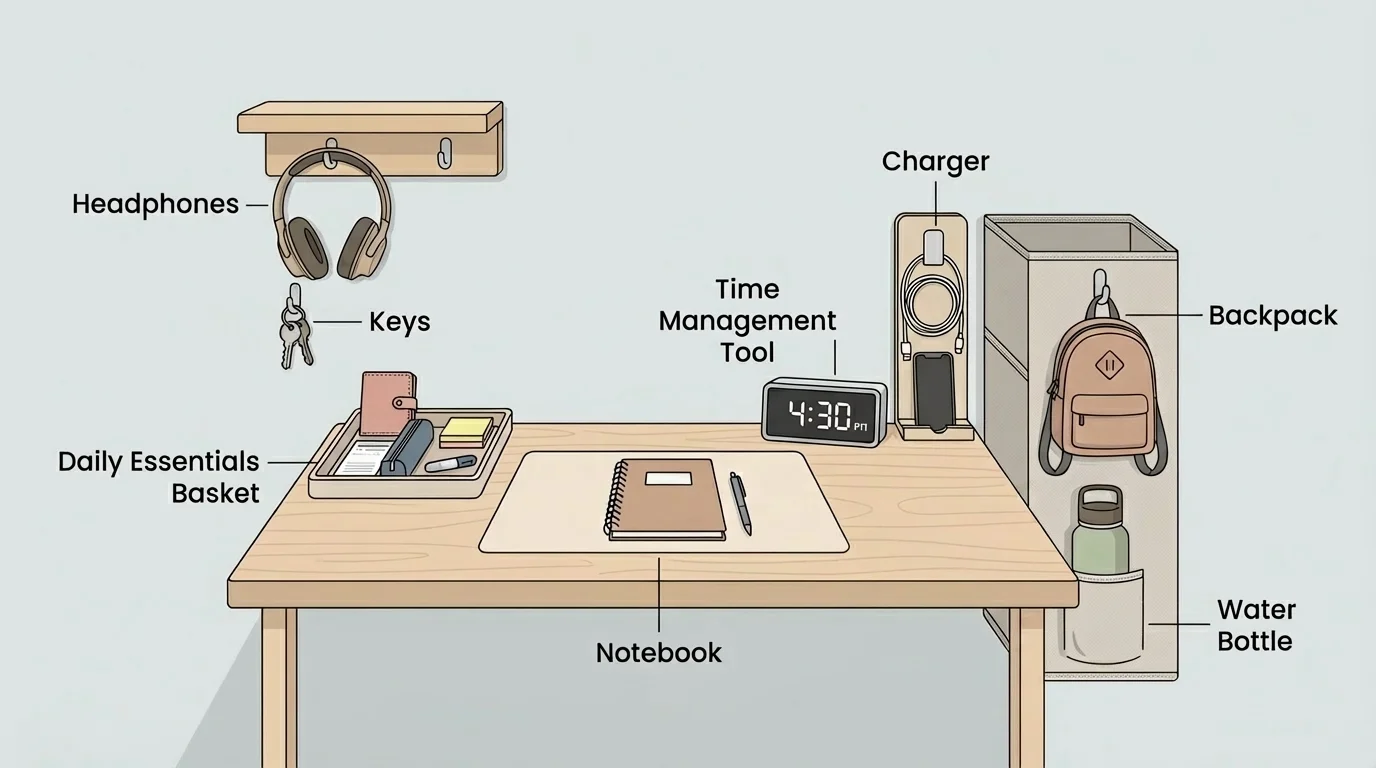
A reset routine keeps clutter from slowly taking over. This is a short daily habit of returning items to their homes and preparing for the next day. A reset might take only five to ten minutes: clear your desk, plug in devices, refill your water bottle, put dirty clothes in the hamper, and place tomorrow's materials where you can grab them quickly.
The organized setup in [Figure 3] is useful because it reduces tiny delays. Losing ten minutes here and ten minutes there adds up. If you misplace your headphones three times in a week and spend about eight minutes searching each time, that is \(3 \times 8 = 24\) minutes gone for no good reason.
You do not need to organize everything at once. Start with high-impact areas: your work surface, your charging area, your bag, and one storage spot for daily essentials.
Containers can help, but only if you keep the system simple. A small tray, drawer, basket, or shelf is often enough. Too many tiny categories can become annoying to maintain. If putting something away feels complicated, the system may be too detailed.
Strong systems usually combine three tools: reminders, checklists, and habits. Each one helps in a different way. Reminders help you notice something at the right time. Checklists help you remember steps. Habits help you do things with less effort over time.
A reminder should be connected to a specific moment, not just a vague idea. "Do laundry sometime" is weak. "Set a reminder for 6:00 p.m. to move clothes to the dryer" is stronger. Calendar alerts can help with appointments, recurring chores, project deadlines, medication schedules, and activity times.
A checklist is useful for anything with repeated steps. You might have a morning checklist, a schoolwork checklist, a sports practice checklist, or a leaving-home checklist. Checklists are not childish. Pilots, surgeons, and event planners use them because they reduce mistakes.
Example checklist: ready for a study session
Habits grow when you attach them to something that already happens. This is called habit stacking. For example, after you eat breakfast, check your planner. After you finish your last class, reset your desk. After you plug in your phone at night, review tomorrow's schedule. The existing action becomes the trigger for the new one.
The best systems use all three. A reminder tells you it is time. A checklist tells you what to do. A habit makes it easier to repeat tomorrow.
Even good systems break sometimes. You may oversleep, forget to write something down, lose track of time, or get overwhelmed by too many tasks. That does not mean the system failed forever. It means you need a recovery plan.
If you forget a responsibility, respond quickly. Write it down, decide the next action, and communicate if needed. If you miss a deadline, do not hide from it. Message the person involved, explain briefly, and ask what to do next. Avoiding the problem usually makes it worse.
If you fall behind, make a triage list. Triage means sorting by urgency and impact. Ask: what must be handled today? What can wait? What can be shortened, combined, or dropped? This helps when life becomes too full. You cannot solve overload by pretending everything is equally urgent.
Recovery is a skill, not a failure
Responsible people are not people who never mess up. They are people who notice problems, adjust quickly, and restart. A system should help you recover, not shame you.
Sometimes the real issue is that your system asks too much from you. If every day has an unrealistic plan, you are not bad at time management; your plan may be too packed. If your room gets messy because your storage is hard to use, your setup may need to change. Systems should match real life, not fantasy life.
Here are a few practical systems that work well for teenagers building independence at home.
School system: check courses once in the morning and once in the afternoon, write all due dates in one place, and choose the top three tasks for the day. This prevents repeated last-minute surprises.
Belongings system: keep one charging station, one school-supplies zone, and one launch spot near the door or another consistent area. A launch spot is where your backpack, shoes, sports bag, or other take-with-you items wait so you can leave smoothly.
Chore system: assign chores to days instead of deciding randomly. For example, trash on Monday and Thursday, laundry on Saturday, room reset every evening. Repeating patterns are easier to remember than constant decision-making.
Communication system: if someone asks something of you by text or message, either do it now if it takes under a couple of minutes or add it immediately to your task system. Important requests should not stay buried in chats.
| Problem | Weak approach | Stronger system |
|---|---|---|
| Losing chargers | Leave them wherever | Keep one charging station and return chargers there nightly |
| Missing deadlines | Trust memory | Write due dates in one calendar or planner the same day |
| Messy desk | Clean only when it gets bad | Do a 5-minute reset routine each evening |
| Overloaded afternoons | Start tasks randomly | Use must-do, should-do, could-do and time blocks |
| Forgetting small tasks | Keep them in your head | Capture them immediately in one task list |
Table 1. Comparison of weak habits and stronger systems for daily responsibilities and organization.
These systems are flexible. You may use paper, digital tools, or a mix of both. The goal is not to copy someone else perfectly. The goal is to create repeatable actions that reduce stress and improve reliability.
"You do not rise to the level of your goals. You fall to the level of your systems."
— James Clear
That quote matters because good intentions disappear under pressure. Systems keep working when motivation is low, which is exactly when you need them most.
The final step is customizing your system and reviewing it regularly. A weekly review is the maintenance step that keeps your routine useful instead of outdated. Once a week, look at what worked, what got missed, and what needs to change for the next week.
Ask practical questions. Which tasks kept getting delayed? Which items kept getting lost? Which time blocks were realistic, and which were too optimistic? If you notice a pattern, adjust the system. Maybe your homework block needs to start earlier. Maybe your bag needs a better storage spot. Maybe your reminders need to be louder or scheduled sooner.
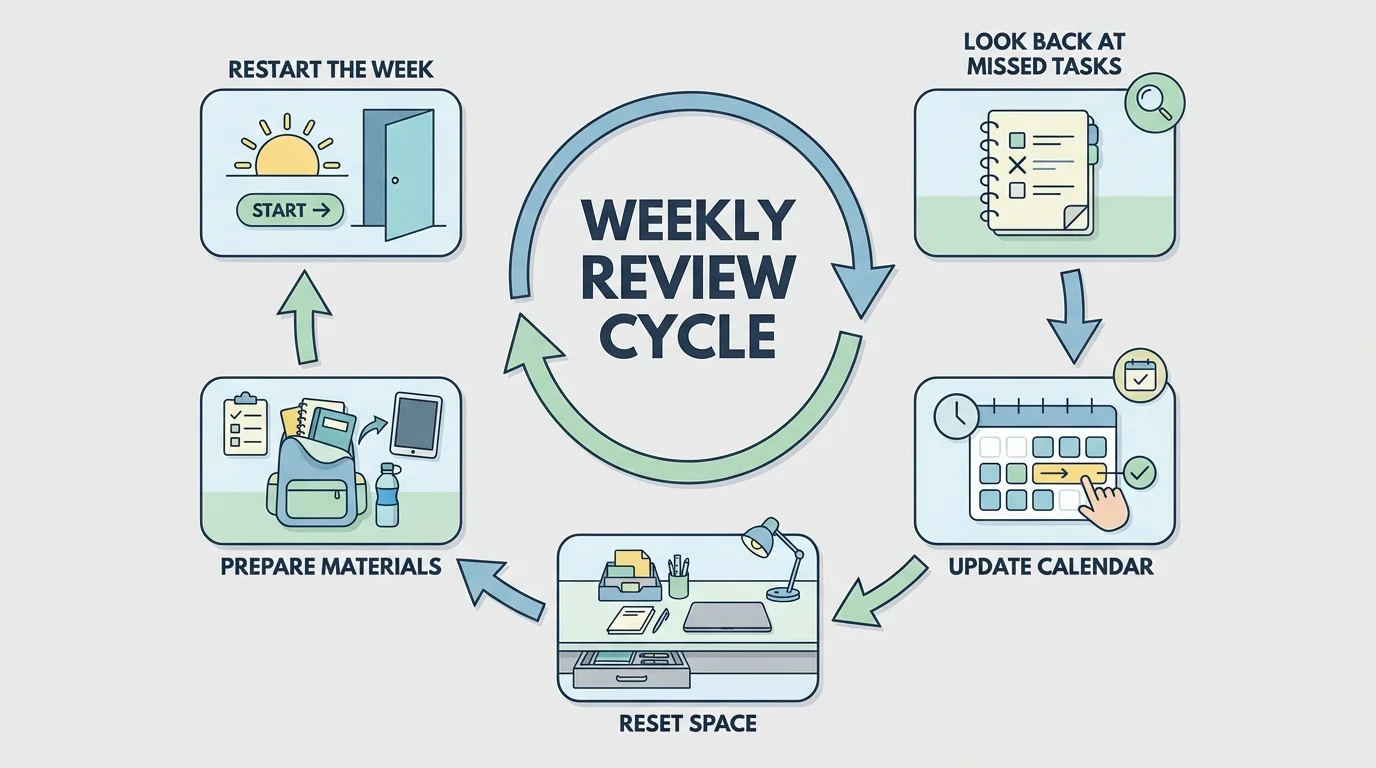
You should also think about your energy. Some people focus best earlier in the day. Others do better after a break and snack. If you know that your energy drops at a certain time, do easier tasks then and put demanding work in your stronger hours. A smart system works with your patterns instead of fighting them.
The review cycle in [Figure 4] helps because it turns mistakes into information. Instead of saying, "I'm just bad at staying organized," you can say, "My current system needs one change." That mindset is more honest and more helpful.
Start small. Choose one task tool, one time-planning habit, one item-home setup, and one short reset routine. Use them consistently for a week. Then improve what is not working. Real independence is built through repeatable systems, not random bursts of effort.
