Buttons, screens, and videos can be fun and helpful, but they are a lot like crossing a street: you need safety rules. When you use a tablet, computer, or class website, the right rules help keep you, your work, and your device safe.
When you use technology safely, you can learn, play, and talk online with fewer problems. Safe choices help protect your feelings, your family information, and the device you are using. Unsafe choices can lead to scary pictures, strangers talking to you, or a device that stops working well.
Device means a tool like a tablet, computer, or phone. Website means a place you visit on the internet. Private information is information that should not be shared online without a trusted grown-up saying it is okay.
A good rule is simple: if you are not sure, stop and ask a grown-up. That can be a parent, caregiver, or another trusted adult at home.
Sometimes a screen shows something new: a game, a button, a video, or a message. Before you click something new, download anything, or join a new website, ask first. A grown-up can help you decide if it is safe.
You should also ask before using a camera, microphone, or chat box. These tools can share your voice, face, or words. It is important to use them only when a trusted adult says yes.
Real-life safe choice
Step 1: You see a bright button that says you won a prize.
Step 2: Do not click it.
Step 3: Call a grown-up and show the screen.
This keeps you safer than guessing by yourself.
Even if something looks fun, safe tech use means waiting for help. Being careful is smart, not slow.
Your private information belongs to you and your family. Some things should stay off websites and apps unless a trusted grown-up says it is okay. These include your full name, home address, phone number, password, and pictures of you.
If a game or website asks, "What is your name?" or "Where do you live?" do not answer by yourself. Tell a grown-up. A safe adult can decide what to share and what to keep private.
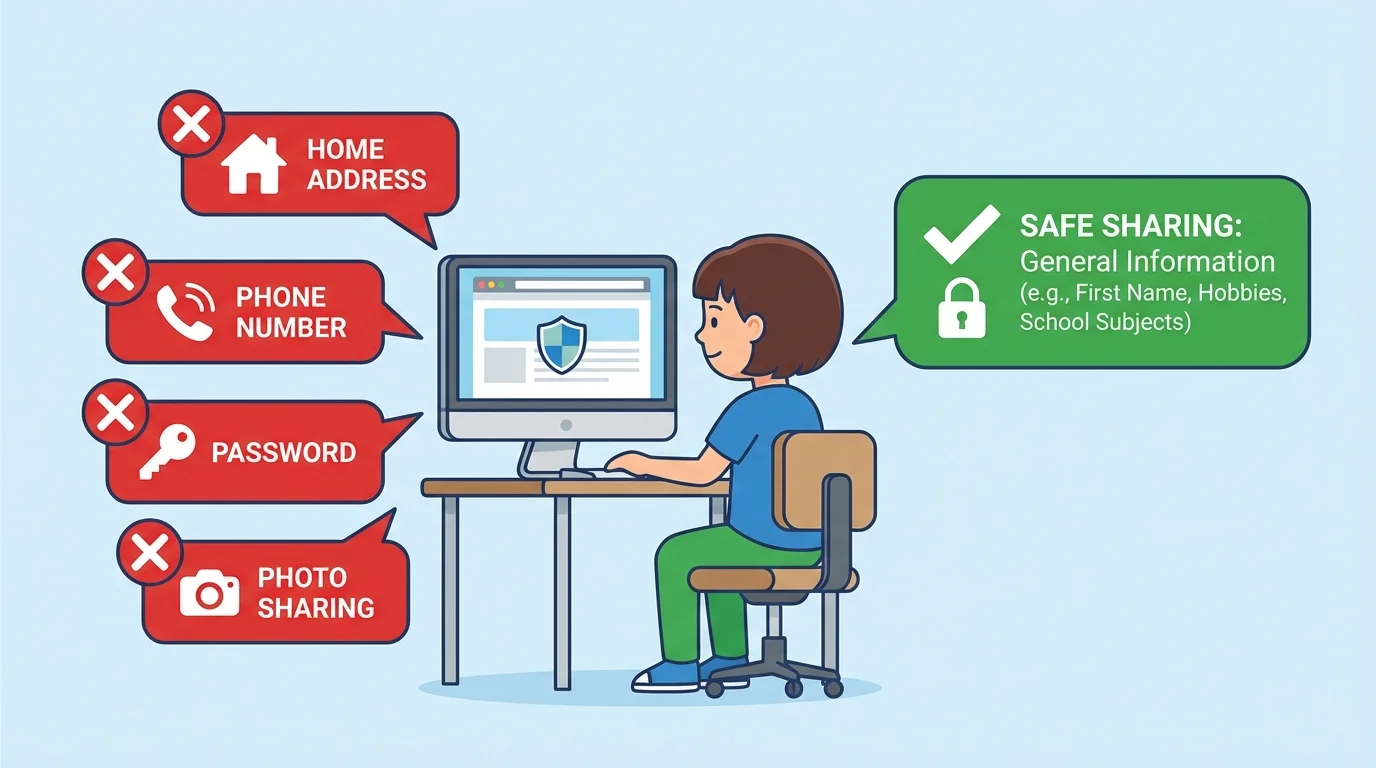
You should never share a password. A password is a secret word or set of letters and numbers that helps protect an account. It is like a key. Only trusted grown-ups should help with it.
One small piece of shared information can lead to bigger sharing. That is why even simple questions online should be checked with a trusted adult.
Later, when you are using another site, remember the picture in [Figure 1]. If the screen asks for family information, stop and get help.
Online words matter. When you type or speak in class, use kind words, take turns, and listen. Good digital behavior means being respectful, just like you would want others to be respectful to you.
You do not need to talk to people you do not know. If a stranger sends a message, asks a question, or wants you to click something, do not answer. Tell a trusted adult right away.
Safe online behavior means two things working together: being kind and being careful. Being kind helps other people feel respected. Being careful helps protect you from strangers, tricks, and hurtful content.
If someone says something mean, weird, or confusing, do not argue. Do not keep it a secret. Show a grown-up. Safe users tell a trusted adult when something online feels wrong.
Your device needs safe hands and a safe space. Put it on a flat table or desk. Keep drinks away. Use clean hands. Carry it with two hands if you need to move it.
Take care of your body too. Sit in a comfortable spot. Keep the sound low enough to protect your ears. Look away from the screen sometimes and blink your eyes. Short breaks help your body feel better.
| Safe choice | Why it helps |
|---|---|
| Ask before clicking | Helps avoid unsafe websites |
| Keep drinks away | Helps protect the device |
| Use kind words | Helps others feel safe |
| Tell a grown-up about strange messages | Helps solve problems quickly |
Table 1. Simple safe-tech choices and how they help.
These small habits make a big difference. Taking care of tools is part of using technology well.
Sometimes an ad, video, or message appears when you did not expect it. The safe plan is easy: stop, do not click, tell a grown-up, and wait.
If you click by mistake, that is okay. You are not in trouble for telling the truth. The important thing is to get help fast. Trusted adults can close the page, check the site, or restart the device.
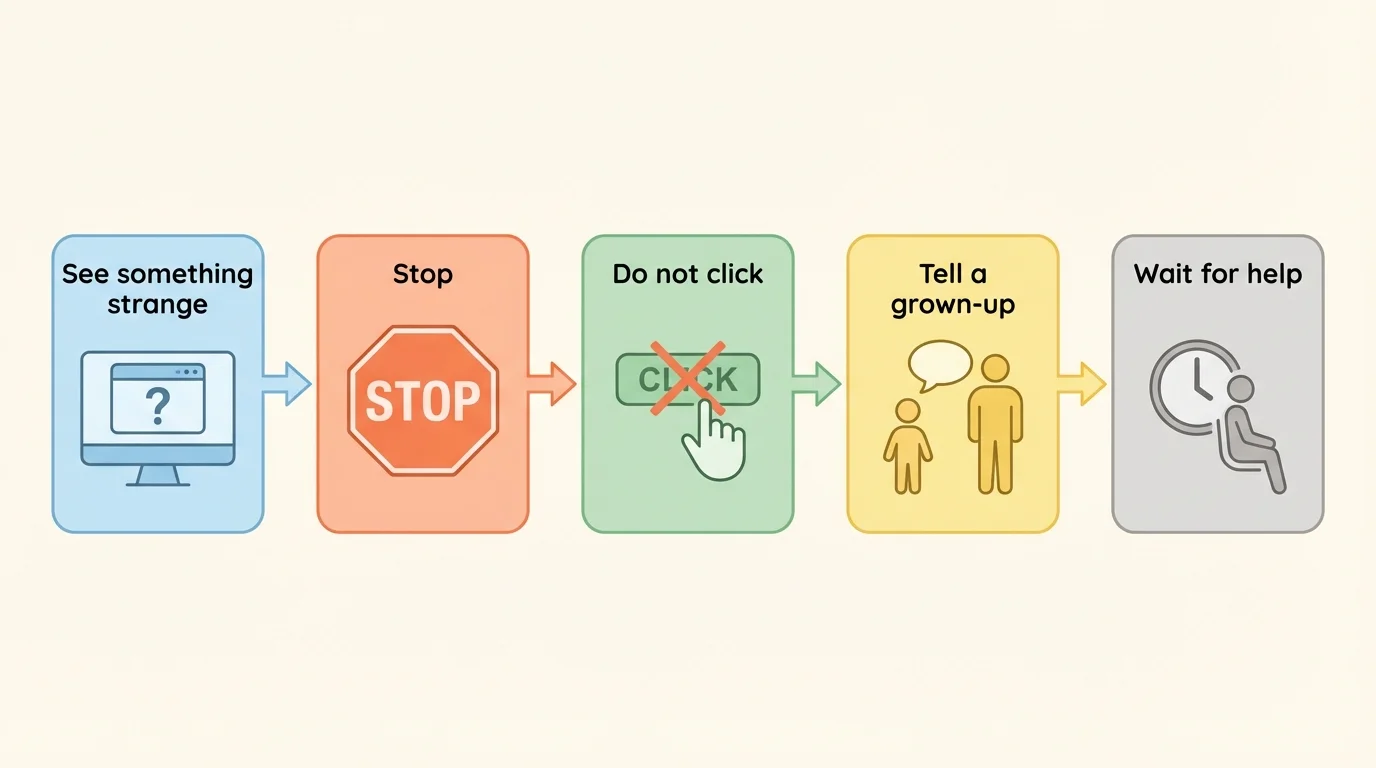
If the screen freezes, if a loud sound starts, or if a message asks for private information, take your hands off the device and call an adult. Safe users do not keep tapping when something is wrong.
What you can say
Step 1: Say, "I saw something strange."
Step 2: Say, "I did not keep clicking."
Step 3: Say, "Can you help me?"
Those words make it easy for a grown-up to help you.
That same safety plan from [Figure 2] works for pop-ups, odd videos, and messages from people you do not know.
Here is a simple checklist you can remember:
First, ask before clicking something new.
Next, keep private information private.
Then, use kind words online.
Also, be gentle with your device.
Last, if something feels wrong, stop and tell a trusted grown-up.
These rules help you become a careful, confident technology user. Every safe choice helps protect your learning, your feelings, and your family.
