A lot of money mistakes do not start with bad intentions. They start with something that looks convenient: a "free" account with hidden fees, a payment app request from the wrong person, a subscription that is hard to cancel, or a message that says your account is locked unless you act now. The difference between keeping your money and losing it often comes down to one skill: knowing how to compare offers carefully and spot trouble before you click.
If you learn this early, you gain a real advantage. You do not need to be rich, old enough for full-time work, or already managing lots of money. Right now, you may use a debit card, a savings account, a prepaid card, a payment method for games, or a money transfer app connected to family. The habits you build now can protect you later when the choices get bigger and more expensive.
Financial products are tools. Some help you manage money safely. Others cost more than they seem. Some are legitimate but poorly matched to your needs. Others are outright scams designed to take your money or your personal information.
Think about two students. One opens an account because the ad says "easy" and "instant." They never check the fees, use an out-of-network ATM several times, and get charged each time. The other spends ten minutes comparing options, chooses a teen account with no monthly fee and free in-network ATM use, and keeps more of their own money. Same basic task, very different result.
Scams create the same kind of split. One person sends money because a text says a package is delayed and a tiny fee is needed. Another person notices the strange link, checks the official website directly, and avoids losing money. Consumer strategy is about slowing down, checking details, and making decisions on purpose.
Financial product means a money-related service or tool, such as a bank account, debit card, prepaid card, credit card, loan, payment app, or insurance policy.
Scam means a dishonest scheme designed to trick someone into giving away money, personal information, or account access.
Fine print is the detailed terms, fees, limits, and rules that can change what an offer really costs or allows.
You do not need to memorize every product on the market. You do need to understand the categories you are most likely to run into and the questions to ask before using them.
A checking account is usually for spending money: purchases, debit card use, direct deposit, and transfers. A savings account is more for storing money and earning a little interest. A debit card pulls money directly from your account. A prepaid card holds money you load onto it ahead of time, but it may have activation or reload fees. A payment app helps you send and receive money digitally, but not all payment apps offer the same fraud protections.
You may also hear about overdraft fees, which can happen when a bank lets a transaction go through even though there is not enough money in the account. Some teen accounts do not allow overdrafts at all, which can be safer. You might also see APR, or annual percentage rate, on loans and credit cards. Even if you are not using a credit card yet, it is smart to understand that APR helps show the yearly cost of borrowing.
Another term to know is minimum balance. Some accounts require you to keep a certain amount of money in the account to avoid a fee. If that amount does not fit your real life, the product may not be a good match, even if the ad looks attractive.
The point is simple: before comparing products, make sure you know what each one is designed to do. A low-fee savings account and a prepaid card are not replacements for each other. They solve different problems.
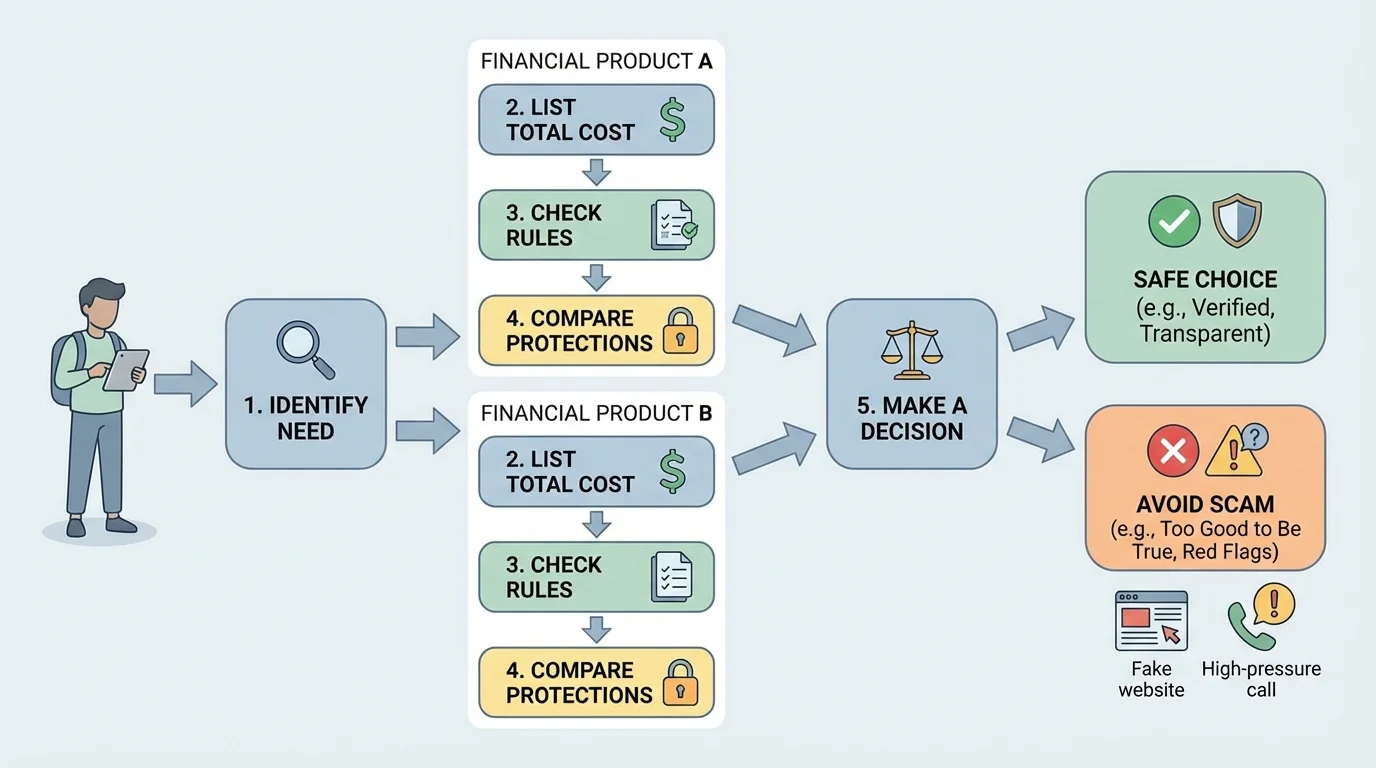
When you compare financial options, use a simple process, as [Figure 1] shows. You are not trying to find the "best" product for everyone. You are trying to find the best fit for your situation.
Step 1: Identify your real need. Are you trying to store money safely, spend money online, get paid from a job, send money to family, or build savings? If you do not know your goal, flashy features can distract you.
Step 2: List the total cost. Look beyond the headline. Ask about monthly fees, ATM fees, transfer fees, inactivity fees, late fees, overdraft fees, or penalties. If one card has a $0 monthly fee but charges $3 each time you reload cash, that matters.
Step 3: Check the rules. Are there age limits, minimum balances, direct deposit requirements, spending limits, cancellation rules, or delays in getting your money back after a dispute?
Step 4: Compare convenience and protection. Does the app let you lock your card? Does the company have customer support? Are transactions insured or monitored? Can you dispute unauthorized charges?
Step 5: Notice the risks. Can you accidentally spend more than you have? Is it easy to get trapped in recurring charges? Are you being rushed to sign up?
This method helps because it turns a vague feeling into a decision system. Instead of thinking, "This one looks cool," you think, "This one meets my goal, costs less over time, and has fewer risks." That is how smart consumers choose.
One useful habit is writing down your comparison in a note on your phone or computer. Even a tiny checklist makes a difference because it forces you to pause. Scams and bad deals both depend on speed. They want you to react, not evaluate.
Total cost matters more than the ad. A product that says "free" or "low fee" may still cost more overall if it adds several small charges. A good comparison looks at what you will actually pay in your normal routine, not just the first number you see.
If a checking account charges a $5 monthly fee, the yearly cost is not just "a few dollars." It is \(12 \times 5 = 60\), so that account costs $60 per year before any extra charges. If another account has no monthly fee but you use an out-of-network ATM twice a month at $2.50 each time, the yearly ATM cost is \(12 \times 2 \times 2.50 = 60\), which is also $60 per year. Different fee types can lead to the same result.
Here are some of the most important costs to check:
Monthly maintenance fee: a regular charge for keeping the account open.
ATM fee: a charge for using a machine outside the provider's network.
Overdraft fee: a fee when a transaction goes through without enough money available.
Reload fee: a charge for adding money to a prepaid card.
Late fee: a penalty for missing a payment date.
APR: the yearly cost of borrowing, especially important for credit cards and loans.
Small fees add up fast. Suppose a prepaid card has a $4 activation fee, a $3 monthly fee, and a $2 cash reload fee. If you keep it for six months and reload three times, your total cost is \(4 + (6 \times 3) + (3 \times 2) = 28\). That means $28 disappears in fees. If another option costs $0 to open and has no monthly fee, the difference is significant.
Fine print also includes limits that may not sound like "fees" but still affect you. For example, some services hold your money for several days after a transfer, some subscriptions renew automatically, and some trial offers become paid memberships unless you cancel on time.
Read especially carefully when you see words like introductory, limited time, subject to approval, terms apply, or up to. Those phrases are not automatically bad. They are signals to slow down and look deeper.
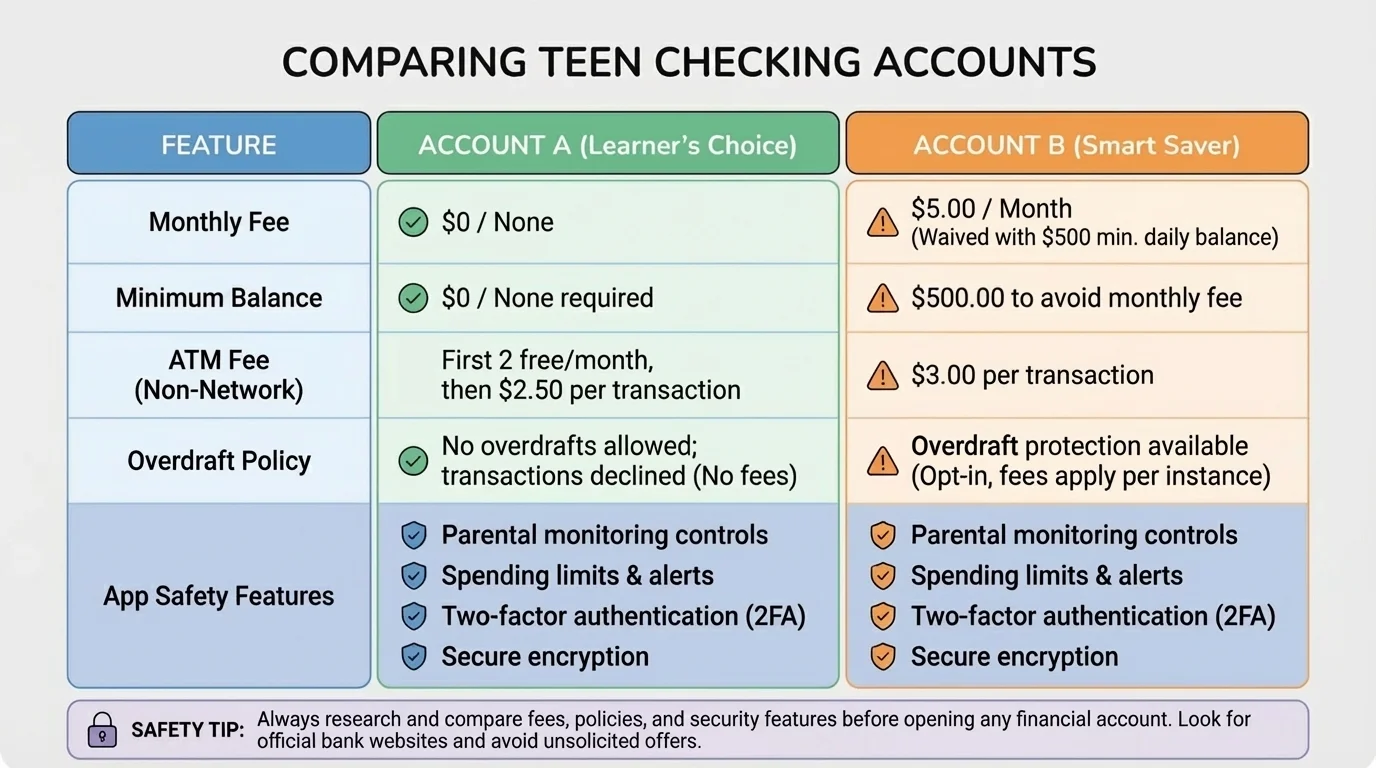
A side-by-side comparison is one of the easiest ways to make a smart choice, and [Figure 2] illustrates the kind of categories that matter most. Looking at products one at a time makes it easier to miss differences.
Suppose you are choosing between two teen checking accounts because you want a debit card, mobile deposits, and low fees. Here is the kind of comparison you should make.
| Feature | Account A | Account B |
|---|---|---|
| Monthly fee | $0 | $5, waived with direct deposit |
| Minimum balance | $0 | $100 |
| In-network ATM use | Free | Free |
| Out-of-network ATM fee | $2.50 | $3 |
| Overdraft policy | Declines purchase, no fee | May allow overdraft, $35 fee |
| Card lock in app | Yes | No |
| Parent/guardian monitoring | Optional alerts | None |
Table 1. Comparison of two youth checking account options using cost, rules, and safety features.
If you do not have direct deposit and often keep less than $100 in the account, Account B may be a poor fit even if its advertisement promises "premium banking." Account A may be safer because it has fewer ways to trigger charges.
Now compare two prepaid cards. Card X has no monthly fee but costs $4 each time you reload with cash. Card Y charges $3 per month but gives one free reload each month. If you reload cash twice per month for four months, Card X costs \(2 \times 4 \times 4 = 32\), so $32 total. Card Y costs \((4 \times 3) + (4 \times 1 \times 4) = 28\), so $28 total if the second reload each month costs $4. In that situation, Card Y is slightly cheaper, even though the monthly fee initially looks worse.
Case study: choosing the better option
Jordan wants an account for part-time job paychecks, online purchases, and saving small amounts each month.
Step 1: Identify the need
Jordan needs a checking account with debit card access, mobile app tools, and low risk of surprise fees.
Step 2: Eliminate poor fits
An account that requires a $100 minimum balance is risky because Jordan often keeps less than that amount.
Step 3: Compare likely costs
If Jordan uses two out-of-network ATMs per month with Account A, the yearly ATM cost is \(12 \times 2 \times 2.50 = 60\), or $60. If Jordan avoids those machines, the cost stays at $0.
Step 4: Compare protections
Account A offers card lock and no overdraft fee, which lowers the risk of losing money from mistakes or unauthorized use.
Jordan should probably choose Account A and also make a plan to use in-network ATMs only.
Notice that the "best" option depends on behavior. A product can be cheap for one person and expensive for another. That is why your own habits matter in the comparison process.
As [Figure 3] highlights, most scams follow repeated patterns, with several red flags you can learn to recognize quickly. The details change, but the pressure tactics stay similar.
One common tactic is phishing, where a scammer pretends to be a trusted company through email, text, or a fake website to steal passwords, account numbers, or verification codes. Another is spoofing, where the message or caller ID is made to look like it came from a real company or person.
Watch for these warning signs: urgent language, threats, requests for secrecy, offers that seem too good to be true, pressure to act immediately, requests for gift cards or cryptocurrency, and links that do not match the real company website. If a message says "Your account will be closed in 10 minutes unless you verify now," that is a strong clue that someone wants you to panic.
Scams aimed at teens often show up as fake job offers, fake online store deals, gaming account messages, social media giveaways, scholarship "fees," or payment app requests from someone pretending to know you. A fake job scam might send you a "check," tell you to deposit it, and then ask you to send part of the money back. Later, the check bounces and you lose the money you sent.
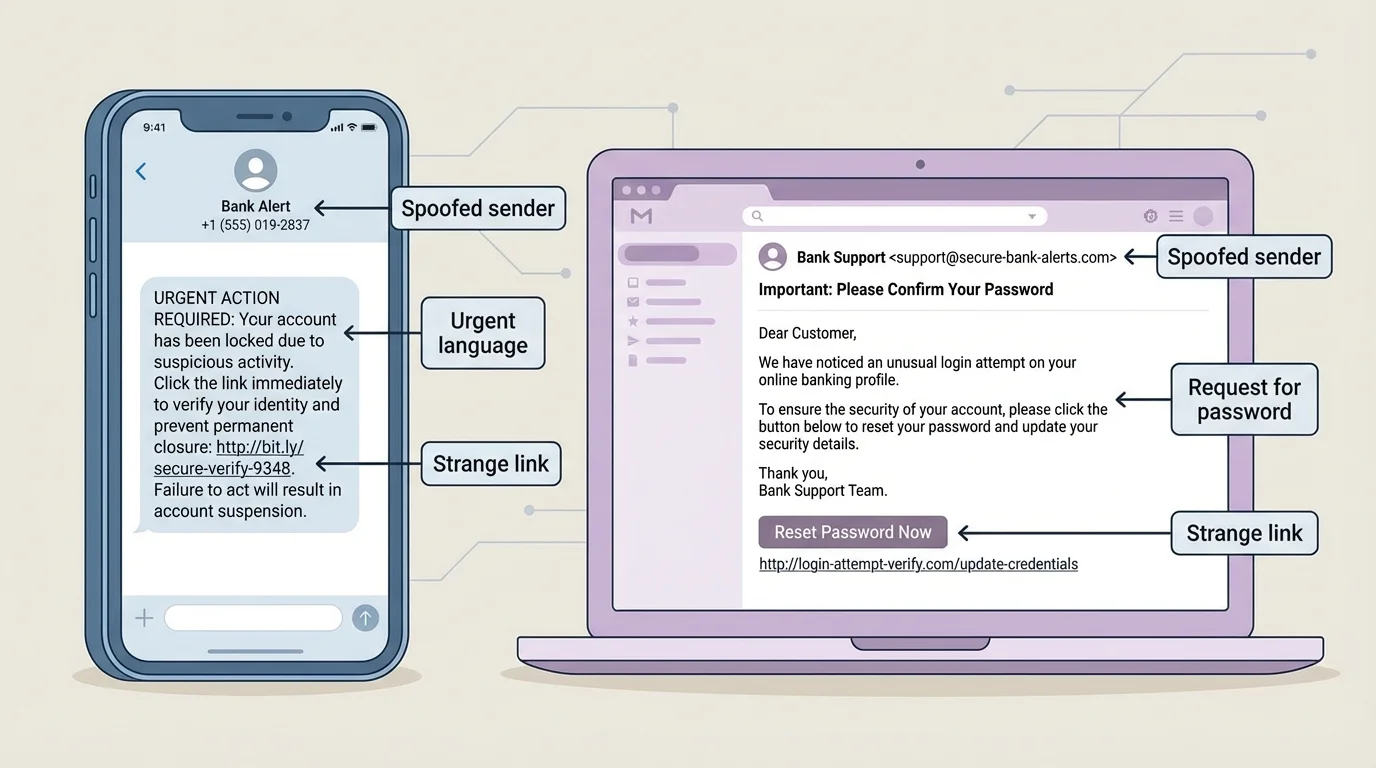
A strong rule is this: real companies may contact you, but they do not need you to click a random link in a panic. If something seems urgent, leave the message and go directly to the company's official website or app on your own.
Scammers often use tiny amounts, like a $1 "verification fee" or a $2 "delivery charge," because small numbers feel less risky. That is exactly why they work: people lower their guard when the amount seems minor.
Another warning sign is unusual payment methods. If someone asks for payment through gift cards, wire transfers, cryptocurrency, or "friends and family" transfers for a purchase, be careful. Those methods can be hard or impossible to reverse. Scam messages often combine urgency with a payment method that gives you less protection.
Good consumer protection is mostly about what you do before the transaction. A short pre-decision routine can save a lot of money and stress.
Check the source. Does the email address, website URL, or account username exactly match the real company? Tiny spelling changes matter.
Search independently. Do not use the link in the message. Search for the company yourself and use the official website or app.
Read reviews carefully. Look for patterns, not just star ratings. Complaints about billing, refunds, account access, or unauthorized charges are important.
Read the cancellation rules. If a trial becomes a paid subscription, know the deadline and how to cancel.
Ask what happens if something goes wrong. Can you dispute charges? Is there customer support by phone or chat? How fast can you lock your card?
Pause when pressured. A legitimate deal can usually survive a few extra minutes of checking. A scam often depends on you not taking that pause.
Protect your data. Never send passwords, one-time security codes, Social Security numbers, or bank login information through text, DM, or email.
Try this: Pick one financial app or service you already use and find its fee page, cancellation policy, and customer support options. If those are hard to find, that is useful information by itself.
"If you feel rushed, step away before you pay."
— A smart consumer rule
When an offer is real, checking details protects you. When an offer is fake, checking details exposes it. Either way, slowing down helps.
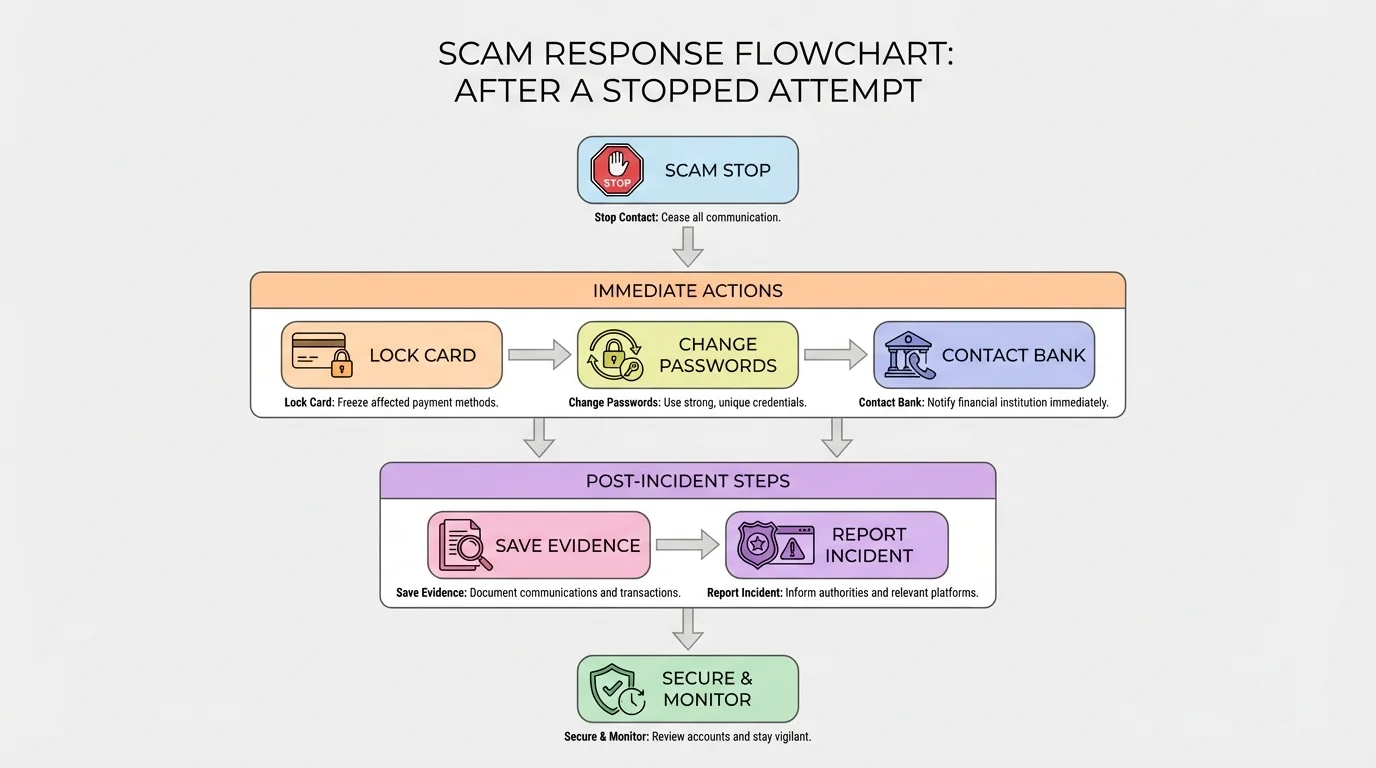
If you notice fraud or think you may have been tricked, move quickly in the order shown in [Figure 4]. Fast action can reduce the damage.
First, stop the interaction. Do not reply further. Do not click more links. Do not send more money.
Second, secure your accounts. Lock the card if possible, change your password, and turn on two-factor authentication if it is available.
Third, contact the real company or bank. Use the official app, website, or phone number. Report suspicious charges or transfers right away.
Fourth, save evidence. Take screenshots of messages, usernames, transaction numbers, emails, and websites.
Fifth, tell a trusted adult. If you are a teen, getting help quickly is smart, not embarrassing. Financial scams are designed to fool people.
Sixth, report it. Depending on the situation, report the scam to the payment app, bank, online platform, or consumer protection agency.
If money was taken from a linked account, ask about dispute procedures and timing. Some protections depend on reporting quickly. Waiting too long can make recovery harder.
It is also important to watch for follow-up scams. Sometimes, after someone is tricked once, another scammer contacts them pretending to be "recovery support" who can get the money back for a fee. That is often another trap. The safest route is through the official company or bank, not random accounts online.
Strong passwords, two-factor authentication, and careful privacy settings are not just tech habits. They are money-protection habits too, because many scams start by stealing account access.
Later, when you review what happened, ask two questions: What was the pressure tactic? What check would have stopped it? That turns a bad experience into a useful protection habit.
The strongest consumer strategy is not one big action. It is a set of small routines. Review your balances regularly. Turn on account alerts. Use official apps instead of random links. Keep track of subscriptions. Avoid storing card details on websites you barely use. Read the total before you hit "pay."
It also helps to create personal rules. For example: "I never send money to solve a problem from a text link." "I never keep using a service if I do not understand its fees." "I compare at least two options before opening an account." Rules like these reduce emotional decisions.
You should also know that convenience and safety sometimes pull in opposite directions. Instant purchases, one-click payments, and saved card details can be useful, but they can also make mistakes easier. The goal is not to avoid all convenience. The goal is to control it.
As the comparison chart in [Figure 2] suggests, a smart financial choice is usually the one with clear rules, low likely costs, and strong protections. And as the scam examples in [Figure 3] show, suspicious messages often become easier to spot once you know the pattern.
You do not need to be perfect. You just need a process: compare carefully, verify independently, and pause when something feels off. That process protects your money now and helps you make stronger choices as financial decisions become more important in adult life.
