Missing one box on a form or forgetting one deadline can create a surprising amount of stress. A missed medical form can delay an appointment. An ignored bill can become a late fee. A schedule you never check can turn a simple task into a last-minute problem. The good news is that independence is not about having a perfect memory. It is about building systems that help you handle details on purpose.
As you get older, more of life runs through paperwork, online portals, digital calendars, confirmation emails, and official messages. If you know how to use those tools well, you waste less time, make fewer mistakes, and feel more in control. This is one of the most practical life skills you can build because it affects health, money, work, school responsibilities, and home life all at once.
Being responsible does not just mean "trying hard." It means knowing what information is needed, when it is due, where it belongs, and how to respond if something changes. That is what forms, schedules, and documents help you do.
Why paperwork and planning matter
Everyday responsibility usually follows a pattern: you receive information, you take action, and then you keep proof. A form collects information. A schedule tells you when to act. A document gives instructions, records, or confirmation. When you use all three together, you become much more independent because you do not need someone else to constantly remind you what to do next.
If these tools are handled well, life becomes smoother. You show up prepared, meet deadlines, and can prove what you submitted or agreed to. If they are handled poorly, problems pile up fast: missed appointments, late payments, incomplete applications, confusion about rules, or lost records.
A form is something you fill out to give information. It might ask for your name, contact details, emergency contact, health information, work availability, or consent. Forms can be online or on paper.
A schedule is a plan that shows when things happen. That includes appointments, due dates, work shifts, chores, medication times, application deadlines, bill due dates, and reminder alerts.
A document is any written or digital record that gives information, sets terms, or proves something. Documents include bills, account statements, leases, pay stubs, school portal notices, medical instructions, insurance summaries, and confirmation emails.
Deadline means the latest time something can be submitted or completed. Required field means a space on a form that must be completed before submission. Verification means checking that information is accurate and complete before you send it.
These tools often connect. For example, you complete a job application form, add the interview to your calendar, and save the confirmation email as a document. Or you receive a bill, schedule the payment date, and save the receipt.
Most forms follow a pattern, as [Figure 1] shows: personal details first, then specific questions, then signatures, consent, or submission steps. Once you know this, forms stop feeling random. Instead of reading every line in panic, you can move through them in an organized way.
Step 1: Scan the whole form before filling anything in. Look for the title, the purpose, who it is for, the due date, any instructions, and whether you need documents to attach.
Step 2: Identify required fields. These may be marked with an asterisk, a bold label, a colored box, or the word "required." Complete those first.
Step 3: Gather the information you need before typing. That could include your address, phone number, email, ID number, emergency contact, health insurance information, or work availability.
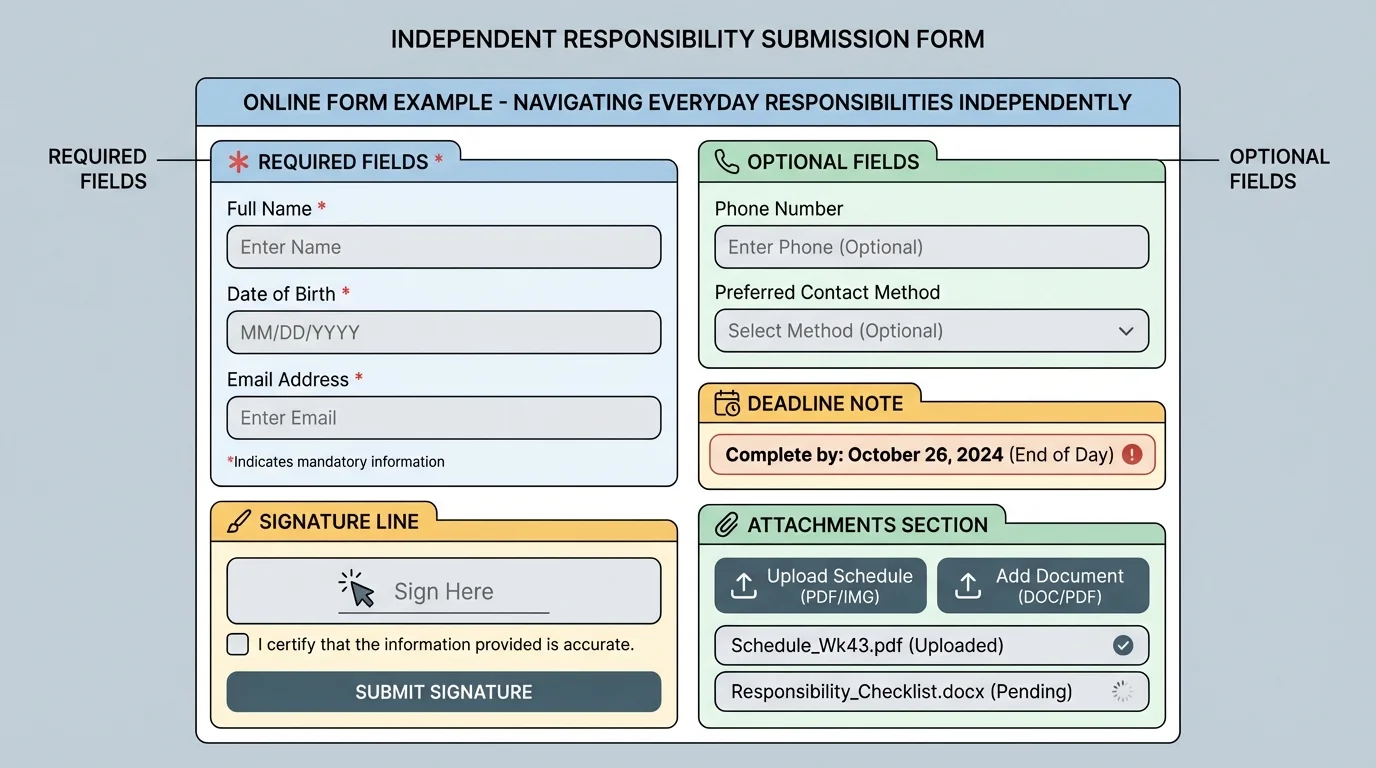
Step 4: Read carefully for words that change meaning. "Optional" does not mean required. "Preferred name" is different from legal name. "Primary contact" is different from emergency contact. "Check one" is different from "select all that apply." Small wording differences matter.
Step 5: Review before submitting. Check spelling, numbers, dates, and attached files. One wrong digit in a phone number or one missing document can create delays.
Step 6: Save proof. Take a screenshot of the confirmation page, save the email, or keep a photo or PDF copy. If there is ever a question later, you have a record.
Example: Completing a medical intake form
You have an appointment next week and receive a digital intake form.
Step 1: Scan the sections.
You notice contact details, allergies, current medications, insurance, consent, and appointment date.
Step 2: Gather what you need.
You find your insurance card, medication list, and emergency contact phone number before starting.
Step 3: Double-check details.
You confirm your birth date, spelling of your last name, and the phone number where the office should reach you.
Step 4: Save proof.
After submitting, you save the confirmation email in a folder labeled "Health."
This keeps the appointment from being delayed and makes follow-up easier.
Later, if you are unsure where to sign or what to attach, the same layout shown in [Figure 1] helps you slow down and check each section in order instead of guessing.
Some forms are one-time tasks, and some return again and again. The more familiar you are with common types, the faster and more accurately you can complete them.
Examples include account registration forms, camp or club permission forms, volunteer applications, part-time job applications, health history forms, emergency contact forms, transportation requests, housing interest forms, and direct deposit setup forms. Even if the details differ, the skill stays the same: read, gather, verify, submit, save proof.
| Form Type | Main Purpose | Common Information Needed | What to Save |
|---|---|---|---|
| Job application | Request employment consideration | Contact info, availability, experience, references | Confirmation email, resume copy |
| Medical form | Provide health and contact details | Birth date, allergies, medications, insurance, emergency contact | Submitted copy, appointment details |
| Account setup | Create login or service access | Email, username, password, phone number | Verification email, login details stored safely |
| Permission or consent form | Approve participation or treatment | Names, dates, signatures, emergency contact | Signed copy, event or appointment date |
| Direct deposit form | Send money to the correct bank account | Account number, routing number, identity details | Submission confirmation |
Table 1. Common everyday forms, their purpose, the information they usually require, and records worth saving.
Whenever possible, use your full legal name where a legal name is requested, and be consistent. If one form uses a nickname and another uses your legal name, systems may not match correctly.
A strong scheduling system combines fixed events, flexible tasks, and reminders in one place, as [Figure 2] illustrates. You do not need a complicated app. You need a system that you will actually check every day.
Start with one main calendar. This can be a phone calendar, tablet calendar, computer calendar, or paper planner. Using too many separate systems without a clear reason often causes missed information.
Put in fixed events first: appointments, live online classes, work shifts, family commitments, deadlines, and meetings. Then add flexible tasks such as laundry, cleaning, document uploads, refill requests, or studying. Finally, add reminders before important events so you have time to prepare.
Use buffer time. If an appointment starts at 3:00 p.m., set a reminder earlier so you can gather documents, log in, or leave on time. For a due date on Friday, make your personal reminder Thursday or even Wednesday. Waiting until the exact deadline increases stress and risk.
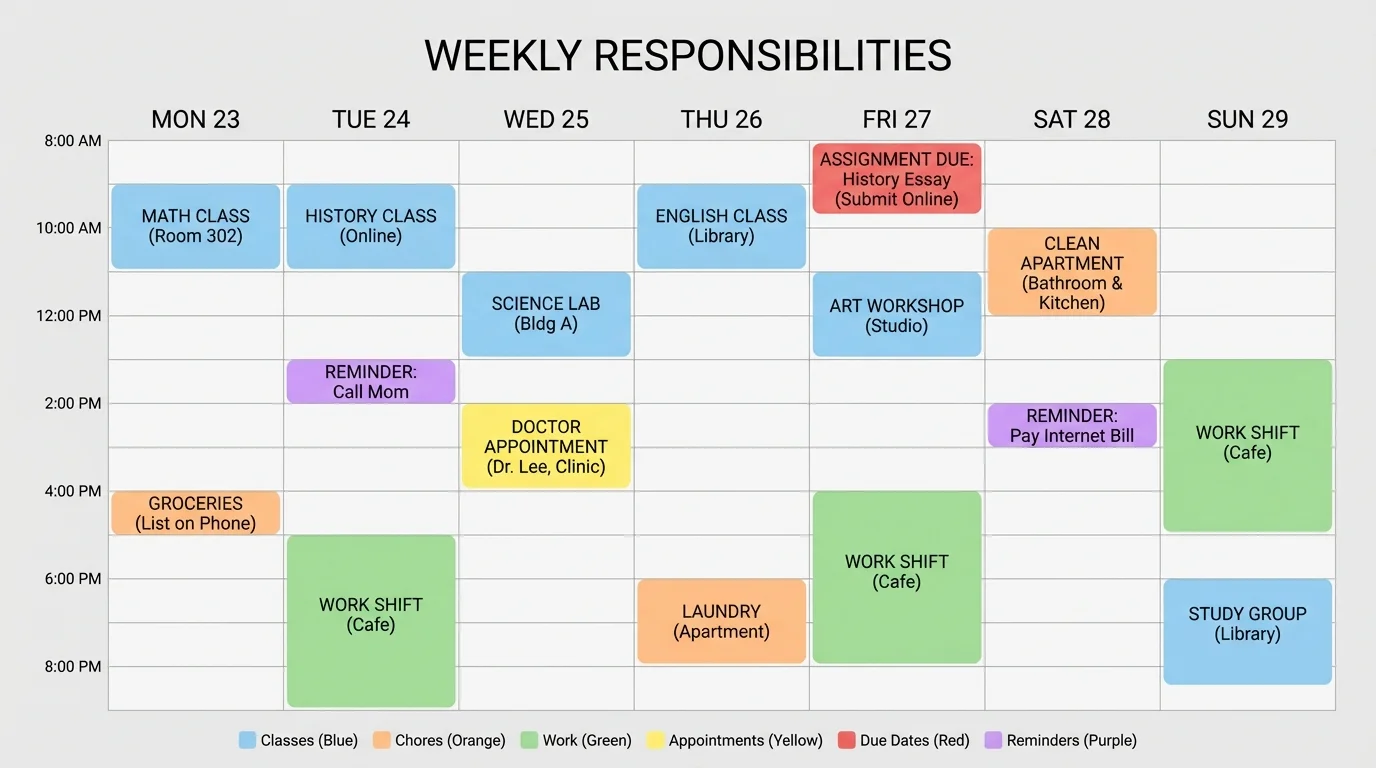
Recurring tasks matter too. If you take medication daily, help with a weekly chore, check a bill each month, or submit availability for work every Sunday, those belong in your schedule as repeating events. Repetition turns responsibility into habit.
Example: Building a weekly system
You need to manage an online assignment, a dentist appointment, two chores, and a volunteer shift.
Step 1: Add fixed times.
Put the dentist appointment and volunteer shift into your calendar first.
Step 2: Add deadlines.
If the assignment is due Friday, create a work block on Wednesday and a reminder on Thursday.
Step 3: Add chores realistically.
Schedule laundry on Saturday morning and room cleaning on Sunday afternoon instead of hoping you will "fit them in."
Step 4: Add preparation reminders.
Set a reminder the day before the dentist appointment to complete any pre-visit forms.
This reduces last-minute scrambling and helps you see whether your week is actually manageable.
When you look at your week visually, as in [Figure 2], it becomes easier to notice overloaded days, empty time you can use wisely, and tasks that need earlier reminders.
Many people think a document only matters if it looks official. In reality, a simple email can be just as important as a printed contract. The key question is: What does this document tell me, require from me, or prove for me?
A bill tells you what you owe, when it is due, and sometimes what happens if payment is late. A bank statement records money moving in and out of an account. A pay stub shows how much you earned and what was deducted. A lease explains housing rules, payment amounts, and responsibilities. A confirmation email proves that you registered, paid, scheduled, or submitted something.
Read for action, not just information
When you open a document, ask four questions: What is this? What action is needed? What is the deadline? What do I need to save? This keeps you from reading passively and then forgetting to do the important part.
Not every line matters equally. Focus first on names, dates, amounts, deadlines, account numbers, contact information, and terms like due, required, late fee, renewal, cancel, or signature needed. Those usually tell you what happens next.
If a bill says payment is due on the 18th, your schedule should remind you earlier. If a message says an uploaded document must be a PDF, submitting a photo file may not work. If a lease says rent is due on the first of each month, that rule matters even if you only read the document once.
Many adult mistakes are not caused by a lack of effort. They happen because people do not keep proof. A saved receipt, screenshot, or confirmation email can solve a problem in minutes that might otherwise take days.
Documents also need context. A pay stub is more useful when compared with your work schedule. A bill is easier to manage when paired with calendar reminders. A confirmation email matters most when stored somewhere you can find it quickly.
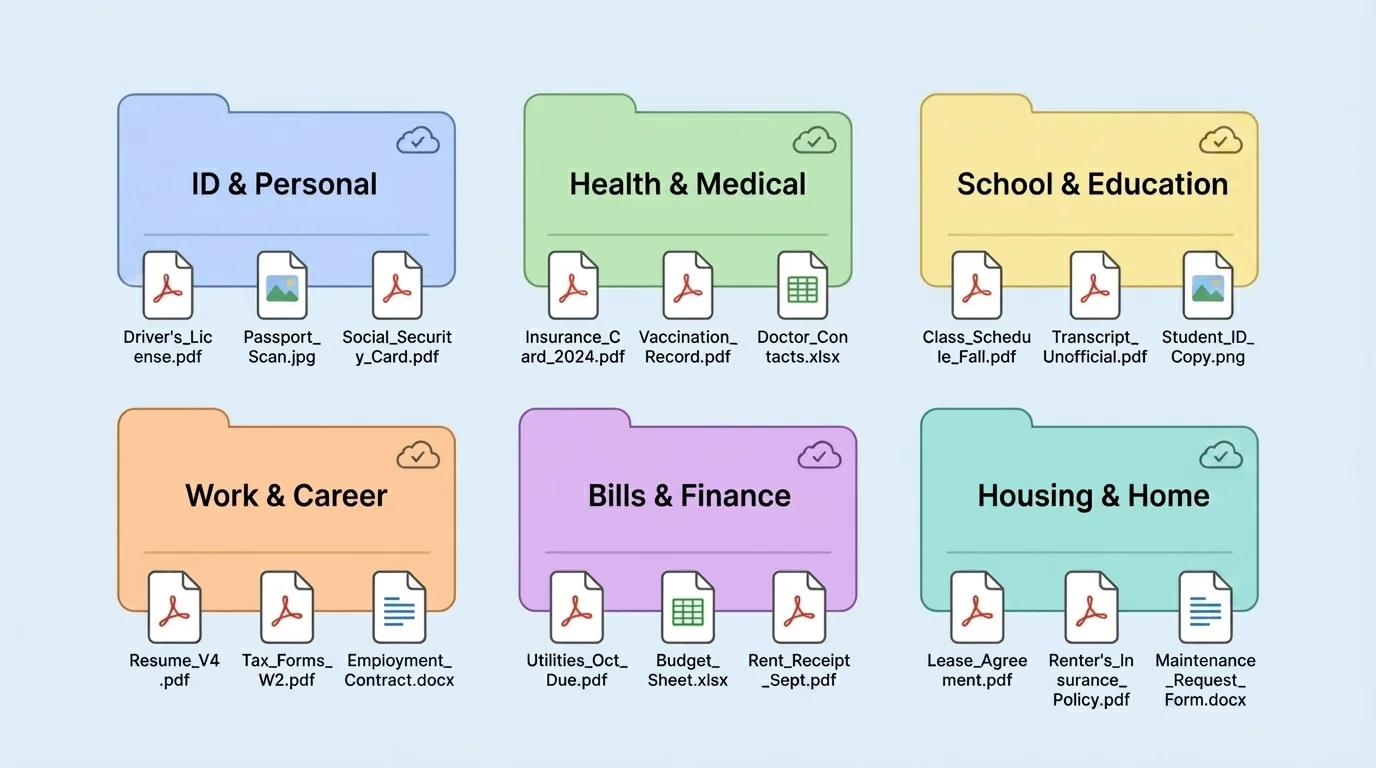
Keeping a document is only helpful if you can find it fast, as [Figure 3] shows with a simple folder system. Organization is not about making things look neat. It is about being able to respond quickly when someone asks for information.
Create a small number of clear folders, such as Health, Work, School, Bills, ID, Housing, and Receipts. Inside those folders, use simple file names like "Doctor-Visit-Confirmation-May" or "Job-Application-River-Cafe." Avoid names like "stuff" or "random file 2."
A useful file name usually includes the source, purpose, and date. For example, "Bank-Statement-June-2026" is easier to find later than "statement-final." If a document matters, back it up. That might mean cloud storage plus a device copy, or a printed copy for especially important records.
Protect personal information. Do not leave private documents open on shared devices. Use strong passwords and avoid sending sensitive information through unsafe channels when a secure portal is available. Personal details like your address, ID number, account details, and medical information should be handled carefully.
One strong habit is to create a "waiting for" note. If you submitted a form and are expecting a response, write down what you sent, when you sent it, and what you are waiting for. That way you can follow up clearly if needed.
"Being organized is being able to find what you need when you need it."
When life gets busy, the folder model from [Figure 3] helps you avoid wasting time searching through screenshots, downloads, and unread messages.
Confusing paperwork feels stressful, but there is a reliable sequence you can follow, as [Figure 4] outlines. The goal is not to guess fast. The goal is to slow down enough to solve the problem correctly.
First, stop and reread the instructions. Many mistakes happen because people react to what they think a form says rather than what it actually says. Highlight or note the exact part that is unclear.
Second, check the official source. That may be the website, portal instructions, confirmation email, or FAQ page. Official sources are better than random online comments or guesses from friends.
Third, if the issue is still unclear, contact the office or organization politely. Be specific. Instead of saying, "I don't get this," say, "On the health form, the insurance section asks for subscriber ID. Is that the number on the front of the card?" Specific questions get better answers.
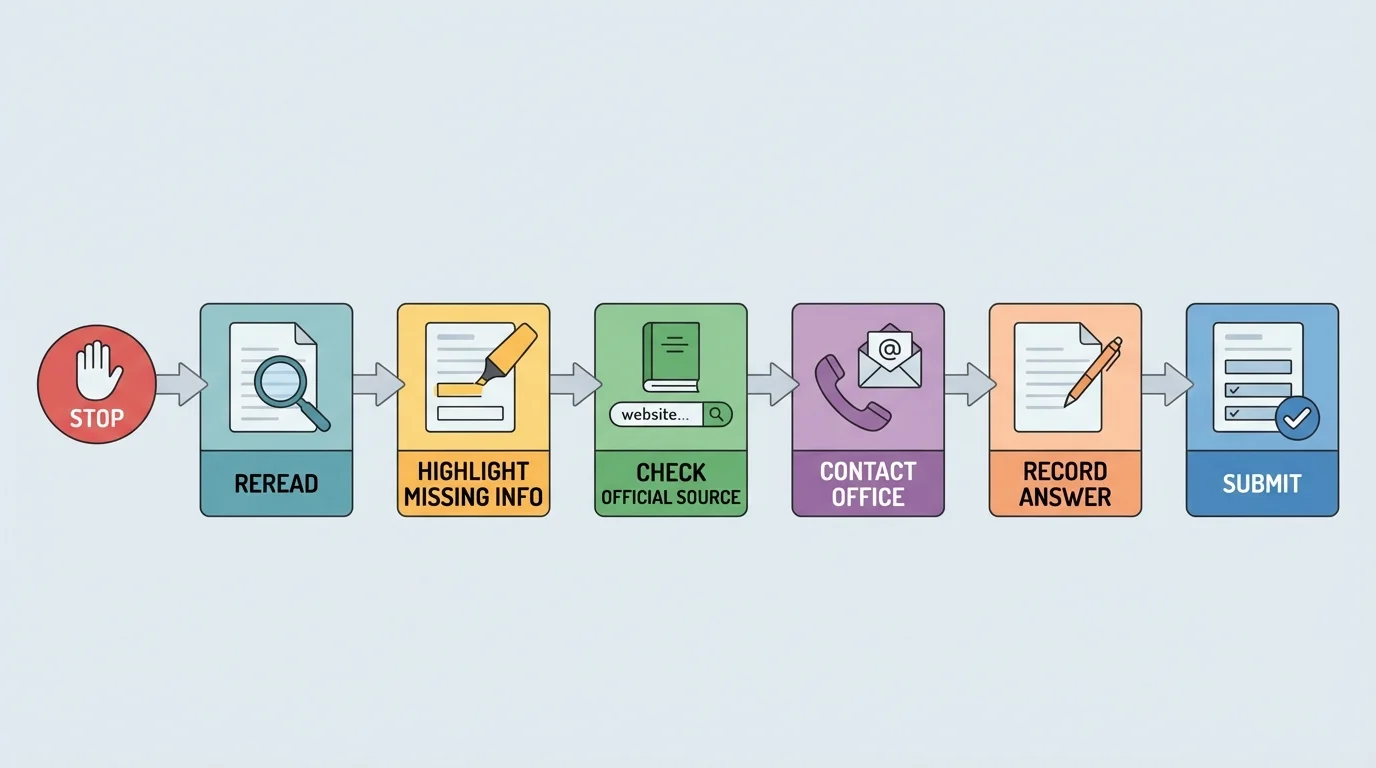
Fourth, write down the answer you receive and save any message that clarifies the issue. If instructions change later, you have a record.
Fifth, if you are missing a required document, do not ignore the task. Add it to your schedule as a follow-up action. For example, if you need proof of address, set a reminder to find a utility statement or request the record.
Example: A missing document problem
You start an application and realize it requires an ID photo you do not have ready.
Step 1: Do not abandon the application.
Check the deadline and confirm whether you can save progress.
Step 2: Make the missing item a scheduled task.
Add "take ID photo" and "upload application" to your calendar before the final due date.
Step 3: Save notes.
Record what the application still needs so you can finish it quickly later.
This turns a stressful surprise into a manageable plan.
The decision process in [Figure 4] also helps when a deadline is close, because it keeps you focused on the next correct action instead of panicking.
Here is what this skill looks like in real life. You get a message confirming a medical appointment. You read the document, notice there is a form to complete, fill it out carefully, save the confirmation, and place the appointment plus a reminder in your calendar. That is independence.
Or you apply for a part-time job online. You upload your resume, list your availability, submit the form, and save the confirmation email. Then you block time in your schedule to check for responses and prepare for an interview. Again, that is independence.
Or a bill arrives by email. You read the amount and due date, check whether it is legitimate, schedule the payment, and save the receipt after paying. That is how adults prevent small responsibilities from becoming expensive problems.
If you already use checklists for homework, chores, or goals, you have a strong starting point. Forms, schedules, and documents work best when you treat them as connected tools, not separate tasks.
Notice the pattern in all three situations: read the information, identify the action, schedule the action, complete it carefully, and keep proof. The pattern stays the same even when the specific task changes.
Try This: Choose one real document you currently have, such as an appointment message, bill notice, registration email, or account confirmation. Identify the purpose, the action needed, the deadline, and where you will save it.
Try This: Set up one main calendar if you do not already have one. Add one appointment, one deadline, and one recurring responsibility.
Try This: Create three folders on your device for important records. Name them clearly and move at least one real file into each folder.
Try This: The next time a form feels confusing, use the sequence: scan, gather, complete, review, save proof. Repeating the same process builds confidence.
You do not become independent by knowing everything in advance. You become independent by knowing how to handle information, stay organized, and follow through. Forms, schedules, and documents are not just paperwork. They are the tools that help you run your life on purpose.
