Most people do not get stuck because a problem is impossible. They get stuck because the system is confusing. A bill arrives with unfamiliar wording. A website asks for documents you do not recognize. A health clinic tells you to call one number, and that number tells you to use a portal. The good news is that you do not need to know everything in advance. You need a method.
Administrative and service systems are the organized ways that schools, clinics, banks, internet service providers, government offices, employers, and other organizations handle requests. Some are simple. Many are not. You may need to update an address, recover an account, schedule an appointment, submit a form, dispute a charge, or ask for help with a service.
When you can handle these systems well, life gets smoother. You meet deadlines, solve problems faster, and avoid extra fees, missed appointments, lost access, or repeated stress. When you handle them poorly, small problems can grow. A missed email can become a late fee. A vague question can lead to a useless answer. Contacting the wrong department can waste a week.
This skill is really about self-advocacy: speaking up clearly for what you need, while staying organized and respectful.
Administrative system means the set of rules, forms, offices, and procedures an organization uses to manage tasks and requests. Self-advocacy means clearly communicating your needs, rights, or concerns in a respectful and effective way.
You do not need to sound powerful or formal to be effective. You need to be clear, calm, and persistent.
When you receive a message from an unfamiliar system, slow down first. The fastest way to solve the problem is often to stop yourself from rushing. A good first scan looks for four things: what this is about, what action is needed, when it is due, and who to contact if something is unclear.
[Figure 1] Look carefully for keywords such as required, deadline, account number, verification, support, appeal, appointment, or documentation. These words usually point to the main task. If the message is long, do not try to memorize it. Pull out the key facts.
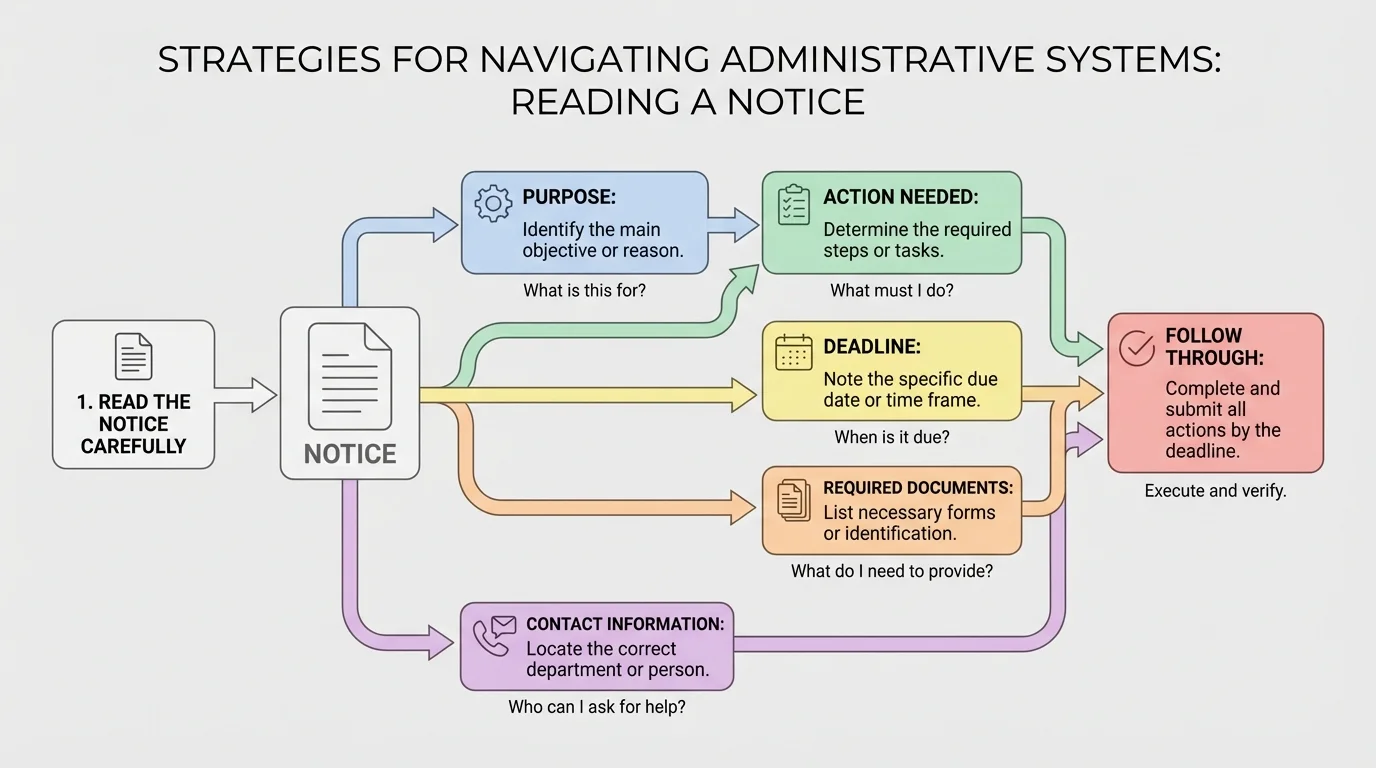
A useful trick is to write down answers to these questions: What happened? What do they want from me? What do I need to send or do? By when? What happens if I do nothing? If you can answer those five questions, you already understand most of the situation.
Be careful with automatic assumptions. If a message says, "Your account requires verification," that does not always mean something is wrong. It may simply mean the organization needs identity confirmation. If a form asks for "proof of residence," that usually means a document showing your address, such as a utility bill or official letter.
Also check whether the message is real. Look for the official website, email domain, phone number, or account portal. Scams often create urgency and confusion on purpose. If something feels suspicious, do not click links right away. Go to the official website yourself and sign in there.
The first goal is not solving the whole problem. The first goal is correctly identifying the task. Many people create extra stress by jumping into action before they understand what is actually being asked. Reading carefully saves time because it prevents avoidable mistakes.
Later, when you compare your notes with the response you receive, the same structure from [Figure 1] helps you see whether you have completed every required step.
Once you know the issue, the next step is to locate the contact channel that matches it. This works like sorting mail: the faster you direct the issue to the correct place, the faster it gets handled. Different problems usually belong to different departments.
[Figure 2] For example, a billing mistake usually goes to billing or accounts, not technical support. Trouble signing into an online portal usually goes to technical support, not records. A missing document may go to records, admissions, human resources, or customer service, depending on the organization.
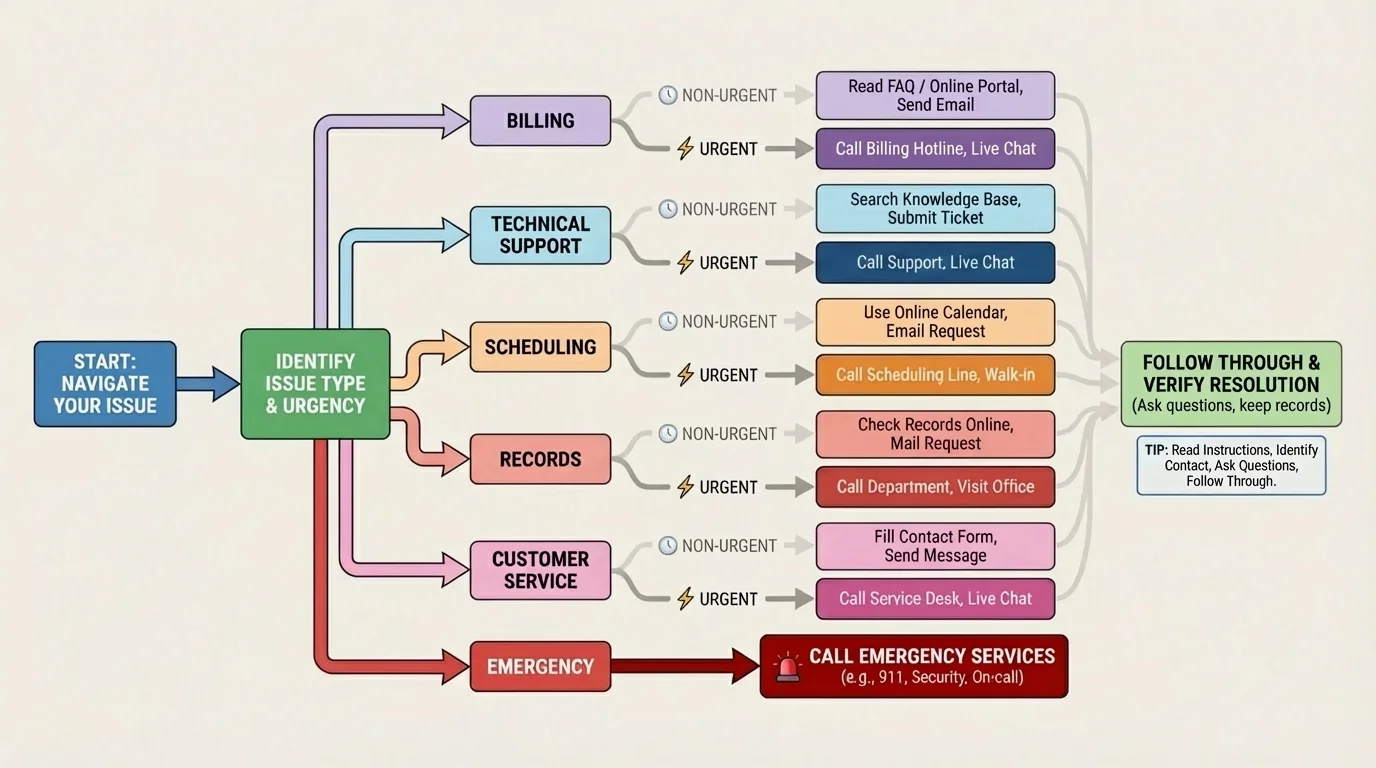
Start by checking the organization's website or app. Look for sections like Help, Support, Contact Us, FAQ, or Departments. Read short descriptions under each option. They often tell you exactly what each office handles.
Think about two things: type of issue and urgency. If your internet is out and you need it for an online class or job shift, live chat or phone support may be better than email. If you need a copy of a form and there is no rush, email may be better because it creates a written record.
Some systems have levels. You may begin with general customer service, then get transferred to a specialist. That is normal. If the first person cannot help, politely ask, "Which department handles this?" or "Could you transfer me to the team that can access this record?"
Do not assume the first answer is the final answer. Sometimes a front-line support worker gives limited information because they only handle basic tasks. If your problem is more specific, ask whether there is a supervisor, a specialist, or another office that handles exceptions or appeals.
| Problem | Best First Contact | Why |
|---|---|---|
| Incorrect charge on an account | Billing or accounts | They can review payments and fees |
| Cannot log into a portal | Technical support | They manage passwords and access issues |
| Need to reschedule an appointment | Scheduling desk or reception | They control appointment times |
| Need a copy of a document | Records office or customer service | They store and release records |
| Question about job onboarding forms | Human resources | They handle employment paperwork |
Table 1. Common problems matched with the most useful first contact.
If the situation involves health, money, contracts, or legal documents, accuracy matters even more. In those cases, ask for the exact office name and, if possible, the full name of the person helping you.
Good questions are specific. Bad questions are broad, emotional, or missing context. "This isn't working" is hard to answer. "I'm trying to upload my ID in the portal, but I keep getting an error message after I click submit" is much easier to solve.
A strong question usually includes four parts: the issue, what you already tried, the result, and what you need next. That keeps the conversation focused.
Here is a simple structure you can use: "Hi, I'm contacting you about ____. I already tried ____. The problem is ____. Could you tell me ____?" You can use this in email, live chat, or on the phone.
Example: weak question vs. effective question
Step 1: Weak version
"My account is messed up. Please fix it."
Step 2: Strong version
"Hi, I'm trying to log into my account, but the system says my email is not recognized. I reset my password twice and still cannot access the portal. Could you tell me whether my account is active and what step I should take next?"
The second version gives the support person something they can actually work with.
Notice what makes the better version strong: it names the problem, gives the exact error, explains what was already attempted, and ends with a clear request.
When possible, ask one main question at a time. If you send a message with six unrelated questions, you may only get an answer to one or two. If your issue has multiple parts, number them clearly.
Useful question starters include:
Your tone matters. You can be firm without sounding rude. Respectful communication keeps people more willing to help. At the same time, politeness does not mean being passive. If the answer is unclear, say so. If the issue remains unresolved, ask what the next step is.
"Clear is kind. Specific is powerful."
If you are nervous on the phone, write a short script first. That is not fake. It is preparation.
A confusing situation becomes much more manageable when you create a paper trail. A paper trail is simply a record of what happened, who you contacted, what they said, and what you need to do next. Even a basic tracking system can prevent repeated mistakes and forgotten promises.
[Figure 3] Keep a note on your phone, a document on your computer, or a small notebook. Record the date, time, organization, person's name, contact method, summary of what was said, any confirmation number, and the next deadline.
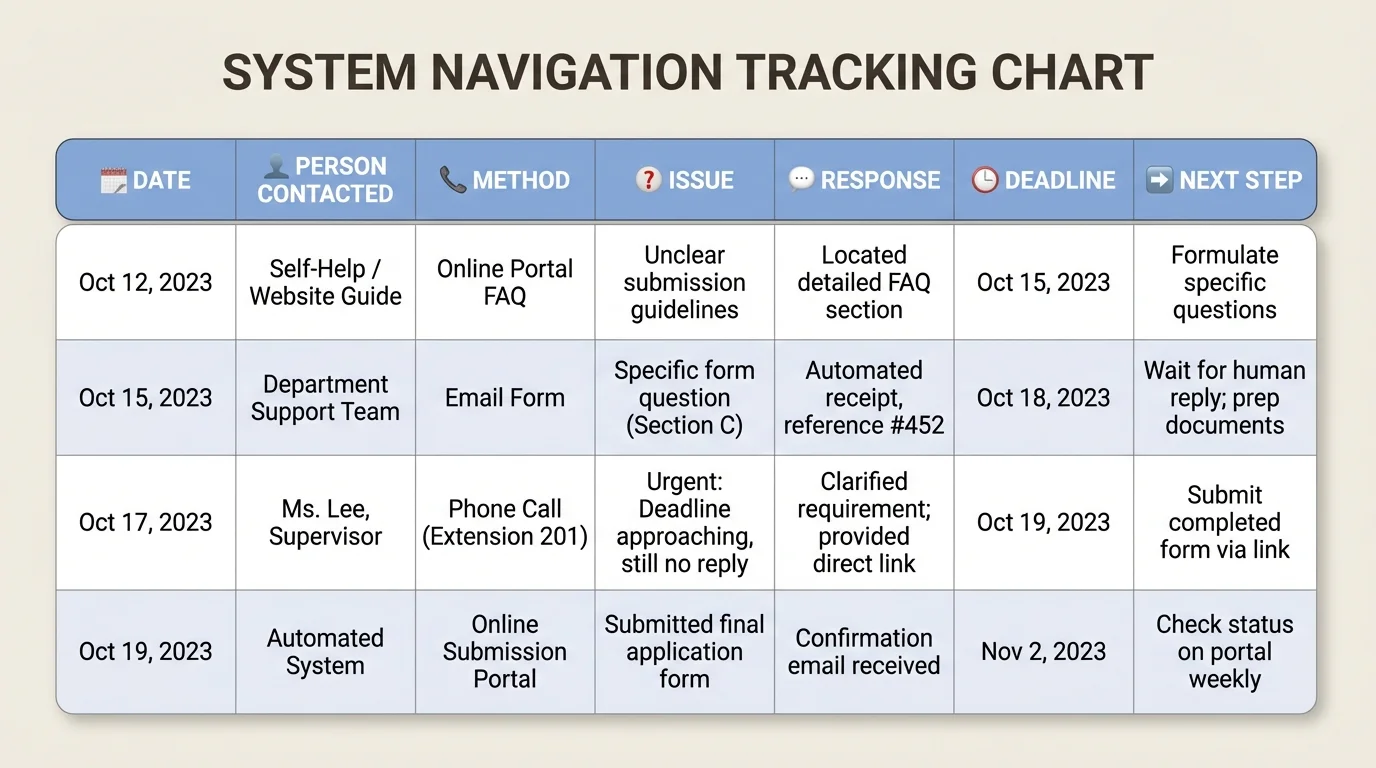
This matters because systems are busy, and people forget things. If you call back and say, "I spoke with Jordan on Tuesday, and I was told the form would be reviewed by Friday," you sound organized and credible. You also make it easier for the next person to help you.
Follow-through means you do the next step and then check the result. If someone says, "Upload this document and wait two business days," do exactly that. Then, if nothing happens, contact them again after the time they gave you.
Do not rely on memory alone. Deadlines feel far away until they are suddenly tomorrow. Use reminders on your phone or calendar. If you need to submit something by the end of the day, set a reminder earlier than that, not at the exact deadline.
If you send an email, save it. If you fill out a form, take a screenshot of the confirmation page when appropriate. If you mail something important, use a method that can be tracked when possible.
Many problems that seem like "nobody helped me" are really tracking problems. People often did contact the right place once, but they did not save the response, note the deadline, or follow up when the promised action did not happen.
Later, when a delay happens, the organized record from [Figure 3] helps you explain the situation quickly instead of starting over from the beginning.
When you face a new system, use a repeatable workflow. The process works for many situations, whether you are dealing with a utility company, a clinic, a school portal, a job form, or a government office.
[Figure 4] Step 1: Read the message, form, or website carefully.
Step 2: Identify the exact problem or task.
Step 3: Gather what you need: account number, dates, screenshots, documents, or names.
Step 4: Choose the right contact channel based on issue type and urgency.
Step 5: Ask a specific question or make a specific request.
Step 6: Write down the response, instructions, and deadline.
Step 7: Complete the next action and check whether the problem is actually resolved.
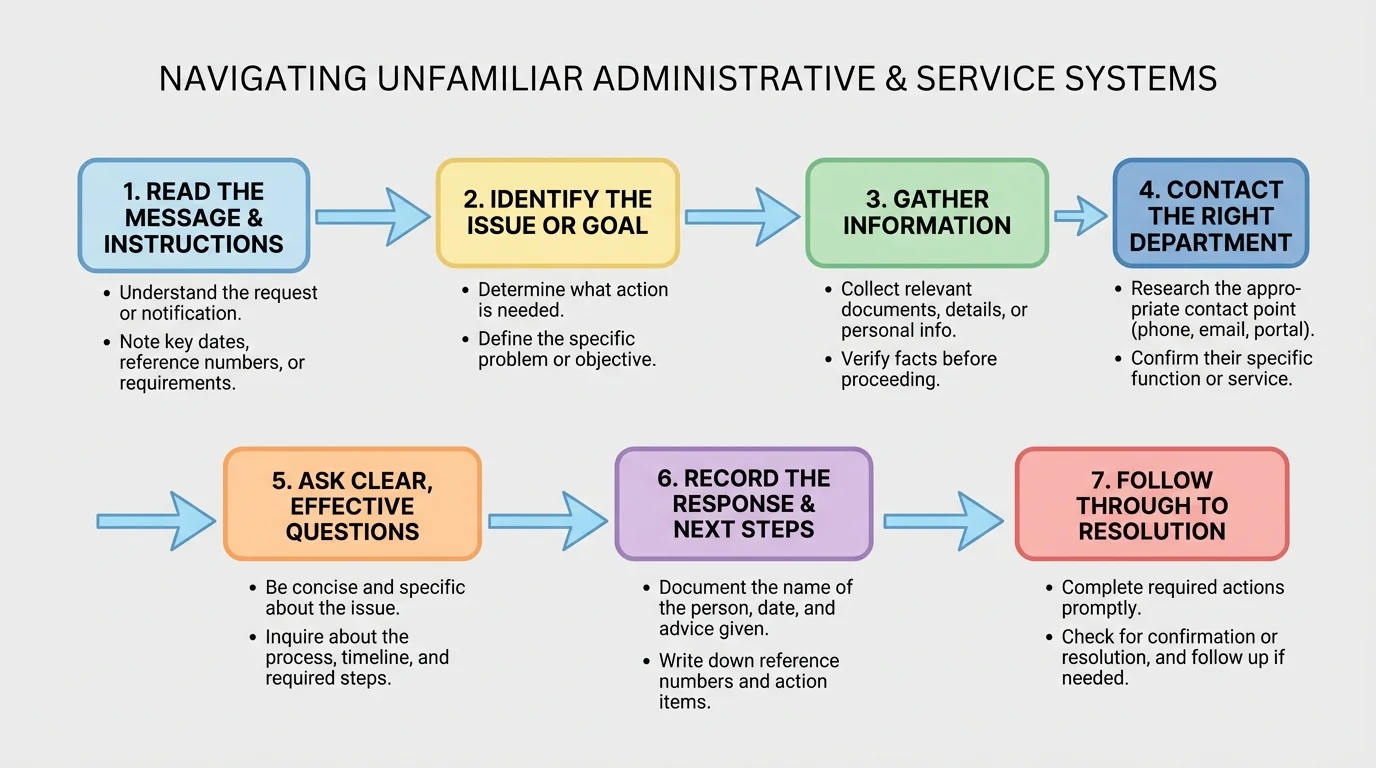
This system works because it breaks a stressful event into manageable pieces. Instead of thinking, "This whole thing is a mess," you think, "What step am I on?" That shift reduces panic and improves decisions.
Systems become easier when you externalize the process. In other words, do not keep the whole problem in your head. Put the instructions, your notes, your questions, and your deadlines into a visible process. This lowers the chance of confusion and helps you notice what still needs to be done.
If the organization gives unclear instructions, go back to the earlier steps. Re-read. Gather your facts. Then ask a more precise question. The workflow in [Figure 4] is not just for first contact; it also helps when you need to loop back and try again.
Scenario 1: Utility account issue. You see a charge on your family internet account that seems too high. First, read the bill carefully. Check the date range, plan name, taxes, equipment charges, and any one-time fees. Then contact billing, not technical support. Ask: "I'm reviewing the bill from this month, and I see a higher charge than usual. Could you explain which line item changed and whether this is a one-time fee or a recurring charge?"
Scenario 2: Health clinic paperwork. A clinic message says you must bring insurance information and complete pre-visit forms before your appointment. Read the instructions slowly. Find out whether the forms are online or need to be printed. If you do not understand one section, contact the clinic's scheduling or front desk staff. Ask exactly which fields are required and whether a parent or guardian must complete part of the form.
Scenario 3: Online school platform problem. You cannot upload an assignment because the platform keeps rejecting the file. Before messaging support, check the file type, size limits, and deadline instructions. Then contact technical support or your school's help desk with the file type, the error message, and what you already tried.
Scenario 4: Job onboarding. You get hired for a part-time job and receive several digital forms. Do not rush through them. Read each one. Notice whether the message comes from human resources, payroll, or a hiring platform. If one form asks for direct deposit information and you do not have it ready, ask what alternatives exist and when the deadline is.
Case study: solving a missing document problem
Step 1: Identify the need
A program requests "proof of address" by Monday.
Step 2: Read the instructions
The website lists acceptable documents, but the student is unsure whether a bank statement counts.
Step 3: Contact the right office
The student emails the records office rather than general support because the question is about acceptable documentation.
Step 4: Ask clearly
"I'm submitting proof of address for my application. The instructions list utility bills and official letters. Would a bank statement with my current address be accepted, or should I send a different document?"
Step 5: Record and follow up
The student saves the reply, submits the correct document, and keeps the confirmation email.
This is what effective navigation looks like: careful reading, the right contact, a precise question, and documented follow-through.
Notice how these examples all use the same pattern. The details change, but the method stays the same.
Mistake 1: Skimming instructions. If you skip details, you may miss a deadline or send the wrong document. Slow down. Use the same scan process shown earlier in [Figure 1].
Mistake 2: Contacting the wrong office. This wastes time and creates frustration. Sort the issue before reaching out, just like the pathways in [Figure 2].
Mistake 3: Asking vague questions. If your message is unclear, the answer may be vague too. Give context, the exact issue, and what you need next.
Mistake 4: Not writing anything down. Without records, you may forget names, dates, promises, or instructions. Your tracking system matters.
Mistake 5: Giving up after one attempt. Some systems require follow-up. Persistence is often part of the process, not proof that you failed.
Mistake 6: Letting stress control the interaction. It is normal to feel annoyed, embarrassed, or overwhelmed. But emotional urgency can make your communication less effective. Pause first, then proceed.
Confidence with systems usually comes after experience, not before it. The first time you deal with a clinic portal, banking app, payroll form, or government document, it may feel confusing. That does not mean you are bad at this. It means the system is new.
Each time you handle one successfully, you build a mental model of how organizations work. You learn that most problems can be broken into parts: read, sort, ask, record, follow through. That is a practical life skill you will use for years.
There is also wisdom in knowing when to ask for help. If the issue involves legal risk, identity theft, large amounts of money, medical consent, or something you genuinely do not understand, bring in a trusted adult. Asking for help is not weakness. It is judgment.
Try This: The next time you receive any official message, do a five-part scan before responding: identify the purpose, required action, deadline, needed documents, and contact information.
Try This: Create a note template on your phone with these labels: date, organization, person contacted, issue, answer, deadline, next step. Use it the next time you call or email support.
Try This: Write one practice script for email and one for phone calls. Keep them short and reusable so you can adapt them quickly when a real problem appears.
