A lot of adult problems do not start because someone is irresponsible. They start because someone cannot find one piece of paper at the right moment. A missing insurance card can delay medical care. A lost Social Security card can slow down a job application. An unread letter can turn into a late fee. Being organized is not about being perfect. It is about making your future life easier, faster, and less stressful.
When you build a personal record system now, you are creating something that supports you for years. You do not need a fancy office, expensive apps, or color-coded binders worthy of social media. You need a system that is simple enough to keep using. If you can find what you need in a few minutes, protect private information, and update things regularly, your system is doing its job.
Personal records are the documents that prove who you are, what you own, what you owe, what care you have received, and what actions you need to take. As an adult, these papers and files affect jobs, housing, banking, taxes, healthcare, travel, and legal responsibilities.
Good organization saves time, protects your money, and lowers stress. If you apply for a job and need identification, you can respond quickly. If a doctor asks for your medication history, you can check it. If a bank sends an alert, you can compare it to your own records. Organized records also help you spot mistakes, such as charges you do not recognize or bills that should already be paid.
Poor organization has real consequences. You might miss a payment, forget an appointment, lose access to an account, or struggle to replace important documents. In more serious cases, private information could be exposed, leading to identity theft or fraud. A system is not just about neatness. It is a form of protection.
Many adults keep important papers in random drawers, backpacks, email inboxes, and phone photo albums. That feels convenient until an urgent deadline arrives and the information is scattered across five places.
If you are still a teenager, now is the best time to start. Your collection of documents is probably smaller than it will be later. That makes this the easiest stage of life to set up a system before paperwork becomes much more complicated.
The easiest way to stay organized is to divide everything into four main groups, as [Figure 1] shows: identity documents, financial records, health records, and important correspondence. These categories cover most of what you will need for independent living.
Identity documents prove that you are you. These include things like your birth certificate, Social Security card, state ID or driver's license, passport, and any legal name-change papers if those apply. These are some of the hardest records to replace quickly, so they deserve extra care.
Financial records track money going in, money going out, and your relationship with banks, employers, lenders, and the government. Examples include bank statements, pay stubs, tax forms, credit card records, loan information, and receipts for major purchases.
Health records include insurance cards, vaccination records, prescription information, allergy lists, doctor visit summaries, lab results, and contact information for healthcare providers. These are especially important in emergencies or when changing doctors.
Important correspondence means letters, emails, notices, and messages that require action or prove something important. Think about acceptance letters, lease agreements, billing notices, government mail, warranty information, and official communication from employers or service providers.
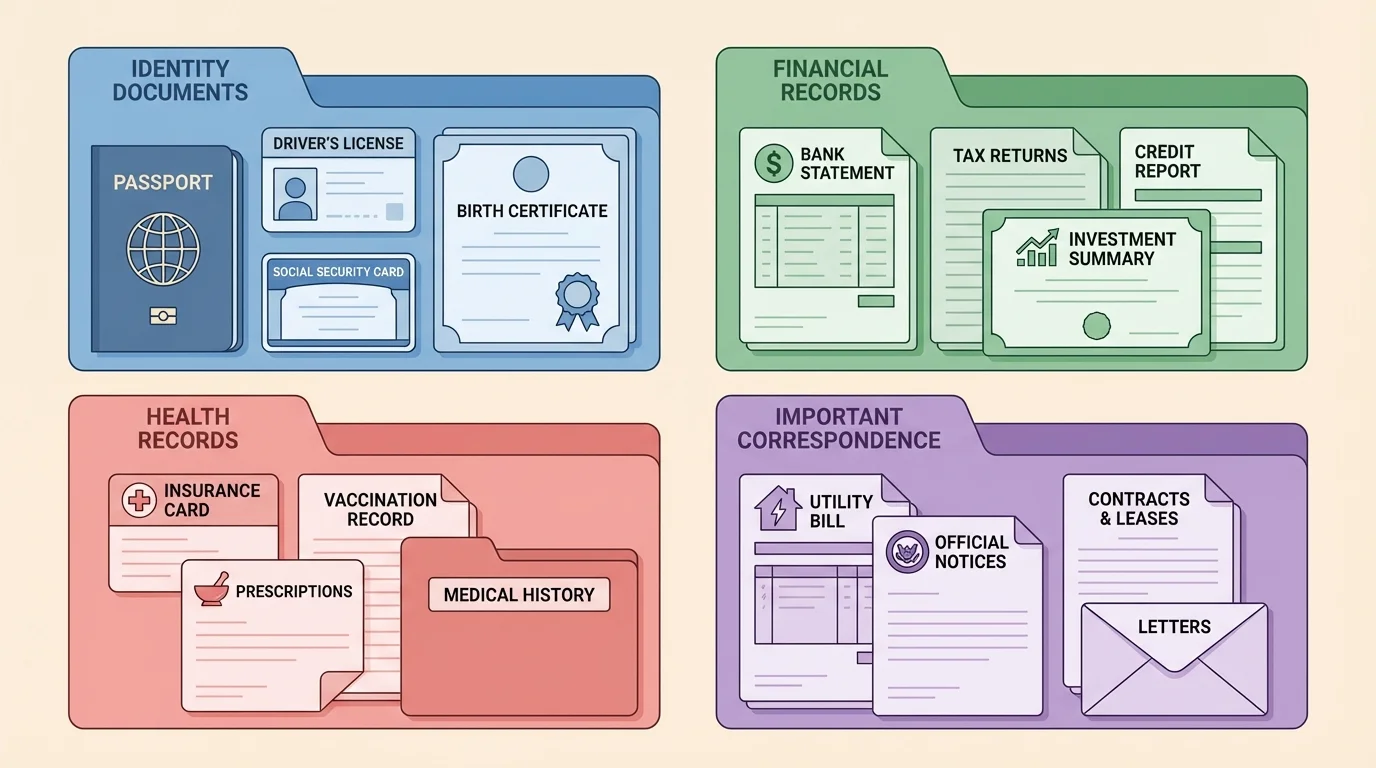
You may notice that some items fit in more than one category. That is normal. For example, a hospital bill is both a health item and a financial one. Choose the place where you would most likely look for it first, or keep a copy in one category and a note in the other. The goal is not perfect classification. The goal is easy retrieval.
Personal record system means a planned way to store, protect, and find important documents. A good system includes categories, storage locations, naming rules, and a routine for updating records over time.
A category system also helps you notice what is missing. If you have a folder for identity documents and one slot is empty, you immediately know you still need to get that document or replacement.
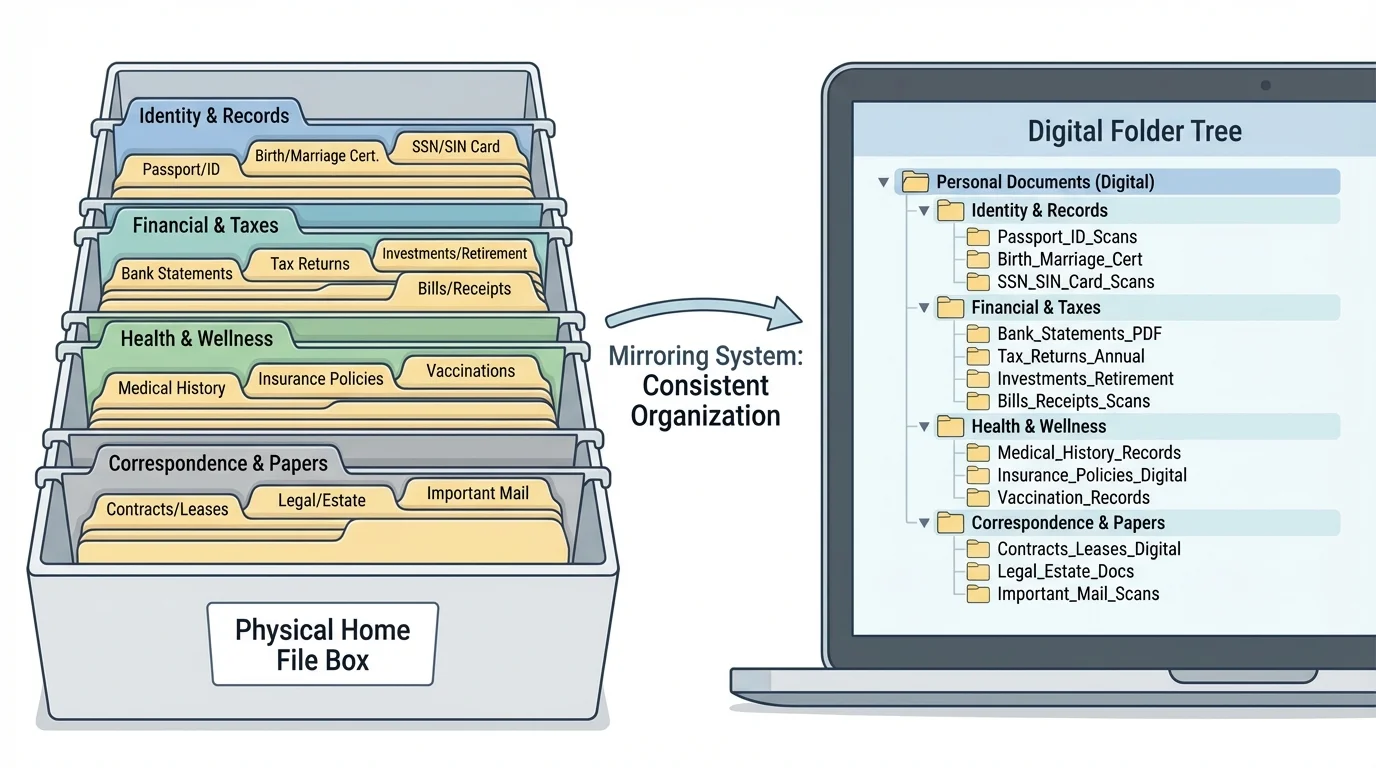
A strong system usually has two parts: a physical setup for original paper documents and a digital setup for scanned copies, PDFs, and important emails. A mirrored system, as [Figure 2] illustrates, makes it much easier to remember where things belong because the same categories appear in both places.
Physical storage should be simple and secure. A small filing box, accordion folder, or locked drawer works well. Use clearly labeled folders: Identity, Financial, Health, and Correspondence. Inside each main folder, add subfolders if needed, such as Taxes, Banking, Insurance, or Medical Visits.
Digital storage should match the physical setup. On your computer or secure cloud account, create one main folder called something like "Personal Records." Inside it, make the same four category folders. Then build subfolders that match your real-life needs.
For digital files, use a clear file naming convention. This means naming files in a consistent way so they sort neatly and make sense later. A strong format is date first, then document type, then source. For example: "2026-03-10_BankStatement_Checking" or "2025-09-01_PhysicalExam_Summary." Date-first naming helps files sort in order automatically.
Scan or photograph important papers, but make sure the image is readable. If text is blurry, cropped, or too dark, it will not help much later. Save digital copies as PDFs when possible because they are easy to store and share.
Keep original documents that are hard to replace, such as birth certificates and passports, in a very safe place. A digital copy is useful, but it does not replace the original in many official situations. For especially important records, consider a fire-resistant box or another highly secure location in your home.
As your system grows, [Figure 2] remains useful because it shows the idea of matching your paper and digital folders. When both systems use the same labels, you spend less time guessing and more time finding.
Now that you know the four categories, the next step is deciding what to keep. Not every scrap of paper deserves permanent storage. Keep documents that prove identity, show legal or financial responsibility, track health care, or require future action.
For identity records, keep originals or secure copies of your birth certificate, Social Security card, driver's license or state ID, passport, immigration papers if relevant, and school or employment records that verify your legal name. If you are applying for jobs, colleges, travel, or housing, these documents often become important fast.
For financial records, keep bank account information, debit and credit card account records, pay stubs, tax documents, scholarship or financial aid records, loan information, and receipts for expensive items like a laptop or phone. If you buy something major, the receipt can help with warranty claims or theft reports.
For health records, keep your insurance card information, immunization records, doctor contact details, prescription list, allergies, ongoing health conditions, and visit summaries. If you take medication, keep a current list of the medication name, dosage, and reason you take it. Even if the dosage is simple, such as taking medicine twice daily, keeping written instructions prevents memory errors.
For important correspondence, save anything official that confirms, changes, or demands something. This might include lease-related messages, utility account notices, job offer emails, college financial aid letters, appointment confirmations, account warnings, legal notices, and repair agreements. If a message affects your money, housing, health, schedule, or legal status, keep it.
| Category | Examples to Keep | Best Storage Priority |
|---|---|---|
| Identity | Birth certificate, Social Security card, passport, state ID | Originals in secure physical storage; scanned backup |
| Financial | Bank statements, pay stubs, tax forms, loan records | Digital folder plus selected paper copies |
| Health | Insurance cards, vaccines, prescriptions, visit summaries | Digital folder with quick phone access for emergencies |
| Correspondence | Government notices, leases, official emails, warranty letters | Digital archive and action folder for current items |
Table 1. Major personal record categories, sample documents, and suggested storage priorities.
You do not need to keep everything forever. A grocery receipt usually does not matter after you confirm the charge. A phone bill from years ago may not matter unless it connects to taxes, reimbursement, proof of address, or a dispute. Use judgment: if the document proves something important or may be needed later, save it.
Example: sorting a mixed pile of documents
You empty a backpack and find a vaccine card copy, a bank statement, a job interview confirmation email printed out, a fast-food receipt, and a phone warranty.
Step 1: Identify documents with long-term value.
The vaccine card copy, bank statement, interview confirmation, and phone warranty all connect to health, money, employment, or ownership.
Step 2: Assign each item to a category.
Vaccine card copy goes to Health. Bank statement goes to Financial. Job interview confirmation goes to Important Correspondence. Phone warranty goes to Important Correspondence or Financial, depending on where you would look first.
Step 3: Remove low-value paper.
The fast-food receipt can usually be thrown away once you know the charge is correct, unless you need it for a refund or budgeting check.
This is how real organization works: quick decisions based on future usefulness.
When in doubt, keep the document temporarily in a folder called "To Review" and make a decision during your next records check.
Organization is not enough if your records are easy for other people to access. Some documents contain account numbers, addresses, medical details, or government identifiers. That information can be misused if it falls into the wrong hands.
Use strong passwords for email, cloud storage, and financial apps. Turn on two-factor authentication when possible. This adds a second step, such as a code sent to your phone, before someone can log in. It is one of the simplest ways to protect digital records.
Be careful with photos of personal documents. A picture of your driver's license or insurance card in your phone camera roll may be convenient, but your camera roll is not always the most secure storage place. Move sensitive images into a protected folder, password manager attachment, encrypted file, or secure cloud location.
Backup matters because devices fail, accounts get locked, and papers can be lost in moves, floods, or fires. The safest approach is to keep originals secure, digital copies stored in one main place, and a second backup in another secure location. That way one problem does not wipe out everything.
Protect what would be hardest to replace. Not all papers need the same level of security. Put the most protection around documents that are difficult, expensive, or slow to replace, such as identity records, tax forms, contracts, and medical history. Convenience matters, but protection matters more for high-risk records.
When you throw away documents with private information, shred them if possible. If you cannot shred them, black out sensitive details thoroughly before disposal. Simply crumpling a document and tossing it in the trash does not protect you.
You also need a plan for access during emergencies. If a parent, guardian, or trusted adult helps you manage healthcare or finances right now, know where the key documents are stored. As you get older, your goal is to understand the system well enough that you can manage it yourself.
The best record systems stay useful because they are maintained in small, regular check-ins, as [Figure 3] shows. You do not need giant clean-up sessions every few years. A monthly routine and a yearly review usually work better.
Once a month, check your mail, downloads, and email for anything that belongs in your system. File new documents, delete obvious junk, and move action items into a place where you will not forget them. A small habit that takes 10 minutes is easier to keep than a huge project that takes 3 hours.
Once a year, review each category. Replace outdated copies, remove documents you no longer need, and make sure emergency information is current. If your address, phone number, insurance, school, job, or legal name changes, update records right away rather than waiting.
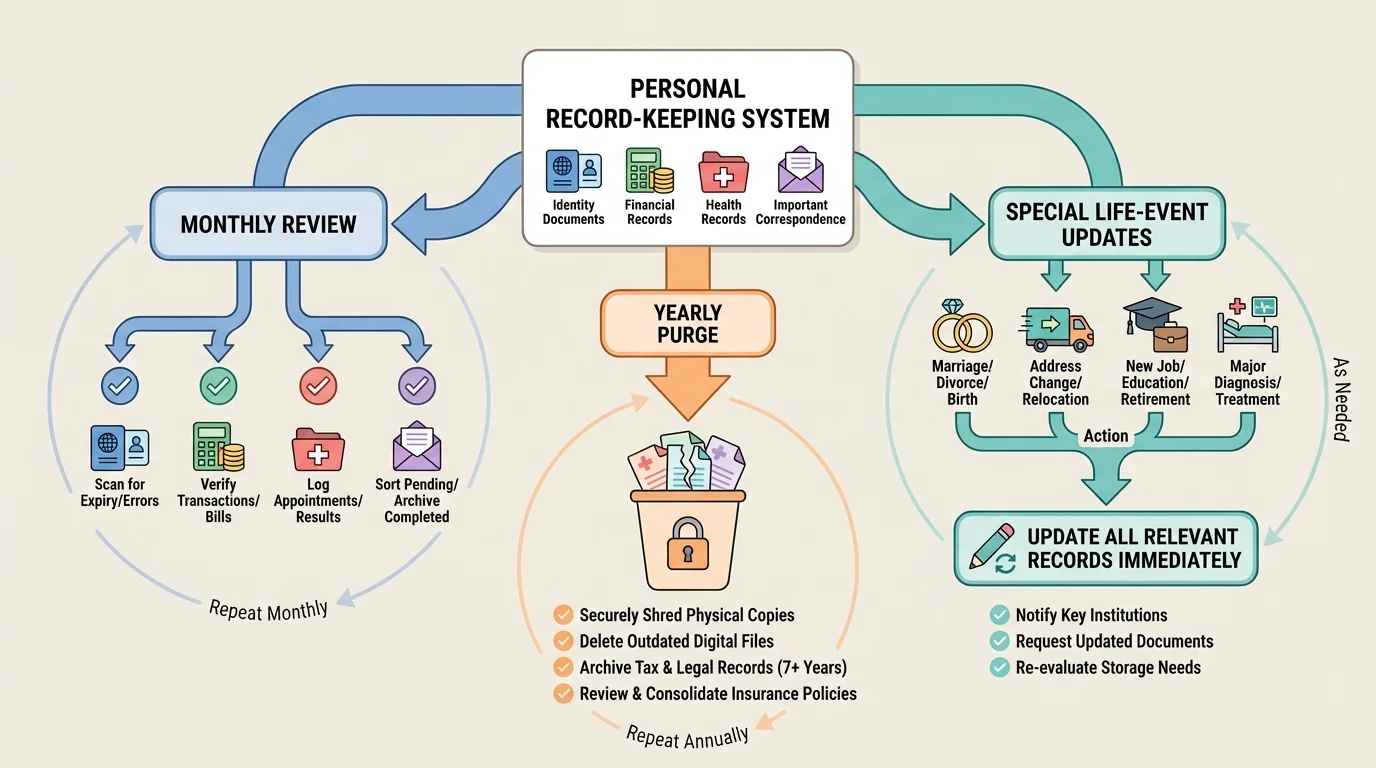
A good maintenance routine includes life-event updates too. If you start a job, open a bank account, get a driver's license, move, switch doctors, or turn 18, your system should change with you. [Figure 3] helps you see that organization is not a one-time event. It is an ongoing loop of collect, file, review, and update.
Starter routine you can actually use
Step 1: Pick one weekly reset time.
For example, every Sunday evening, spend a few minutes checking your email, downloads, and any loose papers.
Step 2: Process what came in.
Ask: keep, act, or discard? If it matters later, file it. If it needs attention now, place it in an action folder. If it has no future value, delete or throw it away safely.
Step 3: Do a monthly scan check.
Make sure your most important papers have readable digital copies and that your backup still works.
Step 4: Do a yearly review.
Archive older records, remove outdated copies, and update anything that has changed.
This routine is boring in the best possible way: it prevents chaos before chaos starts.
If you tend to forget tasks, put reminders in your calendar. Adult systems work best when they do not rely only on memory.
One common mistake is keeping everything everywhere. Some files are in email, some are in text messages, some are screenshots, and some are paper copies under a bed. The fix is to choose one main home for each type of record and move older documents into that system.
Another mistake is labeling folders too vaguely. A folder called "Important Stuff" becomes useless fast. Specific labels such as "Taxes," "Banking," or "Medical Visits" are easier to use.
A third mistake is mixing urgent action items with long-term storage. If a bill needs to be paid next week, do not bury it inside your archive. Keep an "Action Needed" folder for current tasks and a separate archive for records you are keeping mainly for reference.
Many people also forget to check official email accounts. If a college, employer, doctor's office, or bank contacts you digitally, that message may be as important as a paper letter. Correspondence is not just mail in an envelope anymore.
"A system only works if you can trust yourself to use it."
— Practical rule for adult organization
Another major mistake is assuming you will remember where something is. You probably will not. Searchable filenames, consistent folders, and calendar reminders beat memory almost every time.
You can build a working system without waiting for adulthood to fully arrive. Start with what you already have. Gather your documents from drawers, backpacks, old email attachments, phone photos, and download folders. Then sort them into the four categories.
Make one physical folder or box and one digital master folder. Label both with the same categories. Put your hardest-to-replace items in the safest place. Scan key papers. Rename files clearly. Create one action folder for anything that still needs a response.
If the pile feels overwhelming, start small. Set a timer for 20 minutes and organize just one category. Progress matters more than finishing everything at once.
One-day setup plan
Step 1: Gather everything.
Pull together all papers and digital files that seem official, financial, medical, or legal.
Step 2: Sort into the four categories.
Create piles or digital folders for Identity, Financial, Health, and Important Correspondence.
Step 3: Protect the highest-priority items.
Move original identity records and other sensitive papers into secure storage first.
Step 4: Build your habits.
Add a weekly reminder, a monthly file check, and a yearly review to your calendar.
After one setup session, your future self will already have an easier time handling jobs, appointments, taxes, applications, and unexpected problems.
Being organized will not make adult life perfect, but it will remove a lot of avoidable stress. The real win is confidence. When someone asks for a document, you know where to find it.
