Being disorganized does not usually look dramatic at first. It looks like a missed email, a forgotten bill, a late assignment upload, an unanswered text about a work shift, or a room that slowly becomes too stressful to work in. Then all those small problems stack up. What makes adult life feel hard is often not the number of responsibilities alone, but the lack of a system that can hold them. If you are learning online, managing your own time matters even more because no physical school routine is automatically structuring your day for you.
A personal organization system is not about becoming a perfectly neat person. It is about making sure important things do not depend on memory, panic, or luck. The goal is to create a setup that helps you remember what matters, decide what to do next, and reduce the mental pressure of trying to keep everything in your head.
A lot of people think organization is just a personality trait: either you have it or you do not. That is not true. Organization is a set of skills. If you have never been taught how to build a system, you will probably try to manage life in inconsistent ways. You might write some tasks in a notes app, remember others mentally, leave some in email, and hope you will "just get to it." That usually fails.
One reason this happens is executive functioning, the group of mental skills that helps you plan, focus, remember instructions, and manage multiple tasks. When you are tired, stressed, busy, or distracted, these skills can weaken. That means even smart, motivated people can forget important things if their system is weak.
Another reason is decision overload. If every day starts with "What should I do first?" and every new responsibility makes you rethink your entire plan, you waste energy before you even begin. A good system reduces repeated decisions. It gives you a standard way to capture information, sort it, and act on it.
Your brain is better at thinking than at storing dozens of loose reminders. Writing tasks into a trusted system often reduces stress not because life becomes smaller, but because your brain stops trying to hold every unfinished detail at once.
Without a system, the consequences are real. You may submit work late, forget appointments, lose files, miss job opportunities, disappoint other people, or feel constant low-level anxiety. With a system, you can still be busy, but you are much less likely to feel lost.
A strong personal organization system has a few connected parts, not a random collection of apps. As [Figure 1] shows, the key is that each part has a clear job and works with the others. If you mix everything together without rules, your system becomes confusing instead of helpful.
The first part is a calendar. Your calendar is for things that happen on a specific date or at a specific time: assignment due dates, work shifts, medical appointments, video meetings, test dates, family events, and payment deadlines. If something must happen on Tuesday at 5:00 p.m., it belongs on your calendar.
The second part is a task list. This is where you keep actions that need to be done but may not require an exact time yet. Examples include finishing a discussion post, calling a dentist, cleaning your room, updating a resume, or buying groceries.
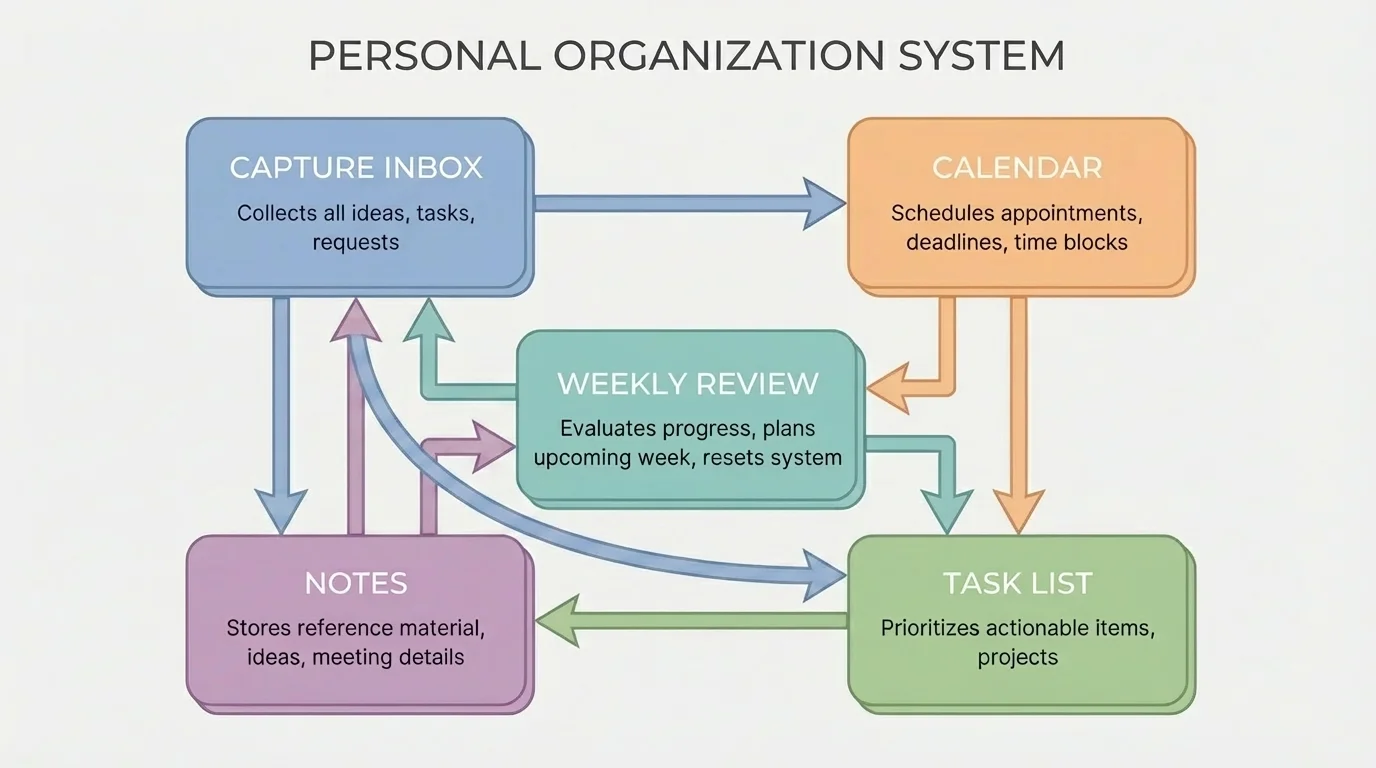
The third part is capture. Capture means quickly recording a responsibility as soon as it appears. If your manager messages you, your teacher posts a due date, or your parent asks you to handle an errand, you need one trusted place to catch that information immediately. This could be a notes widget, planner page, or inbox app.
The fourth part is routine. A system only works if you actually check it. Daily and weekly routines turn planning into a habit instead of a random emergency response.
The fifth part is storage. You need an organized place for digital files, passwords, notes, forms, and important information. If your tasks are tracked well but your files are impossible to find, you still lose time and create stress.
Calendar means a tool for date-specific commitments. Task list means a tool for actions you need to complete. Capture means recording information as soon as it appears so you do not rely on memory. Routine means a repeated pattern that keeps your system working over time.
Think of it this way: your calendar answers when, your task list answers what, your notes answer details, and your routines answer when you check the system. Later, when you are balancing several areas of life, the structure in [Figure 1] stays useful because every new responsibility still has a clear home.
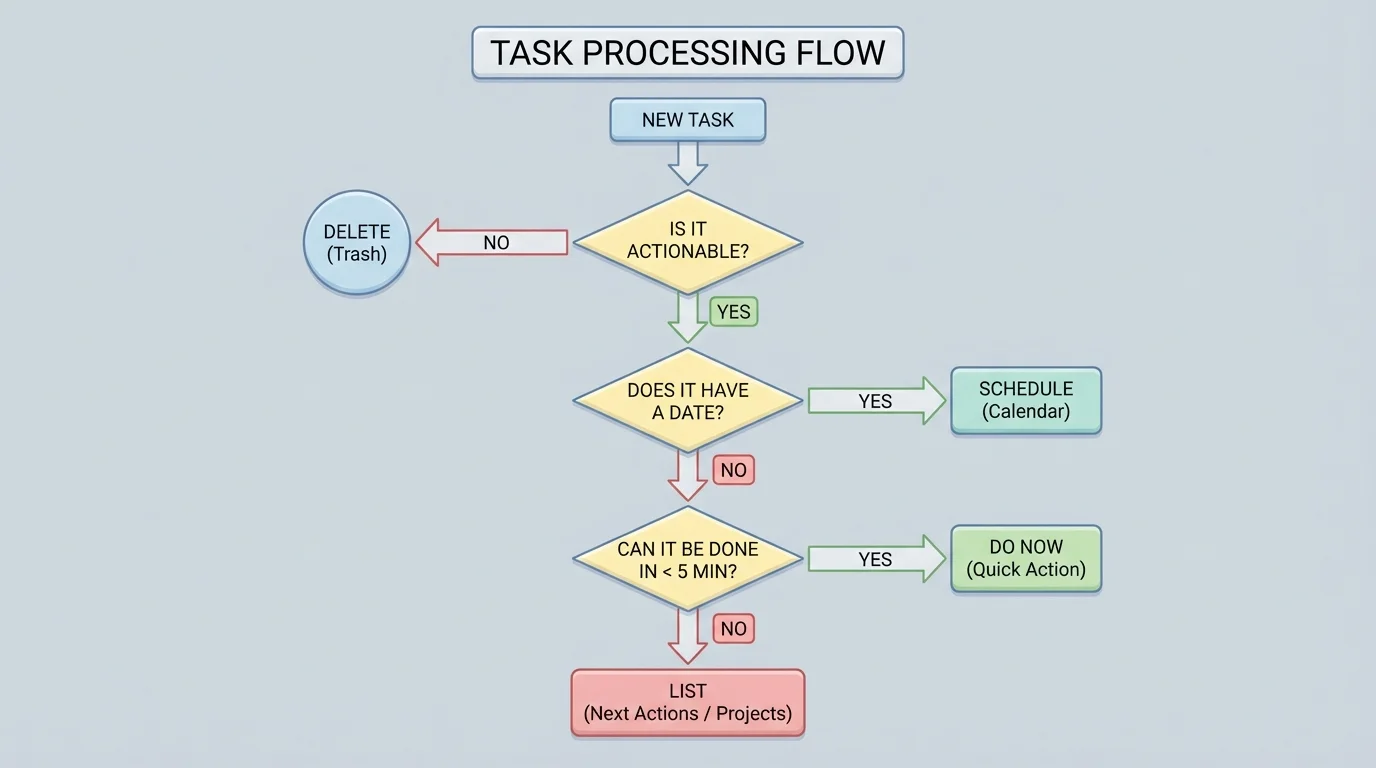
The easiest systems are usually the ones you keep using. That is why you should not begin with too many tools. A good setup can be built with one calendar, one task manager or notebook, one capture space, and one storage method. As [Figure 2] illustrates, every new responsibility should go through the same decision process instead of being handled differently each time.
Step 1: Choose your tools. Digital tools are helpful if you want reminders, search functions, and access across devices. Paper tools are helpful if writing by hand helps you focus. Some students use a digital calendar plus a paper task planner. The best tool is the one you will actually open every day.
Step 2: Create one inbox or capture spot. This is where all incoming responsibilities go first. If you currently save tasks in texts, screenshots, sticky notes, and mental reminders, reduce that. The goal is one trusted intake point.
Step 3: Process what you capture. Ask: Is this actionable? Does it have a deadline? Does it belong on the calendar, the task list, or nowhere at all? If something takes less than about 5 minutes, doing it immediately may be easier than tracking it.
Step 4: Break large responsibilities into smaller actions. "Do history project" is too vague. Better task steps might be "read instructions," "choose topic," "find 3 sources," "make outline," and "draft introduction." Small tasks are easier to start.
Step 5: Schedule what matters. Some tasks only live on a task list for too long because there is no actual time reserved for them. If your essay is due Friday but your week is full, block time on Wednesday and Thursday to work on it.
Building one task from start to finish
You receive an online message on Monday: a scholarship application is due on Friday at noon.
Step 1: Capture it immediately.
Write "Scholarship application due Friday, noon" in your inbox or quick-entry notes.
Step 2: Put the deadline in your calendar.
Add Friday at noon, and set a reminder for Thursday evening.
Step 3: Break it into actions.
Create tasks such as "download form," "write responses," "ask for recommendation if needed," "proofread," and "submit."
Step 4: Schedule work time.
Place a writing block on Tuesday and a proofreading block on Thursday.
Step 5: Check completion.
After submitting, mark the task complete and remove any extra reminders.
This takes a stressful deadline and turns it into a manageable sequence.
A system should reduce friction. If entering a task feels complicated, simplify it. If you avoid checking your planner because it looks overwhelming, your setup needs adjusting.
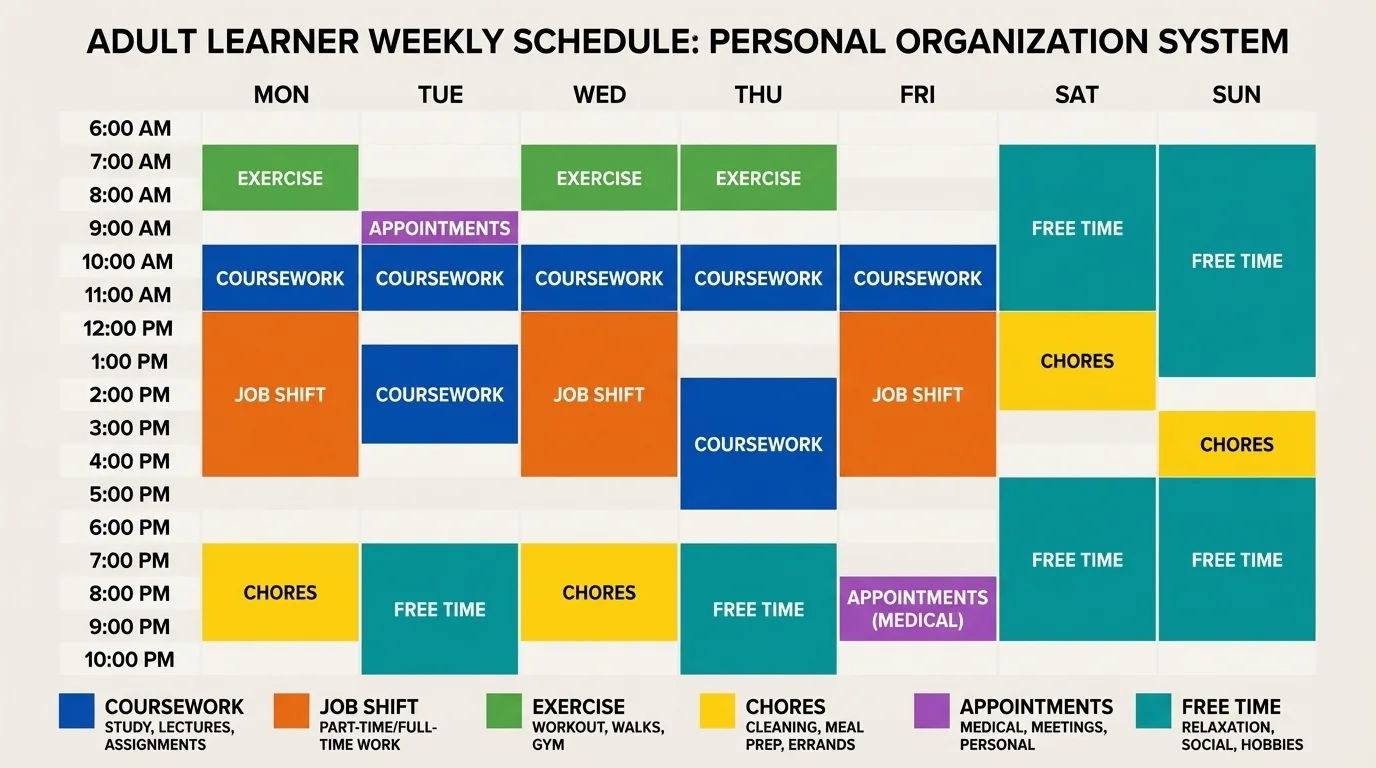
Online learning often gives you flexibility, but flexibility can become confusion if you do not map your week clearly. Seeing the whole week in one place, as [Figure 3] shows, helps you notice overload early. You can spot when fixed commitments leave too little room for homework, sleep, travel time, chores, or recovery.
Start by separating fixed commitments from flexible commitments. Fixed commitments include live classes, work shifts, appointments, and due dates. Flexible commitments include reading, study time, laundry, cleaning, meal prep, workouts, and errands. Fixed commitments go on the calendar first. Flexible commitments fill the open spaces.
This is where time blocking becomes useful. Time blocking means assigning parts of your day to categories of work instead of just hoping you will fit everything in. For example, you might block 9:00 a.m. to 10:30 a.m. for coursework, 12:00 p.m. to 12:30 p.m. for lunch, 2:30 p.m. to 3:30 p.m. for a work shift commute and setup, and 7:00 p.m. to 7:30 p.m. for chores.
| Type of commitment | Examples | Best tool |
|---|---|---|
| Fixed | Assignment deadline, job shift, doctor appointment, live lesson | Calendar |
| Flexible | Study block, exercise, laundry, grocery trip, room cleanup | Calendar or task list |
| Reference information | Login details, class links, project notes, phone numbers | Notes or file storage |
| Incoming items | New requests, reminders, ideas, errands | Capture inbox |
Table 1. A comparison of common responsibility types and the best place to organize them.
If you work part-time, protect transition time. Do not schedule yourself as if you can switch instantly from a shift to homework without eating, resting, or traveling. If you help care for siblings or have family duties, include those honestly in your plan. A realistic calendar is more useful than an ideal one.
A balanced week includes rest and maintenance, not just achievement. Sleep, meals, showering, and basic cleaning are not "extra." They are part of the system because they affect your ability to think clearly and follow through.
When everything feels important, nothing is clear. That is why decision rules help. A decision rule is a simple standard you use repeatedly so you do not have to rethink every situation from scratch.
One strong rule is this: urgent is not always important, and important is not always urgent. A text asking for a quick reply may feel urgent, while studying for a final exam may not feel urgent yet. But the exam may matter more.
Try sorting tasks into four groups: do soon, schedule, delegate if possible, or drop. If a task has a near deadline and strong consequences, do it soon. If it matters but not today, schedule it. If someone else can reasonably handle it, ask. If it does not actually matter, remove it instead of carrying it around mentally.
The point of prioritizing is not to do everything. It is to make intentional choices about limited time, energy, and attention. A good organization system helps you see trade-offs clearly. If you say yes to one commitment, you are also using time that cannot go somewhere else.
You can also rate tasks using three quick questions: How soon is it due? How important is the outcome? How much effort will it take to start? A task due tomorrow with major consequences should usually beat a task due next week with minor impact. A tiny task that takes 3 minutes can sometimes be done immediately to clear space.
Be careful with perfectionism. Spending 2 hours color-coding notes may feel productive, but if the actual assignment remains undone, your system is helping you avoid work rather than complete it.
Even the best planner fails if you never look at it. Routines are what turn tools into a working system. The two most useful routines are a daily check and a weekly review.
Your daily check can be brief. In the morning, look at your calendar and choose your top priorities. At night, reset your space, review what was completed, and move unfinished tasks to a realistic next step. This should take minutes, not hours.
Your weekly review is more powerful. Once a week, look through your calendar, task list, inbox, messages, and notes. Clear loose items. Update deadlines. Delete things that no longer matter. Notice what is approaching. This prevents "surprise" deadlines that were actually visible all along.
A simple weekly review checklist
Step 1: Check last week.
What was finished, missed, or postponed?
Step 2: Look ahead two weeks.
Notice assignments, work shifts, appointments, forms, or bills.
Step 3: Empty your inbox.
Move each item to the calendar, task list, notes, or trash.
Step 4: Prepare your environment.
Charge devices, gather materials, and clean your main workspace.
Step 5: Set priorities.
Choose the few tasks that matter most for the coming week.
Routines work best when attached to something stable. For example, you might do your weekly review every Sunday evening after dinner, or every Friday afternoon before logging off work.
Clutter is not only physical. Digital clutter can create the same kind of mental friction, as [Figure 4] illustrates through both workspace layout and file structure. If your desktop is full of unnamed downloads and your tabs stay open for weeks, your brain keeps receiving signals that things are unfinished.
Start with folders that match the major areas of your life: school, work, personal, finances, and archive. Inside school, you might have one folder for each course. Inside work, you might have schedules, payroll, and applications. Use names you will recognize quickly, not vague titles like "stuff" or "important."
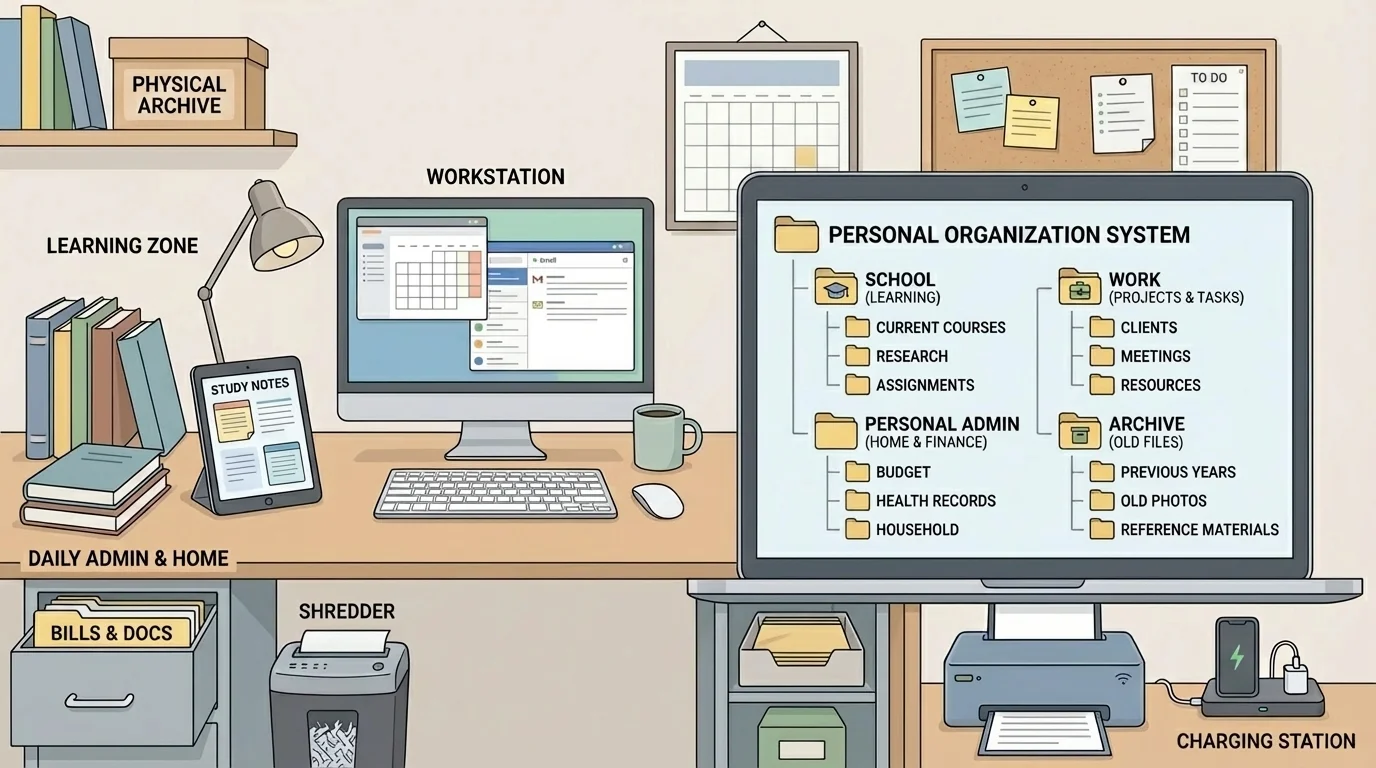
Good file names save time. "Essay_Final_Revision2" is better than "document." "Resume_May_2026" is better than "new resume." Dates can help too, especially in the form year-month-day, such as 2026-05-14, because files then sort in time order.
Email also needs structure. Unread emails are not a task system. If an email contains an action, move the action into your calendar or task list. Then archive or label the email if you still need the information. Otherwise your inbox becomes a stressful pile of mixed messages and hidden responsibilities.
Your physical space matters too. You do not need a perfect room, but you do need a usable one. Keep your charger, notebook, headphones, and current materials in predictable places. If you spend 10 minutes every day looking for supplies, the problem is not your memory alone; it is your environment.
Later, when your workload increases, the structure from [Figure 4] becomes even more valuable because less time is wasted on searching, deciding, and resetting.
Every system fails sometimes. You oversleep. You ignore reminders. You get sick. Family needs change. A busy week turns into a chaotic month. The important skill is not avoiding every mistake. It is recovering quickly.
When your system breaks, do not try to fix everything at once. First, make a reset list with only three categories: urgent, important, and later. Next, clear your capture inbox. Then review your calendar for the next seven days. Finally, contact anyone affected by missed responsibilities. A short message like "I missed this deadline; I am working on a plan now" is better than silence.
Watch out for all-or-nothing thinking. Missing one routine does not mean the whole system is ruined. If you miss your weekly review, do one the next day. If your room gets messy, reset one area. If your task list becomes too long, rewrite only the current week. Restarting small is more realistic than waiting for a "perfect" fresh start.
"You do not rise to the level of your goals. You fall to the level of your systems."
— James Clear
This idea matters because motivation changes. A system protects you on the days when you do not feel focused, inspired, or energetic.
Your organization system should fit your actual life, not someone else's ideal routine from social media. If you work evening shifts, your planning day may start later. If you focus better in short bursts, use shorter work blocks. If you forget visual reminders, use alarms. If too many notifications make you tune out, reduce them and rely more on scheduled reviews.
Some students need high visibility: a wall calendar, sticky note dashboard, or homepage checklist. Others prefer low visual noise and work better with one clean digital list. Some need more external structure because attention is hard to regulate. That is not failure. It just means your system should provide stronger support.
A useful system is sustainable. That means you can keep using it during busy weeks, stressful months, and changing routines. If your system only works when life is calm, it is too fragile.
One good test is this: if a new responsibility appears tonight, do you know exactly where it goes? If the answer is yes, your system is becoming reliable. If the answer is no, simplify until it becomes obvious.
Organization is not about controlling every minute. It is about creating enough structure that you can learn, work, and live with less chaos and more choice.
