One message can shape a major opportunity. A careless reply to a manager, a public post that reveals too much, or a profile that looks unprofessional can affect jobs, scholarships, internships, housing, and even personal safety. The reverse is also true: clear communication, good privacy habits, and a strong online presence can make you look reliable before anyone ever meets you.
Digital citizenship is not just about "being nice online." As an adult skill, it means using technology in ways that are respectful, safe, responsible, and smart. It includes how you communicate, what you share, how you protect your information, and how you present yourself when others search your name.
Your online life is already part of your real life. Employers read emails. Coaches and volunteer coordinators notice how you communicate. Scammers look for easy targets. Search engines connect your name to posts, comments, photos, usernames, and public profiles. That means digital citizenship is really about managing trust.
Digital citizenship is the responsible, safe, and effective use of digital tools and online spaces. Professional identity is the public impression you create through your communication, profiles, work samples, and online behavior. Privacy is your ability to control who can access your personal information and how it is used.
When you do this well, people are more likely to see you as mature, dependable, and ready for adult responsibilities. When you do it poorly, the consequences can include missed opportunities, damaged relationships, hacked accounts, harassment, or embarrassment that is hard to undo.
At your age, you may be emailing employers, messaging supervisors, signing up for accounts, applying to colleges or training programs, joining community groups, selling items online, or networking through social media. These are not "someday" situations. They are current situations, and they all require judgment.
Adult digital life often blends personal and professional spaces. You might use the same phone for family chats, work messages, banking alerts, and job applications. That convenience is helpful, but it also means one weak habit can create several problems at once. A reused password can expose multiple accounts. A late-night emotional post can be seen by a recruiter the next morning. A joke that makes sense in a private group can look offensive when screenshotted and shared elsewhere.
Many employers, internship coordinators, and scholarship reviewers search applicants online before making decisions. They are often looking less for perfection and more for signs of judgment, reliability, and respect.
Good digital citizenship is not about acting fake. It is about matching your online behavior to your goals. If you want to be trusted with opportunities, your digital choices should make trust easy.
Strong netiquette matters because online messages remove facial expressions, body language, and tone of voice. As [Figure 1] shows, the difference between casual and professional communication is often small on the surface but huge in effect. A message can be brief without sounding rude, and professional without sounding stiff.
Start by matching the communication channel to the situation. Email works best for formal requests, job-related questions, scheduling, introductions, and anything that may need a record. Direct messages or texts may be fine for quick updates if that method has already been invited. Public comments are usually the wrong place for private concerns, disagreements, or sensitive questions.
In email, use a clear subject line, a greeting, a concise message, and a respectful closing. Instead of writing "hey i need help," write something like: "Subject: Question About Interview Documents." Then begin with "Hello Ms. Patel," explain your question in a few sentences, and end with "Thank you for your time, Jordan Lee." That structure saves the other person time and makes you sound organized.
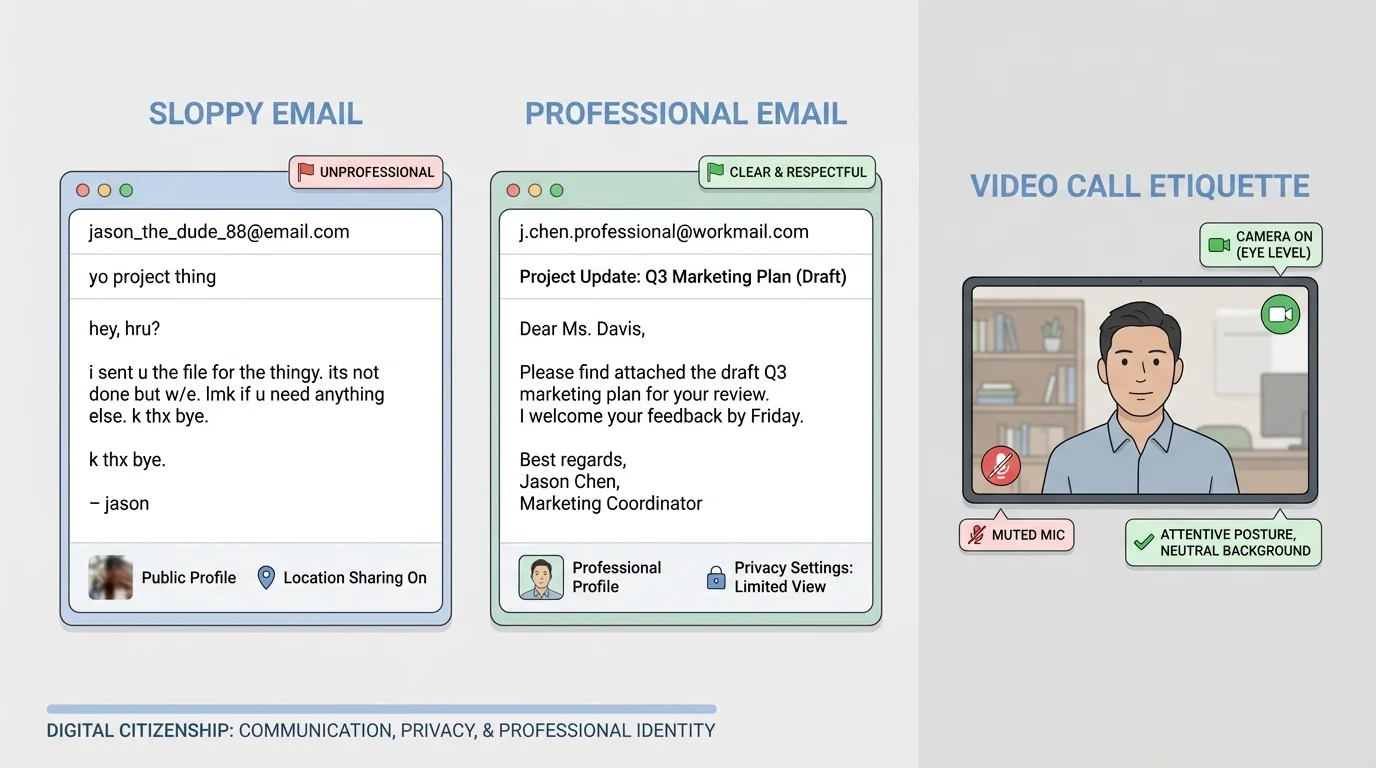
Message tone matters just as much as grammar. All caps can seem aggressive. One-word replies can seem dismissive. Too many exclamation points can seem immature. Long emotional paragraphs sent in anger often create problems that are harder to fix later. Before sending, ask: Would I be comfortable if this message were forwarded to a supervisor, coach, or hiring manager?
Professional does not mean overly formal. It means clear, respectful, and appropriate. For example, "Hi, I'm running about 10 minutes late because of a family transportation issue. I'm sorry for the inconvenience and I'm on my way," sounds responsible. "omg running late lol" does not.
Response time is part of communication too. You do not need to be available every minute, but you should be reasonably prompt. For school, work, volunteer, or application-related messages, replying within 24 hours is a strong habit unless a faster response is clearly needed. If you need more time, send a short acknowledgment: "Thanks for your message. I received it and will send the document by tomorrow afternoon."
Video calls are another adult communication skill. Dress appropriately for the purpose, choose a quiet space, test your device, and sign in on time. Keep your screen name professional, not random or outdated. Looking prepared on a video call sends the same message as arriving prepared for an in-person interview. Later, when you think about how digital first impressions work, return to [Figure 1], which shows that tiny details like camera angle, background, and message format affect how others read your seriousness.
Example: turning a weak message into a professional one
Suppose you need to ask a supervisor if you can switch your volunteer shift.
Step 1: Identify what is missing in the weak version.
Weak version: "cant do friday. let me know"
This message has no greeting, no context, no respect, and no effort to help solve the problem.
Step 2: Rewrite with responsibility.
Better version: "Hello Mr. Alvarez, I wanted to let you know that I have a family conflict on Friday and may not be able to attend my volunteer shift. If possible, could I switch to Saturday or help cover another time this week? Thank you for understanding."
Step 3: Check tone and usefulness.
The better message explains the issue briefly, proposes a solution, and respects the other person's time.
Conflict online needs extra care. If a conversation becomes tense, slow down. Do not match sarcasm with sarcasm. Move complex issues to a private channel. If emotions are high, draft a response and wait before sending it. A calm answer protects your reputation better than a "winning" reply.
Your digital footprint includes what you post, what others post about you, what apps collect, what websites track, and what data leaks through weak security. Privacy is not only about hiding secrets. It is about controlling access to your identity, location, finances, contacts, and daily routines.
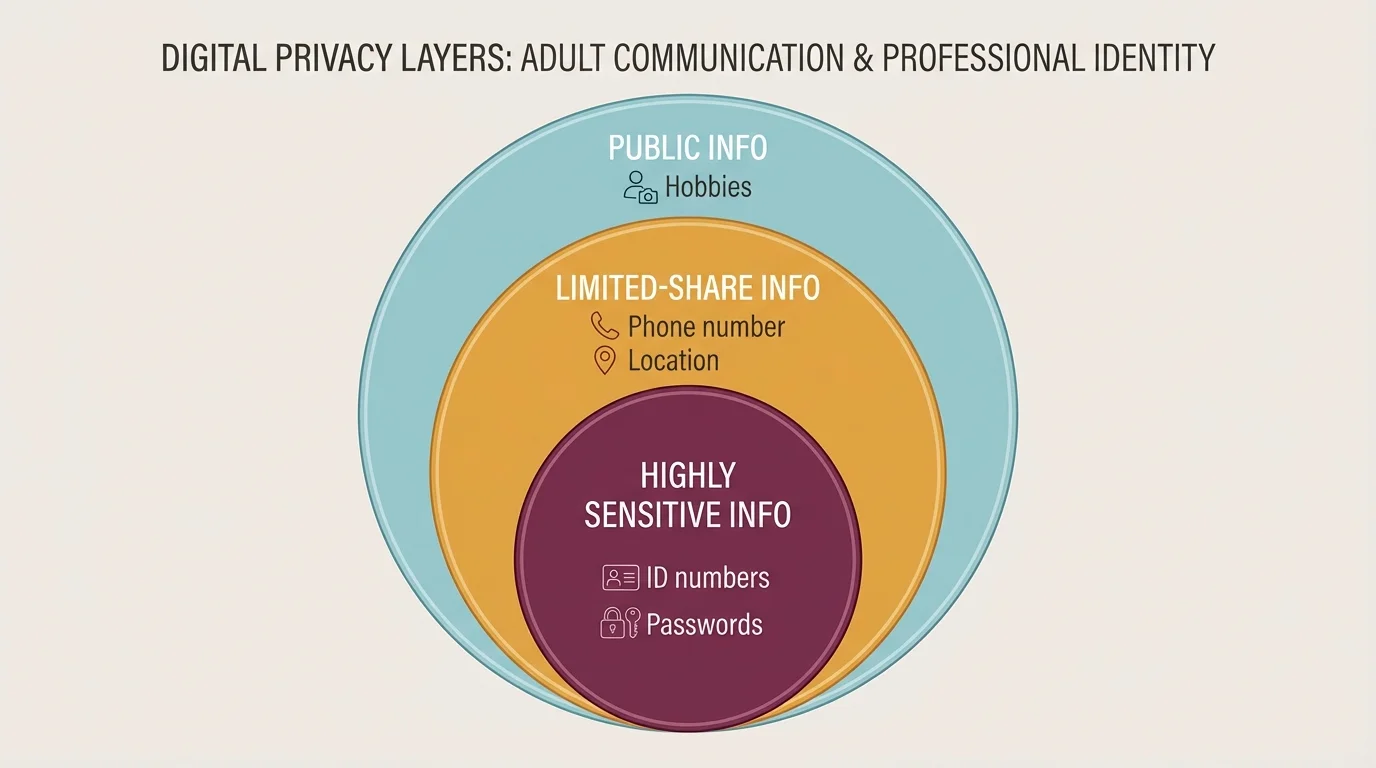
Not all personal information carries the same level of risk. As [Figure 2] illustrates, some details are low-risk in the right context, while others should almost never be shared publicly. For example, a hobby may be fine to post publicly. Your full birth date, home address, school schedule, banking details, government ID numbers, and passwords are far more sensitive.
A good rule is to separate information into three levels: public, limited-share, and private. Public information might include a first name, interests, or general career goals. Limited-share information might include your phone number or personal email, which you share only when necessary and with trusted people or organizations. Private information includes passwords, login codes, exact location, legal documents, and financial account details.
One of the strongest privacy habits is using unique passwords for important accounts. If one password is used everywhere, one breach can lead to many account takeovers. Use a password manager if possible, and turn on two-factor authentication for email, banking, shopping, and social media. That extra step can stop someone even if they somehow get your password.
Privacy settings matter, but they are not magic. A "private" account can still be screenshot. A trusted follower can still reshare content. A platform can still change settings. That means your best protection is a combination of settings, smart sharing, and skepticism.
Be alert for phishing, which is when someone tries to trick you into revealing personal information, passwords, or payment details. Phishing can look like a fake bank alert, a delivery text, a scholarship email, or a message that says your account has been locked. The goal is urgency. The attacker wants you to click before you think.
Here are warning signs: spelling mistakes, weird links, pressure to act immediately, requests for login codes, offers that seem too good to be true, and messages from people pretending to be authority figures. If you are unsure, do not click the message link. Go directly to the official website or app yourself.
The pause-check-protect method
Pause: Stop before clicking or replying. Check: Verify the sender, the link, and the request through an official source. Protect: Use strong passwords, two-factor authentication, and limited sharing so one mistake does less damage.
Location sharing deserves special caution. Posting in real time can reveal when you are away from home, alone, or following a predictable schedule. Sharing a concert photo later is safer than posting your exact location while you are still there. The same idea applies to boarding passes, package labels, work badges, or documents in the background of a photo.
If you want a simple privacy filter, ask yourself three questions before posting: Who can see this? What could they do with it? Would I still be okay with this a year from now? That habit prevents many avoidable problems.
Example: spotting a scam message
You receive a text that says: "Your bank account is suspended. Click now to verify your identity."
Step 1: Notice the pressure.
Words like "suspended" and "click now" are meant to create panic.
Step 2: Avoid the link.
Do not tap the message. Open your official banking app or type the bank's website yourself.
Step 3: Verify independently.
If there is a real problem, it will usually appear in your secure account or through official customer service.
Step 4: Protect your account.
Report the message, delete it, and change your password if you already clicked.
Notice how privacy and professionalism connect. If your account gets hacked because of weak habits, the damage can affect school records, job communication, payment apps, and your reputation all at once. The privacy layers in [Figure 2] help you decide what belongs online and what does not.
Your online presence tells a story, whether you manage it or not. A professional identity is the version of that story that helps people trust you with adult opportunities. It is built from your profiles, posts, comments, usernames, photos, bios, work samples, and the way you interact with others.
Think of your professional identity as a reputation system. If someone searches your name, what do they learn in the first few minutes? Do they see maturity, skill, and consistency? Or do they see old jokes, messy arguments, offensive content, and confusing usernames? Building a stronger online presence is a process, not a one-time cleanup.
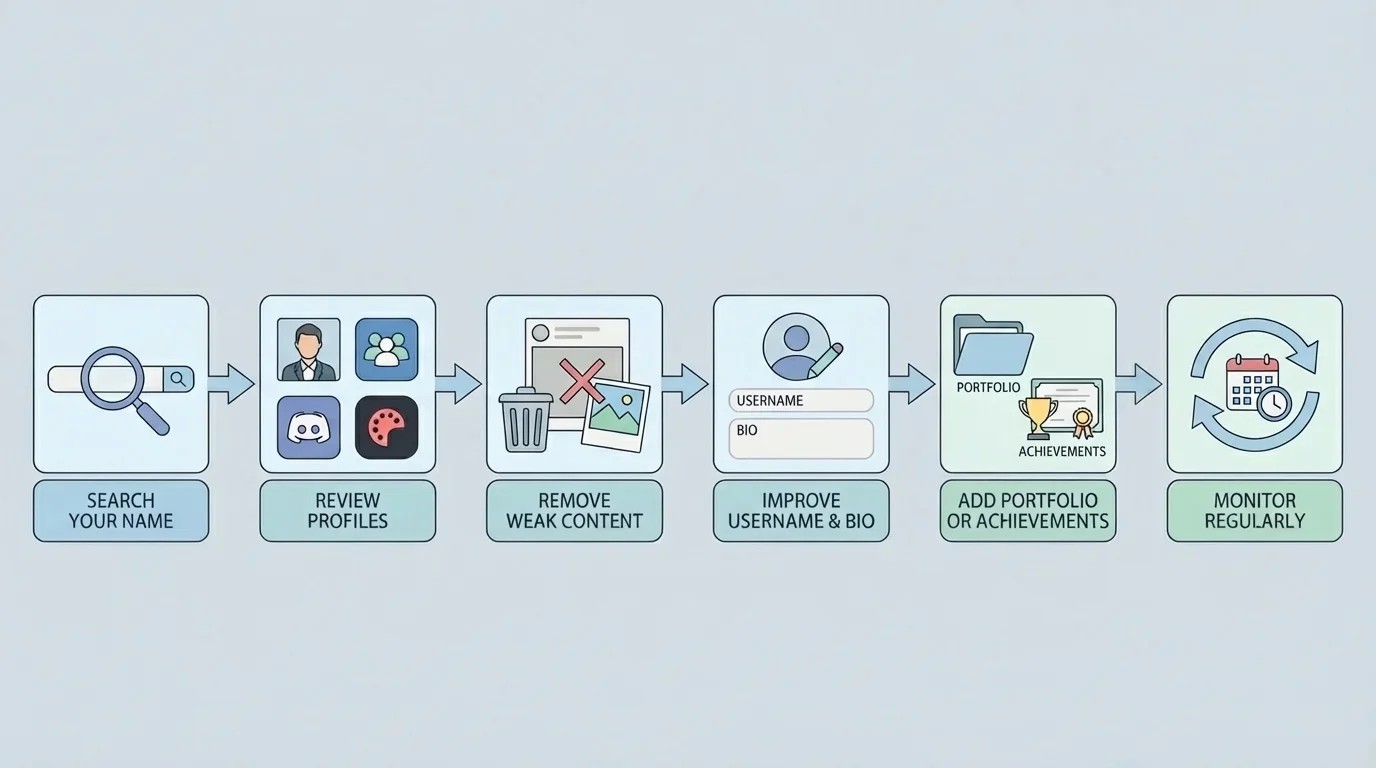
As [Figure 3] shows, start with an audit. Search your name in a browser. Check image results. Review your public social media profiles, old bios, usernames, comments, and tagged photos. If you have multiple accounts, look at them from the perspective of a stranger. Remove what is clearly harmful, hide what is unnecessary, and strengthen what supports your goals.
Usernames matter more than many people realize. A username used for gaming with friends may not be the right username for college networking, job applications, or freelance work. If possible, use a variation of your real name for professional spaces. The same goes for profile photos. You do not need a studio portrait, but you should look neat, approachable, and appropriate for the purpose.
Your bio should be simple and specific. For example: "High school senior interested in graphic design and community service. Building experience in digital media and event promotion." That tells people more than a vague quote or a random joke. If you have a portfolio, résumé, LinkedIn profile, personal website, or examples of your work, connect them clearly.
Professional identity does not mean deleting your personality. It means showing personality without creating confusion about your judgment. You can be creative, funny, and genuine while still being respectful and thoughtful.
| Area | Weak choice | Stronger choice |
|---|---|---|
| Username | something random or offensive | a name-based, memorable handle |
| Profile photo | blurry, inappropriate, hard to identify | clear, neat, suitable for public viewing |
| Bio | inside jokes or vague phrases | interests, goals, or useful skills |
| Posts | constant negativity or drama | thoughtful content, achievements, interests |
| Comments | arguments, insults, impulsive reactions | respectful, constructive, or no comment at all |
Table 1. Comparison of choices that weaken or strengthen a professional online presence.
It also helps to separate audiences. Some people maintain a public professional account and a more private personal one. Even then, remember that separation is never perfect. Screenshots and shared contacts can connect spaces quickly. The goal is not to create two fake selves. The goal is to use the right level of openness in the right place.
Reputation builds through repeated choices. One polished profile cannot fully cancel out a pattern of rude messages, unsafe sharing, or public arguments. Consistency is what makes people trust what they see.
As your goals change, your online presence should change too. If you start applying for jobs in health care, design, education, mechanics, coding, or business, highlight experiences and interests that fit those paths. The audit process in [Figure 3] helps you keep your online identity aligned with your next step.
Knowing the rules is helpful, but adult digital life moves fast. What matters most is having a decision process you can use in the moment.
Before you post: Ask whether the content is true, necessary, respectful, and safe. If it reveals private details, attacks a person, spreads rumors, or could be misunderstood without context, stop. If you are posting while angry, tired, or trying to impress people, that is another reason to stop.
Before you reply: Decide what outcome you want. Do you want to solve a problem, ask a question, set a boundary, or just release emotion? If the real goal is emotional release, do not send the message yet. Write it privately, then edit later.
Before you share someone else's content: Think about consent and accuracy. Just because something is visible does not mean it should be spread. Sharing screenshots, rumors, private jokes, or embarrassing photos can harm trust even if it is technically allowed on the platform.
Before you click: Check the sender, URL, and purpose. If a message creates urgency, asks for codes, or wants money, slow down. The more rushed you feel, the more careful you should become.
"Post as if the future version of you has to explain it to someone important."
That mindset works because it brings long-term thinking into short-term decisions. Adult digital citizenship is often less about knowing more and more about refusing to act on impulse.
Most people will make at least one digital mistake. You may send a message too quickly, overshare something personal, click a suspicious link, or leave up content that no longer reflects who you are. What matters is how you respond.
If you send an unprofessional message, correct it quickly. Apologize without making excuses. A simple message works: "I want to apologize for the tone of my earlier message. It was disrespectful, and I should have communicated more professionally." Then fix the issue that caused the problem.
If you overshare private information, remove the content if possible, change affected settings, and take extra security steps. If financial or account details were exposed, change passwords immediately and contact the relevant company. If someone else's privacy was affected, tell them directly and honestly.
If your account is compromised, act in order: change passwords, turn on two-factor authentication, log out of other sessions, check recovery methods, warn relevant contacts, and watch for follow-up scams. Attackers often use one hacked account to target friends or coworkers.
Example: cleaning up a public mistake
You posted a sarcastic comment on a community page, and now a volunteer coordinator has seen it.
Step 1: Remove the harmful content.
Delete the comment if possible and stop adding more replies.
Step 2: Take responsibility.
Send a short apology: "I realized my comment was inappropriate and unprofessional. I removed it, and I'm sorry."
Step 3: Rebuild trust.
Let your future communication show maturity. People often notice changed behavior more than long explanations.
Consistency is what turns digital citizenship from a rule into a lifestyle. Use the same standards whether you are emailing a manager, updating a profile, commenting on a post, or setting up a new account. Respect, caution, and clarity work across all of them.
You do not need a perfect internet history to build a strong future. You need better habits starting now. The way you communicate, protect yourself, and present yourself online can open doors instead of closing them.
