Most life problems do not begin as huge disasters. They begin as small things: one unread email, one form left unfinished, one bill you meant to pay tomorrow, one appointment you forgot to confirm. Then those small things pile up. A late fee appears. A service gets interrupted. A document deadline passes. The good news is that managing adult responsibilities is not about being naturally organized. It is about having a system that catches tasks before they become problems.
If you are finishing high school, this matters now. Whether you are applying for a job, signing up for college orientation, scheduling a doctor visit, renewing an ID, or helping at home, you are already dealing with life logistics. These are the practical tasks that keep daily life running: paperwork, schedules, payments, errands, records, and communication. You do not need a perfect system. You need one that is simple enough to use consistently.
Forms are official documents that collect information and often require deadlines, signatures, or supporting documents. Appointments are scheduled commitments tied to a specific time and place or online meeting link. Bills are money you owe by a due date. Daily logistics are the practical details that make your schedule, transportation, food, responsibilities, and communication work smoothly.
When you manage these things well, your life feels calmer because your brain does not have to remember everything at once. When you manage them poorly, the consequences are real: missed opportunities, extra costs, stress, and damaged trust. If you tell an employer you will submit a form and you do not, or if you repeatedly miss appointments, people notice.
Being responsible is not the same as being busy. Plenty of people stay busy while still losing track of what matters. A strong logistics system helps you separate urgent from important. For example, scrolling through messages might feel urgent, but paying your phone bill before the due date is important. Replying to a casual text can wait; sending a signed form before a deadline often cannot.
Think of your life as a set of moving parts. If one part slips, other parts can be affected. Missing a car ride can make you late for work. Being late for work can affect your pay. Forgetting to update your calendar can cause schedule conflicts. Practical planning is really about reducing friction so your time, money, and energy are not constantly wasted.
Many late fees and missed deadlines happen not because people do not care, but because they rely on memory alone. Memory is helpful, but systems are more reliable.
A useful rule is this: if it matters, it should live outside your brain. Put it in a calendar, a checklist, a folder, or a tracker. Once important information exists in a trusted system, you do not have to keep mentally reheating the same worry all day.
Your personal organization system works best when it is simple, and the main idea is one reliable calendar, one task list, one document storage location, and one reminder routine. If you scatter information across random notes, screenshots, and half-read messages, you create confusion for yourself.
[Figure 1] Start with one calendar. This can be a phone calendar, an online calendar, or a paper planner if you actually use it. Put every time-specific commitment there: appointments, work shifts, due dates, virtual meetings, rides, and reminders to leave the house or log in early. Add alerts. For an important event, use more than one reminder, such as one reminder the day before and another reminder one hour before.
Next, choose one task list. A calendar is for things tied to time. A task list is for actions you need to do, such as "upload insurance card," "call dentist," "pay electricity bill," or "print job application." If you use your calendar for everything, it gets cluttered. If you use only a task list, you may forget time-sensitive items.
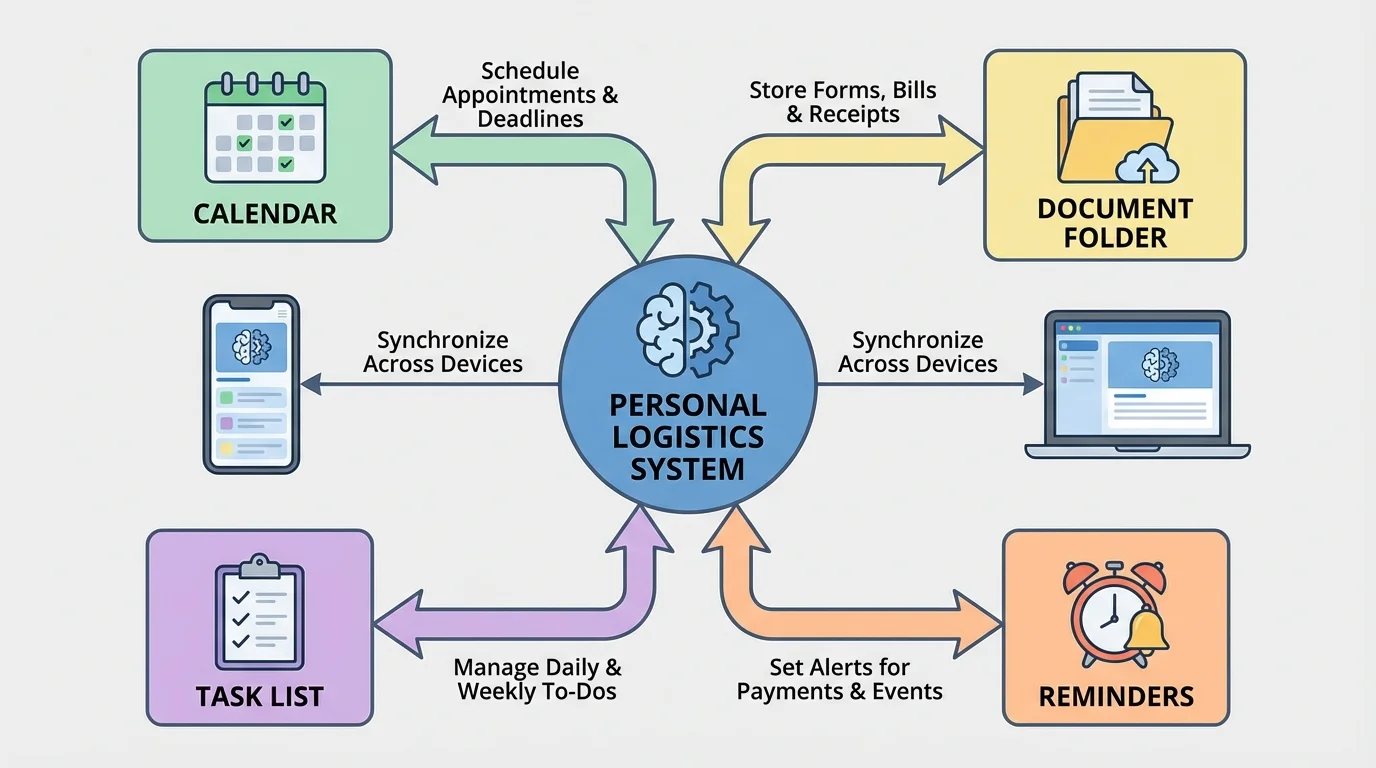
You also need one document home. That means a folder system for forms, IDs, account numbers, receipts, and confirmation emails. This can be digital, physical, or both. A digital system might include folders named "School," "Work," "Medical," "Bills," and "Important IDs." A physical folder or accordion file can hold printed items you may need to access quickly.
Finally, create a short routine for checking your system. For example, every evening you might spend about 10 minutes checking tomorrow's calendar, looking at your task list and gathering anything you need. A system only works if you return to it regularly.
The one-system rule
The goal is not to use every productivity tool. The goal is to reduce the number of places where important information can hide. The fewer places you need to check, the less likely you are to miss something important.
If you share responsibilities with family members, a partner, or roommates, your personal system still matters. Shared calendars and group messages help, but you should still track your own responsibilities. "I thought someone else was handling it" is one of the most common reasons important tasks get missed.
Paperwork feels annoying when you treat every form like a surprise. It becomes manageable when you treat it as a repeatable process. Whether the form is for a job, financial aid, healthcare, housing, sports registration, or an ID application, the same basic approach works.
[Figure 2] Step 1: Read the entire form first. Do not start typing or writing immediately. Look for deadlines, required fields, instructions, and anything you must upload or attach. Notice whether the form needs a parent or guardian signature, proof of address, identification, or payment.
Step 2: Gather your information before you begin. This may include your legal name, address, birth date, phone number, email, emergency contact, account numbers, insurance details, or documents like an ID or transcript. Having everything ready makes mistakes less likely.
Step 3: Fill it out carefully. Use your official information, not nicknames or guesses. If a form asks for your legal name, use exactly what appears on official records. If you are unsure about a question, pause and verify rather than entering incorrect information.
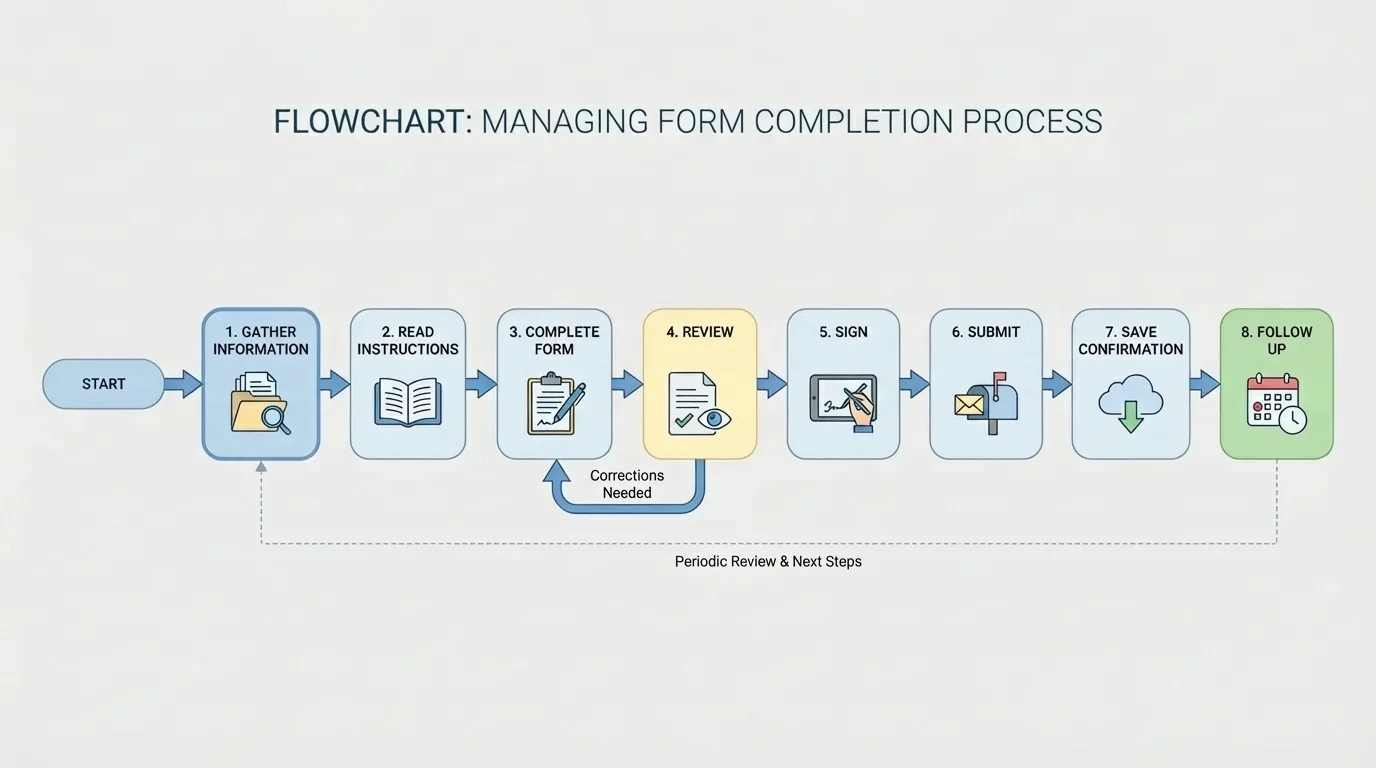
Step 4: Review everything. Check spelling, dates, numbers, and attached files. Look for missing signatures. A form can be delayed for something as small as an unchecked box or absent page.
Step 5: Save proof. Take a screenshot of the submission confirmation, save the email receipt, or make a copy of the completed form. If something gets lost or delayed, proof matters.
Step 6: Follow up if needed. Some forms require extra steps after submission, like checking status, responding to an email, or attending an appointment. Submitting something is not always the end of the process.
Real-world example: Completing a job application packet
Step 1: You notice the packet asks for contact information, work availability, a resume, and two references.
Step 2: Before filling it out, you create a small checklist: resume file, reference phone numbers, exact work hours you are available, and your employment history if you have one.
Step 3: After submitting, you save the confirmation email in your "Work" folder and put a reminder in your calendar to check for a response in one week.
This turns a stressful task into a sequence you can repeat next time.
As you saw earlier in [Figure 1], your document folder and reminder system support your forms process. Forms are easier when your information is stored in one place and your next steps are already scheduled.
An appointment is more than an event on a calendar. It usually involves preparation, travel or login time, documents, and communication. If you only remember the time itself, you may still end up late or unprepared.
When you schedule an appointment, immediately record the date, time, location or link, purpose, and what to bring. For a doctor visit, that might include an ID, insurance card, medication list, and any forms. For a job interview, it might include the meeting link, contact person, and a copy of your resume.
Always build in buffer time. If a ride usually takes 20 minutes, do not plan to arrive exactly at the 20-minute mark. Plan for delays. If an online meeting starts at 2:00, try to be ready by 1:50. Buffer time is one of the easiest ways to reduce stress.
Confirm important appointments. Many offices send automatic reminders, but do not depend on them completely. If the appointment is high-stakes, check the confirmation email, verify the address or link, and make sure you know what happens if you are running late.
If you need to reschedule, communicate early and professionally. A respectful message might say: "Hello, I need to reschedule my appointment because of a transportation conflict. I'm sorry for the inconvenience. Are there other times available this week?" This shows responsibility. Ignoring the appointment and disappearing damages trust.
Good communication is part of organization. A missed appointment becomes a smaller problem when you contact the person early, explain briefly, and ask about the next step.
Some appointments also create follow-up tasks: picking up medication, sending requested documents, scheduling a second visit, or updating your calendar. Treat appointments as events with a before, during, and after phase.
Bills can feel overwhelming when they live in separate apps, emails, and paper envelopes. A visible tracker helps you see what is due and when. Even if your family currently handles most bills, learning this skill now will save you trouble later.
[Figure 3] Start by knowing the difference between fixed and variable expenses. A fixed bill tends to stay about the same each month, like a subscription or phone plan. A variable bill changes, like electricity, food, or gas. Both types need attention, but variable bills may require extra checking.
Create a bill tracker with these columns: bill name, due date, amount, autopay status, paid status, and notes. This can be in a spreadsheet, notes app, or paper chart. The goal is not fancy design. The goal is visibility.
| Bill | Due Date | Amount | Autopay | Status | Notes |
|---|---|---|---|---|---|
| Phone | 5th | $45.00 | Yes | Pending | Check bank balance |
| Streaming service | 12th | $11.99 | Yes | Pending | Cancel if unused |
| Car insurance | 18th | $96.00 | No | Not paid | Manual payment |
| Credit card | 22nd | $35.00 minimum | No | Not paid | Pay more if possible |
Table 1. Example of a simple monthly bill tracker with due dates, amounts, autopay status, and notes.
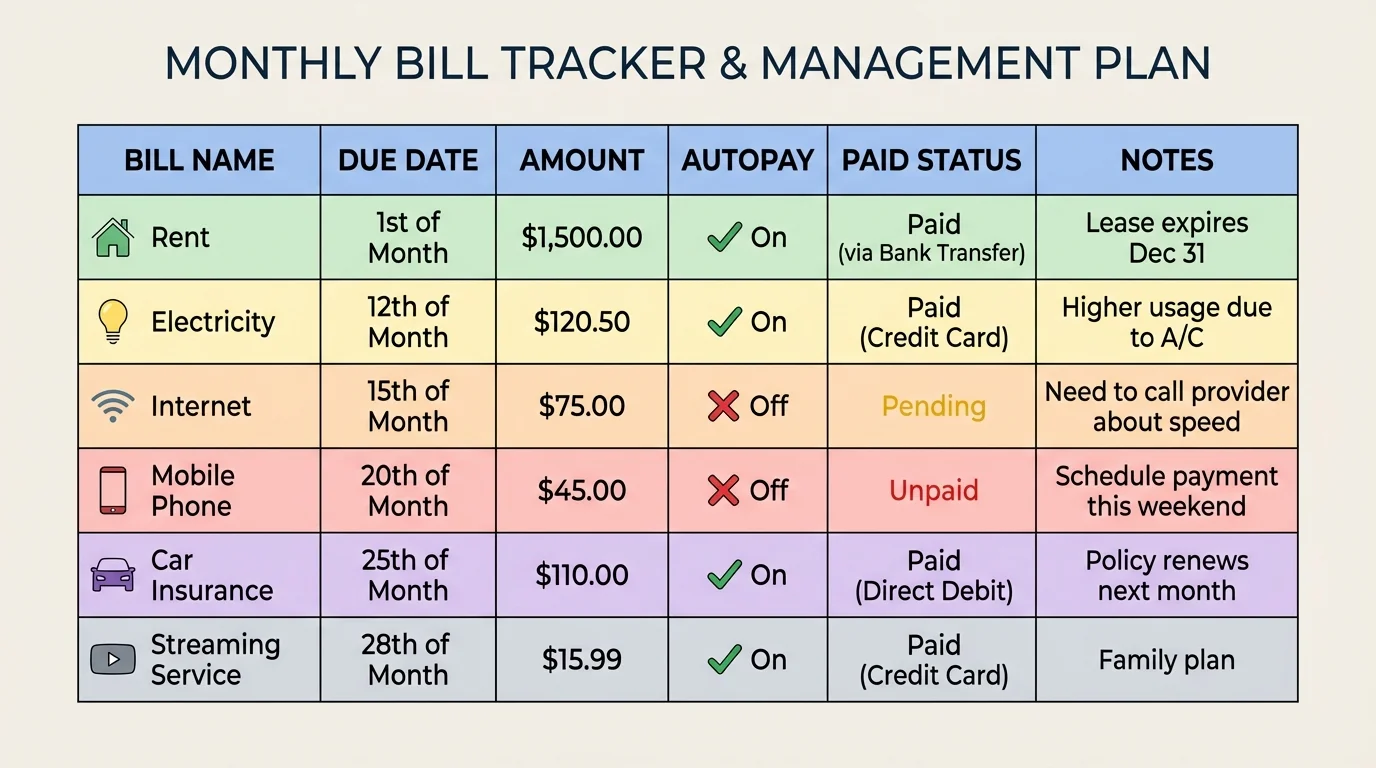
Set reminders before the due date, not on the due date. A useful pattern is one reminder about a week early and another about two days early. That gives you time to move money, ask questions, or solve account issues.
Be careful with autopay. It can be helpful, but only if you have enough money in the account and you still monitor statements. Autopay does not remove responsibility. It just automates one step.
You should also understand simple bill math. If your monthly bills are $45.00, $11.99, and $96.00, then your total is \(45.00 + 11.99 + 96.00 = 152.99\). That means you need at least $152.99 ready for those three bills, not counting anything else. If you add a $35.00 minimum credit card payment, the total becomes \(152.99 + 35.00 = 187.99\).
Real-world example: Planning for bill week
Step 1: You look at your tracker and see that three bills are due between the 18th and the 22nd.
Step 2: You total the amounts: \(96.00 + 45.00 + 35.00 = 176.00\).
Step 3: Because your next paycheck arrives on the 20th, you set a reminder on the 17th to check your balance and decide whether any payment must be made earlier.
This prevents the common mistake of noticing a due date only after it has passed.
Late payments can cost more than money. They can lead to service interruption, extra fees, stress, and a negative payment history. That is why your tracker, like the one shown in [Figure 3], should include not only due dates but also proof that you paid.
Daily logistics are the things that make life function: transportation, meals, laundry, supplies, work shifts, caregiving, charging devices, medication, and errands. These tasks may seem small, but they affect whether everything else goes well.
A common mistake is planning only the main event and ignoring the support tasks around it. For example, "I work at 4:00" is not enough. You may also need clean clothes, transportation, food beforehand, a charged phone, and enough gas money or ride time. A realistic plan includes the invisible tasks around the visible task.
Use grouping to save energy. If you already have to go out, combine nearby errands. If you have forms to submit and copies to make, do both in one trip. If you are planning meals, check what is already at home first so you do not buy duplicates.
Another useful skill is estimating time honestly. If an errand usually takes about 30 minutes but sometimes takes 45, planning only for 30 can make the rest of your day collapse. Underestimating time is one of the biggest causes of lateness.
Buffer time protects your schedule
Buffer time is extra space between tasks. It covers traffic, long lines, technical issues, forgotten items, and simple human delays. Without buffer time, one problem can ruin your entire day. With it, small delays stay small.
You can also build "default plans." For example: if a ride falls through, use public transit; if dinner plans fail, make a quick backup meal; if the internet is unstable before a virtual meeting, move closer to the router or use a phone hotspot if available. A backup plan lowers panic.
Systems do not stay organized by themselves. They need maintenance. You do not need long planning sessions. Short, regular check-ins work better.
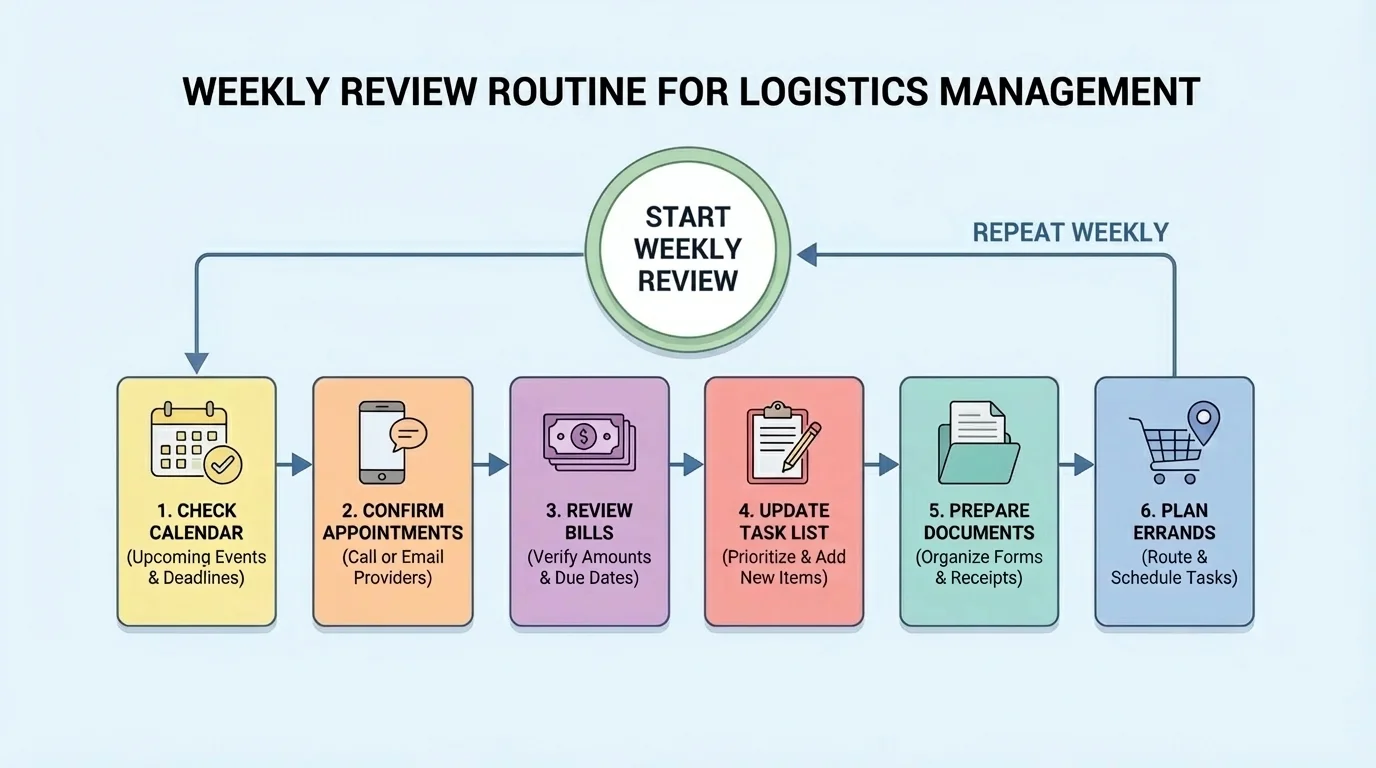
[Figure 4] A daily check can take about 5 to 10 minutes. Review tomorrow's schedule, charge devices, gather needed items, and update your task list. This small habit prevents morning chaos.
A weekly review might take about 20 to 30 minutes. Check upcoming appointments, due dates, work shifts, transportation needs, meals, errands, and unfinished forms. Look one week ahead so you have time to prepare instead of reacting at the last minute.
A monthly review is for larger resets. Review recurring bills, subscriptions, documents that need renewal, school or work deadlines, and any appointments you should schedule in advance. This is also a good time to clean out your downloads folder, rename important files, and throw away outdated papers you no longer need.
Here is a simple checklist approach:
| Routine | What to Check | Time Needed |
|---|---|---|
| Daily | Tomorrow's schedule, reminders, needed items, messages requiring reply | 5 to 10 minutes |
| Weekly | Appointments, bills, errands, forms, transportation, meals | 20 to 30 minutes |
| Monthly | Recurring bills, renewals, subscriptions, document cleanup, long-term deadlines | 30 to 45 minutes |
Table 2. A simple schedule for daily, weekly, and monthly organization routines.
The weekly review in [Figure 4] matters because it connects your calendar, task list, bill tracker, and document system. Without that review, information sits in separate places and never turns into action.
"What gets scheduled gets done more often than what gets remembered."
If routines feel boring, that is actually a good sign. Boring systems are often reliable systems. Your goal is not excitement. Your goal is fewer emergencies.
Even organized people miss things sometimes. The difference is how quickly they respond. If you miss a deadline, contact the relevant person or office immediately. Be honest, brief, and respectful. Ask whether there is a late option, extension, or next step.
If you lose a document, first check your system: email confirmations, digital folders, screenshots, and physical files. This is why saving copies matters. If you cannot find it, request a replacement right away instead of waiting.
If you miss an appointment, apologize and reschedule as soon as possible. Some offices charge no-show fees, and some opportunities disappear after one missed meeting. Fast communication can limit the damage.
If you pay a bill late, make the payment as soon as you can, check whether a fee was added, and update your tracker so you do not lose sight of the next due date. One late payment should become a lesson, not a pattern.
Recovery example: Fixing a missed form deadline
Step 1: You realize a scholarship form was due yesterday.
Step 2: You email the contact person the same day, explain briefly that you missed the deadline, and ask whether late submission is still possible.
Step 3: You finish the form immediately so that if they allow a late submission, you can send it without more delay.
Step 4: You add future deadlines to your calendar with two reminders so the same mistake is less likely to happen again.
Mistakes happen. Recovery plus a better system is what builds maturity.
You do not need to reorganize your entire life in one day. Start with a system you can keep using next week and next month. Choose one calendar, one task list, and one document folder. Then make one bill tracker and one weekly review habit.
Try This: Tonight, set up three folders on your device: "Important IDs," "Forms," and "Bills." Then put one reminder on your calendar for a weekly review. That small setup gives future-you a place to work from.
Try This: Pick one recurring responsibility you already have, such as a club payment, subscription, work shift, or family errand. Write down the full chain: what must happen before it, during it, and after it. This helps you notice the hidden steps that often cause stress.
Try This: For the next seven days, spend a few minutes each evening checking tomorrow's tasks. You are training consistency, not chasing perfection.
The real goal of life management is not to become robotic. It is to create enough structure that you can focus on bigger goals without constantly being knocked off course by preventable problems. A strong system gives you more freedom, not less.
