One tiny click can send a message, share a picture, or open a game. That is why being safe online matters so much. The internet can be fun and useful, but it also has places where people can make unkind choices, ask for private information, or try to trick you. Learning a few smart habits helps you protect your feelings, your information, and the devices you use at home.
When you go online, you might watch videos, play games, talk on a class platform, or use an app. Most of the time, these activities are fine. But sometimes a person online may not be who they say they are. Sometimes a pop-up tries to get you to click fast. Sometimes someone asks a question that feels strange. Online safety means making careful choices so you stay protected.
Being safe online is a lot like being safe at home. You do not open the door to a stranger by yourself. You also should not open online messages, links, or chats that feel strange without help. You do not tell everyone your family secrets. You also should not tell people online private information. Simple rules help you stay in control.
Password is a secret word, phrase, or code that helps protect your account.
Privacy means keeping personal information safe and not sharing it with people who should not have it.
Trusted adult is a grown-up who helps keep you safe, such as a parent, grandparent, or caregiver.
Good online choices can prevent problems before they start. If you protect your account, people cannot easily pretend to be you. If you keep private information private, strangers cannot learn too much about you. If you ask an adult when something feels wrong, you get help quickly.
A password works like a secret key for your online account, as [Figure 1] shows. It helps keep other people out. If someone else knows your password, they might log in, change things, send messages, or buy something without permission. That is why passwords should be shared only with a trusted adult who helps you with your account.
If a friend online says, "Tell me your password so I can help you," the safe answer is no. Real friends do not need your password. Games and apps also should not ask you to tell your password in a chat. If that happens, stop and tell an adult.
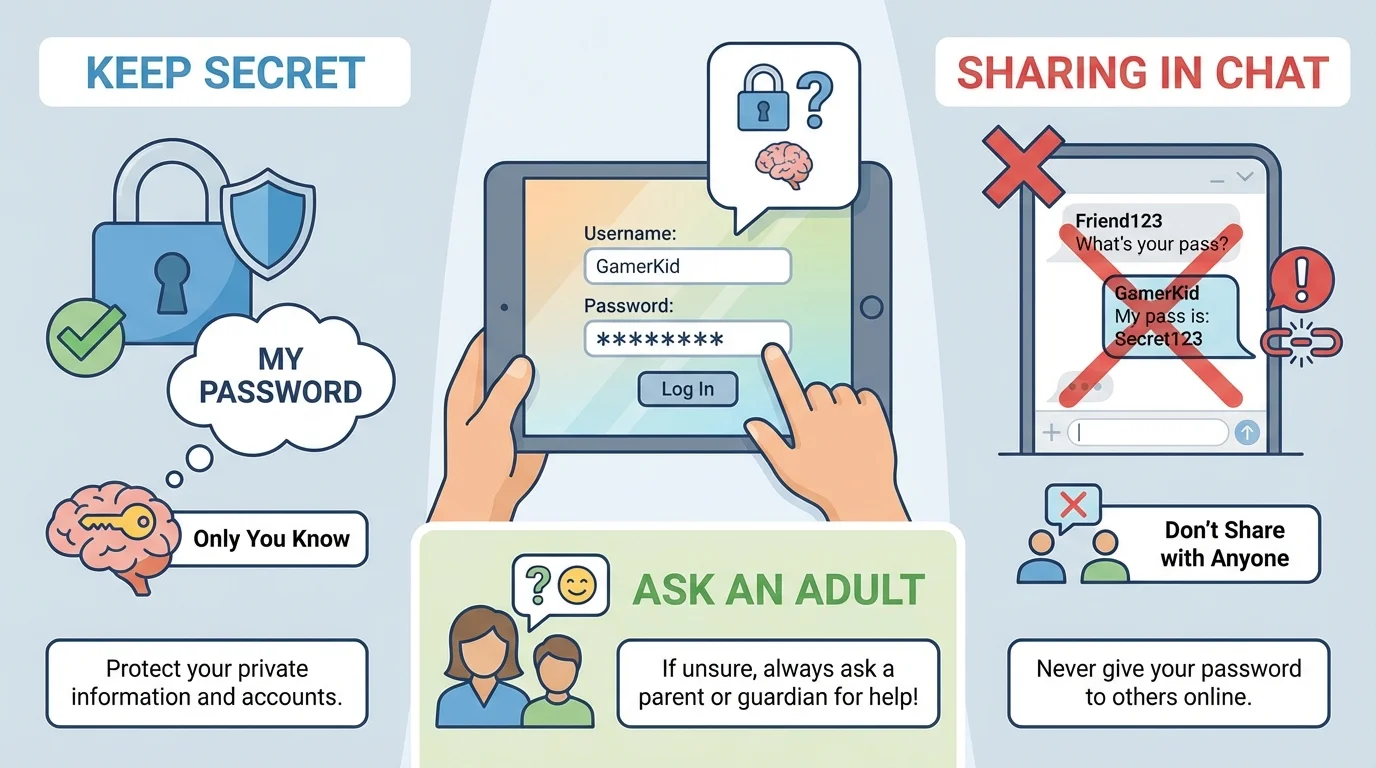
A good password is not something easy for other people to guess, like your first name or the word password. A trusted adult can help you make one that is stronger. You do not need to make it all by yourself. What matters most for you is this: keep it secret, do not type it where others can see, and do not share it in messages or games.
If you think someone else learned your password, tell an adult right away. Then the adult can help you change it. Acting fast matters. Waiting too long can let another person use your account again.
Example: What can happen if a password is shared?
Step 1: Maya tells someone in a game her password because they promise her free coins.
Step 2: The person logs in to Maya's account and changes her picture and messages.
Step 3: Maya feels confused and upset because the account no longer looks like hers.
Step 4: Maya tells a trusted adult, who helps change the password and report the problem.
Sharing a password can lead to trouble, but asking for help quickly can make things safer again.
Later, when you use other apps, remember the secret-key idea from [Figure 1]. A password protects your space online, just like a key protects a locked door.
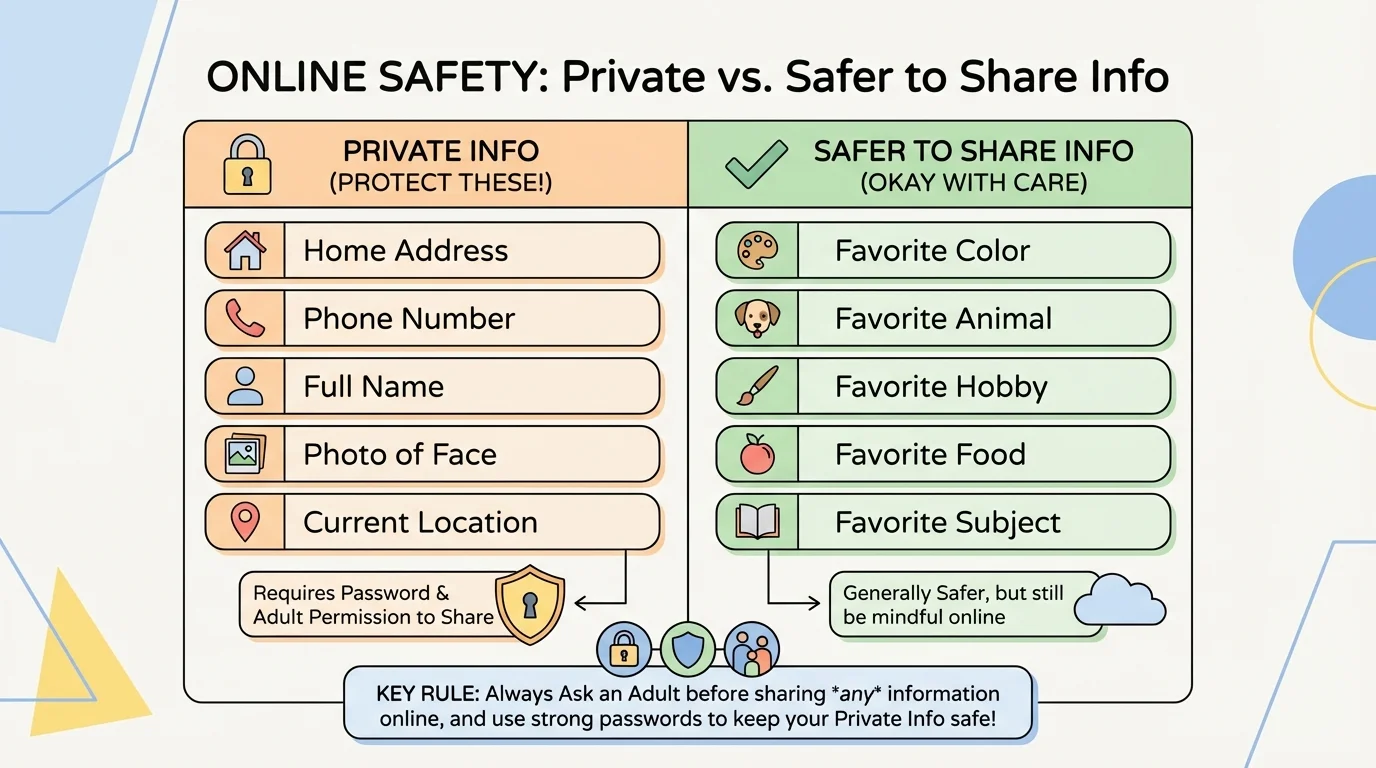
Privacy means keeping important personal information safe, and [Figure 2] helps you see the difference between private information and information that is usually safer to share. Private information is anything that tells people too much about who you are or where to find you.
Private information can include your full name, home address, phone number, email address, passwords, your location, and photos that show where you live or where you are right now. Sometimes even the name of your online school platform, your schedule, or a picture with a house number in the background can share more than you meant to share.
Some things are usually not private, like your favorite color, favorite animal, or favorite snack, but you still should be careful. Even harmless questions can become a problem if a stranger keeps asking for more and more details. That is a clue to stop and ask an adult.
Photos deserve extra care. A picture may seem simple, but it can show your face, your room, your street, your school name on a shirt, or where your family is visiting. Before posting or sending a photo, check with an adult. It is always okay to pause first.
If an app asks for your location, camera, or microphone, do not press yes by yourself unless a trusted adult has already said it is okay. These tools can share a lot. Adults can help decide what is safe and needed.
Why privacy protects you
When people online do not know your personal details, it is harder for them to bother you, trick you, or find you in real life. Privacy gives you space and safety. Keeping personal information private is one of the best ways to stay protected online.
Think back to the private-information list in [Figure 2]. If someone online asks for any of those details, that is a strong sign to stop and tell an adult instead of answering.
Sometimes you can solve small tech problems, like closing a video that is too loud. But some online situations need adult help right away. Asking an adult is not tattling or getting someone in trouble. It is a smart safety choice.
Ask a trusted adult right away if someone online is mean, sends scary words or pictures, asks for a photo, asks where you live, wants your password, says "do not tell your parent," asks you to click a strange link, or wants to meet in real life. Also ask for help if you accidentally click something strange or if a pop-up says you won a prize.
If you feel confused, worried, shaky, or rushed, that is another clue to ask for help. Unsafe messages often try to make you hurry. Safe choices can wait. You never have to handle a tricky online problem alone.
People who trick others online often try to sound friendly first. They may offer gifts, game items, or secret deals to get private information.
A trusted adult can help you block a person, report a message, close an app, change a password, or check privacy settings. Adults help because they know how to make the problem smaller and safer.
When something online feels odd, the safety plan in [Figure 3] gives you four easy moves to remember: stop, think, do not click or share, and ask an adult. This plan works for messages, games, videos, pop-ups, and apps.
Stop: Put your hands still for a moment. Do not answer fast. Think: Ask yourself, "Is this safe? Do I know this person? Are they asking for private information?" Do not click or share: Leave links, pictures, and buttons alone until an adult checks. Ask an adult: Show the screen or explain what happened.
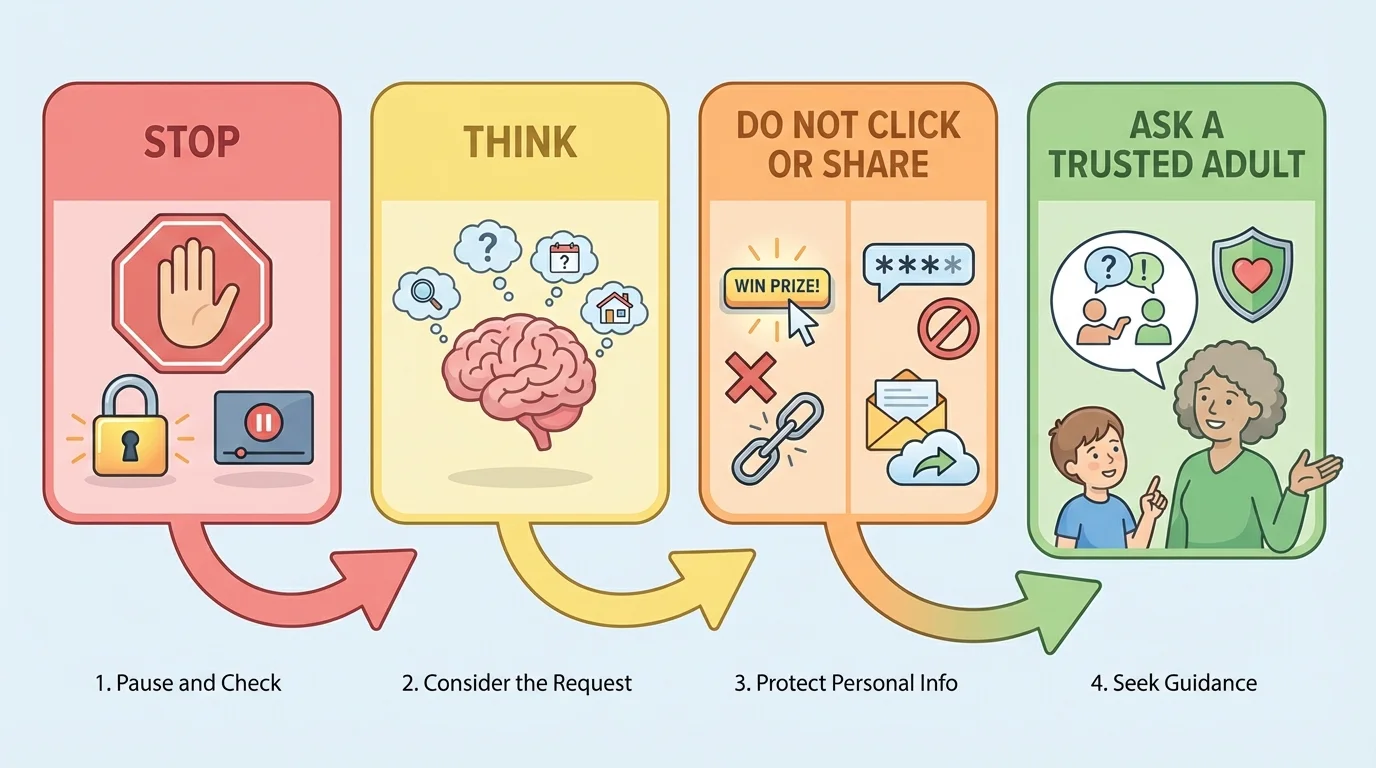
This plan is helpful because tricks often depend on speed. If someone says, "Hurry or you will lose your prize," stopping gives your brain time to notice the warning signs. The plan also helps protect your account, your feelings, and your family's information.
"If it feels wrong, pause and ask for help."
Later, if you forget what to do, remember the flow of steps from [Figure 3]. The order matters: first pause, then think, then keep your information to yourself, then get help.
Here are some situations you might really face at home.
Situation 1: A person in a game says, "Tell me your password and I will give you rare items." The safe choice is not to answer the question. Leave the chat and tell an adult. Giving the password away could let them take over your game account.
Situation 2: A video app asks to use your camera. Maybe that is okay for a specific reason, or maybe it is not needed at all. Instead of guessing, ask an adult before allowing it.
Situation 3: Someone sends a message that says, "Where do you live?" That is private information. Do not answer. Show the message to an adult.
Situation 4: You accidentally click a pop-up and a new page opens. Do not keep clicking. Get help from an adult right away. Extra clicking can sometimes make a problem bigger.
Try This
Pick one device you use at home. With a trusted adult, practice saying these safety words out loud: "That is private." "I do not share passwords." "I need to ask an adult first." Practicing the words now makes them easier to use later.
These choices may seem small, but they protect you in big ways. Good choices help keep your online space calm and safe. Poor choices can lead to lost accounts, hurt feelings, scary messages, or strangers learning too much.
Safe online habits get stronger when you use them often. Log out when needed. Keep passwords secret. Ask before downloading anything. Be careful with photos. Do not chat with strangers. Tell an adult about anything mean, confusing, or scary.
You do not have to know every answer by yourself. Online safety is not about being perfect. It is about noticing warning signs and getting help when you need it. Smart, careful choices help you enjoy the good parts of the internet while staying protected.
You already know how to ask for help in real life when something feels unsafe. Online safety uses that same skill. The screen may be different, but the smart choice is the same: pause and tell a trusted adult.
Every time you protect a password, keep something private, or ask an adult before clicking, you are practicing digital responsibility. Those habits help you now and will keep helping you as you grow.
