Have you ever known you had something to do, but then you forgot what it was, when it was due, or where your materials were? That can happen fast in online school. One tab is open, your notebook is somewhere else, and your assignment directions are hidden in a lesson page. The good news is that you do not need a perfect memory. You need a good plan.
Planning tools help you stay in charge of your work instead of letting your work surprise you. When you use them well, you feel calmer, start faster, and finish more often. When you do not use them, small tasks can pile up and feel huge. A five-minute job can turn into a stressful problem just because it was not written down.
Planning is not just about being neat. It is about helping your brain do less guessing. If you already know what to do first, what materials you need, and what comes next, your brain has more energy for the actual task. That means less time wandering, less frustration, and more success.
Think about two students learning from home. One checks a plan before starting. The other tries to remember everything. The first student opens the right lesson, grabs the right notebook, and begins. The second student looks around the room, clicks through pages, and says, "Wait, what am I supposed to do?" Both students may be smart, but the one with a plan is ready to use that smart thinking.
Planning tools are items or systems that help you remember, organize, and finish tasks. Common planning tools include a planner, a calendar, a checklist, folders, labels, and a timer.
Multi-step tasks are jobs that take more than one action to finish. Instead of doing everything at once, you complete the steps in order.
A plan also helps you outside school. You might use one to pack for a sports class, clean your room, get ready for a video club meeting, or finish a craft project. Once you learn how to plan, you can use the skill almost anywhere.
You can use different tools for different jobs, and [Figure 1] shows how each tool has a special purpose. A planner is good for writing down tasks. A calendar helps you notice dates. A checklist helps you see steps. A folder system keeps papers and files sorted. A timer helps you focus for a set amount of time.
You do not need fancy supplies. Your planning tools can be very simple: a notebook, a printed page, sticky notes, a whiteboard, or a digital app. The best tool is the one you will really use. If a tool is too confusing, it will not help much.
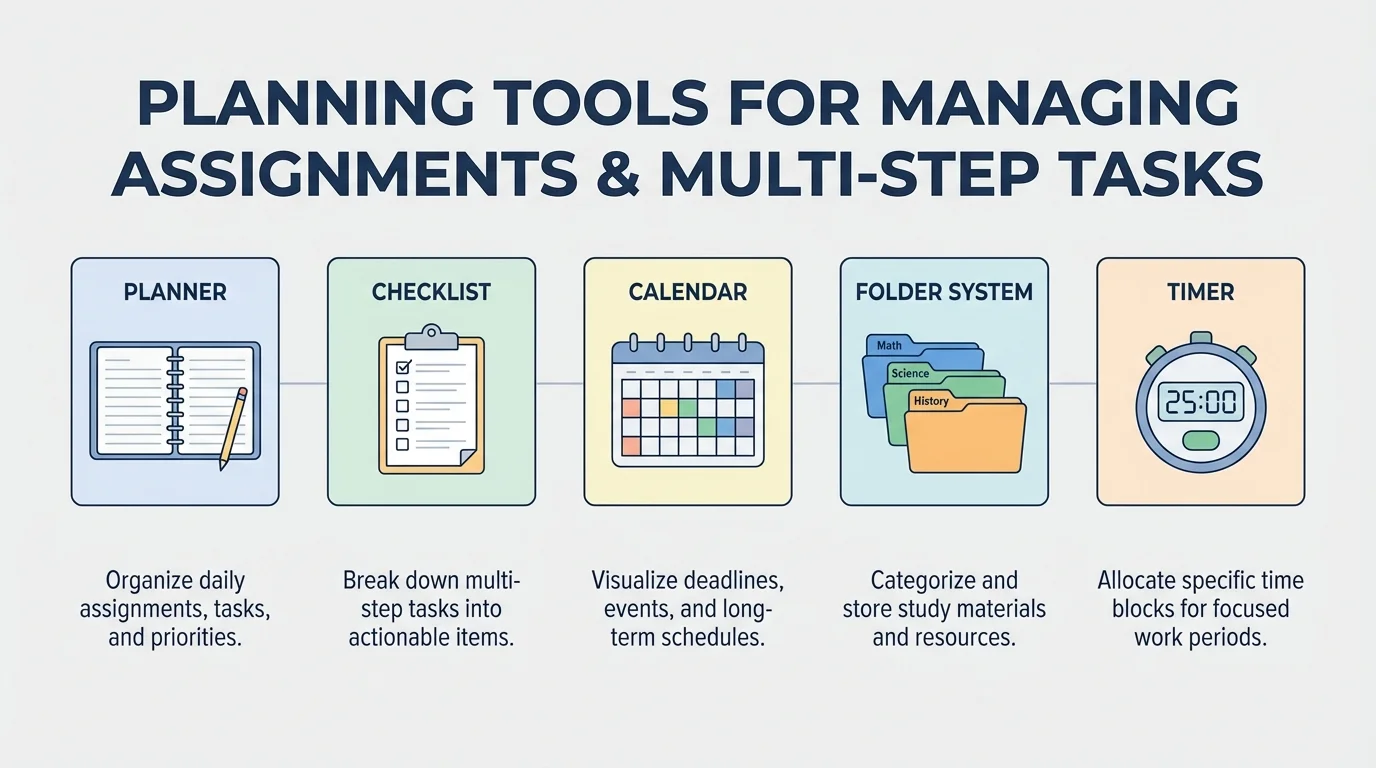
It also helps to match the tool to the job. If you need to remember a due date next week, put it on a calendar. If you need to finish five small steps today, use a checklist. If you need to stop getting distracted, set a timer. Planning gets easier when each tool has one clear job.
Your brain is better at thinking than at holding lots of little reminders all day. Writing things down frees up brain space so you can focus on learning and doing.
Some students like paper tools because they can touch and see them easily. Other students like digital tools because they can type fast and set reminders. You can even use both. For example, you might keep due dates in a digital calendar and keep today's tasks on paper beside your computer.
An assignment is any task your teacher wants you to complete, such as watching a lesson, reading, answering questions, uploading a photo, or joining a video call. The first planning habit is simple: as soon as you learn about an assignment, write it down.
When you write an assignment, include the most important details: what to do, when it is due, and anything you need. A short note works well, such as: "Read pages 10 to 15, answer questions, due Thursday, need reading notebook." That short note is much more helpful than writing only "reading."
It can help to use the same order every time. First write the subject or class. Next write the task. Then write the due date. Last, write special directions. When you use the same pattern again and again, your planning gets faster.
Example: Writing down an assignment clearly
Step 1: Find the task.
You read your online lesson and see that you must watch a science video and answer three questions.
Step 2: Add the due date.
The work is due on Friday.
Step 3: Add needed materials.
You need headphones and your science notebook.
Step 4: Write one clear plan entry.
"Science: watch video, answer 3 questions, due Friday, need headphones + notebook."
Now you can tell what to do without searching for the directions again.
After you write an assignment down, check whether it is a one-step job or a bigger job. If it is small, you may finish it soon. If it is bigger, you should break it apart. That keeps one big task from becoming a forgotten task.
[Figure 2] Your materials need a home too. At home, that means having one main learning spot for supplies and one clear system for digital files. If pencils are in three rooms and files are saved with random names, you waste time every day looking for things.
Start with physical materials. Keep basic supplies together: pencils, eraser, charger, headphones, notebooks, and any class folders. Use a box, bin, shelf, or drawer. Label it if that helps. When you finish learning, return each item to its place. This small habit saves time the next day.
Digital materials matter too. Make folders on your device for each subject or type of work. Give files names that make sense, like "Math fractions Tuesday" or "Animal report draft." Avoid names like "stuff" or "new file," because those are hard to understand later.
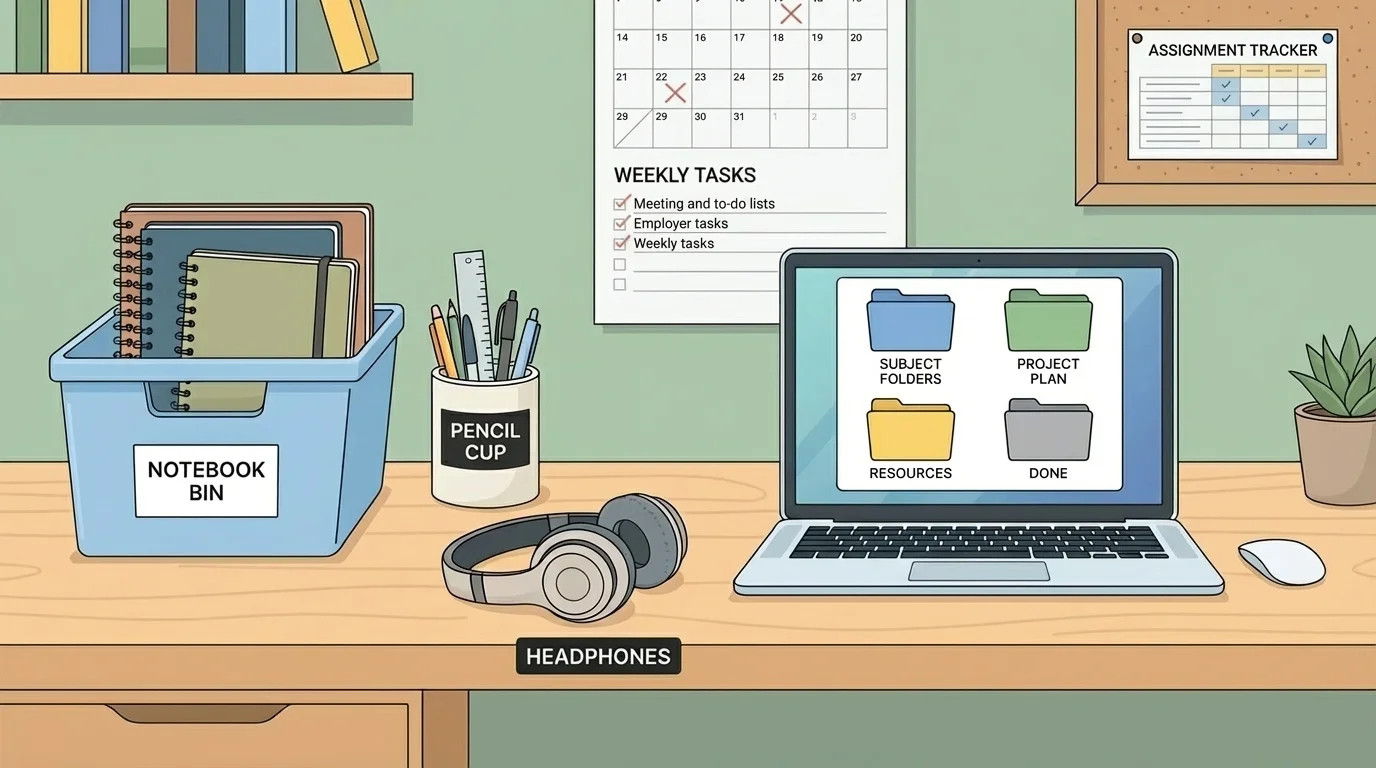
A good folder system works like a set of drawers. Each folder has one job. You might have folders called Reading, Math, Writing, and Projects. Inside Projects, you could keep smaller folders for each big task. This makes it easier to find old work and continue where you stopped.
When your space is organized, your body and brain are more ready to work. You are less likely to get up again and again to hunt for supplies. Even a simple setup can make your learning time smoother.
One place, one purpose
Organization works best when each item belongs in one place. If your headphones sometimes go on the couch, sometimes on the table, and sometimes in a backpack, they are harder to find. But if they always go in the same bin after class, you can grab them quickly the next time you need them.
You can use the same idea for other parts of life too. Sports gear can go in one basket. Art supplies can go in one cart. Library books can go on one shelf. Planning is easier when your materials are easy to see and easy to put away.
Some tasks look hard because they are really many little tasks stuck together. A multi-step task becomes easier when you split it up, and [Figure 3] shows what that looks like. Instead of saying, "I have to do my whole project," you can say, "First I choose a topic. Next I gather facts. Then I write."
This is called task breakdown thinking. You turn one big job into smaller steps you can check off. Every checked box gives you a little success, and that helps you keep going.
Ask yourself three useful questions: What comes first? What comes next? What is the last thing I do? Those questions help you build the order of the task. Then write the steps in your checklist.
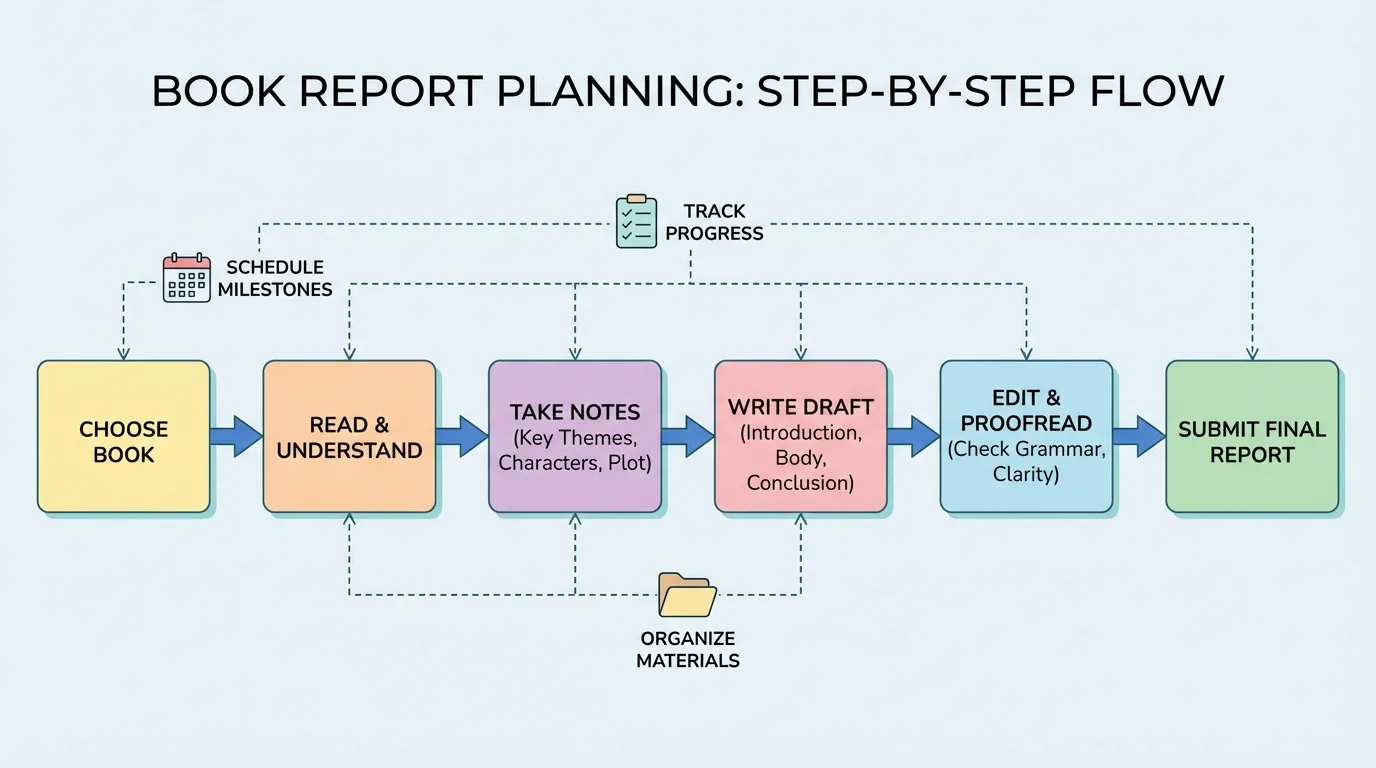
Example: Breaking down a book report
Step 1: Write the big job.
"Book report due next Monday."
Step 2: List the smaller parts.
Choose a book, read each day, write notes, make a first draft, fix mistakes, submit the report.
Step 3: Decide when to do each part.
Read on Monday and Tuesday, notes on Wednesday, draft on Thursday, edit on Friday, final check on Monday.
Step 4: Check off each step as you finish it.
Now the task feels smaller because you are completing one part at a time.
A big project often feels scary only because the steps are hidden. Once the steps are visible, the job feels more possible.
If you get stuck, make the steps even smaller. Instead of "write paragraph," try "write first sentence." Instead of "clean room," try "put books on shelf." Tiny steps still count. In fact, tiny steps are often how big jobs get done.
A routine is a pattern you repeat. When you use the same planning routine often, you do not have to decide everything from the beginning each day. [Figure 4] shows a simple routine that moves from checking your plan to resetting your space at the end.
A strong daily routine might look like this: check your planner or calendar, read today's tasks, gather materials, start the first task, check off finished work, and put items back when done. This routine does not need to be long. It just needs to happen regularly.
A weekly routine helps with bigger planning. Once a week, look ahead. Ask: What is due soon? Which jobs will take more than one day? Do I need special materials? Looking ahead prevents last-minute surprises.
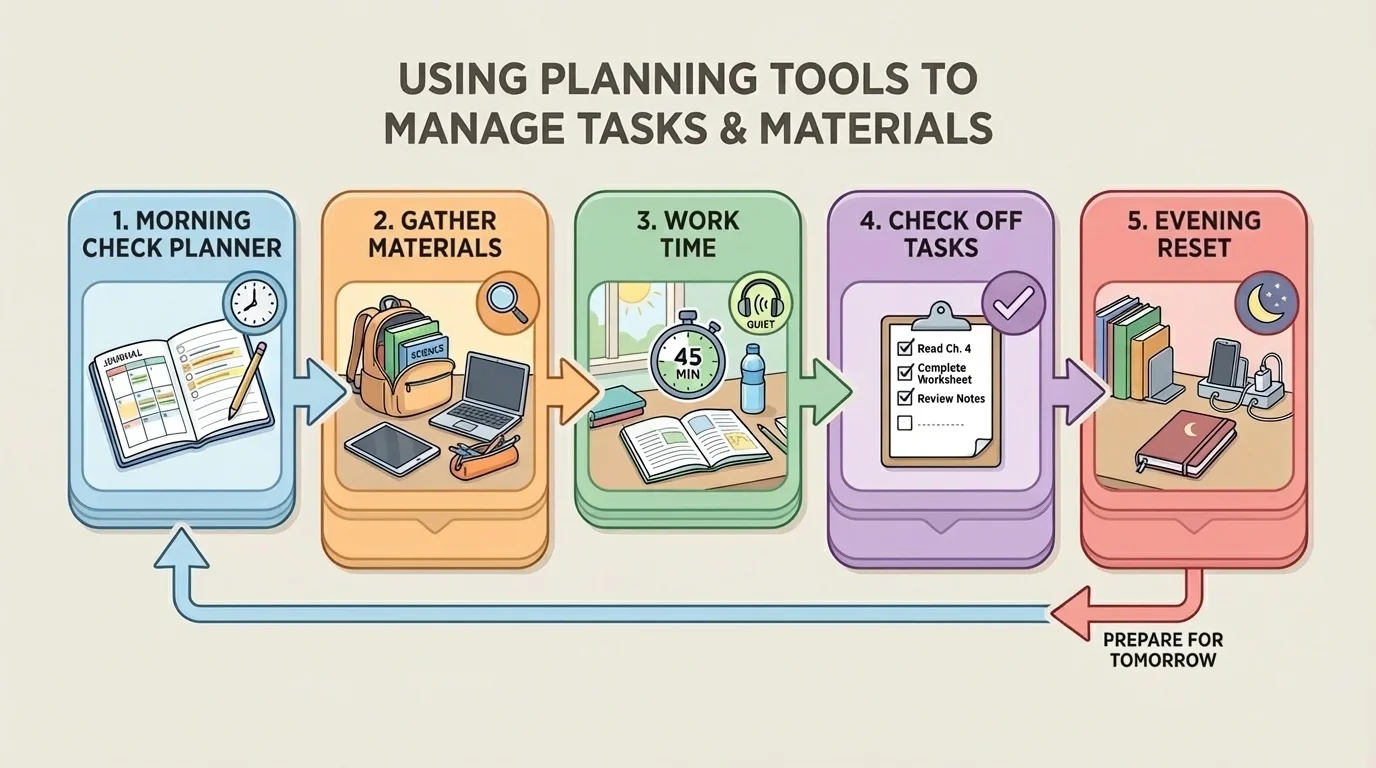
You can also choose a regular reset time. Maybe every afternoon you spend a few minutes cleaning your work area, charging your device, and checking tomorrow's tasks. That short reset can save a lot of stress later.
Example: A simple end-of-day reset
Step 1: Check what you finished.
Mark completed tasks with a check.
Step 2: Move unfinished tasks.
If something is not done, write it on the next day's plan.
Step 3: Put materials away.
Return notebooks, pencils, and headphones to their spots.
Step 4: Prepare for tomorrow.
Open the next lesson page or place needed materials nearby.
This reset is small, but it helps tomorrow start more smoothly.
Later, when you need to handle a larger project, the same routine still helps. Just like [Figure 3] breaks one project into steps, your daily routine gives those steps a place in your week.
Sometimes planning tools exist, but they are not being used well yet. That is normal. The answer is not to quit. The answer is to fix the problem in a simple way.
If you forget to check your planner, connect it to something you already do. For example, check it right after logging in to school. If you lose papers, use one folder for unfinished work and one folder for finished work. If you keep running out of time, start with the most important task first instead of the easiest task.
If a big task feels impossible, shrink it. If your space gets messy, do a two-minute cleanup. If digital files disappear, rename them right away and place them in the correct folder immediately. Planning works best when you use small fixes quickly.
You already know how to follow steps when you cook with help, build something, or play a game with rules. Planning uses that same skill. You are simply choosing the steps ahead of time and keeping track of them.
It also helps to notice what tool solves which problem. A missed due date might mean you need a better calendar habit. A lost worksheet might mean you need a stronger folder system. Trouble finishing a project might mean you need a checklist with smaller steps.
Planning is not only for lessons and homework. You can use it to pack for a trip, get ready for a music practice, prepare ingredients for baking, or clean your room. The same tools still work: write the job, gather materials, break it into steps, and check your progress.
For example, if you are packing for an afternoon activity, your checklist might say water bottle, shoes, notebook, and snack. If you are making a craft, your planner note might remind you to get paper, glue, and scissors before starting. If you are helping at home with a chore, you can write the steps in order so you do not miss one.
That is why planning is such a powerful life skill. It helps you be more independent. Instead of waiting for someone to remind you again and again, you can use your tools to remind yourself. That builds confidence because you know how to get yourself ready.
"A good plan is like a map. It helps you know where to start and what to do next."
You do not need to be perfect at planning. You only need to practice. Start small. Pick one tool you will use every day. Then add another tool when you are ready. Little by little, planning becomes a habit, and habits make hard things easier.
