Here is something surprising: a device can help you learn, create, talk to people you care about, and have fun, but the same device can also lead to wasted time, expose your private information, and cause problems if you use it without a plan. That is why smart digital habits matter. You do not need to fear technology, and you do not need to be online all the time. You need balance, good judgment, and a few clear rules you can actually use.
Being a good digital citizen means more than knowing how to click buttons. It means knowing when to log on, when to log off, what to share, what to keep private, and how to treat other people online. These are real-life skills. They affect your sleep, your mood, your friendships, your family time, and your safety.
Screen time is the time you spend using devices such as tablets, phones, computers, game systems, or TVs.
Privacy means keeping personal information and personal space protected.
Online responsibility means making safe, respectful, and honest choices when you use the internet.
If you use these skills well, technology becomes a helpful tool. If you ignore them, you may end up tired, distracted, upset, or at risk. The goal is not to be perfect. The goal is to notice your habits and make better choices little by little.
Your digital choices affect regular moments all day long. Maybe you wake up and want to watch videos right away. Maybe you start a game and suddenly an hour disappears. Maybe someone in a chat asks where you live. Maybe you feel like posting a photo without thinking about who can see it. These are normal situations, but they need smart decisions.
Good screen habits can help you feel calmer and more organized. Good privacy habits can stop strangers or even people you know from getting information they should not have. Good online responsibility can help you build trust. People learn that you are thoughtful, kind, and careful.
Your brain can lose track of time when apps and games are designed to keep you watching, tapping, and scrolling. That is one reason timers and routines are so useful.
Think of digital life like riding a bike in a neighborhood. Riding a bike is not bad. It is useful and fun. But you still need a helmet, awareness, and rules for where to go. Technology works the same way.
Screen time balance means your day includes more than just screens, as [Figure 1] shows. You still have time for sleep, meals, movement, schoolwork, family, hobbies, chores, and quiet time. Screens fit into your day, but they do not take over your whole day.
A balanced day does not look exactly the same for everyone. One day you may need more screen time for an online class project. Another day you may hardly use a device because you are visiting family or doing outdoor activities. Balance is not about making every day exactly equal. It is about noticing when screens are helping you and when they are crowding out other important things.
Signs that your screen use may be out of balance include staying up too late, skipping chores, rushing through schoolwork, feeling grumpy when asked to stop, forgetting to eat, or losing interest in offline activities you usually enjoy. You might also notice tired eyes, headaches, or trouble focusing.
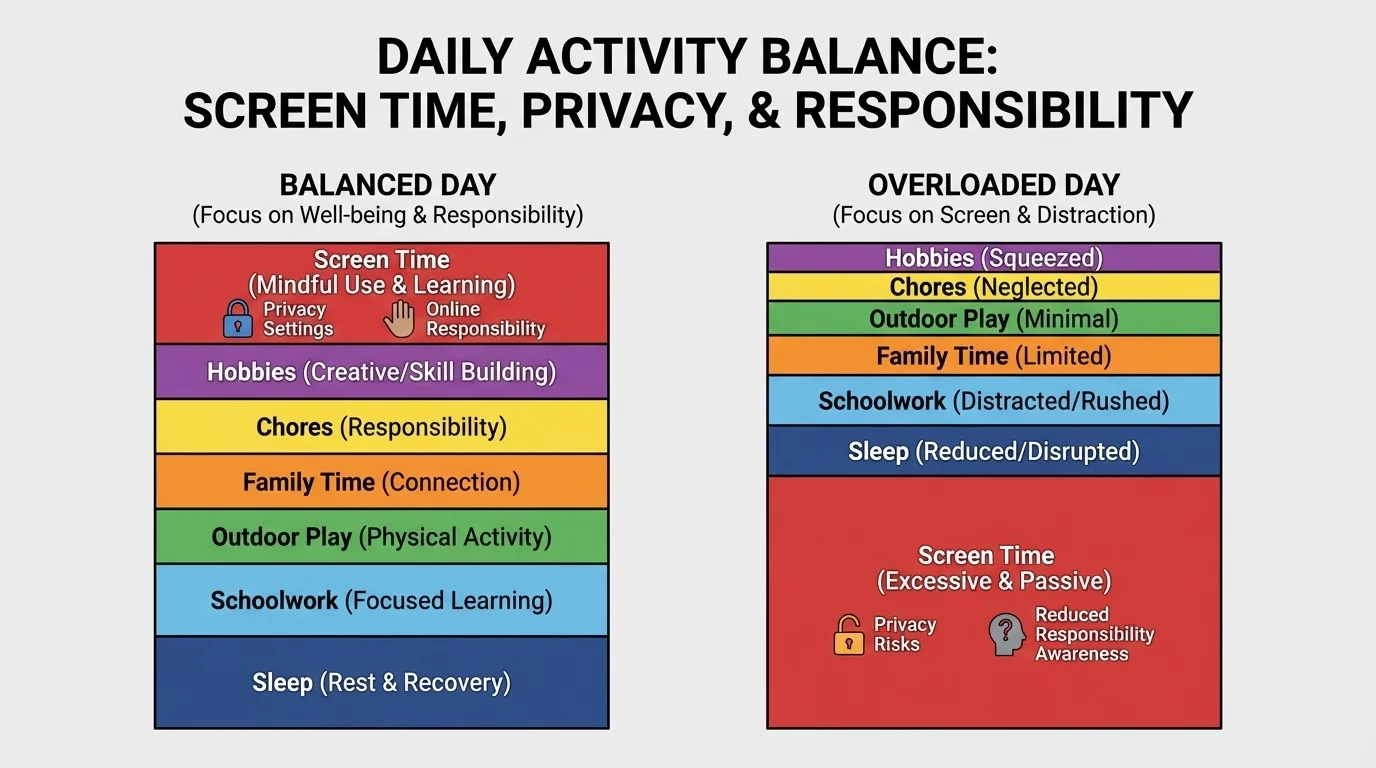
Signs of healthier balance include being able to stop when it is time, finishing important tasks first, getting enough sleep, and still enjoying offline things like drawing, reading, building, cooking, sports, music, or talking with family.
You do not need to count every minute forever. But it helps to notice patterns. If you planned to play for a short time and then it turned into a very long stretch, that is a clue that you need stronger boundaries.
Balance is about choices, not just minutes. Two hours on a device can feel very different depending on what you are doing. Attending an online lesson, making digital art, and video-calling a grandparent are not the same as endless scrolling late at night. The healthiest plan looks at both how long and how you use screens.
Another helpful question is: What did screen time replace? If it replaced a little boredom while you waited for dinner, that may be fine. If it replaced sleep, exercise, or school responsibilities, then it is a problem worth fixing.
The easiest way to manage screen time is to make decisions before you get pulled into an app, game, or video. When you decide in advance, you are in charge. When you decide in the middle, the screen often feels in charge.
Try a simple plan with four parts. First, know your must-do tasks. These might include online schoolwork, reading, chores, feeding a pet, practicing an instrument, or getting ready for bed. Second, choose your fun screen activity. Third, set a stopping point, such as a timer or the end of one episode. Fourth, decide what you will do next so you do not just keep scrolling.
Here are some practical rules that help many students:
If your timer goes off and you feel annoyed, that does not mean the timer failed. It means the timer is doing its job. Stopping can be hard. The trick is to practice stopping even when you would rather continue.
A real-life screen plan
Maya wants to play an online game after schoolwork, but she also needs to walk the dog and eat dinner with family.
Step 1: She lists her must-do tasks.
Maya finishes her reading, puts away laundry, and walks the dog.
Step 2: She chooses one fun activity.
She decides to play one game with friends online.
Step 3: She sets a clear stopping point.
She uses a timer for one session and tells her friends, "I can play until dinner."
Step 4: She plans what happens next.
When time is up, she plugs in her device and joins dinner.
This plan works because Maya knows her priorities and makes stopping easier.
Try This: Pick one part of your day when screen use often stretches too long. Choose one rule for that time: a timer, a device-free meal, no videos before schoolwork, or screens off a set time before bed.
As you saw in [Figure 1], balance works best when your whole day has room for many different activities. A device is one part of life, not the center of it.
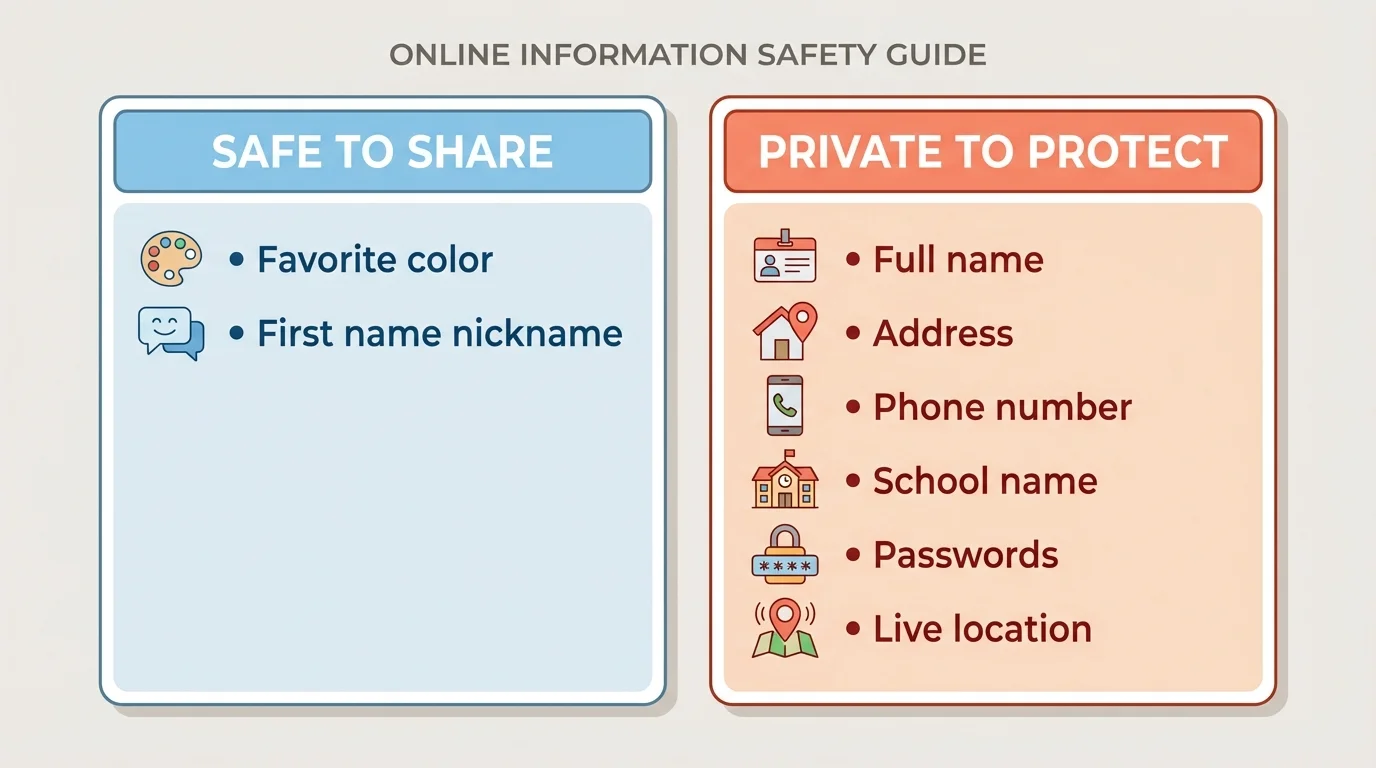
Privacy online means protecting information about yourself, with examples of what is safer to share and what should stay private. Some information seems small, but when pieces are combined, they can tell strangers a lot about you.
[Figure 2] Private information includes your full name, home address, phone number, passwords, school name, daily schedule, live location, and details about where you will be at a certain time. Photos can also reveal private details in the background, like street signs, house numbers, team names, or family papers on a table.
Safer information might include a hobby, favorite book, favorite animal, or a nickname that does not reveal too much. Even then, you should still be thoughtful about where you post and who can see it.
One of the best privacy tools is a strong password. A strong password is hard for other people to guess. It should not be your name, birthday, or something obvious like "1234." Your passwords should stay private, except with a trusted parent or guardian if your family uses that rule.
Another important tool is your account settings. Many apps, games, and websites have settings for who can contact you, who can see your posts, and whether your location is shared. Ask a trusted adult to help you check these settings. Privacy settings are helpful, but they are not magic. You still need good judgment.
Before you post, send, or upload anything, pause and ask: "Would I be okay if a trusted adult saw this? Would I be okay if this stayed online for a long time?" That quick pause can protect your privacy.
Be extra careful with photos and videos. Once something is shared, saving or forwarding it can be easy. Even if you delete it later, someone may already have a copy. That is why it is smart to share less, not more.
A common mistake is trusting someone online just because they seem friendly. People online are not always who they say they are. If someone asks for private information, photos, or your location, do not answer the question. Leave the conversation and tell a trusted adult.
Digital footprint is the trail of things you do online, such as posts, comments, likes, messages, usernames, and shared photos. Some parts of that trail may last longer than you expect. That is why online responsibility matters even when something feels temporary.
Responsible online behavior starts with kindness. Text on a screen can feel less real than face-to-face conversation, but the person reading it is real. Jokes can sound mean. Fast replies can turn into arguments. A smart rule is this: if you would not say it kindly in a video call with a trusted adult nearby, do not type it.
Responsibility also means honesty. Do not pretend to be someone else. Do not copy someone else's work and claim it is yours. Do not spread rumors. Do not forward a screenshot from a private chat just to embarrass someone. Those actions break trust.
"Before you post, pause."
— A simple rule for safer digital choices
Another part of responsibility is checking whether information is true. Not every video, message, or post is accurate. Some are jokes. Some are tricks. Some are made to get attention. If a claim sounds wild, scary, or too amazing to be true, slow down. Check with a trusted adult or look for information from reliable sources.
Being responsible also means respecting other people's privacy. Ask before posting a photo of someone else. Do not share private messages without permission. Just because you can share something does not mean you should.
Think before you post
Jordan takes a funny screenshot during a group video chat. A friend in the screenshot looks awkward and would probably be embarrassed if others saw it.
Step 1: Jordan pauses.
He does not post right away.
Step 2: He thinks about the other person.
Would posting it feel kind and respectful? Probably not.
Step 3: He chooses responsibility.
He deletes the screenshot instead of sharing it.
That small choice protects someone else's feelings and privacy.
Try This: Before you send any message today, read it one more time and ask, "Is it true? Is it kind? Is it necessary?" If the answer is no, change it or do not send it.
Sometimes the internet feels easy and fun. Sometimes it feels weird, unsafe, or upsetting. In those moments, a simple safety plan helps, and [Figure 3] lays out a clear order: pause, avoid clicking or replying, save evidence if needed, and tell a trusted adult.
Here are situations that need extra caution: a pop-up says you won a prize, a stranger asks to chat privately, someone pressures you to share a photo, a message includes mean words, or a link looks suspicious. You do not have to solve these problems alone.
A good safety plan is: pause, protect, and tell. Pause so you do not react quickly. Protect yourself by not clicking, replying, or sharing more. Tell a trusted adult what happened.
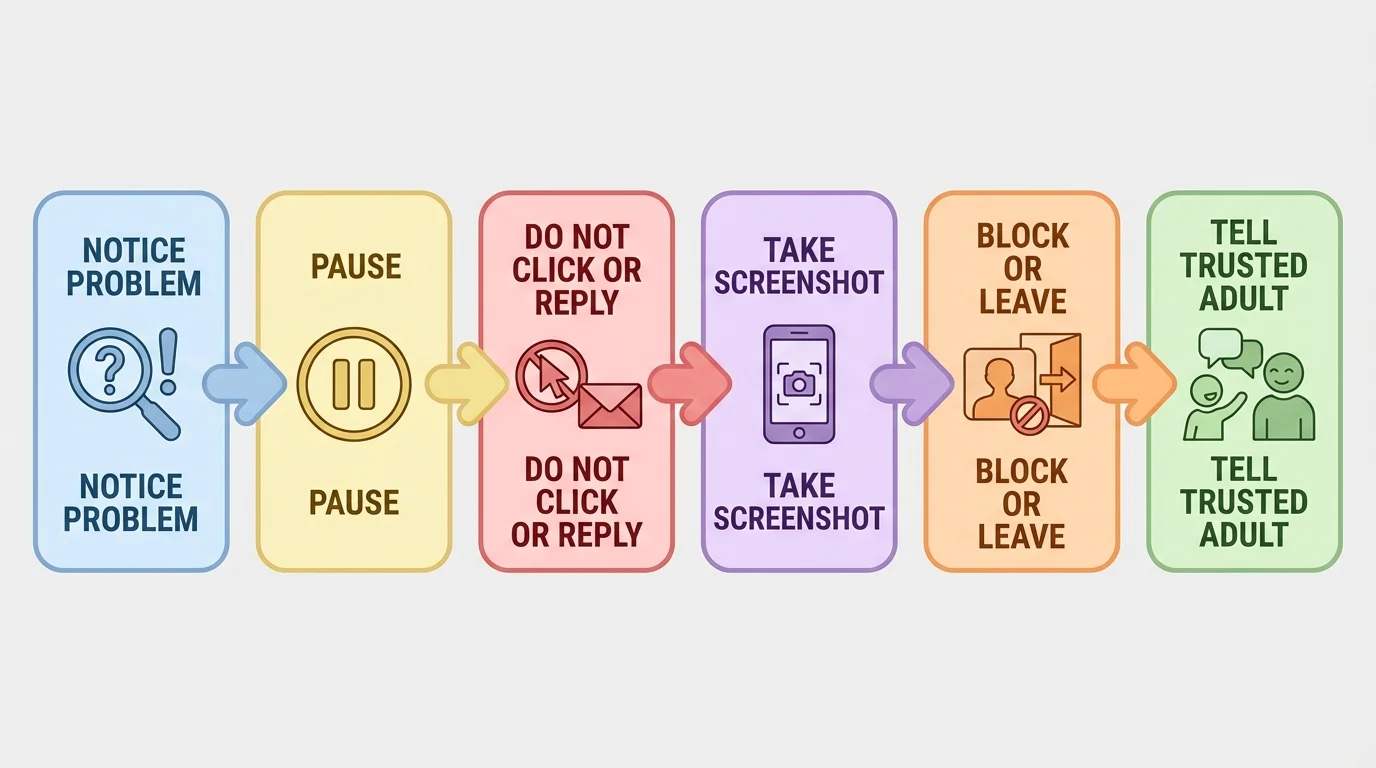
If you see something upsetting, you can close the app or tab, block the person if the platform allows it, and save a screenshot if an adult may need to report it. A screenshot is a picture of what is on your screen. It can help show what happened.
If someone is being mean online, do not fight back with more mean words. That often makes the situation bigger. Instead, save evidence, stop replying, block if possible, and tell an adult. If the person is someone you know in a club, sport, neighborhood, or online group, adults can still help.
Pressure online is still pressure. If someone says, "Come on, everyone is doing it," "Do not tell your parents," or "If you were really my friend, you would send it," that is a warning sign. Safe people do not pressure you to hide things or break your boundaries.
Mistakes happen too. Maybe you shared too much, clicked something odd, or posted while upset. If that happens, act quickly instead of hiding it. Tell a trusted adult, change passwords if needed, delete what you can, and review privacy settings. Problems are usually easier to fix when you speak up early.
Later, when you need to make another safety decision, the steps in [Figure 3] still help: pause first, protect your information, and get help from a trusted adult.
Good digital habits work best when they become part of ordinary routines. For example, you might charge devices outside your bedroom, keep notifications off during schoolwork, ask before downloading a new app, and check with an adult before joining a new online group.
Gaming is one place where all three skills connect. You need screen-time balance so gaming does not push out sleep or responsibilities. You need privacy so you do not share your real name, location, or account information. You need online responsibility so you play fairly, speak respectfully, and leave if a chat becomes unsafe.
Group chats are another place where these skills matter. A group chat can be fun and helpful, but it can also become distracting or unkind. You can mute alerts during important times, avoid sharing private details, and choose not to join in if people start teasing or gossiping.
Video calls need good habits too. Wear appropriate clothes, check what is visible behind you, keep private papers out of view, and speak respectfully. If you would not want a room full of people to see your background, fix it before the camera turns on.
| Situation | Smart choice | Why it helps |
|---|---|---|
| Watching videos before bed | Turn screens off earlier and plug the device in outside the bed area | Helps your brain rest and improves sleep |
| Someone asks for your address | Do not answer and tell a trusted adult | Protects your safety and privacy |
| A friend posts something mean | Do not join in; save evidence and get help if needed | Prevents harm and supports respectful behavior |
| You want to post a photo | Check who is in it and what details are visible | Protects other people and yourself |
| You lose track of gaming time | Use a timer and plan your stopping point before you start | Makes it easier to stay balanced |
Table 1. Everyday situations that connect screen time, privacy, and online responsibility.
You do not have to use every strategy at once. Start with one or two habits that solve your biggest problem. Maybe your first step is putting devices away at bedtime. Maybe it is checking privacy settings with an adult. Maybe it is pausing before posting. Small changes can make a big difference.
A one-day reset plan
If your screen use has felt messy lately, try this simple reset for one day.
Step 1: Choose three must-do tasks.
Examples: schoolwork, one chore, and outdoor time.
Step 2: Pick one screen-free time.
Examples: during meals or the last part of the evening.
Step 3: Check one privacy setting with an adult.
Look at who can message you or view your account.
Step 4: Use the pause rule before posting or replying.
Take one breath and think first.
This kind of reset can help you notice what habits actually support you.
Technology is part of modern life. Learning to use it wisely is a real adulting skill you can start building now. The strongest digital habits are not fancy. They are simple, repeatable, and protective: use screens with purpose, protect personal information, and act with respect.
