One small choice can change your whole day. Sending one angry message, ignoring one missing assignment, or clicking one suspicious link can turn a tiny problem into a much bigger one. The good news is that problem-solving is a skill. That means you can practice it, get better at it, and use it in real life when school gets stressful, friendships feel confusing, or something online seems wrong.
Problem-solving is not about being perfect. It is about slowing down enough to make a smart choice. When you have a plan, you are less likely to panic, overreact, or let someone else make the choice for you. That matters in online school, where you often manage your own time, messages, and devices.
Every day, you make decisions. Some are small, like whether to start your assignment now or later. Some are bigger, like how to respond when a friend says something hurtful in a group chat. A good decision can save time, protect your feelings, keep you safe, and help you build trust with others. A rushed decision can create stress, hurt relationships, or put your privacy at risk.
Strong problem-solvers usually do three things well: they pause, they think ahead, and they take action. They do not just ask, "What do I want right now?" They also ask, "What will happen next?"
Problem-solving is the process of figuring out what is wrong, thinking of possible solutions, and choosing the best action.
Decision-making is choosing between options after thinking about what might happen.
Critical thinking means looking carefully at information instead of believing the first idea, rumor, or feeling that pops up.
These skills work together. If your internet stops working during a live lesson, if a classmate in an online project does not reply, or if someone sends you a mean comment, you can use the same basic process.
A useful strategy gives you a path to follow when your brain feels busy. The process in [Figure 1] helps you move from confusion to action without skipping important thinking steps.
Step 1: Pause. If you are upset, annoyed, embarrassed, or worried, stop before you act. A fast reaction is not always a smart reaction. Take a breath, count slowly, get a sip of water, or step away from the screen for a minute if you can.
Step 2: Name the problem. Be specific. "Everything is ruined" is too big and too fuzzy. "I missed the assignment deadline because I read the due date wrong" is clear. Clear problems are easier to solve.
Step 3: Gather facts. Find out what you know for sure. What happened? When? Who is involved? What evidence do you have? Facts are different from guesses. "My friend hates me" is a guess. "My friend has not replied for two days" is a fact.
Step 4: List possible choices. Try to think of at least two or three options. When people feel stressed, they often act like there is only one choice. Usually there are more.
Step 5: Predict outcomes. Ask yourself what will probably happen with each choice. Think about short-term and long-term results. A choice that feels good for five seconds may cause trouble later.
Step 6: Choose the best option. Pick the choice that is safe, respectful, and likely to solve the actual problem.
Step 7: Act. Follow through calmly and clearly. Send the message, ask the question, fix the setting, report the problem, or make a new plan.
Step 8: Review. Afterward, ask: Did it work? If not, what can I change? Good problem-solvers learn from the result.
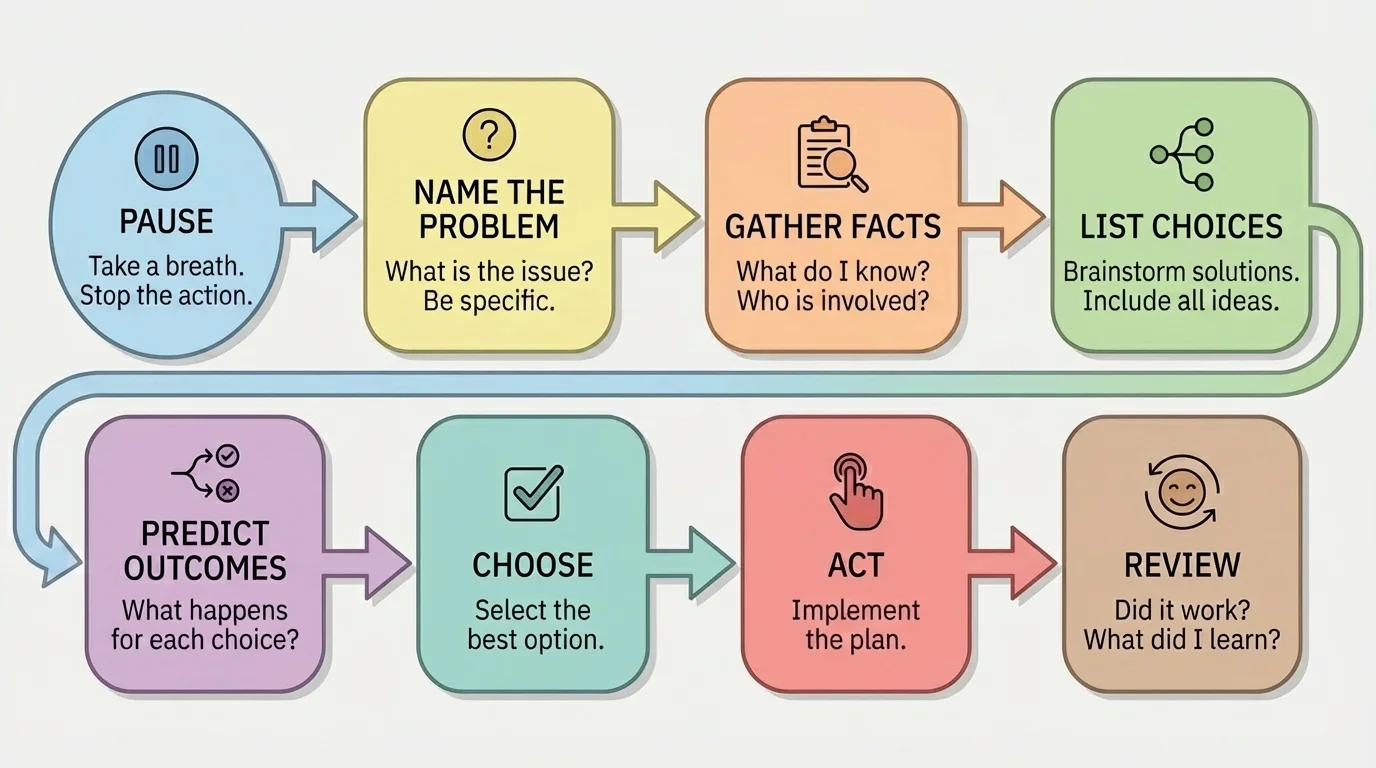
You do not need to use fancy words. You just need to remember the order: pause, understand, think, choose, act, check. That order matters because people often jump straight from feelings to action.
Facts, feelings, and guesses
When something stressful happens, your feelings are real and important, but they are not always the same as facts. A strong problem-solver notices feelings without letting them take over the whole decision. You can say, "I feel ignored," while also checking whether you actually have enough information to know what is happening.
If you mix up facts and guesses, you may solve the wrong problem. For example, if a teacher has not replied yet, the problem may be "I need another way to get help before the deadline," not "My teacher does not care."
Online school gives you freedom, but it also means you must manage yourself more often. Problems can show up as missed deadlines, confusing instructions, internet trouble, or poor time management. Using the steps early can stop a small issue from becoming a larger one.
Suppose you realize at night that an assignment was due that afternoon. First, pause. Panicking will not change the deadline. Next, name the problem clearly: you missed the due time. Then gather facts: Was it submitted partially? Is there a late policy? Can you still turn it in? Is there a message tool you can use to explain briefly and respectfully?
Then list choices. You might submit it late right away, send a polite message to your teacher, make a plan to avoid the same mistake, or all three. The best response is usually honest and responsible. Blaming technology when the real problem was forgetting may feel easier in the moment, but it can damage trust.
Example: Missed assignment in online school
Step 1: Name the problem.
"I missed the deadline for my science assignment."
Step 2: Gather facts.
You finished about half, the platform still allows uploads, and the teacher checks messages in the morning.
Step 3: List choices.
Choice A: Do nothing. Choice B: Submit the half-finished work. Choice C: Finish as much as possible, submit it, and send a respectful message.
Step 4: Predict outcomes.
Choice A almost guarantees a zero. Choice B shows some effort but may not reflect your best work. Choice C takes responsibility and gives your teacher the clearest picture.
Step 5: Act.
Finish what you can, submit it, and send: "Hello, I misread the due date and I am sorry. I submitted my work as soon as I noticed. I am also setting a reminder so this does not happen again."
This response does not promise a perfect result, but it shows honesty, effort, and problem-solving.
Technology problems need the same calm approach. If your device crashes during a quiz, get facts first. Take a screenshot if possible, note the time, restart the device, check your connection, and contact your teacher or tech support through the proper channel. Keeping basic information ready can help: the class name, the time the issue happened, and a short description of what went wrong.
Try This: Set two reminders for important school tasks: one for starting and one for submitting. That simple habit can prevent many "last-minute" problems before they begin.
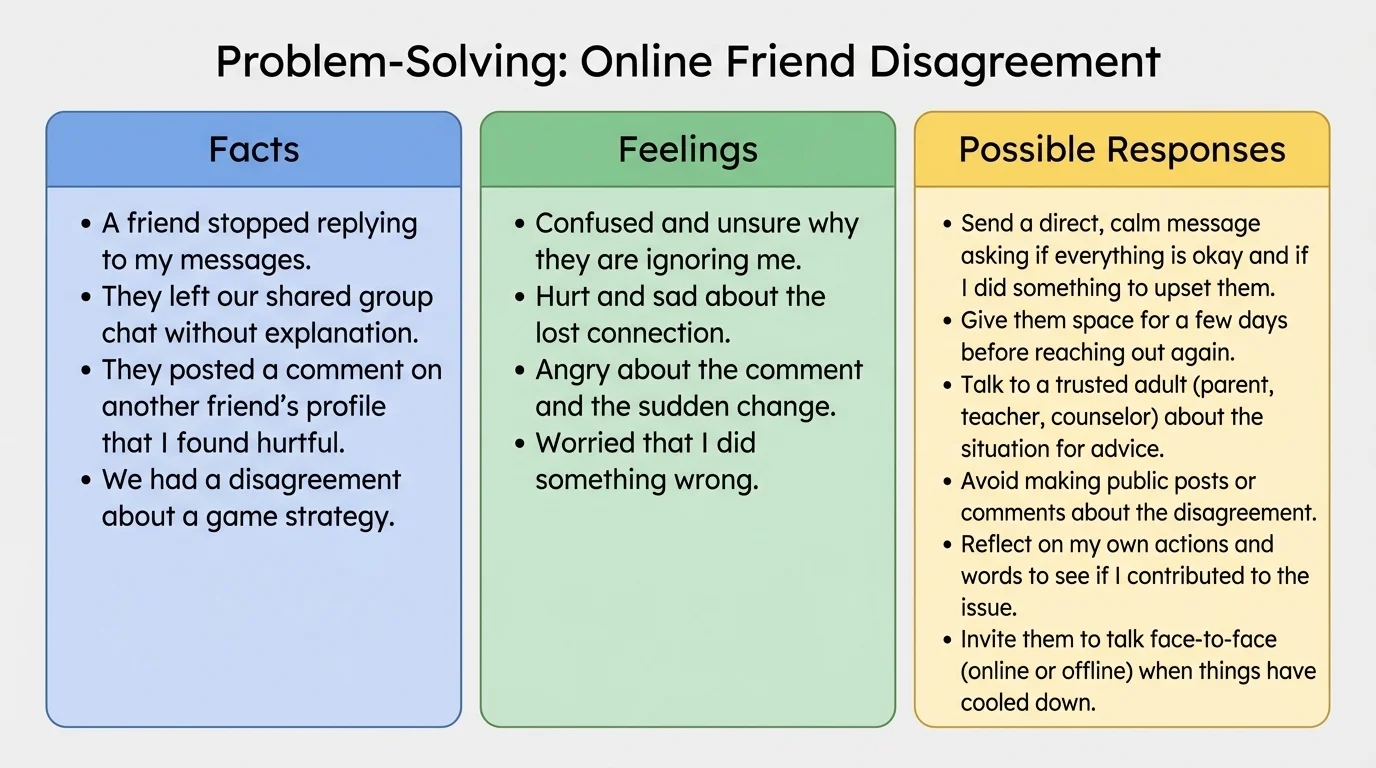
Friend problems can feel bigger than school problems because emotions are involved. In online chats or community groups, messages are easy to misunderstand. Tone of voice, facial expression, and timing are not always clear. That is why sorting a situation into facts, feelings, and choices can help before you answer.
[Figure 2] Here is a common situation: you text a friend, see that they are active online, and they still do not answer. You might feel hurt or angry. But before you decide what to do, gather facts. Maybe they are busy, maybe they forgot, maybe they are upset, or maybe there is another reason. You do not know yet.
If you react based on an assumption, you may create a conflict that did not need to happen. Sending "Wow, thanks for ignoring me" can start an argument. Asking "Hey, are you okay? Just checking in" keeps the door open.
Another peer problem is pressure. A friend might push you to join in teasing someone online, keep a secret that feels unsafe, or share a screenshot of a private chat. When that happens, ask yourself: Is this respectful? Is it safe? Would I be okay if someone did this to me? If the answer is no, do not join in.
You are allowed to set boundaries. A boundary is a limit you set to protect your time, feelings, privacy, or safety. It can sound simple: "I am not comfortable posting that," or "Please do not share my messages without asking."
Example: Handling a chat disagreement
Step 1: Pause before replying.
You feel angry because a friend made a joke that embarrassed you in a group chat.
Step 2: Name the problem.
The problem is not just the joke. The problem is that the joke felt disrespectful and happened in front of others.
Step 3: Gather facts.
The comment happened once today. You do not know if your friend meant to be hurtful or thought it was funny.
Step 4: Choose a response.
A private message is often better than starting a public fight. You could write: "That joke bothered me. Please do not say things like that about me in the group chat."
Step 5: Review.
If your friend apologizes and changes, the problem may be solved. If the behavior continues, you may need to mute, leave the chat, or ask an adult for help.
Later, when you face another confusing social moment, the sorting method from [Figure 2] still works. Write down one fact, one feeling, and two possible responses before you message back.
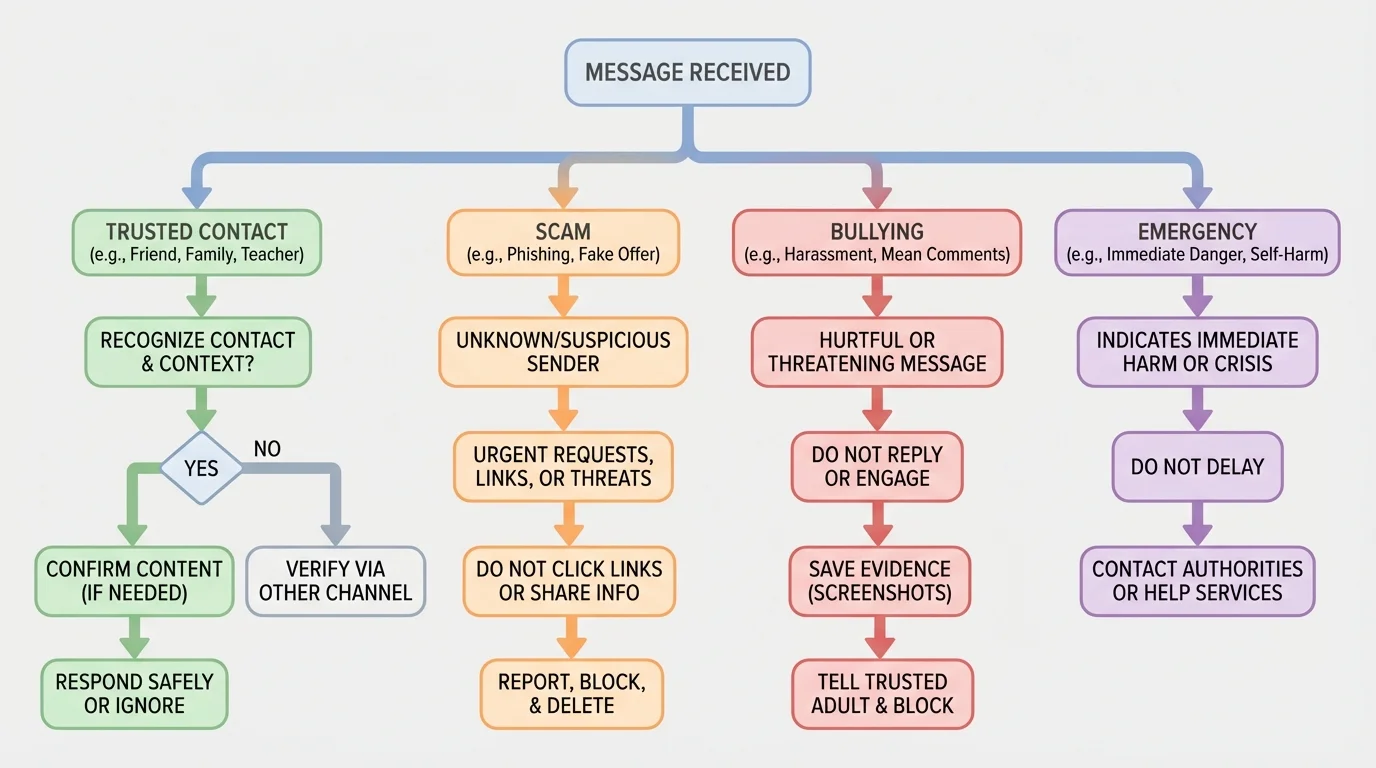
Some online problems are not just annoying; they can be unsafe. When you get a strange message, see a threat, or notice pressure to share personal information, use a careful decision process right away. The action paths in [Figure 3] help you decide whether to ignore, block, report, or tell a trusted adult.
Watch for warning signs. A message may be suspicious if it asks for passwords, home address details, private photos, or money. It is also a problem if someone threatens you, tries to make you feel guilty for saying no, or tells you to keep something secret from your family.
Not every online problem should be handled alone. Some situations need adult help immediately, especially if there are threats, blackmail, sexual messages, scams, or repeated bullying.
Try This: Before replying to a message from someone you do not know well, ask three questions: Who is this? What do they want? What could happen if I respond?
If someone sends a mean comment, you have choices. Sometimes the best choice is not replying at all. You can save evidence with screenshots, block the account, and report it on the platform. If it is from someone you know in real life, tell a trusted adult instead of trying to manage repeated bullying alone.
If someone asks for private information, do not share it. Personal information includes your full name, address, school schedule, phone number, passwords, and live location. Even a photo can reveal more than you think if it shows your home, street sign, or routine.
Many scams work by creating urgency. They want you to click or reply before you have time to think. Slowing down is one of the easiest ways to protect yourself online.
A digital consequence can last longer than an in-person mistake because screenshots, reposts, and saved files can spread quickly. That is why it is smart to think beyond the moment.
Feelings are not bad. They are signals. Anger can signal unfairness. Worry can signal risk. Sadness can signal loss. But strong feelings can also shrink your thinking. You might focus only on getting even, escaping blame, or making the bad feeling stop immediately.
That is why emotional control is part of problem-solving. A short pause can protect you from a long regret. If you are too upset to decide well, use a reset routine: breathe in slowly, breathe out slowly, relax your shoulders, and wait before typing. Even waiting a few minutes can help.
"When emotions go up, clear thinking can go down."
You can also ask yourself a few grounding questions: What happened? What am I feeling? What do I need right now? What choice will help most by tomorrow, not just in the next ten seconds?
This is especially important if you are tempted to post, share, or reply publicly. Public reactions often spread problems. Private, calm, respectful communication solves more.
When a problem appears, you do not need a long speech in your head. You can use a short checklist.
| Question | Why it helps |
|---|---|
| What is the actual problem? | Keeps you focused on the real issue. |
| What facts do I know? | Stops guesses from taking over. |
| What are my choices? | Reminds you that you have options. |
| What could happen next? | Helps you think ahead. |
| Is this safe and respectful? | Protects you and others. |
| Do I need help from an adult? | Prevents you from handling serious problems alone. |
Table 1. A quick decision checklist for everyday school, peer, and online problems.
Here are useful message starters you can adapt:
For school: "I am confused about the directions. Can you please explain what to do first?"
For peers: "I want to talk about what happened because it bothered me."
For boundaries: "I am not okay with that. Please stop."
For online safety: "I am not sharing that information."
For asking for help: "Something happened online that I do not think I should handle by myself."
Asking for help is not the same as giving up. Smart problem-solvers know when a problem is too big, unsafe, or serious to handle alone.
The decision paths in [Figure 3] are especially useful for that last question. If there is danger, pressure, threats, or private information involved, getting adult help is often the best choice, not the last choice.
Situation 1: Your group project partner in online school is not replying. First, check the facts: when was the last message, what work is due, and what parts are assigned? Then send a clear follow-up message. If there is still no reply, finish your own part, document your communication, and let the teacher know early instead of waiting until the deadline passes.
Situation 2: A friend wants you to send a screenshot of someone else's private message. The problem is not just whether you are curious. The problem is whether sharing private communication is respectful and safe. A good choice is to refuse kindly and protect the other person's privacy.
Situation 3: You receive a message saying you won a prize, but you must click a link and enter personal information. Gather facts. Did you enter a contest? Is the account official? Are there spelling mistakes or pressure words like "act now"? Most likely, the safest choice is not to click, and to show the message to an adult.
Situation 4: You post something while upset and then regret it. Review is part of problem-solving too. Delete it if possible, apologize if needed, and think about what would help next time, such as waiting before posting when emotions are high.
Example: Solving a problem from start to finish
Step 1: The situation.
You see that a class discussion post is due in one hour, but your internet starts cutting out.
Step 2: Name the problem clearly.
"I may not be able to submit my discussion post on time because my connection is unstable."
Step 3: Gather facts.
Your device works, the platform loads slowly, your phone can send messages, and the due time is soon.
Step 4: List and compare choices.
Choice A: Wait and hope it fixes itself. Choice B: Message your teacher immediately, type your answer in a document, and submit as soon as the connection returns. Choice C: Give up.
Step 5: Pick the best choice and act.
Choice B is strongest because it shows effort, communication, and preparation.
Step 6: Review later.
If this happens often, make a backup plan, such as drafting work offline before posting.
Try This: The next time a small problem happens, do not wait for a giant crisis. Practice on something simple, like a confusing message or a forgotten reminder. The more you use the steps on small problems, the easier they become when the problem feels bigger.
