One quick post, one weak password, or one careless click can travel much farther than you expect. A photo shared with a friend can be copied. A game account with an easy password can be taken over. A form asking for "just a little info" can collect enough details to figure out who you are. That is why your digital choices matter so much: even small actions online can affect your safety, your reputation, and your peace of mind.
When you use apps, games, websites, video platforms, and messaging tools, you make choices all the time. You choose what to post, what to click, what to download, and what to tell people. Some choices are low-risk, like liking a video. Other choices are more serious, like sharing your location, using the same password everywhere, or giving your full name and birth date to a website you do not know well.
Good digital safety is not about being afraid of the internet. It is about being smart, calm, and aware. You do not need to stop having fun online. You just need habits that help you protect yourself, the same way you look both ways before crossing a street.
Privacy means controlling who can see, collect, or use information about you. Personal information is information that can identify you or help someone figure out who you are. A password is a secret you use to protect an account, and a passphrase is a longer password made of words and symbols that is usually easier to remember and harder to guess.
These ideas connect. If your privacy settings are weak, more people can see your personal information. If your password is weak, someone else can get into your account and see even more. Protecting one area helps protect the others.
Online privacy is not just "keeping secrets." It is about deciding what belongs to you and who gets access to it. That includes your photos, videos, messages, usernames, search history, location, contacts, and even what times you are usually online.
Many apps and websites are built to encourage sharing. They may ask you to add a profile picture, connect contacts, turn on location, or fill in personal details. Sometimes that information helps the app work. Sometimes it collects more than you really need to give. A smart digital user pauses and asks, "Why does this app need this?"
Privacy settings are tools that help you control your information. On many platforms, you can choose whether your account is public or private, who can message you, who can comment, and whether your location is shared. If you never check these settings, the default choices may share more than you want.
Private does not always mean invisible
Even if you send something to one person, that person may save it, forward it, screenshot it, or show it to someone else. "Private" online often means more limited, not completely controlled. That is why a strong habit is to avoid sending anything you would not want shared more widely.
A good rule is this: if information could help a stranger find you, contact you, trick you, or embarrass you, treat it carefully. This includes information about your routines, your family, and where you spend time.
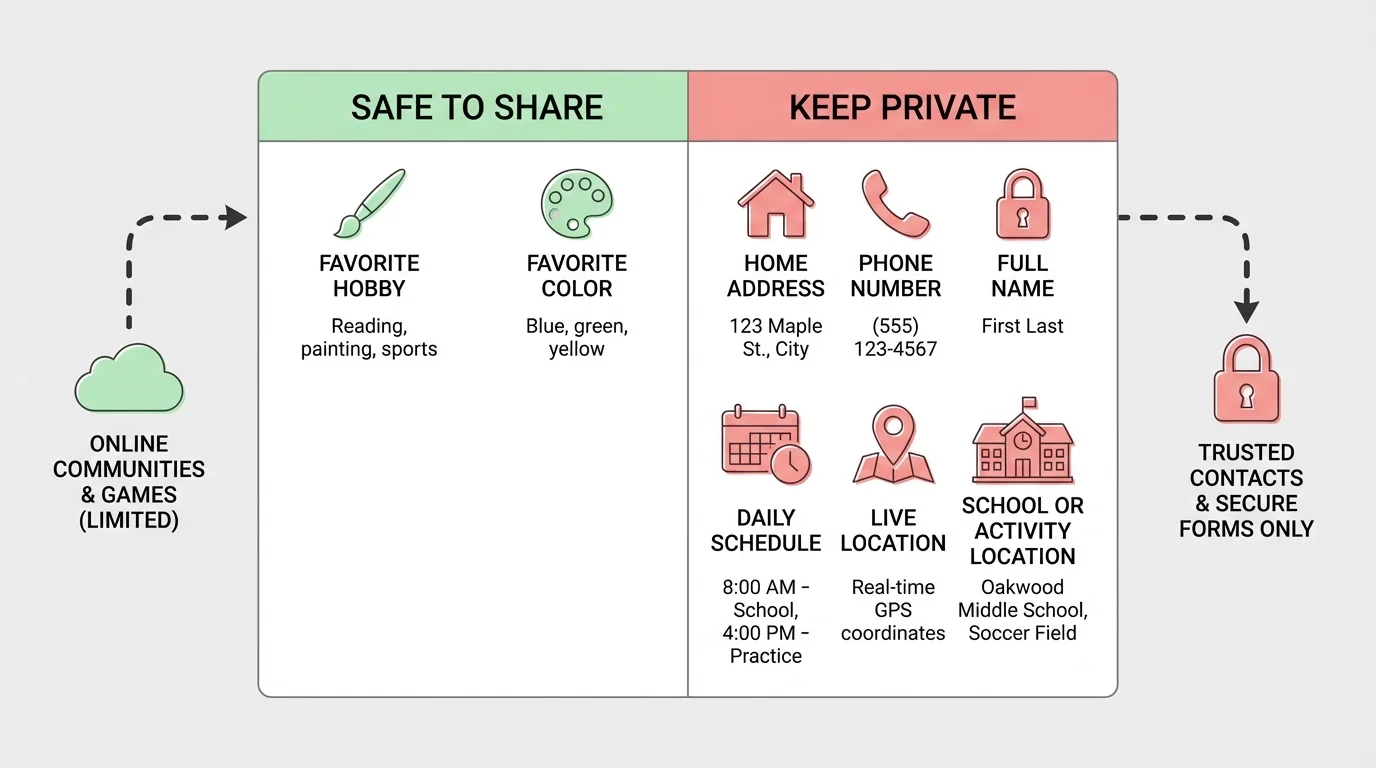
Your personal information includes obvious details like your full name, home address, phone number, and birth date. It also includes less obvious details that can still identify you. The difference becomes clearer in [Figure 1], which compares examples of safer sharing with information that should usually stay private.
For example, saying "I like basketball" is usually fine. But saying "I play basketball every Tuesday at the gym on Pine Street from \(6\) to \(7\) p.m." shares a pattern, a place, and a time. That creates a bigger risk. Even small clues can add up.
Photos can share personal information too. A picture might include a street sign, house number, school logo, license plate, or a screen showing your username. A video call background can reveal where you live or what documents are on a desk.
Some information is especially important to protect because it can be used to access accounts or pretend to be you. This includes usernames, passwords, verification codes, answers to security questions, and email addresses linked to important accounts.
Be careful with indirect clues. If you post your pet's name, your birthday, your favorite team, and the town where you live, those details might help someone guess a password or answer a security question. That is one reason why oversharing can be risky even when each detail seems harmless by itself.
| Type of information | Examples | Safer choice |
|---|---|---|
| Public-interest details | Favorite game, favorite food, hobby | Usually okay to share if the setting is safe |
| Direct identifying details | Full name, address, phone number, birth date | Keep private |
| Location details | Live location, daily schedule, places you go often | Keep private or share only with trusted adults |
| Account protection details | Passwords, codes, security answers | Never share |
| Media clues | Photos with house numbers or uniforms | Check carefully before posting |
Table 1. Different kinds of information and safer choices for sharing them online.
As you saw earlier in [Figure 1], safe decisions are often about the amount of detail. Sharing a general interest is different from sharing exact names, places, and times.
Many scams work by collecting tiny pieces of information from different places and putting them together. A username on one site, a birthday on another, and a pet name from a video can become a useful set of clues.
Before filling out any online form, stop and check whether every question is really necessary. If a website for a simple game asks for your full address, school schedule, or phone number, that is a sign to be cautious.
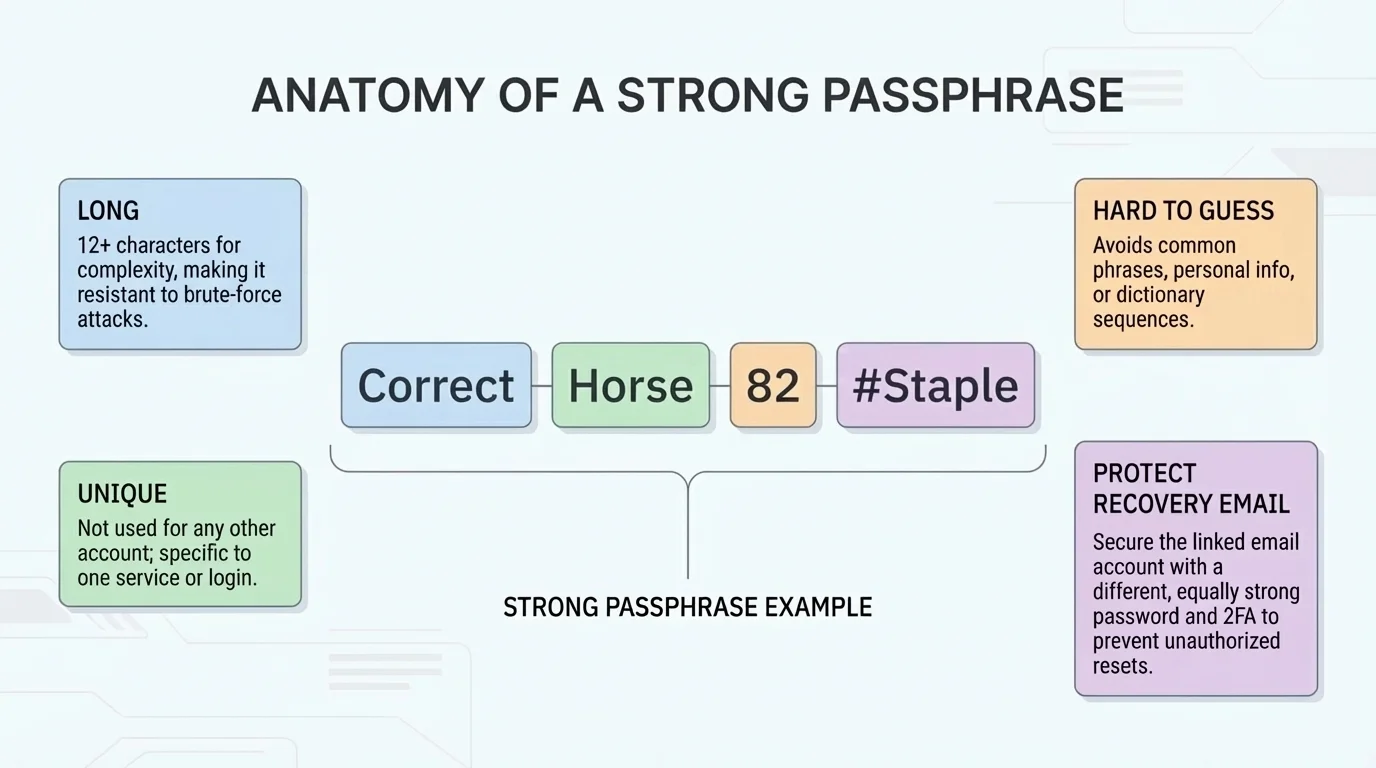
A password protects your account like a key protects a door. As [Figure 2] shows, strong protection comes from more than one habit: using a long passphrase, keeping it unique, and protecting recovery information too.
Weak passwords are easy to guess. Examples include your first name, "password," "123456," your birthday, or your pet's name. These are common because they are easy to remember, but that also makes them easier for others to guess.
A strong password is usually long and uncommon. A passphrase made from random words is often better than one short word with a number. For example, a phrase like BlueRiverPizza!Cloud27 is stronger than something short like Max12. The specific words in this example are not important; what matters is that a real passphrase should not be obvious or based on personal details someone could guess.
Another major rule is: do not reuse the same password for many accounts. If one account is hacked, every other account using that same password becomes easier to access.
Creating a stronger passphrase
You want a password for a game account that is easy for you to remember but hard for others to guess.
Step 1: Avoid personal clues
Do not use your real name, birthday, pet name, town, or favorite team.
Step 2: Pick random words
Choose several unrelated words, such as tree, marble, comet, and sandwich.
Step 3: Add variation
Add a symbol and numbers in a way that is memorable to you, such as Tree!Marble7CometSandwich.
Step 4: Keep it unique
Do not use this same passphrase for email, gaming, shopping, or social media accounts.
This creates a password that is longer and less predictable than a short, personal one.
If a service offers two-factor authentication, it adds another layer of protection. That means after entering your password, you may also need a code sent to a device or app. Even if someone guesses your password, they still may not be able to get in.
Never share your password with friends. Even if you trust them, sharing passwords can lead to accidents, jokes that go too far, or loss of control over your account. If someone truly needs access, there is usually a better and safer way.
Later, when you review your account safety, remember what [Figure 2] emphasizes: long, unique passphrases protect you best when paired with careful recovery settings and extra verification.
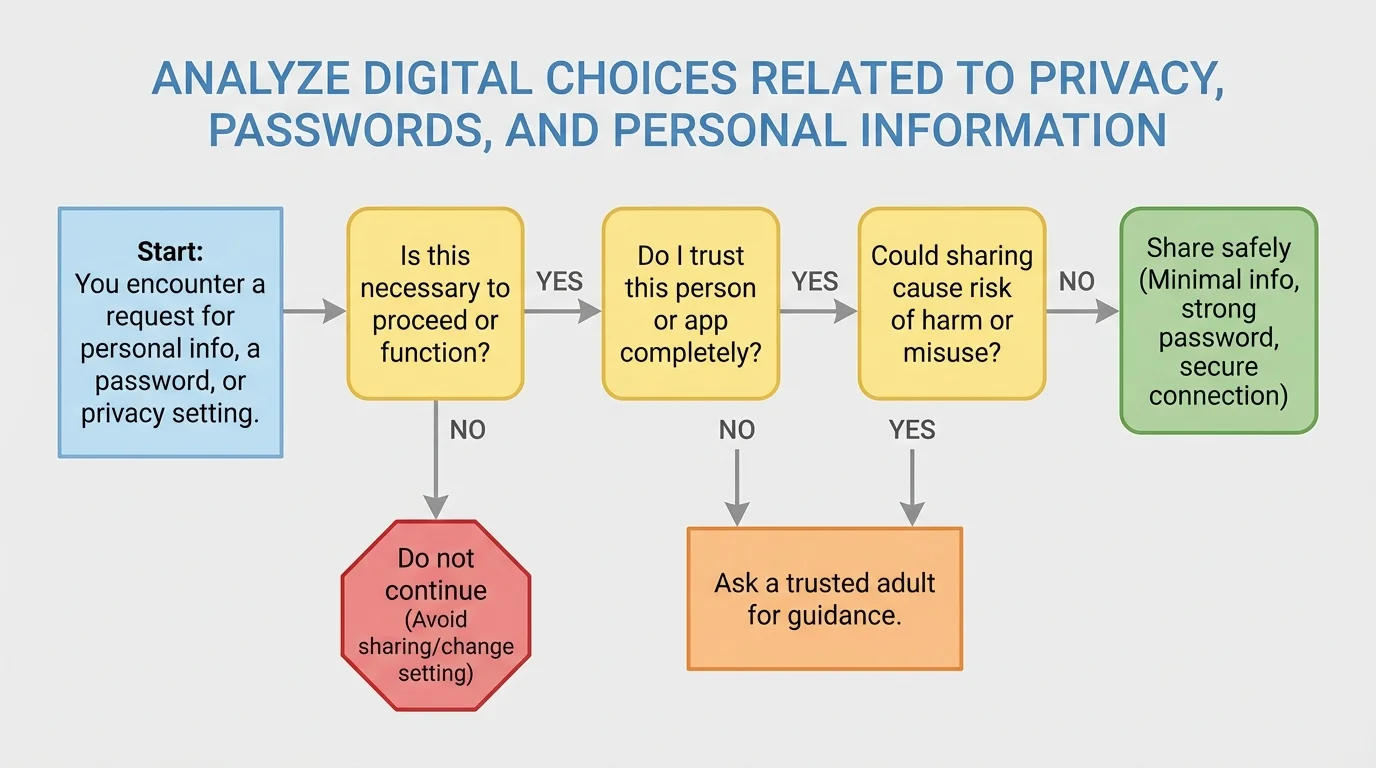
Good choices online often come down to one simple routine: pause, check, decide. The decision path in [Figure 3] helps you slow down before you share information, click a link, or approve an app permission.
Pause. Do not rush. Many bad digital choices happen when people are excited, curious, angry, or distracted.
Check. Ask a few quick questions. Who is asking? Why do they need this? What could happen if I share it? Is this account, app, or message trustworthy?
Decide. If something feels off, do not continue right away. Ask a trusted adult, close the page, or use a safer option.
Use this checklist before you post, message, or sign up:
This same checklist works for app permissions. If a flashlight app asks for your contacts and microphone, that does not make much sense. Permissions should match what the app actually does.
Not every question deserves an answer
Online forms and messages can sound normal even when they ask for too much. You are allowed to skip, close, or leave a page if the request feels unnecessary. Smart digital citizenship includes knowing when not to respond.
Scammers and fake accounts often create urgency. They may say your account will be deleted in \(10\) minutes, you won a prize, or you must confirm your information now. Urgency is a common trick because it pushes people to act before thinking clearly.
Suppose someone in a game chat asks, "What city do you live in?" You do not owe them an answer. You can ignore it, change the topic, or leave the chat. If the questions continue, block and report the account if that option exists.
Suppose a video trend encourages users to post their birthday, first pet, and the street they grew up on. That may look fun, but those are also common security question topics. Sharing them publicly can make your accounts easier to break into.
Suppose a new app says, "Sign up fast with your full name, phone number, and live location." Ask whether all of that is truly needed. If not, use the minimum information possible or do not sign up until you have checked with a trusted adult.
Real-life decision example
You receive a direct message that says, "I made a fan page for you. Click here and log in to see it."
Step 1: Pause
The message tries to get a fast reaction by making you curious.
Step 2: Check the account
Look for warning signs: a strange username, few posts, poor spelling, or a new account with no real connections.
Step 3: Do not log in through the link
If you are curious, open the real app or website directly, not through the message link.
Step 4: Report or block if needed
If it seems fake or unsafe, protect yourself and move on.
This is a strong digital choice because it lowers the chance of giving your password to a scammer.
In situations like these, the flow in [Figure 3] still works: ask whether the request is necessary, trustworthy, and low-risk before doing anything.
Everyone makes mistakes online sometimes. What matters most is what you do next. Acting quickly can reduce the problem.
If you shared too much personal information, delete the post or message if possible. Then tell a trusted adult what happened. If the information included location, phone number, or another sensitive detail, take it seriously and get help right away.
If you clicked a suspicious link, stop interacting with the page. Do not enter more information. Close the page, tell a trusted adult, and run a device safety check if available.
If you think someone got into your account, change the password immediately from a safe device if you can. Sign out of other sessions, update your recovery email if needed, and turn on extra security features.
Being responsible online does not mean never making mistakes. It means noticing a problem, telling the truth, and taking action quickly so the problem does not get worse.
If a person online makes you uncomfortable, pressures you for personal details, or keeps contacting you after you say no, block them and tell a trusted adult. You do not need to manage that alone.
Safe digital choices become easier when they are habits instead of last-second decisions. Check privacy settings when you join a new platform. Use strong, unique passphrases. Keep personal details limited. Think before posting. Ignore pressure to share more than you want.
It also helps to review old accounts. You may have signed up for games, apps, or websites months ago and forgotten what information you gave them. Delete accounts you no longer use and remove information that does not need to stay there.
A strong habit is to ask yourself one final question before sharing anything: "Could this help someone identify me, find me, access my account, or misuse my information?" If the answer might be yes, stop and rethink.
"Protecting your information is not about hiding who you are. It is about choosing wisely who gets access to it."
The goal is not perfection. The goal is control. When you understand privacy, protect your passwords, and guard your personal information, you make the internet a safer place for yourself and for the people around you.
