A single mean message can feel huge when it lands on your screen at night. The tricky part is that online problems can spread fast, but the good news is that safety tools can work fast too. Knowing how to report, block, and save proof gives you real control when someone is being cruel, threatening, or unsafe online.
When you use the internet, you should not have to handle cyberbullying alone. Apps, games, and websites usually include safety tools for a reason: to help protect users. Those tools are most effective when you use them calmly, quickly, and in the right order.
If someone sends insults, spreads rumors, pretends to be you, pressures you for private pictures, or threatens harm, the situation can become more serious if it is ignored. Fast action can stop more messages from coming in, help adults support you, and give platforms information they need to remove harmful content.
Safe action matters because reacting in anger often makes things worse. If you reply with another mean message, the other person may keep going. If you post the fight publicly, more people may join in. A safer move is to use the tools built into the platform and bring in a trusted adult.
Cyberbullying is using digital tools like messages, games, group chats, or social media to hurt, embarrass, scare, or repeatedly target someone. A threat is a message or action that says someone will harm you, someone else, or your property, or that pressures you in a dangerous way.
Not every unkind message is the same. Some situations are rude but brief. Others are repeated and targeted. Some are dangerous right away. Learning the difference helps you choose the best response.
One rude comment might be a bad choice by another person. But repeated harassment, public humiliation, fake accounts, sharing secrets, or telling others to attack someone can become cyberbullying. Cyberbullying is often meant to make you feel trapped, embarrassed, or afraid.
An online threat is more serious than ordinary meanness. It can include messages like "I'm going to hurt you," "I know where you live," "Send me a picture or else," or "Everyone should attack this person." Even if you are not sure whether the person means it, you should treat threats seriously.
Some unsafe online behavior is not exactly bullying, but it still needs action. Examples include impersonation, repeated spam from a stranger, sexual messages, requests for private photos, doxxing, blackmail, or attempts to trick you into clicking harmful links. If something makes you feel scared, pressured, or unsafe, it deserves attention.
Many apps review reports using both computer systems and human safety teams. That means clear evidence, correct report categories, and accurate details can make a big difference.
You do not need to figure out the perfect label before getting help. If your first thought is, "This feels wrong," that is enough to pause and use your safety plan.
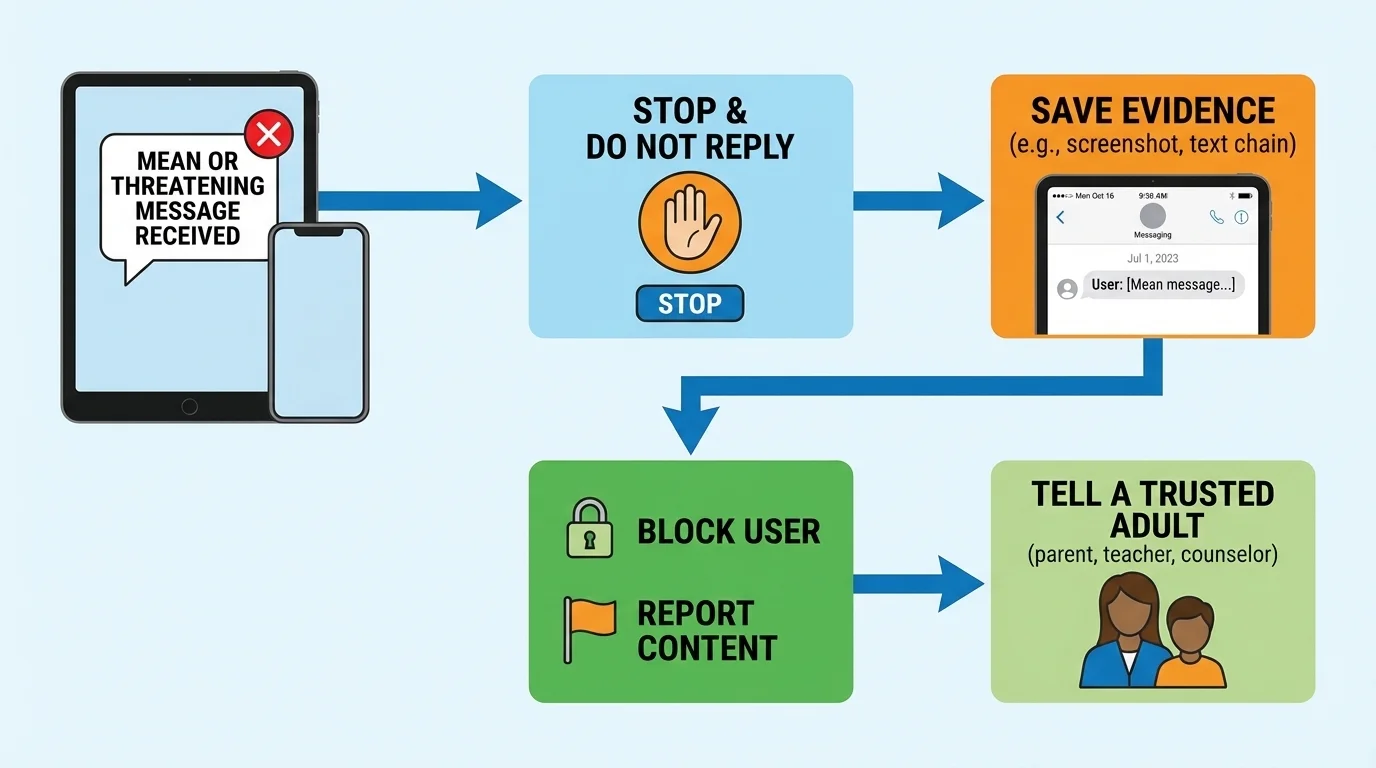
When something harmful shows up, follow the order shown in [Figure 1]: stop, do not reply, save evidence, use report or block tools, and tell a trusted adult. This order helps protect you without giving the other person more attention.
Step 1: Pause. Take a breath. Do not answer right away. People who bully often want a reaction. Even one angry reply can keep the situation going.
Step 2: Do not argue. You do not have to prove the other person is wrong. You also do not have to defend yourself to a group chat or comment section. Silence can be a smart safety choice.
Step 3: Save evidence. If it is safe to do so, take screenshots before the message disappears or gets deleted. Save the username, date, time, and where it happened.
Step 4: Report and block. Use the app's built-in tools so the platform can review the behavior and stop contact from that account.
Step 5: Tell a trusted adult. A parent, guardian, older family member, coach, club leader, or another trusted adult can help you decide the next step.
This plan works in many places: online games, video chat, social media, group texts, and messaging apps. Later, if you feel upset or shaky, that does not mean you handled it badly. It means the situation mattered, and you used a smart process anyway.
Case study: Mean messages in a game chat
You are playing an online game, and another player starts insulting you, then says they will "find you" if you leave the match.
Step 1: You stop replying and leave the chat or match if needed.
Step 2: You take a screenshot that includes the username and the threatening message.
Step 3: You use the game menu to report the player for harassment or threats.
Step 4: You block the player so they cannot contact you again through that account.
Step 5: You tell a trusted adult and show the screenshot.
This response protects you and gives the platform useful information.
A lot of students worry that reporting is "making a big deal" out of something. It is not. Reporting is using a safety tool exactly how it is supposed to be used.
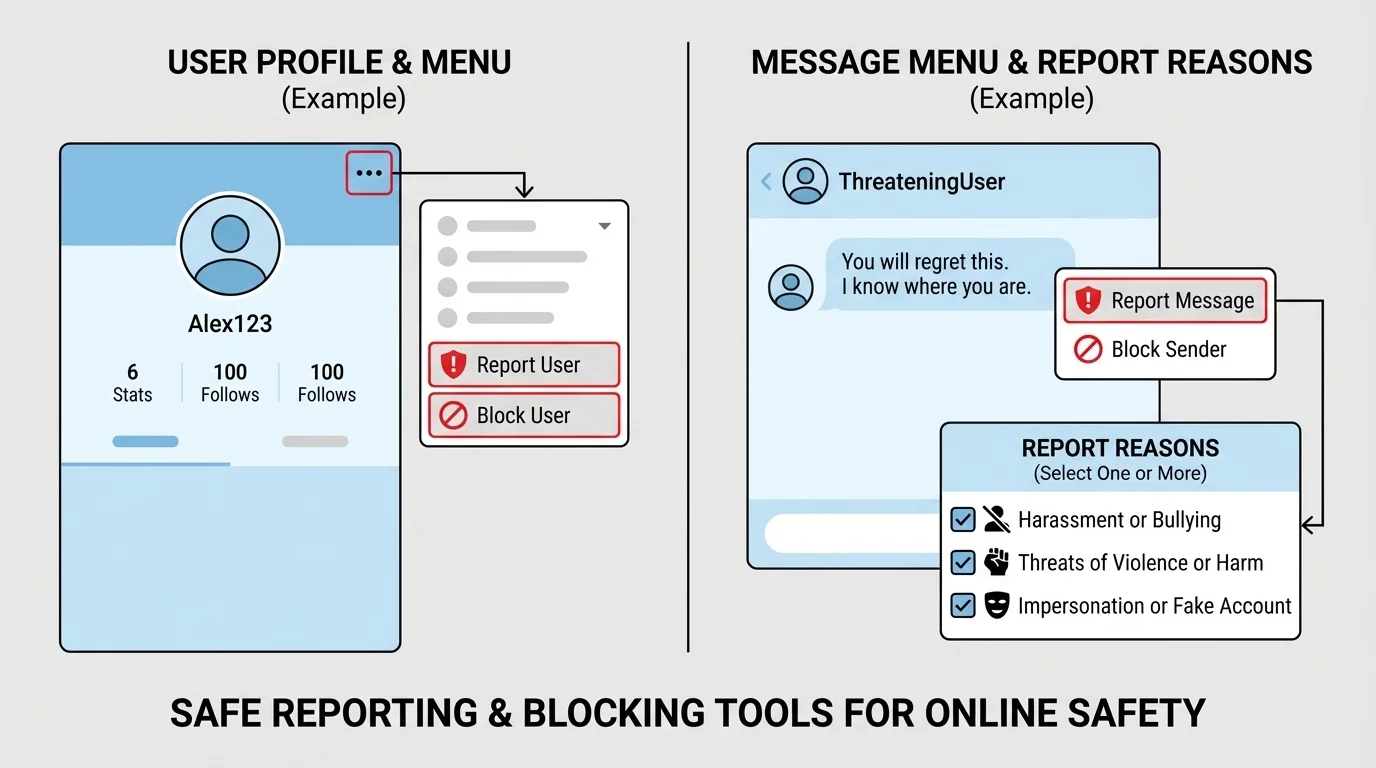
On many platforms, as [Figure 2] shows, the report tool is often hidden inside a menu such as three dots, a gear icon, a profile page, or a chat menu. It may be attached to a message, post, username, photo, or video.
When you report, the platform may ask what happened. Choose the most accurate option you can, such as harassment, bullying, threats, impersonation, hate speech, sexual content, or scam. If there is a box for extra details, keep your note short and clear: what happened, who did it, and why it feels unsafe.
Good reports are truthful and specific. A weak report says, "This person is annoying." A stronger report says, "This account sent repeated insulting messages and threatened to hurt me."
Some platforms let you report a single message. Others let you report the whole account. If both are available, use both when the behavior is repeated or serious. Reporting one message shows the exact problem. Reporting the account shows a pattern.
After you report, the platform may remove content, warn the user, suspend the account, or do nothing if there is not enough evidence. If that happens, do not assume your concern was silly. You still did the right thing, and a trusted adult can help with the next step.
Reporting is not for revenge. False reports can hurt innocent people and make real safety problems harder to spot. Use reporting tools honestly and only for real rule-breaking or danger.
Blocking usually stops another account from sending you messages, commenting on your content, inviting you to games, or viewing parts of your profile. The exact rules depend on the platform, but the main goal is to cut off access.
Blocking is a good choice when someone keeps bothering you, when a stranger contacts you in a creepy or pushy way, or when you need quick space from someone who is acting badly. It is especially useful after you save evidence and submit a report.
Still, blocking has limits. A person might create a new account, contact you through a shared group, or ask a friend to message you. That is why blocking works best together with reporting, privacy settings, and support from an adult.
Remember the order from [Figure 1]: if the message may disappear, save proof first when you safely can. Then block. If you block first and the app hides the messages, it may be harder to show what happened later.
Blocking and reporting do different jobs. Blocking protects your space by cutting off contact. Reporting alerts the platform so it can review the behavior and possibly protect other users too. In many situations, using both tools is the smartest choice.
Privacy settings help too. You can often make your account private, limit who can comment, turn off direct messages from strangers, approve followers, or mute group notifications. These settings do not replace reporting, but they can reduce future problems.
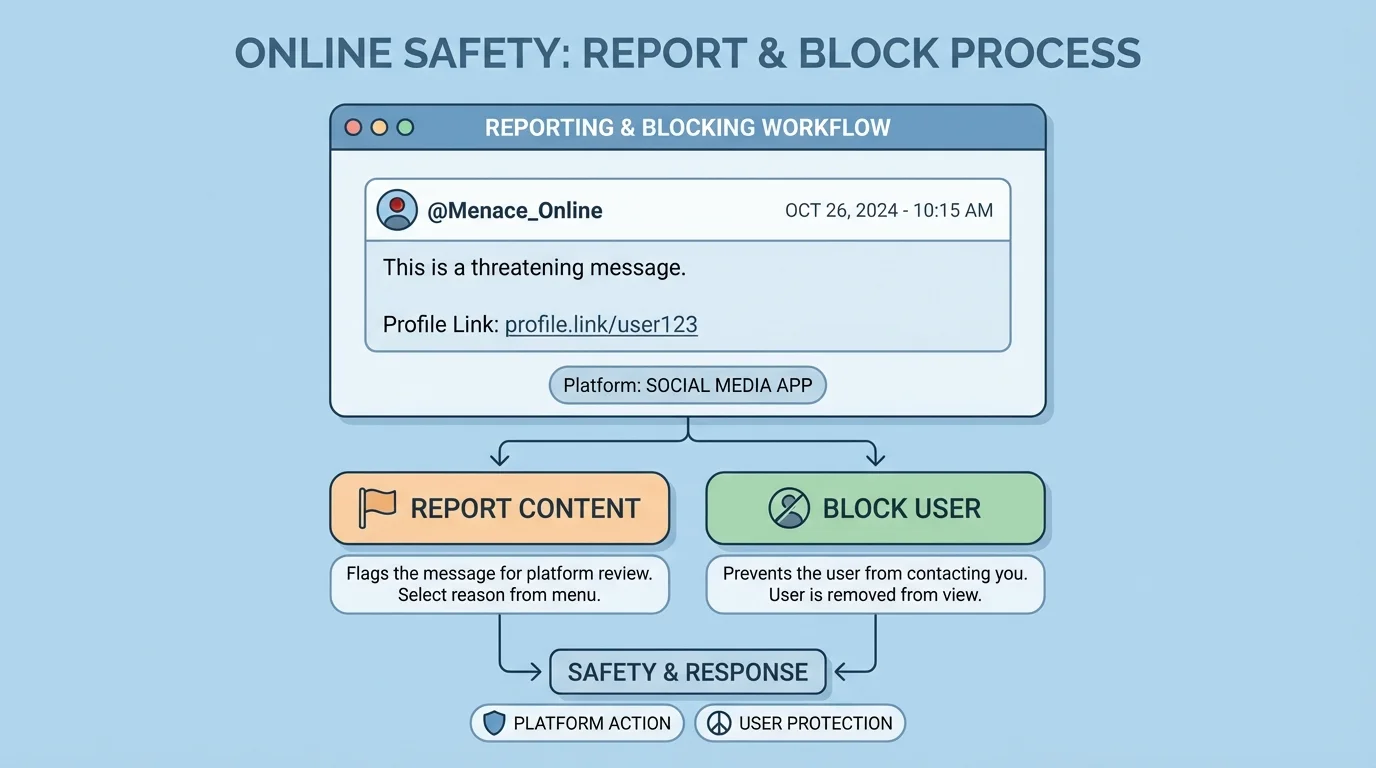
A useful record of evidence includes more than just the mean words. As [Figure 3] illustrates, strong proof often shows the username, profile picture, date, time, full message, and where it happened, such as a game chat, video app, or group message.
If possible, save more than one screenshot when the behavior is repeated. A pattern matters. One message might look like a joke to a reviewer, but several messages over time can show harassment clearly.
You can also copy the profile link or username into a notes app. If the platform gives a case number after you report, save that too. A short note like "Tuesday night, group chat, repeated insults and one threat" helps adults understand the situation quickly.
Do not share screenshots widely with friends just to prove what happened. That can spread the harmful content farther. Instead, show them only to a trusted adult, the platform if needed, or law enforcement in serious cases.
Also, be careful with private information. If your screenshot includes someone else's phone number, address, or private photos, do not repost it publicly. Evidence is for safety and support, not for public drama.
| What to save | Why it helps | What to avoid |
|---|---|---|
| Screenshot of the message | Shows exact words or images | Cropping out the username or date |
| Username or profile link | Helps identify the account | Depending only on display names |
| Date and time | Shows when it happened | Saying "it happened before" with no details |
| Several examples if repeated | Shows a pattern | Saving only one small part |
| Report confirmation or case number | Tracks what you already did | Forgetting which app you used |
Table 1. Smart evidence choices for online bullying, harassment, or threats.
The stronger your evidence, the easier it is for a platform or adult to understand what happened. That does not mean weak evidence is useless. Even if you only have one screenshot, still ask for help.
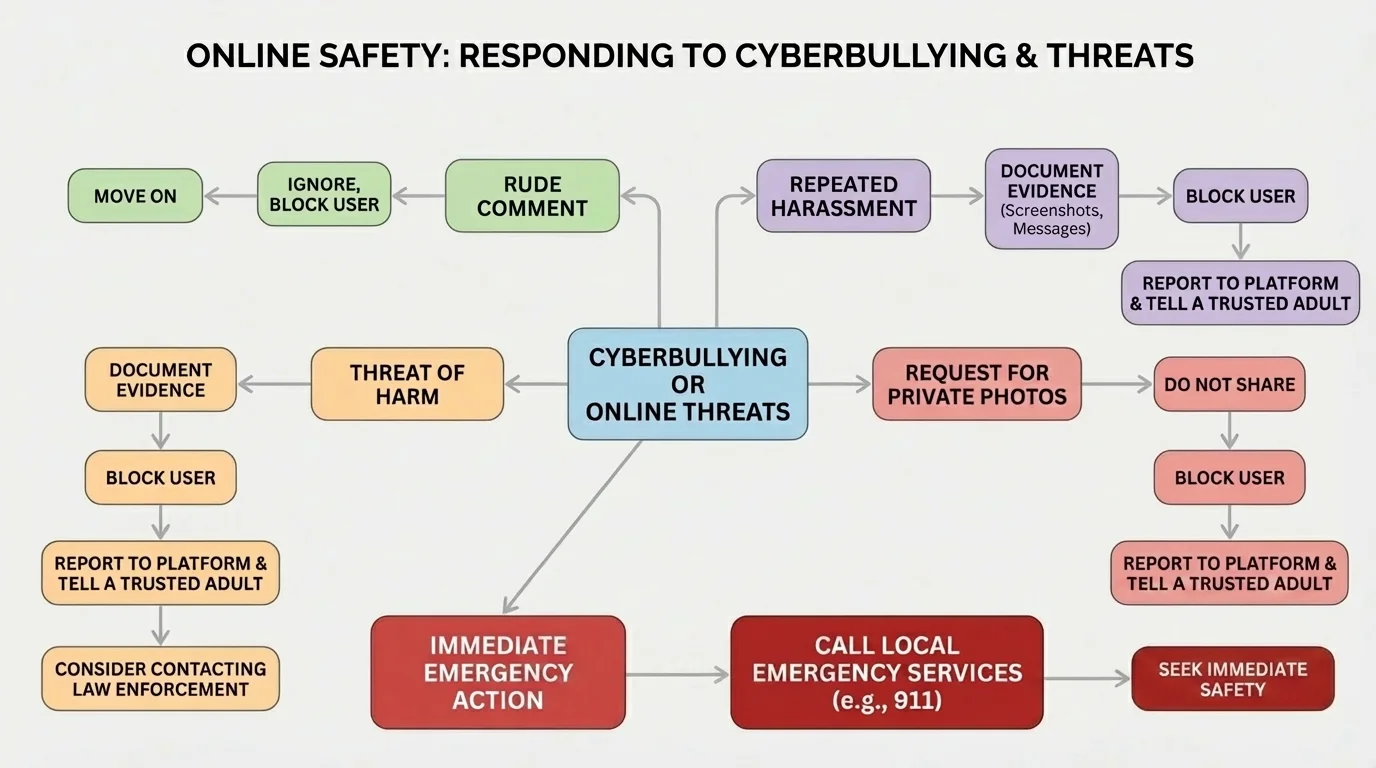
Some situations need immediate adult help, and [Figure 4] shows the difference between lower-risk and urgent situations. If someone threatens to hurt you, says they are coming to your home, shares your address, demands sexual images, talks seriously about self-harm or suicide, or says they will hurt someone else, do not handle it alone.
In those cases, tell a parent or guardian right away. If there is immediate danger, contact emergency services in your area. If a friend is being threatened, you should still tell an adult. Keeping a dangerous secret does not protect your friend.
Sometimes students worry they might be overreacting. It is better to speak up and let adults judge the level of danger than to stay silent about a serious threat. Trust your safety instincts.
"If something online makes you feel unsafe, you do not have to solve it by yourself."
Emergency action may include saving evidence, reporting to the platform, changing passwords, checking privacy settings, and contacting local authorities. As with the process in [Figure 4], the more serious the danger, the faster adults need to step in.
One mistake is replying with threats or insults of your own. That can make it harder to sort out what happened and may put your own account at risk.
Another mistake is deleting everything right away. If you erase the messages before saving proof, it may be harder to report clearly. If the content is extremely upsetting, ask an adult to help save evidence so you do not have to keep looking at it alone.
A third mistake is trying to investigate the person yourself. Do not click suspicious links, do not try to "hack back," and do not agree to meet anyone in person. Stay inside the platform's safety tools and trusted adult support.
It is also a mistake to think blocking means the problem is solved forever. If the person returns with another account, save the new evidence, report again, and tighten your privacy settings. The goal is not one perfect click. The goal is ongoing safety.
Case study: Fake account pretending to be you
A social media account uses your name and photo and posts embarrassing comments.
Step 1: Take screenshots of the fake profile and posts.
Step 2: Copy the profile link or username.
Step 3: Report the account for impersonation, not just bullying.
Step 4: Block the account.
Step 5: Tell a trusted adult, because impersonation can spread quickly.
Choosing the correct report reason helps the platform review the problem faster.
Another poor choice is fake reporting as a joke. Safety tools are for real harm, real danger, and real rule-breaking. Using them honestly protects everyone better.
The best time to prepare is before a problem happens. Make a short plan now so you do not have to invent one while upset.
Your routine can be simple: know where the report button is on your favorite apps, keep screenshots in one folder, have at least two trusted adults you can tell, use strong passwords, and keep your accounts as private as makes sense for you.
A smart routine also includes emotional safety. If a message leaves you upset, step away from the screen, sit near a trusted person, drink water, and give your brain time to calm down. Safety is not only about devices. It is also about how supported you feel.
You already know that online choices have real-world effects. Reporting and blocking are not "extra" features. They are part of being a responsible digital citizen who protects yourself and helps keep online spaces safer for others.
Here is a quick checklist you can actually use:
Before a problem: check privacy settings, know your trusted adults, learn where report and block tools are, and avoid sharing private details publicly.
During a problem: pause, do not reply, save evidence, report, block, and tell an adult.
After a problem: watch for repeat accounts, update settings if needed, and keep evidence until the issue is resolved.
The more you practice these habits, the less powerless you feel. You cannot control every person online, but you can control your response. That is a real skill, and it can protect you.
