One small mistake on a form can cause a surprisingly big problem. A missing phone number might mean you do not get updates. A wrong date might make you miss an appointment. A guessed answer might delay a service your family needs. Learning how to read forms carefully is a real-life skill that helps you stay organized, safe, and ready for independent living.
Forms already show up in everyday life. You may need to complete a school technology agreement, sign up for an online club, share transportation details for an activity, or help an adult read a form for a doctor, library, or community program. Forms are not just paperwork. They are instructions, requests, and records all in one.
When you read a form accurately, you are more likely to get the right help at the right time. You avoid confusion, save time, and show responsibility. This matters in school, at home, and in your community. As you get older, you will use more forms for jobs, sports, travel, banking, and health care.
If you do not understand a form and just guess, the result can be frustrating. Maybe you sign up for the wrong event time. Maybe a ride is sent to the wrong place. Maybe a service cannot contact you because the information is incomplete. Reading carefully and asking questions is not a sign that you are behind. It is a smart habit.
Form means a document, whether paper or digital, that asks for information or gives directions. Directions are the instructions that tell you what to do. Required fields are the spaces you must complete before a form can be accepted.
Some forms are short and simple. Others have many boxes, notes, and special rules. The important thing is to slow down enough to understand what the form is asking before you begin typing or writing.
A form can be digital or printed. In an online school setting, many forms appear on websites, apps, shared documents, or emailed attachments. You might see forms for updating your address, choosing classes, joining an online event, requesting tech support, or agreeing to rules for using school devices.
Transportation forms can include pickup requests for an activity, travel permission details, emergency contact information, carpool information, or arrival and departure plans. Service forms can include sign-up pages for a library card, sports league registration, health clinic paperwork, camp forms, tutoring forms, internet service requests, or community center memberships.
Different forms look different, but they often ask for the same kinds of information: your name, contact details, dates, choices, signatures, and emergency contacts. Once you learn to spot these parts, forms become easier to handle.
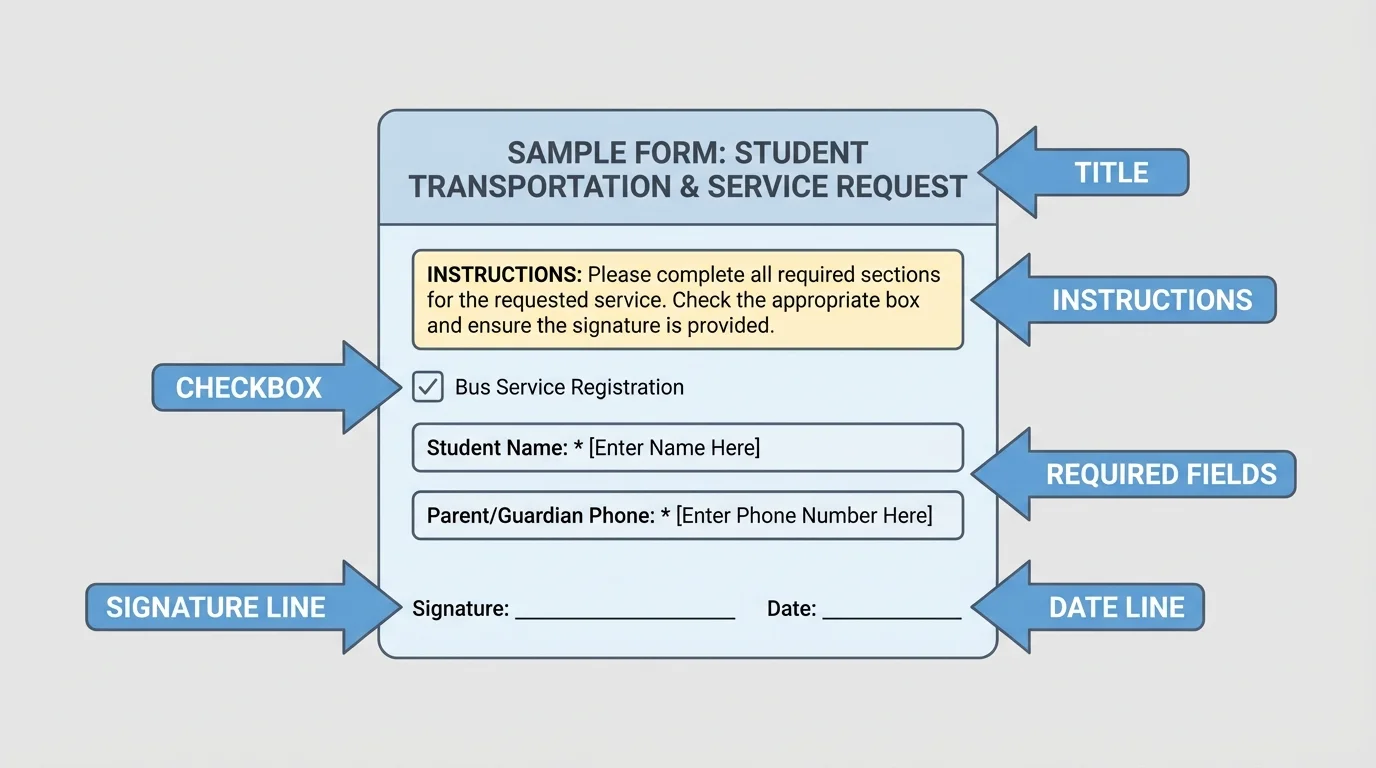
Most forms give you clues about what to do, and [Figure 1] shows the common parts you should look for first: the title, instructions, required fields, checkboxes, signature line, and date line. When you know where these parts are, you can read with a plan instead of jumping around.
A form usually starts with a title. The title tells you what the form is for. Then look for the instructions. These may say things like "Please print clearly," "Select one," "Complete all required fields," or "Submit by Friday." Some forms use symbols such as a star to mark required boxes.
Next, notice the spaces where you must enter information. These may include blank lines, boxes, menus, or check marks. A checkbox is a small square you mark to choose an option. A signature line is where a person signs to show that the information is true or that they agree to something. On digital forms, this could be typing a name, clicking an agreement box, or using an approved e-sign tool.
Watch for words that tell you exactly what kind of answer is needed. If a form says "date of birth," it means your birthday, not today's date. If it says "emergency contact," it means a trusted adult who can be reached quickly if there is a problem. If it says "preferred contact method," it is asking whether text, phone, or email works best.
Also pay attention to deadline information. A deadline is the last day or time to turn something in. Missing a deadline can mean your form is not accepted, even if the rest is correct.
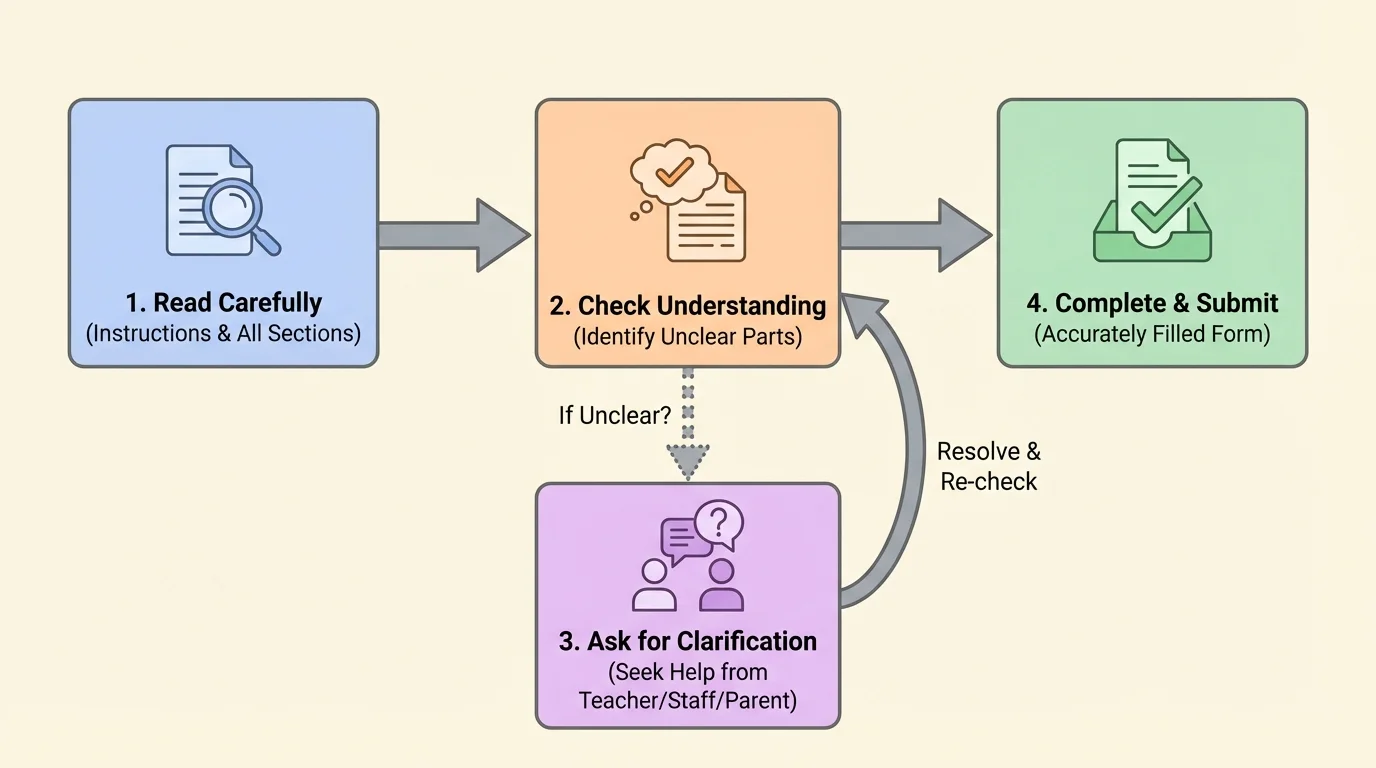
A helpful way to handle almost any form is the Read-Check-Ask method, and [Figure 2] lays out the order clearly. This method helps you avoid rushing and makes confusing directions easier to manage.
Read: Read the whole form once before filling anything in. Find the title, instructions, and deadline. Notice whether it says to choose one answer or more than one. Check whether an adult must sign too.
Check: As you fill it out, stop and check each answer. Make sure names are spelled correctly, dates are correct, and all required boxes are completed. If you type quickly, review for missing words or wrong numbers.
Ask: If any part is unclear, ask before you submit. Do not guess. A quick message now can prevent a bigger problem later.
This method works because forms often contain details that are easy to miss when you rush. For example, a question might ask for a parent or guardian email, not the student email. Or it may say that only one option should be selected, not two.
Using the Read-Check-Ask method on a club sign-up form
Step 1: Read the title and instructions.
You notice the form is for an online coding club and that meetings happen on Tuesdays at 4:30 p.m. The form says all required fields must be completed.
Step 2: Check each answer as you fill it in.
You enter your name, your adult contact, and mark the correct grade level. You make sure your email is typed correctly.
Step 3: Ask about anything unclear.
The form says, "List device access," but you are not sure if that means laptop only or internet too. You message the organizer and ask before submitting.
Because you asked, you give the exact information the organizer needs.
As with the sequence in [Figure 2], the best time to ask a question is before you hit submit, not after there is already confusion.
In online school, forms often help your school stay updated and support your learning at home. You might see course request forms, device care agreements, schedule update forms, tutoring requests, test sign-up forms, online activity registration, or family contact updates.
Read school forms carefully for words about dates, needed materials, technology requirements, and who should respond. If a form says "guardian approval required," do not submit it without talking to your adult first. If it says "student must use school email," that detail matters too.
Be careful with forms that ask about attendance, class choices, or technology problems. One wrong click can send the wrong message. For example, selecting "I do not need help" instead of "I need help with my device" could delay support. This is why reading line by line matters.
School forms are often about communication. They help your school know what you need, where to send messages, and how to support your learning. Accurate information makes it easier for teachers, advisors, and school staff to help your family quickly.
If a school form includes words you do not know, pause and look for clues. Sometimes nearby questions explain the meaning. If not, ask a trusted adult or send a respectful message to the school office.
Transportation forms are especially important because they affect safety. These forms may ask who is driving, where pickup and drop-off happen, what time to arrive, and who to contact in an emergency. Even if you are not driving yourself, understanding the form helps you and your family avoid mix-ups.
Read every part carefully when a transportation form includes dates, times, or locations. "Pickup location" and "drop-off location" are not always the same. "Departure time" means when travel begins. "Arrival time" means when you are expected to get there. Mixing those up can cause stress quickly.
Emergency contact information must be current. If a form asks for two contacts, do not leave the second one blank unless the instructions say it is optional. Also check whether the form wants phone numbers, email addresses, or both.
| Form detail | What to check | Why it matters |
|---|---|---|
| Pickup location | Exact place name or address | Prevents going to the wrong place |
| Date | Correct day, month, and year | Avoids missed travel |
| Time | Arrival time versus departure time | Helps you be on time |
| Contact person | Phone number and relationship | Allows quick communication |
| Special notes | Medical, accessibility, or safety details | Helps adults plan safely |
Table 1. Important details to review on transportation forms.
If you ever feel unsure about travel details, ask. It is much better to confirm than to assume.
Service forms appear in many places outside school. Your family may use them for clinics, libraries, sports leagues, after-school programs, repair requests, utility services, or community events. These forms often ask for personal details, preferences, and permission.
Some service forms ask health or safety questions. Read these slowly. If a question asks whether a person has allergies, medications, or special needs, answer honestly and carefully with an adult's help. If a question does not make sense, never guess on medical or safety information.
Other service forms may ask you to choose options. For example, a library form might ask whether you want email notices. A sports form might ask for shirt size. A tutoring form might ask which subject needs support. Choices matter because they tell the service how to help you.
Many digital forms do not save unfinished answers unless you click a save button. If a form is long, check whether it saves automatically before you leave the page.
Be careful with personal information on service forms. Do not share private details with random websites. Before entering names, addresses, or phone numbers, make sure the form comes from a trusted organization and that an adult knows about it.
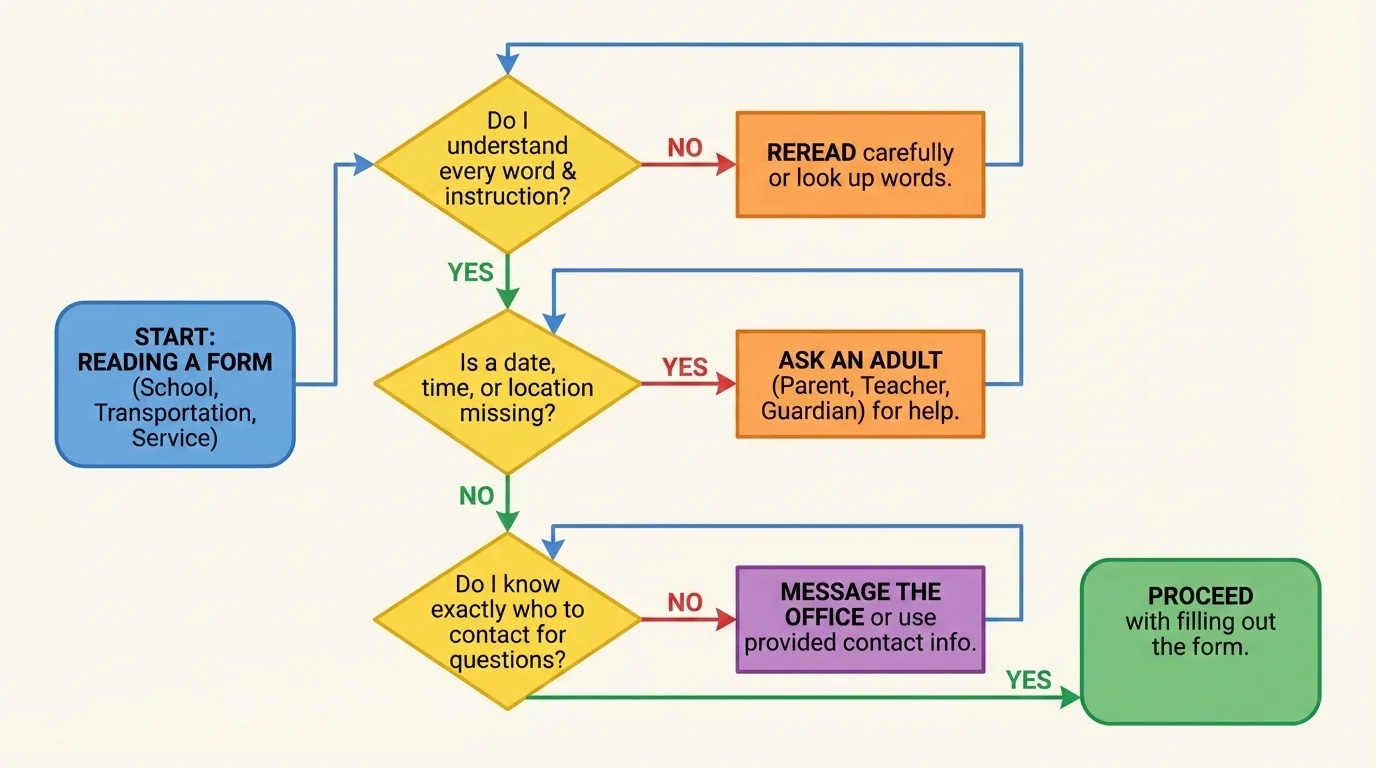
When directions are confusing, you do not need to panic. You can solve the problem one step at a time, and [Figure 3] shows a simple decision path: first reread, then identify what is unclear, then ask the right person. Asking a good question is a practical skill that saves time.
A good question is clear, polite, and specific. Instead of saying, "I don't get it," try saying, "On the registration form, what does 'proof of address' mean?" or "The instructions say to select a session, but I only see one option. Is that correct?" These questions tell the other person exactly what you need.
You can also include the name of the form and the exact part that is confusing. That helps the other person answer faster. For example: "On the community sports form, does 'guardian signature' mean my parent types their name, or do they need to upload a signed page?"
When asking, choose the right person. A parent, guardian, or trusted adult can help with personal information. A school office, program leader, or service provider can explain directions on their own form. If you message an adult or office online, be respectful and brief.
Helpful question messages
Message 1: "Hello, I am filling out the online activity form. The instructions say to include a student ID, but I am not sure where to find it. Could you please tell me where to look?"
Message 2: "Hi, on the transportation form, should I list the place we leave from or the place we return to in the drop-off box?"
Message 3: "I am completing the clinic form with my adult. What does 'insurance policy number' mean?"
These questions are polite, specific, and easy to answer.
Later, when you face another confusing document, the same pattern from [Figure 3] still works: identify the exact problem, then ask the person most likely to know the answer.
One common mistake is skipping the instructions and going straight to the boxes. That is risky because the instructions often tell you how many choices to make, what format to use, or whether an adult must approve the form.
Another mistake is filling in every blank even when you do not know the answer. Some forms allow you to leave optional questions blank. Others need an exact answer from an adult. Guessing can create incorrect records.
A third mistake is not reviewing before submitting. Typos in names, emails, and phone numbers are easy to make. Even one wrong letter in an email address can stop an important message from reaching your family.
Also be careful with dates. Some forms write dates in different orders. If a date looks confusing, ask. And always double-check whether the date you enter is your birth date, the event date, or today's date.
When you read closely in any subject, you look for key words and context clues. The same reading skill helps with forms. Slow reading is often smarter reading.
Finally, do not ignore tiny notes at the bottom of a page or under a box. These notes may explain age limits, fees, cancellation rules, or special steps for submission.
Before you turn in a form, do one final review. Read the title again. Make sure you filled in all required fields. Check names, dates, numbers, and email addresses. Confirm that the choices you selected match what you meant to choose.
Look for any upload requirements, such as attaching a document or photo. If a form asks for a signature, make sure the right person signed. If it says to submit by a certain date, do not wait until the last minute if possible.
A useful checklist is: correct person, correct information, correct choices, correct signature, correct deadline. If all five are right, your form is probably ready.
Suppose you are signing up for an online art workshop. You read the form carefully and notice that students must choose one time slot and list a backup contact. You check your answers, ask what "backup contact" means, and submit the form correctly. As a result, you are placed in the right session, and the organizer can reach your family if plans change.
Now compare that with a rushed version. You skim the form, click two time slots, and leave the contact box blank. The organizer does not know which session you want, and your registration is delayed. Same form, different result.
Or think about a transportation plan for a weekend community event. If you confuse arrival time with departure time, your family may show up too late. But if you slow down, reread, and confirm details, the trip runs smoothly.
"Clear questions lead to clear answers."
— A smart rule for everyday life
Reading forms accurately is not about being perfect. It is about being careful, honest, and willing to ask when something is unclear. Those habits will help you now and will matter even more as you grow into greater independence.
