Missing one deadline can feel stressful. Missing three at once can feel impossible. The strange part is that many students do not fall behind because they are lazy or incapable. They fall behind because they try to keep too much in their head at the same time. Planning tools help you take all that pressure out of your brain and put it somewhere you can see, sort, and manage.
When you learn online, this matters even more. No one is standing next to you reminding you that a project is due in a week, or that two smaller assignments are quietly stacking up behind it. You have to notice those things for yourself. That is not a flaw. It is a skill, and like any skill, it gets stronger with practice.
Long-term assignment means a task that takes several days or weeks to finish, not something you can do in one quick sitting.
Deadline means the time or date when work must be turned in.
Planning tool means any system that helps you organize time, tasks, and due dates, such as a calendar, checklist, planner, reminder app, or timeline.
Good planning does not mean filling every minute of your day. It means making a clear path so you know what to do next. When your plan works, you feel less rushed, you forget fewer things, and you have a much better chance of finishing strong instead of scrambling at the last second.
Think about two students working from home. One keeps saying, "I'll remember." The other writes down due dates, breaks big jobs into steps, and checks a planner every day. After two weeks, the difference is huge. The first student is stressed and surprised by deadlines. The second student is busy too, but not confused. Planning does not remove work. It removes avoidable chaos.
This skill helps outside school too. You use it when preparing for a sports tryout, saving for a purchase, organizing chores before a family event, or balancing homework with clubs, hobbies, or volunteer work. Learning to plan now makes later responsibilities easier.
Your brain is much better at doing tasks than storing every task. Writing things down lowers the chance that you will waste energy trying to remember what comes next.
That is why planning tools are powerful. They free up attention for the actual work.
You do not need a perfect system. You need a system you will actually use. Common tools include a digital calendar, a paper planner, sticky notes, a to-do app, reminder alarms, a whiteboard, or a notebook with weekly pages. Some students like color-coding. Some prefer a very simple list. Either can work.
A calendar is best for dates and appointments. A task list is best for action steps. A weekly plan helps you see what fits into the next few days. A checklist helps you track progress on a bigger assignment. Most students do best when they combine at least two tools instead of relying on only one.
For example, you might put due dates in a calendar, keep project steps in a checklist, and set a reminder the day before something is due. That way, one missed glance does not ruin your whole system.
Before you can make a good plan, you need all the information in one place. Open your course dashboard, assignment list, messages, and any notes you have taken. Write down every due date for the next two to four weeks. Include quizzes, discussion posts, projects, reading checks, and anything else that requires time.
This is where a deadline stops being a surprise and starts becoming a plan. Do not just write "history project due Friday." Also estimate how long it may take. Maybe research takes about \(30\) minutes, outlining takes \(20\) minutes, drafting takes \(60\) minutes, and revising takes \(30\) minutes. Your estimate might not be perfect, but it is much better than pretending the whole thing will somehow fit into one short session.
When you list everything together, patterns appear. You may notice that two projects end in the same week or that a short assignment is sitting right in the middle of a larger one. Seeing the full picture helps you avoid accidental pileups.
| Task | Due date | Estimated time | Notes |
|---|---|---|---|
| Science slideshow | Thursday | \(90\) minutes | Needs images and citations |
| Reading response | Tuesday | \(25\) minutes | Short but specific questions |
| Math review quiz | Friday | \(40\) minutes | Practice first |
| Group chat planning for club event | Wednesday evening | \(20\) minutes | Reply online |
Table 1. A simple task overview showing due dates, time estimates, and notes.
As [Figure 1] shows, a large project feels overwhelming when it sits in your mind as one undefined task. It becomes manageable when you turn it into a milestone-based plan. Instead of "finish essay," think in steps: choose topic, find sources, take notes, make outline, write first draft, revise, submit.
This process is often called backward planning when you connect the steps to a final due date, but first you need to identify the smaller parts. Small steps are easier to start because they answer one important question: What exactly do I do now?
Try to make each step specific enough that you could begin it without guessing. "Work on project" is vague. "Find three reliable sources" is clear. "Revise introduction and check spelling" is clear. Specific tasks reduce procrastination because your brain is not facing an unclear mountain.
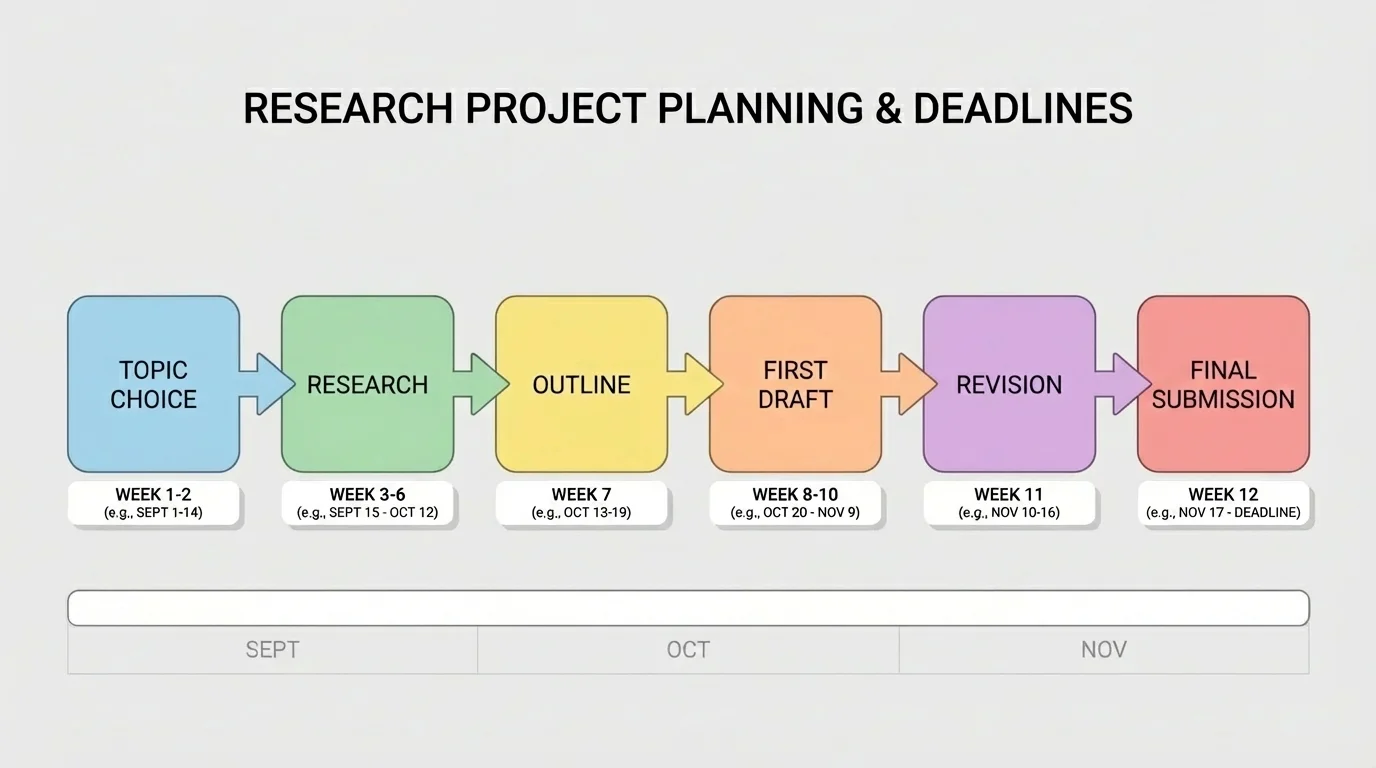
Mini-deadlines matter because waiting until the final due date is risky. If one part takes longer than expected, the whole assignment gets squeezed. When you set smaller checkpoints, you find problems early. Maybe your source search takes longer, or maybe your draft needs more revision than expected. That is normal. Planning gives you room to notice it in time.
Turning one big task into clear steps
You have a digital presentation due in one week.
Step 1: List the main parts.
Topic choice, research, slide outline, slide design, practice, final upload.
Step 2: Estimate time for each part.
Research \(25\) minutes, outline \(20\) minutes, slide design \(40\) minutes, practice \(15\) minutes, final check \(10\) minutes.
Step 3: Spread the work across days.
Monday research, Tuesday outline, Wednesday and Thursday slides, Friday practice, Saturday final check, Sunday submit.
The project now feels like a series of doable actions instead of one giant task.
Notice how the plan above leaves a little space before the due date. That is not wasted time. It is protection.
The smartest way to plan a long-term assignment is to start with the final due date and move backward, as [Figure 2] illustrates. If a project is due on Friday, do not schedule the entire draft for Thursday night. Ask what needs to be finished by Thursday, then what needs to happen before that, and keep stepping backward until today.
This creates a timeline. A timeline is not just a list of dates. It shows the order of work. That matters because some steps depend on others. You cannot revise a draft before you write one, and you should not design final slides before you know what information belongs on them.
Include buffer time. Buffer time is extra space built into your plan in case something takes longer than expected, internet problems happen, you get tired, or another task suddenly pops up. Even \(1\) extra day can make a big difference. Without buffer time, one small delay can wreck the whole schedule.
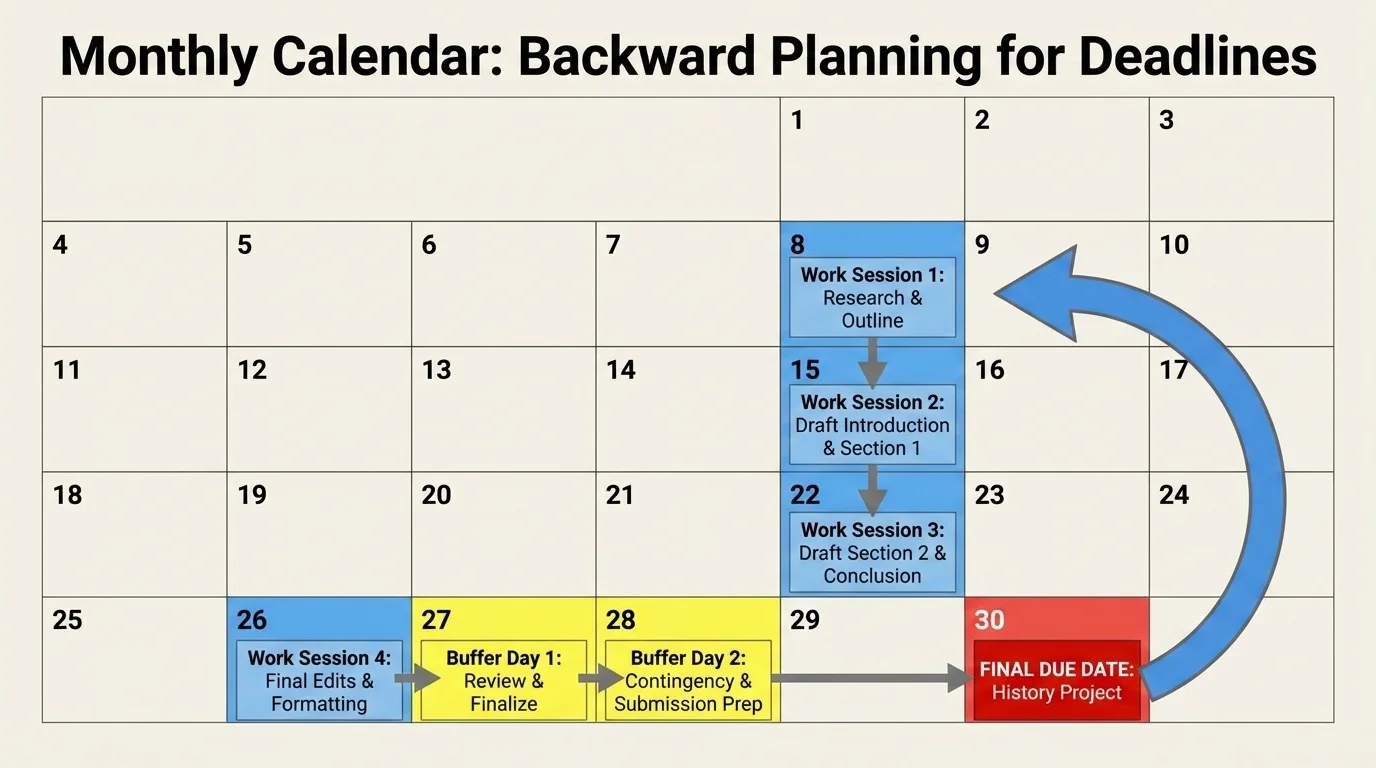
A realistic timeline also respects your actual life. If you have a music lesson, family responsibility, or sports practice on Wednesday evening, do not schedule \(2\) hours of focused work then. A good plan fits the real you, not an imaginary superhuman version of you.
Later, when you start balancing several tasks at once, the backward-planning idea from [Figure 1] still helps. Every big assignment becomes a string of smaller actions placed in order.
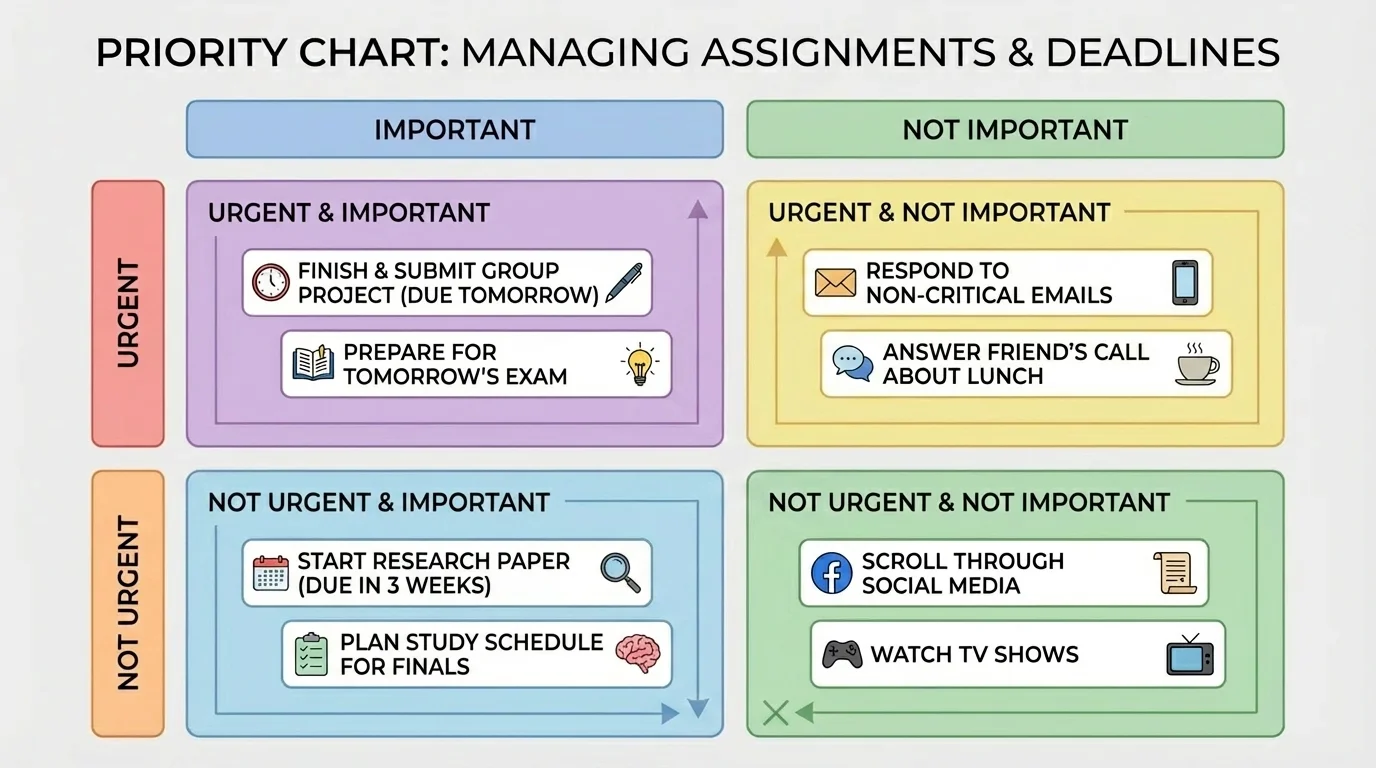
As [Figure 3] shows, when several things are due around the same time, guessing usually leads to trouble. A priority system helps you decide what comes first. The basic question is not just "What is due soonest?" It is also "What will take the longest?" and "What has the biggest consequence if I ignore it?"
One helpful approach is to sort tasks by priority. A task is high priority if it is due soon, important, hard to replace, or connected to several later steps. For example, a rough draft due tomorrow is probably more urgent than organizing your desktop files. A project due next week may still deserve attention today if it will take a lot of time.
You can think in three levels: do first, do soon, and do later. This keeps you from spending your best energy on low-impact tasks just because they feel easier.
If two tasks are both important, choose the one with the nearest checkpoint or the larger time requirement. For example, if a discussion post takes \(15\) minutes and a project step takes \(45\) minutes, you might do the discussion post first if it is due tonight, then start the project step right after. But if the project has been ignored for days, it may deserve your first serious work block.
Do not confuse "easy" with "important." Many students answer one quick message, rearrange folders, or check grades because those jobs feel productive. Sometimes they are useful, but they should not push aside the assignment that truly matters.
Urgent and important are not the same thing. Something urgent needs attention soon. Something important has a meaningful result if you complete it well. A short task due tonight may be urgent, while a major project due next week may be more important. Good planning helps you notice both.
A calm plan beats panic. Once you know what is first, your next decision becomes much easier.
Long-term plans only help if they turn into small daily moves, as [Figure 4] shows. At the start of each week, look at all your deadlines and choose what you want to finish by the end of that week. Then, each day, choose a few specific tasks that move those goals forward.
Your daily list should be short enough to be realistic. A good rule is to choose \(1\) to \(3\) main tasks, not \(12\). You can always do more if you finish early, but a list that is too long often creates guilt instead of progress.
For example, your weekly goal might be "finish the first draft of the science slideshow." Today's list might be: find two sources, write slide headings, and draft slide \(1\) through slide \(3\). That is much clearer than writing "science project."
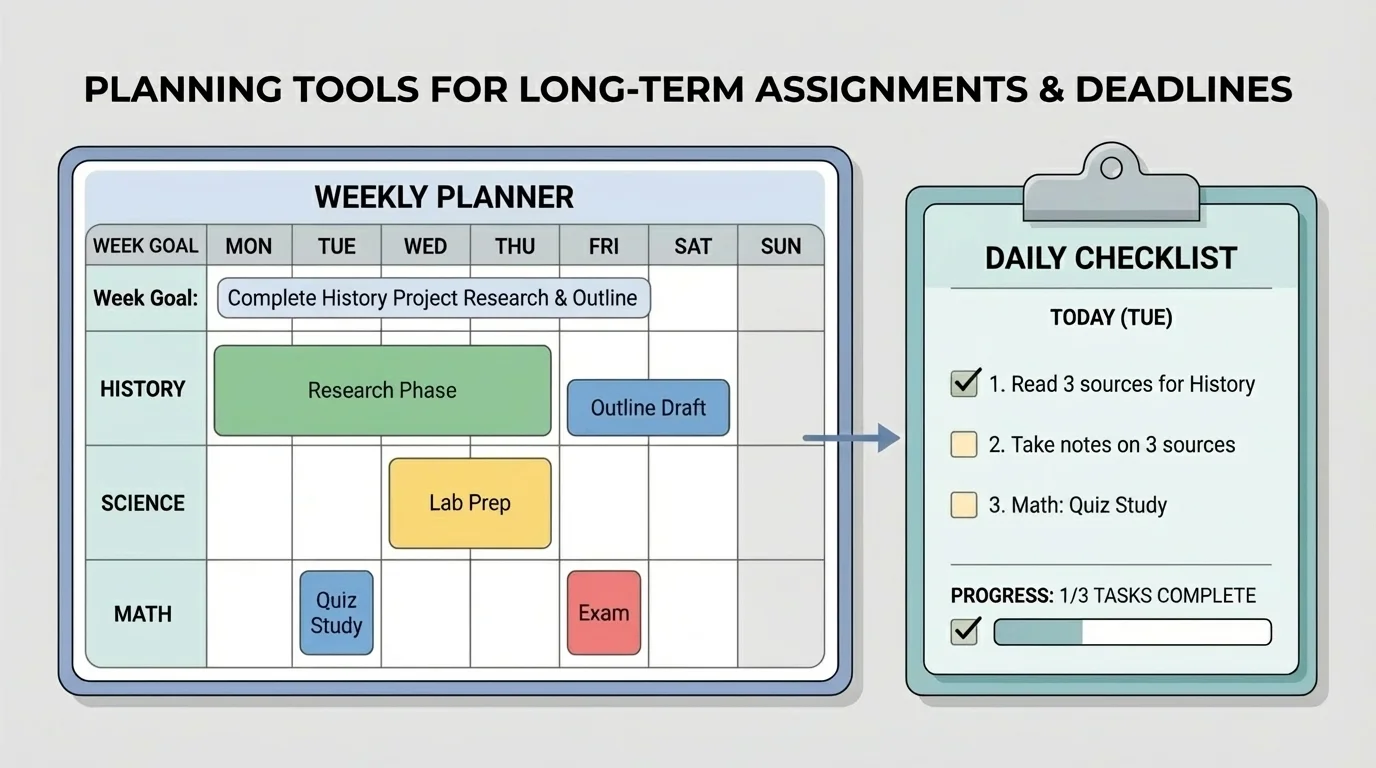
Check your plan at least once a day. A planning system you never look at is just decoration. Many students do well with a quick review in the morning and a short update in the evening. Morning tells you what matters today. Evening helps you move unfinished items to a new spot instead of forgetting them.
That same weekly-to-daily pattern also connects back to the calendar in [Figure 2]. The calendar holds the big picture, while the daily list tells you exactly what to do now.
One common mistake is underestimating how long things take. If you always tell yourself a project will take \(20\) minutes and it actually takes \(60\), your plan will keep failing. Fix this by tracking your time honestly for a week. You do not need perfection. You just need better guesses.
Another mistake is forgetting hidden steps. Uploading files, checking directions, finding sources, fixing formatting, and proofreading all take time. If your plan only includes the obvious part, you will feel "behind" even when you have been working hard.
A third mistake is making a beautiful plan and then never updating it. Plans are living tools. If you miss Tuesday's task, do not give up on the whole week. Move the task, shorten it, or change your order. Flexibility is part of good executive functioning, not a sign of failure.
You do not need to finish everything at once. The goal is to keep making progress. When a plan breaks, repair it. Do not throw it away.
Also watch out for overloading your strongest work time. If you focus best in the morning, protect that time for your hardest tasks whenever possible. Save simpler jobs, like checking messages or renaming files, for lower-energy times.
Let's say you have three responsibilities this week: a reading response due Tuesday, a science slideshow due Thursday, and a math quiz on Friday. You also help with dinner on Wednesday and have an online club meeting Thursday evening. Without a plan, that week could feel packed. With a plan, it becomes clearer.
Planning one busy week
Step 1: Put all deadlines in one place.
Tuesday reading response, Thursday science slideshow, Friday math quiz.
Step 2: Break down the largest task.
Science slideshow becomes research, outline, slides, practice, final check.
Step 3: Work backward from the due dates.
Science slides should be done by Wednesday night, so research starts Monday and outline happens Tuesday.
Step 4: Protect busy times.
Since Wednesday includes helping with dinner, only a short review task goes there.
Step 5: Make daily actions.
Monday: reading notes and science research. Tuesday: submit reading response and create slideshow outline. Wednesday: build slides. Thursday: final slideshow check and submit. Friday: math review and quiz.
This plan is not magic. It just turns confusion into order.
The student still has to do the work, but now each day has a purpose. That is the power of planning.
If you like alerts and easy editing, digital tools may work best. A phone calendar, tablet planner, or reminder app can send notifications and help you move tasks quickly. If you remember things better by writing them down, a paper planner or notebook may feel stronger and less distracting.
Some students use a hybrid system: digital calendar for deadlines, paper checklist for daily work. That often works well because each tool does a different job. The best setup is the one you can check consistently without getting lost.
| Tool | Best for | Possible downside |
|---|---|---|
| Digital calendar | Due dates and reminders | Easy to ignore alerts |
| Paper planner | Weekly overview | Must remember to open it |
| Checklist app | Small action steps | Can become cluttered |
| Whiteboard | Seeing top priorities clearly | Not portable |
Table 2. A comparison of common planning tools and how they can help.
Try This: Pick one place for deadlines and one place for action steps. Keep it simple for one week before changing your system.
Sometimes your internet goes out, you get sick, family plans change, or an assignment takes longer than expected. A strong plan adapts. It does not fall apart. When something changes, ask three quick questions: What must still happen today? What can move? What needs help or extra time?
If you realize early that you may miss a deadline, communicate. Send a respectful message through your online platform as soon as possible. Explain the problem briefly and honestly. Planning includes asking for support before things become an emergency.
"A plan is a tool, not a prison."
— Practical time-management principle
The goal is not to control every minute. The goal is to make thoughtful decisions. When you use planning tools well, you are building independence, responsibility, and confidence. Those skills will help you long after one assignment is over.
