A post pops up on your screen: "This trick charges your phone in 10 minutes," or "Breaking news: school laws changed today," or "Celebrity giveaway—first 100 people win." It looks convincing, and thousands of people have already shared it. But online, something can be popular and still be false. Knowing how to tell the difference between real information and manipulated content is one of the most useful digital skills you can build, because it protects your time, your trust, your privacy, and sometimes even your safety.
Every day, you make fast decisions online. You decide what to believe, what to ignore, what to repost, and what to click. That means you are not just a viewer—you are also part of how information spreads. If you learn how to pause and check first, you become much harder to fool.
Manipulated online content can do real damage. A fake health tip can make someone try something unsafe. A false rumor about a local event can make people panic. A fake screenshot can hurt someone's reputation. A scam giveaway can steal passwords or personal details. Even something that seems small, like sharing a misleading meme, can push false ideas to more people.
On the other hand, when you know how to spot reliable information, you make smarter decisions. You waste less time. You avoid drama. You protect yourself from scams. You also become someone others can trust online.
Credible information is information that comes from a trustworthy source, is supported by evidence, and can be checked. Manipulated content is content that has been changed, edited, presented out of context, or designed to mislead people. Misinformation is false or misleading information shared without meaning to harm, while disinformation is false information shared on purpose to deceive.
One important thing to remember is that false content is not always completely made up. Sometimes it mixes a little truth with missing details, a dramatic headline, or an edited image. That can make it even more convincing.
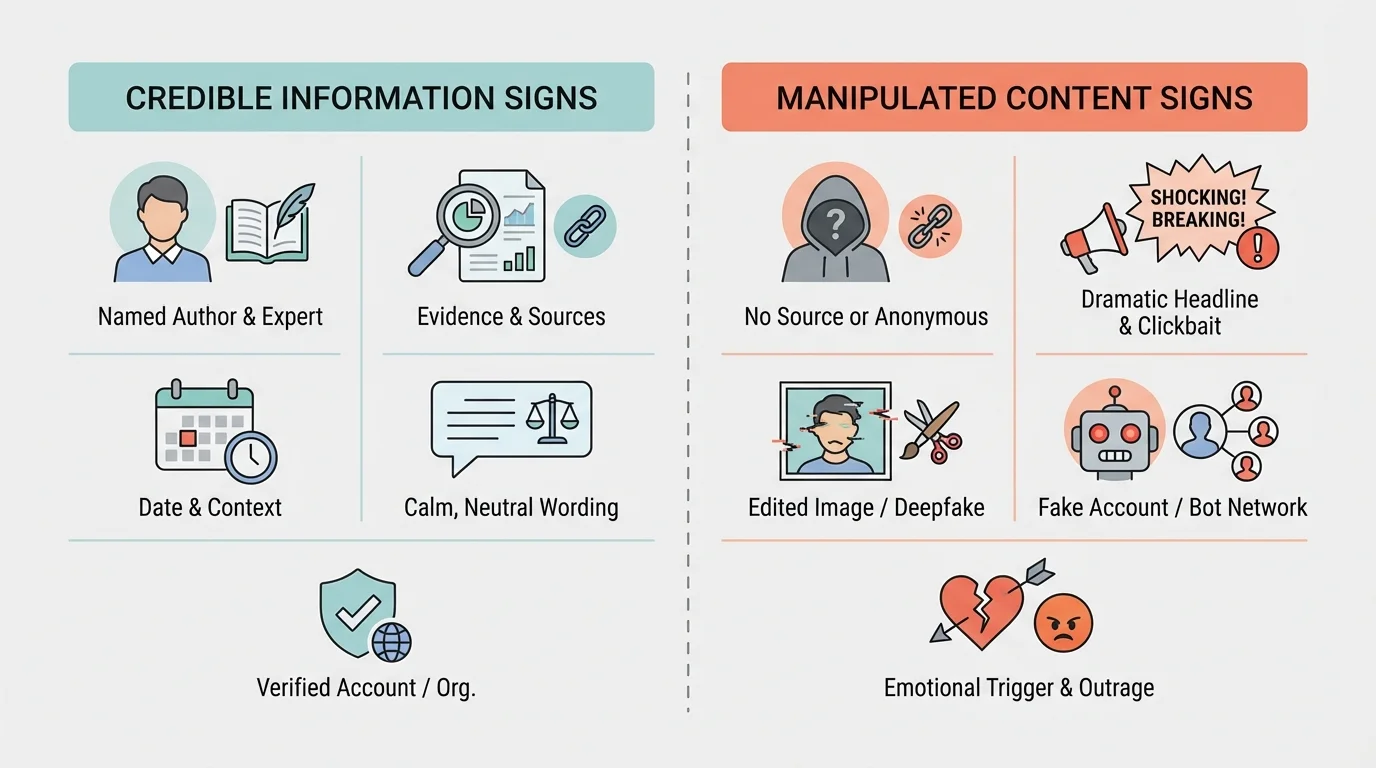
When you evaluate online information, you should look for several clues together, as [Figure 1] shows. A credible source usually tells you who created the information, where it came from, when it was published, and what evidence supports it. Trust is rarely based on one clue alone.
A trustworthy post or article often includes the author's name, a real organization or source, working links to evidence, and a date. It may also use careful language instead of trying to shock you. If new facts come out, credible sources often correct mistakes or update information instead of pretending they were never wrong.
Think about the difference between these two examples. One post says, "Experts say this snack cures headaches," but it does not name the experts, show any study, or explain where the claim came from. Another article says, "According to the children's hospital website, drinking water and resting may help with some headaches, but severe or repeated headaches should be checked by a doctor." The second one is more credible because it names the source, sounds specific, and avoids exaggerated promises.
Here are some signs that information may be credible:
Here are warning signs that information may be weak or misleading:
You do not need to become an expert in every topic. You just need to ask smart questions. A strong digital citizen knows how to say, "I'm not sure yet. Let me check."
Manipulated content can appear in many forms, as [Figure 2] illustrates, and not all of them look obviously fake. Some are designed to fool people quickly. Others are made to spread confusion, gain followers, start arguments, or earn money from clicks.
Clickbait uses dramatic headlines to make you click. A headline like "You won't believe what happened next" is trying to trigger curiosity, not provide clear information. Sometimes the article behind it is weak, misleading, or not related to the headline.
Cropped or edited images can remove important context. For example, a photo of a crowded event might be cropped to make it seem much bigger or smaller than it really was. Filters and editing tools can also change colors, shadows, and details to create a false impression.
Out-of-context content is real content used in the wrong way. A real video from three years ago might be reposted as if it happened today. A real quote might be cut short so it sounds like the person said something completely different.
Fake accounts may pretend to be a real person, company, or news source. The username might look almost correct, but with one small change. These accounts often copy profile pictures, post quickly, and try to gain trust before spreading false information or scams.
Satire is content made as a joke or for humor, but some people mistake it for real news. If you miss the label or do not know the site, you might share something that was never meant to be taken seriously.
Cherry-picked facts use only the details that support one side while leaving out important information. This can make a claim sound true even when the full picture tells a different story.
AI-generated media can create fake faces, voices, images, and even videos. Some AI tools are used for harmless creativity, but others are used to imitate real people or create convincing false scenes.
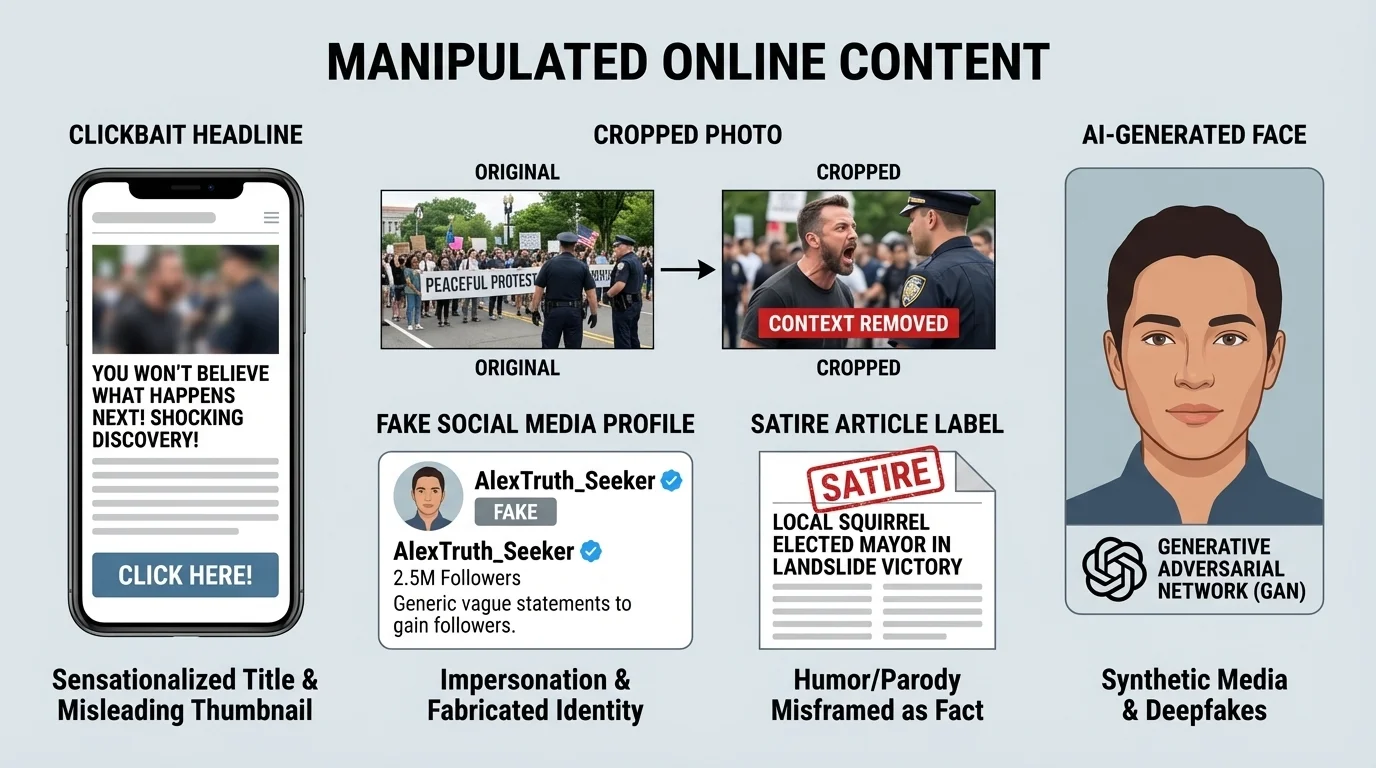
Later, when you check a suspicious post, remembering these different categories helps you ask a better question: "Is this fake, edited, missing context, or just designed to trick my emotions?"
False information often spreads faster than careful information because dramatic content gets stronger emotional reactions. That does not make it more accurate—it just makes it more shareable.
Some manipulated content is easy to spot, but some is not. That is why using a repeatable method matters more than trusting your first impression.
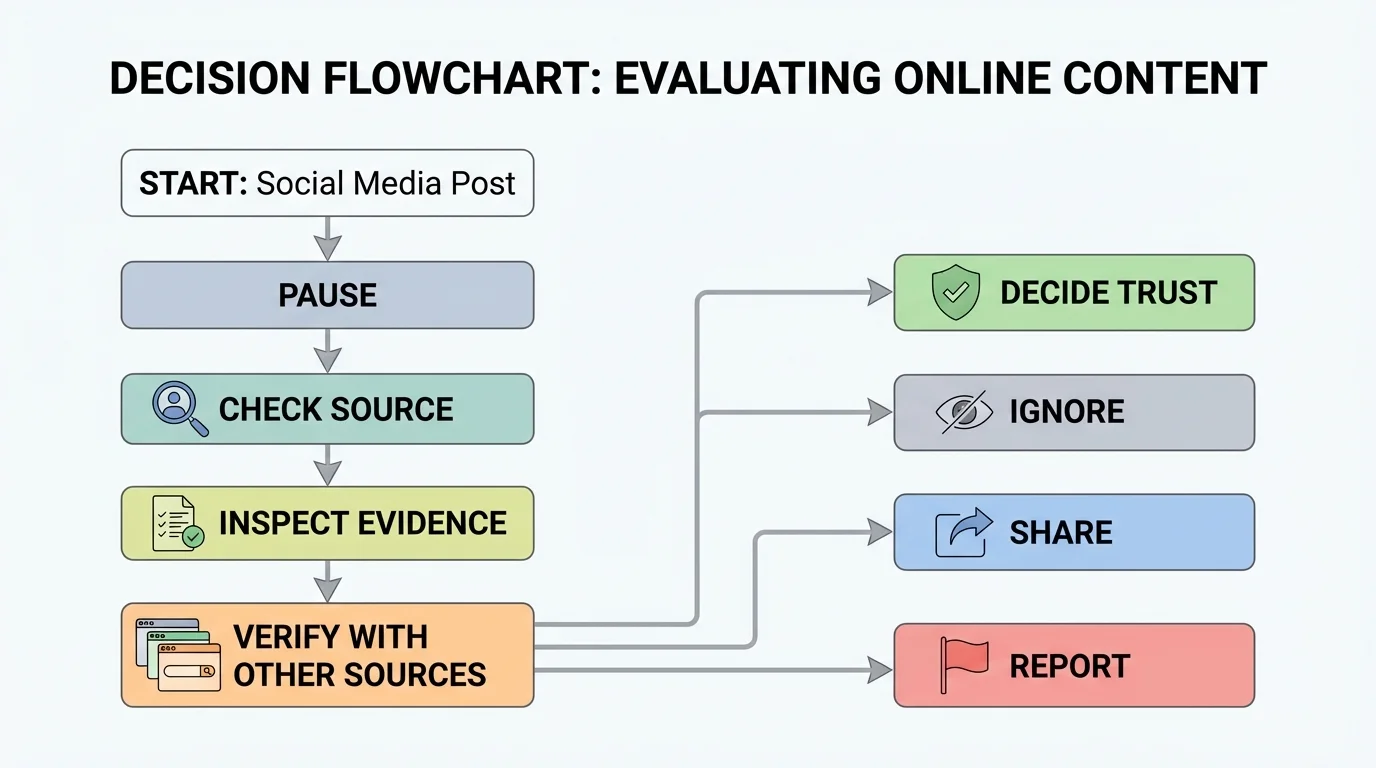
Before you like, repost, or act on a claim, use a quick routine, as [Figure 3] shows. Think of it as a digital safety check. It only takes a minute, but it can prevent bad decisions and stop false information from spreading through your account.
Use this five-step method: pause, check the source, inspect the evidence, verify with other reliable sources, and decide what action makes sense. At first you may need to think through every step. With practice, it becomes a habit.
Step 1: Pause. If a post makes you angry, excited, shocked, or scared, stop. Strong emotion is a signal to slow down, not speed up. Manipulated content often tries to create a fast emotional reaction so you will share before thinking.
Step 2: Check the source. Who posted it? Is it a known organization, a real person, or a random account? Tap the profile. Look for a history of normal posting, not just extreme content. A source does not become trustworthy just because it has many followers.
Step 3: Inspect the evidence. Does the post include proof? Are there links, names, dates, images, quotes, or documents you can examine? Be careful: having a lot of details is not the same as having good evidence.
Step 4: Verify somewhere else. Look for the same claim on more than one reliable site. If only one unknown account is saying it, that is a warning sign. Independent confirmation matters.
Step 5: Decide your action. You may choose to trust it, ignore it, save it to check later, report it, or warn someone privately. "Not sharing" is often the smartest choice when you are unsure.
This routine is useful for more than news. You can use it for rumors, product claims, celebrity posts, gaming tips, "life hacks," and health advice. The method stays the same even when the topic changes.
Case study: a suspicious giveaway
You see a post that says a famous gaming brand is giving free consoles to the first 50 people who enter their login details.
Step 1: Pause instead of clicking right away.
The message creates urgency by saying "first 50 people," which pushes people to rush.
Step 2: Check the source.
The account name is almost the same as the real brand, but one letter is missing. That is a red flag.
Step 3: Inspect the evidence.
There is no link to the official website and no announcement from the real company.
Step 4: Verify elsewhere.
The official brand page does not mention any giveaway.
Step 5: Decide what to do.
Do not enter information. Report the account and, if helpful, warn a friend privately.
This is likely a scam, not a real promotion.
When you use a process instead of guessing, you make fewer mistakes. That is a practical skill you can use for years.
Text is not the only thing that can mislead you. Images and videos can be edited, reused, or miscaptioned. A real photo paired with a false caption can still spread false information.
If an image seems shocking or too perfect, check whether it appears elsewhere online. Search for the same image if possible. Look for older versions, different captions, or posts from different dates. If you find the same image connected to a completely different story, the current post may be misleading.
For videos, look closely at details in the background. Signs, weather, clothing, accents, shadows, or landmarks may help reveal when and where the video was really made. If the caption says the video shows one event, but the details do not match, be cautious.
For claims, read beyond the headline. Some headlines are written to create drama while the actual article is more careful. Also watch for screenshots of "news" with no link to the original article. Screenshots are easy to fake.
If a post includes a quote, ask where the quote came from. Can you find the full statement? Was it edited or cut short? A short clip or one-line quote does not always tell the whole story.
| What you see | What to check | Why it matters |
|---|---|---|
| Shocking headline | Read the full article or original post | The headline may exaggerate the claim |
| Image with a strong claim | Search for older versions or other captions | The image may be real but reused out of context |
| Video clip | Look for full video, date, and background clues | Short clips can hide important context |
| Quote graphic | Find the original speech, interview, or post | Quotes can be shortened, edited, or invented |
| "Breaking" post from a random account | Compare with trusted organizations | Real major news is usually reported by multiple sources |
Table 1. Practical checks for common types of online claims and media.
These habits do not mean you must distrust everything. They mean you should match your trust to the quality of the evidence.
Online platforms are designed to keep your attention, and [Figure 4] shows how emotional content can move from one user to many others very quickly. Posts that get strong reactions often get more views, whether they are accurate or not.
This is where the algorithm behind your feed matters. An algorithm is a system that decides what content to show you based on things like clicks, watch time, and interactions. If you keep watching dramatic or extreme content, the platform may show you even more of it.
Your own bias matters too. Bias is a tendency to favor ideas that already match what you think or feel. If a post agrees with your opinion, you may trust it too quickly. If a post upsets you, you may share it before checking. Either way, emotion can rush your judgment.
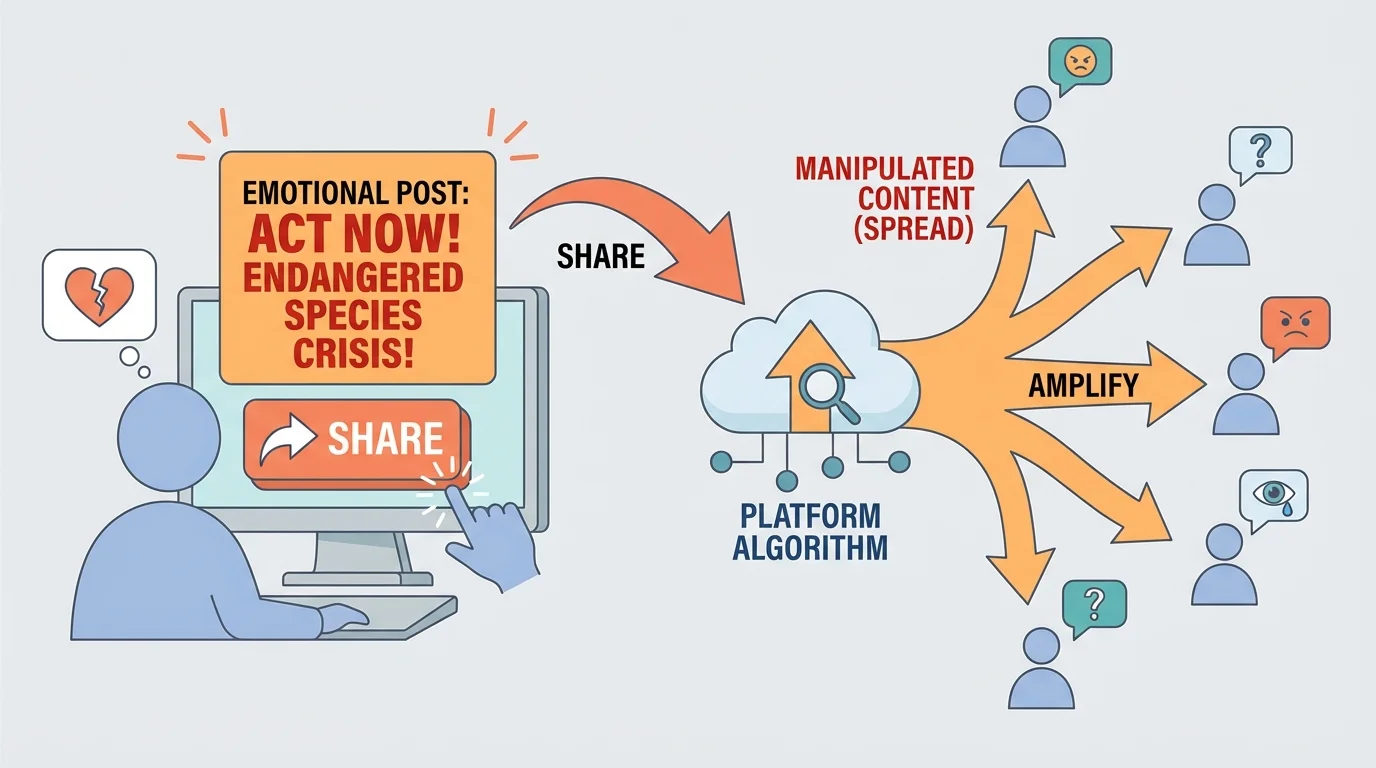
That is why "I saw it everywhere" is not proof. A post can appear all over your feed because the platform amplified it, not because it is true. Popularity and credibility are not the same thing.
The more a post makes you feel like you must react right now, the more carefully you should slow down. In that sense, emotion is not just a feeling online—it is a clue.
Why false content feels believable
Your brain likes shortcuts. Repetition can make something feel familiar, and familiar things can feel true even when they are not. This is why seeing the same rumor many times can make it seem more believable. The best defense is not perfect memory—it is a habit of checking.
When you compare this section to the warning signs in [Figure 1], you can see why calm, evidence-based information often feels less dramatic. Reliable information usually tries to inform you, not control your reaction.
Suppose you see a post saying a weather emergency is headed to your area tonight. Before you panic or send it to everyone you know, check an official weather source, local government account, or emergency service update. False emergency posts can spread fear quickly.
Suppose an influencer claims a product "works instantly" and has "secret ingredients doctors hate." That language is designed to push emotion and curiosity. Check whether there are real reviews, clear ingredients, trusted sources, and honest limits. If the claim sounds magical, be extra careful.
Suppose someone shares a screenshot showing that a creator said something rude. Screenshots can be edited. Try to find the original post, account, or video clip. If you cannot verify it, do not help spread it.
Suppose a friend messages you, "Is this true?" with a link. You do not need to act like a detective in a movie. Just use the method: pause, check source, inspect evidence, verify elsewhere, decide what to do. Sometimes the best answer is, "I'm not sure yet, and I don't want to spread something false."
"Pause is a power move online."
— A smart rule for digital citizenship
That simple habit can protect your reputation. People notice when someone shares false information often. Over time, being careful makes others trust you more.
If you discover that something is false or misleading, you still have choices. You do not have to fight with strangers in comments. In many cases, a calm and practical response works best.
You can choose to:
If you shared something inaccurate, the best response is simple: delete it if needed, post a correction if appropriate, and move on. Making a mistake online is not the end of the world. Refusing to correct it is the bigger problem.
Case study: fixing a mistake responsibly
You repost a dramatic image claiming a local store is giving away free items, then you learn it was fake.
Step 1: Remove the repost if possible.
This reduces how many people keep seeing it from your account.
Step 2: Check the real information.
Visit the store's official account or website to confirm the truth.
Step 3: Correct it calmly.
If needed, say something short like, "I shared this too fast. It is not confirmed, and the official account says it is false."
Step 4: Learn from it.
Notice what fooled you—urgency, excitement, or a familiar-looking logo—so you can spot it faster next time.
Correcting a mistake builds trust more than pretending it never happened.
Good digital citizenship is not about never being fooled. It is about responding responsibly when something is unclear or wrong.
The goal is not to memorize every fake post you might see. The goal is to build habits that work across apps, websites, games, videos, and social platforms.
Here are strong habits to practice regularly:
If you want one short rule to remember, use this: slow down before you spread it. That one habit can prevent many online mistakes.
As you keep using the checklist from [Figure 3], you become faster at spotting patterns. You also become less likely to get pulled in by the emotional chain reaction shown in [Figure 4].
Being safe online is not just about passwords and privacy settings. It also includes what you believe, what you share, and how you affect other people through your actions online.
When you choose carefully, you protect more than yourself. You help create an online space where truth matters more than clicks.
