One message can be copied in seconds, one photo can be captured in a screenshot forever, and one rude comment can change how people see you. That is why online communication is not "just online." It is part of your real life. The way you text, comment, post, stream, chat in games, and share photos all help create a picture of who you are. Learning to be smart, kind, and careful online is not about being scared of the internet. It is about using it in a way that protects you and shows your best self.
When you use the internet, you leave a digital footprint. That means the trail of information created by what you post, like, search, comment on, and share. Some parts of that trail are public, and some feel private but can still spread. Even when something disappears from your screen, it may still exist in screenshots, copies, or platform records.
Your privacy is your ability to control what personal information other people can access. Your online choices also affect your digital reputation, which is the impression people get about you based on your online behavior. A strong digital reputation can help others trust you. A careless one can make people think you are rude, reckless, or unsafe.
Digital footprint is the record of your online activity.
Privacy means protecting personal information and controlling who can see it.
Digital reputation is how others view you based on what you do online.
Think about two students in an online group project. One replies politely, shows up on time to video calls, and gives credit when using someone else's ideas. The other ignores messages, posts mean jokes, and shares a screenshot of the group chat without permission. Both students are building a reputation, whether they realize it or not.
Being a responsible digital citizen means understanding that online spaces still involve real people with real feelings, boundaries, and safety needs. The goal is simple: communicate with respect, protect your information, and make choices that still look good later.
Online communication can be tricky because people cannot always hear your tone of voice or see your facial expression. A message that seems funny to you may sound rude, cold, or insulting to someone else. That is why it helps to slow down and check your tone before you send anything.
Start with three basic questions before you reply: Is it true? Is it kind? Is it necessary? If your answer is no to any of those, stop and rethink. You do not have to answer every comment right away. Waiting a few minutes can stop a lot of problems.
Good online communication is clear, calm, and respectful. Responsible communication does not mean you always agree with people. It means you disagree without insulting, threatening, embarrassing, or piling on. You can say, "I see it differently," or "I do not think that is accurate," without turning the conversation into a fight.
Group chats are a common place where problems grow fast. A joke can turn into teasing, and teasing can become bullying. If someone is being targeted, do not add laughing emojis, repost the comment, or stay involved just because "everyone else is doing it." Joining in still hurts. A better move is to stop responding, support the person privately, or report the problem if it crosses the line.
Gaming chats and livestream comments also count as communication. Trash talk, insults, threats, and sharing personal information about others are not harmless when they make people feel unsafe. If a space is getting toxic, leaving, muting, blocking, or reporting is often the smartest choice.
Example: Rewriting a risky message
You are frustrated because someone in a shared online project did not finish their part.
Step 1: Notice your first reaction.
Your first draft might be: "You never do anything. You're ruining this."
Step 2: Remove blame and exaggeration.
Words like "never" and "ruining" make the other person defensive.
Step 3: State the issue clearly and respectfully.
A better message is: "We still need your section. Can you send it by tonight, or should we divide the work differently?"
This version is more likely to solve the problem instead of creating a new one.
Another strong habit is asking permission before posting or sharing content that includes someone else. Just because a friend sent you a photo or voice message does not mean they want it shared. Respecting consent online is part of respecting people offline too.
Not all personal information is equally sensitive, as the circles in [Figure 1] make clear. Some details are okay to share in limited ways, while others should stay completely private. A good rule is this: if information could help someone identify you, find you, access your accounts, or pretend to be you, protect it carefully.
Personal information includes your full name, home address, phone number, email, passwords, school schedule, live location, private photos, and details like where you regularly go. Even things that seem small can combine into a bigger risk. For example, a selfie in front of your house number, a sports jersey with your team name, and a post saying where you will be at a certain time can reveal more than you intended.
Your account privacy settings matter because they control who can view your content, send you messages, tag you, or find your account. Check them regularly. Apps update, and settings can change. A private account is usually safer than a public one, but "private" does not mean fully secure. Followers can still screenshot or share what you post.
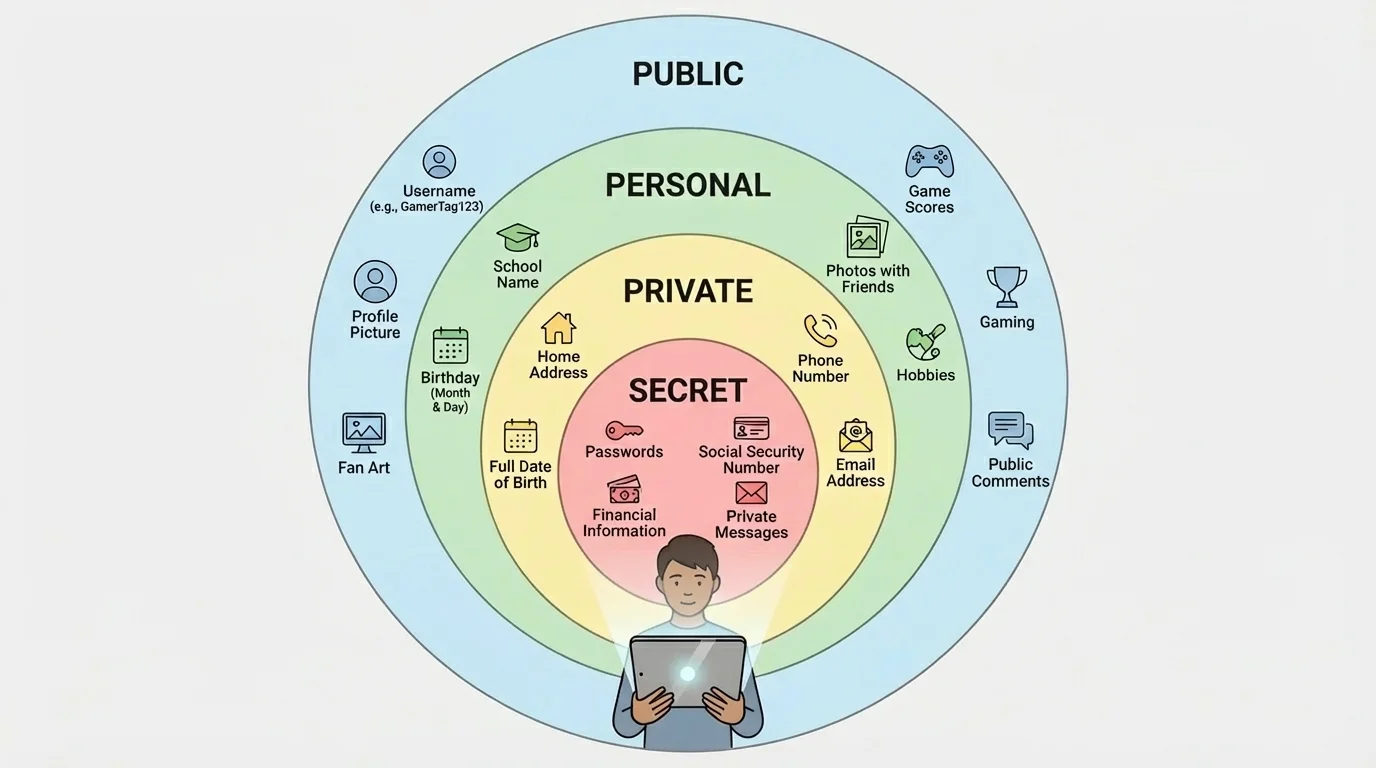
One of the biggest privacy skills is knowing what to keep secret. Passwords should never be shared with friends, even close friends. If someone gets angry later, your account could be at risk. Use strong passwords that are hard to guess. A longer password or passphrase is usually better than something simple like a pet's name or birthday. If you can use two-factor authentication, turn it on. That means logging in requires not just your password but also a second step, such as a code sent to your device.
Location sharing needs extra caution. Some apps attach location data to photos or show when you are active in a certain place. It is safer to share updates after you leave a location, not while you are still there. Posting "At the park until 6" gives strangers more information than you may realize.
Many people reveal personal details without meaning to by showing a bedroom wall, mail on a desk, a sports uniform, or a street sign in the background of a photo or video.
Scammers often try to get information by pretending to be someone trustworthy. This is called phishing. A phishing message might say your account is locked, you won a prize, or you must click a link right away. The message tries to create panic or excitement so you act without thinking.
If a message asks for your password, personal details, or money, stop. Do not click links from unknown sources. Check with a trusted adult or go directly to the official website instead of using the link in the message. As we saw with the privacy circles in [Figure 1], information that seems small can become dangerous when it falls into the wrong hands.
| Safer to Share | Think Carefully First | Usually Keep Private |
|---|---|---|
| Favorite hobby | First name only | Home address |
| Book or game opinions | General city or region | Phone number |
| Artwork you made | Photos with background details | Password |
| Non-identifying username | School or team name | Live location |
| Completed project or achievement | Daily schedule | Private photos or codes |
Table 1. Examples of information grouped by sharing risk.
Your digital reputation does not come from one giant moment. It grows from small repeated choices. The username you choose, the comments you leave, the videos you repost, and the way you treat people all send signals about your character.
People often think only "big" posts matter, but likes, reactions, and tags matter too. As [Figure 2] shows, if you support cruel content or repost embarrassing material, others may connect that behavior to you. Even if you did not create the original post, you still helped spread it.
A strong digital reputation is built on trust. That means being honest, respectful, and careful with other people's information. Give credit when you use someone else's work. Avoid fake stories, edited screenshots, and rumors. If you make a mistake, own it, apologize, and fix what you can.
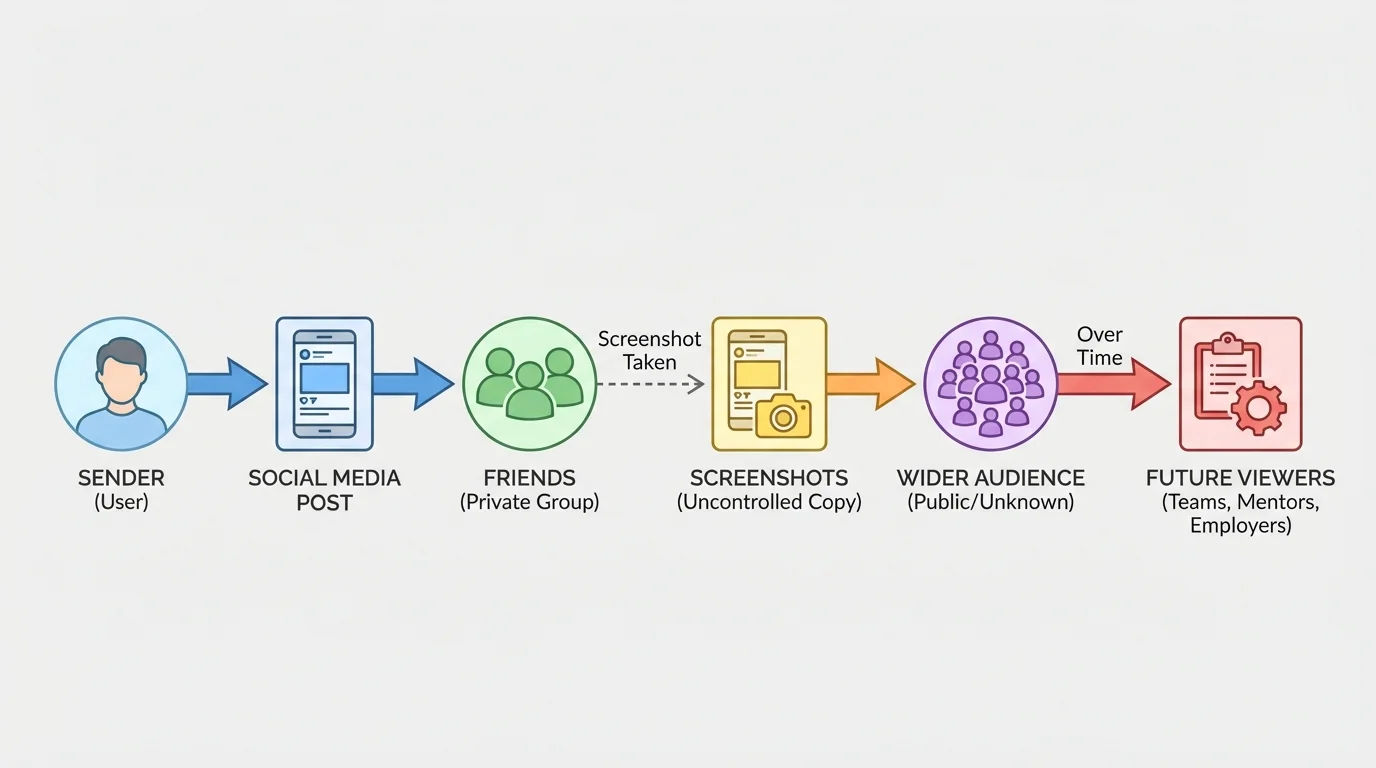
Think long-term. Right now, your audience may feel like friends, followers, or other gamers. Later, it could include club leaders, coaches, mentors, volunteer groups, or people deciding whether to trust you with responsibility. You do not need a perfect online image, but you do want one that shows maturity and good judgment.
Case study: Two different reputations
Both students enjoy posting videos and comments online.
Student A posts funny clips, but also shares rumors, insults people during arguments, and forwards private screenshots.
Student B posts creative content, credits music and art sources, avoids drama, and deletes a post if it hurts someone.
Result Over time, Student B is more likely to be seen as trustworthy and respectful. Student A may become known for drama and poor judgment.
Reputation grows from patterns, not excuses.
It also helps to clean up your accounts once in a while. Review old posts, bios, profile pictures, and public comments. Ask yourself, "If someone important saw this today, would I be okay with it?" That question is not about pretending to be someone else. It is about checking whether your online presence matches your real values.
As the sharing path in [Figure 2] illustrates, control can shrink quickly after you post. That is why the smartest time to protect your reputation is before you hit send.
Sometimes the problem is not something you posted. Sometimes it is something happening to you. You might get mean messages, pressure to send photos, fake account requests, or links that seem suspicious. When something feels wrong, trust that feeling and pause.
Cyberbullying is bullying that happens through digital devices or online spaces. It can include threats, repeated insults, spreading rumors, sharing private images, or making fake accounts to embarrass someone. If it happens, do not argue back in a long thread. Save evidence with screenshots, block the account if needed, report the behavior on the platform, and tell a trusted adult.
If a situation makes you feel unsafe, embarrassed, pressured, or confused, you do not have to handle it alone. Asking for help is a smart safety choice, not a sign of weakness.
Be especially careful with anyone who pushes you to keep secrets, move to a different app quickly, or share photos and personal details. A safe person will respect boundaries. Pressure is a warning sign. So is impersonation, when someone pretends to be a friend, company, or even you.
If someone creates a fake account using your name or photos, report it right away. Ask an adult for help documenting what happened. Change passwords if needed and warn trusted contacts not to interact with the fake account.
When you receive a suspicious link, do not click just to "see what happens." That is how scams and malware spread. Check the sender, look closely at the username, and ask yourself whether the message makes sense. Weird spelling, urgent warnings, and requests for private information are all red flags.
"Pause is a power move."
— A smart rule for online safety
Pausing gives you time to think instead of reacting. A lot of digital mistakes happen when people are rushed, angry, excited, or curious. Calm choices are usually safer choices.
The checklist turns good judgment into a routine you can actually use. When you are about to post a video, reply to a comment, share a screenshot, or click a link, run through five quick checks.
Check 1: Is it true? As [Figure 3] shows, if you do not know whether something is accurate, do not spread it. Rumors move fast online, and fixing false information is much harder than stopping it in the first place.
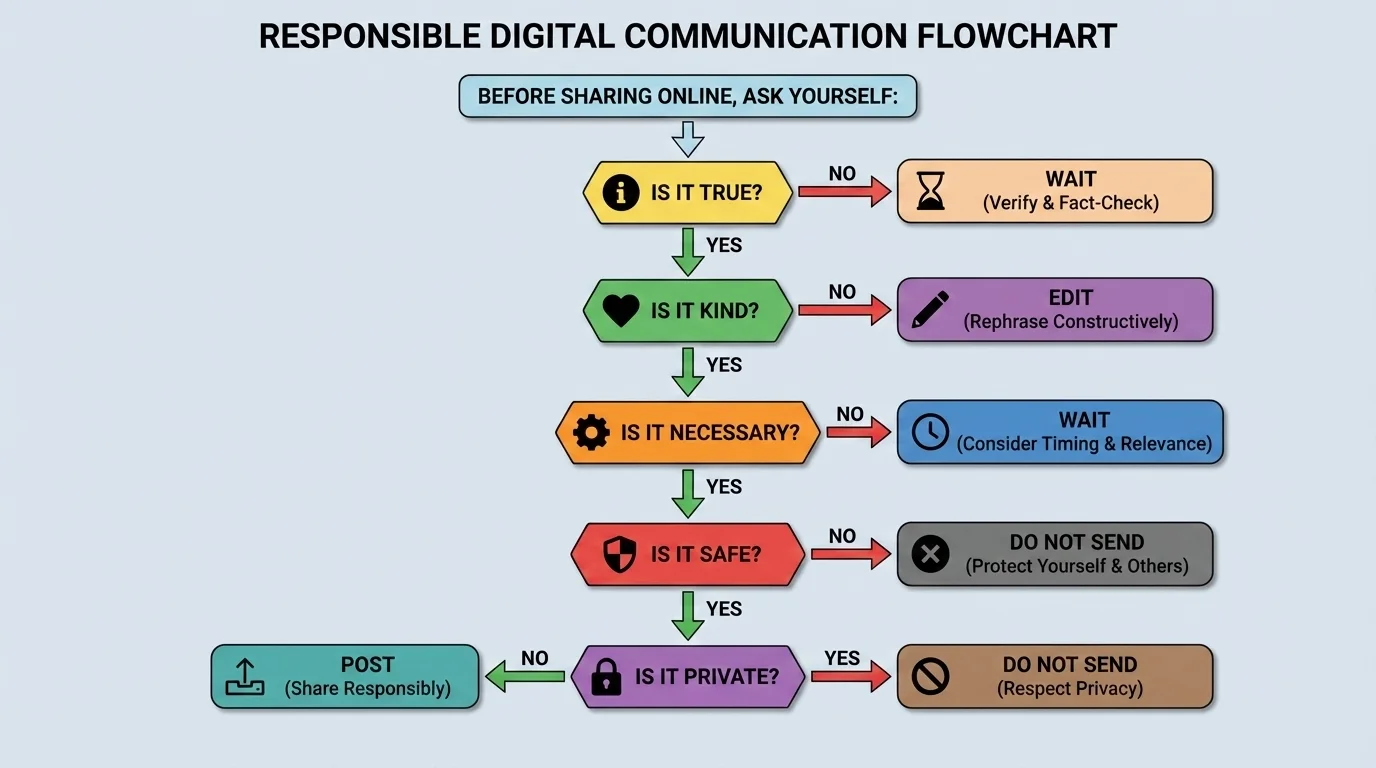
Check 2: Is it kind? Honest does not have to mean harsh. If your message would embarrass, shame, or target someone, do not send it.
Check 3: Is it necessary? Not every thought needs to become a post. Sometimes the best choice is to say nothing, especially when a conversation is already heated.
Check 4: Is it safe? Consider whether the action could expose your account, your location, or your personal details. Safety includes your emotional safety too.
Check 5: Is it private? Ask whether you are sharing someone else's information, image, or message without permission. If the answer is yes, stop.
How to use the decision guide in real life
You want to repost a screenshot from a group chat because it seems dramatic and funny.
Step 1: Is it true?
The screenshot may be real, but it may also be missing context.
Step 2: Is it kind?
It could embarrass someone.
Step 3: Is it necessary?
No. Reposting it does not solve anything.
Step 4: Is it safe and private?
No. It shares someone else's conversation without permission.
The smart choice is not to repost it.
You can also use the same guide for clicking links. If the message is urgent, confusing, or asks for account details, it usually fails the safety test. As [Figure 3] shows, "wait" is often a better option than "send" or "click."
Responsible digital behavior is not one big rule. It is a set of small habits you repeat. Review your privacy settings every few months. Update passwords. Think before posting. Ask permission before sharing content about others. Leave unhealthy online spaces. Report serious problems. Keep trusted adults in the loop when something feels off.
It also helps to create some personal boundaries. For example, you might decide not to post when angry, not to accept requests from people you do not know, and not to keep notifications on all night. Boundaries make smart choices easier because you decide ahead of time instead of in the moment.
Responsible digital citizenship is a daily practice. You do not need to be perfect. You need habits that make harm less likely and respect more likely. Good digital citizens protect themselves, treat others fairly, and understand that online actions can last a long time.
Try This: Check one app you use often and review who can see your posts, who can message you, and whether location sharing is on. Then update one weak password and delete one old post or comment that no longer represents you well.
Try This: The next time you feel upset online, wait at least ten minutes before replying. Draft your message, reread it, and remove anything you would not want screenshot and shared.
Try This: Make a short private rule list for yourself: three things you will always do online and three things you will never do. Keep it somewhere easy to check.
