A message can take only a few seconds to send, but the effects can last for months or even years. One screenshot, one forwarded photo, or one pressured reply can spread far beyond the person you meant to send it to. That is why digital boundaries matter. They help protect your safety, your feelings, your reputation, and your relationships.
When you spend time online, you are not just using apps. You are making choices about trust, respect, and personal space. The same way people need boundaries in face-to-face life, they also need them in texts, group chats, gaming chats, social media, video calls, and direct messages. Healthy digital behavior means knowing what is okay, what is not okay, and what to do when someone pressures you.
Online communication moves fast. A joke can become bullying. A private message can become a screenshot. A photo meant for one person can be shared with many others. Even if you delete something, other people may already have copied it, saved it, or forwarded it. That is why it helps to think before you send.
Digital choices also affect trust. If someone shares your private message without asking, you may feel embarrassed, angry, or unsafe. If you share someone else's image or secret, they may stop trusting you. Healthy relationships online depend on respect, permission, and honesty.
Digital boundary means a limit you set about what you will share, what others can ask from you, and how you expect to be treated online.
Privacy means control over your personal information, messages, images, and details about your life.
Consent means permission that is freely given, informed, and specific. In digital spaces, consent matters before sharing messages, images, videos, or personal information.
Boundaries are not about being rude or secretive. They are about protecting your well-being and respecting the well-being of others. You are allowed to say no to a request, ignore pressure, leave a chat, or ask someone not to share your content. Other people are allowed to set boundaries too.
A digital footprint is the trail of information you leave online. It can include posts, comments, likes, messages, usernames, photos, and videos. Some parts are public, and some feel private, but even "private" spaces can become public if someone shares your content.
Your boundary might sound like: "Please don't post pictures of me without asking," or "I don't share personal photos," or "I don't stay in group chats where people target others." These are clear, healthy limits. They tell people how to treat you and what you will do to protect yourself.
Privacy and boundaries work together
Privacy is about protecting access to your personal information. Boundaries are the rules and limits you use to protect that privacy. If privacy is the door, boundaries are the lock, the key, and the choice about who gets to come in.
Not everyone will like your boundaries. Someone might say you are overreacting, being dramatic, or "no fun." That does not mean your boundary is wrong. A healthy person may feel disappointed, but they still respect your answer. Someone who keeps pushing after you say no is showing a problem with respect, not a problem with your boundary.
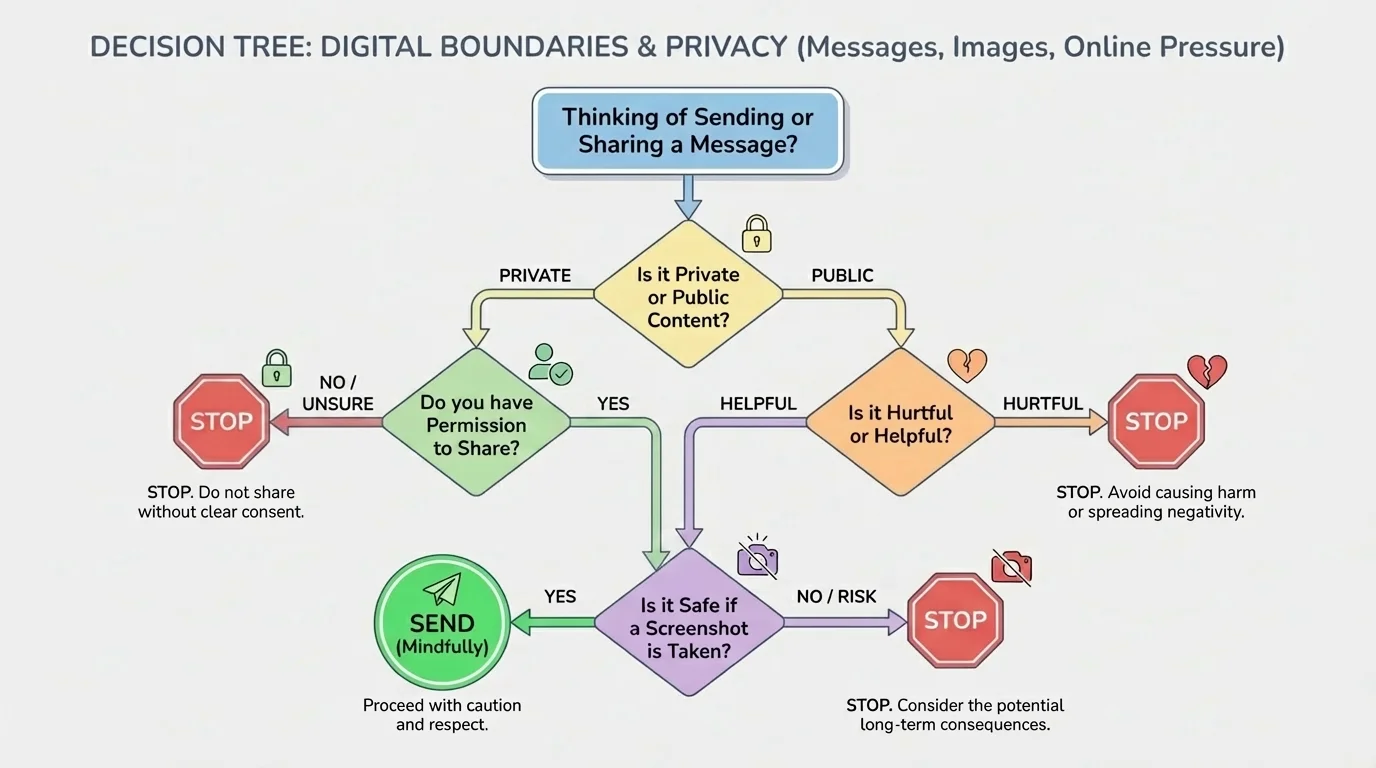
Messages can feel casual, but they still deserve respect. In chats and direct messages, a screenshot can turn a private moment into a public one very quickly. A simple check before sending, as shown in [Figure 1], helps you decide whether a message is safe and respectful before it leaves your screen.
Ask yourself a few questions before sending or sharing a message: Is it kind? Is it true? Is it private? Do I have permission to share it? Would I be okay if this were shown to a parent, caregiver, coach, or future me a year from now? If the answer makes you uncomfortable, pause.
Screenshots are a big boundary issue. Sometimes people take screenshots to save proof of bullying, threats, or unsafe behavior. That can be a smart safety step. But taking screenshots of private conversations just to embarrass someone, spread gossip, or start drama crosses a line. Intent matters, and impact matters too.
Group chats can become especially tricky. People may pressure others to joke harder, insult someone, reveal secrets, or choose sides. It is easy to join in because everyone else seems to be doing it. But "everyone else" does not make it respectful or safe. If a chat becomes cruel or invasive, leaving, muting, or not replying can be a strong choice.
You should also watch for requests that feel too personal. If someone asks for your password, home address, phone number, location, private family details, or personal pictures, stop and think. Trusted people do not need to rush you into sharing private information. If someone says, "If you trust me, send it," that is pressure, not proof of trust.
Example: A private message gets shared
You tell a friend in a DM that you are upset about a disagreement. Later, you find out they sent screenshots to other people.
Step 1: Name the boundary problem.
Your private message was shared without permission. That breaks trust and privacy.
Step 2: Respond clearly.
You could say, "That message was private. Do not share my messages again."
Step 3: Protect yourself.
Stop sharing personal information with that person for now, save evidence if needed, and talk to a trusted adult if the sharing continues or becomes bullying.
Respect goes both ways. Do not forward a friend's message just because it seems funny, dramatic, or surprising. If a message is not yours, treat it as private unless the person clearly says you may share it or unless safety requires getting help from a trusted adult.
That same rule applies in other situations as well. When people say, "It was only a joke," they often ignore the harm. As we saw in [Figure 1], one of the best checks is asking whether the message is still okay if it gets saved, shared, or seen out of context.
Photos and videos can reveal much more than you expect. A single image can expose location details, names, schedules, or private surroundings. That is why posting is not just about whether a picture looks good. It is also about whether it protects you and respects others.
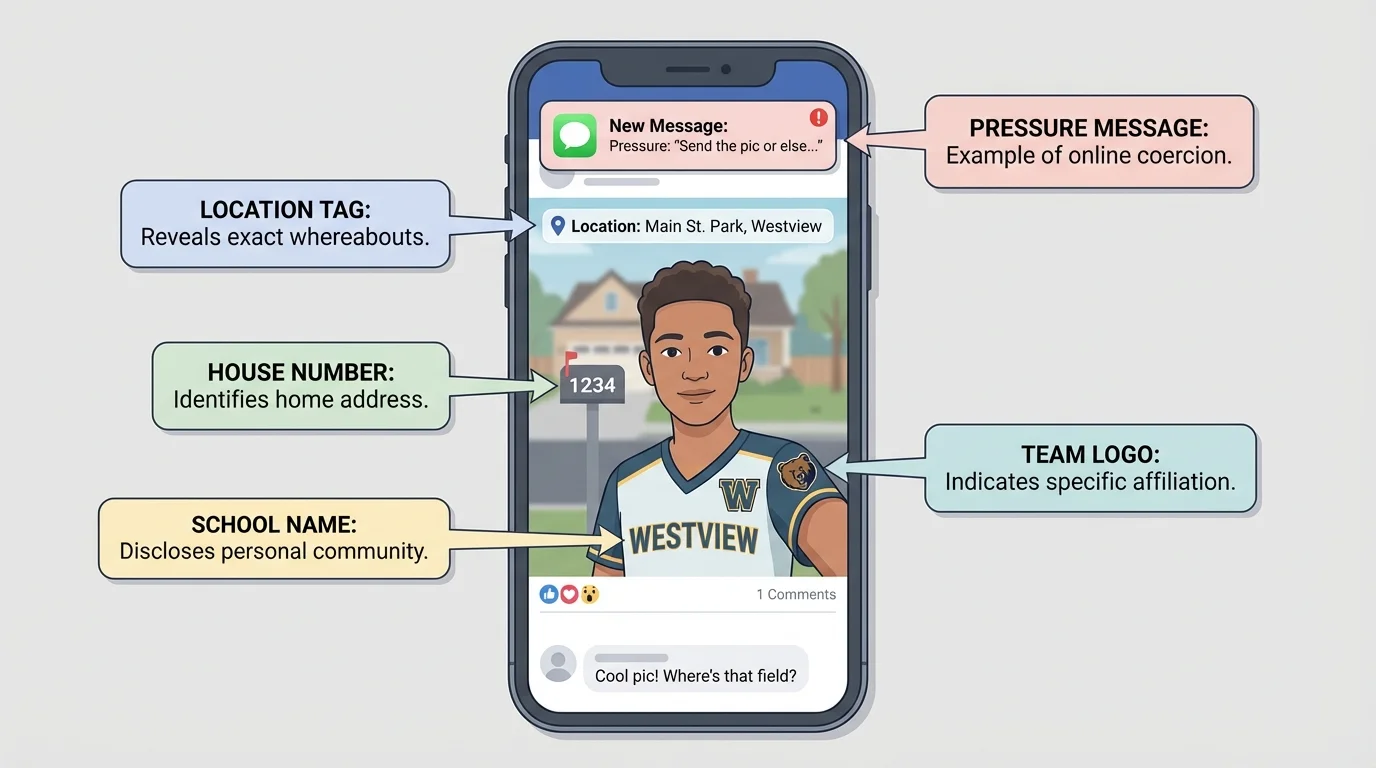
[Figure 2] Always ask before posting or sending a picture of someone else. Even if you think the image is funny, cute, or harmless, the other person may feel embarrassed or unsafe. They may not want their face, room, family members, or activity shared. Permission matters.
Pictures can contain hidden clues. A jersey might show a team name. A pet tag might show a phone number. A window view might reveal where you live. A location sticker can tell people where you are right now. Notifications on a screen in the background can reveal names or messages. Once you start looking closely, you realize how much one photo can say.
This is especially important with private or sensitive images. If someone asks you to send an image that makes you uncomfortable, you do not owe them anything. You do not need to prove trust, maturity, or affection by sharing a picture. A person who respects you will not push after you say no.
Never share someone else's private image or video. Doing that can deeply harm them and can lead to serious consequences for everyone involved. Even if someone else sent it to you first, forwarding it adds to the harm. The right move is to stop the spread, not become part of it.
Images are often more permanent than people expect. Even if a post disappears from a story or chat, another person may have already saved it, copied it, or taken a photo of the screen.
If you are unsure about posting, try this simple rule: wait. A delay of even a few minutes can help you notice risks. If you still feel unsure, do not post. You lose very little by waiting, but you can avoid a lot of regret.
Online pressure is not always loud or obvious. Sometimes it sounds sweet, funny, or urgent. It often follows patterns that are easier to notice once you learn them, and [Figure 3] organizes several of the most common tactics. If something feels pushy, guilty, or rushed, trust that feeling enough to pause.
One common tactic is manipulation, which means trying to control someone unfairly. A person might say, "If you were a real friend, you would send it," or "Everyone else already did," or "Don't be boring." These lines are designed to make you feel bad so you will give in.
Another tactic is urgency. Someone may say, "Send it now," "Don't think about it," or "Delete this after." Pressure often tries to stop you from thinking clearly or asking for advice. Healthy communication gives you time to decide.
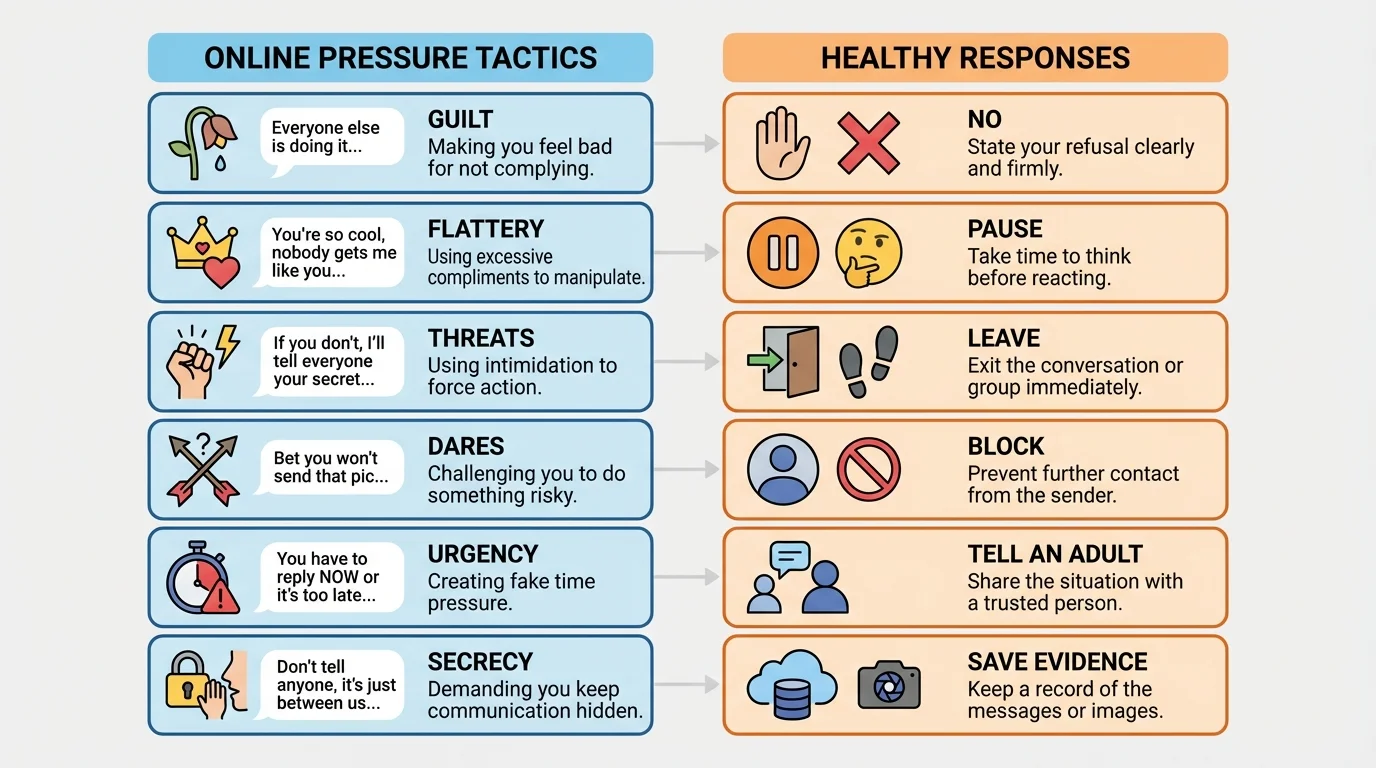
Threats can be direct or indirect. Someone might threaten to stop being your friend, spread rumors, leak a chat, or embarrass you if you do not cooperate. That is not friendship. That is coercion. Flattery can also be pressure if it is used to get something from you: "You're so mature, prove it."
Coercion means pressuring, forcing, or threatening someone to make them do something. Consent is not real if a person feels scared, trapped, guilty, or worn down. "Fine" after repeated pressure is not enthusiastic permission.
You may also feel peer pressure in group spaces. Even online, people can make you feel like you have to copy the group to fit in. Real confidence means you can choose not to join behavior that is unsafe, unkind, or invasive.
| Pressure tactic | What it sounds like | Healthier response |
|---|---|---|
| Guilt | "If you cared, you would do it." | "Caring about someone does not mean ignoring my boundary." |
| Urgency | "Reply right now." | "I do not make rushed decisions online." |
| Threat | "I'll expose you if you don't." | Save evidence, stop replying, block, and tell a trusted adult. |
| Flattery | "You're brave enough to send it." | "Being smart is more important than proving something." |
| Group pressure | "Everyone else is doing it." | "I'm not everyone else." |
Table 1. Common online pressure tactics and safer ways to respond.
Later, when you notice the same patterns in a game chat, social app, or text thread, the categories in [Figure 3] help you name what is happening instead of getting pulled into it.
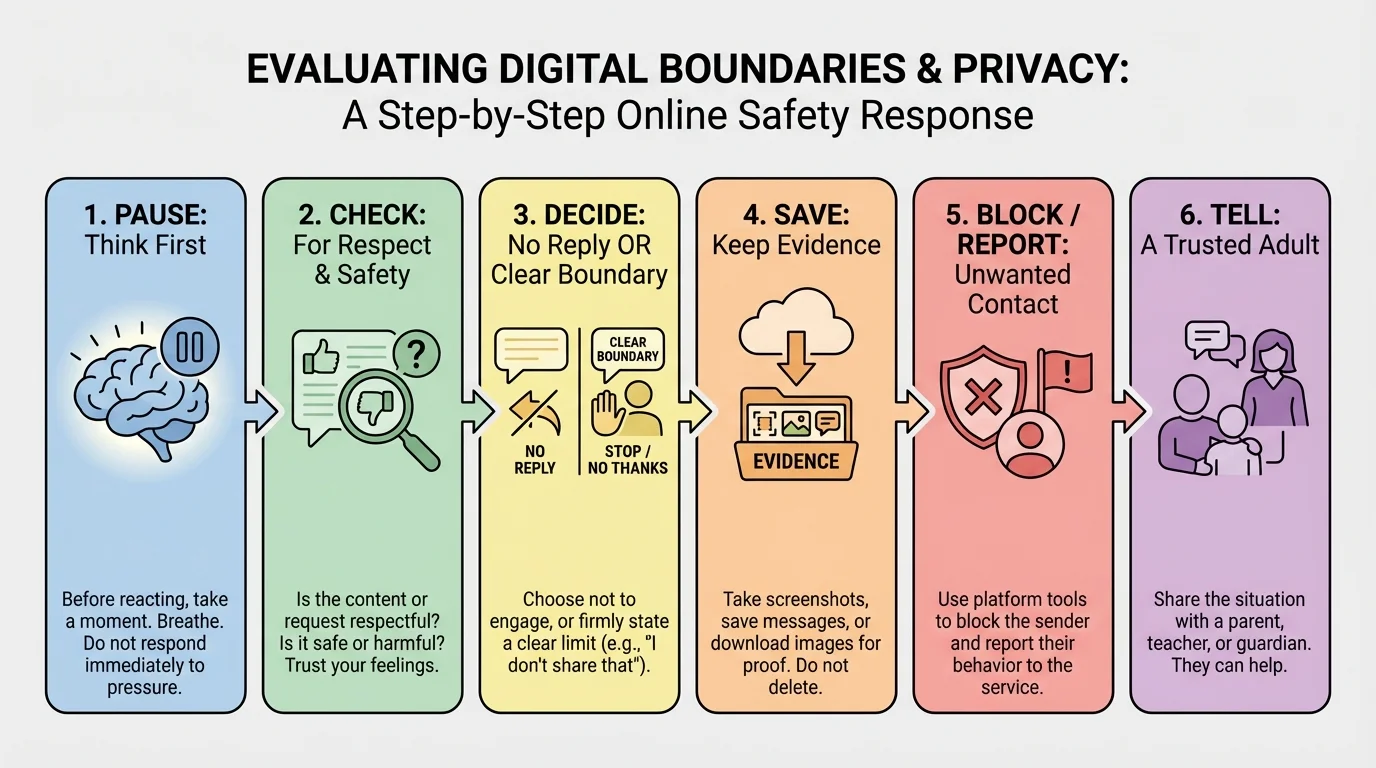
When something online feels wrong, you do not need a perfect response. You need a safe one. A simple pause-check-decide process, shown in [Figure 4], can help you slow down and make a smarter choice instead of reacting under pressure.
Pause. Do not answer right away. Fast replies often help the other person keep control of the situation. Take a breath. Put your device down for a minute if needed.
Check. Ask yourself: Is this respectful? Is it safe? Is it private? Am I being pressured? What might happen if this is saved or shared? If you feel confused or uneasy, treat that as important information.
Decide. Choose the action that protects you best. That could mean not replying, saying no, taking a screenshot for evidence, leaving the chat, blocking the person, adjusting privacy settings, or telling a trusted adult.
You can also use short scripts. Try: "No, I'm not sharing that." "Do not send me that again." "I said no." "That's private." "I'm leaving this chat." "Do not post that picture of me." Clear language is powerful because it leaves less room for confusion.
Example: Responding to pressure for a photo
Someone messages, "If you trust me, send me a private picture. I won't show anyone."
Step 1: Recognize the pressure.
The message uses trust to push for something personal. That is a warning sign.
Step 2: Set the boundary.
You could reply, "No. Do not ask me for that again."
Step 3: Protect your safety.
If they keep pressuring you, stop replying, save the messages, block them, and tell a trusted adult.
If someone shares your image or messages without permission, save proof if it is safe to do so. Then get help. You do not have to solve it alone. A trusted adult can help you report the account, contact the platform, and support you emotionally. That matters because digital harm can feel very personal and very stressful.
The steps in [Figure 4] also work when you are tempted to join drama. Pausing is not only for self-protection from others; it also helps you avoid becoming the person who forwards, posts, or pressures.
Strong boundaries are easier to keep when you build habits ahead of time. Set your accounts to the most private settings that still work for you. Review who can contact you, tag you, see your posts, or add you to group chats. Privacy settings are not perfect, but they are useful tools.
Use unique passwords and do not share them with friends. Even if you trust someone today, friendships can change. Your account is part of your private space. Protecting it is a basic digital boundary.
Choose a few trusted adults you can go to if something goes wrong online. This might be a parent, caregiver, older sibling, mentor, coach, or community leader. Deciding this before a problem happens makes it easier to ask for help later.
Respect online still counts as respect. If behavior would feel wrong, cruel, invasive, or unsafe in person, it is still wrong, cruel, invasive, or unsafe in a digital space.
Create your own personal rules. For example: "I do not post when upset." "I ask before sharing someone else's photo." "I never share passwords." "I do not respond to pressure immediately." "If something feels off, I check with a trusted adult." Personal rules can make hard moments easier because you have already decided what matters to you.
Scenario one: A friend posts a funny picture of you from a video call without asking. A healthy response is: "Please take that down. I didn't agree to have that posted." If they apologize and remove it, that shows respect. If they refuse and mock your feelings, that shows a boundary problem.
Scenario two: A group chat starts making fun of someone's appearance and people keep adding screenshots from that person's account. Joining in may feel easier in the moment, but it turns you into part of the harm. A better choice is to stop responding, leave the chat, and avoid sharing the screenshots.
Scenario three: Someone you know online keeps asking where you live and what times you are home. Even if they seem nice, that is too much personal information. You can say, "I do not share that," then stop replying if needed.
Example: Choosing the safer action
A person in a gaming chat says, "Send me your phone number or you can't join our private server."
Step 1: Notice the boundary.
Your phone number is personal information. You are not required to give it to belong.
Step 2: Evaluate the pressure.
The message tries to make access conditional: give private info or be left out.
Step 3: Decide on safety.
You can decline, leave the chat, or ask whether there is another way to join that does not involve sharing personal information.
Healthy online relationships feel respectful, not pushy. You should feel free to say no, ask questions, take time, and protect your privacy. If a person keeps trying to cross your limits, believe what their behavior is showing you.
"A boundary is not a wall to keep everyone out. It is a line that protects what matters."
Every time you pause before sending, ask before posting, refuse pressure, or protect someone else's privacy, you are building digital maturity. That does not mean being perfect. It means making thoughtful choices that protect people, including yourself.
