One missing signature can block a sports registration, delay an appointment, cancel a trip, or keep you from joining something you were excited about. That may sound unfair, but it is a real part of life. A lot of adult life runs on forms. The good news is that this is a skill you can learn early, and once you do, you will save yourself a lot of stress.
Paperwork is any document you need to complete, sign, return, upload, or keep for a service, activity, event, or application. It may be on paper, on a website, in an app, or attached to an email.
When you handle forms on time, people see you as responsible. More importantly, your plans stay on track. If you finish a permission form before the deadline, you can attend the event. If you submit an application correctly, your name gets considered. If you complete a service form, the service can begin without delays.
When forms are late, incomplete, or inaccurate, the consequences are frustrating. You might miss a deadline, lose a spot, have to redo the entire form, or need an adult to rush around fixing the problem. Paperwork may seem boring, but it often controls access to things you care about.
"Small responsibilities handled well lead to bigger opportunities later."
This skill is not about having perfect handwriting or memorizing fancy rules. It is about noticing details, following directions, and using a system that helps you finish what you start.
You may already have seen forms for clubs, camps, sports teams, volunteer projects, tutoring programs, library cards, doctor visits, internet accounts, contests, and community events. Some forms ask for simple information, and some require a parent or guardian to complete part of them.
A application is a form used to ask for acceptance into something, such as a program, activity, or job opportunity. A permission form gives approval for you to participate in something. Basic service paperwork is used to start, change, or confirm a service, such as setting up an appointment, joining a class, registering for an account, or confirming emergency contact information.
Some forms are short. Others have several pages. Some are due once. Others must be updated every year. That is why it helps to treat every form like it matters, even when it seems simple.
Deadline means the latest time or date something can be submitted.
Required field means a question or box that must be completed before the form is accepted.
Submission means the act of turning in or sending a finished form.
If you learn to spot what kind of form you are dealing with, you can immediately know what to check: instructions, due date, signatures, and any extra documents.
Most forms follow a pattern, as [Figure 1] shows. Once you know the common parts, forms stop feeling confusing. You begin to recognize where your name goes, where emergency contacts go, where checkboxes matter, and where a signature is needed.
A lot of forms include basic personal information: your name, birth date, address, phone number, email, and sometimes a parent or guardian's contact details. Others may ask for medical information, allergies, pickup permissions, or special instructions. Always read the top of the page or screen first because that is usually where the instructions and due date appear.
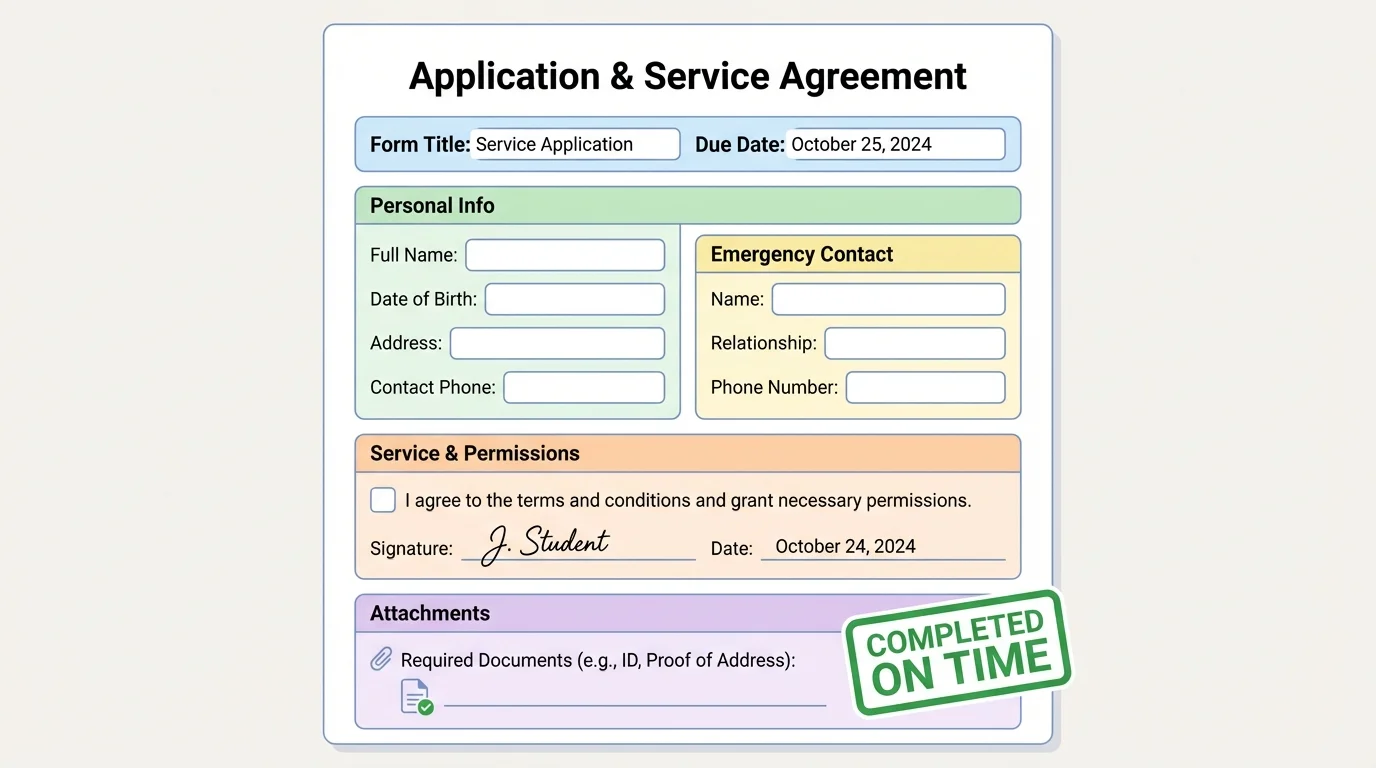
Pay close attention to signature lines and dates. A form can be fully filled out but still be unusable if the correct person did not sign it. Some forms need your signature. Some need a parent or guardian's signature. Some need both. If a date is required, write the current date clearly and in the requested format.
Watch for instructions like print clearly, use black ink, attach a copy, upload as PDF, or complete all sections. Those are not extra suggestions. They are part of the task.
Also notice boxes that ask you to check one option. If the form says choose one and you mark two, that can create confusion. If a question does not apply to you, do not guess. Some forms allow you to write N/A, which means "not applicable." That shows you did not simply skip the question.
Many online forms will not accept your submission if even one required field is left blank. On paper forms, though, the missing field may not be noticed until much later, which can delay everything.
Later, when you review your work, think back to the labeled layout in [Figure 1]. It reminds you to check every major part instead of only the first page or the questions that seem easiest.
A repeatable system makes paperwork much easier, and [Figure 2] lays out a reliable order to follow. You do not need to rely on memory if you use the same steps every time.
Here is a practical system you can use for almost any form, whether it is paper or digital.
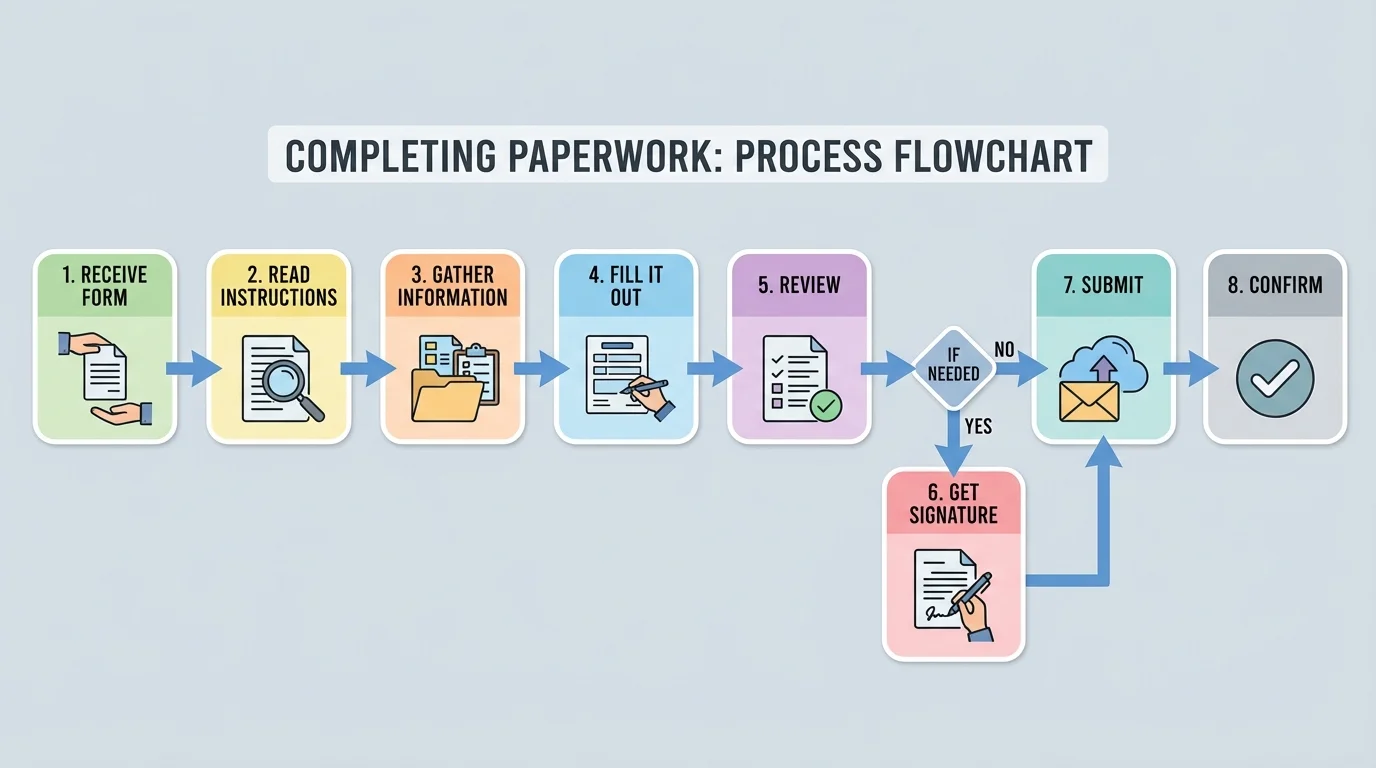
Step 1: Read the whole form first. Do not start writing right away. Scan the instructions, due date, and any note about signatures, attachments, or uploads.
Step 2: Gather what you need. This could include contact information, insurance details, an emergency phone number, a document to upload, or a parent's signature. Forms feel harder when you start before you have the needed information.
Step 3: Fill it out carefully. Write neatly or type slowly enough to avoid mistakes. Double-check spelling in names, email addresses, and dates.
Step 4: Review every section. Look for blanks, unchecked boxes, or missing pages. Make sure all required fields are complete.
Step 5: Get help or a signature early. Do not wait until the last hour before the deadline to ask an adult to review or sign something.
Step 6: Submit it the correct way. That might mean handing it to an event organizer, uploading it online, emailing it, or mailing it.
Step 7: Confirm it was received. If it is digital, look for a confirmation message or email. If it is paper, ask politely whether anything else is needed.
Example: Using the system for a community art workshop form
Step 1: You receive a signup form that is due in 3 days. You read the whole thing and notice it needs an emergency contact and a parent signature.
Step 2: You ask for the emergency phone number before dinner instead of at bedtime, and you place the form where your parent will see it.
Step 3: You fill in your name, age, allergies, and contact details neatly.
Step 4: You review the form and find one missed checkbox.
Step 5: You get the signature that evening and submit the form the next morning.
The result is simple: no last-minute rush, no missed workshop, and no stress.
If you keep using the same process, the flow in [Figure 2] becomes a habit rather than something you have to think hard about each time.
Most form problems are not caused by big errors. They usually come from small details that were skipped. These are some of the most common mistakes: forgetting a signature, missing the deadline, leaving a required field blank, entering the wrong phone number, using an old address, uploading the wrong file, or assuming someone else handled it.
Another common mistake is rushing. If you try to finish paperwork while distracted by a game, a video, or several open tabs, your brain may miss simple details. Give the form your full attention for a short time. Even 10 focused minutes can work better than 30 distracted minutes.
It also helps to check whether the form asks for attachments. An attachment is an extra file or document sent with the form, such as proof of identity, a medical note, or a photo. If the attachment is missing, the form may be incomplete even if every question is answered.
| Common mistake | What can happen | Better move |
|---|---|---|
| Missing signature | Form is rejected or delayed | Check signature lines before submission |
| Late submission | You miss the event or lose your spot | Set a reminder as soon as you get the form |
| Wrong contact info | People cannot reach you in an emergency | Read phone numbers and emails twice |
| Unreadable writing | Staff may enter incorrect information | Print clearly or type if possible |
| Missing attachment | Application cannot be processed | Review any document checklist |
Table 1. Common paperwork mistakes, possible consequences, and simple ways to prevent them.
If you make a mistake, fix it calmly. Do not hide it or ignore it. Contact the person or organization, explain clearly, and ask what to do next. Solving a mistake quickly is part of being responsible too.
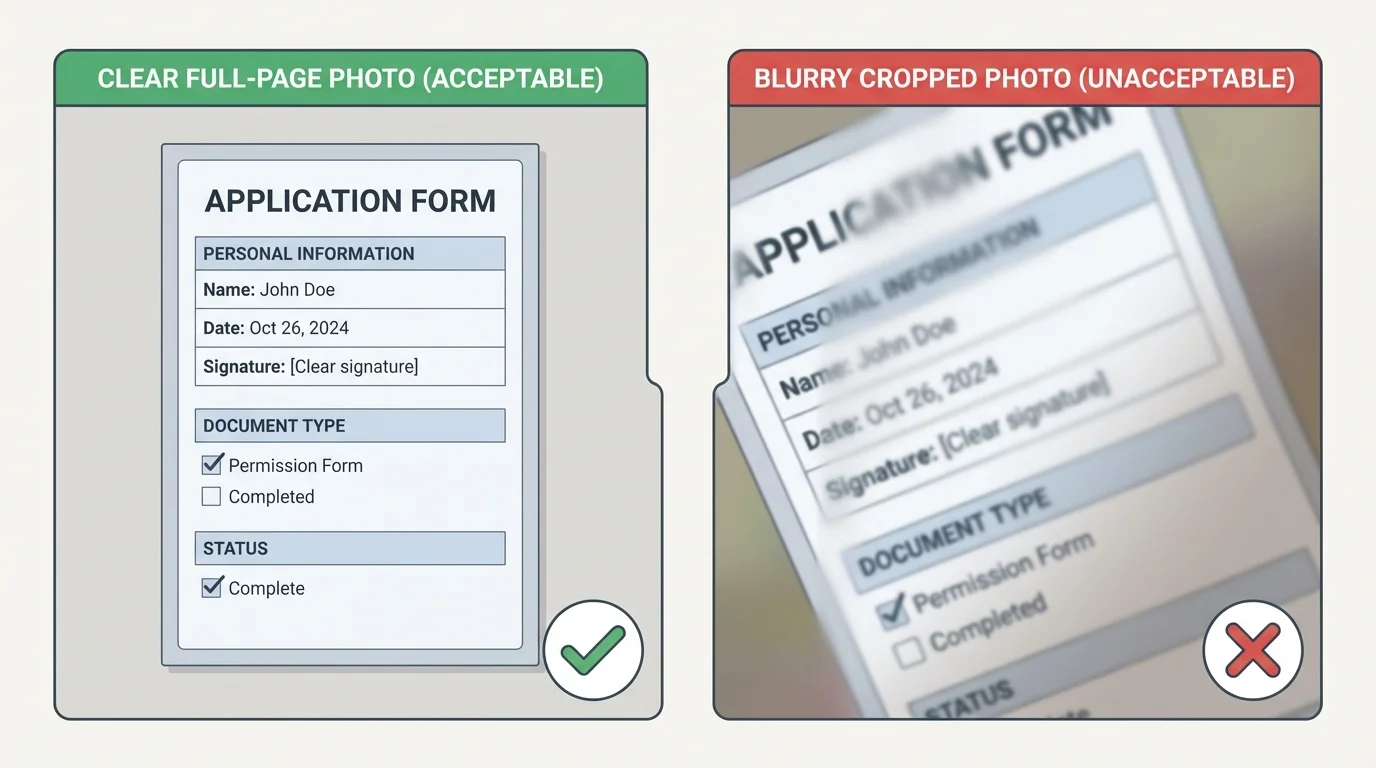
Many forms are now completed online. That can be faster, but it creates new ways to make mistakes. Readable uploads matter, as [Figure 3] demonstrates, because a blurry or cropped image can make your form useless.
If you are taking a picture of a paper form, place the paper on a flat surface in good light. Make sure the full page is visible. Avoid shadows from your hand or phone. Check that words are readable before you send the file.
Use simple file names when you upload documents. A file named camp_permission_form_may is much better than stuff123. Clear names help you and others find the right document later.
Pay attention to file type instructions. A form may ask for a photo, PDF, or screenshot. If it says PDF and you send something else, the system may not accept it. Also check your email address carefully. One wrong letter can send a form nowhere.
Protect your privacy. Do not share forms that include addresses, phone numbers, medical information, or account details with people who do not need them. If you use a shared computer, sign out after submitting anything personal.
Digital paperwork is still real paperwork. Because a form is online, it may feel less serious than a paper copy. But the same rules still apply: read carefully, complete every required field, review before sending, and save proof that you submitted it.
When you compare your upload habits to the good example in [Figure 3], it becomes easier to catch problems before they cause delays.
You do not need to understand every form by yourself. In fact, knowing when to ask for help is a smart part of the process. If a question seems confusing, or if the form asks for information you do not know, pause and ask.
You might ask a parent or guardian for contact details, a coach for deadline information, a program leader for instructions, or a service office for help with a section that is unclear. If you email someone, be polite and specific. For example: Hello, I am completing the registration form for the Saturday class. I am not sure what to enter in the emergency contact section. Could you please clarify?
When you ask early, people usually have time to help. When you ask five minutes before the deadline, the situation becomes much harder. A big part of being dependable is giving yourself enough time to solve problems.
You already use similar skills in other parts of life: following instructions, checking details, meeting due dates, and keeping track of important information. Paperwork is another place where those habits matter.
It is also okay if a form includes words you do not know. Look for explanations on the page, ask a trusted adult, or contact the organization. Guessing is usually worse than asking.
Here are a few realistic situations where paperwork matters.
Example 1: Permission form for a weekend field experience. You receive a digital form on Monday, and it is due Thursday. The form needs your health information and a parent signature. If you wait until Thursday night, you may miss the deadline. If you read it on Monday, gather the information on Tuesday, and submit it Wednesday, the process stays easy.
Example 2: Application for a teen volunteer program. The application asks for your contact information, interests, and availability. It also asks one short question about why you want to join. If you answer carefully and submit before the deadline, your application looks thoughtful and complete. If you rush and leave blanks, the organizer may move on to other applicants.
Example 3: Signing up for a basic service. Suppose you are registering for a library card, art class, recreation account, or tutoring service. The form may ask for your address, age, emergency contact, and consent from a parent or guardian. A mistake in your email or phone number can stop updates and confirmations from reaching you.
Case study: Last-minute stress versus steady planning
Step 1: Jordan gets a sports registration packet and leaves it in a backpack for 5 days.
Step 2: The night before the deadline, Jordan notices a medical section, a payment note, and two signatures are needed.
Step 3: Everyone feels rushed, one box is missed, and the form has to be corrected.
Now compare that to Mia, who reads the packet the day it arrives, puts the deadline in a calendar, gets signatures the next evening, and submits early. Same task, very different stress level.
The difference is usually not intelligence. It is timing, attention, and having a system.
Paperwork gets easier when you stop treating every form like a surprise. A routine helps, and [Figure 4] shows how reminders, calendar planning, and a folder system can work together.
Create one place for important forms. This might be a folder in your room, a section of a family bulletin board, a labeled folder on your device, or a cloud storage folder for uploads and confirmations. If forms always go to the same place, they are less likely to disappear.
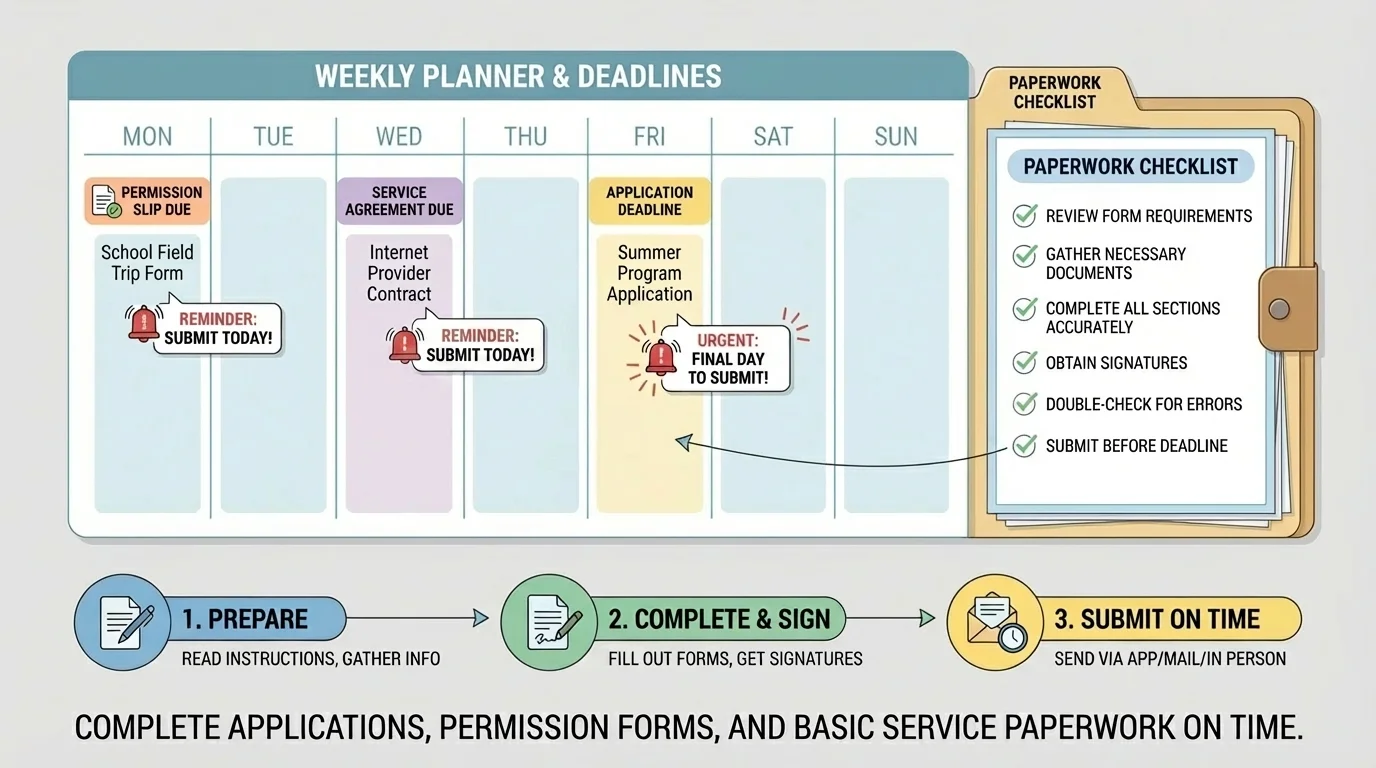
As soon as you receive a form, record the deadline. Put it in a calendar, planner, or reminder app. Set at least two reminders: one for a few days before and one for the day before. If the form is due on the 20th, a smart reminder plan might be the 17th and the 19th.
Break the task into smaller actions. For example: read today, ask questions tomorrow, get signatures the next day, submit after schoolwork is done. Small actions feel easier than one big rushed task.
Keep proof when possible. Save a screenshot of a digital confirmation, a sent email, or a photo of the completed form. If there is ever confusion, you have a record.
Over time, the planner system in [Figure 4] becomes part of your normal routine. That means less stress, fewer forgotten forms, and more control over your own responsibilities.
Try This: The next time you receive any form, do three things within 5 minutes: read the due date, note what information or signatures are needed, and place a reminder in your calendar.
Try This: Create one digital folder and one physical folder labeled Important Forms. Use them for all future paperwork.
Try This: Before submitting a form, ask yourself a final checklist question: Did I read it, complete it, sign it, attach what is needed, and turn it in the right way?
