One screenshot can travel farther than you think. A joke, a password mistake, a rushed reply, or one tap on a fake link can affect your privacy, your friendships, your family, and even your future accounts. That is why digital safety is not just about "being careful." It is about having a plan before something goes wrong.
A personal digital safety plan is a set of choices you make in advance so you know how to protect yourself online, how you secure your accounts, how you handle messages, and what you do if something feels unsafe. The goal is not to make you scared of the internet. The goal is to help you use it with confidence, self-respect, and good judgment.
Because so much of life happens online, your online safety connects to real life. You may use apps for chatting, gaming, streaming, learning, clubs, hobbies, or talking with relatives. You may also sign up for websites, save photos in the cloud, and use shared family devices. Each of those choices creates chances for connection, but also chances for mistakes.
When people do digital safety well, they protect their time, privacy, and peace of mind. When they do it poorly, the consequences can be serious: lost accounts, stolen information, embarrassing posts that spread, trick messages, conflict with friends, or stress that keeps growing because the people involved do not know what to do next.
Anything sent digitally can be copied, forwarded, or screenshotted, even if an app says a message disappears. "Temporary" online does not always mean truly gone.
A good plan helps you respond faster and smarter. Instead of panicking, you already know your next move. That matters because online problems often get worse when people react too quickly, argue back, or try to fix everything alone.
Your plan has several connected parts, as [Figure 1] shows: account protection, privacy settings, posting rules, trusted people, reporting steps, and recovery actions. Think of it like safety gear for your digital life. One piece helps, but several pieces working together protect you much better.
The easiest way to build your plan is to organize it into a few simple questions: What am I protecting? Who can see my information? How will I respond to problems? Who can help me? If you can answer those questions clearly, you already have the foundation of a strong plan.
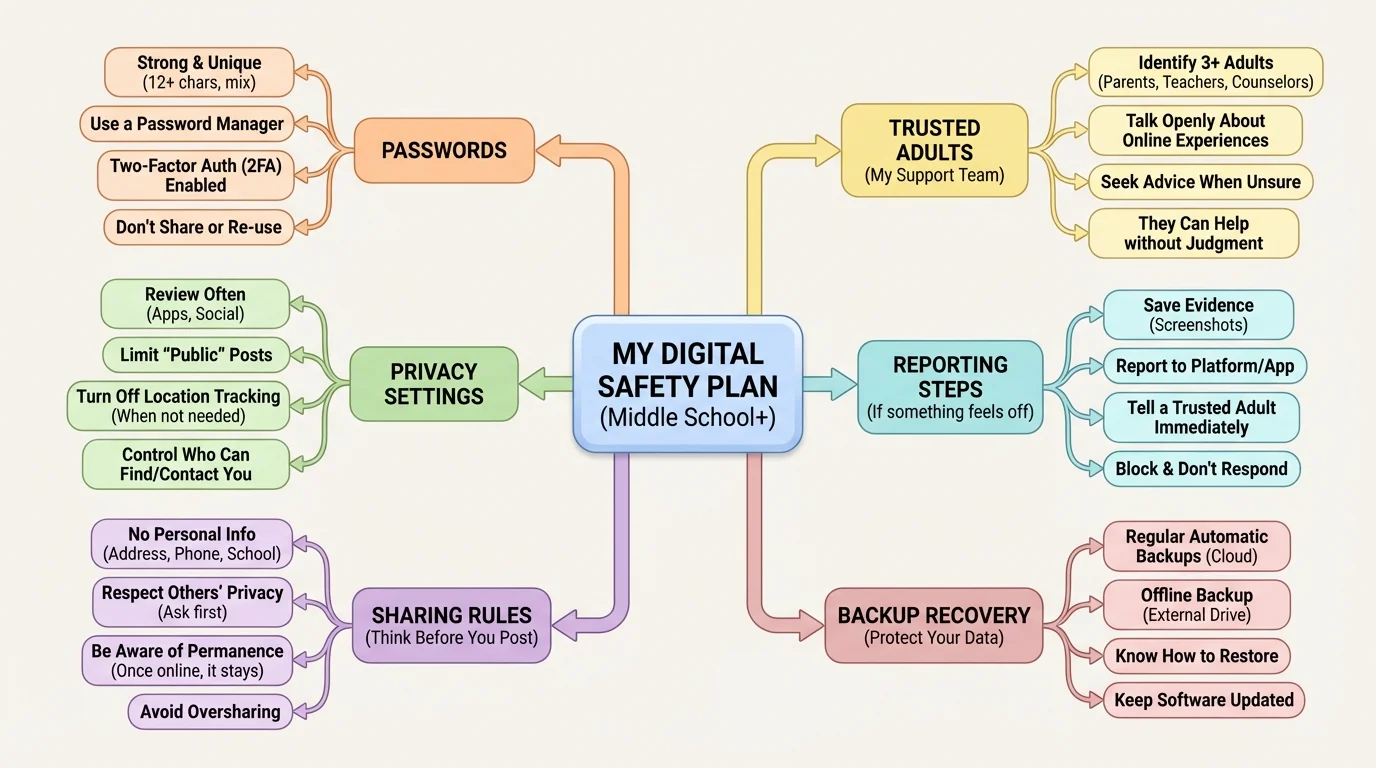
Start by naming what matters most to you. This might include your main email, gaming accounts, photos, chat apps, school platform login, device access, and personal reputation. You cannot protect everything equally at every moment, so focus first on the accounts and information that would cause the biggest problem if they were stolen, misused, or exposed.
Digital footprint is the trail of information connected to what you do online, such as posts, comments, likes, account sign-ups, search history, shared photos, and data collected by apps and websites.
Privacy settings are the controls that let you decide who can view your content, contact you, tag you, or collect your data.
Multi-factor authentication is an extra security step that asks for more than just a password, such as a code sent to a device or an authentication app.
Your plan should also include names of trusted adults or trusted older teens you can contact if something serious happens. That could be a parent, guardian, older sibling, coach, mentor, youth leader, or another responsible adult in your life. Choosing these people before a problem happens makes it much easier to ask for help quickly.
Your digital footprint is bigger than just what you post on purpose. It also includes comments, usernames, old bios, tagged photos, account history, app data, search habits, and sometimes location details. Even if you delete something, another person may have already saved it.
This matters because your online choices can shape how others see you. Friends, teammates, club leaders, and people reviewing future opportunities sometimes notice what people post publicly. You do not need to act perfect online, but you do need to act like your choices matter, because they do.
A helpful rule is pause before you post. Ask yourself: Would I be okay if a family member saw this? Would I be okay if this got shared outside the original group? Am I posting because I truly want to, or because I feel pressured, angry, bored, or left out? A short pause can prevent a long problem.
Real-world posting check
You are about to post a photo from a weekend event with friends.
Step 1: Look for private details.
Check whether the photo shows a house number, street sign, school logo, team schedule, license plate, or another person's face without permission.
Step 2: Check the mood behind the post.
If you are posting to get back at someone, prove something, or show off after an argument, wait. Emotional posts often cause the most regret.
Step 3: Choose the audience.
Use the smallest audience that makes sense. If only close friends need to see it, do not post it publicly.
Step 4: Decide whether skipping the post is the smarter choice.
Sometimes the safest post is no post.
That same thinking applies to profiles and usernames. Choose names that do not reveal too much personal information, such as your full name, birth year, hometown, or team number. A username like SkaterJay2028 reveals less than a username that includes your full name and age.
Your accounts and devices need layers of protection, as [Figure 2] illustrates. One strong password helps, but real protection also includes screen locks, software updates, secure internet use, backups, and careful app choices. Digital safety works best when it is built in, not added at the last second.
Start with passwords. Do not reuse the same password across many accounts. If one site gets hacked, reused passwords make it easier for someone to break into other accounts too. Use long, unique passwords or passphrases. A phrase made of random words is often easier to remember and stronger than a short simple password.
A password manager can securely store strong passwords for you, so you do not need to memorize every single one. If your family does not use one, you can still build safer habits by keeping passwords private, never sharing them with friends, and changing them right away if you think one was exposed.
Turn on multi-factor authentication when an app offers it. That extra step can stop someone from getting in even if they know your password. Also use a screen lock on every device, update apps and operating systems regularly, and back up important photos or files. When you delay updates, you may also delay important security fixes.
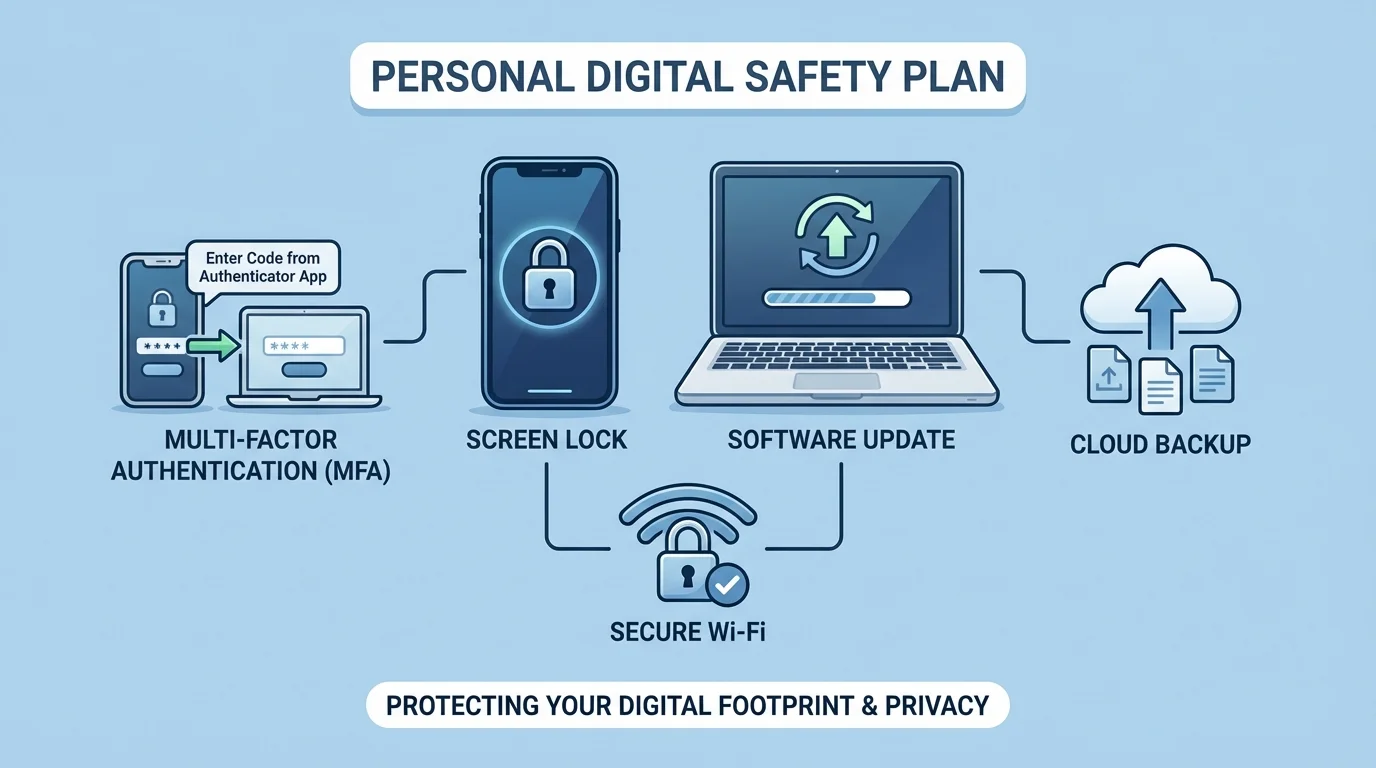
Be careful on public or shared Wi-Fi. If you are on a network you do not know well, avoid signing into important accounts unless necessary. On shared family devices, always log out of accounts you do not want others opening by accident. Small habits like logging out and locking your screen matter more than they seem.
App safety matters too. Before installing an app, check what permissions it wants. Does a flashlight app really need your contacts? Does a game need constant location access? If a permission does not make sense, that is a warning sign. You can review and remove permissions later in your device settings.
Strong security is about layers
If one protection fails, another can still help. For example, if someone guesses a password, a locked phone and multi-factor authentication may still block them. If a device breaks, a backup protects your files. If a post spreads, a trusted adult and saved evidence help you respond. Layers make recovery easier.
Protecting yourself is not one giant move. It is a series of repeatable habits that work together over time.
Privacy settings are not something you set once and forget forever. Apps update, new features appear, and your needs change. Review who can contact you, who can tag you, who can see your posts, and whether your location is being shared.
Location sharing deserves special attention. Posting where you are in real time can reveal more than you expect. It can show your routines, favorite hangouts, sports schedules, and times when no one is home. A safer choice is to share after you leave a place, or not share the location at all.
It is also smart to separate different parts of your life. For example, you might keep one email for important accounts and another for optional sign-ups. You might keep a private account for close friends and avoid accepting follow requests from people you do not actually know. Separation creates fewer openings for problems to spread.
| Situation | Safer choice | Riskier choice |
|---|---|---|
| New app asks for permissions | Allow only what it needs | Tap "allow all" without checking |
| Posting a photo | Check background details and audience | Post publicly right away |
| Location feature | Use only when necessary | Share live location all the time |
| Friend request | Accept only if you truly know the person | Add anyone with mutuals |
Table 1. Common digital situations and the difference between safer and riskier choices.
Privacy is not about hiding who you are. It is about controlling what others can access. You deserve space, boundaries, and the ability to choose what parts of your life stay personal.
Some online problems start with a single message. It might look friendly, urgent, flattering, or dramatic. A stranger may ask personal questions. Someone may pretend to be your age. A scammer may claim there is a problem with your account. A person you know may pressure you to send a photo, share a password, join in bullying, or keep a harmful secret.
A phishing message tries to trick you into giving information, clicking a bad link, or logging into a fake website. These messages often create urgency: "Your account will be locked," "Claim your prize now," or "Verify immediately." Urgency is a tool. It is meant to make you react before you think.
Catfishing is when someone creates a fake identity online to trick others. They may use stolen photos, fake stories, or emotional manipulation to gain trust. If something feels inconsistent, too fast, too secretive, or too dramatic, listen to that feeling.
If a message makes you feel rushed, scared, guilty, or weirdly flattered, slow down. Strong emotions can be warning signs, not proof that the message is real.
You do not owe strangers your attention, your photos, your location, or your personal story. You also do not owe anyone proof that you are "nice" by replying. Blocking, ignoring, and reporting are not rude when someone is crossing a line.
Social pressure can be especially tricky when it comes from people you know. Someone may say, "If you trust me, send it," or "Everyone else is doing it," or "Don't tell anyone." Real trust does not demand risky behavior. Healthy friendships do not require secrecy that makes you feel unsafe.
The best time to decide what you will do in a digital emergency is before one happens. A calm step-by-step response, as [Figure 3] shows, helps you avoid panic and protects evidence if you need help from an adult, a platform, or law enforcement later.
Your response plan should cover at least three situations: suspicious messages, account problems, and harmful social situations such as harassment, threats, or pressure to share private content. Keep the steps simple enough that you can actually remember them.
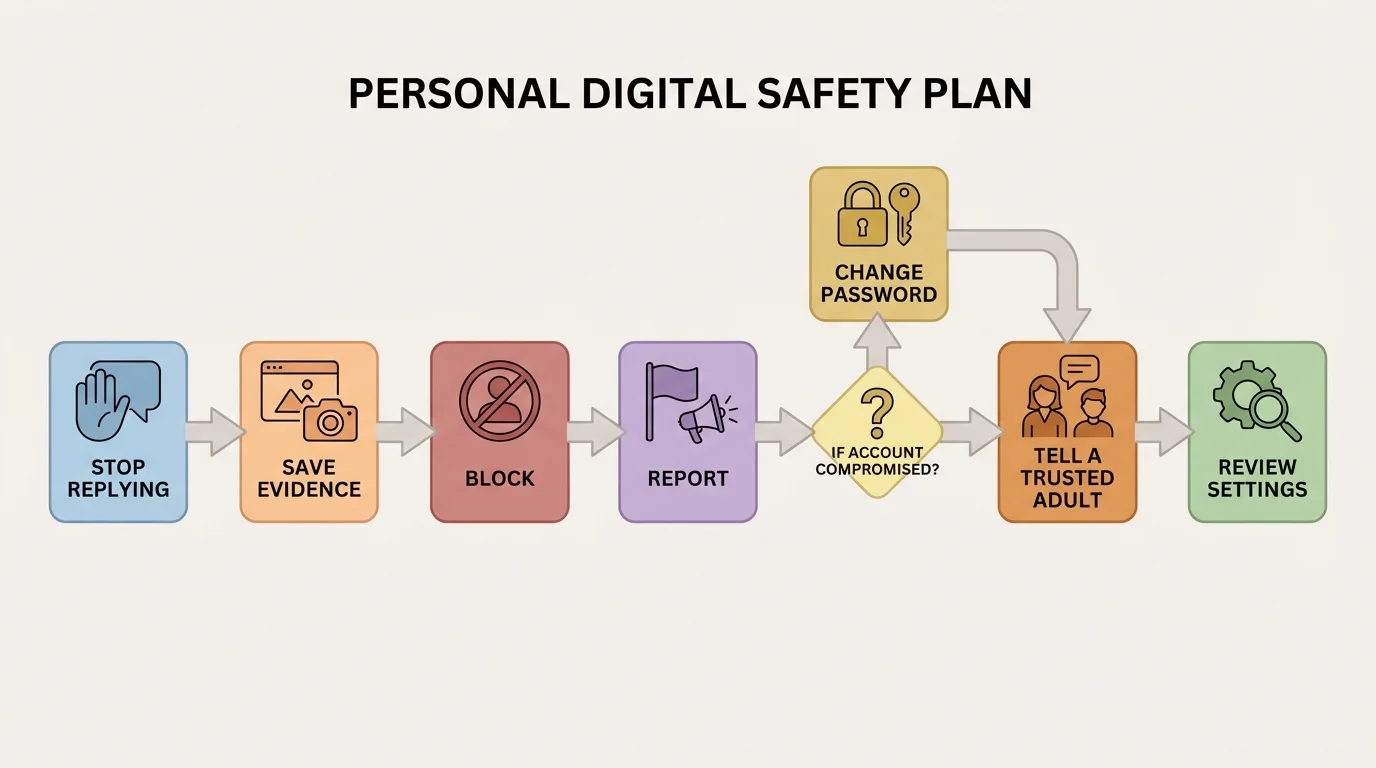
Step 1: Stop and do not engage more than necessary. If a message or post seems unsafe, do not argue, threaten back, or keep chatting to "figure it out." More replies can create more risk.
Step 2: Save evidence. Take screenshots, save usernames, record dates, and note what happened. If the problem disappears later, that record can still help.
Step 3: Block and report through the app or platform. Reporting helps protect you and may help protect others too.
Step 4: Tell a trusted adult. If the situation involves threats, sexual content, blackmail, hacking, or repeated harassment, get help quickly. You do not need to solve serious problems by yourself.
Step 5: Secure your accounts if needed. Change passwords, sign out of other sessions, review connected devices, and turn on stronger security.
Step 6: Review what allowed the problem to happen. Did you click a link, overshare information, or leave a setting too open? This is not about blaming yourself. It is about making your plan stronger next time.
Case study: suspicious login alert
You get a message saying your gaming account will be deleted unless you log in immediately using a link in the message.
Step 1: Do not tap the link.
Urgent messages are common scam tactics.
Step 2: Open the app or website yourself.
Type the real address or use your saved app, instead of using the message link.
Step 3: Check the account directly.
If there is no alert there, the message was likely fake.
Step 4: Change your password if anything seems off.
Then review devices logged in to your account and enable stronger security.
Step 5: Tell a trusted adult if you clicked the link or entered information.
The faster you act, the better your chances of protecting the account.
Later, if you face another suspicious message, the same process still works: stop, save, block, report, tell, secure.
Your digital safety plan should grow with you. The habits you build now will still matter when you are older and using more accounts, handling money online, joining new communities, applying for opportunities, or managing your own devices more independently.
One of the best long-term habits is doing regular safety checkups. Once a month, review your passwords, privacy settings, app permissions, blocked lists, backups, and account recovery options. A short routine check can prevent a big problem later.
Another strong habit is protecting your attention. Not every notification deserves a reply. Not every argument deserves an answer. Not every trend deserves participation. Digital safety is also about managing your time, your emotions, and your energy.
"Pause is a safety skill."
— A useful rule for digital decision-making
As you get older, your plan may include online shopping, banking tools, job applications, or public portfolios of your work. The same basics still apply: protect your accounts, verify before trusting, share carefully, and ask for help early when something feels wrong.
If you want a simple way to remember your plan, use this checklist: Protect your accounts. Protect your information. Protect your boundaries. Protect your future self. That is what digital safety really means.
