You can be fully prepared for a big opportunity and still get stuck because of one missing paper. A school program might ask for an immunization record. A first job might require ID and work forms. A sports league, travel program, or volunteer application might need proof of residence or an emergency contact form. Knowing which documents matter and keeping them organized is one of those quiet life skills that saves time, stress, and missed chances.
Personal documents are records that prove important facts about you. They can confirm your name, age, address, education, health history, work eligibility, or identity. Some documents help you sign up for services. Others help you apply for school programs, jobs, permits, or official identification.
When your papers are organized, everyday tasks become easier. You can fill out forms faster, upload needed files without scrambling, and ask a parent or guardian for help with fewer delays. When documents are disorganized, people often miss deadlines, turn in the wrong version, or accidentally share private information with the wrong person.
Think of documents like tools in a toolbox. You do not carry every tool everywhere, but you should know what each one does and where it belongs. That is especially true as you start doing more things independently online, such as joining activities, applying for opportunities, or preparing for your first job.
Personal documents are important records that prove facts about you, your identity, your education, your health, or your legal status. Official purposes means situations where a government office, employer, school, doctor, or other formal organization needs accurate records from you.
Some personal documents are needed only once in a while. Others get used often. A birth certificate might stay stored safely most of the time, while a student ID or insurance card may be needed more regularly. Part of being organized is knowing which documents are for safe storage, which are to keep handy, and which should also be backed up digitally.
Most important papers fit into a few categories, as [Figure 1] shows: identity documents, education records, employment documents, health records, financial documents, and official records. Some papers fit more than one category. For example, a state ID is useful for jobs, travel, and official forms.
An identity document proves who you are. Common examples include a birth certificate, passport, state ID, school ID, or Social Security card. These are some of the most sensitive records you have, because they connect directly to your legal identity.
Education records show your school history and progress. These might include report cards, transcripts, class schedules, enrollment records, or certificates from completed courses. If you learn online, you may receive many of these through a student portal or email rather than on paper.
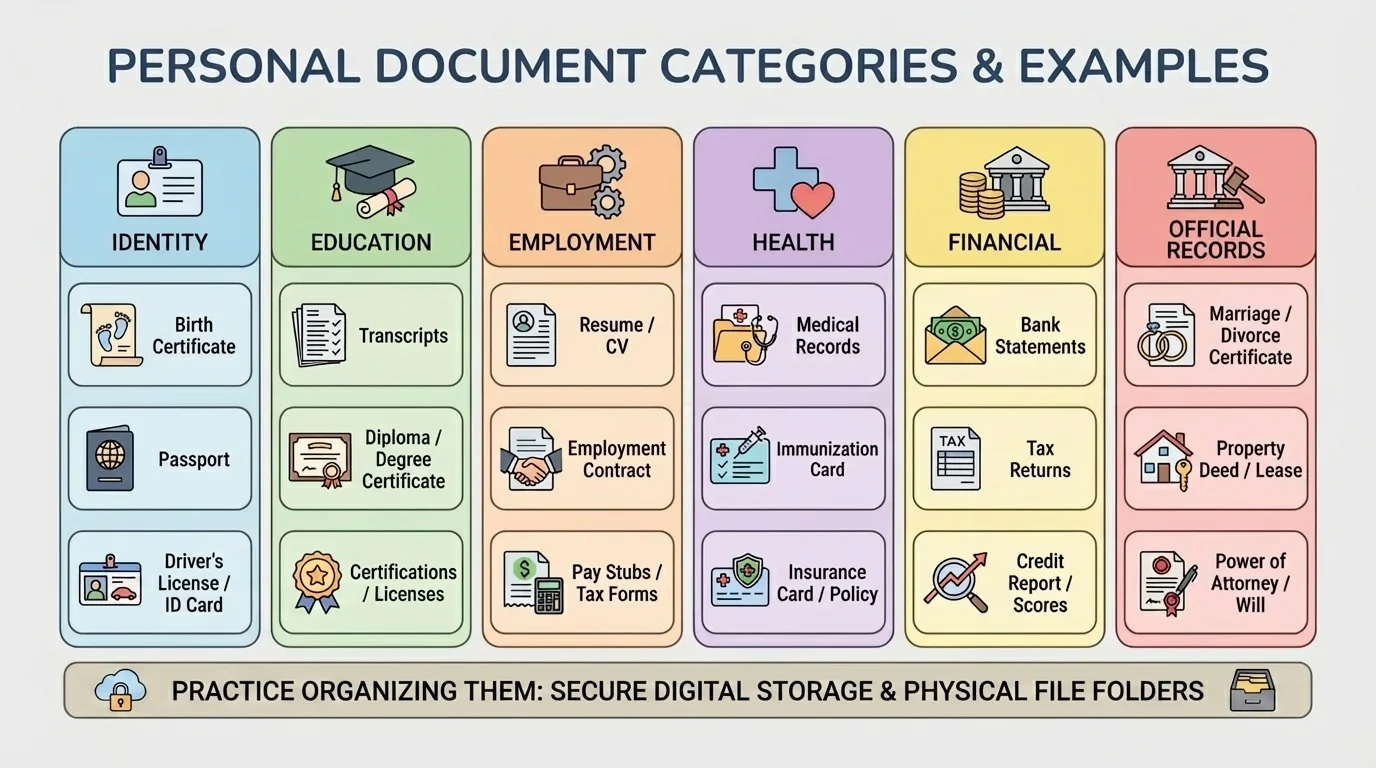
Employment documents are records used to apply for work or complete hiring steps. Examples include a resume, work permit if required in your area, tax forms, direct deposit forms, references, and proof that you can legally work.
Official records are documents used for government, legal, or formal service purposes. These may include a birth certificate, court papers, immigration documents, proof of residence, or health insurance information. They are often needed when applying for an ID, benefits, permits, or certain programs.
Not every student will have every document yet, and that is normal. The goal is not to collect random papers. The goal is to understand what each document is for, where it is stored, and who to ask if you need access to it.
Many adults lose time and money replacing documents they already had because they were stored in random drawers, old email accounts, or mislabeled photo folders. A simple organization system prevents that problem.
It also helps to know that some documents belong mostly to your family household, even when they are about you. For example, a parent or guardian may currently store your original birth certificate or health insurance papers. You still benefit from knowing where they are kept and what they are used for.
Education-related paperwork often appears when you enroll in a program, transfer schools, sign up for sports or clubs outside of school, apply for tutoring, or join a summer course. Even online learners may need records for community classes, testing, certifications, or future high school and college applications.
Common education documents include report cards, transcripts, proof of enrollment, attendance records, course completion certificates, and sometimes standardized test results. Schools or programs may also ask for proof of address, emergency contact forms, and vaccination or immunization records.
A transcript is one of the most important school records because it shows the classes you have completed and the grades you earned. A report card gives a shorter-term snapshot, while a transcript is more like a long-term academic record.
If you are applying for a special program, you may also need a personal statement, recommendation, writing sample, or portfolio. Those are not identity records, but they still count as important application documents and should be stored carefully.
| Document | What It Proves or Shows | When You Might Need It |
|---|---|---|
| Report card | Your recent grades and progress | Program applications, family records |
| Transcript | Your full course and grade history | Transfers, future school applications |
| Proof of enrollment | That you are currently a student | Clubs, discounts, community programs |
| Immunization record | Your required vaccines | Sports, camps, some school programs |
| Proof of address | Where you live | Enrollment, district-based services |
Table 1. Common education documents, what they show, and when they may be needed.
Try This: Ask a parent or guardian where your latest report card, enrollment record, and immunization record are stored. You do not need to move anything yet. Just learn the location and whether there is also a digital copy.
Real-life situation: Joining a community robotics program
You want to join a robotics program that meets online and in a local community center. The application asks for proof of age, proof of enrollment, and an emergency contact form.
Step 1: Match each requirement to a likely document.
Proof of age might be a birth certificate or passport. Proof of enrollment might be a school letter or portal record. Emergency contact information belongs on the form itself.
Step 2: Check whether the program wants originals, copies, or uploads.
Most programs want a copy or secure upload, not your original birth certificate.
Step 3: Save the final application materials together.
Create one folder for the robotics application so the documents and submitted forms stay together.
This saves you from hunting for the same papers again if the program asks a follow-up question.
One smart habit is to keep application documents grouped by purpose. If you apply for a summer course, store the application form, any uploaded files, confirmation email, and acceptance notice in one place instead of scattering them across downloads, screenshots, and messages.
Your first job may be part-time, seasonal, freelance, or volunteer-to-paid later. Even so, employers usually need more than just "I want to work." They need records that help them verify your identity, contact information, and ability to complete hiring paperwork correctly.
Common job-related documents include a resume, reference list, work permit if required by local law, Social Security card, photo ID, and bank information for direct deposit. You may also need certifications, such as babysitting, first aid, or food handling, depending on the job.
A work permit is permission required in some places for teens under a certain age to work. Rules vary by location, so you should check your state or local labor website with a parent or guardian. Not every student needs one, but if your area requires it, not having it can delay your start date.
A resume is a short document that summarizes your skills, experience, achievements, and contact information. At your age, a resume may include volunteer work, pet sitting, neighborhood help, clubs, digital skills, or certifications rather than formal job history.
Employers may also ask for forms related to taxes or payment. You do not need to memorize every form name right now. What matters is understanding that jobs involve paperwork, and accurate documents help you get paid correctly and legally.
Why job paperwork matters
Hiring paperwork is not just "boring adult stuff." It affects whether you can be added to payroll, whether your pay goes to the right account, and whether the employer has the legal information they need. A missing ID or wrong Social Security number can slow everything down.
Try This: Make a draft list called "First Job Folder." Include your resume, reference list, any certificates you earn, and a note reminding you where your ID documents are stored with family help.
It is also important to separate documents by level of sensitivity. A resume is meant to be shared with employers. A Social Security card is much more private. You should not upload highly sensitive records unless the employer uses a trusted hiring system or directly requests them through a secure process.
Official purposes include anything involving government offices, health care providers, travel, insurance, housing, legal matters, or formal applications. These situations often require exact names, dates, addresses, and identification details, so your records must be accurate and current.
Some of the most common official documents are a birth certificate, passport, state ID, Social Security card, health insurance card, medical records, and proof of residence. Proof of residence may include a utility bill, lease document, or official mail addressed to your household, usually under an adult's name if you are a minor.
Proof of residence is evidence showing where you live. It is often needed for school enrollment, district services, sports registration, and government forms. Because many bills are in an adult's name, a parent or guardian usually helps provide this.
A birth certificate proves facts about your birth, including your legal name, date of birth, and place of birth. A passport is used for international travel and also works as a strong form of ID. A state ID can serve as everyday photo identification even if you do not drive.
Healthcare documents matter too. Insurance cards, vaccination records, allergy information, and lists of medications can all be important in emergencies or when joining activities. These may not feel exciting, but they can become urgent very quickly when needed.
"Being organized before you need something is what makes you ready when it matters."
If your information changes, official records may need updating. For example, a move to a new address means your proof of residency documents change. A new phone number means your forms should be updated so people can actually reach you.
Not all versions of a document are equal. An original document is the official paper issued by the organization that created it, such as your birth certificate from a government office. A copy is a photocopy, printed duplicate, or scan. A digital file may be a PDF, image, or portal download.
Originals are usually the most important to protect. They should be stored safely and used only when truly necessary. Many applications only need a copy or scanned upload. Sending an original when a copy would work is risky because originals are harder and sometimes expensive to replace.
A digital backup is a saved electronic copy of an important file in a secure location. Good backups can help if paper documents get damaged, lost, or misplaced. But digital storage must be private and organized, not just dumped into a random camera roll.
Before sharing any file, check what format is requested. Some forms want a PDF. Others allow a clear photo. Make sure names, dates, and signatures are readable. A blurry upload can be treated as missing information.
| Version | Best Use | Main Caution |
|---|---|---|
| Original | Safe long-term storage, rare official use | Can be hard to replace |
| Photocopy | Applications and reference copies | May not be accepted in every case |
| Scan or PDF | Secure uploads and digital storage | Must be clear and stored safely |
| Photo on phone | Quick temporary reference | Easy to lose in clutter or share unsafely |
Table 2. Comparison of originals, copies, scans, and phone photos for personal documents.
One easy rule: if a document is difficult to replace, protect the original and create a secure backup. If a document is used often, keep an accessible copy while leaving the original in a safer place.
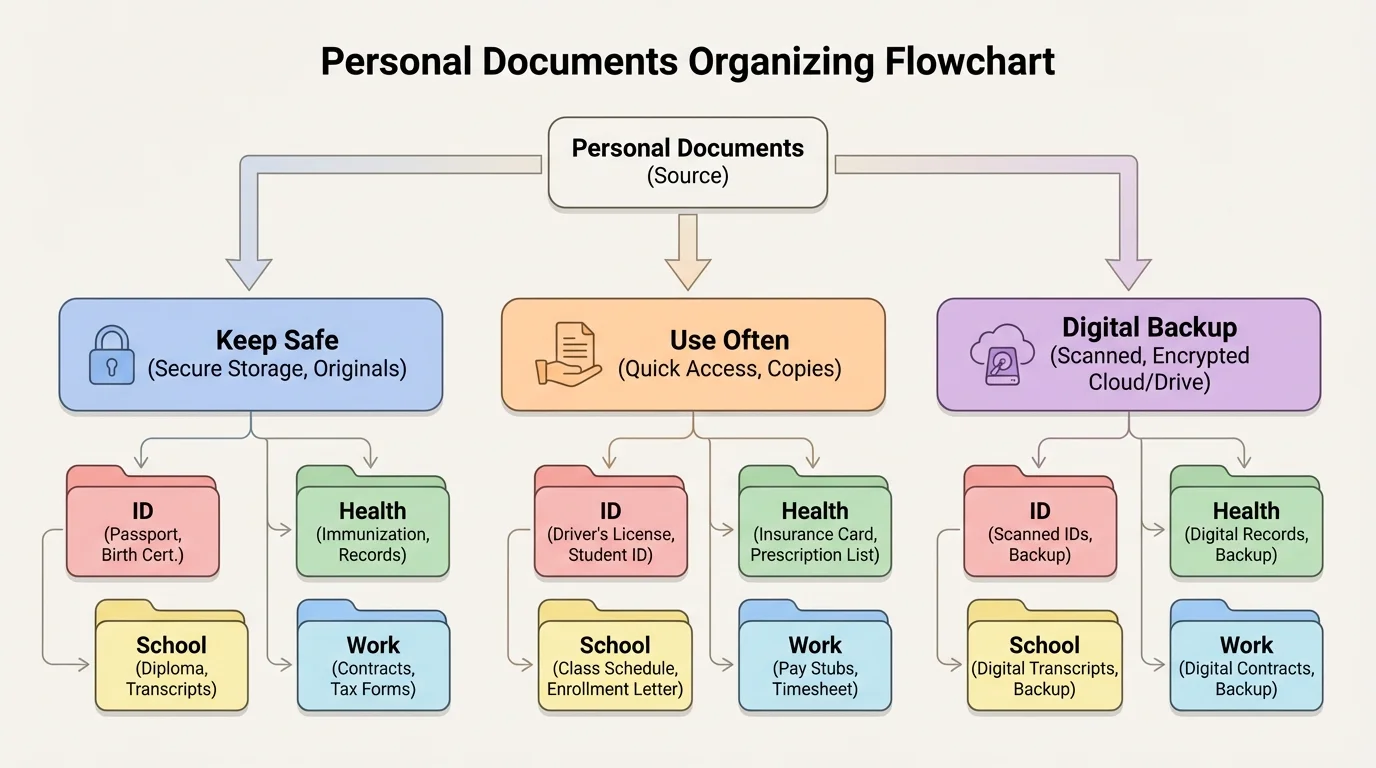
A simple system works better than a fancy system you never use. As [Figure 2] illustrates, the easiest method is to sort documents by purpose first, then by frequency of use. That keeps school, work, health, and ID papers from mixing together.
Step 1: Gather your documents. Look in folders, drawers, backpacks, downloads, emails, and school portals. Ask a parent or guardian which important originals are stored in a safe place.
Step 2: Sort them into categories. Start with broad folders such as ID, Education, Employment, Health, and Official. If you have many files, add subfolders like "Applications," "Certificates," or "Insurance."
Step 3: Separate by storage type. Create one paper system and one digital system. For paper, use labeled folders or an accordion file. For digital files, use clearly named folders on a secure device or family-approved cloud storage.
Step 4: Name files clearly. Good file names are specific, such as "Immunization_Record_2025.pdf" or "Resume_Alex_Rivera.pdf." Bad file names are vague, such as "document2" or "IMG_4819."
Step 5: Mark what is current. Some records expire or change. IDs, insurance cards, resumes, permits, and proof of address may need updates. Add a note or checklist so you know when to replace old versions.
Step 6: Decide what stays private. Keep sensitive documents in a protected location. If you use digital files, use passwords, trusted storage, and family guidance for anything related to identity or legal records.
Starter folder setup
A grade 8 student can begin with a small system and expand it later.
Step 1: Paper folders
Create folders labeled ID, School, Health, Jobs, and Forms to Submit.
Step 2: Digital folders
Match the same folder names on your device or cloud storage so paper and digital systems feel familiar.
Step 3: Add one update day each month
Spend a few minutes checking whether anything new should be filed or deleted.
This is simple enough to keep using, which is the real goal.
Later, when you apply for more programs or jobs, the same system still works. You just add subfolders instead of starting from scratch.
Try This: Create one digital folder today named "Important Documents." Inside it, make subfolders for School, Health, ID, and Jobs. Even if they are empty right now, you are building the system before the rush happens.
Documents often contain private details like your full name, birth date, address, account information, or identification numbers. Sharing a document through a secure upload portal is very different from sending it through a random message, public post, or suspicious link.
As [Figure 3] shows, be careful about where you store and send sensitive files. A school portal, employer hiring website, healthcare portal, or verified email from a trusted organization may be appropriate. A stranger asking through social media messages is not.
Red flags include pressure to "send it now," requests for highly sensitive information before you even know the organization is real, links that look strange, and messages full of spelling errors or fake urgency. Another red flag is being asked to post ID documents publicly or send them to multiple unknown people.
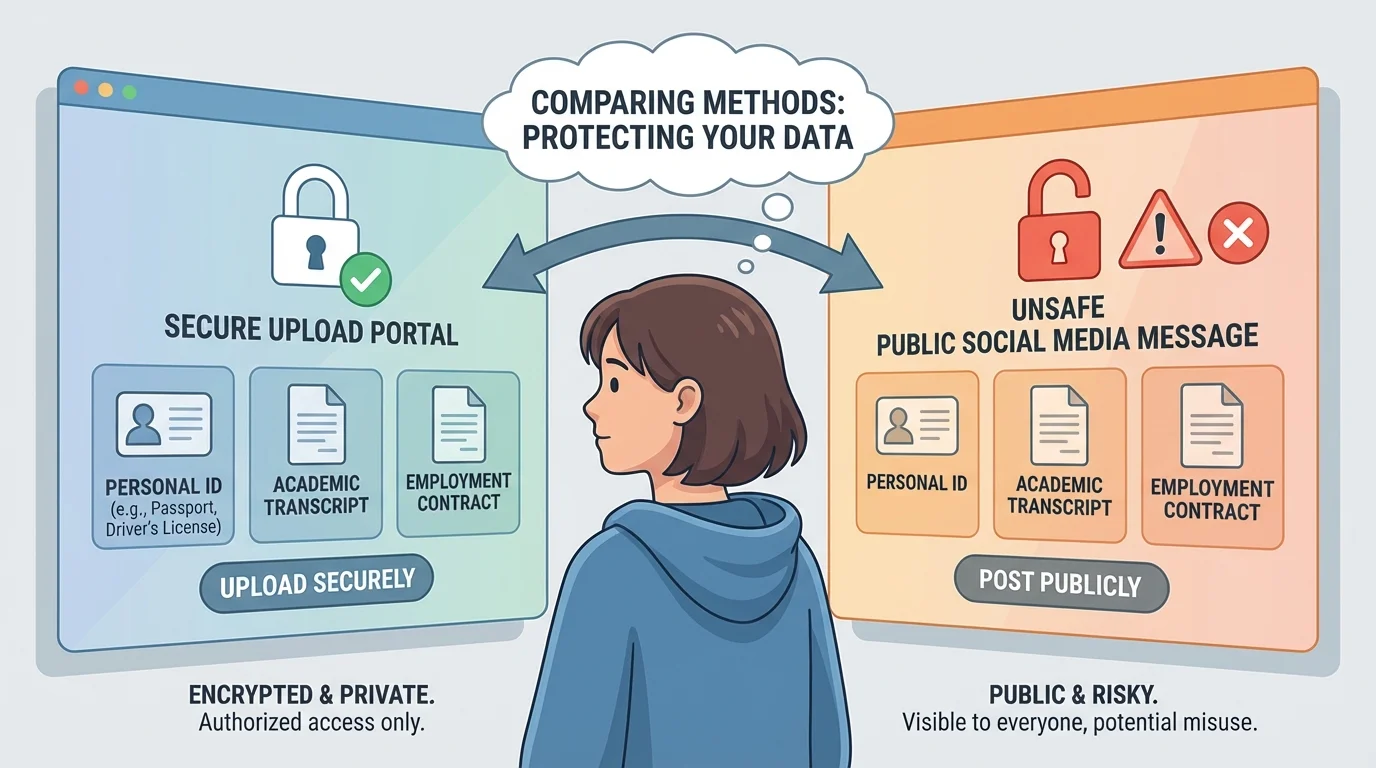
If you are unsure whether a request is real, pause. Verify the source by checking the official website yourself, not by clicking the message link. Ask a trusted adult before sending documents that contain identity details.
Passwords matter too. If you store digital files, use secure passwords and avoid sharing accounts casually. Logging out on shared devices is another basic habit that protects your information.
Privacy rule to remember: Just because someone asks for a document does not mean they should get it. First ask: Who are they? Why do they need it? Is this the official place to send it? Is a less sensitive document enough?
A good example is a resume versus a Social Security card. A resume is designed to be shared with possible employers. A Social Security card should be shared only when truly necessary and through a trusted, official process. The difference matters.
Later, when you upload files for a job or program, these safe-sharing habits help you protect yourself while still getting things done.
You do not need to wait until adulthood to get organized. You can begin building a starter document kit now with family support. This means knowing what documents exist, where they are stored, and which copies you may need access to.
Your starter kit might include a copy of your student information, latest report card, transcript if available, immunization record, resume draft, certificate copies, emergency contacts, and a note listing where original identity documents are stored. If your family agrees, you might also keep secure digital backups of selected records.
It is helpful to make a "documents I may need soon" checklist. That list could include items for summer programs, part-time jobs, sports registration, travel, or high school planning. Once you know the likely uses, organizing feels much more purposeful.
Being organized does not mean doing everything alone. It means being aware, responsible, and ready to work with the adults who help manage important records. That skill makes future applications, deadlines, and responsibilities much easier.
