A stolen password can cause more damage in minutes than a lost $20 bill. A criminal who gets access to one banking app, one payment account, or one piece of personal information can sometimes unlock far more: online purchases, drained accounts, fake loans, or even a damaged credit history. Many teenagers think identity theft is only an adult problem, but students use debit cards, payment apps, online shopping accounts, school email addresses, and mobile devices every day. That makes this topic very real.
Protecting personal financial data is part of risk management. Risk management means taking steps to lower the chance of harm and to reduce the impact if harm happens. In personal finance, that includes protecting income, property, health, and your identity. Identity fraud can lead to lost money, wasted time, stress, and long-term problems that affect future goals such as renting an apartment, getting a car loan, or opening a credit card.
Your personal financial data includes any information that can be used to access your money, pretend to be you, or open accounts in your name. Criminals do not always need everything. Sometimes one weak point is enough. A login to a shopping site might reveal saved card details. A stolen phone without a strong lock screen can expose banking apps, email, and texted verification codes. A photo of a debit card can be used to make unauthorized purchases before the owner notices.
Fraud is not always dramatic at first. It may begin with a tiny test purchase, such as $1 or $2, to see if a card works. It may look like a fake package delivery text that asks you to click a link. It may arrive as a message claiming your account is "locked" and demanding immediate action. Because of that, preventing fraud is not only about one big decision. It is about daily habits.
Identity theft is when someone uses another person's personal information without permission, usually for financial gain or to commit fraud. Fraud is intentional deception used to steal money, property, information, or access. Personal financial data includes account numbers, card details, login information, identification numbers, billing records, and other information tied to a person's financial life.
Criminals may target bank accounts, payment apps, online stores, tax records, medical records, or social media accounts. These targets seem different, but they are connected. If a criminal gets into one account, they often try to reset passwords for others. Email is especially important because many password resets go there first.
Not all identity theft looks the same. Account takeover happens when someone gets into an existing account, such as a bank or payment app. New account fraud happens when someone uses stolen information to open a new credit card, loan, or service account. There is also tax fraud, medical identity theft, and employment fraud. Even if you are still in high school, your data can be valuable because younger people may check their credit less often, giving criminals more time.
One useful way to think about protection is to ask two questions: What could a criminal use? and How would I notice quickly? The first question is about safeguarding. The second is about monitoring. Good personal finance habits require both.
The first step is simple but powerful: know exactly what counts as sensitive information. This includes your bank account number, debit or credit card number, card security code, account usernames, passwords, one-time verification codes, Social Security number, date of birth, driver's license number, and answers to security questions. It also includes less obvious information, such as your email login, phone number connected to accounts, and saved payment details in shopping apps.
Some information is sensitive because it gives direct access to money. Other information is sensitive because it helps a criminal impersonate you. For example, your school email password might not seem "financial," but if your banking app sends password reset links to that email, then the email account becomes part of your financial security.
Students should also understand that devices store financial data. A smartphone may contain banking apps, payment apps, notes with passwords, photos of cards, and messages containing login codes. A laptop may save browser passwords or autofill forms. If the device is weakly protected, the data on it is weakly protected too.
Many fraud cases begin with information people share casually, such as a birthday, address, pet name, or school mascot. Those details can help criminals guess passwords or answer security questions.
A smart habit is to separate information into levels: information that is public, information that is private, and information that is highly sensitive. Highly sensitive information should never be shared through random links, unsecured messages, or public computers.
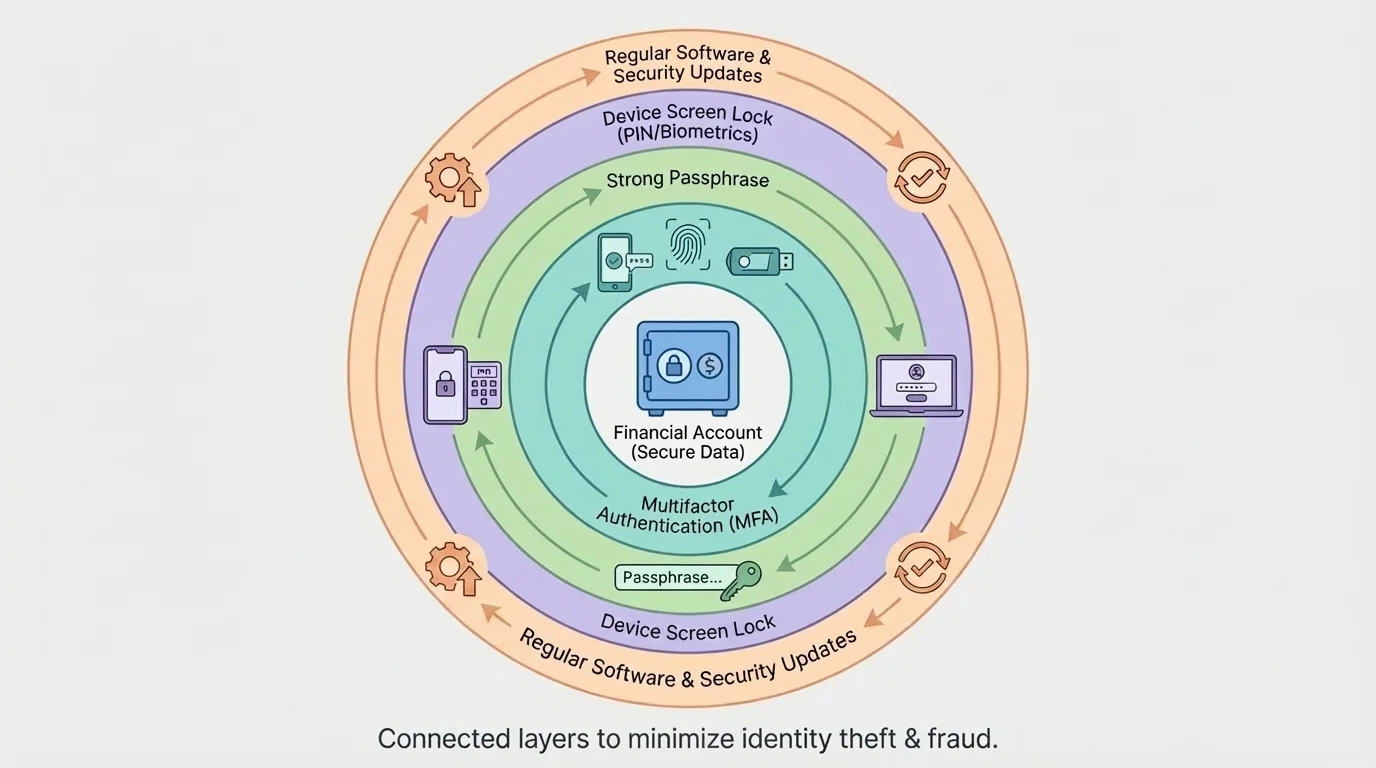
Digital security works best in layers, as [Figure 1] illustrates. One strong password helps, but a safer system combines strong passwords, device locks, software updates, and extra verification. If one layer fails, another layer may still stop the criminal.
Use long, unique passwords or passphrases for financial accounts and the email account connected to them. A passphrase is a longer password made from words or a memorable sentence pattern. Length and uniqueness matter more than making something merely complicated. Reusing the same password across accounts is risky because if one site is breached, criminals may try that same login everywhere else.
Turn on multifactor authentication whenever possible. Multifactor authentication, often shortened to MFA, requires more than one kind of proof before access is granted, such as a password plus a code from an app or a fingerprint. This is important because even if a password is stolen, the second factor may block entry.
Keep phones, tablets, and computers updated. Software updates often fix security weaknesses. Skipping updates is like leaving a broken lock unfixed. Use a screen lock, enable biometric security if available, and set devices to lock automatically after a short period of inactivity.
Avoid logging into financial accounts on public Wi-Fi unless you are using a trusted secure connection, and never save passwords on shared school or library computers. If you must use a shared device, sign out fully and clear saved browser information. Also be cautious with public charging stations. Some students choose to use their own charging block and cable instead of plugging directly into unknown USB ports.
A password manager can help generate and store strong, unique passwords. This lowers the temptation to reuse easy passwords. Later, when you think about the layered protection shown in [Figure 1], remember that convenience and security do not have to be opposites. Good tools can improve both.
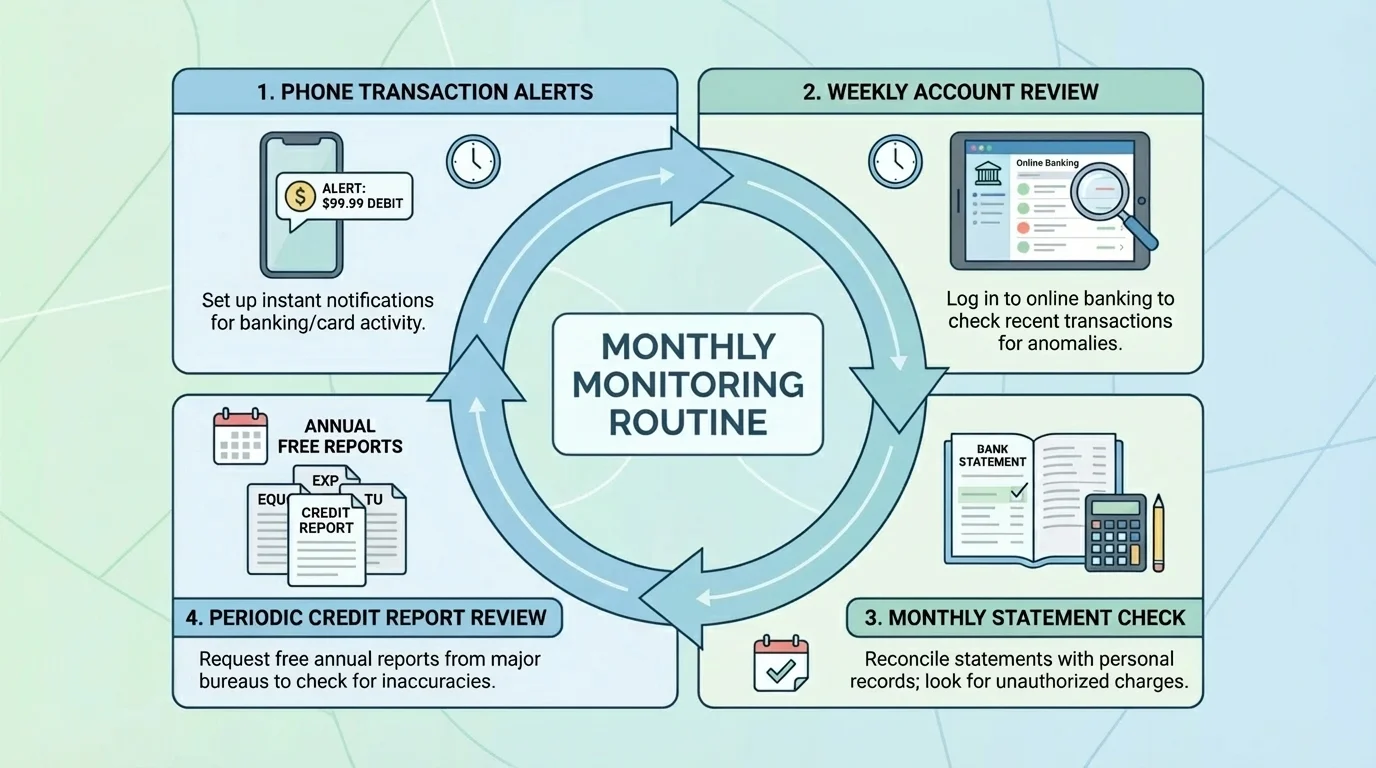
Monitoring is an ongoing cycle, not a one-time check, and [Figure 2] shows how alerts, statement review, and credit checks fit together. The faster you spot a problem, the easier it usually is to limit the damage.
Check account activity often. For a debit card or payment app, that may mean reviewing transactions every few days. For a bank account or credit card, it means reading each monthly statement carefully instead of ignoring it. Set transaction alerts so your phone notifies you about purchases, withdrawals, password changes, or logins from new devices.
Look for warning signs such as purchases you do not recognize, tiny test charges, missing deposits, account balance changes, password reset messages you did not request, mailed bills for accounts you never opened, or calls from debt collectors about unfamiliar debts. These signs should never be brushed off as "probably nothing."
It is also important to monitor your credit report. A credit report is a record of how you have used credit and what accounts are connected to your name. Even if you have not used much credit yet, checking your credit report can help you detect fake accounts or inquiries. Reviewing it a few times each year is a strong fraud-prevention habit.
If your bank app shows an unfamiliar charge for $8.99, do not assume it is too small to matter. Criminals often begin with a small amount to test whether an account is active. If unnoticed, larger charges may follow. Monitoring helps catch the first sign instead of the fifth.
Case study: catching fraud early
A student notices a $1 charge on a debit card from an online store they never used.
Step 1: Treat the small charge as a warning sign.
Small unauthorized purchases often test whether the card works before a criminal attempts larger transactions.
Step 2: Review recent transactions.
The student checks the banking app and sees two other unfamiliar charges from the same day.
Step 3: Lock the card and contact the bank.
The student freezes the card through the app, reports unauthorized activity, and requests a replacement card.
Step 4: Change related passwords.
The student updates the email password and payment app password in case the card data was stolen through an online account.
Because the student acted quickly, the bank can investigate early and reduce the chance of larger losses.
Monitoring also includes reading messages carefully. Real banks may contact customers, but they do not usually ask for complete passwords or full verification codes through random texts or calls.
Not all fraud begins online. Paper bank statements, receipts, preapproved credit offers, insurance documents, and tax forms may contain account numbers or other sensitive information. Store important documents in a safe place at home, and shred papers that contain private data before throwing them away.
Be careful with wallets, backpacks, and student ID cards. A lost wallet can expose more than cash: debit cards, health insurance cards, school IDs, and sometimes written PINs. Never keep your PIN with your debit card. If someone steals both, they have removed one of your security barriers.
Mail can also create risk. If you are expecting a replacement debit card, check the mail promptly. If you move, update your mailing address with banks and other financial institutions. An old address can allow sensitive mail to go somewhere you no longer control.
| Everyday situation | Risk | Safer choice |
|---|---|---|
| Using a shared computer | Saved passwords or autofill data may remain | Use private browsing if necessary, sign out fully, and avoid financial logins when possible |
| Throwing away receipts or statements | Private data may be exposed | Shred or securely destroy documents with account details |
| Keeping card and PIN together | A thief can use both immediately | Memorize the PIN and store it separately from the card |
| Leaving phone unlocked | Apps and codes may be accessible | Use screen locks and automatic locking |
| Using an ATM in a rushed situation | Card skimming or shoulder surfing | Inspect the machine, cover the keypad, and choose well-lit locations |
Table 1. Common everyday fraud risks and safer habits that reduce exposure.
Physical habits matter because identity protection is not only about technology. It is about controlling access wherever your information exists.
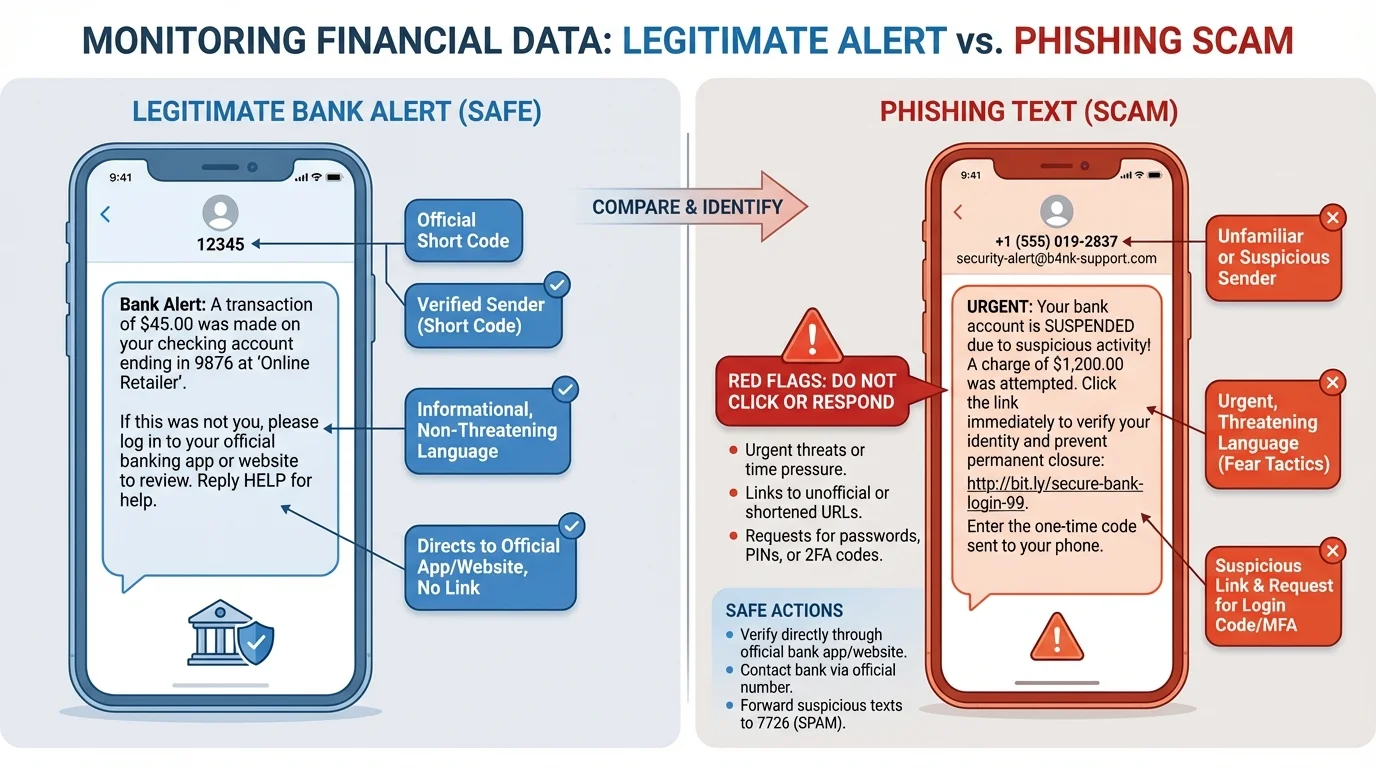
Scam messages often follow predictable patterns, as [Figure 3] shows in the contrast between legitimate and fake messages. They create urgency, fear, excitement, or curiosity. The goal is to get a person to click before thinking.
Phishing is a scam in which criminals pretend to be trustworthy organizations to steal information. If it happens by text message, it is often called smishing. A message may claim your bank account is frozen, your package cannot be delivered, your scholarship is waiting, or your payment app needs verification. These messages often include suspicious links, spelling errors, unusual sender addresses, or requests for personal information.
Be especially cautious about requests for verification codes. One-time codes are meant to prove you are logging in. If you send that code to someone else, you may be helping them enter your account. Real customer service workers should not need your full password or a one-time login code to "confirm" your identity through an unsolicited message.
Another warning sign is pressure. Scammers may say, "Respond in 10 minutes or your account will be closed." Real financial institutions usually provide secure ways to log in directly through their official websites or apps. A safer habit is to avoid clicking the message link and instead open the official app yourself or type the company's web address manually.
Scams can also appear as fake online stores, job offers, romance scams, fake charities, or account recovery requests on social media. Students are common targets for "easy money" job scams that ask for bank details, or scholarship scams that request fees or sensitive information before any real verification.
Trustworthy organizations do not become trustworthy simply because they use a familiar logo, your name, or urgent language. Always verify through official contact methods you find independently.
When evaluating a suspicious message, slow down and ask: Who sent this? What exactly are they asking for? Why is there urgency? Can I verify this through the official app, website, or phone number? The comparison in [Figure 3] helps you see that scammers often rely on the same small set of pressure tactics.
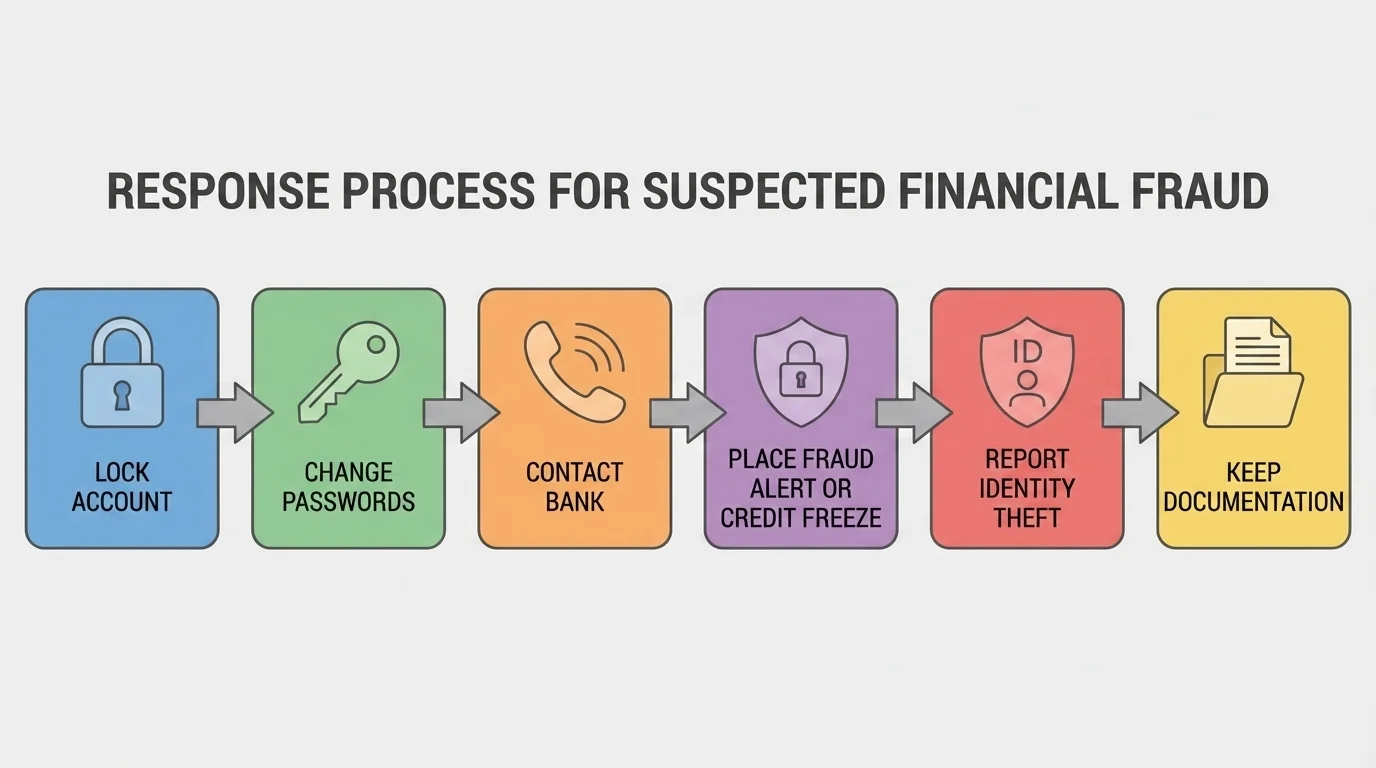
If identity theft or fraud is suspected, speed matters, and [Figure 4] lays out the order of response actions. The goal is to stop further access, document what happened, and begin recovery as fast as possible.
First, secure the account or card involved. Lock the card in the banking app if that option exists. Change passwords for the affected account and the connected email account. Sign out of other devices if possible. Then contact the bank, credit card company, or payment platform directly using the number on the official website or the back of the card.
If someone may be opening accounts in your name, place a fraud alert on your credit file or consider a credit freeze. A fraud alert tells lenders to take extra steps to verify identity before opening new credit. A credit freeze restricts access to your credit file, making it harder for new accounts to be opened without your permission.
Keep records of everything: dates, times, names of representatives, account numbers affected, screenshots, and copies of reports. Good records make disputes and recovery easier. If money was stolen, ask how to dispute transactions and what deadlines apply. If identification documents were lost, report those losses to the appropriate agencies.
In many fraud cases, a quick response can stop losses from spreading. For example, if a criminal enters one shopping account, they may try the same password on your email, payment app, and bank login. That is why changing passwords only on one account may not be enough.
Case study: responding to a stolen phone
A student loses a phone that has payment apps, saved passwords, and access to email.
Step 1: Lock or erase the device remotely.
This reduces the chance that someone can open apps or read texted verification codes.
Step 2: Change passwords beginning with email.
Email is changed first because it is often the key to resetting other accounts.
Step 3: Contact banks and payment apps.
The student asks about suspicious activity, removes the device from trusted devices, and freezes cards if needed.
Step 4: Review transaction history and alerts.
The student checks for unfamiliar purchases, transfers, or password reset attempts.
This response reduces the chance that a lost device turns into a larger identity theft case.
Later, when using the response pathway in [Figure 4], remember that the best plan is one you already know before a crisis begins. Panic causes delays; preparation speeds action.
Preventing identity theft is not about becoming fearful. It is about building systems that make fraud less likely and easier to detect. That is a core idea in personal financial literacy. Just as insurance helps manage the risk of property loss or health costs, good security habits help manage the risk of identity fraud.
Strong long-term strategies include using unique passwords, enabling MFA, checking financial statements, reviewing credit reports, protecting physical documents, limiting oversharing on social media, and pausing before responding to urgent requests. It also helps to keep emergency contact information for banks and card issuers in a safe place, not only inside the phone that could be lost.
There is also a balance between convenience and security. Saving every card in every app may feel fast, but it increases exposure. Auto-login on all devices feels easy, but it lowers protection if one device is stolen. Risk management means thinking ahead: what level of convenience is worth the risk, and where should stronger protection be nonnegotiable?
Prevention, detection, and recovery form the three-part model of identity protection. Prevention lowers the chance of fraud, detection helps you notice it early, and recovery limits the damage and restores control. Strong financial decision-making includes all three, not just one.
As financial tools become more digital, protecting personal financial data becomes a normal part of being responsible with money. The habits you build now can protect not only your current accounts, but also your future opportunities.
