Two students can have the same number of assignments, the same number of hours in a day, and similar ability levels, yet one feels constantly overwhelmed while the other stays steady. The difference is often not effort. It is the system. The way you organize tasks, time, materials, and information can either make life feel manageable or make every day feel like a small emergency.
If you study online, organization matters even more. You are not moving through a school building with bells, teachers reminding you in person, or classmates asking what is due. You often have to create your own structure. That means your system for tracking deadlines, planning work time, storing files, and switching between school and personal life has a direct effect on your stress, your performance, and your sense of balance.
Many people think organization is just about being neat. It is much bigger than that. Organization is really about reducing friction. A good system helps you know what to do, when to do it, where to find what you need, and how to keep responsibilities from piling up. A weak system does the opposite: it creates confusion, wasted time, and unnecessary pressure.
When your system works, you spend less energy trying to remember everything. When it does not work, your brain has to act like a storage unit, reminder app, and emergency manager all at once. That is exhausting. Over time, that mental overload can affect mood, sleep, confidence, and motivation.
Organization system is a repeatable way of managing tasks, time, materials, and information. It can include a planner, digital calendar, notes app, folder structure, routines, reminders, and habits.
Stress is the mental and physical strain that builds when demands feel higher than your ability to handle them.
Balance is the ability to meet important responsibilities while still protecting time for rest, relationships, health, and personal interests.
A good organization system is not the fanciest one. It is the one you will actually use on regular days, busy days, and stressful days. That matters because a system only helps if it is realistic.
Your organization system is not just one tool. It is a group of supports working together. For example, you might use a calendar for deadlines, a checklist for daily tasks, folders for course files, and a short evening reset routine. Those parts form a system.
One useful idea here is executive functioning. Executive functioning includes the mental skills that help you plan, prioritize, begin tasks, manage time, and follow through. An organization system acts like an external support for those skills. Instead of relying only on memory or motivation, you build a structure around yourself.
This matters because motivation changes. Energy changes. Mood changes. A system gives you something steady even when you do not feel at your best.
Why systems beat memory
If you tell yourself, "I'll remember," you are using mental energy every time you try to hold a task in your head. If you write it down, schedule it, and store the file where it belongs, the task stops floating around in your mind. That frees attention for actually doing the work.
Think of it like this: if your room has no place for your headphones, charger, and notebook, those items keep getting lost. Your time gets wasted searching. The same thing happens with school tasks in your mind. If every task has no "place" in a system, it gets lost in mental clutter.
Stress often increases when you face uncertainty. If you are not sure what is due, when to start, or how long a task will take, your brain treats that uncertainty like a threat. Even before you begin, you may feel tense or avoid the work completely.
[Figure 1] Disorganization creates several stress triggers at once: forgotten tasks, last-minute rushing, messy work spaces, constant searching, and the feeling that something important is slipping through the cracks. The brain does not like unfinished, untracked responsibilities. They stay active in the background and keep pulling on your attention.
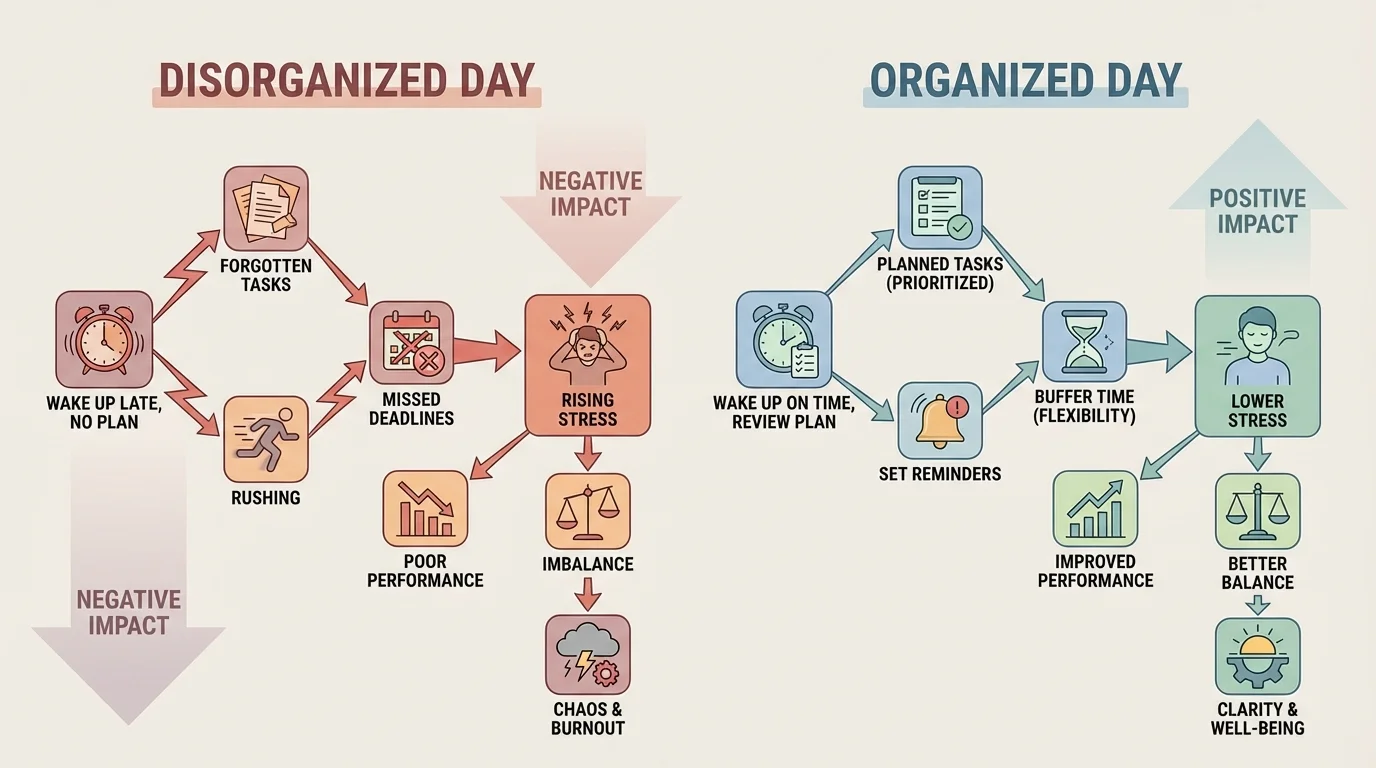
Clear systems lower stress because they make demands visible and manageable. A calendar tells you when something is due. A task list tells you the next action. A folder system helps you find files quickly. A routine tells you when to check messages or submit work. These are small supports, but together they reduce the number of stressful surprises in your day.
There is also a major difference between cognitive load and actual workload. Cognitive load is the amount of mental effort needed to keep track of information. You might have only three assignments, but if they are scattered across tabs, messages, and random notes, the mental strain can feel huge. A better system lowers cognitive load even when the amount of work stays the same.
For example, suppose you have a discussion post due tonight, a quiz tomorrow, and a chore to finish before dinner. If none of it is written down, you may spend the whole afternoon feeling vaguely stressed. But if you list the tasks, estimate the time, and schedule them in order, the same responsibilities often feel more doable.
People often feel less stressed not because a problem disappeared, but because they can now see a plan. Clarity itself can calm the nervous system.
Stress does not always come from having too much to do. Sometimes it comes from not knowing where to start. That is why organization is not just about neatness. It is a mental health support.
Your system affects more than your feelings. It also affects results. Performance improves when you can start tasks on time, break large assignments into parts, keep materials accessible, and review work before submitting it.
Students often think poor performance means they are not smart enough or not trying hard enough. Sometimes the real issue is that the system makes good performance harder. If your notes are scattered, you cannot find your login information, your files have unclear names, and you begin assignments late, your final work may look weaker than your actual ability.
A strong system improves performance in at least five ways. First, it helps you start sooner. Second, it helps you find what you need. Third, it supports focus by reducing distractions. Fourth, it increases accuracy because you have time to check your work. Fifth, it makes follow-through more likely because each task has a next step.
This is especially important in online learning. You may be switching between videos, documents, tabs, messages, and submission portals. Without a system, digital clutter can quietly hurt performance. With a system, you reduce errors like uploading the wrong file, forgetting a deadline, or studying the wrong material.
Notice that organization does not replace skill. It supports skill. If you are good at writing but always start essays the night they are due, your writing quality may drop. If you are good at math but lose track of quiz times, your grade may not show your real understanding. Organization helps your performance reflect your ability more accurately.
Balance is not about doing everything perfectly. It is about making room for what matters without letting one area swallow the rest of your life. Organization affects balance because time and energy are limited. When schoolwork is unmanaged, it expands into evenings, weekends, sleep, meals, and downtime.
A weak system often creates false tradeoffs. You may think, "I can either finish my work or relax," when the real problem is that tasks were not planned early enough. Good organization does not create more hours, but it helps you use the hours you do have on purpose.
For a Grade 10 student learning from home, balance may include school assignments, helping around the house, exercise, hobbies, part-time work, family time, social time online, and sleep. If your system tracks only school deadlines and ignores everything else, life can still feel chaotic. A balanced system includes your whole life, not just academic tasks.
For example, if you schedule a project block from 4:00 to 5:00, dinner at 6:00, and a workout or walk at 7:00, you are protecting both performance and wellbeing. If you leave the afternoon unplanned and assume you will "just get it done," schoolwork may stretch across the whole evening and crowd out rest.
"What gets scheduled gets protected."
— Productivity principle
That quote matters because many students protect deadlines but not recovery. A balanced system includes both. Rest is not a reward for finishing every task perfectly. It is part of what helps you keep functioning well.
No single system works for everyone. Some students need visual systems. Others prefer simple digital lists. The goal is not to copy someone else's setup. The goal is to evaluate which system lowers stress, improves performance, and supports your life.
[Figure 2] Here are some common styles and how they differ.
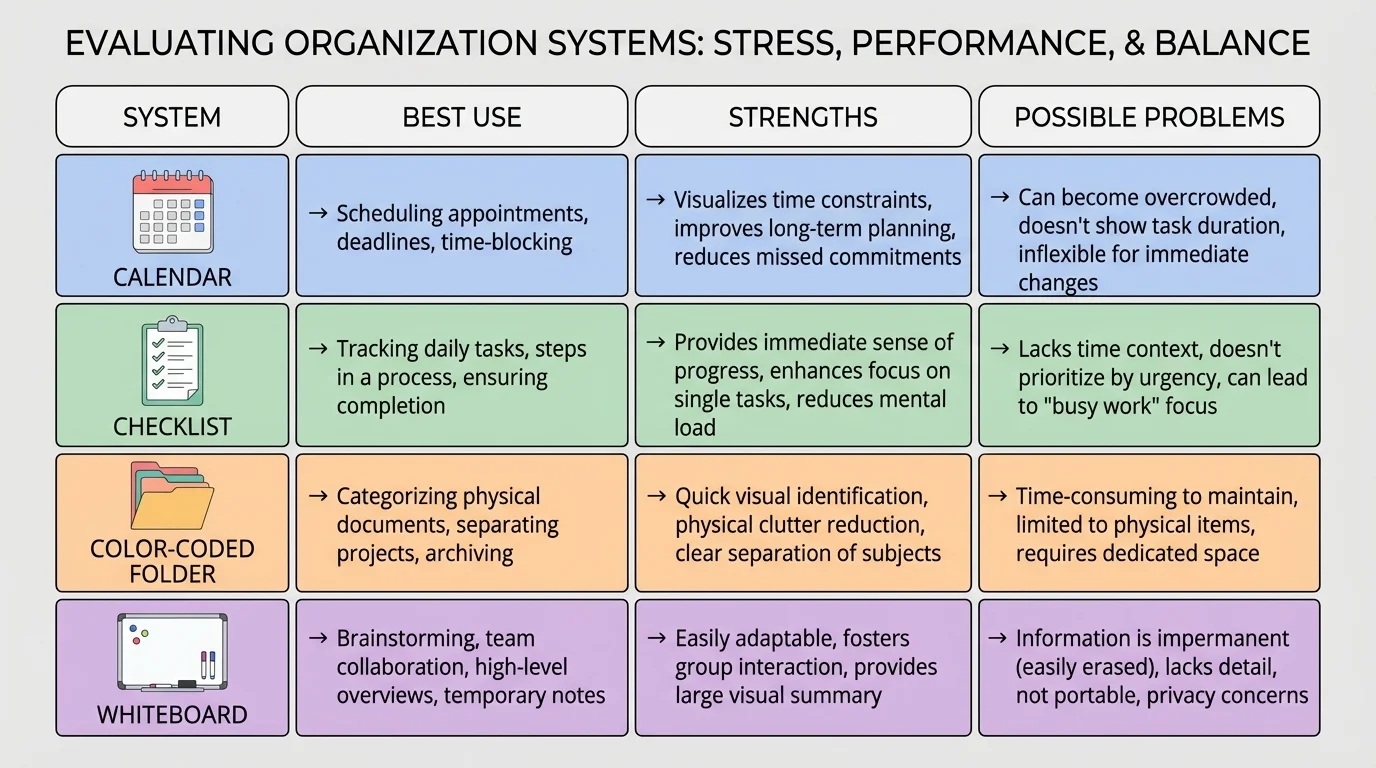
| System style | Best for | Strengths | Possible problems |
|---|---|---|---|
| Digital calendar | Deadlines, appointments, study blocks | Shows time clearly, gives reminders | Can become crowded if overplanned |
| Daily checklist | Short-term action steps | Simple, satisfying, easy to update | Does not always show timing |
| Color-coded folders | Files and subjects | Quick visual sorting, less searching | Useless if you stop filing items |
| Whiteboard or wall planner | Big-picture weekly view | Highly visible, hard to ignore | Not portable, can become outdated |
| Minimal system | Students who get overwhelmed by complex tools | Fast, low-maintenance | May not hold enough detail for busy weeks |
Table 1. Comparison of common organization systems and how each can help or create problems.
A digital calendar is strong when timing matters. It helps with due dates, video sessions, appointments, and study blocks. A checklist is strong when action matters. It answers the question, "What exactly do I need to do next?" Many students need both.
Visual systems can work well if you forget things that stay hidden in apps. A whiteboard, sticky-note board, or wall calendar keeps tasks visible. But visibility only helps if you update it. An outdated system can become part of the problem.
As we saw in [Figure 2], each system has tradeoffs. A detailed planner may feel helpful to one student and suffocating to another. A minimal checklist may feel freeing to one student and too loose to someone who needs stronger time structure.
The best systems are usually simpler than people expect. Building one works best when you follow a clear order. If you add too many apps, color labels, notebooks, and rules at once, the system becomes another thing to manage.
[Figure 3] Start with the idea that your system should answer four questions every day: What do I need to do? When will I do it? Where is the material? What needs attention first?
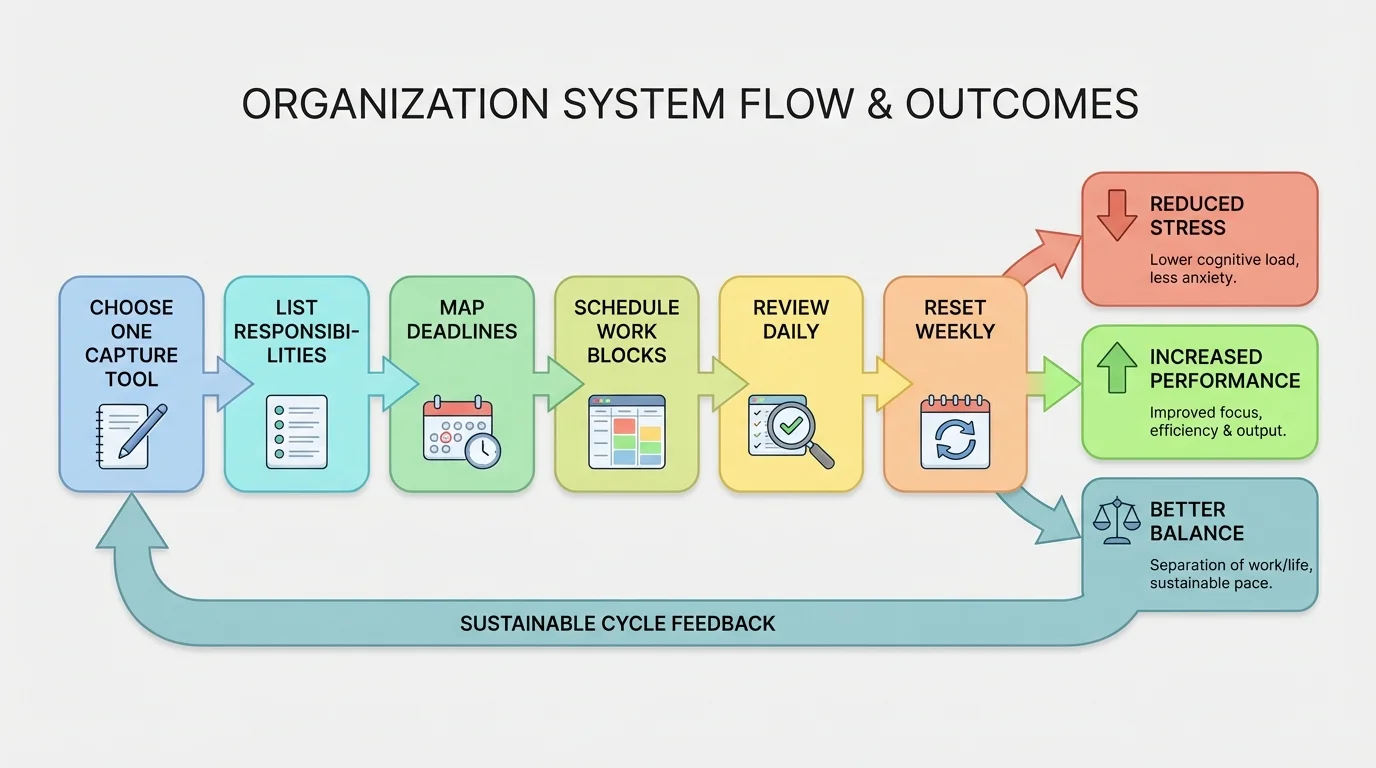
How to build a practical organization system
Step 1: Choose one main capture tool.
This can be a planner, notes app, task app, or paper notebook. The point is to have one trusted place where tasks first go.
Step 2: List all regular responsibilities.
Include classes, recurring assignments, chores, activities, appointments, and personal commitments.
Step 3: Put time-specific items in a calendar.
Deadlines, appointments, meetings, and quiz dates belong on a calendar because they happen at specific times.
Step 4: Put action steps in a task list.
Instead of writing "history project," write smaller actions like "choose topic," "find sources," and "draft intro."
Step 5: Create a file system.
Name folders clearly by course or category. Use names you can recognize fast, not vague labels like "stuff" or "new folder 7."
Step 6: Add a short daily review.
Spend about 5 minutes checking what is due, what was finished, and what must move to tomorrow.
Step 7: Add a weekly reset.
Once a week, clean up files, update missing tasks, and prepare for the next few days.
If your days vary a lot, use flexible work blocks instead of planning every minute. For example, schedule "science work, 45 minutes" instead of trying to predict the exact second you will start each subtask.
A good rule is to plan for about what you can truly handle, not your fantasy version of yourself. If you usually focus well for about 30 minutes at a time, build around that. A realistic system beats an ideal system you abandon after two days.
Problems with organization usually show up as patterns before grades drop. If you pay attention early, you can adjust your system before stress becomes overwhelming.
[Figure 4] Common warning signs include missing small deadlines, feeling surprised by assignments, spending lots of time searching for files, staying up late to finish avoidable work, forgetting chores or appointments, and feeling busy all day without finishing much.
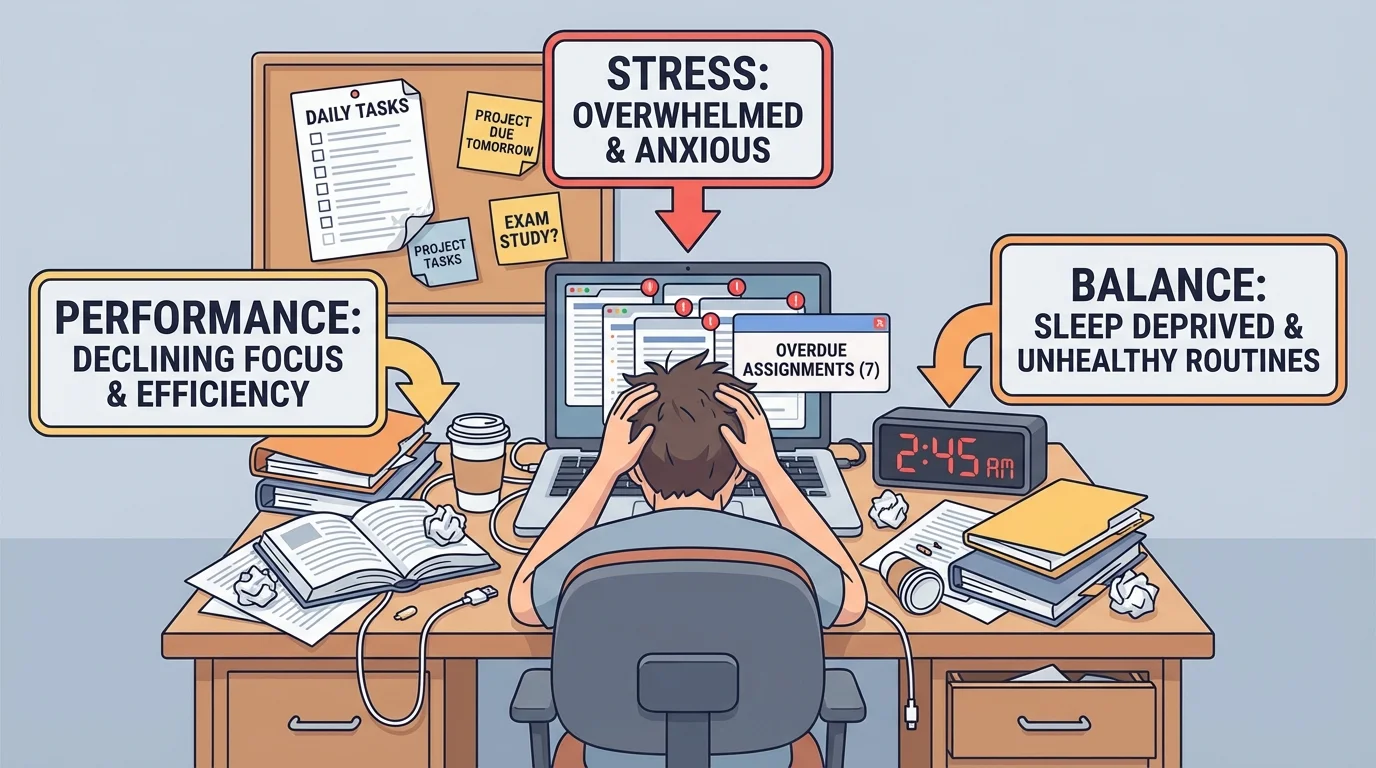
Another warning sign is emotional: you feel guilty whenever you rest because you are never fully sure what is unfinished. That usually means your responsibilities are not fully captured in a trusted system. Your brain keeps scanning for danger.
Physical signs matter too. A cluttered workspace, too many browser tabs, mixed files, and dead devices can all increase friction. Small obstacles add up. If it takes 10 minutes just to get ready to work, you are less likely to begin.
As the warning pattern in [Figure 4] suggests, a failing system rarely means you are lazy. More often, it means the setup is too complicated, too hidden, too inconsistent, or too dependent on memory.
You do not need to throw out your whole routine every time something goes wrong. Often one change helps: a clearer task list, fewer tools, a daily review, or a better folder structure.
Consider three realistic situations.
Case study 1: Maya
Maya keeps deadlines in her head and screenshots assignment pages instead of recording them in one place. She often feels okay at the start of the week, then stressed by Wednesday. She forgets one discussion response, rushes a quiz review, and stays up late finishing work she could have started earlier. Her stress is high, her performance is inconsistent, and her evenings feel out of control.
Evaluation: Maya does not mainly have a motivation problem. She has a weak capture system and no regular review.
Maya would likely improve by choosing one task list, putting due dates in a calendar, and doing a 5-minute check each afternoon. Notice how this addresses stress and performance at the same time.
Case study 2: Jordan
Jordan uses a digital calendar for deadlines and a short checklist for daily tasks. Files are stored by course in clearly named folders. Jordan reviews tasks at breakfast and resets the workspace before bed. Jordan still gets busy, but rarely feels blindsided. Work is usually finished on time, and evenings still include gaming with friends online and time to exercise.
Evaluation: Jordan's system supports both performance and balance because it is consistent and simple.
Jordan is not necessarily working fewer hours. Jordan is reducing wasted effort. This is the practical power of organization.
Case study 3: Eli
Eli creates a very detailed system with multiple apps, color codes, categories, and perfect layouts. For a few days it feels amazing. Then updating the system starts taking too long. Eli skips reviews, stops trusting the setup, and falls behind.
Evaluation: The issue is not lack of planning. It is overplanning. The system is too heavy to maintain.
Eli needs a lighter structure. That might mean one calendar, one checklist, and one weekly reset instead of an elaborate setup.
Even the best system fails if it is never maintained. The good news is that maintenance does not have to take long. Small habits matter more than occasional giant cleanup days.
Useful maintenance habits include opening your calendar at the same time each day, writing tasks down immediately instead of "later," renaming downloaded files right away, charging devices overnight, clearing your workspace before logging off, and checking tomorrow's top priorities before bed.
These habits create routine. A routine is a repeated pattern that reduces the number of decisions you have to make. That matters because repeated decisions can lead to decision fatigue, which is the mental drain that makes even simple choices feel harder after too many decisions.
The flow in [Figure 3] stays useful here because maintaining a system is really a loop: capture, schedule, do, review, reset. You do not build the system once and finish forever. You keep it alive with small repeated actions.
Organization is supposed to support your life, not control it. If you spend more time decorating a planner than doing the work in it, the system may be turning into avoidance. If one missed step makes you abandon the whole setup, perfectionism may be getting in the way.
A healthy system has room for real life. You might get sick, lose energy, have family responsibilities, or underestimate how long something will take. That does not mean the system failed. It means the system needs adjustment.
One helpful mindset is this: aim for useful, not perfect. A messy but updated checklist is more powerful than a beautiful planner you stopped using last week. A basic folder structure that helps you find files is better than an elaborate digital setup you never maintain.
Flexible systems are stronger systems
The most effective organization systems are stable enough to guide you and flexible enough to survive a difficult week. If a system only works under perfect conditions, it is not actually practical.
That idea connects back to stress and balance. Rigid systems can create extra pressure. Flexible systems help you recover, adapt, and keep moving.
To evaluate your system honestly, ask three questions. First, does it lower or raise my stress? Second, does it help my work quality and follow-through? Third, does it protect time for sleep, meals, movement, and personal life?
If your answer is no to any of those, the goal is not self-criticism. The goal is redesign. You can change one piece at a time. Simplify tools. Add a review routine. Make deadlines more visible. Break tasks into smaller actions. Protect recovery time on purpose.
The strongest organization system is not the most impressive one. It is the one that helps you stay clear-headed, productive, and balanced in real life.
