Much online risk does not start with a hacker typing furiously in a dark room. It starts with one ordinary tap: allowing location access, leaving an account public, syncing contacts, or clicking "agree" without checking what you just gave away. Online safety is not only about avoiding obvious threats. It is also about understanding how everyday design choices shape your behavior and how your information travels after you share it.
That matters because your online life is connected to your real life. A public workout route can reveal where you live. A quiz app can collect your contact list. A platform that makes sharing fast and private-feeling can still spread screenshots far beyond your intended audience. The safer you are online, the more control you keep over your time, reputation, relationships, and personal information.
Online safety means protecting your identity, personal information, devices, accounts, and well-being while using digital tools. Privacy settings are controls that let you manage who can see your content or access your data. Data sharing is the transfer of information from you or your device to an app, website, company, or third party. Platform design is the way an app or website is built to guide what users notice, click, and do.
To assess online safety well, you need to look at all three together. Strong privacy settings help, but they do not fix careless posting. Careful posting helps, but it does not stop a platform from collecting metadata. And even if you are cautious, a platform can still make risky choices feel normal or easy.
Privacy settings work in layers, as [Figure 1] shows. One layer controls your whole account, such as public versus private. Another controls each post, story, or stream. Another controls location, contacts, camera, microphone, and tracking permissions. If you only check one layer, you may still be exposed through another.
A private account is often safer than a public one, but "private" does not mean invisible. People can still screenshot your content, copy it, or share it in group chats. Also, some information may remain visible, such as your username, profile photo, bio, mutual connections, or activity status, depending on the platform.
Good privacy settings reduce risk in practical ways. They can limit who sends you messages, who tags you, who sees your active status, who can stitch or remix your content, and whether strangers can find you through your phone number or email. These are not minor details. They directly affect harassment risk, impersonation risk, and how easily someone can map your routines.
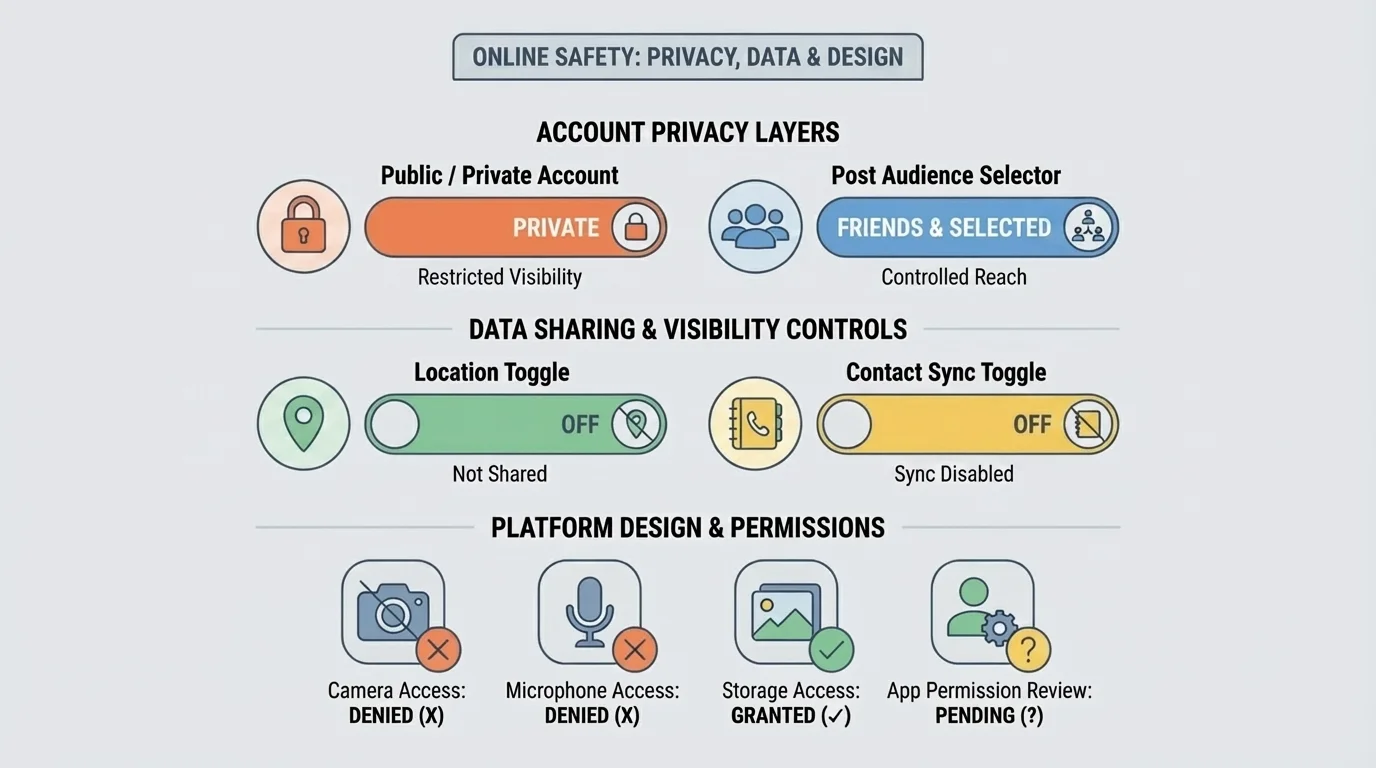
One smart habit is to check settings whenever you make a new account instead of trusting the default. Many platforms are designed to collect more data and encourage wider sharing unless you actively turn those options off. If the default is public, searchable, or trackable, doing nothing is still a choice with consequences.
For social media, focus on account visibility, post audience, tagging approval, direct message permissions, and location sharing. For gaming platforms, check voice chat, friend requests, profile visibility, and whether your real name appears. For messaging apps, review last-seen status, read receipts, disappearing message settings, and backup options. A message that disappears from your screen may still exist in cloud backups or screenshots.
Quick account check
Step 1: Open your account privacy menu and ask, "Can strangers view my profile, posts, or activity?"
Step 2: Open app permissions on your device and ask, "Does this app really need my camera, microphone, contacts, photos, and location?"
Step 3: Check discoverability settings to see whether people can find you using your phone number, email, or synced contacts.
Step 4: Review story, livestream, and tagging controls, because these are often overlooked even when the main profile is private.
This kind of review takes a few minutes and often removes a lot of unnecessary exposure.
Later, when you think about audience and permanence, the layered model in [Figure 1] still matters. A post can feel safe because your account is private, but a single location tag or open message setting can still create a problem.
When you use a platform, data sharing can continue far beyond the moment you type, upload, or click, as [Figure 2] illustrates. You may share information directly, such as your name, birthday, photos, or school activities. But you also generate data indirectly through your device, behavior, and timing.
Personal data includes details that identify or describe you, such as your full name, email, phone number, photos, voice, and payment details. Metadata is data about your activity rather than the message itself, such as when you posted, where you were, what device you used, who you interacted with, and how long you watched something. Metadata can seem less personal, but it can still reveal patterns about your life.
For example, if you regularly post from the same location between certain hours, someone may infer where you live or work. If you click on content about stress, insecurity, or money problems, advertisers and platforms may classify you into categories and target you with manipulative content. If an app has your contact list, it may connect your account to other people even if you never meant to share that relationship.
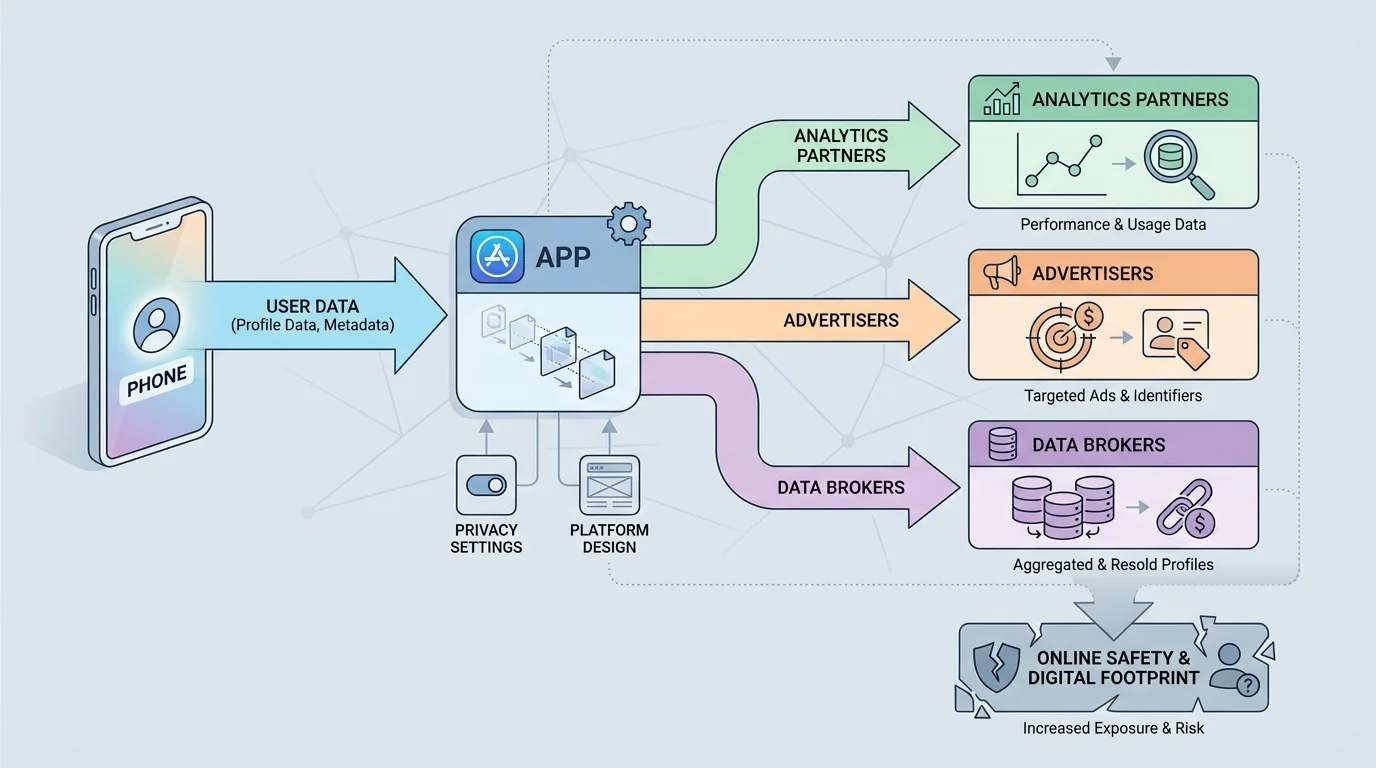
This is where permissions matter. A permission is access you give an app or site to parts of your device or account. Location, camera, microphone, photos, contacts, motion data, and tracking access can all be useful in limited situations. But if an app asks for more than it needs, that is a warning sign. A flashlight app does not need your contacts. A simple filter app does not need your precise location all the time.
Third-party sharing means your data is passed to another company that is not the main service you think you are using. That might include advertisers, analytics companies, payment processors, or data brokers. Sometimes this helps the service function. Sometimes it expands surveillance and tracking in ways that are hard to see.
The risk is not only identity theft. Shared data can affect what prices you see, what content gets pushed to you, what scams target you, and what strangers can learn about your habits. Even small pieces of information can combine into a detailed picture. A birthday here, a pet's name there, a city tag, a regular jogging route, and a public friend list can help someone guess passwords, security questions, or routines.
| Type of data | Example | Possible risk | Safer choice |
|---|---|---|---|
| Profile data | Name, birthday, profile photo | Impersonation or identity exposure | Limit public profile details |
| Location data | Tagged posts, live maps, workout routes | Routine tracking | Share later or use approximate location |
| Contact data | Synced phone contacts | Others exposed without consent | Deny unless truly necessary |
| Behavior data | Clicks, views, watch time | Manipulative targeting | Review ad and tracking settings |
| Message-related data | Who you contact and when | Relationship mapping | Use tighter permissions and privacy tools |
Table 1. Common categories of shared data, their risks, and safer choices.
Some apps can learn a lot from patterns that seem harmless on their own. Repeated logins, device type, time of day, and location history can create a surprisingly detailed picture of your routines and preferences.
If you are deciding whether an app is worth using, do not only ask, "Is it fun?" Also ask, "What is this app getting from me?" That question often tells you more about safety than the app store description does.
Platform design is not neutral. Apps are built to guide your attention and behavior, and [Figure 3] highlights how that can happen through defaults, layout, and one-tap actions. If the easiest button is "allow," "share," or "post publicly," more people will choose it even when it is not the safest option.
One common example is default settings. If a platform makes accounts searchable by phone number unless you turn that off, many users will stay exposed without realizing it. If autoplay keeps feeding emotional or extreme content, you may keep watching without deciding to. If reshare buttons are instant but reporting abuse takes several steps, the platform is telling you what it values.
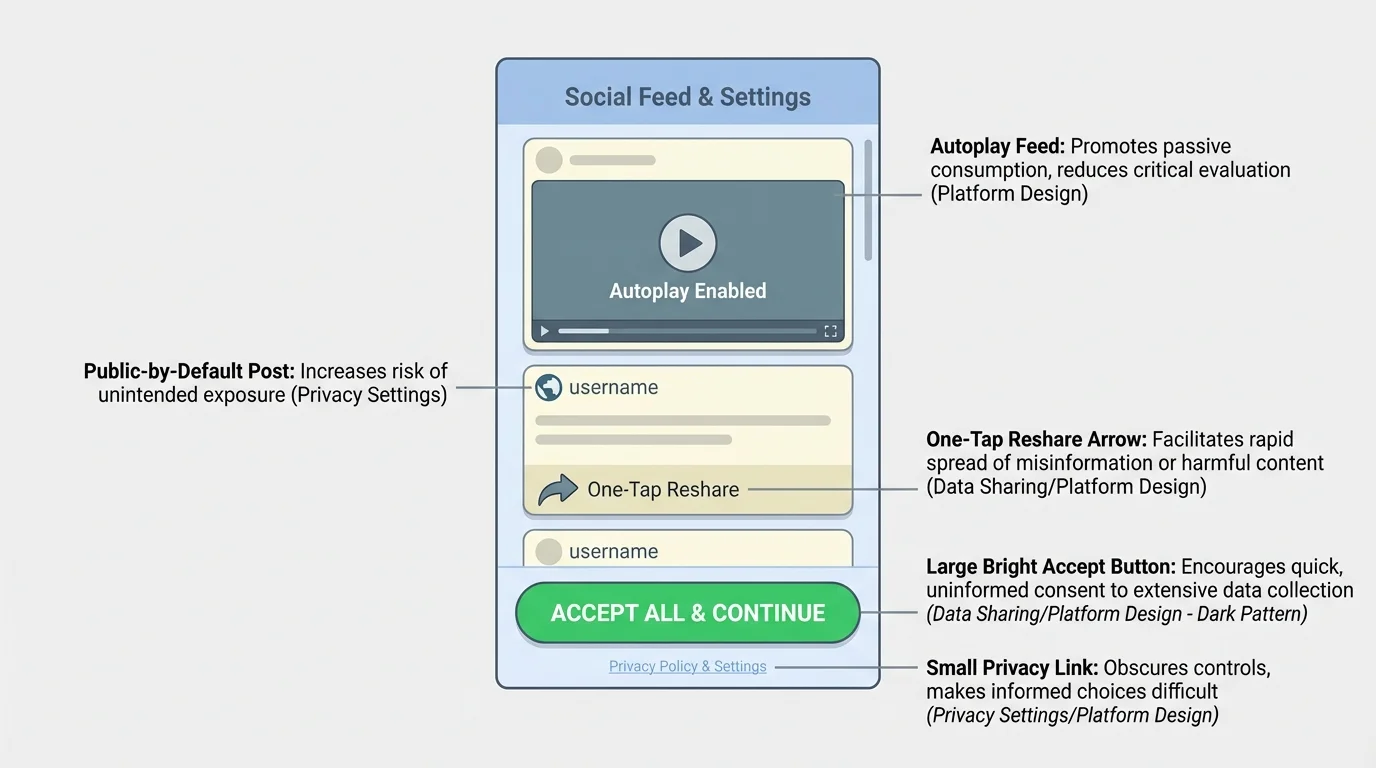
A dark pattern is a design trick that nudges users into choices they might not make if the options were clear and balanced. Examples include making "accept all cookies" bright and easy while hiding "manage choices," adding guilt language like "No thanks, I don't care about staying connected," or making it difficult to delete an account.
Another safety issue is how platforms create a false sense of privacy. Stories, close-friends lists, private groups, and disappearing messages can be useful, but they can also make people lower their guard. The content may still be copied, saved, or spread. Feeling informal is not the same as being safe.
Algorithms also matter. A recommendation system may increase the reach of dramatic, controversial, or revealing posts because those posts attract attention. That can reward oversharing. It can also spread misinformation, harassment, and scams faster than slower, more thoughtful communication would.
Why "easy" can be unsafe
Fast, smooth design is often presented as a benefit, but less friction can also mean less thinking time. One-tap purchases, instant reposting, automatic contact syncing, and default public sharing reduce the pause that helps you notice risk. Good safety design adds helpful friction at the right moments, such as warning labels, approval steps, visible privacy controls, and easy blocking/reporting tools.
When you notice a platform making risky choices feel normal, treat that as information. You are not "bad at the internet" if something confusing happens. Often, the system was designed to make the profitable choice easier than the safe one.
The design tricks in [Figure 3] matter in real life because they shape habits. If you keep accepting defaults, a platform slowly collects more access, more data, and more influence over what you see and share.
You do not need to panic about every online action. You do need a repeatable method. A quick check can help you judge whether something is low risk, needs editing, or should not be shared at all.
[Figure 4] Use these four questions before posting or granting access. Who can see this? What does it reveal? How long could it last? How could it be misused? Those questions are simple, but they catch many problems before they grow.
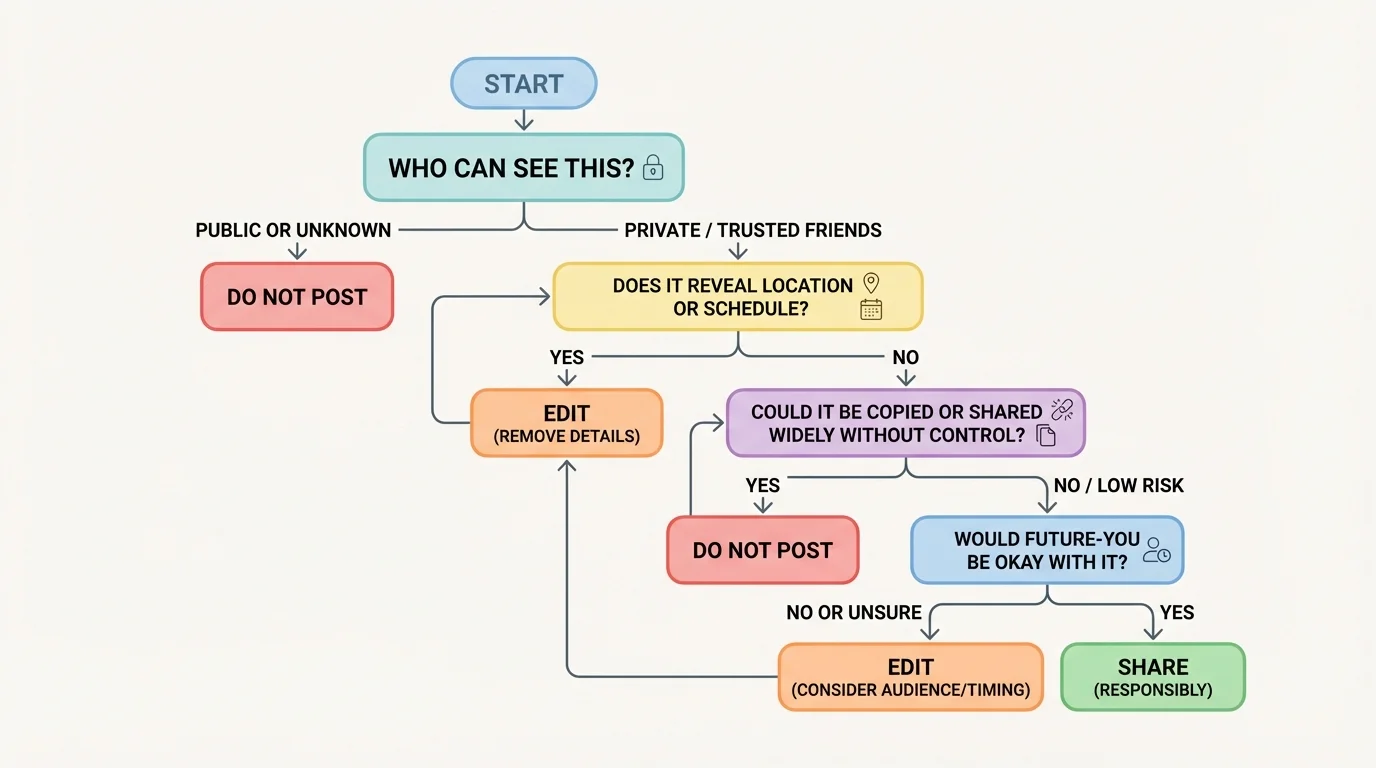
Who can see this? Do not rely on what you hope. Check the actual audience. "Friends only" may still include people you barely know. A livestream audience can expand quickly. A shared post can escape your original circle.
What does it reveal? Look beyond the obvious. A bedroom photo might show mail, school logos, family photos, medication labels, or a street through a window. A casual video can reveal your voice, routines, neighborhood, or younger siblings.
How long could it last? Even content that disappears may survive through screenshots, recordings, backups, or archives. A useful rule is this: if seeing the content again in a month, a year, or during a future opportunity would be a problem, pause now.
How could it be misused? Could someone use it to guess a password, impersonate you, embarrass you, pressure you, track you, or target you with a scam? Safe users think one step ahead. They do not only ask what they mean to share; they ask what others could do with it.
"The internet rarely forgets as fast as users do."
This method also works for links and requests. Before you click a giveaway, quiz, or account-verification message, ask the same questions. Who sent it? What data does it want? How long will access last? How could that access be abused?
Consider a student who posts their running route every afternoon. It seems healthy and motivating. But repeated route maps can reveal starting points, ending points, and timing patterns. Someone does not need one exact address if they can build a pattern over time. That is why delayed posting is usually safer than live posting.
Another example is a "Which character are you?" quiz that asks to connect a social media account. It may look like entertainment, but it can request profile access, friend data, likes, email, or permission to post on your behalf. The data flow model in [Figure 2] helps here: once access is granted, your information may travel beyond the quiz itself.
A third case is linking multiple accounts for convenience. Signing into one app through another can save time, but it can also connect more data across platforms. If one account is compromised, others may become easier to access. Convenience is real, but so is the extra risk.
Case study: public livestream
You start a livestream while spending time at home. You think only a few followers will watch.
Step 1: A viewer notices a package label in the background and reads part of your address.
Step 2: Another viewer hears when your family usually gets home.
Step 3: Someone records the stream and shares clips outside your follower list.
Step 4: What felt temporary becomes searchable and harder to control.
The problem is not that streaming is always unsafe. The problem is that several small exposures can combine into one major one.
Group chats can create risk too. People often say things there that they would never post publicly. But one screenshot can move private conflict into a wider audience. If a platform makes forwarding easy, design is part of the risk, not just the users.
You can improve your accounts quickly with a short safety tune-up. The main categories to review are organized clearly. This is one of the highest-value things you can do because it changes your everyday defaults, not just one moment.
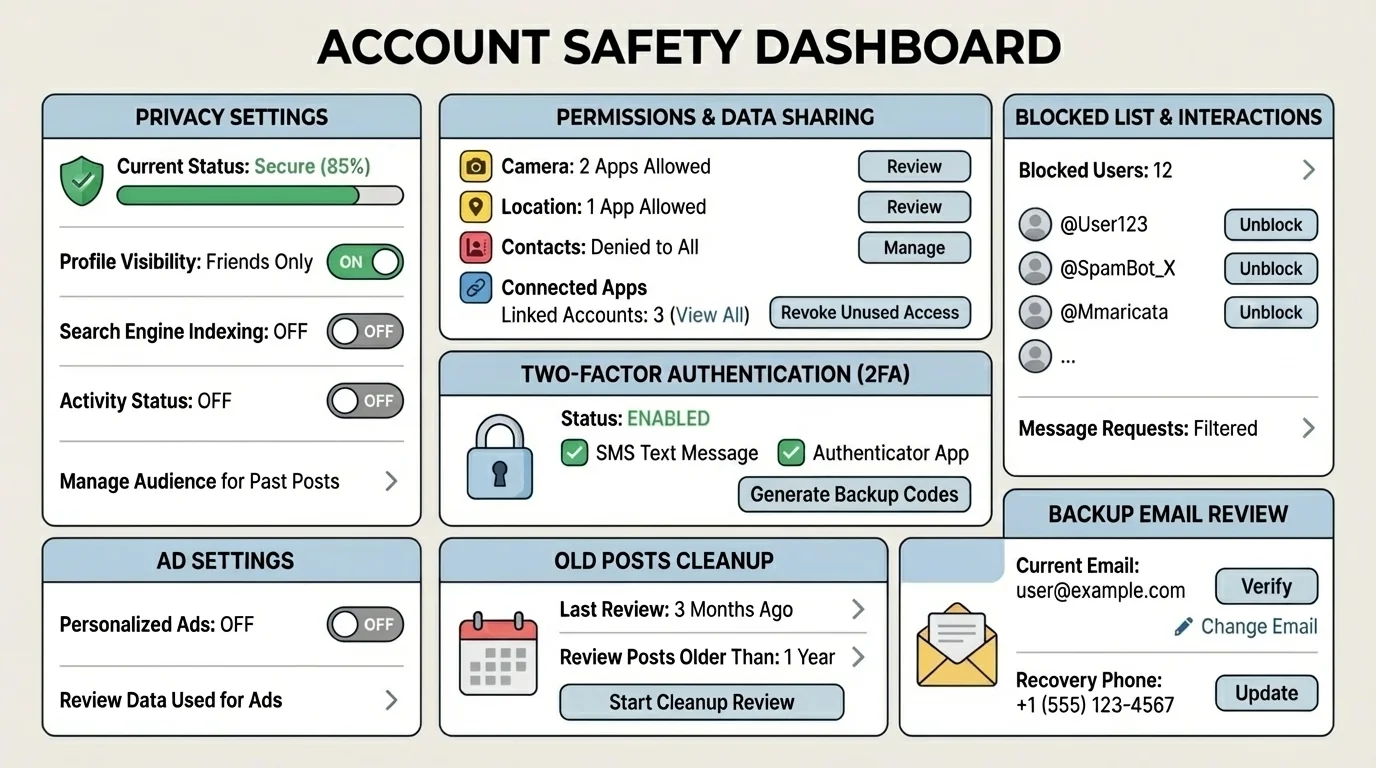
[Figure 5] First, review account visibility. Make accounts private when public exposure is unnecessary. Limit who can message you, tag you, mention you, or add you to groups. Turn off discoverability by phone number or email if you do not need it.
Second, review device permissions. Change location access from "always" to "while using" when possible. Remove microphone, camera, photo, and contact access from apps that do not truly need them. If an app stops working without an unnecessary permission, ask whether the app is worth keeping.
Third, strengthen account security. Use strong unique passwords and enable two-factor authentication, often called 2FA. That means logging in requires both your password and a second proof, such as a code from an app or text message. If one password is stolen, 2FA can stop the attacker from getting in.
Fourth, clean up your history. Review old posts, saved stories, bios, and public highlights. Remove anything that exposes your address, routine, phone number, school schedule, or personal documents. Old content still affects present safety.
Fifth, adjust ad and tracking settings. Turn off ad personalization when possible, clear unused app connections, and check whether your data is being used for off-platform tracking. This does not make you invisible, but it reduces unnecessary collection.
Sixth, check recovery options. Make sure your backup email and phone number are current and secure. An account is only as safe as its recovery method. If someone controls your backup email, they may control everything connected to it.
Passwords protect entry, but privacy settings protect exposure. You need both. A locked account with reckless sharing is still risky, and careful posting on a weakly protected account is also risky.
The checklist is most useful when repeated. Recheck settings after app updates, after creating new accounts, and after any unusual activity or suspicious message.
If you overshare, act fast instead of freezing. Delete the content if possible, remove location details, change the audience setting, and ask trusted contacts not to reshare it. If the post included identifying information, think beyond embarrassment and consider practical safety: routes, schedules, addresses, and account recovery details.
If you think an account was compromised, change the password immediately, log out of other sessions, turn on 2FA, and review connected devices and linked apps. Check recent messages and posts in case someone used your account to scam others.
If someone is harassing, threatening, or trying to manipulate you, block and report them. Save evidence through screenshots if needed before the content disappears. Tell a trusted adult if there is a safety risk, blackmail, sexual pressure, threats, or location exposure. Getting help is not overreacting; it is smart damage control.
If a platform is making it hard to fix a problem, that itself is part of your assessment. Good safety tools are easy to find and use. If blocking, reporting, or controlling visibility is hidden or confusing, your risk on that platform is higher.
The main skill is not memorizing every app setting on earth. It is learning to notice the pattern: who gets access, what data moves, what design is pushing you, and what the real-life consequences could be. Once you think that way, you are much harder to trick, pressure, or track.
