One message on a screen can make your day better or worse in just a few seconds. A kind message might say, "Great job!" But a hurtful or dangerous message can feel confusing, scary, or upsetting. When you are online, you need to know how to spot trouble early and what to do next.
Being safe online is a real-life skill. You might play games, watch videos, send messages, join a club video call, or talk with family online. Most online spaces can be fun, but sometimes a person may act in a way that is unkind online behavior or unsafe. The good news is that you do not have to solve it alone.
Sometimes your body gives you clues before your mind understands what is happening. Your stomach might feel twisty. Your face may get hot. You may want to hide the screen or stop looking. Those feelings matter. If something online feels wrong, it is okay to stop right away.
You do not need to be one hundred percent sure that something is bad before you tell an adult. If a message makes you feel scared, pressured, confused, or very uncomfortable, that is enough reason to get help. It is safest to tell a trusted adult early.
Unkind behavior is behavior that is intended to hurt someone's feelings or demean them. Unsafe behavior is behavior that could put you in danger, trick you, or ask you to do something that is not safe. Report means to tell the right person so they can help.
Unkind behavior and unsafe behavior are not always the same. A mean comment might hurt your feelings. A message asking for your home address is more than mean—it is dangerous. Some messages can be both unkind and unsafe.
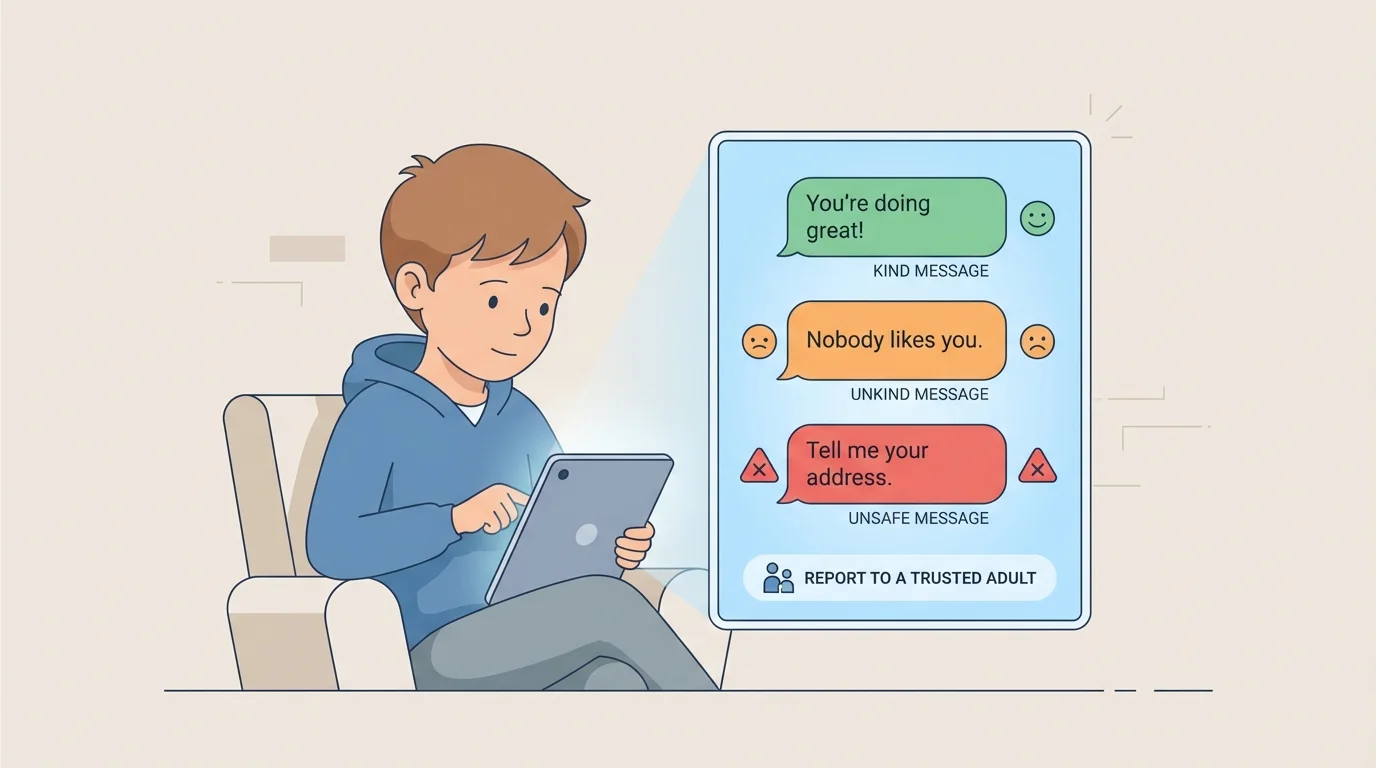
[Figure 1] Online behavior can be rude, mean, or harmful. Unkind behavior includes name-calling, teasing, laughing at you, leaving you out on purpose, or sending repeated mean messages. It can happen in game chats, comments, private messages, or video calls.
[Figure 1] Here are some examples of unkind behavior: "You can't play with us," "Your drawing is dumb," or "Everyone is laughing at you." A person may also send messages that seem silly that are actually meant to hurt. If someone keeps bothering you after you want them to stop, that is not okay.
Another kind of unkind behavior is cyberbullying. Cyberbullying means using technology again and again to be mean, embarrass someone, or make them feel bad. It might happen through messages, posts, shared pictures, or game chat.
Sometimes a person says, "I was just joking." But if the "joke" is hurtful, cruel, or keeps going after you ask for it to stop, it is still unkind. Jokes should not make you feel unsafe.
Mean messages can spread fast online because one person can copy, share, or repeat them. That is why telling an adult quickly is an important safety step.
You may also see unkind behavior happen to someone else. If a person is being mocked, excluded, or threatened in a chat, that matters too. You should still tell a trusted adult, even if the mean message was not sent to you.
Unsafe online behavior is different from simple rudeness. It includes actions that try to get private information, trick you, scare you, or move you into a risky situation. A stranger, an older kid, or even someone pretending to be friendly can do this.
Watch for these warning signs: asking for your full name, address, phone number, school name, passwords, photos, or your location; telling you to keep a secret from your family; asking to meet in person; sending links and saying "click now"; asking you to turn on a camera when you do not want to; or offering gifts in exchange for something. These are signs of personal information being targeted or of someone trying to trick you.
A person may also pretend to be a child when they are really an adult. That is one reason you should be careful with strangers online. A stranger is someone you do not really know in real life, even if they seem nice in a game or chat.
Safe or secret? Safe adults do not ask kids to keep online secrets that make them feel worried. If someone says, "Don't tell your parent," "This is our secret," or "You'll be in trouble if you tell," that is a strong warning sign. Secrets that make you feel scared should always be told.
Scary pictures, links that pop up and ask you to click fast, and messages that say you won a prize can also be unsafe. Some are tricks to get information. Some may lead to bad websites. You do not need to figure it out by yourself. Stop and get help.
The message examples from [Figure 1] help you notice the difference between a message that is simply friendly, one that is mean, and one that is dangerous. That difference helps you choose the right action quickly.
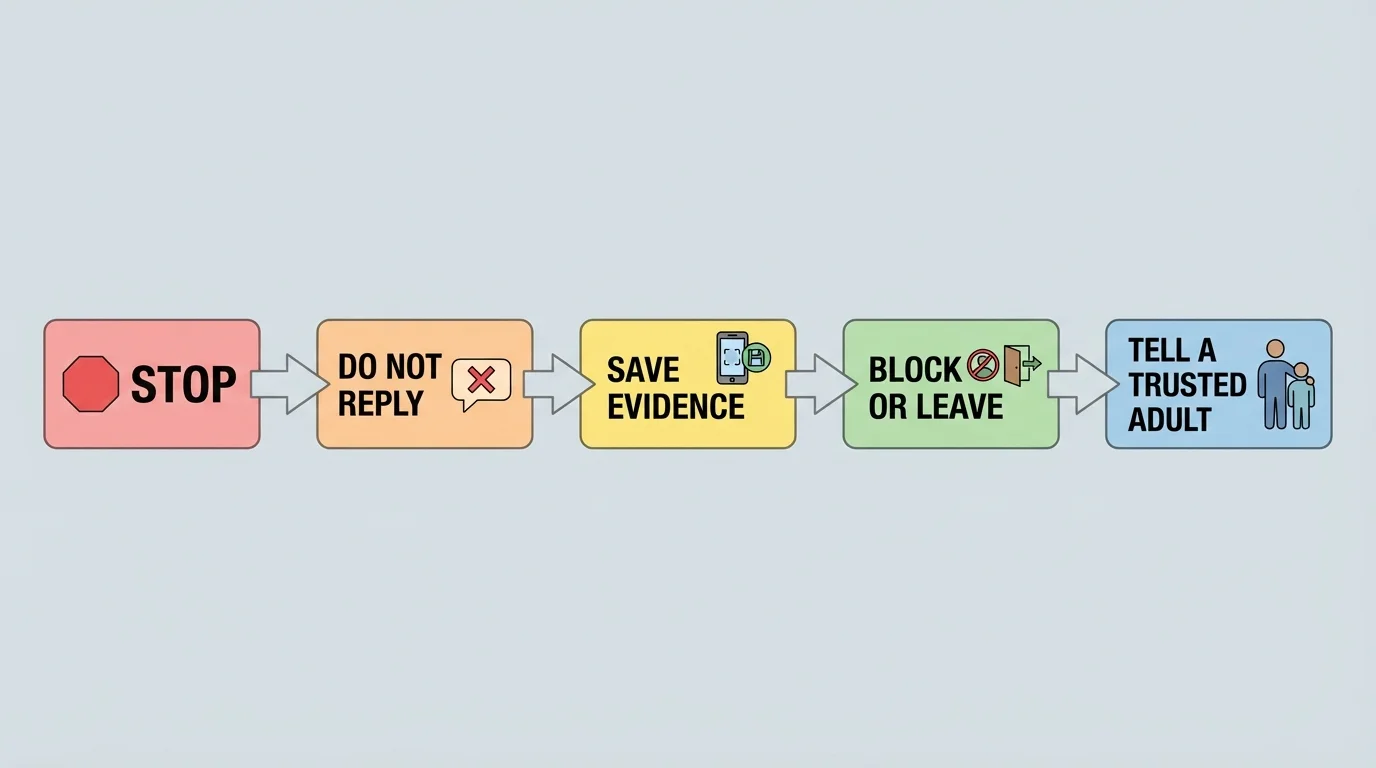
[Figure 2] If something online makes you feel confused, scared, sad, or pressured, use a simple rule: pause before you tap. Do not answer right away. Do not click right away. Do not send a picture just because someone asks.
Your safety is more important than being polite to a stranger online. You do not owe anyone a reply. You are allowed to leave a game, close a chat, turn off a video call, or put the device down and go find help.
"If it feels wrong, stop and tell."
— A smart online safety rule
This rule is helpful because unsafe people often try to make kids move fast. They may say, "Hurry," "Only you," or "Don't tell." Fast pressure is a clue to slow down.
When something goes wrong online, use this safety plan: stop, do not reply, save evidence, block or leave, and tell a trusted adult. These steps help protect you and help adults understand what happened.
It begins with Step 1: Stop interacting with that message, chat, game, or video. Put the device down if you need to.
Step 2: Do not reply. Answering can sometimes make the problem bigger.
Step 3: Save proof. If a grown-up says it is okay, take a screenshot or keep the message so the adult can see it. This can help show what happened.
Step 4: Block the person, mute them, leave the chat, or close the app if you know how.
Step 5: Tell a trusted adult right away.
You can use simple words when you tell. Try: "Someone sent me a message that felt scary." Or: "A person online asked for my address." Or: "Someone keeps being mean to me in the game chat." You do not need perfect words. Just start talking.
Example: What to do in a game chat
You are playing a game. Another player writes, "You're terrible," and then says, "Tell me where you live so I can send you something."
Step 1: Notice the clues
The first part is mean. The second part is unsafe because the person wants private information.
Step 2: Stop and do not answer
Leave the chat or game if needed. Do not type back.
Step 3: Save and tell
Show the message to a trusted adult and let them help you report or block the person.
You did the right thing by getting help quickly.
Many apps and games have a report button. Reporting tells the app, game, or website that a user broke a safety rule. An adult can help you use that tool. Even if you report inside the app, you should still tell a trusted adult in your life.
Later, when you think again about the safety plan in [Figure 2], remember that the order matters: stop first, then avoid replying, then get help. That keeps the situation from growing.
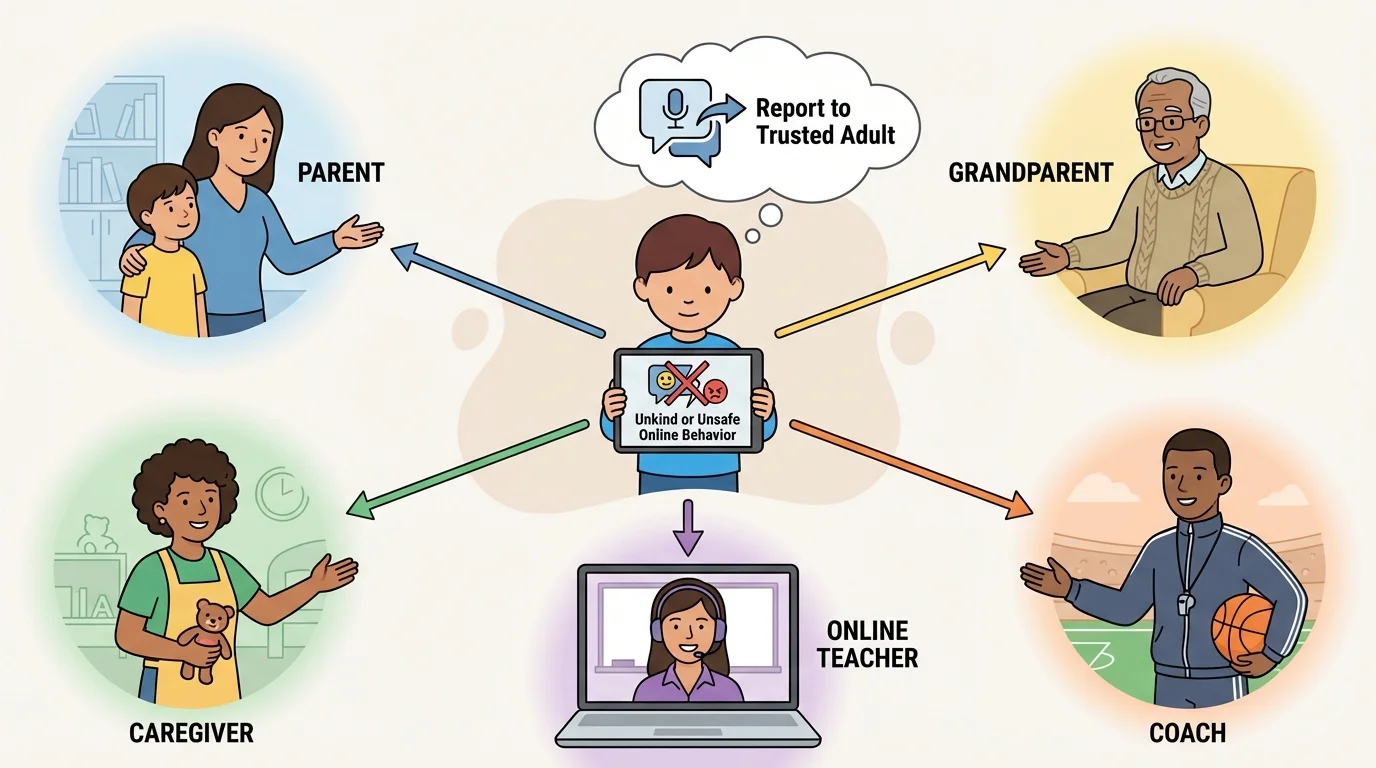
A trusted adult is a grown-up who listens, helps you stay safe, and takes your worries seriously. This might be your parent, grandparent, guardian, older caregiver, online teacher, counselor, coach, or another adult your family says is safe to tell.
[Figure 3] Trusted adults can include different caring people in your life. It is smart to know more than one trusted adult. If one adult is busy, you can tell another. Keep going until someone helps you.
You can even make a short safety list with names of adults you can tell. Keep it near your device or remember it with your family. Knowing who to go to makes it easier to act fast.
| Situation | Tell a trusted adult? | Why |
|---|---|---|
| A player calls you a mean name | Yes | It is unkind and may become bullying |
| Someone asks for your address | Yes | That is unsafe |
| A person says, "Keep this secret" | Yes | Secret pressure is a warning sign |
| You see mean comments toward someone else | Yes | Adults can help protect others too |
| A pop-up says "Click now to win" | Yes | It may be a trick |
Table 1. Common online situations and why they should be shared with a trusted adult.
Looking back at [Figure 3], notice that trusted adults can be both at home and in your wider community. In online school, a teacher on your screen can still be a helpful adult to tell, along with your family.
Here are some real situations you might face.
In a video call: Someone laughs at how you look and keeps doing it. That is unkind. Leave if needed and tell an adult.
In a game: A player says they will give you special game items if you send a photo. That is unsafe. Do not send anything. Tell an adult.
In comments: A person writes that your family is weird and tells others not to talk to you. That is unkind and may be cyberbullying. Save it and tell.
In a message: Someone says, "What is your password? I need it to help you." No safe person should ask for your password. Tell an adult right away.
Example: A secret message
You get a message that says, "You seem cool. Don't tell your family we are talking."
Step 1: Spot the warning sign
The person wants a secret. Safe adults do not ask kids to hide online chats.
Step 2: Stop
Do not answer. Close the message.
Step 3: Tell
Show the message to a trusted adult as soon as possible.
Telling is the safe choice, even if the message sounded friendly at first.
If you make a mistake online, you should still tell. Maybe you clicked something before you knew it was a problem. Maybe you replied once. You are still supposed to get help. Adults can help best when they know what happened.
Good safety habits make problems less likely. Keep accounts private when possible. Use nicknames instead of full names if a grown-up says that is okay. Never share passwords except with your parent or guardian. Ask before downloading, clicking links, or joining new chats.
Be kind online too. Do not forward mean messages. Do not laugh at someone being hurt. If you see unkind behavior, step away and tell an adult. Being safe also means helping make online spaces kinder.
Remember: Private information includes your full name, home address, phone number, password, school or activity location, and pictures that should stay personal. Keep these details with trusted adults only.
A good quick check is: Kind? Safe? Private? Before you send, share, click, or reply, ask those three questions. If the answer to any one is "no" or "I'm not sure," stop and tell.
Sometimes kids stay quiet because they feel embarrassed or worried they will lose screen time. But safety comes first. Telling a trusted adult is brave and smart.
If someone online is mean, creepy, pushy, or asks for private things, the problem is not your fault. Your job is not to fix it alone. Your job is to notice, stop, and tell.
Try This: Pick two trusted adults today and say their names out loud. Then practice one sentence you could use: "I need help with something online." Practicing when you are calm makes it easier to speak up when you really need help.
