Every click can leave a clue. When you watch a video, post a picture, type in a search box, or write in a game chat, you are creating pieces of a story about your online life. That story is called your digital footprint. Even small choices online can matter, because what you do on the internet can sometimes stay there for a long time.
Learning about your digital life is an important part of being safe and smart online. You use devices for fun, learning, talking with family, games, and hobbies. That is why it helps to know how your choices shape what others, apps, and websites may learn about you.
A digital footprint is the trail of information left behind when you use the internet. It is called a footprint because, like footprints in sand or snow, it shows where you have been and what you have done. Your footprint can be made by things you do on purpose and by information collected in the background.
Digital footprint means the information trail created by your online actions, such as searching, posting, liking, messaging, watching videos, and using apps or websites.
Your digital footprint is not always bad. It can include good things too, like kind comments, creative art you share with family, or a helpful username in a safe learning app. The important thing is to understand that your choices build that footprint piece by piece.
Some parts of your footprint may be seen by people you know, and other parts may be seen by companies, apps, or websites. This is one reason privacy matters. Privacy means keeping personal information safe and sharing only what should be shared.
Every time you go online, you make choices, and many of those choices add to your footprint. As [Figure 1] shows, one device can connect to many online actions, and each one leaves a trace. You might choose to search for a craft idea, tap a heart on a video, join a game, send a sticker in a chat, or sign up for an app with a parent. Each action can create information about you.
Here are some common ways footprints are created: posting a photo, writing a comment, making a username, sharing a video, clicking a link, joining a game server, watching certain kinds of videos often, filling in your age, or turning on location in an app. Even deleting something does not always mean it is completely gone, because someone may have copied it, saved it, or seen it before it was removed.

Think about a game chat. If you type, "I live near the big park on Oak Street," that message shares personal information. If you type, "Good game, everyone," that also becomes part of your footprint, but it is much safer and kinder. The words are different, so the footprint they create is different too.
Photos and videos can add even more information than you expect. A picture might show your face, your pet's name on a tag, the street number on your house, your sports team shirt, or a location in the background. That means one post can reveal many clues at once.
Apps and websites may also keep track of what you watch or click. If you watch lots of animal videos, the app may show you more animal videos. If you search for building games, you may get more ads or suggestions for similar games. Your choices teach the app what you like.
Some websites and apps remember your activity so they can make suggestions later. That can feel helpful, but it also means your choices are being noticed and stored.
Your online choices can also shape your reputation. Reputation is what other people think about how you act. If your messages are respectful and kind, that creates a positive picture of you. If your messages are rude or mean, those create a very different picture.
There are two main kinds of footprints, and [Figure 2] helps compare them. Knowing the difference makes it easier to understand what you control directly and what happens in the background.
The first kind is an active digital footprint. This is made by things you choose to do, like posting a comment, uploading a drawing, sending a message, or making a profile name. You are actively creating the trace.
The second kind is a passive digital footprint. This is created when websites, apps, or devices collect information as you use them. For example, an app may notice what videos you watch, how long you stay on a page, or what device you use.
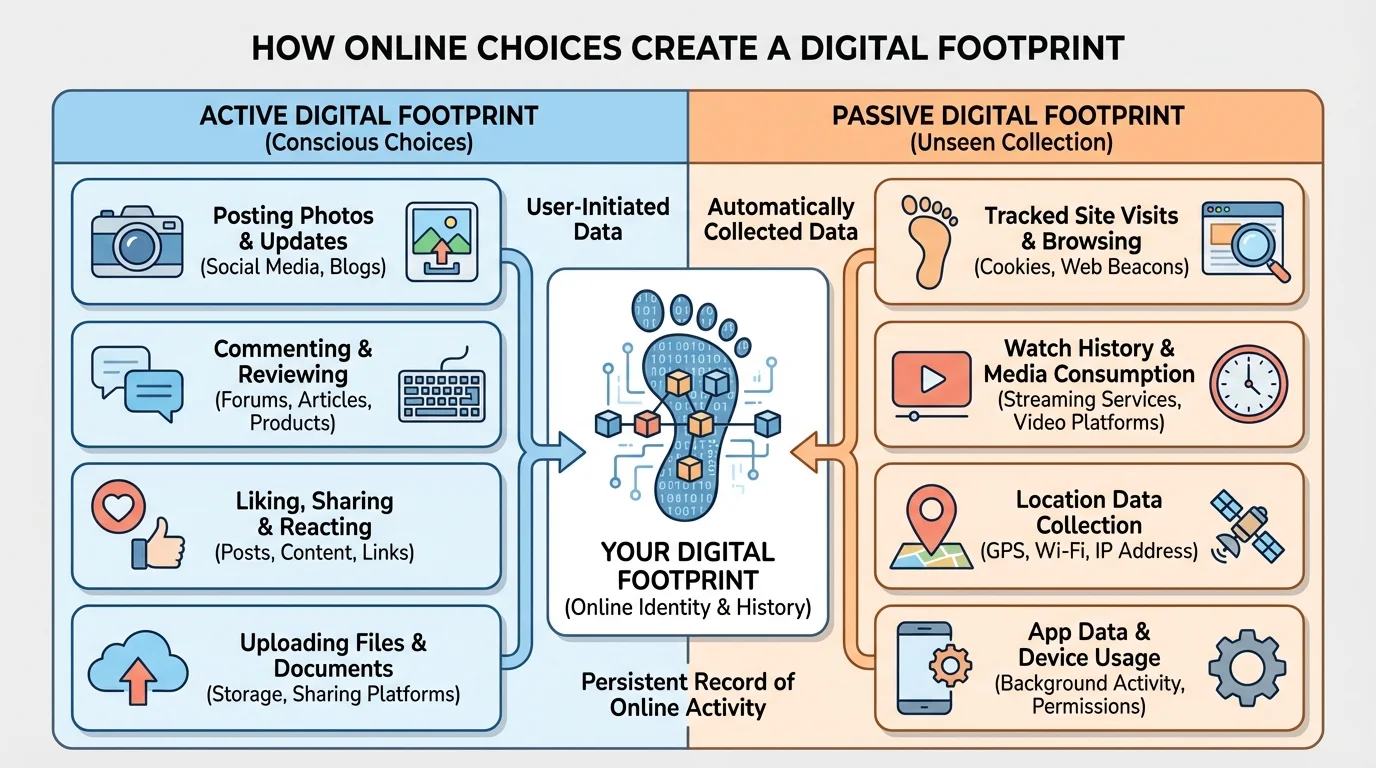
Here is a simple way to remember it: active means "I chose to do it," and passive means "it was collected while I was using it." Both become part of your digital footprint.
| Type | What it means | Examples |
|---|---|---|
| Active | You do something on purpose online | Posting, commenting, liking, sharing, messaging |
| Passive | Information is collected while you use a site or app | Watch history, app tracking, location data, search history |
Table 1. A comparison of active and passive digital footprints.
Later, when you think about privacy settings or asking an adult for help, it helps to remember this chart. As we saw in [Figure 2], not every part of your footprint comes from posting. Some parts come from simply using the internet.
Online choices have real-world effects. A kind message can make someone feel included. A mean comment can hurt someone's feelings. Sharing too much personal information can make you less safe. This is why your digital footprint matters in everyday life, not just on screens.
Why digital footprints matter
Your footprint can affect your safety, your privacy, your feelings, and how others see you. A safe footprint usually includes kind words, careful sharing, and smart choices about personal information.
Here are some possible results of online choices:
Sometimes children think, "It was only online, so it does not matter." But online choices can affect trust, safety, and friendships outside the screen too. If people see unkind behavior again and again, they may not want to talk or play online with that person.
Your feelings matter too. If you share something private and later wish you had not, you may feel worried or embarrassed. Making careful choices early can help prevent that stress.
Before you post, share, chat, or sign up, you can use a quick safety check. [Figure 3] shows this as a simple path you can follow each time you are unsure. You do not need to be perfect. You just need to pause and think before you click.
Try this easy plan:
Stop. Do not rush.
Think. Ask yourself a few questions.
Check. Make sure the choice is safe, kind, and not too personal.
Ask. If you are unsure, tell a trusted adult.
Choose. Only post or share if it feels safe and smart.
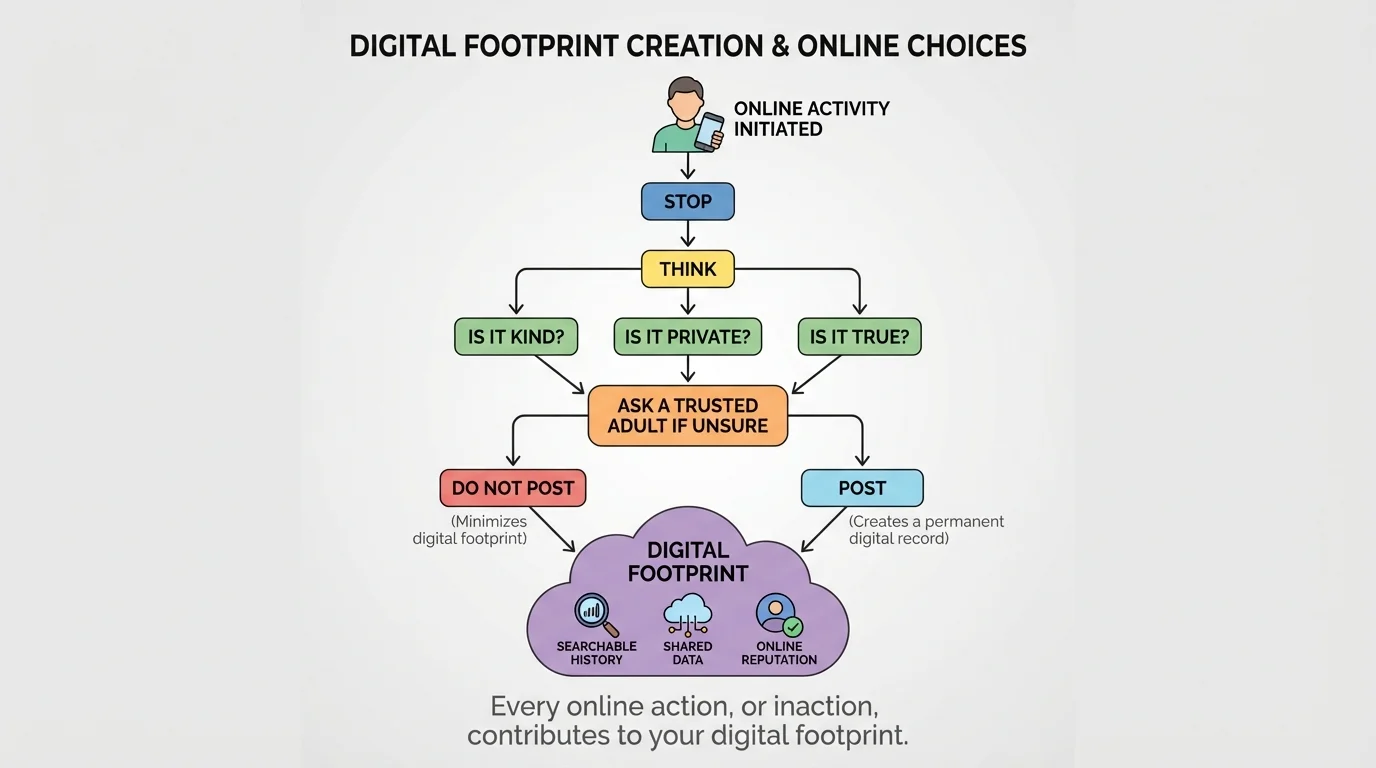
You can ask yourself these questions before sharing anything online:
This little pause can protect you. For example, if a game asks for your real name and address, the answer should be no unless a trusted adult says it is okay. If a video app asks to use your location, that is another moment to stop and ask.
Real-life choice check
You want to post a photo of your new science project.
Step 1: Look closely at the photo.
Does it show your full name, home address, or school information on a paper or background?
Step 2: Think about privacy.
If the photo reveals private details, crop it or do not post it.
Step 3: Ask a trusted adult.
Get help deciding whether the photo is safe to share.
Step 4: Make the safer choice.
Post only the part that shows the project and not personal details.
This way, you still share your hard work without sharing private information.
Later, when you feel rushed or excited, remember the path in [Figure 3]. The best online choices often happen when you slow down for just a moment.
Good habits make safe choices easier. You do not have to solve everything alone. Trusted adults can help with apps, settings, and tricky messages.
Here are some smart habits you can start using right away:
These habits help build a safer footprint over time. One smart choice is helpful, but many smart choices together are even better. That is how digital citizenship works in real life: through small actions repeated over time.
"Before you share, show that you care."
If you are using a shared family account or a shared device, remember that your choices still matter. Even on someone else's device, comments, searches, and app activity can become part of an online record.
Let's look at a few examples you may recognize from daily life.
Example 1: You watch pet videos every day. The app notices and shows you more pet videos. That is part of your passive footprint.
Example 2: You write, "Great job!" under a cousin's art post. That is part of your active footprint, and it adds a kind trace.
Example 3: You join a game and make your username your full real name plus your birth year. That reveals too much information and creates a risky footprint.
Example 4: A family member wants to post your soccer photo online. You can ask, "Does it show my team name, my location, or other private details?" That is a smart privacy question.
Example 5: You click "allow" on everything quickly without reading. The app may collect more information than you meant to share.
Being safe online is not just about strangers. It is also about protecting your information, treating others kindly, and thinking ahead before you click.
These examples show that a digital footprint is not created by one huge action only. It grows from many small online choices. As we saw earlier in [Figure 1], even simple actions like liking posts, chatting, and searching add up.
[Figure 4] Everyone makes mistakes sometimes. If something unsafe, private, or unkind gets posted, stay calm and take one step at a time.
A simple plan can help you handle an online problem safely. You might send a message you regret, share too much personal information, or see someone being mean in a chat. The important thing is what you do next.
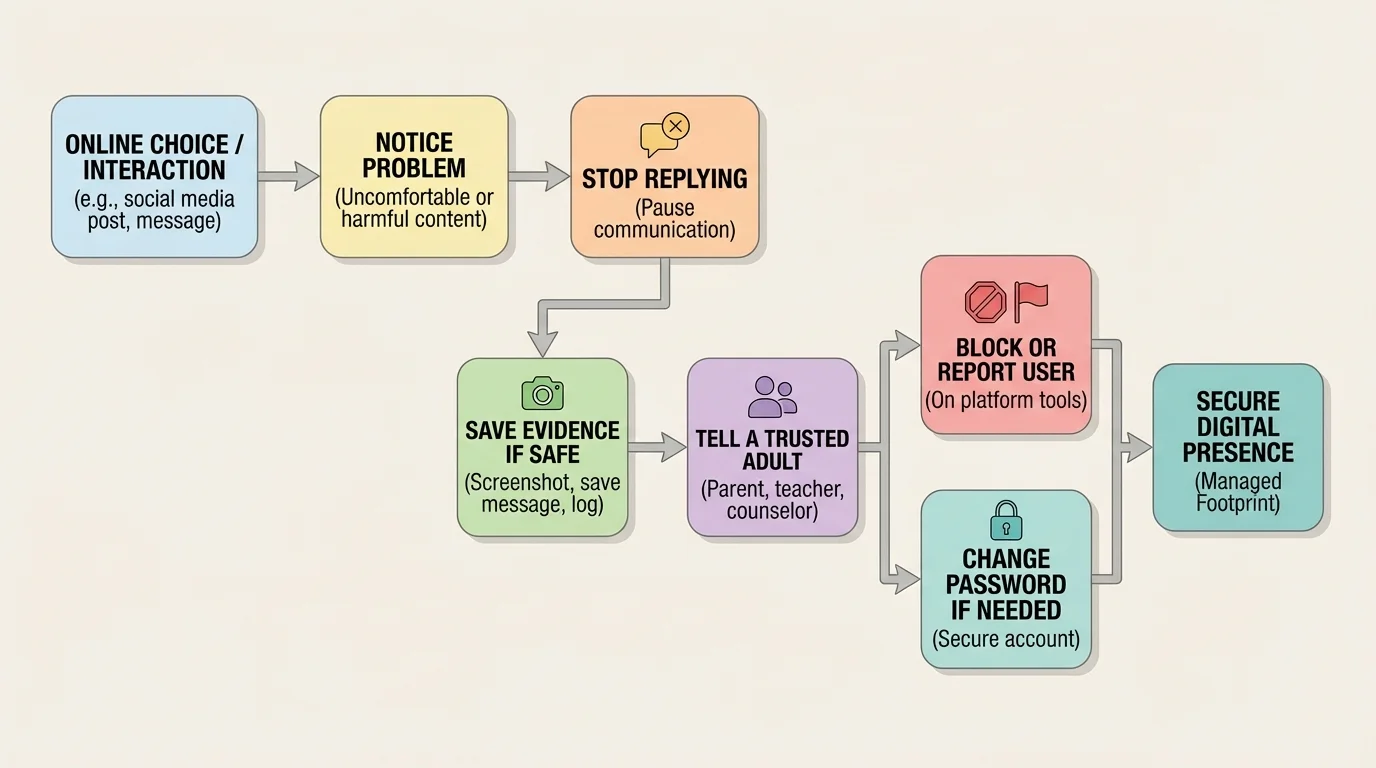
Here is a good response plan:
If someone else shares your photo or message without permission, that is not your fault. You still deserve help. A trusted adult can help you report the content and decide what to do next.
Later, if you need to remember the steps, think back to the calm response path in [Figure 4]. The goal is not to panic. The goal is to get help and make the situation safer.
Your digital footprint is something you build over time. Each safe, thoughtful, and kind online choice helps create a footprint that protects your privacy and shows good character.
