One click can do a lot. It can help you learn a new skill, send a kind message, or watch a fun video. But one click can also send private information to a stranger, open a trick website, or start a problem that is hard to fix. That is why knowing the difference between safe and unsafe choices online is such an important life skill. You make digital choices every day whenever you learn, connect, or spend time online.
Being online is part of real life. You may message friends or family, join a video call, play games, watch videos, search for facts, or share photos. These can all be great tools. But online spaces are not always what they seem. A person may pretend to be someone else. A website may try to trick you. A photo may reveal more than you meant to share. Safe online habits help you protect your feelings, your information, and your time.
When you use safe habits, you are more likely to have positive experiences: learning something useful, staying connected, and solving problems quickly. When you use unsafe habits, the consequences can be serious. Someone could copy your picture, learn where you live, bother you with mean messages, or steal account information. Online safety is not about being scared. It is about being smart, calm, and careful.
Private information is personal information that should not be shared publicly online. This includes things like your full name, home address, phone number, school name, passwords, and real-time location.
Digital footprint is the trail of information you leave behind when you post, comment, search, like, or share online.
Trusted adult is a grown-up you know in real life who helps keep you safe, such as a parent, guardian, coach, or another caregiver.
One important thing to remember is that the internet can save and spread information very fast. Even if you delete a post later, someone may already have seen it, shared it, or taken a screenshot. That is part of your digital footprint. A smart rule is this: if you would not want a trusted adult to see it, do not post it.
Safe online choices protect your privacy, your feelings, and your device. They help you learn, connect, and have fun without giving strangers power over your information. Unsafe online choices put your information, emotions, or accounts at risk. Unsafe choices often happen when someone moves too fast, trusts too quickly, or shares too much.
Safe choices are usually calm and thoughtful. Unsafe choices are often rushed. For example, a safe choice is checking with an adult before signing up for a new app. An unsafe choice is typing in your real name, birthday, and address because a game asks for them. Just because a website asks for something does not mean you should give it.
Some trick messages are designed to make you feel hurried, excited, or worried so you act before you think. That is why slowing down is one of the best online safety skills you can build.
Online safety also includes how you treat other people. A safe online space is respectful. A person who spreads rumors, excludes others in chats, or sends mean comments is creating an unsafe space, even if no passwords are involved. Safety includes privacy, honesty, and kindness.
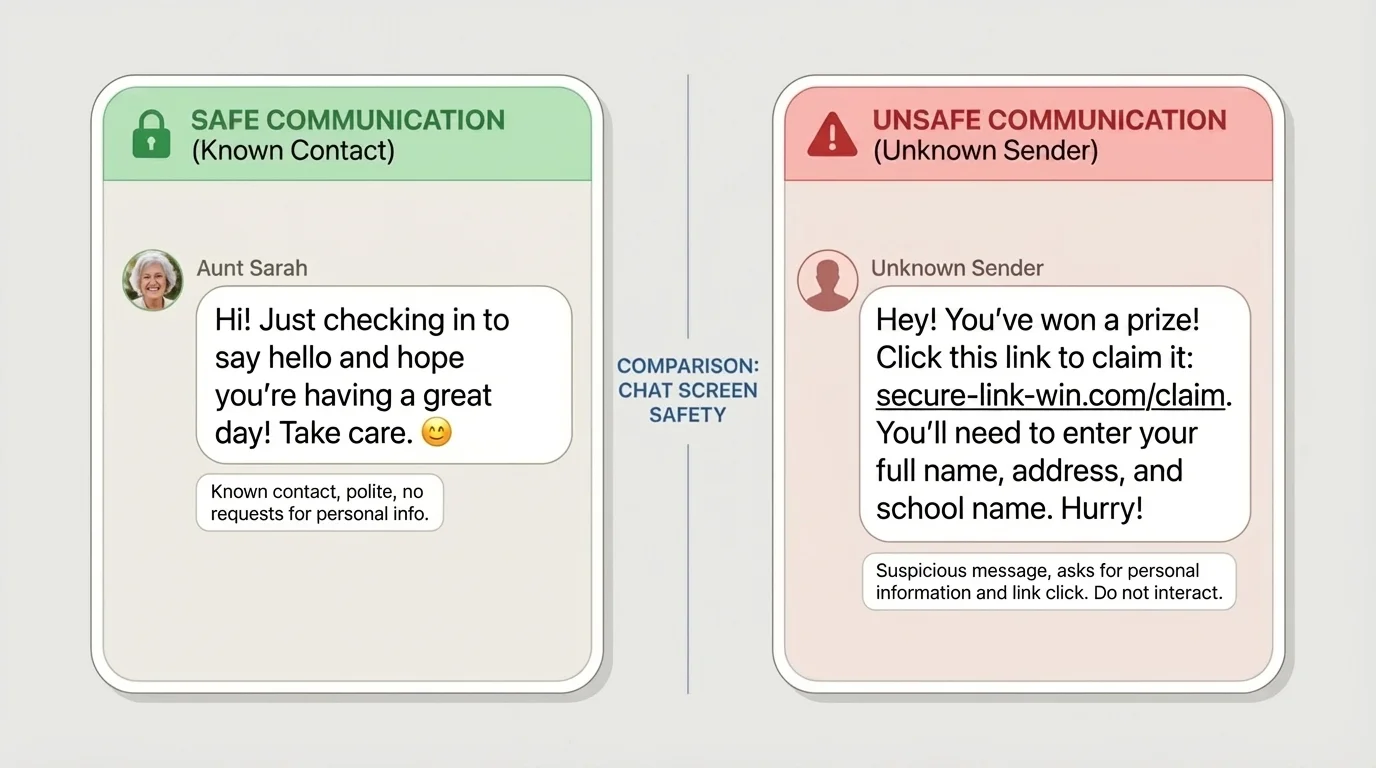
[Figure 1] When you communicate online, the biggest question is not just "What did they say?" It is also "Who is this, and what do they want?" Safe communication respects privacy and personal boundaries. Unsafe communication often asks for secrets, pushes you to reply fast, or sends links you did not expect.
A safe message usually comes from someone you know in real life or through a trusted family connection. It is polite, clear, and does not ask for private information. For example: "Hi! Want to join our game later?" or "Grandma sent a photo from our trip." These are normal messages. But an unsafe message might say, "Tell me your address," "What is your password?" or "Click this link now to win a prize." Those are warning signs.
Be extra careful with strangers online. A stranger is anyone you do not truly know in real life, even if they seem friendly, have a nice profile picture, or say they are your age. People online can pretend. They can use fake names, fake photos, and fake stories.
Another harmful form of online behavior is cyberbullying. That means using digital tools to be mean, hurtful, threatening, or embarrassing to someone in messages, posts, game chats, or video calls. If someone keeps sending unkind messages, spreads rumors, or tries to embarrass you online, do not answer with more meanness. Save evidence if an adult asks you to, block the person, and tell a trusted adult right away.
Safe communication also means thinking before you send. Ask yourself: Is it true? Is it kind? Is it necessary? Once words are sent, they can be copied and shared. The same idea appears later when you share posts or photos, and the message example in [Figure 1] reminds you that a friendly tone is not enough if the message asks for private details.
Example: Deciding whether to reply
You get a message in a game chat: "Hey, I know a way to get free coins. Send me your username and password."
Step 1: Notice the warning sign
The message asks for account information. Passwords should never be shared.
Step 2: Do not reply or click
Replying can encourage the person to keep messaging you.
Step 3: Take a safe action
Leave the chat if needed, block the account, and tell a trusted adult.
The safe choice is to protect your account instead of trying to get a reward.
Another smart habit is to keep communication in the app or website your family already knows and trusts. If someone tries to move you to a different app, private chat, or video call quickly, pause. That can be a sign that the person does not want trusted adults to notice what is happening.
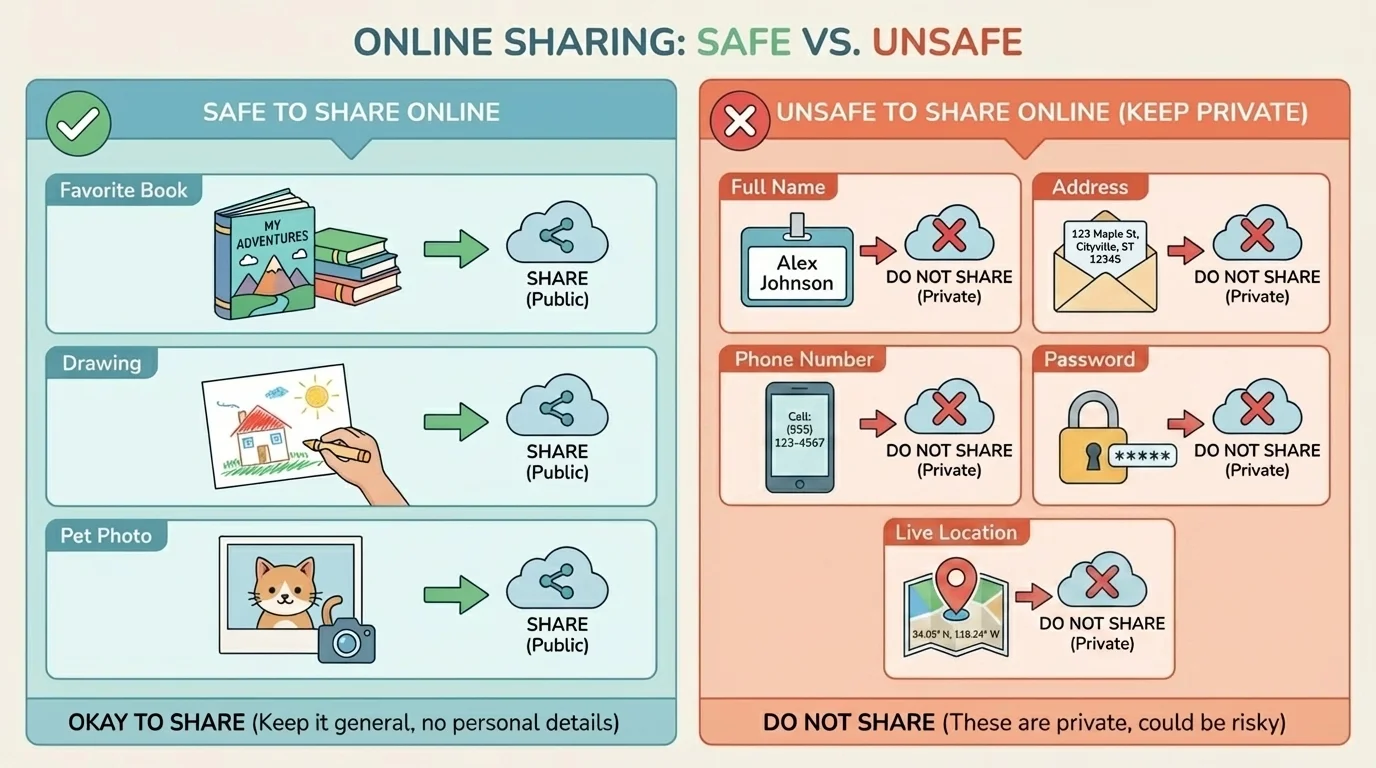
[Figure 2] Not everything belongs online. Some information is fine to share, and some should stay private. A safe share is something that does not put you in danger, embarrass someone, or reveal personal details. An unsafe share gives away too much information or hurts someone else.
Usually, it is safe to share things like your favorite color, a drawing you made, a book you liked, or a pet photo that does not show private details. It is unsafe to share your full name, address, phone number, password, birthday with the year, school or activity location, or your real-time location. Sharing your real-time location tells people where you are right now, and that is not safe.
Photos and videos need extra care. A picture can show more than you think: house numbers, street signs, license plates, team names, or papers in the background. Even if you are only sharing a selfie, the background may reveal private information. Before posting a photo, look at the whole picture, not just your face.
You should also ask permission before sharing photos or videos of other people. A safe digital citizen respects other people's privacy too. If your cousin or teammate does not want a picture posted, do not post it. Being safe online includes being respectful online.
Another important idea is privacy settings. These are controls in apps and websites that help choose who can see your posts, contact you, or use your information. Privacy settings can make sharing safer, but they do not make unsafe sharing safe. For example, posting your address is still unsafe, even on a private account.
| Type of Sharing | Safer Choice | Unsafe Choice |
|---|---|---|
| Profile name | Use a nickname approved by family | Use full real name |
| Photo posting | Check the background first | Post a photo showing house number |
| Location | Share after leaving a place, if allowed | Share your real-time location publicly |
| Passwords | Keep private | Send to a friend or stranger |
The chart in [Figure 2] helps with a quick test: if the information helps someone find you, enter your account, or learn too much about your daily life, do not share it. A good habit is to ask, "Would I be okay with this being seen by people I do not know?" If the answer is no, keep it private.
Your digital footprint lasts longer than a moment. A post may feel small when you make it, but online content can be copied, saved, and shared. That means every message, photo, and comment deserves a quick pause before you send it.
Sometimes unsafe sharing happens by accident. Maybe you fill out a form, take a quiz, or enter a contest that asks lots of personal questions. You do not have to answer everything. If a website asks for information that seems too personal, stop and check with a trusted adult.
Searching online is useful, but not every result deserves your trust. A search result can look helpful even when it is really an ad, a trick, or a low-quality page. Safe searching means looking carefully before clicking.
[Figure 3] Start with clear search words. If you want information about rain forests, search for a full idea instead of one random word. Then look at the results. Trusted sites often belong to museums, libraries, well-known news organizations, child-friendly educational sites, and official groups. Unsafe results may promise impossible prizes, use shocking words to grab attention, or ask you to download something right away.
Watch out for scams. A scam is a trick to get your money, information, or account access. For children, scams often use fake prizes, "free" game items, or messages that say you have won something. If a result says, "Claim your reward now," that is a big clue to slow down.
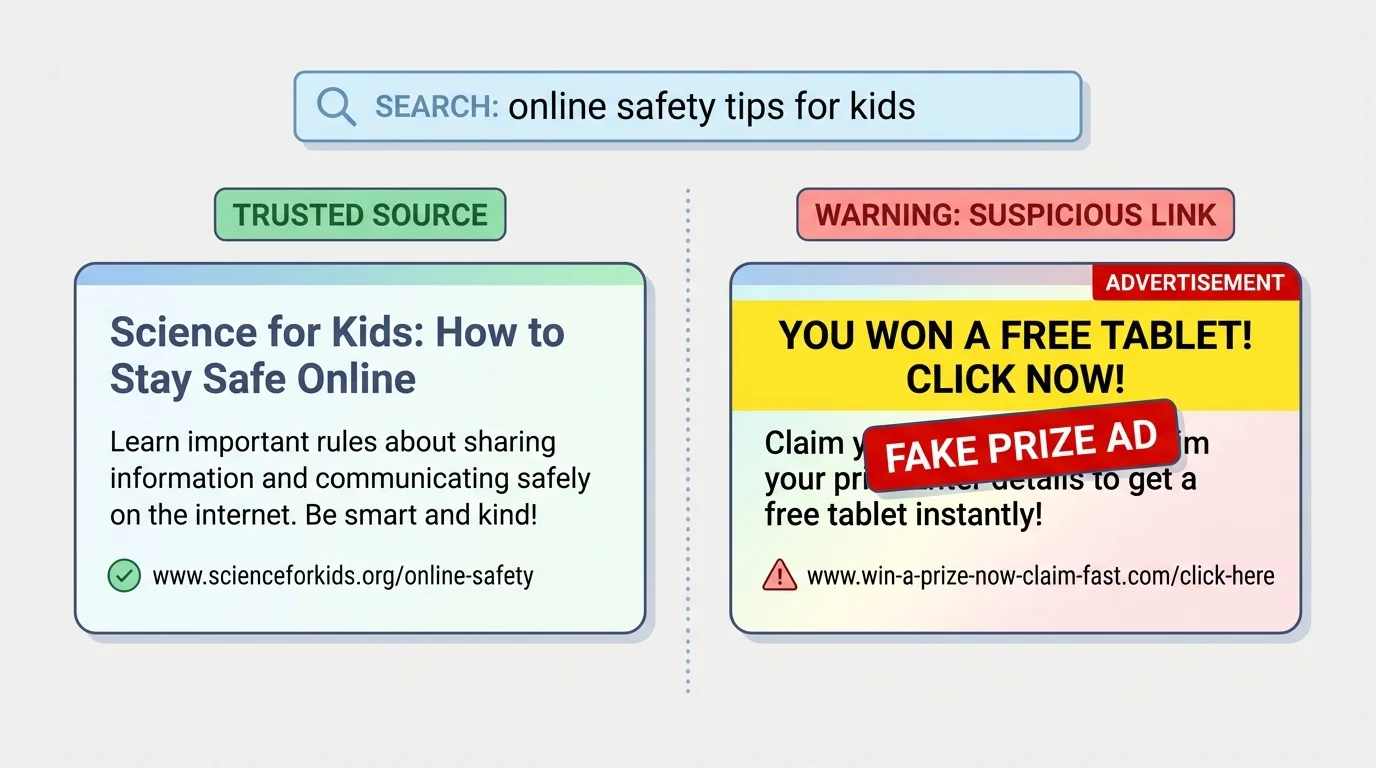
Another clue is a website address, also called a URL. You do not need to memorize every address, but you should notice whether the site name matches what it claims to be. If you think you are clicking a science site but the address looks strange, full of random letters, or unrelated to the topic, do not continue without checking.
Safe searching also means not believing the first thing you see. Compare information across more than one trusted source. If one site says something wild and no other trusted source agrees, it may not be reliable. The trustworthy and suspicious result clues in [Figure 3] help you remember to look for quality, not just bright colors or exciting words.
Example: Choosing a search result
You search for "easy facts about volcanoes" and see two results. One is from a children's museum website. The other says, "You won a free tablet! Click before time runs out!"
Step 1: Look at the purpose
The museum site is trying to teach. The prize site is trying to get a click.
Step 2: Check for warning signs
"Time runs out" and "You won" are pressure words often used in scams.
Step 3: Make the safe choice
Open the museum site, and ignore the prize link.
Safe searching means choosing information, not falling for tricks.
If a site opens lots of pop-ups, asks you to download something, or tells you your device has a problem, do not keep clicking. Close the page and tell a trusted adult. Some pages are designed to confuse people into clicking the wrong thing.
[Figure 4] When you are not sure what to do, use this four-step safety check: Stop, Think, Check, Act. This works for messages, posts, game chats, search results, links, forms, and videos.
Stop: Do not click or reply right away. Pause.
Think: Ask yourself what is happening. Is this asking for private information? Is this trying to rush me? Do I know this person or site?
Check: Ask a trusted adult, or compare with a trusted website. Look at privacy settings, account names, and website clues.
Act: If it is safe, continue carefully. If it is unsafe, leave, block, report, or close it.
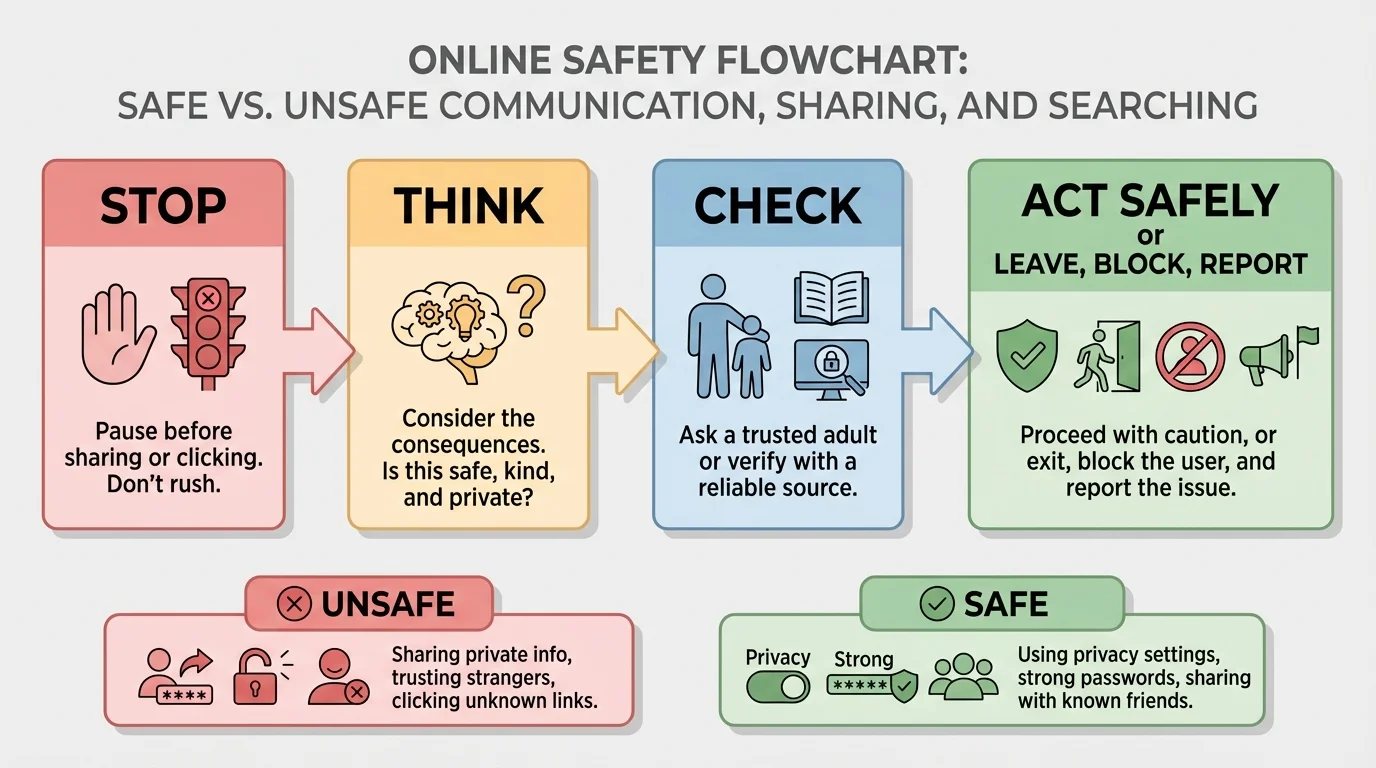
This safety check is powerful because it slows you down. Unsafe online situations often depend on speed. The person or website wants you to act before you notice the warning signs. The flow in [Figure 4] reminds you that pausing is not weakness. It is smart protection.
Sometimes you will notice a problem only after something has already happened. Maybe you clicked a strange link. Maybe someone sent a mean message. Maybe you posted something and then realized it shows private information. The most important thing is to act quickly and honestly. You are not in trouble for asking for help.
Here is what to do if something feels wrong online:
First, stop using that page or chat. Do not keep exploring it.
Second, do not reply to scary or suspicious messages. Replying can make things worse.
Third, block or report the person if the app allows it. Many apps and games have safety tools.
Fourth, tell a trusted adult right away. Show them exactly what happened.
Fifth, if needed, save evidence. A screenshot can help explain the problem, especially in cyberbullying situations.
If someone pressures you to keep a secret online, that is a major warning sign. Safe adults and safe friends do not tell children to hide online conversations from caregivers. The same message warning signs shown earlier in [Figure 1] connect to this rule: secrecy, pressure, and personal questions are not safe.
"When in doubt, check it out."
— A smart rule for online safety
If you ever share something by mistake, do not panic. Tell a trusted adult, change settings if needed, and remove the post if possible. Mistakes can happen. What matters is responding quickly and learning from them.
Strong safety comes from small habits repeated often. Use passwords or passcodes that are kept private from friends. Log out of shared devices when you are done. Keep apps updated if a trusted adult manages your device. Ask before downloading new games or extensions. Read before clicking "agree."
Kindness is also a safety habit. If you would not say something face-to-face to a family member or respected adult, do not type it online. Respecting others helps build healthy digital spaces. It also protects your own digital footprint.
Finally, remember that safe online behavior is not about never using the internet. It is about using it wisely. You can enjoy videos, games, messages, and searches while still protecting your privacy, checking sources, and asking for help when needed. The more you practice these habits, the easier they become.
You already know how to stay safe in everyday life by noticing warning signs, listening to your feelings, and asking trusted adults for help. Online safety uses those same skills in digital spaces.
Every time you communicate, share, or search online, you are making choices. Safe choices protect your information, your time, and your well-being. Unsafe choices often begin with hurry, secrecy, or too much sharing. Slow down, look closely, and trust the adults who help keep you safe.
