Have you ever remembered an assignment only after the deadline had passed? That can happen fast in online school, where lessons, files, messages, and due dates can live in different places. The good news is that being organized is not about having a perfect desk or fancy supplies. It is about building a system you can trust, so your brain does not have to remember everything by itself.
When you have a good system, you waste less time searching for files, asking yourself what to do next, or worrying that you forgot something. You can start your work faster, finish with less stress, and notice when you need help before you fall behind. That is a big part of strong executive functioning, which means using your brain to plan, organize, and follow through.
Think of your system like a control center. Planes do not fly safely by guessing. Pilots use instruments, schedules, and checklists. You can do something similar for school: one place to see what is due, one place to find your materials, and one way to check your progress.
Deadline means the time something must be finished. Materials are the things you need to do your work, like links, worksheets, notebooks, headphones, login information, or a science kit. Progress means how much of a task you have already completed and what still needs to be done.
In online learning, your school platform may show assignments, but that does not always mean it is your full system. You still need a way to notice new tasks, collect what you need, and track how far you have gotten. A strong system helps you answer three questions any time: What is due? What do I need? What is my next step?
Without a system, small problems pile up. One missing worksheet can delay a whole assignment. One forgotten password can waste ten minutes. One project left until the last day can feel huge and scary. But with a system, you catch problems earlier. You know that a quiz is coming, your notes are ready, and your draft is already half done.
Being organized also helps outside school. The same skill can help you remember soccer practice, music lessons, chores, family plans, or items you need to pack for a trip. When you learn to track important tasks now, you are building a life skill you will use for years.
Many students think organization means spending a long time making everything look neat. In real life, the best system is usually the one that is simple enough to use every day.
A system should save time, not create extra work. If your planner has too many pages, or your folders have confusing names, you may stop using them. Simple beats fancy.
Your schoolwork is easier to manage when you track the right things. Start with the basics for every subject: the assignment name, the due date, the materials needed, and the progress so far. If you only write down the assignment title, you may still forget important details.
It helps to track five categories across subjects:
This is where a checklist can help. A checklist turns a big pile of "school stuff" into clear, visible steps. When you check off one item at a time, your work feels more doable.
| What to track | Helpful example | Why it matters |
|---|---|---|
| Deadline | Math quiz on Thursday | You can prepare before the last minute |
| Materials | Fraction notes, pencil, calculator link | You are ready when it is time to work |
| Progress | \(\dfrac{1}{2}\) of the reading done | You know how much is left |
| Message | Ask teacher about question 5 | You do not forget to get help |
| Next action | Finish introduction slide | You can start quickly |
You do not need the same tools as someone else. What matters is choosing tools you will really use. Some students like paper. Others like digital tools. Many do best with a mix of both.
A planner is one of the most useful tools because it gives your tasks a home. Your planner can be a notebook, a printed chart, or a digital calendar. If you use a digital calendar, be sure to set alerts for important deadlines. If you use paper, keep it in the same place every day.
Here are some strong choices:
A simple rule works well: use one main place for deadlines, one main place for materials, and one main place for progress. If you spread everything across too many apps and papers, you may lose track.
Keep your system connected
Your tools should work together. For example, if your science assignment is written in your planner, the matching science folder should hold the file and the progress tracker should show how much is finished. When your system is connected, you do not have to guess where to look next.
One useful choice is to match names exactly. If your subject is called "ELA" in your planner, call the folder "ELA" too. If your color for math is blue, use blue in your folder, notebook tab, or digital label. Matching names and colors reduces confusion.
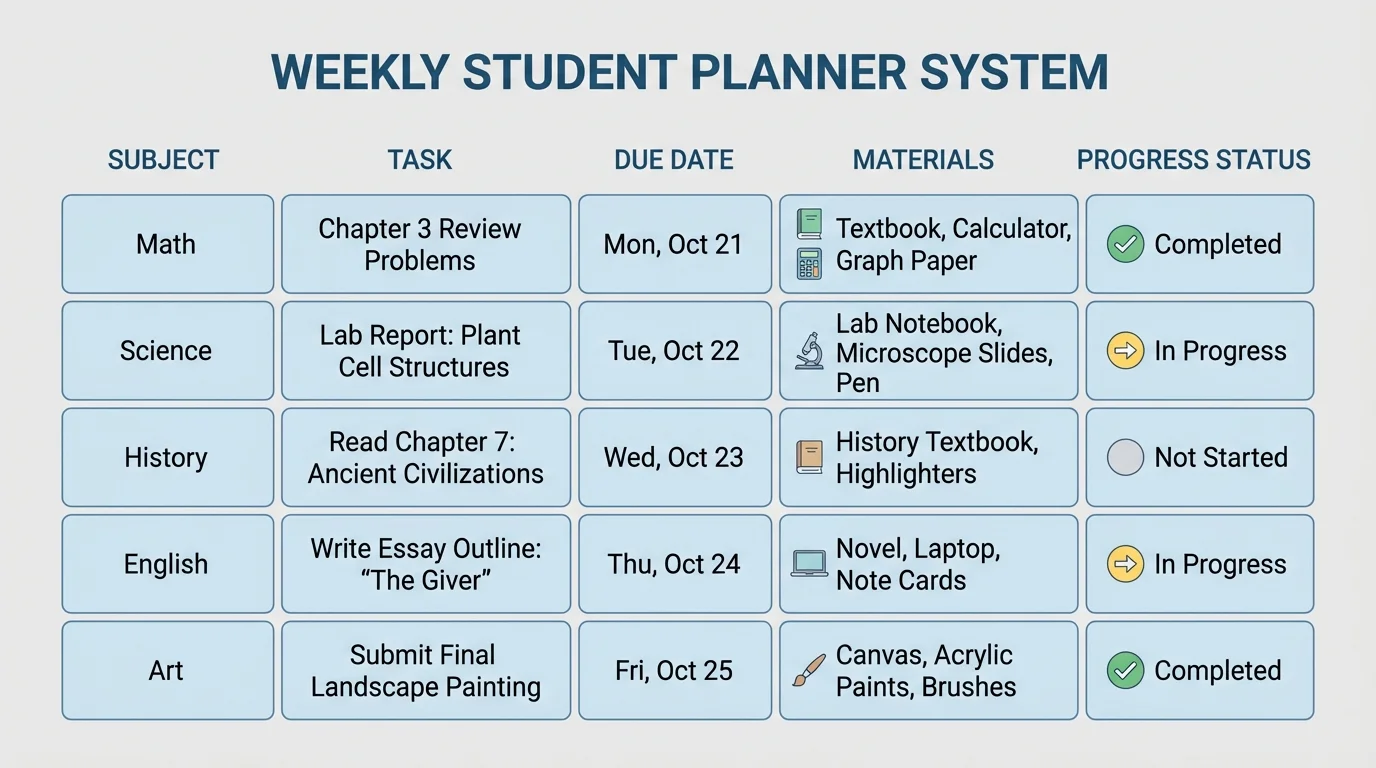
As [Figure 1] shows, a strong dashboard gives you one place to see everything at once, such as a weekly view of subjects, due dates, materials, and progress. This home base might be a sheet in a binder, a whiteboard near your workspace, or a digital document you open every day.
Your home base should include each subject and a few short columns or boxes: task, due date, materials, progress, and next step. Keep the words short so you can scan quickly. A good dashboard is easy to scan and update in just a few minutes.
Here is a simple setup for one task: "Science video notes," due Wednesday, materials: notebook and lesson link, progress: started, next step: finish notes and upload photo. When every task has this information, you spend less time wondering what to do.
You can also sort tasks into three groups: Do now, Do soon, and Later. That helps when several assignments are listed at once. "Do now" means due very soon or very important. "Do soon" means this week. "Later" means not urgent yet.
If you have many tasks, a tiny bit of math can help you estimate time. For example, if reading takes about \(\dfrac{1}{4}\) of an hour and notes take another \(\dfrac{1}{4}\) of an hour, then the total work time is \(\dfrac{1}{2}\) of an hour. In LaTeX, that is \[\frac{1}{4} + \frac{1}{4} = \frac{2}{4} = \frac{1}{2}\] So the whole task takes about half an hour. Estimating time helps you choose what fits into your day.
Later, when you review your week, the same home base still helps. You can look back and spot patterns. If math often stays in "Do now" too long, you may need to start it earlier. That kind of noticing is easier when the information is all together, like the layout in [Figure 1].
As [Figure 2] illustrates, each subject needs its own organized space, and matching labels make that space easier to use. Digital folders and physical supplies should use the same names and colors. You should be able to open any subject and quickly find current work, finished work, and important resources.
For digital work, make one main folder for each subject. Inside it, keep small folders if needed, such as "Current," "Finished," and "Resources." Use clear file names like "Math_Fractions_Notes" instead of "stuff" or "new file." Clear names save time later.
For paper materials, use one folder, binder section, or tray per subject. Keep only what you still need in the front. Old papers can go in a back pocket or archive folder. This prevents giant messy stacks.
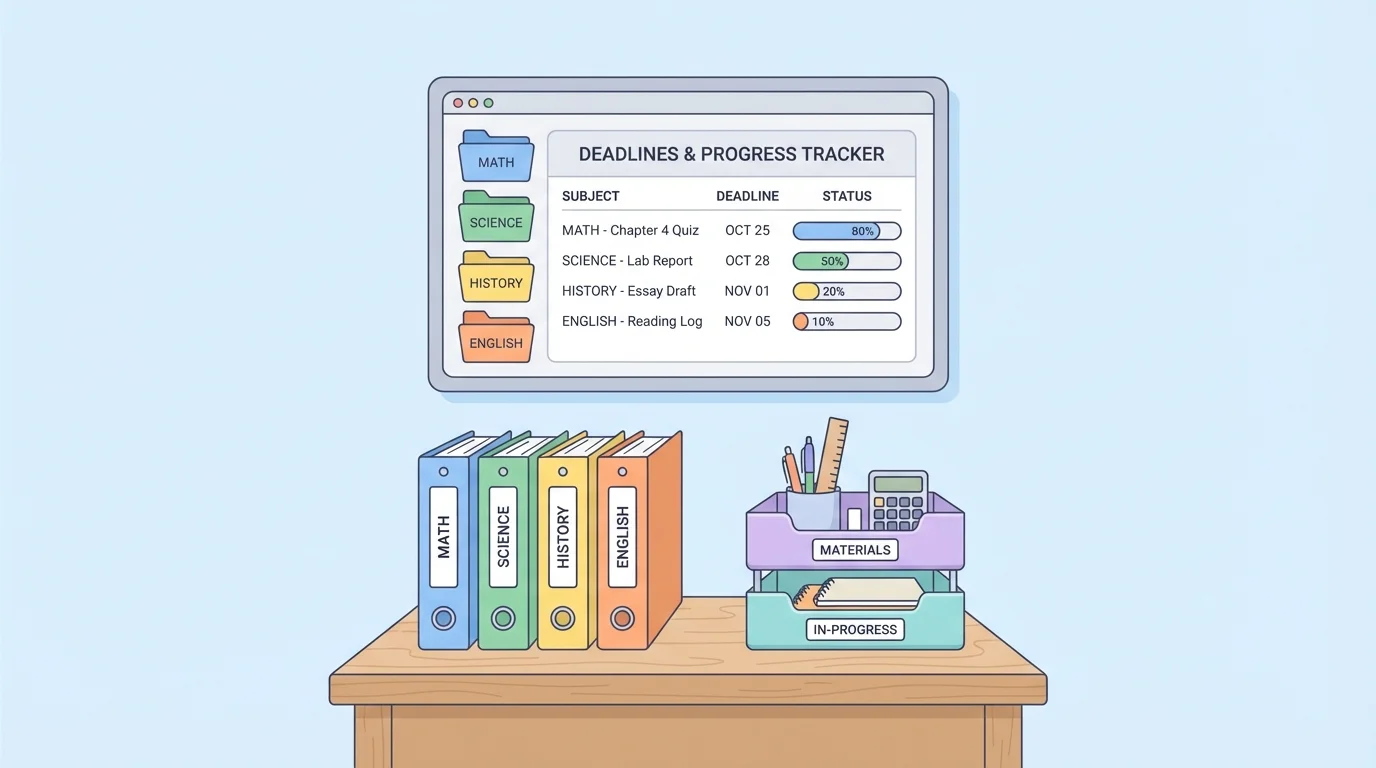
You may also want a materials list for each subject. For example, art may need pencils and sketch paper. Science may need a notebook and lab kit. ELA may need a reading notebook and headset for recorded responses. When you know the usual materials for each subject, you can gather them quickly before starting.
Passwords and login links count as materials too. Keep them in a safe parent-approved place. If you often lose time searching for links, create a shortcuts folder or bookmark bar with your main school websites.
Example: Matching subject setup
A student uses green for science in every place.
Step 1: The planner highlights science tasks in green.
Step 2: The digital folder is named "Science" and has a green icon.
Step 3: The paper notebook has a green tab.
Step 4: The supply basket has a small label for science items.
Because everything matches, the student finds science work faster and makes fewer mistakes.
When you switch subjects, reset your space. Close tabs you no longer need. Put away materials from the last subject. Open only what belongs to the next one. This keeps your attention from getting pulled in too many directions.
As [Figure 3] shows, a large assignment can feel overwhelming until you break it into a mini-deadline plan with smaller checkpoints. A project is rarely just one task. It is usually a group of smaller tasks combined under one big label.
Suppose you have a social studies slideshow due in five days. Instead of writing "slideshow" once in your planner, break it into steps: read directions, choose topic, gather facts, draft slides, add pictures, practice speaking, and submit. Each step can have its own day or checkpoint.
This makes progress visible. Even if the whole project is not finished, you can still say, "I completed steps 1 through 3." That is better than feeling stuck because the final product is not done yet.
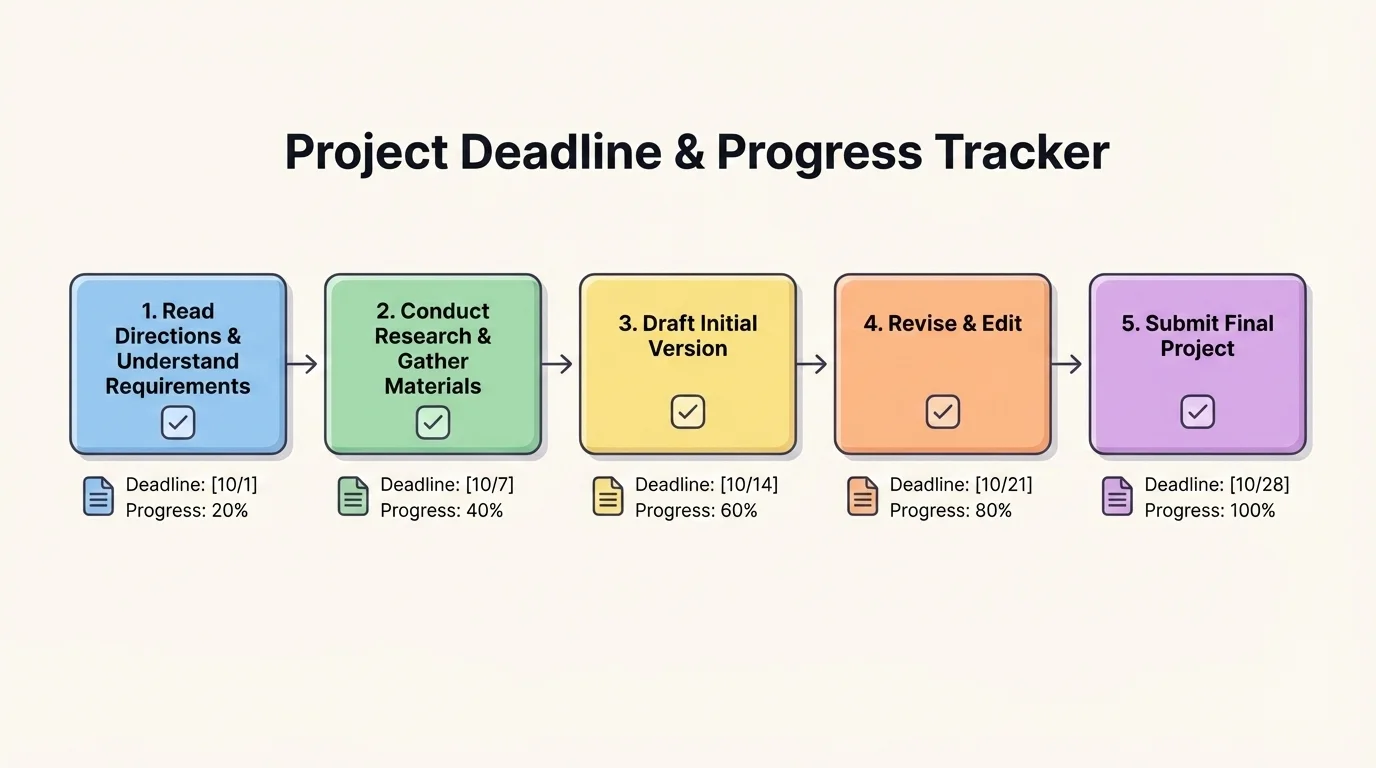
Try using simple progress labels: Not started, In progress, Almost done, and Done. Some students also like to use boxes they can shade in. If a project has 5 steps and you finish 2, then you have completed \[\frac{2}{5}\] of the project.
You do not need every step to be equal. One step might take ten minutes, and another might take forty. What matters is that each step is small enough that you know how to begin.
Example: Turning one assignment into mini-deadlines
A student has a book response due on Friday.
Step 1: Monday: Read pages and highlight key parts.
Step 2: Tuesday: Write a simple outline.
Step 3: Wednesday: Draft the first half.
Step 4: Thursday: Finish and revise.
Step 5: Friday: Submit and check that it uploaded correctly.
Now the assignment feels smaller, clearer, and easier to finish on time.
Later, if you notice you are often doing the last two steps on the final day, use that information to change your plan. The checkpoint path in [Figure 3] reminds you that progress grows one step at a time, not all at once.
Your system only works if you look at it often. A short routine helps you check your calendar, gather materials, work, update progress, and prepare for tomorrow. These check-ins do not need to be long. Even five minutes can make a big difference.
As [Figure 4] shows, a good routine has two parts: a daily check-in and a weekly check-in. The daily check-in keeps today organized. The weekly check-in helps you see what is coming next.
For a daily check-in, try this order: look at your home base, choose your top tasks, gather materials, start work, then mark progress when you finish. At the end of the day, clear your workspace and write tomorrow's first step. That makes tomorrow easier to start.
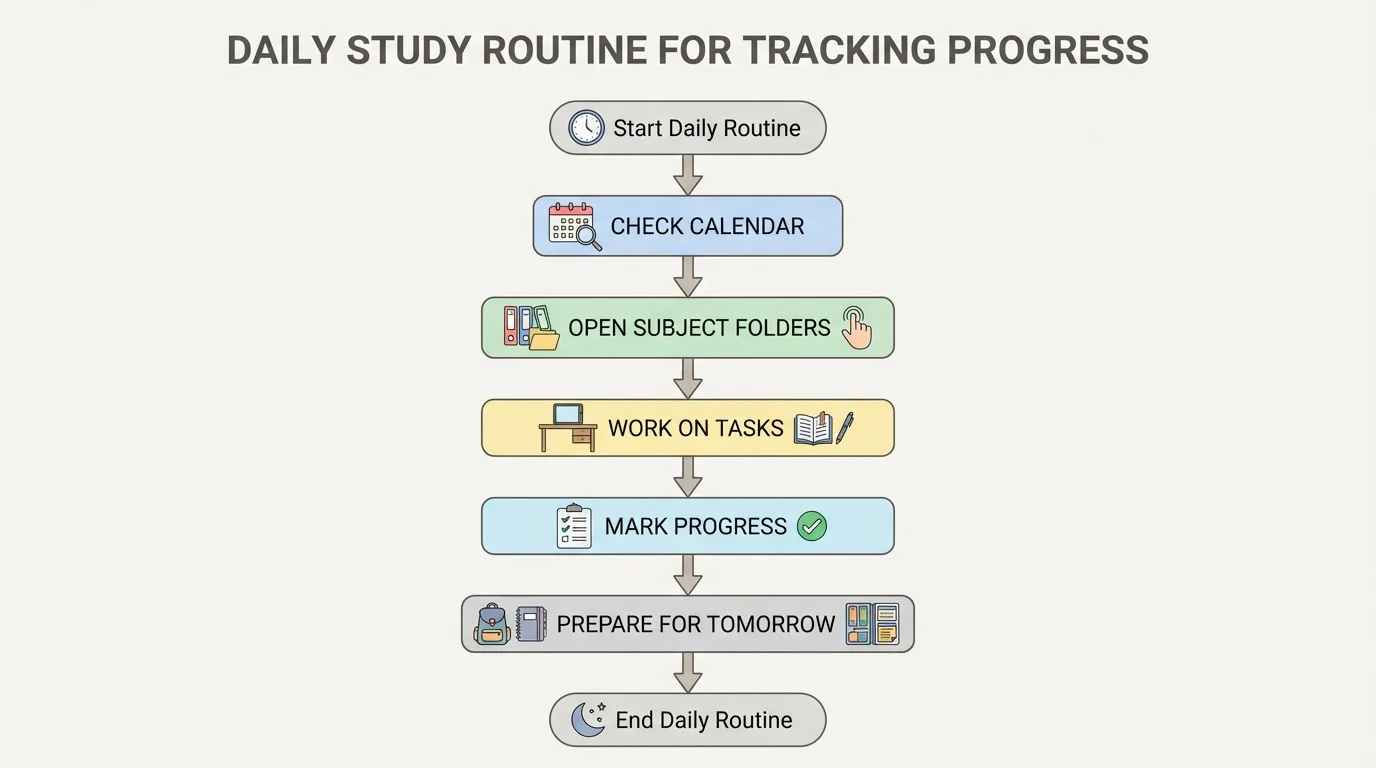
For a weekly check-in, choose one regular time, such as Sunday evening or Monday morning. Review every subject. Add new deadlines, remove completed tasks, and break upcoming projects into mini-deadlines. If you have live sessions or appointments, place those first, then fit work around them.
This routine also helps you estimate workload. If one task takes about \(\dfrac{1}{3}\) of an hour and another takes \(\dfrac{1}{2}\) of an hour, then together they take \[\frac{1}{3} + \frac{1}{2} = \frac{2}{6} + \frac{3}{6} = \frac{5}{6}\] of an hour. That is less than a full hour, so both might fit before lunch.
When school feels busy, short check-ins matter even more. The loop in [Figure 4] keeps your system alive. If you stop updating it, it stops helping.
"You do not rise to the level of your goals. You fall to the level of your systems."
— James Clear
This quote fits organization well. Wanting to be on time is helpful, but a real system is what makes on-time work happen again and again.
Even a good system needs repairs sometimes. That is normal. The goal is not perfection. The goal is noticing what goes wrong and adjusting your tools.
If you forget deadlines, the fix may be to check your planner at the same time every day and set digital reminders. If you lose files, the fix may be cleaner folder names and fewer random download locations. If you feel behind, the fix may be smaller steps and asking for help sooner.
Here are some common problems and useful fixes:
You already know that school tasks take time and attention. Organization does not replace effort. It helps you use your effort wisely, so more of your energy goes into learning and less goes into searching, guessing, or rushing.
If you get stuck, do not throw out the whole system. Change one part at a time. For example, keep your planner but simplify your folders. Or keep your folders but add a better end-of-day routine. Small fixes are easier to keep.
Different students need different systems. One student may love paper checklists. Another may do better with digital alerts. The best system is the one that fits your habits and your learning space at home.
For example, Mia uses a printed weekly chart taped near her desk. Every morning, she copies today's top tasks onto a sticky note. She keeps subject folders in a crate beside her chair. Because she likes seeing things physically, paper works well for her.
Jordan prefers digital tools. He uses a calendar with reminders, bookmarks his school websites, and keeps one document as a home base for all subjects. He updates progress after each work session. Because he switches devices sometimes, digital tools help him stay consistent.
Sam used to feel overwhelmed by big projects. Now Sam always writes mini-deadlines on the first day. A project that once felt impossible becomes a string of smaller wins. That change does not make the project tiny, but it makes it manageable.
No matter which style you choose, the key ideas stay the same: keep one clear home base, organize each subject, track progress honestly, and use short check-ins to stay current.
