A great presentation is not about sounding perfect. It is about helping other people understand your message. You might speak during a video call, record a class presentation, explain an idea in a club meeting, share information in a community group, or even make a short pitch for a project online. When your ideas are clear and organized, people listen. When your presentation is confusing, even a good idea can get lost.
Presentation skills are real-life skills. You use them when you explain rules in an online game group, tell your family about a plan, ask adults to support an idea, or speak in a future job interview. Strong speakers often seem confident, but what really helps them is structure. They know what they want to say, why it matters, and how to guide listeners from one point to the next.
If you speak without a plan, your audience may feel confused. They might stop paying attention, miss your important points, or not believe your message. But when you present well, people are more likely to understand, remember, and trust what you say.
Presentation is a planned way of sharing information, ideas, or a message with an audience.
Audience means the people who will watch or listen.
Supporting evidence is information that helps prove or explain your point, such as facts, examples, stories, or observations.
Visual aids are helpful visuals, such as slides, charts, pictures, or objects, that make ideas easier to understand.
One helpful way to think about presenting is this: you are not trying to impress people with big words. You are trying to lead them. Good speakers make it easy for listeners to follow along.
Before you open slides or write note cards, decide on your purpose. Ask yourself: What do I want my audience to know, feel, or do after listening? Your purpose might be to inform, persuade, teach, or inspire. If you do not know your purpose, your presentation may wander.
Next, think about your audience. A presentation for your family would sound different from a presentation for a youth group on a video call. Ask: What do they already know? What will they care about? What questions might they have? Strong speakers adjust their words and examples to fit the people listening.
Then choose one clear main idea. Try to say it in one sentence. For example: Too much late-night screen time can hurt sleep, and simple changes can help. That sentence gives your presentation direction. If a point does not connect to your main idea, it probably does not belong.
Purpose + audience + main idea
These three parts work together. Your purpose tells you why you are speaking. Your audience tells you how to explain it. Your main idea tells you what the presentation is really about. When all three are clear, planning gets much easier.
A useful trick is to plan your presentation backwards. Start with the ending you want: What should people remember? Then build the middle with points that support that ending. Last, design an opening that makes people want to listen.
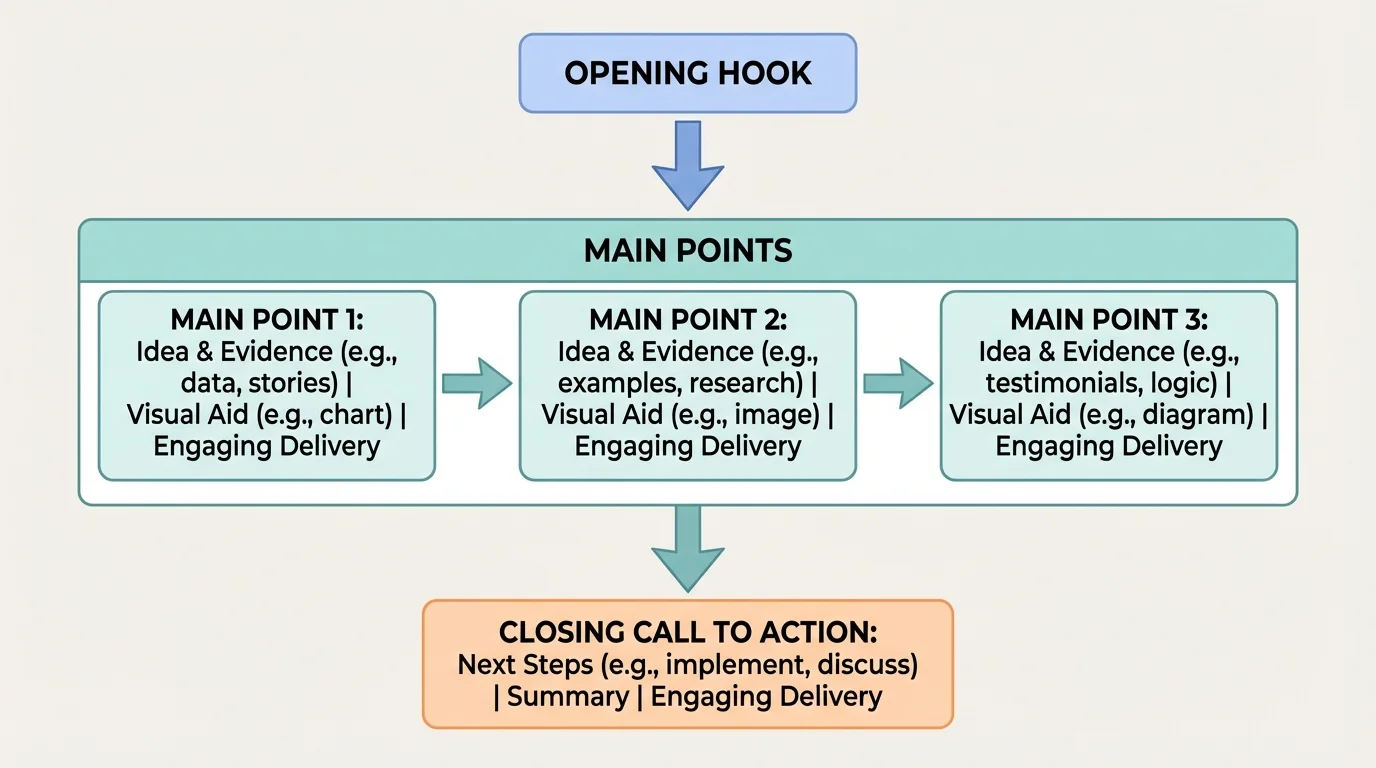
A strong structure helps your audience follow your thinking, and [Figure 1] shows a simple path that works well for most presentations. Think of your presentation like a road map. If you jump randomly between ideas, listeners get lost. If you guide them step by step, they stay with you.
The easiest structure is opening, middle, closing. In the opening, grab attention and introduce your topic. In the middle, explain your main points with evidence. In the closing, remind listeners what matters most and end with purpose.
Your opening should do three jobs: get attention, name the topic, and preview your main points. You might begin with a surprising fact, a short story, a question, or a strong observation. For example: Many people stay up later than they planned because of one more video, one more game, or one more scroll. Then you can say what you will cover.
In the middle, stick to about three main points. Too many points can overwhelm your audience. Three is a good number because it is enough to feel complete but not too much to remember. Each point should connect clearly to your main idea.
In the closing, do not just stop. Restate the message in a fresh way. End with a takeaway, a recommendation, or a call to action. You want listeners to leave knowing exactly what matters.
You can make organization even clearer by using signpost phrases. These are short transition phrases that tell your audience where you are going. Examples include First, Next, For example, On the other hand, and To wrap up. These small phrases may seem simple, but they make a presentation much easier to follow.
Another smart move is to give each main point its own mini-structure: state the point, explain it, give evidence, and connect it back to the main idea. That keeps your middle section from becoming a list of random facts.
Simple organization model
Step 1: Opening
Start with a hook, name the topic, and tell the audience your main points.
Step 2: Middle
Share your main points one at a time. Add examples, facts, or short stories so each point feels real.
Step 3: Closing
Repeat the big idea, leave the audience with one important takeaway, and finish clearly.
As you continue planning, the road-map idea from [Figure 1] still matters. If someone joined your presentation halfway through, your transitions and structure should help them quickly understand where you are.
A presentation becomes stronger when you support your ideas instead of just stating opinions. Evidence helps your audience believe you and understand why your point matters.
You can use different kinds of evidence. Facts and statistics can show scale. Personal stories can create emotion and connection. Examples make abstract ideas feel real. Expert opinions can add trust. Observations from daily life can also help if they are specific and believable.
For grade 7 presentations, you do not need a giant list of sources. You do need enough support to show that your message is thoughtful and grounded in reality. For example, if you say sleep matters, do not stop there. Add a reason: students who stay up too late may have trouble focusing, feel more tired, or become more irritable the next day.
Choose evidence that matches your purpose. If you want to persuade, use evidence that shows consequences and solutions. If you want to inform, use evidence that explains how something works. If you want to inspire, use a short story or example people can remember.
People often remember stories better than lists of facts. That is why many effective speakers mix facts with a short personal example instead of using only data.
Be careful not to overload your audience. A presentation is not a giant data dump. Pick the strongest evidence, explain it simply, and connect it clearly to your point.
Also, make sure your evidence is accurate. If you are using information from a website, video, or article, check that it comes from a trustworthy source. Sharing incorrect information can weaken your whole presentation, even if the rest of it sounds polished.
Good visual aids make your message easier to follow, and [Figure 2] compares a cluttered design with a clean one. Visuals should support your speaking, not compete with it. If people are busy trying to read a crowded slide, they stop listening to you.
A good slide or visual is simple. Use a short title, a few keywords, and maybe one strong image or chart. Avoid filling slides with full paragraphs. If you put every word on the screen, you may end up reading instead of presenting.
Choose visuals that match your point. If you are discussing healthy habits, a small chart of sleep hours might help. If you are teaching how to do something, a step-by-step image or diagram may be useful. If you are presenting about a local issue, a photo can make it feel real.
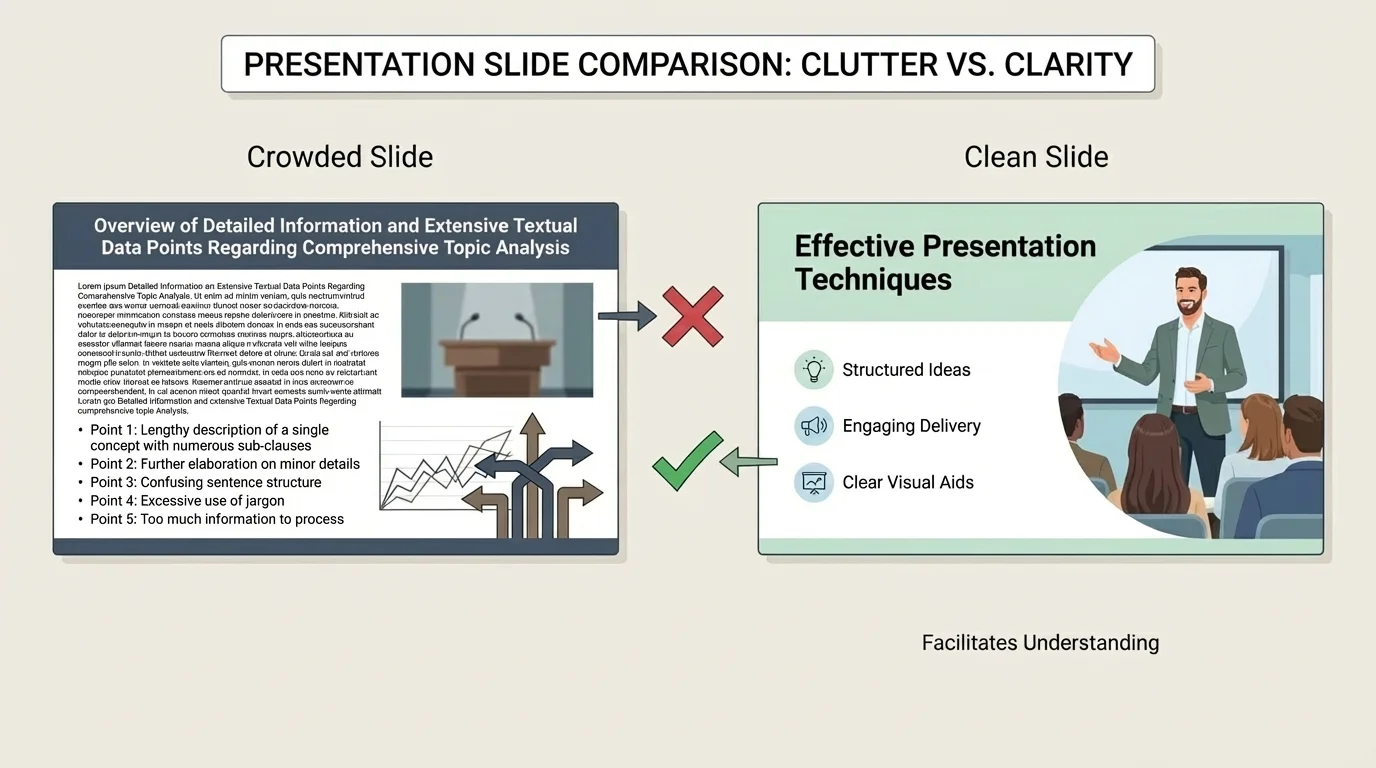
Design matters. Use large, readable text. Make sure colors are easy to see. Keep the style consistent from slide to slide. Too many fonts, animations, or bright colors can make a presentation feel messy.
If you are presenting online, check your visuals before you start. Make sure screen sharing works, files open properly, and text is readable on a small screen. A visual that looks fine to you might be hard for others to read on a phone or tablet.
You can also use non-slide visual aids. An object, a simple drawing, or even a short demonstration can work well. The rule is the same: it should make the idea clearer. If it distracts from the main message, leave it out.
Later, when you review your presentation, use the comparison in [Figure 2] as a quick test. If your visual looks crowded or confusing, simplify it until the main point stands out immediately.
Your delivery is how you bring your message to life, and [Figure 3] illustrates how camera setup, posture, and expression affect what the audience notices. Two people can say the same words, but the one who speaks clearly and connects with the audience will usually be more effective.
Start with your voice. Speak clearly and at a steady pace. Many nervous speakers rush. When you rush, people miss your words and your ideas sound less confident. Slow down slightly more than feels natural. Pause after important points. Pauses help your audience think, and they help you breathe.
Volume matters too. Speak loudly enough to be heard without shouting. If you are recording or presenting online, test your microphone first. Your audience should not have to strain to hear you.
Posture and facial expression matter, even on camera. Sit or stand upright. Keep your face visible. Look toward the camera often so your audience feels that you are talking to them, not to the floor or your notes. Natural facial expression shows interest and helps your message feel alive.
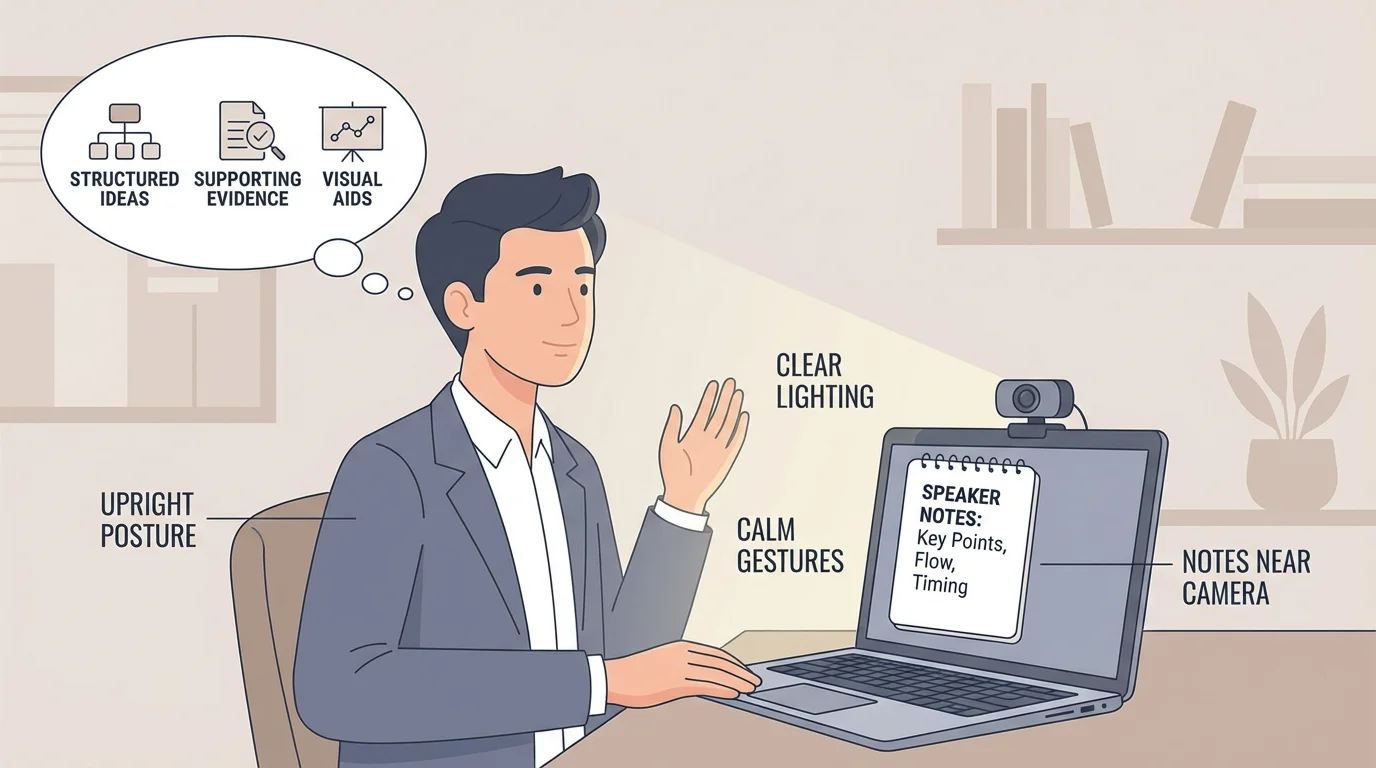
Hand gestures can help if they feel natural. Small, purposeful movements can add emphasis. But too much fidgeting, tapping, swiveling, or touching your face can distract your audience.
One strong speaking habit is variation. Change your tone a little to match the meaning. Important ideas can be said more slowly or with extra emphasis. Questions can sound curious. A story can sound more personal. This keeps your presentation from feeling flat.
"The most valuable thing in communication is hearing what isn't said."
— Peter Drucker
That quote matters in presentations because your audience reacts not only to your words, but also to your tone, pacing, and body language. As with the setup shown in [Figure 3], small delivery choices can make you look more prepared and trustworthy.
Feeling nervous before a presentation is normal. It does not mean you are bad at speaking. In fact, many strong speakers still get nervous. The goal is not to remove nerves completely. The goal is to keep nerves from taking control.
Try a short routine before you begin. Take a slow breath in, hold it briefly, and breathe out. Relax your shoulders. Remind yourself of your first line. When you know exactly how you will start, it is easier to begin with confidence.
Focus on helping the audience, not on being perfect. This mindset shifts your attention away from fear and toward service. You are there to share something useful.
Quick reset if you freeze
Step 1: Pause
Do not panic-fill the silence. A short pause feels longer to you than it does to the audience.
Step 2: Find your place
Look at your keyword notes and restart from the last point you remember.
Step 3: Keep going
You do not need to announce the mistake. Most audiences will barely notice unless you make it a big deal.
If you mispronounce a word, skip a detail, or lose your place, recover calmly. A smooth recovery often makes more difference than the mistake itself. People usually remember the overall message, not every tiny error.
It also helps to prepare backup plans. If your slides fail, can you still explain your idea? If your internet lags, can you continue with audio only or share notes in the chat later? Practical preparation reduces stress.
Practice is what turns a draft into a real presentation. But not all practice helps equally. Reading your script silently is not enough. You need to practice out loud so you can hear your pacing, transitions, and awkward spots.
Start by speaking through your presentation once without worrying about perfection. Then improve one thing at a time: your opening, your transitions, your timing, your eye contact with the camera, or your closing. Small improvements add up.
Use keyword notes instead of writing every word. Full scripts often cause speakers to sound stiff or read directly from the screen. Keyword notes keep you on track while helping you sound more natural.
You already use similar skills in everyday communication. When you explain game rules, tell a story in order, or give directions clearly, you are organizing information for another person. A presentation simply does this in a more planned way.
Timing matters. If your presentation should be around a certain length, practice with a timer. If you finish far too early, you may need more evidence or explanation. If you go too long, look for repeated ideas and remove them.
Recording yourself can feel uncomfortable, but it is one of the fastest ways to improve. You may notice that you speak too quickly, look away often, or use filler words like um and like. Once you notice a habit, you can fix it.
A strong rehearsal plan is simple: practice alone, make changes, then present once more as if it were real. If possible, test your technology in the same setup you will actually use.
A model can make the planning process much easier, and [Figure 4] shows how one topic can move from hook to evidence to solution. Suppose your topic is healthy screen-time habits for middle school students. Your purpose is to inform and persuade. Your audience is students and families. Your main idea is that small changes in screen habits can improve sleep and focus.
Your opening might begin with a relatable observation: many people plan to sleep early but stay awake because they keep scrolling or watching just one more thing. Then you preview your points: how screen habits affect sleep, what signs show a problem, and what changes can help.
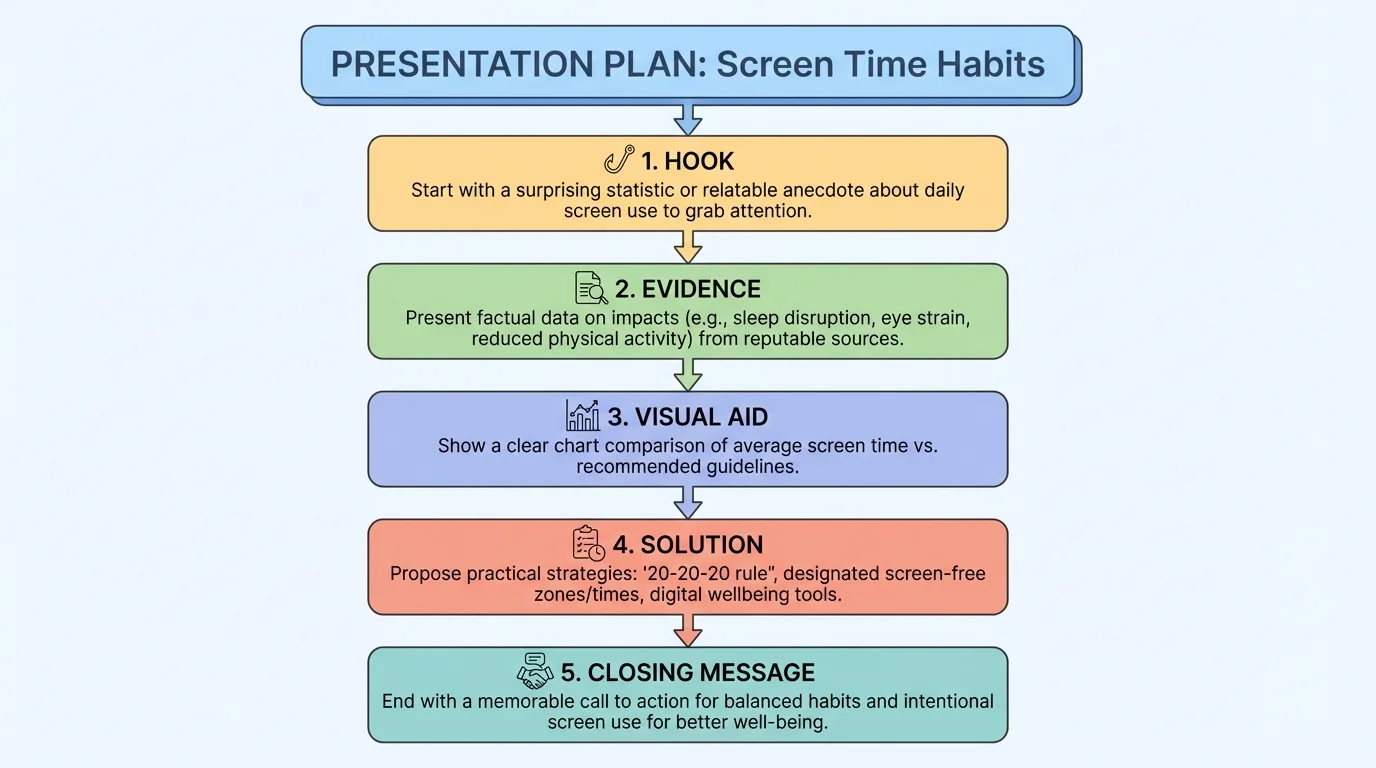
Main point one could explain the problem: late-night screen use can delay sleep. Main point two could describe the effects: feeling tired, struggling to focus, or being in a worse mood the next day. Main point three could share solutions: setting a device cutoff time, charging devices away from the bed, or choosing a calming activity before sleep.
Your evidence might include a short example from daily life, a fact from a trustworthy health source, and a simple chart showing bedtime habits. Your visual aid could be one clean slide with a bedtime routine checklist rather than a wall of text.
Your closing might say something like this: Better sleep does not usually come from one giant change. It often comes from small choices repeated each night. That ending gives your audience a clear, useful takeaway.
How to turn a topic into a plan
Step 1: Write one sentence for your main idea.
Step 2: Pick three points that support it.
Step 3: Add one strong piece of evidence to each point.
Step 4: Choose a simple visual that helps explain one key idea.
Step 5: Finish with a clear takeaway or action step.
If you study the pattern in [Figure 4], you can use the same planning method for many topics: online safety, saving money, healthy habits, community service, or preparing for a first job interview.
Before presenting, ask yourself a few practical questions. Is my main idea clear? Do my points follow a logical order? Does each point have support? Are my visuals simple and readable? Have I practiced out loud? Do I know how I will begin and end?
During the presentation, focus on connection. Speak to the audience, not at them. Use your structure like a guide. If you feel nervous, slow down and breathe. If something goes wrong, recover and continue.
After the presentation, reflect honestly. What worked well? Where did you feel strong? Where did you lose focus or rush? Improvement comes from noticing patterns, not from criticizing yourself harshly.
| Part of Presentation | What to Include | Common Mistake |
|---|---|---|
| Opening | Hook, topic, preview | Starting too vaguely |
| Main Point | Clear claim plus evidence | Listing ideas without explanation |
| Transitions | Words that connect ideas | Jumping suddenly between points |
| Visual Aid | Simple, readable support | Too much text on screen |
| Delivery | Clear voice, good pace, camera connection | Rushing or reading every word |
| Closing | Main takeaway and clear ending | Ending abruptly |
Table 1. Key parts of a strong presentation and common mistakes to avoid.
Effective speakers are not always the loudest or most dramatic. Often, they are the ones who are most clear, most organized, and most focused on helping others understand. That is a skill you can build with planning, practice, and a simple structure you trust.
